Web frameworks · Intermediate · 24 min
Add interactive islands and server rendering to an Astro site
By Padding · Updated 18 Nov 2026
Node.js 26.13 · Astro 7.4.13 · Svelte 5.58.0 · @astrojs/node 11.1.14
You will turn a static Astro 7.4 page into one with two Svelte islands that load their JavaScript only when needed, an on-demand page served by the Node adapter, and a server island that greets signed-in members on an otherwise static page.
On this page
Astro sends HTML. A page built from .astro components reaches the browser with no JavaScript at all, which is why Astro sites load fast. When one part of a page does need to react to the reader, such as a menu, a calculator or a form that updates as you type, you mark that one component as an island. Astro still renders its HTML on the server, then loads only that component's code in the browser and attaches it to the HTML. The rest of the page stays plain HTML.
You will build the home page of a small co-working space, Yaba Desk Hub. It ends up with two Svelte islands that load at different moments, an on-demand member page rendered by a Node.js server for each request, and a server island: a fragment of the static home page that the server fills in per visitor, after the rest of the page has arrived.
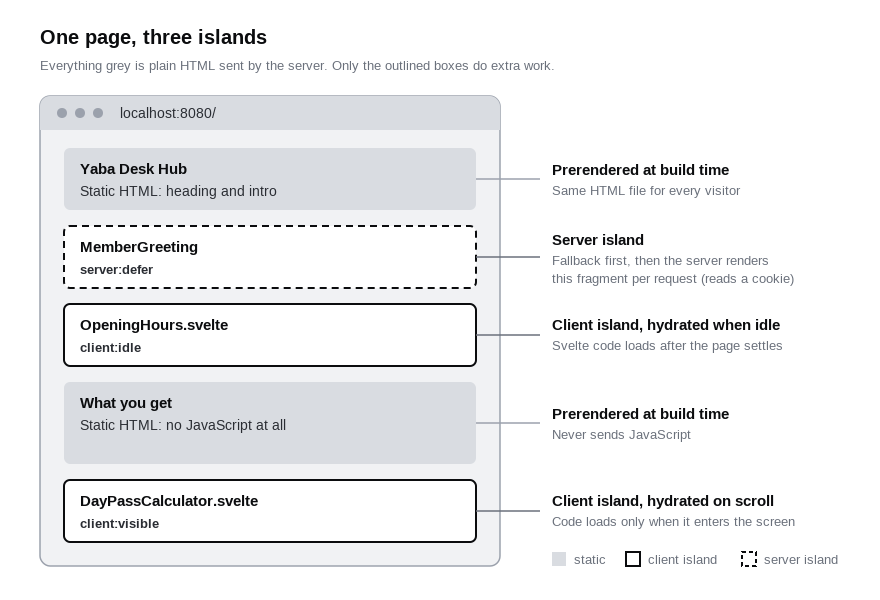
The tutorial assumes Node.js 26 from the Node.js install tutorial and works the same on Linux and macOS.
Step 1 · Create the project
create-astro copies an official starter into a new folder. The minimal template is a single page. --no-install and --no-git leave both jobs to you, and --skip-houston turns off the animated mascot. Then install Astro, the Svelte integration and Svelte itself at exact versions, so your files match this tutorial:
cd ~
npx -y create-astro@5.3.2 astro-islands-demo --template minimal --no-install --no-git --skip-houston --yes
cd astro-islands-demo
npm install --save-exact astro@7.4.13 @astrojs/svelte@9.1.6 svelte@5.58.0
@astrojs/svelte is the bridge between the two: it renders Svelte components to HTML during the build, and it provides the small script that starts them in the browser.
Check it worked
ls src/pages
npm ls astro @astrojs/svelte svelte --depth=0
src/pages holds one file, index.astro. Every .astro or .md file in that folder becomes a route. npm ls lists astro@7.4.13, @astrojs/svelte@9.1.6 and svelte@5.58.0.
Step 2 · Add Svelte and a first island with client:idle
Register the integration in astro.config.mjs. This replaces the whole file:
cat > astro.config.mjs <<'JS'
// @ts-check
import { defineConfig } from "astro/config";
import svelte from "@astrojs/svelte";

export default defineConfig({
  integrations: [svelte()],
});
JS
Now a layout for every page, and a Svelte component that shows or hides the opening hours. $state makes open reactive, so the button text and the hidden attribute follow it. aria-expanded tells screen reader users whether the list is showing:
mkdir -p src/components src/layouts
cat > src/layouts/Base.astro <<'ASTRO'
---
interface Props {
  title: string;
}
const { title } = Astro.props;
---

<html lang="en">
  <head>
    <meta charset="utf-8" />
    <meta name="viewport" content="width=device-width" />
    <title>{title} · Yaba Desk Hub</title>
    <style is:global>
      body { margin: 0; font-family: system-ui, sans-serif; line-height: 1.5; }
      main { max-width: 40rem; margin: 0 auto; padding: 1rem; }
      .spacer { min-height: 150vh; }
    </style>
  </head>
  <body>
    <main>
      <slot />
    </main>
  </body>
</html>
ASTRO
cat > src/components/OpeningHours.svelte <<'SVELTE'
<script>
  let open = $state(false);
</script>

<button type="button" aria-expanded={open} aria-controls="hours" onclick={() => (open = !open)}>
  {open ? "Hide opening hours" : "Show opening hours"}
</button>
<ul id="hours" hidden={!open}>
  <li>Monday to Friday: 08:00 to 20:00</li>
  <li>Saturday: 10:00 to 16:00</li>
</ul>
SVELTE
cat > src/pages/index.astro <<'ASTRO'
---
import Base from "../layouts/Base.astro";
import OpeningHours from "../components/OpeningHours.svelte";
---

<Base title="Home">
  <h1>Yaba Desk Hub</h1>
  <p>Quiet desks, backup power and fast Wi-Fi, five minutes from the bus stop.</p>
  <OpeningHours client:idle />
</Base>
ASTRO
client:idle is the hydration directive. Without one, Astro renders the Svelte component to HTML and sends no code for it, so the button would show but do nothing. With client:idle, the browser first finishes loading the page, then fetches the component when it has nothing else to do (the requestIdleCallback browser API). Opening hours are useful but not urgent, so they can wait.
Start the dev server in your second terminal, from the astro-islands-demo folder, and leave it running:
npm run devIt prints something like Local http://localhost:4321/.
Check it worked
curl -s http://localhost:4321/ | grep -o '<astro-island[^>]*client="idle"\|Show opening hours'The output shows the start of an <astro-island ... client="idle" element and the button text. <astro-island> is the custom element Astro wraps around each island; its attributes say which code to load and when. The button text is already in the server's HTML. Open http://localhost:4321/ in a browser and click Show opening hours: the two lines appear, and the button now reads Hide opening hours.
Step 3 · Add a second island with client:visible
A day pass calculator sits at the bottom of the page. Most visitors read the top and leave, so there is no point downloading its code unless the reader scrolls to it. That is what client:visible does: it watches the component with an IntersectionObserver and loads the code when the component enters the screen.
The component takes the price per day as a prop. $derived recalculates the total whenever days changes, and Intl.NumberFormat formats it as naira:
cat > src/components/DayPassCalculator.svelte <<'SVELTE'
<script>
  let { pricePerDay } = $props();
  let days = $state(1);
  const total = $derived((days ?? 0) * pricePerDay);
  const naira = new Intl.NumberFormat("en-NG", {
    style: "currency",
    currency: "NGN",
    maximumFractionDigits: 0,
  });
</script>

<label>
  Desk days this month
  <input type="number" min="1" max="31" bind:value={days} />
</label>
<p aria-live="polite">Total: <output>{naira.format(total)}</output></p>
SVELTE
cat > src/pages/index.astro <<'ASTRO'
---
import Base from "../layouts/Base.astro";
import OpeningHours from "../components/OpeningHours.svelte";
import DayPassCalculator from "../components/DayPassCalculator.svelte";
---

<Base title="Home">
  <h1>Yaba Desk Hub</h1>
  <p>Quiet desks, backup power and fast Wi-Fi, five minutes from the bus stop.</p>
  <OpeningHours client:idle />

  <section class="spacer">
    <h2>What you get</h2>
    <p>A desk, a locker, tea and coffee, and a meeting room you can book by the hour.</p>
  </section>

  <section id="prices">
    <h2>Day pass prices</h2>
    <DayPassCalculator client:visible pricePerDay={5000} />
  </section>
</Base>
ASTRO
days ?? 0 covers the moment the reader clears the box, when Svelte sets a number input's value to null. The spacer class makes the middle section taller than the screen, so the calculator starts out of view. Props you pass to an island, here pricePerDay={5000}, are written into the HTML and handed to the component in the browser, so they must be data (numbers, strings, arrays, plain objects), never functions.
The dev server picks up the new files on its own.
Check it worked
curl -s http://localhost:4321/ | grep -o 'client="visible"\|<output>[^<]*</output>'The output is client="visible" and <output>₦5,000</output>: the server ran the component once to produce the starting total. In the browser, open the developer tools on the Network tab, filter by JS and reload. Files for OpeningHours arrive, but nothing named DayPassCalculator does. Scroll down, and its file loads as the calculator appears. Type 3 into the box and the total changes to ₦15,000.
Step 4 · Build the site and measure the JavaScript
Stop the dev server with Ctrl+C.
Build the production version. With no adapter, Astro prerenders every page to a plain HTML file in dist/:
npm run build
ls dist dist/_astro
dist/index.html is the home page, finished. dist/_astro/ holds the JavaScript: one file per island component (OpeningHours.<hash>.js and DayPassCalculator.<hash>.js), the Svelte runtime they share, and Astro's client script for Svelte. Add up what a visitor could download, compressed the way a web server would send it:
find dist/_astro -name '*.js' -exec cat {} + | gzip -c | wc -cCheck it worked
The number is something like 13000 bytes, about 13 KB, and most of it is the Svelte runtime. A reader who never scrolls to the calculator downloads even less. Compare that with a single-page app, where the whole page and its framework ship as JavaScript before anything is interactive. On a low-end Android phone on prepaid data, the difference shows up both in how fast the page responds and in what the visit costs the reader. The page itself names each island and when it should load:
grep -o 'client="[a-z]*"' dist/index.htmlIt prints client="idle" and client="visible", one per island.
Step 5 · Compare the hydration directives
Each client: directive answers one question: when should this component's code load? There are five:
client:loadloads the code straight away. Use it for something the reader needs to use at once, such as a search box at the top of the page.client:idlewaits until the page has finished loading and the browser is idle. Pass a timeout in milliseconds, as inclient:idle={{ timeout: 500 }}, when it must not wait forever on a busy page.client:visiblewaits until the component scrolls into view.client:visible={{ rootMargin: "200px" }}starts loading 200 pixels before it arrives, so the reader rarely sees a dead control.client:media="(max-width: 40em)"loads only when a CSS media query matches, for example a menu button that exists only on narrow screens.client:only="svelte"skips the server render and draws the component in the browser only. You must name the framework, because Astro never runs the component on the server to find out. Use it only for components that cannot run on the server, such as one that readswindowon its first line.
Put the same calculator on a scratch page four ways and see what each one sends:
cat > src/pages/compare.astro <<'ASTRO'
---
import Base from "../layouts/Base.astro";
import DayPassCalculator from "../components/DayPassCalculator.svelte";
---

<Base title="Compare directives">
  <h2>No directive: HTML only</h2>
  <DayPassCalculator pricePerDay={5000} />
  <h2>client:load: hydrates straight away</h2>
  <DayPassCalculator client:load pricePerDay={5000} />
  <h2>client:media: hydrates on narrow screens</h2>
  <DayPassCalculator client:media="(max-width: 40em)" pricePerDay={5000} />
  <h2>client:only: rendered in the browser only</h2>
  <DayPassCalculator client:only="svelte" pricePerDay={5000} />
</Base>
ASTRO
npm run build
grep -o 'client="[a-z]*"' dist/compare/index.html
grep -o '<output>[^<]*</output>' dist/compare/index.html | wc -lCheck it worked
The first grep prints client="load", client="media" and client="only": the copy with no directive is not an island at all. The count of server-rendered totals is 3. The client:only copy has none, so until its code arrives, that part of the page is empty, which is why it is the last resort. The no-directive copy has HTML but will never respond to typing.
Delete the scratch page so the site keeps its two real islands:
rm src/pages/compare.astroStep 6 · Render a page on demand with the Node adapter
So far every page is a file made at build time. A member page that knows who you are has to run per request. That needs a server, and in Astro the server comes from an adapter. Install the Node.js one:
npm install --save-exact @astrojs/node@11.1.14
cat > astro.config.mjs <<'JS'
// @ts-check
import { defineConfig } from "astro/config";
import svelte from "@astrojs/svelte";
import node from "@astrojs/node";

export default defineConfig({
  integrations: [svelte()],
  adapter: node({ mode: "standalone" }),
});
JS
mode: "standalone" builds a complete server you start with node. Adding an adapter does not change your existing pages: Astro still prerenders everything by default. A page opts out with export const prerender = false. (Setting output: "server" in the config flips the default the other way, for sites where most pages are dynamic.)
The member page reads and writes a cookie with Astro.cookies. A POST from its form saves the first name and redirects home with a 303, so refreshing the home page does not resend the form. An empty name signs the member out:
cat > src/pages/member.astro <<'ASTRO'
---
import Base from "../layouts/Base.astro";

export const prerender = false;

if (Astro.request.method === "POST") {
  const form = await Astro.request.formData();
  const name = String(form.get("name") ?? "").trim().slice(0, 30);
  if (name) {
    Astro.cookies.set("member", name, {
      path: "/",
      httpOnly: true,
      sameSite: "lax",
      maxAge: 60 * 60 * 24 * 30,
    });
  } else {
    Astro.cookies.delete("member", { path: "/" });
  }
  return Astro.redirect("/", 303);
}

const member = Astro.cookies.get("member")?.value;
const renderedAt = new Date().toISOString();
Astro.response.headers.set("Cache-Control", "no-store");
---

<Base title="Member">
  <h1>Member check-in</h1>
  {member ? <p>Signed in as {member}.</p> : <p>You are not signed in.</p>}
  <form method="post">
    <label>
      Your first name
      <input name="name" autocomplete="given-name" maxlength="30" />
    </label>
    <button type="submit">Save</button>
  </form>
  <p>Leave the name empty and save to sign out.</p>
  <p><small>Rendered on demand at <time datetime={renderedAt}>{renderedAt}</time></small></p>
</Base>
ASTRO
A first name in a cookie is a stand-in for real sign-in, good enough to show per-visitor rendering; for real accounts, use a session from an auth library. Once the site runs behind HTTPS, add secure: true to the cookie options. Astro also rejects form posts to on-demand pages that come from another site (the security.checkOrigin setting, on by default), so other sites cannot submit this form on a member's behalf.
Build, then start the server in your second terminal. PORT picks the port; without it the server uses 4321:
npm run build
ls dist dist/clientPORT=8080 node ./dist/server/entry.mjsCheck it worked
dist/ now has client/ (the prerendered index.html and the _astro files) and server/ (the code for member.astro, with no member folder in client/). Ask for the member page twice, then sign in with curl, which stores the cookie in cookies.txt:
curl -s http://localhost:8080/member | grep -o 'You are not signed in.\|datetime="[^"]*"'
curl -s http://localhost:8080/member | grep -o 'datetime="[^"]*"'
curl -s -D - -o /dev/null http://localhost:8080/member | grep -i '^cache-control'
curl -s -o /dev/null -w '%{http_code} %{redirect_url}\n' -c cookies.txt -d name=Ada http://localhost:8080/member
curl -s -b cookies.txt http://localhost:8080/member | grep -o 'Signed in as Ada.'
The two datetime values differ, because the page runs on every request. The header line is cache-control: no-store. The sign-in prints 303 http://localhost:8080/, and the last command prints Signed in as Ada. In the browser, open http://localhost:8080/member, save your own first name and you land on the home page.
Step 7 · Add a server island to the static home page
The home page should greet a signed-in member, but it is prerendered: one file for everyone, made before anyone visited. Rendering the whole page per request for one line would lose the speed of a static file. A server island keeps the page static and renders only that line on the server, per visitor.
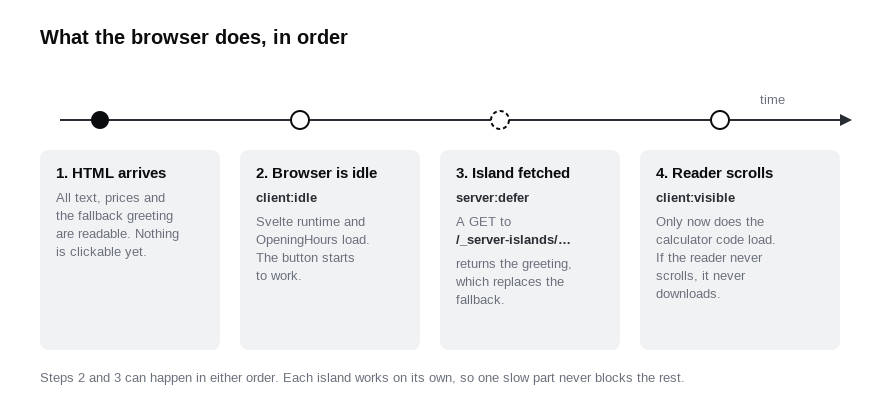
Write the greeting as an ordinary Astro component. It runs on the server, so it can read the cookie:
cat > src/components/MemberGreeting.astro <<'ASTRO'
---
const member = Astro.cookies.get("member")?.value;
Astro.response.headers.set("Cache-Control", "private, no-store");
---

{
  member ? (
    <p class="greeting">Welcome back, {member}. Your usual desk by the window is free today.</p>
  ) : (
    <p class="greeting">
      Members see their desk here. <a href="/member">Check in</a>
    </p>
  )
}
ASTRO
cat > src/pages/index.astro <<'ASTRO'
---
import Base from "../layouts/Base.astro";
import OpeningHours from "../components/OpeningHours.svelte";
import DayPassCalculator from "../components/DayPassCalculator.svelte";
import MemberGreeting from "../components/MemberGreeting.astro";
---

<Base title="Home">
  <h1>Yaba Desk Hub</h1>
  <p>Quiet desks, backup power and fast Wi-Fi, five minutes from the bus stop.</p>
  <MemberGreeting server:defer>
    <p slot="fallback" class="greeting">Checking your membership...</p>
  </MemberGreeting>
  <OpeningHours client:idle />

  <section class="spacer">
    <h2>What you get</h2>
    <p>A desk, a locker, tea and coffee, and a meeting room you can book by the hour.</p>
  </section>

  <section id="prices">
    <h2>Day pass prices</h2>
    <DayPassCalculator client:visible pricePerDay={5000} />
  </section>
</Base>
ASTRO
server:defer is what makes it an island. At build time Astro puts the slot="fallback" content into index.html, plus a small inline script. In the browser, that script requests the component from a URL under /_server-islands/, and swaps the fallback for the HTML the server returns. The request is a GET, so the Cache-Control header you set in the component applies to it: private, no-store keeps one member's greeting out of shared caches. A greeting that is the same for everyone could use public, max-age=300 instead.
Two things work differently inside a server island. Astro.url is the island's own /_server-islands/... address, not the page's, so read the Referer header if you need the page URL. And any props you pass are encrypted into that URL with a key Astro makes at each build. If you run several servers behind a load balancer, generate one key with npx astro create-key and give it to every build as the ASTRO_KEY environment variable, so a page from one server can load its island from another. Treat that key as a secret: keep it in your host's environment settings, never in the repository.
Stop the server with Ctrl+C, rebuild and start it again:
npm run buildPORT=8080 node ./dist/server/entry.mjsCheck it worked
The static page carries the fallback, and the island URL answers per visitor. The sed turns the & in the HTML attribute back into &:
curl -s http://localhost:8080/ | grep -o 'Checking your membership...'
ISLAND=$(curl -s http://localhost:8080/ | grep -o '/_server-islands/MemberGreeting?[^"]*' | head -1 | sed 's/&/\&/g')
echo "$ISLAND"
curl -s "http://localhost:8080$ISLAND" | grep -o 'Members see their desk here'
curl -s -b cookies.txt "http://localhost:8080$ISLAND" | grep -o 'Welcome back, Ada'
The first command prints the fallback text, straight from the prerendered file. The island URL has e=, p= and s= parameters, the encrypted component, props and slots. Without the cookie the island answers with the check-in link; with Ada's cookie it answers Welcome back, Ada.
In the browser, open http://localhost:8080/. You may see Checking your membership... for a moment, then your greeting. Open the Network tab and reload: one request goes to /_server-islands/MemberGreeting. Switch JavaScript off in the developer tools settings and reload: the page, prices and opening hours button all still render, the greeting stays on its fallback, and nothing is interactive. That is the floor every visitor gets, however slow their connection.
Step 8 · Clean up
Stop the production server with Ctrl+C, then remove the project:
cd ~
rm -rf ~/astro-islands-demoCheck it worked
ls ~/astro-islands-demo reports No such file or directory, and curl http://localhost:8080/ fails to connect. Node.js stays installed. To deploy a site like this one for real, build it on the server (or in CI) with npm ci and npm run build, because dist/server/entry.mjs imports packages from node_modules, and run it as a service behind a reverse proxy.
Next steps
- If you skipped the basics of pages, layouts and content collections: build a fast content site with Astro 7 and content collections.
- Go deeper on the Svelte side of each island: learn Svelte 5 runes: $state, $derived and $effect.
- See what is inside the JavaScript you do ship, and cut it: find and shrink what makes your JavaScript bundle big.
- Serve the Node.js build on a domain with HTTPS: put Nginx in front of a Node.js app, using port 8080.
Related tutorials
- Build a fast content site with Astro 7 and content collectionsYou will build a small blog with Astro 7.4, with a shared layout, Markdown posts checked against a Zod schema in a content collection, a page per post from getStaticPaths, an RSS feed, and a static build that ships no client JavaScript.
- Learn Svelte 5 runes: $state, $derived and $effectYou will build a small Svelte 5 app with Vite, a tip calculator and a to-do list that saves itself, using $state, $derived, $effect and $props, snippets and shared state in a .svelte.js module, and you will know how each rune maps to the Svelte 4 code you meet in older projects.
- Find what makes your JavaScript bundle big and shrink itYou will take a Vite page from about 530 kB of JavaScript to under 7 kB by finding the heavy modules with rollup-plugin-visualizer, importing only the icons you use, swapping a date library for Intl and lazy-loading a rarely used screen, then guard the result with a size-limit budget that fails the build.
Need this done for you?
Padding does this work for growing companies, from the first diagnosis to a system that keeps working.
Get new tutorials