Security and hardening · Advanced · 35 min
Add passkey sign-in to a web app with WebAuthn
By Padding · Updated 18 Nov 2026
Node.js 26.13 · SimpleWebAuthn 14.1 · Express 5.3 · Playwright 1.65.1 · checked on node:26 in headless Chromium
You will have a small Express app where people create an account and sign in with a passkey instead of a password, with single-use challenges, origin and RP ID checks, stored public keys and counters, autofill sign-in, a way back in after losing a phone, and Playwright tests that run every ceremony against virtual authenticators.
On this page
A passkey is a key pair that lives in a phone, a laptop, a password manager or a hardware security key. Your server keeps only the public half. To sign in, the device signs a fresh random challenge with the private half after the person unlocks it with a fingerprint, face or PIN. Nothing reusable crosses the network, there is no shared secret in your database to leak, and the browser will only use a passkey on the site it was made for, so a look-alike phishing domain gets nothing.
That last property depends on your server doing its checks properly. This tutorial builds Baobab Notes, a small Express 5 app with no passwords at all, and goes through every check that matters: challenges kept on the server and used once, the origin and the relying party ID (RP ID), the user handle, user verification and the signature counter. You store credentials in SQLite, add sign-in from the browser's autofill list, give people a way back in when a phone is lost, and finish with Playwright tests that drive real ceremonies in headless Chromium against virtual authenticators.
You use SimpleWebAuthn 14: @simplewebauthn/server 14.1 for the server and @simplewebauthn/browser 14.0 for the page. Both wrap the WebAuthn API rather than replace it, so the ideas carry over to any other library.
By the end you will have:
- registration and sign-in routes that reject replayed, foreign-origin and unverified responses
- username-less sign-in with discoverable credentials, plus autofill
- a passkey list where people add a second passkey and remove a lost one
- unit tests for the checks and five browser tests for the ceremonies
Step 1 · Set up the project
Make a demo folder and install the four runtime packages at exact versions. SimpleWebAuthn's server and browser packages are released separately, which is why their minor versions differ.
mkdir -p ~/passkey-demo/public ~/passkey-demo/test ~/passkey-demo/e2e
cd ~/passkey-demo
cat > package.json <<'JSON'
{
  "name": "baobab-passkeys",
  "private": true,
  "type": "module",
  "scripts": {
    "start": "node --env-file=.env server.js",
    "test": "node --test \"test/*.test.js\"",
    "test:e2e": "playwright test"
  },
  "dependencies": {
    "@simplewebauthn/browser": "14.0.0",
    "@simplewebauthn/server": "14.1.0",
    "express": "5.3.0",
    "express-session": "1.19.0"
  }
}
JSON
npm install --save-exact express@5.3.0 express-session@1.19.0 @simplewebauthn/server@14.1.0 @simplewebauthn/browser@14.0.0
The session cookie is signed with a secret. Generate one into a .env file that only your user can read. umask 077 makes the file private as it is created, and the secret never appears on a command line. npm start loads the file with Node's --env-file flag.
cd ~/passkey-demo
(umask 077 && node -e "console.log('SESSION_SECRET=' + require('node:crypto').randomBytes(32).toString('hex'))" > .env)
cat > .gitignore <<'TXT'
node_modules/
.env
*.db
test-results/
playwright-report/
TXT
In production, set SESSION_SECRET through your host's secret store instead of a file, and also set RP_ID and ORIGIN, which the server reads in a later step.
Check it worked
cd ~/passkey-demo
ls -l .env
npm ls --depth=0
.env shows permissions -rw-------. npm ls lists express@5.3.0, express-session@1.19.0, @simplewebauthn/server@14.1.0 and @simplewebauthn/browser@14.0.0.
Step 2 · Store users, passkeys and challenges
Each passkey row needs what the server uses to check a signature later: the credential ID the browser sends back, the public key, the signature counter and the transports (hints such as internal or usb that help the browser find the authenticator). The device type and backup flag tell you whether the passkey syncs between devices, which is useful when you decide whether someone has a safe second way in.
Each user also gets a webauthn_user_id: 32 random bytes, separate from your database ID. The authenticator stores it inside the passkey and returns it as the user handle at sign-in. Using random bytes rather than a username or email keeps personal data out of authenticators.
db.js uses node:sqlite, the SQLite module built into Node. It is a release-candidate API in Node 26, which is fine for a demo; swap in your usual database in production.
cd ~/passkey-demo
cat > db.js <<'JS'
import { DatabaseSync } from 'node:sqlite';

const db = new DatabaseSync(process.env.DB_PATH ?? 'passkeys.db');

db.exec(`
  PRAGMA foreign_keys = ON;
  CREATE TABLE IF NOT EXISTS users (
    id INTEGER PRIMARY KEY,
    username TEXT NOT NULL UNIQUE,
    webauthn_user_id TEXT NOT NULL UNIQUE,
    created_at TEXT NOT NULL DEFAULT (datetime('now'))
  );
  CREATE TABLE IF NOT EXISTS passkeys (
    id TEXT PRIMARY KEY,
    user_id INTEGER NOT NULL REFERENCES users(id) ON DELETE CASCADE,
    public_key BLOB NOT NULL,
    counter INTEGER NOT NULL,
    transports TEXT NOT NULL,
    device_type TEXT NOT NULL,
    backed_up INTEGER NOT NULL,
    created_at TEXT NOT NULL DEFAULT (datetime('now')),
    last_used_at TEXT
  );
  CREATE INDEX IF NOT EXISTS passkeys_by_user ON passkeys(user_id);
`);

const insertPasskey = db.prepare(`
  INSERT INTO passkeys (id, user_id, public_key, counter, transports, device_type, backed_up)
  VALUES (?, ?, ?, ?, ?, ?, ?)`);

export function findUserByUsername(username) {
  return db.prepare('SELECT * FROM users WHERE username = ?').get(username);
}

export function findUserById(id) {
  return db.prepare('SELECT * FROM users WHERE id = ?').get(id);
}

export function addPasskey(userId, p) {
  insertPasskey.run(p.id, userId, p.publicKey, p.counter, JSON.stringify(p.transports),
    p.deviceType, p.backedUp ? 1 : 0);
}

export function createUserWithPasskey(username, webauthnUserId, passkey) {
  db.exec('BEGIN');
  try {
    const { lastInsertRowid } = db
      .prepare('INSERT INTO users (username, webauthn_user_id) VALUES (?, ?)')
      .run(username, webauthnUserId);
    addPasskey(Number(lastInsertRowid), passkey);
    db.exec('COMMIT');
    return Number(lastInsertRowid);
  } catch (err) {
    db.exec('ROLLBACK');
    throw err;
  }
}

export function findPasskey(id) {
  return db.prepare('SELECT * FROM passkeys WHERE id = ?').get(id);
}

export function listPasskeys(userId) {
  return db.prepare('SELECT * FROM passkeys WHERE user_id = ? ORDER BY created_at, rowid').all(userId);
}

export function recordUse(id, counter, backedUp) {
  db.prepare(`UPDATE passkeys SET counter = ?, backed_up = ?, last_used_at = datetime('now')
    WHERE id = ?`).run(counter, backedUp ? 1 : 0, id);
}

export function deletePasskey(userId, id) {
  const owned = listPasskeys(userId);
  if (!owned.some((p) => p.id === id)) return 'missing';
  if (owned.length === 1) return 'last';
  db.prepare('DELETE FROM passkeys WHERE id = ? AND user_id = ?').run(id, userId);
  return 'deleted';
}
JS
deletePasskey refuses to remove someone's last passkey, so nobody can lock themselves out from the passkey list.
Now the challenges. A challenge is a random value the authenticator signs. It has to come from your server, live on your server, be accepted once and expire. If a challenge could be used twice, a signed response captured in a log or a proxy could be sent again to sign in. Keep challenges in the server-side session, never in a cookie the browser can edit:
cd ~/passkey-demo
cat > challenges.js <<'JS'
// Challenges live in the server-side session, expire after five minutes
// and can be taken exactly once.
const TTL_MS = 5 * 60 * 1000;
const MAX_OPEN = 5;

export function rememberChallenge(session, purpose, challenge, data = {}, now = Date.now()) {
  const open = (session.challenges ?? []).filter((c) => c.expires > now);
  open.push({ purpose, challenge, data, expires: now + TTL_MS });
  session.challenges = open.slice(-MAX_OPEN);
}

export function takeChallenge(session, purpose, challenge, now = Date.now()) {
  const open = session.challenges ?? [];
  const index = open.findIndex((c) => c.purpose === purpose && c.challenge === challenge);
  if (index === -1) return null;
  const [entry] = open.splice(index, 1);
  session.challenges = open;
  return entry.expires > now ? entry : null;
}
JS
takeChallenge removes the challenge whether or not it has expired, so a second attempt always fails. A session can hold up to five open challenges because the autofill request and a button click can each ask for one.
Write unit tests for those rules with Node's built-in test runner:
cd ~/passkey-demo
cat > test/challenges.test.js <<'JS'
import { test } from 'node:test';
import assert from 'node:assert/strict';
import { rememberChallenge, takeChallenge } from '../challenges.js';

test('a challenge can be taken once', () => {
  const session = {};
  rememberChallenge(session, 'login', 'abc');
  assert.ok(takeChallenge(session, 'login', 'abc'));
  assert.equal(takeChallenge(session, 'login', 'abc'), null);
});

test('a registration challenge is not accepted for sign-in', () => {
  const session = {};
  rememberChallenge(session, 'register', 'abc');
  assert.equal(takeChallenge(session, 'login', 'abc'), null);
});

test('a challenge expires after five minutes', () => {
  const session = {};
  rememberChallenge(session, 'login', 'abc', {}, 0);
  assert.equal(takeChallenge(session, 'login', 'abc', 5 * 60 * 1000 + 1), null);
  assert.deepEqual(session.challenges, []);
});

test('only the five newest challenges are kept', () => {
  const session = {};
  for (let i = 0; i < 7; i += 1) rememberChallenge(session, 'login', `c${i}`);
  assert.equal(takeChallenge(session, 'login', 'c0'), null);
  assert.ok(takeChallenge(session, 'login', 'c6'));
});
JSCheck it worked
cd ~/passkey-demo
node --test test/challenges.test.js
The summary shows tests 4, pass 4 and fail 0.
Step 3 · Write the registration ceremony
Registration has two requests. The first returns options for navigator.credentials.create(): your RP ID and name, the user, a challenge and the authenticator rules. The second receives the new credential, checks it and stores it.
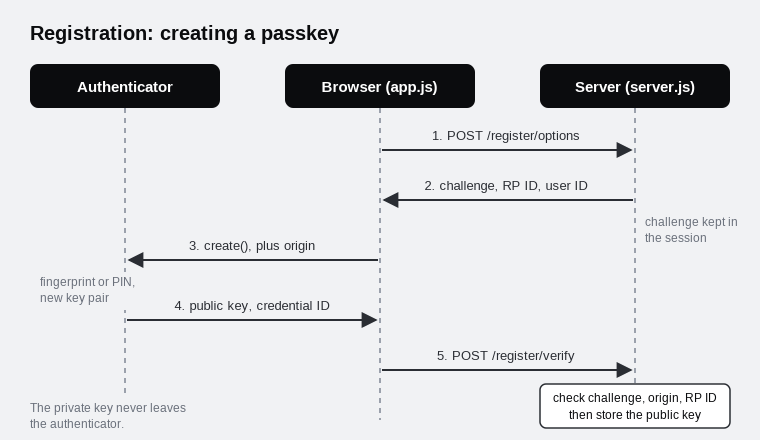
Two settings carry most of the security:
- RP ID is the domain a passkey belongs to. The browser refuses to use a passkey on any site whose domain is not the RP ID or a subdomain of it. Use
localhostwhile developing and your real domain, such asnotes.example.comorexample.com, in production. IP addresses cannot be RP IDs. - Origin is the full scheme, host and port the page ran on. The browser writes it into the signed client data, and the server compares it with the one it expects. A response made on any other site fails here.
Start server.js with the configuration, the session and a sign-in helper:
cd ~/passkey-demo
cat > server.js <<'JS'
import { randomBytes } from 'node:crypto';
import express from 'express';
import session from 'express-session';
import {
  generateAuthenticationOptions,
  generateRegistrationOptions,
  verifyAuthenticationResponse,
  verifyRegistrationResponse,
} from '@simplewebauthn/server';
import * as db from './db.js';
import { rememberChallenge, takeChallenge } from './challenges.js';

const PORT = Number(process.env.PORT ?? 3000);
const RP_ID = process.env.RP_ID ?? 'localhost';
const ORIGIN = process.env.ORIGIN ?? `http://localhost:${PORT}`;
const RP_NAME = 'Baobab Notes';
const USERNAME = /^[a-z0-9._-]{3,32}$/;

if (!process.env.SESSION_SECRET) {
  console.error('SESSION_SECRET is not set. Create .env first.');
  process.exit(1);
}

const app = express();
app.use(express.json({ limit: '20kb' }));
app.use(session({
  name: 'sid',
  secret: process.env.SESSION_SECRET,
  resave: false,
  saveUninitialized: false,
  cookie: {
    httpOnly: true,
    sameSite: 'lax',
    secure: ORIGIN.startsWith('https://'),
    maxAge: 8 * 60 * 60 * 1000,
  },
}));
app.use(express.static('public'));
app.use('/vendor/simplewebauthn', express.static('node_modules/@simplewebauthn/browser/esm'));

// A new session ID on every sign-in stops session fixation.
function signIn(req, userId) {
  return new Promise((resolve, reject) => {
    req.session.regenerate((err) => {
      if (err) return reject(err);
      req.session.userId = userId;
      req.session.save((saveErr) => (saveErr ? reject(saveErr) : resolve()));
    });
  });
}
JS
The cookie is HttpOnly and SameSite=Lax, and becomes Secure as soon as ORIGIN is https://. Express-session's default memory store loses every session on restart and is not meant for production, so use a store backed by Redis or your database there. The second express.static line serves the browser package's ES modules from node_modules, so the page needs no bundler.
Add the two registration routes:
cd ~/passkey-demo
cat >> server.js <<'JS'
app.post('/register/options', async (req, res) => {
  let username;
  let webauthnUserId;
  let userId = null;
  let existing = [];

  if (req.session.userId) {
    // Signed in: add another passkey to this account.
    const user = db.findUserById(req.session.userId);
    username = user.username;
    webauthnUserId = user.webauthn_user_id;
    userId = user.id;
    existing = db.listPasskeys(user.id);
  } else {
    username = String(req.body?.username ?? '').trim().toLowerCase();
    if (!USERNAME.test(username)) {
      return res.status(400).json({ error: 'Use 3 to 32 letters, digits, dots, dashes or underscores.' });
    }
    if (db.findUserByUsername(username)) {
      return res.status(409).json({ error: 'That username is taken. Sign in first to add a passkey to it.' });
    }
    webauthnUserId = randomBytes(32).toString('base64url');
  }

  const options = await generateRegistrationOptions({
    rpName: RP_NAME,
    rpID: RP_ID,
    userName: username,
    userID: Buffer.from(webauthnUserId, 'base64url'),
    attestationType: 'none',
    excludeCredentials: existing.map((p) => ({ id: p.id, transports: JSON.parse(p.transports) })),
    authenticatorSelection: { residentKey: 'required', userVerification: 'required' },
  });
  rememberChallenge(req.session, 'register', options.challenge, { username, webauthnUserId, userId });
  res.json(options);
});

app.post('/register/verify', async (req, res) => {
  let entry = null;
  let verification;
  try {
    verification = await verifyRegistrationResponse({
      response: req.body,
      expectedChallenge: (challenge) => {
        entry = takeChallenge(req.session, 'register', challenge);
        return entry !== null;
      },
      expectedOrigin: ORIGIN,
      expectedRPID: RP_ID,
      requireUserVerification: true,
    });
  } catch (err) {
    console.warn('registration rejected:', err.message);
    return res.status(400).json({ error: 'The passkey could not be verified. Try again.' });
  }
  if (!verification.verified) {
    return res.status(400).json({ error: 'The passkey could not be verified. Try again.' });
  }

  const { username, webauthnUserId, userId } = entry.data;
  if (userId !== null && userId !== req.session.userId) {
    return res.status(400).json({ error: 'Your session changed. Sign in and try again.' });
  }
  const { credential, credentialDeviceType, credentialBackedUp } = verification.registrationInfo;
  const passkey = {
    id: credential.id,
    publicKey: credential.publicKey,
    counter: credential.counter,
    transports: credential.transports ?? [],
    deviceType: credentialDeviceType,
    backedUp: credentialBackedUp,
  };

  let accountId = userId;
  try {
    if (userId === null) accountId = db.createUserWithPasskey(username, webauthnUserId, passkey);
    else db.addPasskey(userId, passkey);
  } catch (err) {
    if (String(err.message).includes('UNIQUE')) {
      return res.status(409).json({ error: 'That username or passkey is already registered.' });
    }
    throw err;
  }
  await signIn(req, accountId);
  res.json({ username });
});
JS
What each choice does:
residentKey: 'required'asks for a discoverable credential, one the authenticator can find without being told its ID. That is what lets people sign in without typing a username.userVerification: 'required'asks the authenticator to check who is holding it, with a fingerprint, face or PIN, not only that someone touched it.requireUserVerification: trueon the server rejects any response where that did not happen. Without it, a passkey is closer to a second factor than a full sign-in.attestationType: 'none'skips proof of which make of authenticator was used. Most consumer sites do not need it, and asking for it adds a prompt on some devices.excludeCredentialslists the person's existing passkeys so the same authenticator is not registered twice.- A new account is only written after
/register/verifysucceeds, inside a transaction, and an existing username is refused unless that person is signed in. Without that rule, anyone could attach their own passkey to someone else's account by typing that person's username.
expectedChallenge takes a function here. SimpleWebAuthn calls it with the challenge from the signed client data, and takeChallenge both checks and removes it, along with the username and user ID saved at the options step.
Check it worked
cd ~/passkey-demo
node --check server.js && echo "server.js parses"
The command prints server.js parses. The server is not complete yet, so do not start it.
Step 4 · Write the sign-in ceremony
Sign-in also has two requests. With no allowCredentials list in the options, the browser offers every discoverable passkey it holds for the RP ID, and the person picks one. That is username-less sign-in: the response tells you which credential was used.
cd ~/passkey-demo
cat >> server.js <<'JS'
app.post('/login/options', async (req, res) => {
  // No allowCredentials: the browser offers any discoverable passkey for this RP ID.
  const options = await generateAuthenticationOptions({ rpID: RP_ID, userVerification: 'required' });
  rememberChallenge(req.session, 'login', options.challenge);
  res.json(options);
});

app.post('/login/verify', async (req, res) => {
  const passkey = db.findPasskey(String(req.body?.id ?? ''));
  if (!passkey) return res.status(400).json({ error: 'unknown-passkey', rpID: RP_ID });

  const user = db.findUserById(passkey.user_id);
  if (req.body.response?.userHandle !== user.webauthn_user_id) {
    return res.status(400).json({ error: 'The passkey does not match its account.' });
  }

  let verification;
  try {
    verification = await verifyAuthenticationResponse({
      response: req.body,
      expectedChallenge: (challenge) => takeChallenge(req.session, 'login', challenge) !== null,
      expectedOrigin: ORIGIN,
      expectedRPID: RP_ID,
      credential: {
        id: passkey.id,
        publicKey: passkey.public_key,
        counter: passkey.counter,
        transports: JSON.parse(passkey.transports),
      },
      requireUserVerification: true,
    });
  } catch (err) {
    console.warn('sign-in rejected:', err.message);
    return res.status(400).json({ error: 'The passkey could not be verified. Try again.' });
  }
  if (!verification.verified) {
    return res.status(400).json({ error: 'The passkey could not be verified. Try again.' });
  }

  const { newCounter, credentialBackedUp } = verification.authenticationInfo;
  db.recordUse(passkey.id, newCounter, credentialBackedUp);
  await signIn(req, user.id);
  res.json({ username: user.username });
});
JS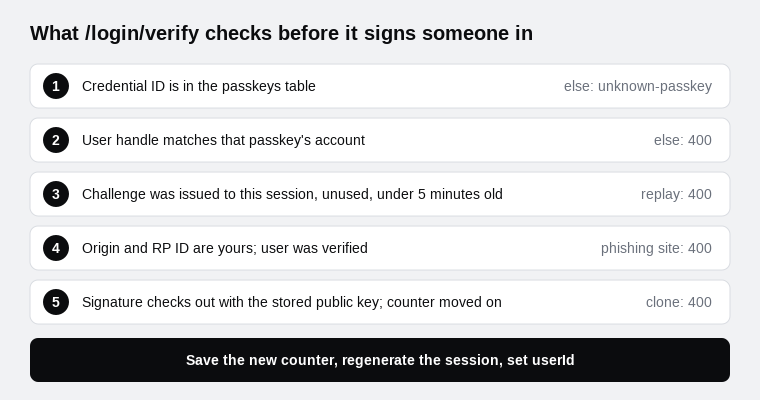
The counter needs a word. Authenticators that keep a counter increase it every time they sign, and SimpleWebAuthn rejects a response whose counter has not moved past the stored one, which can point to a cloned key. Passkeys that sync between devices usually report 0 every time, and the library only enforces the rule when one of the two numbers is above zero, so synced passkeys still work. Always save newCounter after a successful sign-in.
When the credential ID is unknown, the route answers unknown-passkey. The page uses that to tell the browser to hide the dead passkey, in a later step.
Finish the server with routes for the account page, removing a passkey and signing out, and start listening:
cd ~/passkey-demo
cat >> server.js <<'JS'
app.get('/me', (req, res) => {
  if (!req.session.userId) return res.status(401).json({ error: 'signed-out' });
  const user = db.findUserById(req.session.userId);
  const passkeys = db.listPasskeys(user.id).map((p) => ({
    id: p.id,
    createdAt: p.created_at,
    lastUsedAt: p.last_used_at,
    synced: p.backed_up === 1,
  }));
  res.json({ username: user.username, passkeys });
});

app.delete('/passkeys/:id', (req, res) => {
  if (!req.session.userId) return res.status(401).json({ error: 'signed-out' });
  const result = db.deletePasskey(req.session.userId, req.params.id);
  if (result === 'missing') return res.status(404).json({ error: 'No such passkey on your account.' });
  if (result === 'last') {
    return res.status(409).json({ error: 'Add another passkey before you remove your last one.' });
  }
  res.status(204).end();
});

app.post('/logout', (req, res) => {
  req.session.destroy(() => {
    res.clearCookie('sid');
    res.status(204).end();
  });
});

app.listen(PORT, () => console.log(`Baobab Notes on ${ORIGIN} (RP ID ${RP_ID})`));
JS
These routes take JSON or no body at all and rely on SameSite=Lax cookies, which browsers do not send on cross-site POST and DELETE requests. If your app also has HTML forms, add the protections in protect forms from CSRF.
Now test the server's checks against SimpleWebAuthn directly. These responses are made up, but the library reads the client data before anything else, so a wrong origin or an unknown challenge fails before it ever looks at a signature:
cd ~/passkey-demo
cat > test/verify.test.js <<'JS'
import { test } from 'node:test';
import assert from 'node:assert/strict';
import { verifyRegistrationResponse } from '@simplewebauthn/server';

// A registration response whose clientDataJSON claims to come from another site.
function fakeResponse(origin, challenge) {
  const clientData = { type: 'webauthn.create', challenge, origin };
  return {
    id: 'AAAA',
    rawId: 'AAAA',
    type: 'public-key',
    response: {
      clientDataJSON: Buffer.from(JSON.stringify(clientData)).toString('base64url'),
      attestationObject: 'AAAA',
    },
    clientExtensionResults: {},
  };
}

test('a response signed for another origin is rejected', async () => {
  await assert.rejects(
    verifyRegistrationResponse({
      response: fakeResponse('https://baobab-notes.example', 'abc'),
      expectedChallenge: 'abc',
      expectedOrigin: 'http://localhost:3000',
      expectedRPID: 'localhost',
    }),
    /Unexpected response origin/,
  );
});

test('a challenge the server did not issue is rejected', async () => {
  await assert.rejects(
    verifyRegistrationResponse({
      response: fakeResponse('http://localhost:3000', 'made-up'),
      expectedChallenge: () => false,
      expectedOrigin: 'http://localhost:3000',
      expectedRPID: 'localhost',
    }),
    /challenge verifier returned false/,
  );
});
JSCheck it worked
cd ~/passkey-demo
npm test
The summary shows tests 6, pass 6 and fail 0. Node may also print an ExperimentalWarning about ML-DSA-44: SimpleWebAuthn 14 offers that post-quantum signature algorithm when the runtime supports it, and Node marks it as experimental. The warning does not affect the tests.
Step 5 · Build the sign-in page
The page has a sign-in form, a sign-up form and an account view. The sign-in field's autocomplete="username webauthn" matters: webauthn must be the last token for the browser to offer passkeys in its autofill list.
cd ~/passkey-demo
cat > public/index.html <<'HTML'
<!doctype html>
<html lang="en">
  <head>
    <meta charset="utf-8">
    <meta name="viewport" content="width=device-width, initial-scale=1">
    <title>Baobab Notes</title>
    <script type="module" src="/app.js"></script>
  </head>
  <body>
    <main>
      <h1>Baobab Notes</h1>
      <p id="status" role="status"></p>

      <section id="signed-out" hidden>
        <h2>Sign in</h2>
        <form id="signin-form">
          <label for="username">Username</label>
          <input id="username" name="username" autocomplete="username webauthn"
                 autocapitalize="none" spellcheck="false">
          <button type="submit">Sign in with a passkey</button>
        </form>

        <h2>New here?</h2>
        <form id="signup-form">
          <label for="new-username">Choose a username</label>
          <input id="new-username" name="new-username" autocomplete="username"
                 autocapitalize="none" spellcheck="false" required>
          <button type="submit">Create account with a passkey</button>
        </form>
      </section>

      <section id="signed-in" hidden>
        <h2 id="welcome"></h2>
        <h3>Your passkeys</h3>
        <ul id="passkeys"></ul>
        <button type="button" id="add-passkey">Add another passkey</button>
        <button type="button" id="sign-out">Sign out</button>
      </section>
    </main>
  </body>
</html>
HTML
The script calls the four server routes and hands the options to startRegistration and startAuthentication, which convert between JSON and the binary formats navigator.credentials uses:
cd ~/passkey-demo
cat > public/app.js <<'JS'
import {
  browserSupportsWebAuthn,
  browserSupportsWebAuthnAutofill,
  sendSignal,
  startAuthentication,
  startRegistration,
} from '/vendor/simplewebauthn/index.js';

const $ = (id) => document.getElementById(id);
const say = (text) => { $('status').textContent = text; };

async function call(method, url, body) {
  const res = await fetch(url, {
    method,
    headers: { 'Content-Type': 'application/json' },
    body: body === undefined ? undefined : JSON.stringify(body),
  });
  const data = res.status === 204 ? {} : await res.json();
  if (!res.ok) throw Object.assign(new Error(data.error ?? `HTTP ${res.status}`), { data });
  return data;
}

async function register(username) {
  const optionsJSON = await call('POST', '/register/options', { username });
  const attestation = await startRegistration({ optionsJSON });
  await call('POST', '/register/verify', attestation);
}

async function signIn(useBrowserAutofill) {
  const optionsJSON = await call('POST', '/login/options', {});
  const assertion = await startAuthentication({ optionsJSON, useBrowserAutofill });
  try {
    await call('POST', '/login/verify', assertion);
  } catch (err) {
    if (err.data?.error === 'unknown-passkey') {
      // Ask the browser or password manager to hide a passkey the server no longer accepts.
      sendSignal({ signalName: 'unknownCredential', rpID: err.data.rpID, credentialID: assertion.id })
        .catch(() => {});
      throw new Error('This passkey is no longer linked to an account. Use another one.');
    }
    throw err;
  }
  await showAccount();
}

async function startAutofill() {
  if (!(await browserSupportsWebAuthnAutofill())) {
    document.body.dataset.autofill = 'unsupported';
    return;
  }
  document.body.dataset.autofill = 'waiting';
  try {
    await signIn(true);
  } catch (err) {
    // Clicking the button cancels the waiting autofill request; that is expected.
    if (err.code !== 'ERROR_CEREMONY_ABORTED') say(`Could not sign in: ${err.message}`);
  }
}

async function showAccount() {
  const res = await fetch('/me');
  if (res.status === 401) {
    $('signed-in').hidden = true;
    $('signed-out').hidden = false;
    return false;
  }
  const me = await res.json();
  $('welcome').textContent = `Signed in as ${me.username}`;
  const items = me.passkeys.map((p) => {
    const short = p.id.slice(0, 8);
    const li = document.createElement('li');
    const used = p.lastUsedAt ? `last used ${p.lastUsedAt} UTC` : 'not used to sign in yet';
    li.textContent = `${short} · added ${p.createdAt} UTC · ${used}${p.synced ? ' · synced' : ''} `;
    const remove = document.createElement('button');
    remove.type = 'button';
    remove.textContent = 'Remove';
    remove.setAttribute('aria-label', `Remove passkey ${short}`);
    remove.disabled = me.passkeys.length === 1;
    remove.addEventListener('click', async () => {
      try {
        await call('DELETE', `/passkeys/${encodeURIComponent(p.id)}`);
        await showAccount();
        say(`Passkey ${short} removed.`);
      } catch (err) {
        say(`Could not remove the passkey: ${err.message}`);
      }
    });
    li.append(remove);
    return li;
  });
  $('passkeys').replaceChildren(...items);
  $('signed-out').hidden = true;
  $('signed-in').hidden = false;
  return true;
}

$('signup-form').addEventListener('submit', async (event) => {
  event.preventDefault();
  try {
    await register($('new-username').value);
    await showAccount();
    say('Account created.');
  } catch (err) {
    say(`Could not create a passkey: ${err.message}`);
  }
});

$('signin-form').addEventListener('submit', async (event) => {
  event.preventDefault();
  try {
    await signIn(false);
    say('');
  } catch (err) {
    say(`Could not sign in: ${err.message}`);
  }
});

$('add-passkey').addEventListener('click', async () => {
  try {
    await register();
    await showAccount();
    say('Passkey added.');
  } catch (err) {
    say(`Could not add a passkey: ${err.message}`);
  }
});

$('sign-out').addEventListener('click', async () => {
  await call('POST', '/logout');
  await showAccount();
  say('Signed out.');
  startAutofill();
});

if (!browserSupportsWebAuthn()) {
  say('This browser cannot use passkeys.');
} else if (!(await showAccount())) {
  startAutofill();
}
JS
Three parts are worth reading closely:
- Autofill (conditional UI). On load,
startAutofillcallsstartAuthenticationwithuseBrowserAutofill: true. That request waits quietly until the person focuses the username field and picks a passkey from the autofill list. If they click the button instead, SimpleWebAuthn cancels the waiting request first, and the page ignores the resultingERROR_CEREMONY_ABORTED. - Removed passkeys. When the server answers
unknown-passkey, the page callssendSignalwithunknownCredential, which asks the browser or password manager to hide that passkey. Browsers that do not support signals throw, and the page ignores that. - Plain text only. Usernames and dates go in with
textContent, neverinnerHTML.
Check it worked
cd ~/passkey-demo
grep -c "autocomplete=\"username webauthn\"" public/index.html
ls node_modules/@simplewebauthn/browser/esm/index.js
The first command prints 1 and the second prints the path to the module the page imports.
Step 6 · Run the app and try a passkey
Start the server in a second terminal, from ~/passkey-demo, and leave it running:
npm startIt prints Baobab Notes on http://localhost:3000 (RP ID localhost). Back in the first terminal, ask for sign-in options and try to register an invalid username:
curl -s -X POST http://localhost:3000/login/options -H 'Content-Type: application/json' -d '{}'
echo
curl -s -X POST http://localhost:3000/register/options -H 'Content-Type: application/json' -d '{"username":"a"}'
echo
Now open http://localhost:3000 in your browser. localhost counts as a secure context, so WebAuthn works without HTTPS here; anywhere else it needs HTTPS. Choose a username, select Create account with a passkey and follow your device's prompt. Sign out, then sign back in, once with the button and once by focusing the username field and picking the passkey from the autofill list, where your browser supports it.
On Android, passkeys need Android 9 or later, and a third-party password manager as the passkey provider needs Android 14. Many people in Nigeria, Kenya and elsewhere use low-cost Android phones that stay in service for years, and phones change hands, so check your own sign-in analytics before you assume everyone can use a passkey, and keep another way in (the last step covers this). A ceremony is a few kilobytes each way, so it costs almost nothing on prepaid data, and nothing waits on an SMS that might arrive late.
Check it worked
The first curl prints JSON with a random challenge, "rpId":"localhost" and "userVerification":"required". The second prints the username error. In the browser, the heading changes to Signed in as your username and the list shows one passkey that says not used to sign in yet, which changes to last used with a time after you sign in again.
Stop the server with Ctrl+C before the next step, because the tests start their own copy on port 3000.
Step 7 · Test the ceremonies with virtual authenticators
A browser test cannot touch your fingerprint reader, but Chromium has virtual authenticators you can create over the Chrome DevTools Protocol (CDP). They do real cryptography, keep real discoverable credentials and report user verification, so your server code runs exactly as it does for a person. Playwright opens a CDP session to the page, which works in Chromium only.
Add Playwright at an exact version and download Chromium. On Linux, --with-deps also installs the system libraries the browser needs and may ask for your password. The download is a few hundred megabytes, so on prepaid mobile data do it once on Wi-Fi.
cd ~/passkey-demo
npm install --save-dev --save-exact @playwright/test@1.65.1
npx playwright install --with-deps chromium
The config starts a fresh server on a separate database, e2e.db, before the tests:
cd ~/passkey-demo
cat > playwright.config.js <<'JS'
import { defineConfig, devices } from '@playwright/test';

export default defineConfig({
  testDir: 'e2e',
  workers: 1,
  use: { baseURL: 'http://localhost:3000', trace: 'retain-on-failure' },
  projects: [{ name: 'chromium', use: { ...devices['Desktop Chrome'] } }],
  webServer: {
    command: 'rm -f e2e.db && DB_PATH=e2e.db node --env-file=.env server.js',
    url: 'http://localhost:3000/',
    reuseExistingServer: false,
  },
});
JS
The five tests cover the paths that matter: a full sign-up and username-less sign-in with the counter and a replayed response; a stranger trying to register a taken username; the lost-phone recovery, ending with the lost phone's passkey being refused; a page on another origin trying to use the localhost RP ID; and the autofill wiring.
cd ~/passkey-demo
cat > e2e/passkeys.spec.js <<'JS'
import { test, expect } from '@playwright/test';

// A software authenticator inside Chromium, driven over the DevTools protocol.
async function addAuthenticator(cdp) {
  const { authenticatorId } = await cdp.send('WebAuthn.addVirtualAuthenticator', {
    options: {
      protocol: 'ctap2',
      transport: 'internal',
      hasResidentKey: true,
      hasUserVerification: true,
      isUserVerified: true,
      automaticPresenceSimulation: true,
    },
  });
  return authenticatorId;
}

async function setUp(page, { autofill = false } = {}) {
  if (!autofill) {
    // Turn conditional UI off so each test chooses when a ceremony starts.
    await page.addInitScript(() => {
      PublicKeyCredential.isConditionalMediationAvailable = async () => false;
    });
  }
  const cdp = await page.context().newCDPSession(page);
  await cdp.send('WebAuthn.enable');
  return cdp;
}

async function signUp(page, username) {
  await page.goto('/');
  await page.getByLabel('Choose a username').fill(username);
  await page.getByRole('button', { name: 'Create account with a passkey' }).click();
  await expect(page.getByRole('heading', { name: `Signed in as ${username}` })).toBeVisible();
}

async function signOutAndIn(page) {
  await page.getByRole('button', { name: 'Sign out' }).click();
  await expect(page.getByRole('heading', { name: 'Sign in', exact: true })).toBeVisible();
  await page.getByRole('button', { name: 'Sign in with a passkey' }).click();
}

test('sign up, sign out and sign back in without a username', async ({ page }) => {
  const cdp = await setUp(page);
  const phone = await addAuthenticator(cdp);
  await signUp(page, 'amara');
  await expect(page.locator('#passkeys li')).toHaveCount(1);

  let { credentials } = await cdp.send('WebAuthn.getCredentials', { authenticatorId: phone });
  expect(credentials).toHaveLength(1);
  expect(credentials[0].isResidentCredential).toBe(true);
  expect(credentials[0].rpId).toBe('localhost');
  const countBefore = credentials[0].signCount;

  const verifyRequest = page.waitForRequest('**/login/verify');
  await signOutAndIn(page);
  await expect(page.getByRole('heading', { name: 'Signed in as amara' })).toBeVisible();
  await expect(page.locator('#passkeys li')).toContainText('last used');

  ({ credentials } = await cdp.send('WebAuthn.getCredentials', { authenticatorId: phone }));
  expect(credentials[0].signCount).toBeGreaterThan(countBefore);

  // Send the same signed response again: its challenge is already used.
  const replay = await page.request.post('/login/verify', { data: (await verifyRequest).postDataJSON() });
  expect(replay.status()).toBe(400);
});

test('a taken username cannot get a stranger\'s passkey', async ({ page }) => {
  const cdp = await setUp(page);
  await addAuthenticator(cdp);
  await signUp(page, 'chidi');
  await page.getByRole('button', { name: 'Sign out' }).click();
  await page.getByLabel('Choose a username').fill('chidi');
  await page.getByRole('button', { name: 'Create account with a passkey' }).click();
  await expect(page.getByRole('status')).toContainText('That username is taken');
});

test('recover from a lost phone with a second passkey', async ({ page }) => {
  const cdp = await setUp(page);
  const phone = await addAuthenticator(cdp);
  await signUp(page, 'kofi');
  const [phonePasskey] = (await cdp.send('WebAuthn.getCredentials', { authenticatorId: phone })).credentials;
  const phoneId = Buffer.from(phonePasskey.credentialId, 'base64').toString('base64url');

  // Kofi registers a security key while signed in.
  await cdp.send('WebAuthn.removeVirtualAuthenticator', { authenticatorId: phone });
  const key = await addAuthenticator(cdp);
  await page.getByRole('button', { name: 'Add another passkey' }).click();
  await expect(page.getByRole('status')).toHaveText('Passkey added.');
  await expect(page.locator('#passkeys li')).toHaveCount(2);

  // The phone is lost. He signs in with the key and removes the phone's passkey.
  await signOutAndIn(page);
  await expect(page.getByRole('heading', { name: 'Signed in as kofi' })).toBeVisible();
  await page.getByRole('button', { name: `Remove passkey ${phoneId.slice(0, 8)}` }).click();
  await expect(page.locator('#passkeys li')).toHaveCount(1);
  await expect(page.getByRole('button', { name: /^Remove passkey/ })).toBeDisabled();
  const [keyPasskey] = (await cdp.send('WebAuthn.getCredentials', { authenticatorId: key })).credentials;
  const keyId = Buffer.from(keyPasskey.credentialId, 'base64').toString('base64url');
  expect((await page.request.delete(`/passkeys/${keyId}`)).status()).toBe(409);

  // Whoever has the phone now cannot sign in with it.
  await cdp.send('WebAuthn.removeVirtualAuthenticator', { authenticatorId: key });
  const stolen = await addAuthenticator(cdp);
  await cdp.send('WebAuthn.addCredential', { authenticatorId: stolen, credential: phonePasskey });
  await signOutAndIn(page);
  await expect(page.getByRole('status')).toContainText('no longer linked to an account');
});

test('a passkey for localhost does not work on another origin', async ({ page }) => {
  const cdp = await setUp(page);
  await addAuthenticator(cdp);
  await page.goto('http://127.0.0.1:3000/');
  await page.getByLabel('Choose a username').fill('zainab');
  await page.getByRole('button', { name: 'Create account with a passkey' }).click();
  await expect(page.getByRole('status')).toContainText('Could not create a passkey');
});

test('the username field is wired up for passkey autofill', async ({ page }) => {
  await setUp(page, { autofill: true });
  await page.goto('/');
  await expect(page.getByLabel('Username', { exact: true })).toHaveAttribute('autocomplete', 'username webauthn');
  const available = await page.evaluate(() => PublicKeyCredential.isConditionalMediationAvailable());
  await expect(page.locator('body')).toHaveAttribute('data-autofill', available ? 'waiting' : 'unsupported');
});
JS
How the recovery test plays out: Kofi signs up on his "phone" (the first virtual authenticator), adds a "security key" (a second one) while signed in, signs in with the key after losing the phone, and removes the phone's passkey. The test then loads the phone's exported private key into a new authenticator, as a thief holding the phone would have it, and checks that the server now refuses it.
The autofill test turns nothing off. It checks that the field carries the webauthn token and that the page started a conditional request whenever the browser reports support for one. The other tests replace isConditionalMediationAvailable so that no waiting request is open while they click buttons.
Check it worked
cd ~/passkey-demo
npx playwright test
The run ends with 5 passed. If a test fails, run npx playwright show-trace with the trace.zip path from the test-results folder to step through it.
Step 8 · Roll passkeys out beside passwords and plan recovery
Most apps already have passwords. Do not switch them off on day one. A rollout that works:
- Offer, then nudge. After someone signs in with a password, offer to create a passkey on the account page. SimpleWebAuthn also supports
startRegistration({ optionsJSON, useAutoRegister: true })straight after a password sign-in, which some browsers turn into a passkey created without an extra prompt. That response usually has no user-presence flag, so its verify call must setrequireUserPresence: false, and you should treat failure as normal. - Put both on one form. Keep the username and password fields and add
webauthnas the lastautocompletetoken on the username field. People with a passkey pick it from autofill, and everyone else types as before. - Measure. Count passkey sign-ins, password sign-ins and failed ceremonies per platform. Move people towards passkeys when the numbers show it works for them, not before.
- Keep passwords strong while they exist. Hash them as in hash passwords with Argon2id, and keep rate limits on the password route.
Recovery is the part teams skip, and it decides how safe the whole system is. Account recovery is only as strong as its weakest path:
- Two passkeys per person. Prompt people to add a second one, ideally on another device or a security key, as the recovery test did. Synced passkeys (shown as
syncedin the list) also survive a lost phone through the person's password manager. - Revoke on loss. A signed-in person can remove a lost device's passkey, and the server refuses it from then on.
- A recovery path with no passkey. Printed recovery codes, hashed and single-use, work well; see add TOTP two-factor sign-in, which builds them. An email link is weaker: if you use one, make it expire quickly, send a notice to the account when it is used, and ask for a new passkey straight away.
- Never lean on SMS alone. SMS codes can be intercepted or moved to a new SIM, so an SMS-only recovery path makes a passkey account only as safe as a phone number.
Check it worked
Write down, for your own app, the answer to one question: a person loses their only phone today, so what exactly do they do to get back in, and what stops someone else doing the same? If the answer involves only an email or an SMS code, add a stronger path before you make passkeys the main way to sign in.
Step 9 · Clean up
Stop the server if it is still running. Then remove the browsers Playwright downloaded for this project and delete the demo, including its databases and .env secret:
cd ~/passkey-demo
npx playwright uninstall
cd ~
rm -rf ~/passkey-demo
Passkeys you created for localhost stay in your browser or password manager. Delete them from its passkey settings, where they are listed under localhost.
Check it worked
ls ~/passkey-demo reports that there is no such file or directory.
Next steps
- Add recovery codes and a second factor for password accounts: add TOTP two-factor sign-in to a web app.
- Store the passwords you still have safely: hash passwords with Argon2id.
- Grow the browser suite around your real sign-in pages: write end-to-end browser tests with Playwright.
- Lock down the forms around sign-in: protect forms from CSRF with SameSite cookies and tokens.
Related tutorials
- Add authenticator-app two-factor sign-in to a web appYou will have a small FastAPI app that asks for a 6-digit code from an authenticator app after the password, with QR enrolment, an encrypted secret, replay and guessing protection, single-use recovery codes and a password check before 2FA can be turned off, all proven by pytest.
- Hash and verify passwords with Argon2idYou will have a small Python password module that hashes with Argon2id at parameters tuned on your own machine, adds a pepper kept outside the database, upgrades old Argon2 and bcrypt hashes when users sign in, and produces hashes that Node.js can verify too.
- Write end-to-end browser tests with PlaywrightYou will have a Playwright suite that starts a Vite shop with vite preview, tests its sign-in and checkout journeys in headless Chromium and Firefox with role-based locators and a mocked API, and leaves a trace you can open when a test fails.
Need this done for you?
Padding does this work for growing companies, from the first diagnosis to a system that keeps working.
Get new tutorials