Testing and QA · Intermediate · 22 min
Add visual regression tests with Playwright screenshots
By Padding · Updated 18 Nov 2026
Node.js 26.13 · Playwright 1.65.1 · Chromium · checked on node:26
You will have Playwright 1.65 screenshot tests for a page and a single card, with baselines committed to git, dynamic parts masked, a deliberate CSS change caught with a diff, and one Docker image that makes baselines match between your laptop and CI.
On this page
Functional tests check that a button exists and does the right thing. They say nothing about whether it is still the right colour, whether a card's padding collapsed, or whether a long price now wraps onto two lines. Those regressions reach production because nobody looked. A visual regression test looks for you: it takes a screenshot, compares it pixel by pixel with an approved baseline stored in your repository, and fails with a picture of the difference when they do not match.
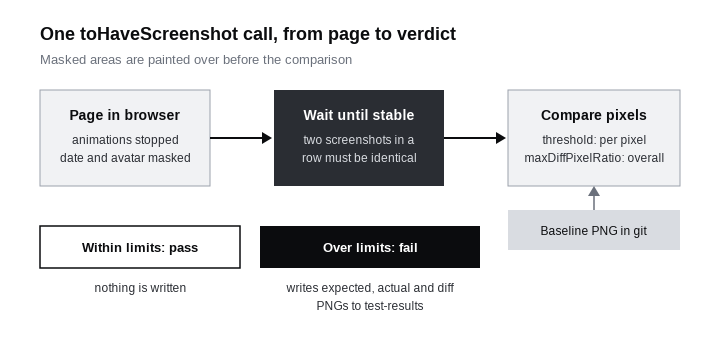
Playwright has this built in. expect(page).toHaveScreenshot() and expect(locator).toHaveScreenshot() take the screenshot, wait until the page stops changing, compare it with the baseline and write diff images when it fails. The hard part is not the API. It is keeping screenshots stable: dates, avatars, animations, fonts and the operating system all change pixels without anyone changing your code.
In this tutorial you test a small data-bundle pricing page served by a 20-line Node.js server. By the end you have:
- page and single-component screenshot tests in Chromium at a desktop and a phone width
- baseline PNG files committed to git, next to the tests
- masks over a timestamp and an avatar, and animations switched off
- a deliberate CSS change caught, with expected, actual and diff images to read
- a reviewed baseline update with
--update-snapshots - the commands that make every machine produce the same baselines from one Docker image
Step 1 · Build the page you will test
Make a demo folder with a package.json and a tiny static file server. It uses only Node.js built-ins, so the server adds no dependencies:
mkdir -p ~/visual-regression-demo/site
cd ~/visual-regression-demo
cat > package.json <<'JSON'
{
  "name": "kibanda-bundles",
  "private": true,
  "type": "module",
  "scripts": {
    "start": "node server.js",
    "test:visual": "playwright test"
  }
}
JSON
cat > server.js <<'JS'
import { createServer } from 'node:http';
import { readFile } from 'node:fs/promises';
import { extname, join, normalize } from 'node:path';

const root = join(import.meta.dirname, 'site');
const types = {
  '.html': 'text/html; charset=utf-8',
  '.css': 'text/css; charset=utf-8',
  '.js': 'text/javascript; charset=utf-8',
};
const port = Number(process.env.PORT ?? 4300);

createServer(async (req, res) => {
  const { pathname } = new URL(req.url, 'http://localhost');
  const file = join(root, normalize(pathname === '/' ? '/index.html' : pathname));
  if (!file.startsWith(root)) return res.writeHead(403).end();
  try {
    const body = await readFile(file);
    res.writeHead(200, { 'content-type': types[extname(file)] ?? 'application/octet-stream' }).end(body);
  } catch {
    res.writeHead(404, { 'content-type': 'text/plain' }).end('Not found');
  }
}).listen(port, '127.0.0.1', () => console.log(`Serving on http://127.0.0.1:${port}`));
JS
Now the page. It has three things that change on every load or every frame, on purpose, because real pages have them too: a "prices checked" timestamp, an avatar whose colour is picked at random (standing in for a user's photo), and a pulsing "Live prices" dot.
cd ~/visual-regression-demo
cat > site/index.html <<'HTML'
<!doctype html>
<html lang="en">
  <head>
    <meta charset="utf-8">
    <meta name="viewport" content="width=device-width, initial-scale=1">
    <title>Kibanda data bundles</title>
    <link rel="stylesheet" href="/styles.css">
  </head>
  <body>
    <header class="top">
      <p class="brand">Kibanda</p>
      <p class="live"><span class="dot" aria-hidden="true"></span> Live prices</p>
      <span class="avatar" data-testid="avatar" role="img" aria-label="Signed in as Amina Wanjiru">AW</span>
    </header>
    <main>
      <h1>Data bundles</h1>
      <p class="updated">Prices checked <time id="updated"></time></p>
      <div class="plans">
        <section class="plan" aria-labelledby="starter">
          <h2 id="starter">Starter</h2>
          <p class="price">KSh 250 <span>per week</span></p>
          <ul>
            <li>2 GB of data</li>
            <li>WhatsApp included</li>
            <li>Unused data rolls over for 7 days</li>
          </ul>
          <button type="button">Choose plan</button>
        </section>
        <section class="plan" aria-labelledby="plus">
          <h2 id="plus">Plus</h2>
          <p class="price">KSh 900 <span>per month</span></p>
          <ul>
            <li>10 GB of data</li>
            <li>2 GB extra at night</li>
            <li>Unused data rolls over for 30 days</li>
          </ul>
          <button type="button">Choose plan</button>
        </section>
      </div>
    </main>
    <script src="/app.js"></script>
  </body>
</html>
HTML
cat > site/app.js <<'JS'
document.getElementById('updated').textContent = new Date().toLocaleString('en-GB', {
  dateStyle: 'medium',
  timeStyle: 'short',
});
const hue = Math.floor(Math.random() * 360);
document.querySelector('.avatar').style.background = `hsl(${hue} 45% 40%)`;
JS
cat > site/styles.css <<'CSS'
* { box-sizing: border-box; }
body { margin: 0; font-family: system-ui, sans-serif; color: #0b0c0e; background: #f1f2f4; }
.top { display: flex; align-items: center; gap: 16px; padding: 12px 24px; background: #ffffff; border-bottom: 1px solid #d9dce1; }
.brand { margin: 0; font-size: 18px; font-weight: 700; }
.live { display: flex; align-items: center; gap: 6px; margin: 0 0 0 auto; font-size: 14px; color: #2a2d33; }
.dot { width: 8px; height: 8px; border-radius: 50%; background: #0b0c0e; animation: pulse 1.2s ease-in-out infinite; }
@keyframes pulse { 50% { opacity: 0.2; transform: scale(1.6); } }
.avatar { display: grid; place-items: center; width: 40px; height: 40px; border-radius: 50%; background: #6a707b; color: #ffffff; font-size: 14px; font-weight: 600; }
main { max-width: 800px; margin: 0 auto; padding: 24px; }
h1 { margin: 0 0 4px; font-size: 28px; }
.updated { margin: 0 0 24px; font-size: 14px; color: #6a707b; }
.plans { display: grid; grid-template-columns: repeat(auto-fit, minmax(260px, 1fr)); gap: 16px; }
.plan { padding: 24px; background: #ffffff; border: 1px solid #d9dce1; border-radius: 12px; }
.plan h2 { margin: 0; font-size: 20px; }
.price { margin: 8px 0 16px; font-size: 28px; font-weight: 700; }
.price span { font-size: 14px; font-weight: 400; color: #6a707b; }
.plan ul { margin: 0 0 24px; padding-left: 20px; line-height: 1.6; }
.plan button { width: 100%; padding: 12px; border: 0; border-radius: 8px; background: #0b0c0e; color: #ffffff; font: inherit; font-weight: 600; }
CSS
Start the server in a second terminal, from the same folder:
npm startBack in the first terminal, ask it for the page:
curl -s http://127.0.0.1:4300/ | grep '<h1>'Check it worked
The server prints Serving on http://127.0.0.1:4300 and curl prints <h1>Data bundles</h1>. Open the address in a browser and reload a few times: the avatar changes colour and the timestamp shows the current minute. Stop the server with Ctrl+C; Playwright starts its own copy from now on.
Step 2 · Install Playwright and configure screenshot defaults
Install an exact version of Playwright and the Chromium build that goes with it. Pinning matters more for visual tests than for any other kind: a new Playwright release brings a new browser build, and a new browser build can move pixels. If you have not used Playwright before, Write end-to-end browser tests with Playwright explains the install and the config in more depth.
cd ~/visual-regression-demo
npm install --save-dev --save-exact @playwright/test@1.65.1
npx playwright install --with-deps chromium
On Linux, --with-deps also installs system libraries and fonts and may ask for your password. The Chromium download is well over 100 MB; on prepaid mobile data, do it once on Wi-Fi.
Now the config. The expect.toHaveScreenshot block sets defaults for every screenshot assertion, and the two projects run each test at a desktop width and at 360 pixels, a common width for budget Android phones and the one where layouts break first.
cd ~/visual-regression-demo
cat > playwright.config.js <<'JS'
import { defineConfig, devices } from '@playwright/test';

const PORT = 4300;

export default defineConfig({
  testDir: './tests',
  fullyParallel: true,
  forbidOnly: !!process.env.CI,
  reporter: [['list'], ['html', { open: 'never' }]],
  expect: {
    toHaveScreenshot: {
      // Up to 1% of all pixels may differ before the test fails.
      maxDiffPixelRatio: 0.01,
      // How different one pixel may be (0 is strict, 1 accepts anything).
      threshold: 0.2,
      animations: 'disabled',
      caret: 'hide',
    },
  },
  use: {
    baseURL: `http://127.0.0.1:${PORT}`,
  },
  projects: [
    { name: 'desktop', use: { ...devices['Desktop Chrome'], viewport: { width: 1280, height: 720 } } },
    { name: 'phone', use: { ...devices['Desktop Chrome'], viewport: { width: 360, height: 740 } } },
  ],
  webServer: {
    command: 'node server.js',
    url: `http://127.0.0.1:${PORT}`,
    reuseExistingServer: !process.env.CI,
  },
});
JS
mkdir -p tests
The two tolerances do different jobs. threshold is per pixel: two pixels whose colours are closer than this, measured in the YIQ colour space, count as the same. The default of 0.2 absorbs anti-aliasing noise at the edges of text. maxDiffPixelRatio is for the whole image: how many pixels may be different before the assertion fails. Keep it small. A 1% allowance on a 1280 by 720 screenshot is over 9,000 pixels, enough to hide a missing icon. maxDiffPixels is the same idea as an absolute count, which suits small component shots better.
animations: 'disabled' and caret: 'hide' are already Playwright's defaults for toHaveScreenshot. Writing them down makes the intent visible to the next person who reads the config. With animations disabled, finite CSS animations and transitions jump to their end state and infinite ones, like the pulsing dot, go back to their starting frame.
Check it worked
npx playwright --version prints Version 1.65.1, and package.json lists "@playwright/test": "1.65.1" with no ^. npx playwright test --list prints Total: 0 tests in 0 files, or says no tests were found, because the tests folder is still empty.
Step 3 · Write page and component screenshot tests
Write two tests. The first screenshots the whole page and masks the parts that change on every load. The second screenshots only the Starter card, found by its role and name the same way a functional test would find it.
cd ~/visual-regression-demo
cat > tests/visual.spec.js <<'JS'
import { test, expect } from '@playwright/test';

async function openPlans(page) {
  await page.goto('/');
  // Do not take pixels while a web font is still loading.
  await page.evaluate(async () => {
    await document.fonts.ready;
  });
}

test('plans page', async ({ page }) => {
  await openPlans(page);
  await expect(page).toHaveScreenshot('plans-page.png', {
    fullPage: true,
    mask: [page.locator('time'), page.getByTestId('avatar')],
  });
});

test('starter plan card', async ({ page }) => {
  await openPlans(page);
  const card = page.getByRole('region', { name: 'Starter' });
  await expect(card).toHaveScreenshot('starter-card.png');
});
JS
What each part is for:
maskpaints a solid box (magenta,#FF00FF, unless you setmaskColor) over each matching element in both the baseline and every later screenshot, so the timestamp and the random avatar never cause a failure. Mask only what is truly dynamic; anything under a mask is untested.fullPage: truecaptures the whole scrollable page, which matters at 360 pixels wide where the second card sits below the fold.document.fonts.readyresolves once the page's fonts have loaded. This page uses system fonts, so it resolves at once; Playwright already waits for fonts before it captures, so on a page with web fonts this line makes that wait explicit in the test.- The card test passes a locator to
expect, so only that element's box is captured. Component shots are smaller, faster to review and fail only when that component changes.
For a timestamp you would rather test than hide, freeze time instead: await page.clock.setFixedTime(new Date('2026-11-18T09:00:00')) before page.goto makes new Date() in the page always return that moment. For an avatar loaded from a URL, page.route can answer with a fixed image.
There are no baselines yet. Run the tests once:
npx playwright testAll four tests fail, with an error something like A snapshot doesn't exist at .../tests/visual.spec.js-snapshots/plans-page-desktop-linux.png, writing actual. That failure is deliberate. Playwright writes the missing baselines, but fails the tests that created them, so a CI run can never pass by quietly inventing its own expectations. Run again and they compare against the files just written:
cd ~/visual-regression-demo
ls tests/visual.spec.js-snapshots
npx playwright testCheck it worked
The snapshots folder holds four files: plans-page-desktop-linux.png, plans-page-phone-linux.png, starter-card-desktop-linux.png and starter-card-phone-linux.png. On a Mac the suffix is -darwin and on Windows -win32. The name is the one you passed, then the project, then the operating system. The second run ends with 4 passed. Open plans-page-phone-linux.png: the two cards sit one above the other, the dot is at its starting frame, and magenta boxes cover the timestamp and the avatar.
Step 4 · Prove the baselines are stable and commit them
A visual test that fails at random is worse than none, because people learn to ignore it. Before you trust the baselines, run every test several times in a row. Each run loads a new timestamp and a new avatar colour, so this proves the masks and the animation setting work:
cd ~/visual-regression-demo
npx playwright test --repeat-each=3
Baselines are part of the test, so they belong in git next to it. The test results and the HTML report are regenerated on every run and do not:
cd ~/visual-regression-demo
cat > .gitignore <<'TXT'
node_modules/
test-results/
playwright-report/
TXT
git init
git add .
git commit -m "Add visual regression tests with approved baselines"
PNG baselines are binary, so a pull request shows them as changed files rather than a text diff. GitHub, GitLab and most other hosts show image diffs side by side in a pull request, which makes baseline changes reviewable.
Check it worked
--repeat-each=3 ends with 12 passed: two tests, two projects, three times each. git log --oneline shows one commit, and git ls-files tests lists the spec file and the four PNGs. git status reports a clean working tree, with test-results hidden by .gitignore.
Step 5 · Catch a deliberate CSS change and read the diff
Now break something the way a real change might. Someone restyles the buttons in a light grey and does not notice that white text on light grey is almost unreadable. Add the rule at the end of the stylesheet:
cd ~/visual-regression-demo
cat >> site/styles.css <<'CSS'

/* A restyle that nobody checked in the browser */
.plan button { background: #d9dce1; }
CSS
Run the suite:
npx playwright testEvery test fails, and each failure reports how many pixels differed, with an error something like 13421 pixels (ratio 0.12 of all image pixels) are different. A bit of grey text would not do this, but a button that changes colour is well over the 1% limit. List what Playwright wrote:
cd ~/visual-regression-demo
find test-results -name '*.png' | sort
Each failed test has its own folder in test-results with three images:
starter-card-expected.png: the baseline from gitstarter-card-actual.png: what the page looks like nowstarter-card-diff.png: a faded copy of the image with every differing pixel highlighted, in red by default
The HTML report puts the three side by side for each failure, with a slider to wipe between expected and actual. Open it:
npx playwright show-reportRead the diff before you decide anything. Red over both buttons and nothing else says the change is contained. Red across the whole lower half of the page says something moved, such as a taller element pushing everything down. Here the actual image shows the real problem: the button labels have become hard to read. This is a regression, so undo it:
cd ~/visual-regression-demo
git restore site/styles.css
npx playwright testCheck it worked
find lists an -actual.png, an -expected.png and a -diff.png for each of the four failed tests. In starter-card-diff.png the button area is red and the rest of the card is pale. After git restore the run ends with 4 passed, and test-results no longer holds any PNGs, because Playwright empties that folder at the start of each run.
Step 6 · Update baselines after a reviewed change
Not every failure is a bug. When a change is intended, the baseline must change with it. Suppose design asks for a dark accent bar along the top of each card:
cd ~/visual-regression-demo
cat >> site/styles.css <<'CSS'

/* Approved by design: an accent bar on each plan card */
.plan { border-top: 6px solid #0b0c0e; }
CSS
Run the suite first, even though you expect failures. You want to see exactly which screenshots change and check that nothing else did:
npx playwright testThe card tests fail on size as well as pixels, with a message something like Expected an image 312px by 285px, received 312px by 290px. The bar adds 5 pixels of height. Look at the actual images in the report. When they show what design asked for and nothing else, accept them:
cd ~/visual-regression-demo
npx playwright test --update-snapshots
git status --short
--update-snapshots with no value means changed: it rewrites only the baselines that did not match and leaves matching ones alone. It updates whatever the run includes, so on a big suite narrow it to what you reviewed, for example npx playwright test tests/visual.spec.js --update-snapshots or -g "starter plan card". Never run it to make a red build green without opening the images first; that turns a visual test into a test that always passes.
Commit the CSS and the baselines together, so the pull request shows the reviewer the code and the pictures side by side:
cd ~/visual-regression-demo
git add site/styles.css tests/visual.spec.js-snapshots
git commit -m "Add accent bar to plan cards and update baselines"
npx playwright testCheck it worked
git status --short lists site/styles.css and the changed PNGs with an M in front of each. After the commit, git log --oneline shows two commits and the final run ends with 4 passed. Open starter-card-desktop-linux.png and you see the dark bar along the top edge of the card.
Step 7 · Generate baselines in one Docker image for everyone
Look at the file names again: every baseline ends in the operating system. Fonts, font hinting, anti-aliasing and GPU settings differ between macOS, Windows and each Linux distribution, so the same page gives different pixels on each. A teammate on a Mac who runs the suite gets -darwin files that CI on Linux never reads, and CI fails because its -linux files are missing or were made on a different machine.
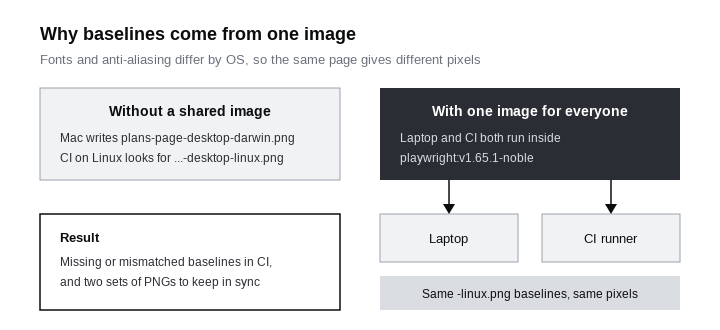
The fix is to run visual tests, and create their baselines, in one place: the official Playwright image, tagged with the same version as your package.json. Its browsers and fonts are fixed for that tag. Run this from the project folder on your laptop, whatever its operating system:
docker run --rm --init --ipc=host -v "$PWD":/work -w /work \
  mcr.microsoft.com/playwright:v1.65.1-noble \
sh -c "npm ci && npx playwright test --update-snapshots"v1.65.1-nobleis Playwright 1.65.1 on Ubuntu 24.04. Keep the tag and the npm version in step; a mismatch means Playwright cannot find its browsers. Change both in the same commit when you upgrade.--ipc=hoststops Chromium running out of shared memory, and--initcleans up the browser processes when the run ends.npm ciinstalls into the mounted folder from inside Linux.@playwright/testis plain JavaScript, so the samenode_moduleskeeps working on your laptop afterwards.
On a Linux laptop, files the container writes belong to root; sudo chown -R "$USER" . in the project folder gives them back. The image is a large download, because it carries browsers and fonts. Pull it once on Wi-Fi and Docker keeps it until you remove it. Delete any -darwin or -win32 baselines that ran on a laptop before this, so only one set lives in git. For day-to-day checks, run the same command without --update-snapshots.
CI must use the same image. In GitHub Actions, run the job inside it and keep the diff images when it fails:
jobs:
  visual:
    runs-on: ubuntu-latest
    container:
      image: mcr.microsoft.com/playwright:v1.65.1-noble
      options: --ipc=host
    steps:
      - uses: actions/checkout@v7
      - run: npm ci
      - run: npx playwright test
      - uses: actions/upload-artifact@v7
        if: ${{ !cancelled() }}
        with:
          name: visual-diffs
          path: |
            playwright-report/
            test-results/
          retention-days: 14
There is no npx playwright install step: the browsers are already in the image. When a pull request fails, download the visual-diffs artifact and open the report as in the previous steps. CI sets CI, so the config's reuseExistingServer is off there and every run starts a fresh server.
Check it worked
After the Docker run, ls tests/visual.spec.js-snapshots shows only -linux files, even on a Mac, and git status shows no changes if your baselines already came from the same image. Run the Docker command without --update-snapshots twice in a row and both runs end with 4 passed.
Step 8 · Clean up
Remove the demo folder. The Chromium download stays in Playwright's shared cache for other projects; run npx playwright uninstall --all from the project first if you want that gone too. If you pulled the Docker image, docker image rm mcr.microsoft.com/playwright:v1.65.1-noble removes it.
cd ~
rm -rf ~/visual-regression-demoCheck it worked
ls ~/visual-regression-demo reports that there is no such file or directory.
Next steps
- Cover the journeys behind these screens with Write end-to-end browser tests with Playwright.
- Add screenshot checks to a larger app with unit tests already in place in Test the library app with Vitest and Playwright.
- When a screenshot test fails only sometimes, track down the cause with Fix flaky tests and stop them coming back.
Related tutorials
- Write unit tests that stay useful as the code changesYou will replace a brittle pytest suite with behaviour tests that catch a real boundary bug and stay green when the code under them is rewritten.
- Write property-based tests in TypeScript with fast-checkYou will use fast-check and Vitest to find a rounding bug in a TypeScript money module, replay the failure from its seed, fix it, and model-test a shopping cart with generated command sequences.
- Write negative tests for an API: bad input, auth and limitsYou will build a pytest and httpx suite that attacks a small FastAPI ordering API with missing and extra fields, wrong types, boundary values, long and multilingual text, bad tokens, another user's data, rate limits and reused idempotency keys, and proves every error comes back in one RFC 9457 format.
Need this done for you?
Padding does this work for growing companies, from the first diagnosis to a system that keeps working.
Get new tutorials