AI and machine learning · Intermediate · 26 min
Build a small AI agent loop from scratch
By Padding · Updated 18 Nov 2026
python:3.15-slim · Python 3.15 · anthropic 2.14.0 · pandas 3.1.1 · pytest 9.2.0 · claude-opus-5-5
You will have a Python agent in two files of about 230 lines that answers questions about a folder of CSV files with three read-only tools, a step limit, a token budget, a step log, an answer check and a clean stop when a tool keeps failing, tested end to end against a scripted stub of the Messages API.
On this page
An agent is three things: a model, some tools, and a loop that keeps calling the model until it stops asking for tools. The loop is the part you own, and it is where most agent bugs live. A loop with no limits will keep paying for tokens while a model retries a broken tool, and a loop with no log leaves you guessing why an answer came out wrong.
In this tutorial you build one by hand. It answers questions such as "Which region had the highest revenue in October?" about a folder of CSV files, using three tools that can only read:
list_filesnames the CSV files in the folderread_headreturns a file's columns, first rows and row countquery_csvruns one aggregation (count, sum, mean, min, max or distinct count) from a fixed allowlist, optionally grouped by a column
Around the tools sit the rules that make an agent safe to leave running:
- a step limit: at most 8 model calls per question
- a token budget: the run stops once input and output tokens together pass 60,000
- a step log: one JSON line per step, saying what was called and what it cost
- an answer check: every number in the final answer must have appeared in a tool result, the question, or both; a first failure gets one correction, a second is flagged for a person
- a failure stop: three failed tool calls in a row end the run cleanly instead of looping
Everything runs offline against a small scripted stand-in for the Messages API, so you can test each stop condition with no API key and no data spend. The last step points the same code at Claude.
Anthropic's Python SDK also has a beta tool runner that runs the call-and-return part of this loop for you. It is the shorter route once you know what the loop does; the last step shows where it fits and what you still have to add.
Step 1 · Create the project and the sample data
Make a throwaway project and add the three packages with exact versions:
mkdir -p ~/agent-loop-demo
cd ~/agent-loop-demo
uv init --no-package
uv add "anthropic==2.14.0" "pandas==3.1.1"
uv add --dev "pytest==9.2.0"
rm main.py
mkdir -p data tests
Tell pytest to import modules from the project folder. This appends a new table to the pyproject.toml that uv init made:
cat >> pyproject.toml <<'TOML'

[tool.pytest.ini_options]
pythonpath = ["."]
testpaths = ["tests"]
TOML
Now the data the agent will read: a month of sales from a small grocery wholesaler with depots in Lagos, Abuja and Kano, and a stock file. The figures are made up and small enough to check by hand. Revenue is in naira.
cat > data/sales.csv <<'CSV'
date,region,product,units,revenue_ngn
2026-10-02,Lagos,rice-5kg,14,126000
2026-10-02,Abuja,rice-5kg,6,54000
2026-10-03,Lagos,palm-oil-1l,30,75000
2026-10-03,Kano,rice-5kg,9,81000
2026-10-04,Abuja,palm-oil-1l,12,30000
2026-10-05,Kano,garri-2kg,25,50000
2026-10-05,Lagos,garri-2kg,18,36000
2026-10-06,Abuja,garri-2kg,10,20000
CSV
cat > data/stock.csv <<'CSV'
product,depot,on_hand
rice-5kg,Lagos,40
rice-5kg,Kano,22
palm-oil-1l,Abuja,65
garri-2kg,Kano,80
CSVCheck it worked
uv run python -c "import anthropic, pandas, pytest; print(anthropic.__version__, pandas.__version__, pytest.__version__)"
wc -l data/*.csv
The first line is 2.14.0 3.1.1 9.2.0. wc counts 9 lines in sales.csv and 5 in stock.csv: a header plus 8 and 4 rows.
Step 2 · Write three read-only tools
Create csv_tools.py. Each tool is a plain function that takes the data folder and returns a dict, and run_tool turns any call into a JSON string or raises ToolError with a message the model can act on.
cat > csv_tools.py <<'PY'
"""Three read-only tools over one folder of CSV files."""
import json
from pathlib import Path

import pandas as pd

MAX_HEAD_ROWS = 20
OPERATIONS = ["count", "max", "mean", "min", "nunique", "sum"]
NUMERIC_ONLY = {"mean", "sum"}


class ToolError(Exception):
    """A failed call, explained in words the model can act on."""


TOOLS = [
    {
        "name": "list_files",
        "description": "List the CSV files in the data folder with their size in bytes. Call this first.",
        "input_schema": {"type": "object", "properties": {}, "additionalProperties": False},
    },
    {
        "name": "read_head",
        "description": "Return the column names, the first rows and the total row count of one CSV file.",
        "input_schema": {
            "type": "object",
            "properties": {
                "file": {"type": "string", "description": "A file name from list_files, such as sales.csv"},
                "rows": {"type": "integer", "minimum": 1, "maximum": MAX_HEAD_ROWS},
            },
            "required": ["file"],
            "additionalProperties": False,
        },
    },
    {
        "name": "query_csv",
        "description": (
            "Run one aggregation on a column of a CSV file, optionally grouped by another column. "
            "Grouped results come back largest first."
        ),
        "input_schema": {
            "type": "object",
            "properties": {
                "file": {"type": "string"},
                "operation": {"type": "string", "enum": OPERATIONS},
                "column": {"type": "string"},
                "group_by": {"type": "string"},
            },
            "required": ["file", "operation", "column"],
            "additionalProperties": False,
        },
    },
]


def _load(data_dir, name):
    folder = data_dir.resolve()
    path = (folder / name).resolve()
    if path.parent != folder or path.suffix != ".csv" or not path.is_file():
        raise ToolError(f"no CSV file called {name!r}; call list_files to see the names")
    try:
        return pd.read_csv(path)
    except (pd.errors.ParserError, UnicodeDecodeError) as err:
        raise ToolError(f"{name} could not be read as CSV: {err}") from err


def list_files(data_dir):
    return {"files": [{"file": p.name, "bytes": p.stat().st_size} for p in sorted(data_dir.glob("*.csv"))]}


def read_head(data_dir, file, rows=5):
    df = _load(data_dir, file)
    rows = max(1, min(int(rows), MAX_HEAD_ROWS))
    first = json.loads(df.head(rows).to_json(orient="values"))
    return {"file": file, "columns": list(df.columns), "total_rows": len(df), "rows": first}


def query_csv(data_dir, file, operation, column, group_by=None):
    if operation not in OPERATIONS:
        raise ToolError(f"operation must be one of {OPERATIONS}, not {operation!r}")
    df = _load(data_dir, file)
    for name in [column, group_by]:
        if name is not None and name not in df.columns:
            raise ToolError(f"{file} has no column {name!r}; its columns are {list(df.columns)}")
    if operation in NUMERIC_ONLY and not pd.api.types.is_numeric_dtype(df[column]):
        raise ToolError(f"cannot {operation} {column!r}: it is not a number column")
    if group_by:
        grouped = df.groupby(group_by)[column].agg(operation).sort_values(ascending=False)
        result = json.loads(grouped.to_json())
    else:
        value = df[column].agg(operation)
        result = value.item() if hasattr(value, "item") else value
    return {"file": file, "operation": operation, "column": column, "group_by": group_by, "result": result}


HANDLERS = {"list_files": list_files, "read_head": read_head, "query_csv": query_csv}


def run_tool(name, tool_input, data_dir):
    handler = HANDLERS.get(name)
    if handler is None:
        raise ToolError(f"unknown tool {name!r}; the tools are {sorted(HANDLERS)}")
    try:
        result = handler(Path(data_dir), **tool_input)
    except (TypeError, ValueError) as err:
        raise ToolError(f"bad arguments for {name}: {err}") from err
    return json.dumps(result, ensure_ascii=False)
PY
Three choices here keep the agent's reach small:
- Only names inside the folder.
_loadresolves the path and refuses anything whose parent is not the data folder, so../.envor/etc/passwdgets an error, not a file. - An allowlist, not a query language. pandas can evaluate expression strings with
DataFrame.queryandeval. Handing a model a string that gets evaluated means any text it reads, including text planted inside a CSV cell, could shape what runs. A fixed list of operations and column names checked against the file leaves nothing to inject into. See /tutorials/defend-an-llm-app-against-prompt-injection for the wider problem. - Errors that say what to do next. "no CSV file called 'sale.csv'; call list_files to see the names" gives the model a way forward. A Python traceback does not.
Results are JSON written with json.dumps defaults, so numbers are separated by ", ". That matters for the answer check later, which reads numbers out of the results.
Check it worked
Call the tools yourself, without a model:
uv run python -c "
from csv_tools import run_tool, ToolError
print(run_tool('query_csv', {'file': 'sales.csv', 'operation': 'sum', 'column': 'revenue_ngn', 'group_by': 'region'}, 'data'))
for bad in [('read_head', {'file': '../pyproject.toml'}), ('query_csv', {'file': 'sales.csv', 'operation': 'eval', 'column': 'units'})]:
    try:
        run_tool(*bad, 'data')
    except ToolError as err:
        print('refused:', err)
" | tee /tmp/tools-check.txt
grep -q '"result": {"Lagos": 237000, "Kano": 131000, "Abuja": 104000}' /tmp/tools-check.txt
The first line ends with "result": {"Lagos": 237000, "Kano": 131000, "Abuja": 104000}, largest first. Then two lines start with refused:: one for the path outside the folder, one for the operation that is not on the list.
Step 3 · Write the loop and its limits
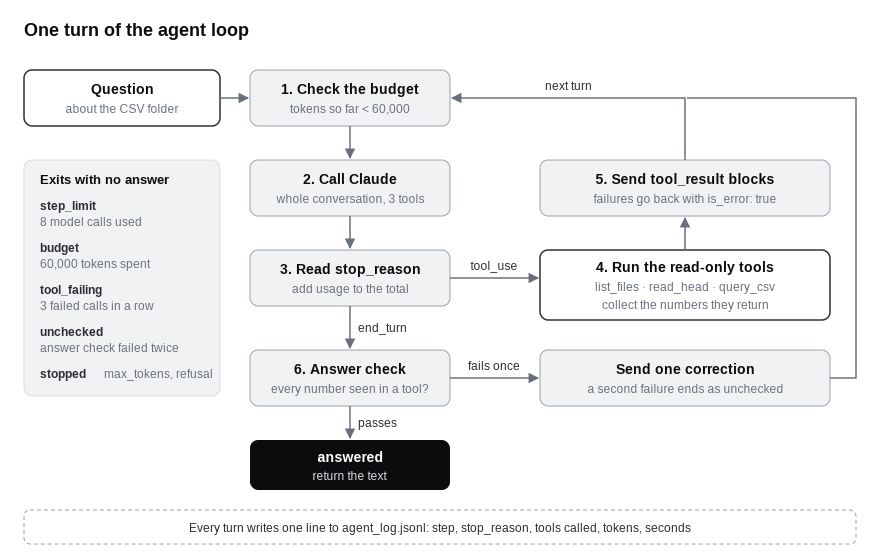
Create agent.py. run_agent returns a Result with a status that says how the run ended, so the caller never has to guess whether the text is an answer:
cat > agent.py <<'PY'
"""A small agent that answers questions about a folder of CSV files."""
import json
import re
import sys
import time
from dataclasses import dataclass
from pathlib import Path

import anthropic

from csv_tools import TOOLS, ToolError, run_tool

MODEL = "claude-opus-5-5"
SYSTEM = """You answer questions about the CSV files in one folder.
Look at the data with the tools before you answer: list the files, read the head
of the file you need, then query it. Never guess a figure: every number in your
answer must come from a tool result. If the data cannot answer the question, say so.
Answer in at most three sentences."""
NUMBER = re.compile(r"\d{1,3}(?:,\d{3})+(?:\.\d+)?(?!\d)|\d+(?:\.\d+)?")


@dataclass
class Limits:
    max_steps: int = 8  # model calls per question
    token_budget: int = 60_000  # input plus output tokens, summed over the run
    max_tool_failures: int = 3  # failed tool calls in a row before giving up
    max_tokens: int = 8000  # per reply; thinking tokens count towards it


@dataclass
class Result:
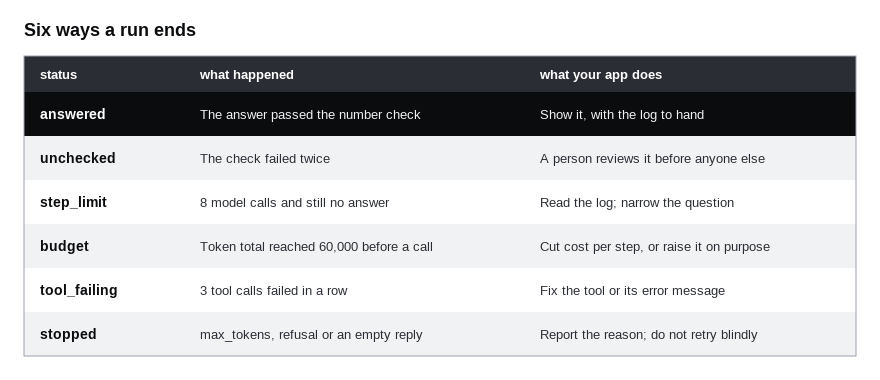
    status: str  # answered, unchecked, step_limit, budget, tool_failing, stopped
    text: str  # the answer, or why there is none
    steps: int
    tokens: int


def numbers_in(text):
    return {float(match.replace(",", "")) for match in NUMBER.findall(text)}


def run_agent(question, client, data_dir, limits=Limits(), log_path="agent_log.jsonl"):
    messages = [{"role": "user", "content": question}]
    seen = numbers_in(question)  # numbers the answer is allowed to use
    tokens = failures = 0
    corrected = False

    with open(log_path, "w", encoding="utf-8") as log:
        def record(entry):
            log.write(json.dumps(entry, ensure_ascii=False) + "\n")
            log.flush()

        for step in range(1, limits.max_steps + 1):
            if tokens >= limits.token_budget:
                return Result("budget", f"spent {tokens} of {limits.token_budget} tokens", step - 1, tokens)

            started = time.monotonic()
            response = client.messages.create(
                model=MODEL,
                max_tokens=limits.max_tokens,
                system=SYSTEM,
                tools=TOOLS,
                messages=messages,
            )
            used = response.usage.input_tokens + response.usage.output_tokens
            tokens += used
            entry = {"step": step, "stop_reason": response.stop_reason, "tokens": used,
                     "total_tokens": tokens, "seconds": round(time.monotonic() - started, 2), "tools": []}
            # Send the whole reply back, thinking blocks included, exactly as it came.
            messages.append({"role": "assistant", "content": response.content})

            if response.stop_reason == "end_turn":
                text = "".join(b.text for b in response.content if b.type == "text").strip()
                unknown = sorted(numbers_in(text) - seen)
                if text and not unknown:
                    record(entry | {"outcome": "answered"})
                    return Result("answered", text, step, tokens)
                if text and not corrected:
                    corrected = True
                    record(entry | {"outcome": "corrected", "unknown_numbers": unknown})
                    messages.append({"role": "user", "content": (
                        f"These numbers in your answer are not in any tool result: {unknown}. "
                        "Check them with the tools, or answer without them.")})
                    continue
                record(entry | {"outcome": "unchecked" if text else "empty"})
                if text:
                    return Result("unchecked", text, step, tokens)
                return Result("stopped", "the final reply had no text", step, tokens)

            if response.stop_reason != "tool_use":
                record(entry | {"outcome": "stopped"})
                return Result("stopped", f"stopped with stop_reason={response.stop_reason}", step, tokens)

            results = []
            for call in (b for b in response.content if b.type == "tool_use"):
                try:
                    content, is_error = run_tool(call.name, call.input, data_dir), False
                    seen |= numbers_in(content)
                    failures = 0
                except ToolError as err:
                    content, is_error = f"Error: {err}", True
                    failures += 1
                entry["tools"].append({"name": call.name, "input": call.input, "ok": not is_error,
                                       "result_chars": len(content)})
                results.append({"type": "tool_result", "tool_use_id": call.id,
                                "content": content, "is_error": is_error})
            messages.append({"role": "user", "content": results})
            record(entry | {"outcome": "tools"})

            if failures >= limits.max_tool_failures:
                return Result("tool_failing", f"{failures} tool calls failed in a row", step, tokens)

    return Result("step_limit", f"no answer after {limits.max_steps} steps", limits.max_steps, tokens)


if __name__ == "__main__":
    client = anthropic.Anthropic()  # reads ANTHROPIC_API_KEY, and ANTHROPIC_BASE_URL if set
    result = run_agent(sys.argv[1], client, Path("data"))
    print(f"[{result.status}] {result.steps} steps, {result.tokens} tokens")
    print(result.text)
    sys.exit(0 if result.status == "answered" else 1)
PY
How each limit works:
- Step limit. The
forloop runs at mostmax_stepstimes. Falling out of the bottom returnsstep_limit, never a half answer. - Token budget. Every reply reports
usage.input_tokensandusage.output_tokens. The loop adds them up and checks the total before each call. Input grows on every step, because the whole conversation, tool results included, is sent again each time; a ten-step run costs far more than ten times a one-step run. On Opus 5.5, thinking always runs and is billed as output, which is also whymax_tokensper reply is 8,000 for a three-sentence answer. - Failure stop.
failurescounts failed tool calls in a row and resets on any success. Three in a row means the model is stuck (asking for a file that does not exist, say), so the run ends withtool_failing. Each failure still goes back as atool_resultwithis_error: true, because the API rejects a request that leaves atool_useblock unanswered. - Answer check.
seencollects every number from the question and from successful tool results. A final answer with a number outside that set gets one correction message; a second failure returnsunchecked, which your app should show to a person rather than to a customer. It is a cheap guard, not proof: it catches an invented figure, not a right number in a wrong sentence. - Other stops.
max_tokens,refusalor an empty final reply returnstoppedwith the reason, so a reply cut off mid-thought is never mistaken for an answer.
The NUMBER pattern reads 237,000 and 237000 as the same number, and the lookahead stops it from gluing CSV-style 14,126000 into one value.
Check it worked
uv run python -c "import agent; print(agent.MODEL, agent.Limits()); print(sorted(agent.numbers_in('Lagos made 237,000 naira, 1.5 times Kano; row 14,126000')))"The first line is claude-opus-5-5 Limits(max_steps=8, token_budget=60000, max_tool_failures=3, max_tokens=8000). The second is [1.5, 14.0, 126000.0, 237000.0]: the thousands separator in 237,000 is read as part of the number, and the CSV pair 14,126000 stays two numbers.
Step 4 · Build a scripted stub of the Messages API
To run the loop without a key, point the SDK at a small HTTP server on your machine that plays back a script of turns. Each turn is a reply in the shape the Messages API reference documents: id, type, role, model, a list of content blocks, stop_reason, stop_sequence and usage. Every reply starts with an empty thinking block, as Opus 5.5 replies do when thinking display is off, so the loop has to pass it back untouched. The stub records each request body, so tests can read back what the loop sent.
/tutorials/test-llm-code-offline-with-a-stub-messages-api builds a fuller, fixture-based stub. This one only needs to follow a script:
cat > stub_api.py <<'PY'
"""A scripted stand-in for the Claude Messages API. Standard library only."""
import json
import sys
import threading
from http.server import BaseHTTPRequestHandler, ThreadingHTTPServer
from pathlib import Path

USAGE = {"input_tokens": 1200, "output_tokens": 300}


def tool_turn(*calls):
    """A reply asking for tools; each call is (name, input)."""
    blocks = [{"type": "tool_use", "name": name, "input": tool_input} for name, tool_input in calls]
    return {"stop_reason": "tool_use", "content": blocks}


def text_turn(text, stop_reason="end_turn"):
    return {"stop_reason": stop_reason, "content": [{"type": "text", "text": text}] if text else []}


class ScriptedStub:
    def __init__(self, turns, port=0):
        self.turns = list(turns)  # replies still to give, in order
        self.requests = []  # every request body received
        stub = self

        class Handler(BaseHTTPRequestHandler):
            def do_POST(self):
                body = json.loads(self.rfile.read(int(self.headers["content-length"])))
                stub.requests.append(body)
                if self.path != "/v1/messages" or not stub.turns:
                    error = {"type": "api_error", "message": f"no scripted reply for {self.path}"}
                    return self.reply(500, {"type": "error", "error": error})
                turn, n = stub.turns.pop(0), len(stub.requests)
                content = [{"type": "thinking", "thinking": "", "signature": "stub"}]
                for i, block in enumerate(turn["content"], 1):
                    content.append(block | {"id": f"toolu_{n}_{i}"} if block["type"] == "tool_use" else block)
                self.reply(200, {
                    "id": f"msg_stub_{n}", "type": "message", "role": "assistant", "model": body["model"],
                    "content": content, "stop_reason": turn["stop_reason"], "stop_sequence": None,
                    "usage": turn.get("usage", USAGE),
                })

            def reply(self, status, payload):
                data = json.dumps(payload).encode()
                self.send_response(status)
                self.send_header("content-type", "application/json")
                self.send_header("content-length", str(len(data)))
                self.end_headers()
                self.wfile.write(data)

            def log_message(self, *args):
                pass

        self.server = ThreadingHTTPServer(("127.0.0.1", port), Handler)

    @property
    def base_url(self):
        return f"http://127.0.0.1:{self.server.server_port}"

    def start(self):
        threading.Thread(target=self.server.serve_forever, daemon=True).start()
        return self

    def stop(self):
        self.server.shutdown()
        self.server.server_close()


if __name__ == "__main__":
    port, script = int(sys.argv[1]), Path(sys.argv[2])
    stub = ScriptedStub(json.loads(script.read_text()), port)
    print(f"Stub Messages API on {stub.base_url} with {len(stub.turns)} scripted turns", flush=True)
    stub.server.serve_forever()
PY
Now the script for a good run: list the files, read the head of sales.csv, sum revenue by region, then answer. The answer quotes the three totals the tool returns:
cat > demo_turns.json <<'JSON'
[
  {"stop_reason": "tool_use", "content": [{"type": "tool_use", "name": "list_files", "input": {}}]},
  {"stop_reason": "tool_use", "content": [{"type": "tool_use", "name": "read_head", "input": {"file": "sales.csv", "rows": 3}}]},
  {"stop_reason": "tool_use", "content": [{"type": "tool_use", "name": "query_csv",
    "input": {"file": "sales.csv", "operation": "sum", "column": "revenue_ngn", "group_by": "region"}}]},
  {"stop_reason": "end_turn", "content": [{"type": "text",
    "text": "Lagos had the highest revenue in sales.csv: 237,000 naira, ahead of Kano with 131,000 and Abuja with 104,000."}]}
]
JSON
Start the stub in a second terminal, from the same folder, and leave it running:
cd ~/agent-loop-demo
uv run python stub_api.py 8802 demo_turns.json
It prints Stub Messages API on http://127.0.0.1:8802 with 4 scripted turns. Back in the first terminal, run the agent against it. ANTHROPIC_BASE_URL sends the SDK's requests to the stub, and stub-key is a dummy value the stub ignores, not a real key:
ANTHROPIC_BASE_URL=http://127.0.0.1:8802 ANTHROPIC_API_KEY=stub-key \
  uv run python agent.py "Which region had the highest revenue in October?" | tee /tmp/agent-out.txt
grep -q '^\[answered\] 4 steps, 6000 tokens' /tmp/agent-out.txt
Stop the stub with Ctrl+C in its terminal. It has played its four turns; run it again to replay them.
Check it worked
The agent prints:
[answered] 4 steps, 6000 tokens
Lagos had the highest revenue in sales.csv: 237,000 naira, ahead of Kano with 131,000 and Abuja with 104,000.
Four steps at the stub's fixed 1,200 input and 300 output tokens each make 6,000. The answer passed the check because 237,000, 131,000 and 104,000 all came back from query_csv in step 3. The tools ran for real against your CSV files; only the model's choices were scripted.
Step 5 · Read the step log
The run wrote agent_log.jsonl, one JSON object per step. Print it as a short table:
cat > show_log.py <<'PY'
import json
import sys

for line in open(sys.argv[1], encoding="utf-8"):
    entry = json.loads(line)
    calls = ", ".join(f"{t['name']}({'ok' if t['ok'] else 'failed'})" for t in entry["tools"]) or "-"
    print(f"{entry['step']:>2}  {entry['stop_reason']:<9} {entry['outcome']:<9} "
          f"{entry['tokens']:>6} tokens  {entry['total_tokens']:>6} total  {calls}")
PY
uv run python show_log.py agent_log.jsonl | tee /tmp/log-table.txt
grep -q 'query_csv(ok)' /tmp/log-table.txt
Each line records the stop reason, what the loop did with it, the tokens for that step and the running total, every tool called with its input, whether it worked, the size of its result, and the seconds the model call took. It does not store tool results or the answer text. Your CSV files may hold customer names or phone numbers, and a log copied to a shared drive or a support ticket should not carry them; result_chars is enough to spot a tool returning far more than expected.
Open the file itself when you need the inputs:
uv run python -m json.tool --json-lines agent_log.jsonl | grep -A6 '"name": "query_csv"'Check it worked
The table has four rows. Steps 1 to 3 show tool_use, tools and one call each, list_files(ok), read_head(ok) and query_csv(ok); step 4 shows end_turn and answered. The total column climbs 1500, 3000, 4500, 6000. The json.tool output shows the query_csv input with "group_by": "region".
Step 6 · Test every way the loop can stop
A good run proves little about limits. Each test below scripts a run that should hit one stop condition, and checks both the status and how many requests reached the stub, so a limit that fires one step late fails the test.
The fixture starts a fresh stub per test on a free port and returns the result, the stub and the parsed log. max_retries=0 stops the SDK retrying the stub's 500 reply when a test runs out of scripted turns, so that failure shows at once:
cat > tests/conftest.py <<'PY'
import json
from pathlib import Path

import anthropic
import pytest

from agent import Limits, run_agent
from stub_api import ScriptedStub

DATA = Path(__file__).parent.parent / "data"


@pytest.fixture
def run(tmp_path):
    stubs = []

    def run(turns, question="Which region had the highest revenue?", **limits):
        stub = ScriptedStub(turns).start()
        stubs.append(stub)
        client = anthropic.Anthropic(api_key="stub-key", base_url=stub.base_url, max_retries=0)
        log_path = tmp_path / "log.jsonl"
        result = run_agent(question, client, DATA, Limits(**limits), log_path=log_path)
        log = [json.loads(line) for line in log_path.read_text().splitlines()]
        return result, stub, log

    yield run
    for stub in stubs:
        stub.stop()
PY
Now the tests, one per stop condition plus the tool guards:
cat > tests/test_agent.py <<'PY'
import json
from pathlib import Path

import pytest

from csv_tools import ToolError, run_tool
from stub_api import text_turn, tool_turn

DEMO = json.loads((Path(__file__).parent.parent / "demo_turns.json").read_text())
LIST = tool_turn(("list_files", {}))
MISSING = tool_turn(("read_head", {"file": "missing.csv"}))
REVENUE = tool_turn(("query_csv", {"file": "sales.csv", "operation": "sum",
                                   "column": "revenue_ngn", "group_by": "region"}))


def test_answers_after_three_tool_steps(run):
    result, stub, log = run(DEMO)
    assert (result.status, result.steps, result.tokens) == ("answered", 4, 6000)
    assert [entry["outcome"] for entry in log] == ["tools", "tools", "tools", "answered"]
    last = stub.requests[3]["messages"]
    assert last[-1]["content"][0]["type"] == "tool_result"
    assert '"Lagos": 237000' in last[-1]["content"][0]["content"]
    assert last[-2]["content"][0]["type"] == "thinking"  # the reply went back whole


def test_step_limit(run):
    result, stub, log = run([LIST] * 5, max_steps=3)
    assert result.status == "step_limit"
    assert len(stub.requests) == 3 and len(log) == 3


def test_token_budget_stops_before_the_next_call(run):
    result, stub, _ = run([LIST] * 5, token_budget=3000)
    assert (result.status, result.tokens) == ("budget", 3000)
    assert len(stub.requests) == 2


def test_three_failures_in_a_row_stop_the_run(run):
    result, stub, log = run([MISSING] * 5)
    assert (result.status, result.steps) == ("tool_failing", 3)
    assert len(stub.requests) == 3
    sent = stub.requests[1]["messages"][-1]["content"][0]
    assert sent["is_error"] is True and "list_files" in sent["content"]
    assert not any(tool["ok"] for entry in log for tool in entry["tools"])


def test_a_success_resets_the_failure_count(run):
    turns = [MISSING, MISSING, LIST, MISSING, MISSING, text_turn("The folder holds sales.csv and stock.csv.")]
    result, _, _ = run(turns)
    assert result.status == "answered"


def test_an_invented_number_gets_one_correction(run):
    turns = [LIST, text_turn("Lagos made 999,999 naira."), REVENUE, text_turn("Lagos made 237,000 naira.")]
    result, stub, log = run(turns)
    assert (result.status, result.steps) == ("answered", 4)
    assert "999999.0" in stub.requests[2]["messages"][-1]["content"]
    assert log[1]["outcome"] == "corrected"


def test_a_second_invented_answer_is_flagged_for_a_person(run):
    result, _, _ = run([LIST, text_turn("Lagos made 999,999 naira."), text_turn("Lagos made 888,888 naira.")])
    assert result.status == "unchecked"
    assert "888,888" in result.text


def test_max_tokens_without_text_is_not_an_answer(run):
    result, _, _ = run([text_turn("", stop_reason="max_tokens")])
    assert result.status == "stopped" and "max_tokens" in result.text


@pytest.mark.parametrize("name, tool_input", [
    ("read_head", {"file": "../pyproject.toml"}),
    ("read_head", {"file": "/etc/passwd"}),
    ("query_csv", {"file": "sales.csv", "operation": "eval", "column": "units"}),
    ("query_csv", {"file": "sales.csv", "operation": "sum", "column": "region"}),
    ("query_csv", {"file": "sales.csv", "operation": "sum", "column": "price"}),
    ("delete_file", {"file": "sales.csv"}),
])
def test_tools_refuse_anything_outside_their_job(name, tool_input):
    with pytest.raises(ToolError):
        run_tool(name, tool_input, Path(__file__).parent.parent / "data")
PY
uv run pytest -q
The budget test is worth reading closely: each scripted step costs 1,500 tokens, so after two steps the total is exactly 3,000, the check before step 3 fires, and the stub sees two requests. In a real run the input side of each step grows, so the budget usually fires sooner than a flat estimate suggests.
Check it worked
pytest ends with 14 passed: eight loop tests and six refused tool calls. Break a limit to see a test catch it: change if failures >= limits.max_tool_failures: to if failures > limits.max_tool_failures: in agent.py, run uv run pytest -q again, and test_three_failures_in_a_row_stop_the_run fails because the stub sees a fourth request. Change it back before you go on.
Step 7 · Run it against Claude and check the figures
With a real key in ANTHROPIC_API_KEY, stored as in /tutorials/call-an-llm-api-from-python, run the same command without ANTHROPIC_BASE_URL:
uv run python agent.py "Which region had the highest revenue in October?"
uv run python show_log.py agent_log.jsonl
The model now makes its own choices, so the number of steps, the tokens and the wording will differ from the stub run, and a second run may differ from the first. Expect something like three to five steps. If you pay for usage from a prepaid balance, the token total on the first output line is the figure to watch: lower token_budget in Limits while you experiment.
Before you trust the answer, check it against the data yourself. The log shows which query_csv call the agent relied on; run the same call with no model in the way:
uv run python -c "from csv_tools import run_tool; print(run_tool('query_csv', {'file': 'sales.csv', 'operation': 'sum', 'column': 'revenue_ngn', 'group_by': 'region'}, 'data'))"Do this for any answer that will be acted on. The answer check proves the numbers came from the tools; it cannot prove the agent asked the right question of them. Summing units instead of revenue_ngn passes the check and gives a wrong ranking.
The shorter route: the SDK's tool runner
The SDK has a beta tool runner that does the call, run, send-back cycle for you. You mark each function with @beta_tool, which builds the JSON schema from its type hints and docstring, and client.beta.messages.tool_runner(...) loops until Claude stops asking for tools or max_iterations is reached:
from anthropic import Anthropic, beta_tool

from csv_tools import run_tool


@beta_tool
def list_files() -> str:
    """List the CSV files in the data folder with their size in bytes."""
    return run_tool("list_files", {}, "data")


runner = Anthropic().beta.messages.tool_runner(
    model="claude-opus-5-5",
    max_tokens=8000,
    max_iterations=8,
    tools=[list_files],  # plus read_head and query_csv, wrapped the same way
    messages=[{"role": "user", "content": "Which files are there?"}],
)
final = runner.until_done()
max_iterations gives you the step limit. The token budget, the failure stop, the answer check and the step log are still yours to add, by iterating over the runner and inspecting each message, which is why it helps to have written the loop once by hand.
Check it worked
The live run prints [answered] with a step count and token total, and show_log.py lists the tools Claude chose. The totals in its answer match the ones the direct query_csv call printed: {"Lagos": 237000, "Kano": 131000, "Abuja": 104000}. If the status is anything other than answered, the second line says why, and the log shows the step where it happened.
Clean up
This deletes the demo folder, its data and its virtual environment. Nothing outside ~/agent-loop-demo was created except the scratch files in /tmp:
cd ~
rm -rf ~/agent-loop-demo
rm -f /tmp/tools-check.txt /tmp/agent-out.txt /tmp/log-table.txt
Next steps
- Decide whether a feature needs this loop at all, or a fixed sequence of calls, in /tutorials/choose-between-an-llm-workflow-and-an-agent.
- Harden the tools and the prompt against instructions hidden in the data with /tutorials/defend-an-llm-app-against-prompt-injection.
- Go deeper on parallel tool calls, strict schemas and
is_errorin /tutorials/let-claude-call-your-functions-with-tool-use. - Swap the scripted stub for recorded fixtures and error replies with /tutorials/test-llm-code-offline-with-a-stub-messages-api.
Related tutorials
- Use MCP server tools from your own Claude appYou will connect a Python app to the stdio clinic-hours MCP server, hand an allowlisted set of its tools to Claude, pass every tool call through to the server with a tested bridge, and know when the API's MCP connector can do the connecting for you.
- Trace LLM calls with OpenTelemetryYou will have a Python app whose Claude calls, retries and tool runs appear as one OpenTelemetry trace with GenAI attributes, token and latency metrics, prompts kept out by default, and an export path from the console to an OpenTelemetry Collector.
- Serve an MCP server over Streamable HTTP with authenticationYou will run an MCP server over Streamable HTTP on localhost that checks the Origin header, accepts only bearer tokens your token verifier knows, limits each tool to the right scope, and refuses calls without a token.
Need this done for you?
Padding does this work for growing companies, from the first diagnosis to a system that keeps working.
Get new tutorials