AI and machine learning · Intermediate · 22 min
Build an MCP server in Python
By Padding · Updated 18 Nov 2026
python:3.15-slim · Python 3.15 · mcp 2.3.0 · pytest 9.2.0 · uv 0.13.10
You will build a stdio MCP server in Python for a small clinic-hours database, with two typed tools, one resource and one prompt, prove it with pytest through the SDK's own client, and add it to Claude Code and Claude Desktop.
On this page
The Model Context Protocol (MCP) is a standard way for an AI application to reach your data and actions. Instead of writing tool-calling glue for every app and every model, you write one MCP server, and any host that speaks MCP can use it: Claude Code, Claude Desktop, an IDE, or an app you build yourself.
Three words carry the whole design. The host is the AI application the person is using. Inside it, an MCP client holds a connection to one server, which is the program you write. A host connected to five servers runs five clients. Your server offers up to three kinds of thing:
- Tools: functions the model decides to call, such as "get the opening hours for this clinic on Sunday".
- Resources: read-only data named by a URI, which the application chooses to attach as context.
- Prompts: message templates the user picks, often shown as slash commands.
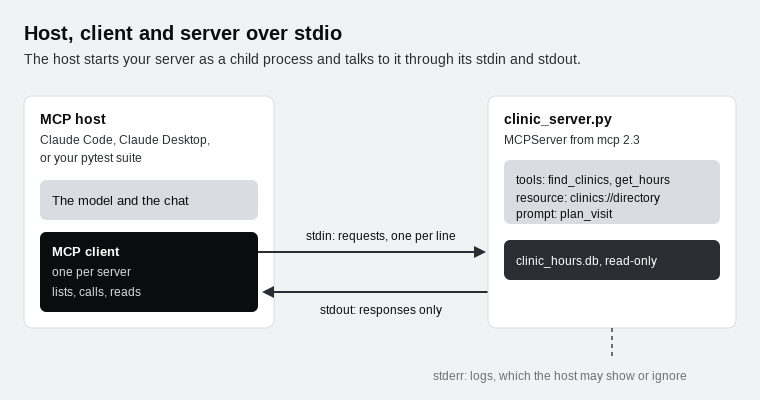
You will build a server for Nsoromma Health, a made-up group of clinics in Kumasi and Tamale. Receptionists, patients and staff ask the same question all day: is the clinic open, and when? The server answers from a small SQLite database. By the end you have:
- a server with two tools,
find_clinicsandget_hours, whose inputs are typed and validated, and whose errors tell the model what to do next - a
clinics://directoryresource and aplan_visitprompt - a pytest suite that starts the server as a subprocess and talks to it over stdio through the SDK's client, the same way a host does
- the configuration that adds it to Claude Code and Claude Desktop
The code uses the official Python SDK, mcp 2.3.0. Version 2 renamed the old FastMCP class to MCPServer, so examples written for 1.x that import mcp.server.fastmcp will not run against it.
A stdio server runs on the same machine as the host, so tool calls never touch the network. If you work on prepaid mobile data, only the model's own requests use your bundle; the clinic lookups are free.
Step 1 · Create the project
Make a throwaway folder and let uv create the project and pin the two packages:
mkdir -p ~/clinic-mcp-demo
cd ~/clinic-mcp-demo
uv init --no-package --python 3.15
uv add "mcp==2.3.0"
uv add --dev "pytest==9.2.0"
mcp brings in pydantic, which the SDK uses to turn your Python type hints into the JSON Schema a model sees, and anyio, whose pytest plugin you will use for the async tests.
Check it worked
uv run python -c "import importlib.metadata as m; print(m.version('mcp'), m.version('pytest'))"The output is 2.3.0 9.2.0. Any other numbers mean an older lock file or a different folder; run the uv add lines again in ~/clinic-mcp-demo.
Step 2 · Build the clinic-hours database
The server needs something real to read. Create seed_db.py, which writes three clinics and their weekly hours into clinic_hours.db. A day with no row is a day the clinic is closed:
cat > seed_db.py <<'PY'
"""Create clinic_hours.db with three made-up clinics and their weekly hours."""
import sqlite3
from pathlib import Path

DB = Path(__file__).with_name("clinic_hours.db")

CLINICS = [
    ("kumasi-asokwa", "Nsoromma Health Asokwa", "Kumasi", "+233 30 000 0101"),
    ("kumasi-bantama", "Nsoromma Health Bantama", "Kumasi", "+233 30 000 0102"),
    ("tamale-central", "Nsoromma Health Tamale Central", "Tamale", "+233 30 000 0103"),
]

WEEKDAYS = ["monday", "tuesday", "wednesday", "thursday", "friday"]
HOURS = (
    [("kumasi-asokwa", d, "08:00", "17:00") for d in WEEKDAYS]
    + [("kumasi-asokwa", "saturday", "09:00", "13:00")]
    + [("kumasi-bantama", d, "07:30", "19:00") for d in WEEKDAYS]
    + [("tamale-central", d, "08:00", "16:00") for d in WEEKDAYS]
    + [("tamale-central", "saturday", "08:00", "12:00"), ("tamale-central", "sunday", "14:00", "18:00")]
)

DB.unlink(missing_ok=True)
with sqlite3.connect(DB) as db:
    db.executescript(
        """
        CREATE TABLE clinics (
            id TEXT PRIMARY KEY,
            name TEXT NOT NULL,
            city TEXT NOT NULL,
            phone TEXT NOT NULL
        );
        CREATE TABLE hours (
            clinic_id TEXT NOT NULL REFERENCES clinics(id),
            day TEXT NOT NULL,
            opens TEXT NOT NULL,
            closes TEXT NOT NULL,
            PRIMARY KEY (clinic_id, day)
        );
        """
    )
    db.executemany("INSERT INTO clinics VALUES (?, ?, ?, ?)", CLINICS)
    db.executemany("INSERT INTO hours VALUES (?, ?, ?, ?)", HOURS)
db.close()
print(f"Wrote {DB.name}: {len(CLINICS)} clinics, {len(HOURS)} opening slots")
PY
uv run python seed_db.py
The script deletes and rebuilds the file each time, so you can run it again whenever you change the data. The phone numbers are placeholders, not real lines.
Check it worked
The script prints Wrote clinic_hours.db: 3 clinics, 18 opening slots. Ask the database directly for the one clinic that opens on Sunday:
uv run python -c "import sqlite3; db = sqlite3.connect('clinic_hours.db'); print(db.execute(\"SELECT day, opens, closes FROM hours WHERE clinic_id = 'tamale-central' AND day = 'sunday'\").fetchone())"The output is ('sunday', '14:00', '18:00').
Step 3 · Write the two tools
Create clinic_server.py with the server object and its two tools. Read the code once before you run it; the notes after it explain the choices that matter:
cat > clinic_server.py <<'PY'
"""Clinic hours MCP server: answers questions about Nsoromma Health opening hours."""
import logging
import os
import sqlite3
from contextlib import closing
from pathlib import Path
from typing import Annotated, Literal

from mcp.server.mcpserver import MCPServer
from mcp.server.mcpserver.exceptions import ToolError
from pydantic import BaseModel, Field

DB_PATH = Path(os.environ.get("CLINIC_DB", Path(__file__).with_name("clinic_hours.db"))).resolve()

Day = Literal["monday", "tuesday", "wednesday", "thursday", "friday", "saturday", "sunday"]
ClinicId = Annotated[
    str,
    Field(pattern=r"^[a-z0-9-]{3,40}$", description="Clinic id from find_clinics, such as kumasi-asokwa"),
]
City = Annotated[str, Field(min_length=2, max_length=40, description="City name, such as Kumasi")]

log = logging.getLogger("clinic_server")

mcp = MCPServer(
    "clinic-hours",
    instructions="Opening hours for Nsoromma Health clinics in Ghana. Call find_clinics first to get a clinic id.",
)


def query(sql: str, params: tuple = ()) -> list[sqlite3.Row]:
    """Run one read-only query. The database is opened in read-only mode on every call."""
    with closing(sqlite3.connect(f"{DB_PATH.as_uri()}?mode=ro", uri=True)) as db:
        db.row_factory = sqlite3.Row
        return db.execute(sql, params).fetchall()


class Clinic(BaseModel):
    id: str
    name: str
    city: str
    phone: str


class ClinicList(BaseModel):
    city: str
    clinics: list[Clinic]


class DayHours(BaseModel):
    clinic_id: str
    clinic_name: str
    day: Day
    is_open: bool
    opens: str | None = Field(description="Opening time, 24-hour clock, clinic local time")
    closes: str | None = Field(description="Closing time, 24-hour clock, clinic local time")


@mcp.tool()
def find_clinics(city: City) -> ClinicList:
    """List the clinics in a city with their ids and phone numbers."""
    rows = query("SELECT id, name, city, phone FROM clinics WHERE lower(city) = lower(?) ORDER BY name", (city.strip(),))
    if not rows:
        known = ", ".join(r["city"] for r in query("SELECT DISTINCT city FROM clinics ORDER BY city"))
        raise ToolError(f"No clinics in {city!r}. Cities with clinics: {known}.")
    return ClinicList(city=rows[0]["city"], clinics=[Clinic(**dict(r)) for r in rows])


@mcp.tool()
def get_hours(clinic_id: ClinicId, day: Day) -> DayHours:
    """Opening hours for one clinic on one day of the week."""
    clinic = query("SELECT name FROM clinics WHERE id = ?", (clinic_id,))
    if not clinic:
        raise ToolError(f"No clinic with id {clinic_id!r}. Call find_clinics to get valid ids.")
    log.info("get_hours %s %s", clinic_id, day)
    slot = query("SELECT opens, closes FROM hours WHERE clinic_id = ? AND day = ?", (clinic_id, day))
    opens, closes = (slot[0]["opens"], slot[0]["closes"]) if slot else (None, None)
    return DayHours(
        clinic_id=clinic_id,
        clinic_name=clinic[0]["name"],
        day=day,
        is_open=bool(slot),
        opens=opens,
        closes=closes,
    )
PY
What each part is for:
- The type hints are the contract.
MCPServerreads each tool's signature and builds the JSON Schema the model receives.Daybecomes anenumof seven strings, so the model is told the exact values it may send.ClinicIdcarries a pattern and a description, and the description is often what stops a model sending a clinic's name where its id belongs. - The docstring is the tool description. Models choose tools by reading it, so say what the tool returns, not how it works.
- Return a pydantic model for structured output. The SDK publishes an output schema for
DayHoursand sends the result twice: asstructuredContentfor code, and as JSON text for older clients. - Raise
ToolErrorfor failures you expect. The call returns a normal result withisErrorset and your message inside, so the model can read "Call find_clinics to get valid ids" and try again. A closed day is not an error at all: it is a valid answer withis_openfalse. Any other exception is a bug, and the SDK hides its text from the client and logs the traceback. - Read-only, parameterised SQL.
mode=romeans no tool can change the data even if you later add a careless query, and the?placeholders keep model-supplied text out of the SQL itself. CLINIC_DBis optional. It lets you point the server at another copy of the data through the environment; without it the server uses the file next to the script, which matters when a host starts it from a different working directory.
Check it worked
You can call the tools in-process before any transport exists. Create check_tools.py:
cat > check_tools.py <<'PY'
import asyncio

from clinic_server import mcp


async def main():
    for tool in await mcp.list_tools():
        print(tool.name, "->", sorted(tool.input_schema["properties"]))
    result = await mcp.call_tool("get_hours", {"clinic_id": "kumasi-asokwa", "day": "saturday"})
    print(result.structured_content)


asyncio.run(main())
PY
uv run python check_tools.py
The output lists find_clinics -> ['city'] and get_hours -> ['clinic_id', 'day'], then a dictionary with 'is_open': True, 'opens': '09:00', 'closes': '13:00'. You also see the log line get_hours kumasi-asokwa saturday, which goes to stderr.
Step 4 · Add the resource and the prompt
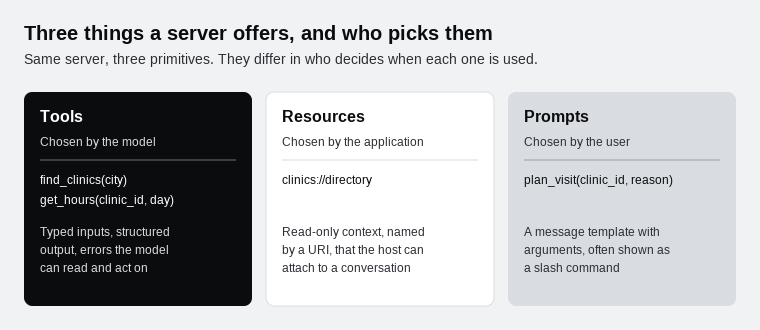
A resource suits data the host may want to attach whole, without the model having to ask: here, the full directory with every clinic's week. A prompt suits a task the user starts on purpose. Append both, and the line that starts the server, to clinic_server.py:
cat >> clinic_server.py <<'PY'


@mcp.resource(
    "clinics://directory",
    name="clinic-directory",
    title="Clinic directory",
    mime_type="text/markdown",
)
def clinic_directory() -> str:
    """Every clinic with its phone number and full weekly hours."""
    lines = ["# Nsoromma Health clinics", ""]
    for clinic in query("SELECT id, name, city, phone FROM clinics ORDER BY city, name"):
        lines.append(f"## {clinic['name']} ({clinic['id']})")
        lines.append(f"{clinic['city']} · {clinic['phone']}")
        hours = {r["day"]: f"{r['opens']}-{r['closes']}" for r in query("SELECT day, opens, closes FROM hours WHERE clinic_id = ?", (clinic["id"],))}
        for day in Day.__args__:
            lines.append(f"- {day}: {hours.get(day, 'closed')}")
        lines.append("")
    return "\n".join(lines)


@mcp.prompt(title="Plan a clinic visit")
def plan_visit(clinic_id: str, reason: str) -> str:
    """Ask the assistant to suggest visit times from the clinic's real opening hours."""
    return (
        f"A patient wants to visit clinic {clinic_id} for: {reason}\n\n"
        "Use the get_hours tool for each day you consider, and do not state hours you have not looked up. "
        "Suggest two days and times when the clinic is open, at least an hour before closing. "
        "End by reminding the patient to phone the clinic to confirm, because hours change on public holidays."
    )


if __name__ == "__main__":
    mcp.run()
PY
mcp.run() with no argument uses the stdio transport. The prompt returns a plain string, which the SDK sends as one user message. Its wording asks the model to check every time it states and to send the patient to a human for confirmation; a model can still get a day wrong, so the reminder to phone is part of the design, not decoration.
Prompt arguments are always strings in MCP, which is why plan_visit takes clinic_id: str rather than the stricter ClinicId used by the tool.
Check it worked
uv run python -c "import asyncio, clinic_server as s; print([str(r.uri) for r in asyncio.run(s.mcp.list_resources())]); print([p.name for p in asyncio.run(s.mcp.list_prompts())])"The output is ['clinics://directory'] and then ['plan_visit'].
Step 5 · Talk to the server over stdio by hand
Before you hand the server to a host, look at what actually crosses the pipe. With stdio, each message is one line of JSON-RPC on stdin, and each reply is one line on stdout. Write a three-line session: the initialize handshake, the initialized notification, and one tool call:
cat > session.jsonl <<'JSON'
{"jsonrpc":"2.0","id":1,"method":"initialize","params":{"protocolVersion":"2025-11-25","capabilities":{},"clientInfo":{"name":"shell","version":"0.1"}}}
{"jsonrpc":"2.0","method":"notifications/initialized"}
{"jsonrpc":"2.0","id":2,"method":"tools/call","params":{"name":"get_hours","arguments":{"clinic_id":"tamale-central","day":"sunday"}}}
JSON
{ cat session.jsonl; sleep 3; } | uv run python clinic_server.py > replies.jsonl
The sleep 3 keeps stdin open for a few seconds so the server can answer before it sees the end of its input and exits. Real hosts keep the pipe open for the whole session. This session uses the 2025-11-25 initialize handshake because it is short to type; the SDK's own client negotiates the newer 2026-07-28 protocol on its own.
This is also why a stdio server must never print(). Anything on stdout that is not a protocol message corrupts the stream, and the host drops the connection or fails to parse a reply. Log with the logging module instead, which writes to stderr; that is why the get_hours ... log line appeared in your terminal and not in replies.jsonl.
Check it worked
wc -l < replies.jsonl
grep -o '"serverInfo":{[^}]*}' replies.jsonl
grep -o '"structuredContent":{[^}]*}' replies.jsonl
The file has 2 lines, one reply per request (a notification gets no reply). The first grep prints "serverInfo":{"name":"clinic-hours","version":""} and the second prints the Sunday hours for Tamale Central, "opens":"14:00","closes":"18:00", inside structuredContent.
Step 6 · Test the server with the SDK's client
Typing JSON does not scale. The SDK's Client class can start your server as a subprocess from a StdioServerParameters, run the handshake and give you typed results, which is what a host does. Each test below opens its own connection so a failure in one cannot leak into the next. The anyio_backend fixture tells anyio's pytest plugin, installed with mcp, to run the async tests on asyncio:
mkdir -p tests
cat > tests/test_clinic_server.py <<'PY'
"""Start clinic_server.py as a subprocess and talk to it over stdio, as a host would."""
import sys
from pathlib import Path

import pytest
from mcp import Client, MCPError, StdioServerParameters

PROJECT = Path(__file__).resolve().parent.parent
SERVER = StdioServerParameters(
    command=sys.executable,
    args=[str(PROJECT / "clinic_server.py")],
    cwd=PROJECT,
)

pytestmark = pytest.mark.anyio


@pytest.fixture
def anyio_backend():
    return "asyncio"


async def test_server_offers_two_tools_one_resource_one_prompt():
    async with Client(SERVER) as client:
        tools = (await client.list_tools()).tools
        resources = (await client.list_resources()).resources
        prompts = (await client.list_prompts()).prompts
    assert sorted(t.name for t in tools) == ["find_clinics", "get_hours"]
    assert [str(r.uri) for r in resources] == ["clinics://directory"]
    assert [p.name for p in prompts] == ["plan_visit"]
    get_hours = next(t for t in tools if t.name == "get_hours")
    assert get_hours.input_schema["required"] == ["clinic_id", "day"]
    assert "sunday" in get_hours.input_schema["properties"]["day"]["enum"]


async def test_get_hours_returns_structured_hours():
    async with Client(SERVER) as client:
        result = await client.call_tool("get_hours", {"clinic_id": "tamale-central", "day": "sunday"})
    assert not result.is_error
    assert result.structured_content == {
        "clinic_id": "tamale-central",
        "clinic_name": "Nsoromma Health Tamale Central",
        "day": "sunday",
        "is_open": True,
        "opens": "14:00",
        "closes": "18:00",
    }


async def test_closed_day_is_not_an_error():
    async with Client(SERVER) as client:
        result = await client.call_tool("get_hours", {"clinic_id": "kumasi-bantama", "day": "saturday"})
    assert not result.is_error
    assert result.structured_content["is_open"] is False
    assert result.structured_content["opens"] is None


async def test_unknown_clinic_tells_the_model_what_to_do():
    async with Client(SERVER) as client:
        result = await client.call_tool("get_hours", {"clinic_id": "accra-osu", "day": "monday"})
    assert result.is_error
    assert "Call find_clinics" in result.content[0].text


async def test_bad_day_fails_input_validation():
    async with Client(SERVER) as client:
        result = await client.call_tool("get_hours", {"clinic_id": "kumasi-asokwa", "day": "funday"})
    assert result.is_error
    assert "validation error" in result.content[0].text


async def test_unknown_city_lists_known_cities():
    async with Client(SERVER) as client:
        found = await client.call_tool("find_clinics", {"city": "kumasi"})
        missing = await client.call_tool("find_clinics", {"city": "Accra"})
    assert [c["id"] for c in found.structured_content["clinics"]] == ["kumasi-asokwa", "kumasi-bantama"]
    assert missing.is_error
    assert "Kumasi, Tamale" in missing.content[0].text


async def test_directory_resource_lists_every_clinic():
    async with Client(SERVER) as client:
        result = await client.read_resource("clinics://directory")
    text = result.contents[0].text
    assert result.contents[0].mime_type == "text/markdown"
    assert text.count("## ") == 3
    assert "- sunday: 14:00-18:00" in text


async def test_unknown_resource_is_a_protocol_error():
    async with Client(SERVER) as client:
        with pytest.raises(MCPError):
            await client.read_resource("clinics://missing")


async def test_plan_visit_prompt_names_the_tool_and_the_check():
    async with Client(SERVER) as client:
        result = await client.get_prompt("plan_visit", {"clinic_id": "kumasi-asokwa", "reason": "a malaria test"})
    message = result.messages[0]
    assert message.role == "user"
    assert "a malaria test" in message.content.text
    assert "get_hours" in message.content.text
    assert "phone the clinic" in message.content.text
PY
uv run pytest -q tests
Notice the two kinds of failure the tests pin down. A bad tool call (an unknown clinic, a day called funday) is a successful response with is_error true, because the model should see it and correct itself. An unknown resource URI is a protocol error, raised as MCPError, because no model is waiting to read it. For funday the message starts Error executing tool get_hours: 1 validation error and lists the seven allowed days, which is exactly what a model needs to retry.
sys.executable is the Python inside the project's virtual environment, so the subprocess has mcp installed without any path set up.
Check it worked
pytest prints a row of dots and 9 passed. To see a test catch a real regression, change "Call find_clinics to get valid ids." in clinic_server.py to some other wording and run uv run pytest -q tests again: test_unknown_clinic_tells_the_model_what_to_do fails. Put the wording back before you go on.
Step 7 · Add the server to Claude Code and Claude Desktop
A host needs one thing from you: the command that starts the server. Use absolute paths, because a host does not start it from your project folder. The project's virtual environment already has mcp installed, so point straight at its Python.
Claude Code. From the project folder, register the server. $PWD expands to the absolute path of the folder, and everything after -- is the command Claude Code runs:
cd ~/clinic-mcp-demo
claude mcp add --transport stdio clinic-hours -- "$PWD/.venv/bin/python" "$PWD/clinic_server.py"
claude mcp list
claude mcp add prints an Added ... line, and claude mcp list shows clinic-hours with a status such as ✔ Connected. The server is added for you only, in this project. To share it with a team, add --scope project instead, which writes the entry to .mcp.json at the project root; teammates approve it the first time they start Claude Code. On Windows the interpreter is .venv\Scripts\python.exe.
In a Claude Code session, /mcp lists the server and its two tools. You can attach the directory with @clinic-hours:clinics://directory, and the prompt is available as /mcp__clinic-hours__plan_visit kumasi-asokwa vaccination.
Claude Desktop. Open Settings, then Developer, then Edit Config. This opens claude_desktop_config.json, which lives at ~/Library/Application Support/Claude/claude_desktop_config.json on macOS, %APPDATA%\Claude\claude_desktop_config.json on Windows and ~/.config/Claude/claude_desktop_config.json on Linux. Add the server under mcpServers, replacing /home/you with the absolute path to your home folder (run echo $HOME to see it):
{
  "mcpServers": {
    "clinic-hours": {
      "command": "/home/you/clinic-mcp-demo/.venv/bin/python",
      "args": ["/home/you/clinic-mcp-demo/clinic_server.py"]
    }
  }
}
If the file already has other servers, add clinic-hours next to them inside the same mcpServers object. Quit Claude Desktop completely and open it again; it reads the file only at start-up.
To poke at the server with a graphical client instead, the MCP Inspector runs through npx and needs Node.js: npx @modelcontextprotocol/inspector .venv/bin/python clinic_server.py from the project folder.
Check it worked
In Claude Code or Claude Desktop, ask: "Is the Tamale Central clinic open on Sunday afternoon?". The host shows a call to get_hours (perhaps after find_clinics), usually asking your permission first, and the answer gives 14:00 to 18:00. Then ask about a clinic that does not exist, such as "Accra Osu": the model should report that there is no such clinic and offer Kumasi or Tamale, using the text from your ToolError. Model behaviour varies, so read the tool calls the host shows you, not only the final sentence, and check the hours it quotes against clinic_hours.db before you trust the setup with real patients.
If the server does not appear, run the exact command from the configuration in a terminal. It should sit waiting for input with no output; press Ctrl+C to stop it. An error there (a wrong path, a missing database) is the same error the host saw.
Next steps
- Move this server off stdio and onto the network, with a bearer token and per-token tool scopes, in /tutorials/serve-an-mcp-server-over-http-with-authentication.
- Before you install other people's servers, or ship this one, read /tutorials/secure-the-mcp-servers-you-build-and-install.
- Connect to MCP servers from your own Claude app rather than a ready-made host in /tutorials/use-mcp-tools-from-your-own-claude-app.
- See what a host does with your tools underneath, by writing the tool-use loop by hand, in /tutorials/let-claude-call-your-functions-with-tool-use.
Related tutorials
- Use MCP server tools from your own Claude appYou will connect a Python app to the stdio clinic-hours MCP server, hand an allowlisted set of its tools to Claude, pass every tool call through to the server with a tested bridge, and know when the API's MCP connector can do the connecting for you.
- Trace LLM calls with OpenTelemetryYou will have a Python app whose Claude calls, retries and tool runs appear as one OpenTelemetry trace with GenAI attributes, token and latency metrics, prompts kept out by default, and an export path from the console to an OpenTelemetry Collector.
- Serve an MCP server over Streamable HTTP with authenticationYou will run an MCP server over Streamable HTTP on localhost that checks the Origin header, accepts only bearer tokens your token verifier knows, limits each tool to the right scope, and refuses calls without a token.
Need this done for you?
Padding does this work for growing companies, from the first diagnosis to a system that keeps working.
Get new tutorials