Web frameworks · Advanced · 30 min
Cache library pages with Next.js 16 Cache Components and refresh them on change
By Padding · Updated 18 Nov 2026
Next.js 16.4 · React 19.3 · Drizzle ORM 0.45 · Node.js 26 · node:26 image
You will cache the library catalogue with the "use cache" directive, cacheLife and cacheTag, refresh it with updateTag after every edit or loan and with revalidateTag from outside the app, and end with a fast catalogue that never serves a lent book as available.
On this page
Since part 3, every catalogue page in the library app asks SQLite for its data on every request. That keeps the catalogue honest, but the server repeats the same work for every visitor: the list of twenty books looks the same to everyone until a librarian changes something, which happens a few times a day at most.
In this part you cache that shared work with Next.js 16 Cache Components and keep it correct. You mark the catalogue reads with the "use cache" directive, give them a lifetime with cacheLife and a label with cacheTag, and clear exactly the right labels with updateTag from the server actions that add, edit, lend and return books. The parts of a page that depend on who is looking, such as the "Edit this book" link only a librarian sees, stay dynamic. For changes that do not come through the app, such as a script that imports donated books straight into the database, you add a small endpoint that calls revalidateTag. You measure the app before and after in the production build.
The goal is a catalogue that is fast and never shows a lent book as available. The lending rules still live in part 6's transaction; the cache only changes how quickly pages arrive, never who can borrow what.
This part edits files the earlier parts made, and keeps everything else as it is:
src/lib/books.tsfrom part 3, withsearchBooks(),readCatalogueQuery(),getBooks()andgetBook().- The book page
src/app/books/[id]/page.tsxas part 6 left it: part 3's details, the loan status, part 6'sLoanDeskand the "Edit this book" link, the last two shown only whengetLibrarian()fromsrc/lib/session.tsreturns a librarian. src/app/books/actions.tsfrom part 4, withcreateBookandupdateBook, both guarded byrequireLibrarian()and saving throughinsertBookandsaveBookChangessince part 5.src/app/loans/actions.tsfrom part 6, with thelendBookandreturnBookserver actions, which call the rules of the same names insrc/lib/loan-rules.ts.
If you named something differently, keep your name and change the import.
Step 1 · Measure the app before you cache anything
Start with numbers, so you can tell later whether caching helped. Build the app as it stands at the end of part 6:
cd ~/community-library-demo
npm run build
Look at the route table at the end. The book pages under /books/[id] are not listed one by one: part 3 removed generateStaticParams, because every read in src/lib/books.ts waits for a request.
Start the production server in your second terminal:
npm run startBack in the first terminal, time one request to each kind of page, then a hundred requests in a row to one book page:
for path in / /books /books/3; do
  curl -s -o /dev/null -w "%{http_code} %{time_total}s $path\n" "http://localhost:3000$path"
done
time (for i in $(seq 1 100); do curl -s -o /dev/null http://localhost:3000/books/3; done)Check it worked
The loop prints three lines that start with 200, each with a time in seconds. time then prints how long the hundred requests took, as real (or total in zsh). Write the real figure down. The numbers depend on your machine; what matters is the comparison in step 7. Stop the server with Ctrl+C in the second terminal.
Step 2 · Check that Cache Components is switched on
Cache Components is one option in next.config.ts. It turns on the "use cache" directive and the rule that anything read at request time sits inside a <Suspense> boundary, which the earlier parts already followed. Look for it:
grep -n "cacheComponents" next.config.tsIf the line is missing, the template you started from did not set it. Make the file look like this, keeping any other options you added:
import type { NextConfig } from "next";

const nextConfig: NextConfig = {
  cacheComponents: true,
};

export default nextConfig;
With the option on, the old route segment settings export const revalidate, export const dynamic and export const fetchCache are errors. cacheLife replaces revalidate, and you choose what to cache function by function instead. If an earlier part left one of them in a page, delete it.
Check it worked
grep prints one line, something like 4: cacheComponents: true,. If you had to add it, run npm run build again: it should still succeed.
Step 3 · Cache the catalogue reads with "use cache", cacheLife and cacheTag
Three tools do the work, all from next/cache:
"use cache"at the top of anasyncfunction stores its result. The function's arguments are part of the key, sosearchBooks({ q: "achebe", ... })andsearchBooks({ q: "adichie", ... })are separate entries.cacheLife("hours")sets how long an entry lives. Thehourspreset serves an entry for up to an hour, then refreshes it in the background, and drops it after a day without visits. That is the safety net; tags do the real work.cacheTag("books")labels an entry so you can clear it by name when the data changes.
Decide the labels first, in one small module, so the reads and the writes cannot drift apart. books covers anything that lists, searches or counts books. book-<id> covers one book's page:
cat > src/lib/catalogue-cache.ts <<'TS'
import "server-only";
import { updateTag } from "next/cache";

// Every list, search result and count of books.
export const booksTag = "books";

// One book's page, such as book-3 for /books/3.
export function bookTag(id: number) {
  return `book-${id}`;
}

// Call in a server action once its change to books or loans has succeeded.
export function refreshCatalogue(bookId?: number) {
  updateTag(booksTag);
  if (bookId !== undefined) updateTag(bookTag(bookId));
}
TS
Now open src/lib/books.ts from part 3. You keep the whole module: the types, PAGE_SIZE, selectBooks(), readCatalogueQuery(), every query and part 5's insertBook and saveBookChanges stay exactly as they are. Only the first lines of the three read functions change, and one new function goes at the end.
At the top, swap the connection import for the cache functions and the tags:
import { cacheLife, cacheTag } from "next/cache";
import { bookTag, booksTag } from "@/lib/catalogue-cache";
Delete import { connection } from "next/server";. In searchBooks and getBooks, replace the line await connection(); with these three:
  "use cache";
  cacheLife("hours");
  cacheTag(booksTag);
getBook is different, because its tag depends on what the query finds. Replace its body so it reads:
export async function getBook(id: string): Promise<Book | undefined> {
  "use cache";
  cacheLife("hours");

  const bookId = Number(id);
  const book =
    /^[0-9]+$/.test(id) && Number.isSafeInteger(bookId) && bookId >= 1
      ? selectBooks().where(eq(books.id, bookId)).get()
      : undefined;
  // A miss is cached too. Tag it with the whole catalogue, so adding a book clears it.
  cacheTag(book ? bookTag(book.id) : booksTag);
  return book;
}
Finally add getBookIds() at the end of the file. The book page uses it in the next step to build one page per book:
export async function getBookIds(): Promise<number[]> {
  "use cache";
  cacheLife("hours");
  cacheTag(booksTag);

  return db.select({ id: books.id }).from(books).orderBy(asc(books.id)).all().map((row) => row.id);
}
Some choices here are worth a closer look:
- The cache sits on the data functions, not on whole pages. The search results, the home page counts (part 3's
ShelfCountscallsgetBooks()) and the book page all reuse these entries, and each page can still mix in parts that must not be cached. readCatalogueQuery()is unchanged and stays outside the cache. It cleans the URL first, sosearchBooksis keyed on the tidy query:?q=Achebeand?q=%20Achebe%20share one entry. Every different search is still its own entry, and thehoursprofile drops the ones nobody asks for again within a day.getBooktags its entry after the query, with the id from the database rather than the text from the URL./books/3and/books/03make two entries, but both carrybook-3, so one refresh clears both.- A book that does not exist is cached as "not found" for up to an hour. Tagging that miss with
booksmeans adding a book clears it, so a new book's page never shows "Not on our shelves". - Everything a cached function returns must be serialisable. Plain objects, arrays, numbers, strings and booleans are fine; a class instance or a database connection is not.
- Every visitor shares the same entries. That is why nothing in this file reads cookies or headers: Next.js refuses
cookies()andheaders()inside a"use cache"function, and the next step keeps the session read outside.
Some reads deliberately stay uncached. Part 4's edit page reads the row with connection(), because the form must start from what is in the database now, and part 6's getOpenLoans(), getOpenLoan() and getMembers() in src/lib/loans.ts call connection() and read on every request, because a librarian at the desk must never see an old list. Part 5's insertBook and saveBookChanges stay as they are too: only reads get "use cache".
Check it worked
Type-check the project:
npx tsc --noEmitIt prints nothing and returns to the prompt. If it reports Cannot find name 'connection', one of the functions still has its await connection(); line: delete it. That call tells Next.js to wait for a request, which is the opposite of what a cached function is for. An error that bookTag or booksTag is not exported means the import path for catalogue-cache does not match where you saved the file.
Step 4 · Keep the loan status and the librarian's desk out of the cache
The book page has two kinds of content. The title, author and year are the same for everyone and can come from the cache. The rest of part 6's page cannot: the status names the borrower only for librarians, the lending desk and the "Edit this book" link appear only for a signed-in librarian, and the loan itself changes whenever someone borrows the book. The rule with Cache Components: read the session, and anything else that belongs to one request, outside any cached function, and put the component that reads it inside <Suspense>. The cached part goes into the prerendered page; the per-request part streams in after it.
Right now part 6's BookPage reads the session, the open loan and the search params itself, so the whole page waits for the request.
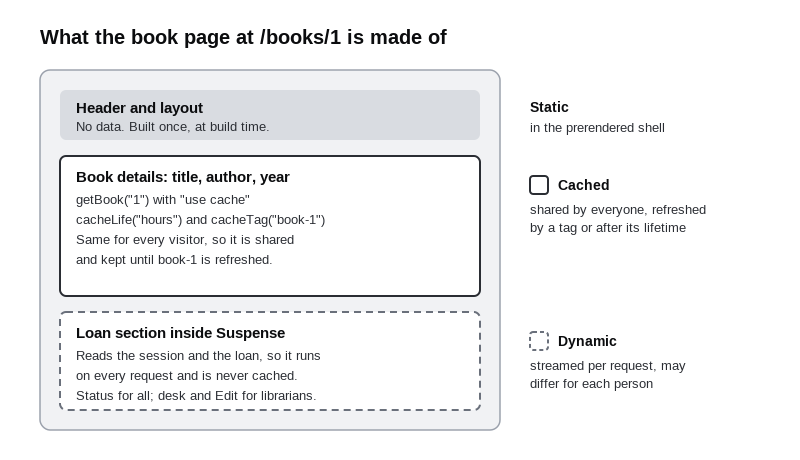
Replace src/app/books/[id]/page.tsx. Everything part 6's page shows is still there. The per-request reads move into LoanSection at the end of the file, and generateStaticParams, which part 3 removed, comes back:
cat > "src/app/books/[id]/page.tsx" <<'TSX'
import type { Metadata } from "next";
import Link from "next/link";
import { notFound } from "next/navigation";
import { Suspense } from "react";
import { getBook, getBookIds } from "@/lib/books";
import { formatDate } from "@/lib/format";
import { getOpenLoan } from "@/lib/loans";
import { getLibrarian } from "@/lib/session";
import LoanDesk from "./loan-desk";

export async function generateStaticParams() {
  const ids = await getBookIds();
  return ids.map((id) => ({ id: String(id) }));
}

export async function generateMetadata({ params }: PageProps<"/books/[id]">): Promise<Metadata> {
  const { id } = await params;
  const book = await getBook(id);
  return { title: book ? book.title : "Book not found" };
}

export default async function BookPage({ params, searchParams }: PageProps<"/books/[id]">) {
  const { id } = await params;
  const book = await getBook(id);
  if (!book) notFound();

  return (
    <main>
      <p>
        <Link href="/books">Back to all books</Link>
      </p>
      <h1>{book.title}</h1>
      <dl>
        <dt>Author</dt>
        <dd>{book.author}</dd>
        <dt>First published</dt>
        <dd>{book.year}</dd>
      </dl>
      <Suspense fallback={<p>Checking the shelf…</p>}>
        <LoanSection bookId={book.id} searchParams={searchParams} />
      </Suspense>
    </main>
  );
}

// Reads the session, the open loan and the URL, so it runs for every request and is never cached.
async function LoanSection({
  bookId,
  searchParams,
}: {
  bookId: number;
  searchParams: PageProps<"/books/[id]">["searchParams"];
}) {
  const [librarian, loan, query] = await Promise.all([getLibrarian(), getOpenLoan(bookId), searchParams]);
  const problem = typeof query.problem === "string" ? query.problem : undefined;

  // Members see when a book is due back; only librarians see who has it.
  let status = "On the shelf";
  if (loan) {
    status = librarian
      ? `On loan to ${loan.memberName}, due back ${formatDate(loan.dueAt)}`
      : `On loan, due back ${formatDate(loan.dueAt)}`;
  }

  return (
    <>
      <dl>
        <dt>Status</dt>
        <dd>{status}</dd>
      </dl>
      {librarian ? (
        <>
          <LoanDesk bookId={bookId} onLoan={Boolean(loan)} problem={problem} />
          <p>
            <Link href={`/books/${bookId}/edit`}>Edit this book</Link>
          </p>
        </>
      ) : (
        <p>Ask a librarian at the desk to borrow this book.</p>
      )}
    </>
  );
}
TSX
What this changes:
generateStaticParamsreads ids through the cachedgetBookIds(), so the build makes one page per book ahead of time. A book added later is rendered when someone first asks for it, and its details come from the cachedgetBookentry after that. The build now reads the database, so run it wheredata/library.dbexists and holds at least one book: with Cache Components,generateStaticParamsmust return at least one id.BookPageno longer awaitssearchParams. It hands the promise toLoanSection, which awaits it inside theSuspenseboundary; awaiting it inBookPagewould make the whole page wait for the request again.LoanSectiongets the id as a prop instead of loading the book again, and shows what part 6's page showed: visitors get the status and "Ask a librarian at the desk to borrow this book."; a librarian also gets the borrower's name, the desk and the edit link.getOpenLoan()still callsconnection(), so the status comes from the loans table on every request, never from the cache.- The fallback, "Checking the shelf…", fills the moment the session and the loan take to read.
getLibrarian()keeps its Reactcache()wrapper from part 5. That only shares one session lookup within a single render; it is not the shared server cache, so it is safe here.
Check it worked
Type-check again:
npx tsc --noEmitIt prints nothing. If you call getLibrarian() inside getBook, or anywhere else below a "use cache" line, Next.js stops with an error that request data cannot be used inside "use cache", at build time or on the first request to the page. Keep it in LoanSection.
Step 5 · Refresh the cache from the server actions with updateTag
A cached catalogue is only safe if every change clears the right entries. In this app every change goes through four server actions: createBook and updateBook from part 4, and lendBook and returnBook from part 6. Each one calls refreshCatalogue once its write has succeeded.
refreshCatalogue uses updateTag, which exists for exactly this case. It can only be called from a server action, it expires the tagged entries at once, and the request that follows the action waits for fresh data instead of getting the old copy. The visitor who searches a second after a lend sees "On loan". Next.js also clears the librarian's in-browser router cache when an action calls it, so going back to the catalogue does not show an old copy either.
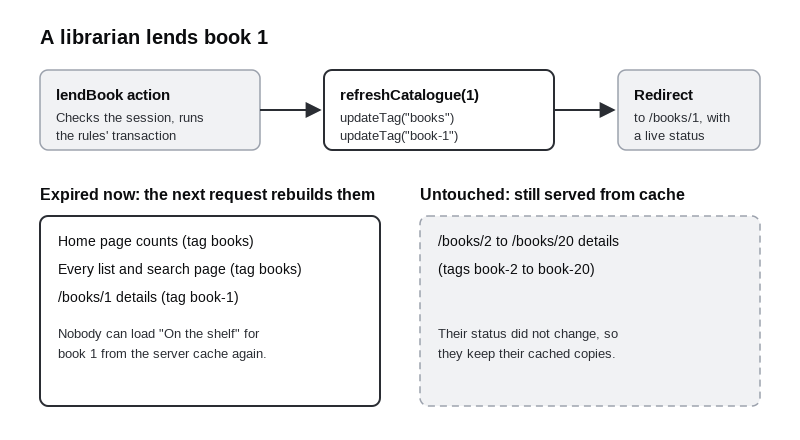
Start with the loans. Open src/app/loans/actions.ts from part 6 and add this import at the top:
import { refreshCatalogue } from "@/lib/catalogue-cache";At the end of lendBook, the refusal check sends the librarian back to the book page with its reason, so the lines after it run only when the loan was written. Put refreshCatalogue between that check and the last redirect:
  const result = rules.lendBook(db, { bookId, memberId });
  // A refusal goes back to the book page with its reason, which the page turns into a message.
  if (!result.ok) redirect(`/books/${bookId}?problem=${result.reason}`);
  refreshCatalogue(bookId);
  redirect(`/books/${bookId}`);
If the rules refuse the lend, for example because the book is already out, redirect throws before refreshCatalogue runs. Nothing changed, so nothing needs refreshing.
At the end of returnBook, keep the rules' answer and refresh only if a loan was really closed:
  // A second click finds the book already back: nothing changes.
  const result = rules.returnBook(db, { bookId });
  if (result.ok) refreshCatalogue(bookId);
  redirect(`/books/${bookId}`);
The rules in src/lib/loan-rules.ts do not change, so part 8's tests of them still apply. Both actions still end on the book's page, where LoanSection reads the loan on every request, so the librarian sees the result at once. The refresh is for the cached entries: the list, every search result, the home page counts and the book's own details.
Now the books. Open src/app/books/actions.ts as part 5 left it, import the helper, and replace the revalidatePath calls just before each redirect:
import { refreshCatalogue } from "@/lib/catalogue-cache";

  // in createBook, in place of revalidatePath("/books"):
  refreshCatalogue(saved.id);
  redirect(`/books/${saved.id}`);

  // in updateBook, in place of the two revalidatePath calls:
  refreshCatalogue(id.data);
  redirect(`/books/${id.data}`);
Delete the revalidatePath import from that file, since nothing there uses it any more. requireLibrarian() stays the first line of both actions and the Zod checks stay as they are. As before, the refresh comes after the write: a refused save returns its field errors early and never reaches it.
Check it worked
List every call:
grep -n "refreshCatalogue(\|revalidatePath(" src/app/books/actions.ts src/app/loans/actions.tsYou see four lines, all refreshCatalogue calls: one in each of createBook, updateBook, lendBook and returnBook. If an action that writes to books or loans has no refreshCatalogue line, its changes will not show in the catalogue until the cache expires on its own. If a revalidatePath("/books") is still there, it does no harm, but it is no longer needed.
Step 6 · Add a refresh endpoint for changes made outside the app
Not every change goes through a server action. A volunteer might load a box of donated books with a script, or fix a typo straight in SQLite. updateTag cannot help there, because it only works inside server actions. For those cases add a route handler that calls revalidateTag, protected by a secret token.
revalidateTag("books", "max") behaves differently from updateTag: it marks the entries as stale, the next visitor still gets the old copy at once while Next.js rebuilds it in the background, and the visitor after that sees the new data. That suits a bulk import, where a few seconds of delay harms nobody. It does not suit a loan, where the librarian and the next visitor must see the result straight away; that is why the actions use updateTag.
Create the token in .env.local, which part 5 created private. The command runs in a subshell with a private umask, so the file stays readable only by you even if it did not exist yet, and the token never appears on the command line:
(umask 077 && node -e 'console.log("REVALIDATE_TOKEN=" + require("node:crypto").randomBytes(32).toString("hex"))' >> .env.local)
grep -c '^REVALIDATE_TOKEN=' .env.local
Now the route handler. It compares the token in constant time and refuses every request without the right one, so nobody on the internet can make your server rebuild its catalogue on demand:
mkdir -p src/app/api/revalidate
cat > src/app/api/revalidate/route.ts <<'TS'
import { timingSafeEqual } from "node:crypto";
import { revalidateTag } from "next/cache";
import { booksTag } from "@/lib/catalogue-cache";

function tokenMatches(given: string, expected: string) {
  const a = Buffer.from(given);
  const b = Buffer.from(expected);
  return a.length === b.length && timingSafeEqual(a, b);
}

// POST with "Authorization: Bearer <REVALIDATE_TOKEN>" after changing books outside the app.
export async function POST(request: Request) {
  const expected = process.env.REVALIDATE_TOKEN;
  const header = request.headers.get("authorization") ?? "";
  const given = header.startsWith("Bearer ") ? header.slice("Bearer ".length) : "";
  if (!expected || !tokenMatches(given, expected)) {
    return Response.json({ ok: false }, { status: 401 });
  }
  revalidateTag(booksTag, "max");
  return Response.json({ ok: true, tag: booksTag });
}
TS
This endpoint only refreshes books, which covers lists, searches, counts and pages for books that did not exist. If a script edits an existing book, also call revalidateTag(bookTag(id), "max") for that book, or the book's own page keeps the old text until its hour is up.
Check it worked
grep -c prints 1: the token is in the file once. If it prints 2, you ran the command twice; delete one of the lines in an editor. Check the file's permissions with ls -l .env.local: they start with -rw-------.
Step 7 · Build again and watch a loan refresh the pages
Build the cached version:
npm run buildCompare the route table with the one from step 1. /books/[id] now lists the book pages it built ahead of time, such as /books/1 and /books/2 and a count of more paths, because getBookIds() and getBook() can run at build time. The book pages are marked as partial prerenders (something like ◐): the cached details are in the HTML already, and only the loan section is left for request time.
Start the server in your second terminal:
npm run startRun the same measurements as in step 1:
for path in / /books /books/3; do
  curl -s -o /dev/null -w "%{http_code} %{time_total}s $path\n" "http://localhost:3000$path"
done
time (for i in $(seq 1 100); do curl -s -o /dev/null http://localhost:3000/books/3; done)
With twenty books, SQLite answers in well under a millisecond either way, so most of the gain comes from not rendering the same page over and over. On a laptop the hundred requests usually finish somewhat faster than in step 1; on a small shared server, or with thousands of books and many searches, the difference grows. Readers see one small change too: before, a book page sent its "Loading book…" placeholder first and the details a moment later in the same response; now the title, author and year are part of the prerendered HTML, and only the status and the desk follow. The page is no smaller, so it costs the same prepaid data as before.
Now check the part that matters more than speed. Open http://localhost:3000/books?q=Things in a private window, where you are not signed in, and leave it open. In your normal window, sign in as a librarian and open Things Fall Apart at http://localhost:3000/books/1. Choose any member and press "Lend for 14 days". The page comes back with a status such as On loan to Chukwuemeka Obi, due back 3 Dec 2026 and a "Record return" button.
Reload the private window. Open Things Fall Apart from the results and look at its Status. Then, in your librarian window, press "Record return" on the book's page, and reload both private-window pages again. From the first terminal, a visitor's view of the book page:
curl -s http://localhost:3000/books/1 | grep -o '<h1>[^<]*</h1>\|<dd>On [^<]*</dd>\|Edit this book\|Librarian sign in' | sort -uCheck it worked
The timing loop prints three 200 lines again, and real is lower than the figure you wrote down in step 1, or about the same if your machine was already quick. After the lend, the private window shows Things Fall Apart as "On loan" as soon as you reload, in the search results, which had been cached a moment earlier, and on the book page. After you press "Record return", the librarian's page says "On the shelf" and the private window says so again too. The curl command prints <dd>On the shelf</dd>, <h1>Things Fall Apart</h1> and Librarian sign in, and no Edit this book: visitors get the cached details and never the librarian's link. Leave the server running for the last step.
Step 8 · Import a book directly and refresh with revalidateTag
Act out a bulk import. First note what the home page says:
curl -s http://localhost:3000/ | grep -o '[0-9]*</span> books'It prints 20</span> books, or more if you kept the books you added in parts 4 and 5; the numbers below assume twenty. Now add a donated book straight into SQLite, the way an import script would, without going through the app:
node - <<'JS'
const Database = require("better-sqlite3");
const db = new Database(process.env.DATABASE_FILE ?? "data/library.db");
db.prepare("insert into books (title, author, year) values (?, ?, ?)").run("Freshwater", "Akwaeke Emezi", 2018);
console.log(db.prepare("select count(*) as books from books").get());
JS
curl -s http://localhost:3000/ | grep -o '[0-9]*</span> books'
The script prints { books: 21 }, but the home page still says 20</span> books. Nothing told the cache, so it keeps serving its copy until the hour is up. This is the trade you made: fast pages in exchange for refreshing them yourself.
Call the endpoint. The first request has no token and must be refused. The second sends the token from .env.local as a header read from a file descriptor, so the token stays out of your shell history and the process list:
curl -s -o /dev/null -w "%{http_code}\n" -X POST http://localhost:3000/api/revalidate
TOKEN="$(grep '^REVALIDATE_TOKEN=' .env.local | head -n 1 | cut -d= -f2)"
curl -s -X POST -H @<(printf 'Authorization: Bearer %s\n' "$TOKEN") http://localhost:3000/api/revalidate
unset TOKEN
Then load the home page a few times:
for i in 1 2 3; do
  curl -s http://localhost:3000/ | grep -o '[0-9]*</span> books'
  sleep 1
doneCheck it worked
The request without a token prints 401. The one with the token prints {"ok":true,"tag":"books"}. In the loop, the first line can still say 20</span> books, because revalidateTag with "max" hands that visitor the stale copy while the fresh one is built; the lines after it say 21</span> books. Open http://localhost:3000/books?q=Freshwater and Freshwater is in the list, "On the shelf".
Stop the server with Ctrl+C in the second terminal. Keep ~/community-library-demo: part 8 tests it. The cache lives in the server's memory, so it starts empty on every restart and a new build never reuses old entries.
Next steps
- Continue the series: Test the library app: loan rules in Vitest, journeys in Playwright turns the lend-and-check journey from this part into a test you run before every deploy.
- Look back at Lend and return books with database transactions: the transaction there decides who can borrow a book, and the cache only decides how fast the answer shows.
- The same ideas apply to HTTP caches between your server and the reader. Set caching headers for API responses covers
Cache-Control,ETagand when a CDN may keep a copy. - Deploy the library app to a Linux server runs it as one long-lived Node.js process, which is where this in-memory cache works best. On serverless hosting each instance can start with an empty cache.
Part of these paths
Related tutorials
- Lend and return books safely with database transactionsYou will let librarians lend and take back books from each book's page, with the loan rules enforced inside one SQLite transaction so two clicks at once can never lend the same book twice or push a member past three books, plus an overdue list.
- Test the library app: loan rules in Vitest, journeys in PlaywrightYou will unit test part 6's loan rules with Vitest 5 against a fresh SQLite file per test, and drive the librarian journey through the production build with Playwright 1.65, ending with one npm test command that would have caught the double-lend bug from part 6.
- Cache API responses with Cache-Control and ETagsYou will give each endpoint of a small Node.js 26 API its own Cache-Control policy, add ETag and Last-Modified validators that answer 304 Not Modified, compress large responses with the right Vary header, and finish with a script that checks the policy for every endpoint.
Need this done for you?
Padding does this work for growing companies, from the first diagnosis to a system that keeps working.
Get new tutorials