Containers and Kubernetes · Intermediate · 22 min
Choose a Kubernetes Service type: ClusterIP, NodePort, LoadBalancer or headless
By Padding · Updated 18 Nov 2026
Ubuntu 26.04 · Kubernetes 1.37 on kind 0.33 · cloud-provider-kind 0.12.0 · kubeconform 0.8.0
You will put one small app behind a ClusterIP, a NodePort, a LoadBalancer, a headless and an ExternalName Service on a kind cluster, test each from a debug pod or your laptop, and know which type to pick for internal traffic, public traffic and StatefulSets.
On this page
A Service gives a changing set of pods one stable name. The type field decides who can use that name: other pods only, anything that can reach a node, the internet through a cloud load balancer, or a client that wants to talk to each pod by name. Picking the wrong one is a common way to expose a database to the world, or to pay for a load balancer per microservice.
In this tutorial you run one small app, echo, on a kind cluster and put it behind each Service type in turn. The app is agnhost, a test server from the Kubernetes project; its /hostname path answers with the name of the pod that served the request, so you can see the Service spreading traffic. You check every manifest offline with kubeconform before you apply it.
The kindest/node image is large and the cloud-provider-kind binary is about 78 MB. If you are on prepaid mobile data, run docker pull kindest/node:v1.37.0 and download cloud-provider-kind (step 5) on a fixed connection first.
Step 1 · Write the demo app and check it with kubeconform
kubeconform validates manifests against the Kubernetes 1.37 API schemas without a cluster. It catches misspelt fields and wrong types before kubectl apply does. Install version 0.8.0 on Ubuntu (on macOS, run brew install kubeconform instead):
ARCH="$(dpkg --print-architecture)"
curl -fsSL "https://github.com/yannh/kubeconform/releases/download/v0.8.0/kubeconform-linux-$ARCH.tar.gz" | tar -xz kubeconform
sudo install -m 0755 kubeconform /usr/local/bin/kubeconform
rm kubeconform
kubeconform -v
Keep everything in a throwaway folder. The kind configuration maps port 30080 on your computer to port 30080 on the kind node, and only on 127.0.0.1, so nobody else on your Wi-Fi can reach it. You use that mapping in step 4:
mkdir -p ~/service-types-demo/k8s
cd ~/service-types-demo
cat > kind-config.yaml <<'EOF'
kind: Cluster
apiVersion: kind.x-k8s.io/v1alpha4
nodes:
  - role: control-plane
    extraPortMappings:
      - containerPort: 30080
        hostPort: 30080
        listenAddress: "127.0.0.1"
        protocol: TCP
EOF
Now the app: a namespace and a Deployment with three replicas. The container port has a name, http. Services can point at that name instead of the number, so you can change the number in one place later.
cat > ~/service-types-demo/k8s/app.yaml <<'EOF'
apiVersion: v1
kind: Namespace
metadata:
  name: service-demo
---
apiVersion: apps/v1
kind: Deployment
metadata:
  name: echo
  namespace: service-demo
spec:
  replicas: 3
  selector:
    matchLabels:
      app.kubernetes.io/name: echo
  template:
    metadata:
      labels:
        app.kubernetes.io/name: echo
    spec:
      containers:
        - name: echo
          image: registry.k8s.io/e2e-test-images/agnhost:2.67.0
          args: ["netexec", "--http-port=8080"]
          ports:
            - name: http
              containerPort: 8080
          resources:
            requests:
              cpu: 10m
              memory: 32Mi
            limits:
              memory: 64Mi
EOF
kubeconform -strict -summary -kubernetes-version 1.37.3 ~/service-types-demo/k8s/app.yaml
Create the cluster and start the app:
cd ~/service-types-demo
kind create cluster --name service-types --image kindest/node:v1.37.0 --config kind-config.yaml --wait 120s
kubectl apply -f k8s/app.yaml
kubectl rollout status deployment/echo -n service-demo --timeout=120s
kubectl get pods -n service-demo -o wideCheck it worked
kubeconform -vprintsv0.8.0.- kubeconform ends with
Summary: 2 resources found in 1 file - Valid: 2, Invalid: 0, Errors: 0, Skipped: 0. kubectl get podslists threeecho-...pods, each1/1Running, each with its own pod IP in theIPcolumn. Those IPs change whenever a pod is replaced, which is the reason Services exist.
Step 2 · Give the app an internal address with ClusterIP
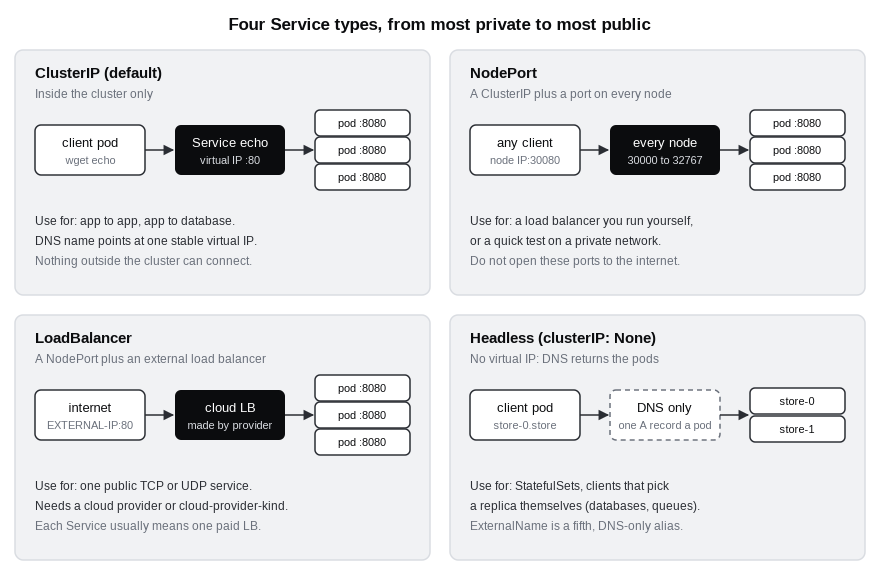
ClusterIP is the default type. Kubernetes gives the Service a virtual IP that only works inside the cluster, and a DNS name that points at it. Three fields matter:
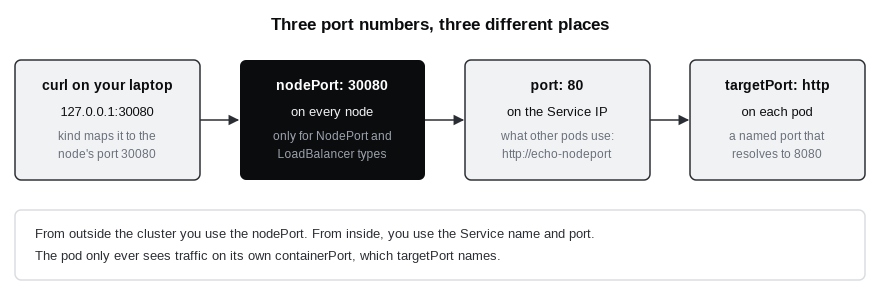
selectorpicks the pods. Any pod in the namespace with all of these labels becomes a backend, whichever Deployment created it.portis the port the Service listens on. Clients use this one.targetPortis the port on the pod the traffic goes to. Here it names the container porthttprather than repeating8080.
cat > ~/service-types-demo/k8s/clusterip.yaml <<'EOF'
apiVersion: v1
kind: Service
metadata:
  name: echo
  namespace: service-demo
spec:
  type: ClusterIP
  selector:
    app.kubernetes.io/name: echo
  ports:
    - name: http
      port: 80
      targetPort: http
EOF
kubeconform -strict -summary -kubernetes-version 1.37.3 ~/service-types-demo/k8s/clusterip.yaml
-strict matters. Without it, kubeconform ignores fields it does not know, so a typo passes and you only find out when kubectl apply runs against a live cluster. Try one with targetport in lower case:
cd ~/service-types-demo
cat > typo.yaml <<'EOF'
apiVersion: v1
kind: Service
metadata:
  name: echo-typo
  namespace: service-demo
spec:
  selector:
    app.kubernetes.io/name: echo
  ports:
    - port: 80
      targetport: 8080
EOF
kubeconform -strict -summary -kubernetes-version 1.37.3 typo.yaml || echo "kubeconform rejected typo.yaml"
rm typo.yaml
Apply the real Service and look at how Kubernetes tracks its backends. The Service controller writes the ready pod IPs into EndpointSlice objects, labelled with the Service's name. kube-proxy on each node reads them and programs the forwarding rules. The older Endpoints API still exists but is deprecated since Kubernetes 1.33; read EndpointSlices instead.
kubectl apply -f ~/service-types-demo/k8s/clusterip.yaml
kubectl get service echo -n service-demo
kubectl get endpointslices -n service-demo -l kubernetes.io/service-name=echoCheck it worked
- The typo check prints an error mentioning
targetportas an additional property that is not allowed, thenkubeconform rejected typo.yaml. kubectl get serviceshowsTYPEClusterIP, aCLUSTER-IPsuch as10.96.x.x,EXTERNAL-IP<none>andPORT(S)80/TCP.- The EndpointSlice lists port
8080and three IPs, the same oneskubectl get pods -o wideshowed. Runkubectl scale deployment/echo -n service-demo --replicas=2and get the EndpointSlice again: one IP is gone. Scale back to 3 before you go on.
If the EndpointSlice shows no endpoints, the selector does not match the pod labels. Compare kubectl get pods -n service-demo --show-labels with the Service's selector.
Step 3 · Test the name and the spreading from a debug pod
Inside the cluster, a Service is reachable as <service>.<namespace>.svc.cluster.local. Pods in the same namespace can shorten that to echo, and pods elsewhere to echo.service-demo, because the cluster DNS search list fills in the rest. Start a throwaway BusyBox pod, look the name up, and call /hostname six times:
kubectl run dns-debug -n service-demo --rm -i --restart=Never --image=busybox:1.38.0 -- sh -c '
  nslookup echo.service-demo.svc.cluster.local
  for i in 1 2 3 4 5 6; do wget -qO- http://echo.service-demo.svc.cluster.local/hostname; echo; done
'
--rm deletes the pod when the command finishes, so nothing is left behind.
Check it worked
nslookupreturns one address, and it is theCLUSTER-IPfrom the previous step, not a pod IP.- The six
wgetlines print pod names such asecho-6d8f...-abcde, usually more than one different name. kube-proxy picks a backend for each new connection, so the spread is not strictly even. - The command ends with
pod "dns-debug" deleted.
Use ClusterIP for anything only your own workloads call: APIs behind a gateway, databases, caches, queues. It is the right answer more often than any other type.
Step 4 · Reach the app through a NodePort
A NodePort Service is a ClusterIP Service that also opens one port on every node. Traffic to <any node IP>:<nodePort> is forwarded to the pods, even on a node that runs none of them. If you leave nodePort out, Kubernetes picks a free one from 30000 to 32767. Set it yourself only when something outside the cluster must know the number in advance, like the kind port mapping here, and pick from 30000 to 30085: Kubernetes reserves that lower band for ports chosen by hand, so an automatic choice will not take yours first.
cat > ~/service-types-demo/k8s/nodeport.yaml <<'EOF'
apiVersion: v1
kind: Service
metadata:
  name: echo-nodeport
  namespace: service-demo
spec:
  type: NodePort
  selector:
    app.kubernetes.io/name: echo
  ports:
    - name: http
      port: 80
      targetPort: http
      nodePort: 30080
EOF
kubeconform -strict -summary -kubernetes-version 1.37.3 ~/service-types-demo/k8s/nodeport.yaml
kubeconform checks the shape of a manifest, not every rule. A nodePort of 40000 passes the schema check, and the API server rejects it, because it is outside the node port range. Ask the API server with a server-side dry run, which validates without saving anything:
kubectl create service nodeport echo-bad -n service-demo --tcp=80:8080 --node-port=40000 --dry-run=serverApply the real one and call it from your computer:
kubectl apply -f ~/service-types-demo/k8s/nodeport.yaml
kubectl get service echo-nodeport -n service-demo
curl -sS --retry 5 --retry-all-errors http://127.0.0.1:30080/hostname; echoCheck it worked
- The dry run fails with an error that says the provided port is not in the valid range, and names
30000-32767. kubectl get serviceshowsTYPENodePortandPORT(S)80:30080/TCP: Service port 80, node port 30080.curlprints a pod name such asecho-6d8f...-abcde.
Why not to expose a NodePort to the internet
It works, and on a cloud server with a public IP it is one firewall rule away from being public. Avoid that:
- The port opens on every node, including nodes you add later, so your firewall rules must follow the node list.
- Clients have to use a high, unusual port, and there is no TLS unless the app does it itself.
- With the default
externalTrafficPolicy: Cluster, a node can forward a request to a pod on another node, and the pod sees the node's address instead of the client's. - Node IPs change when nodes are replaced.
Use NodePort as a building block: for a load balancer you run yourself in front of the nodes, or for testing on a private network, as here. For public HTTP traffic, put a Gateway in front of ClusterIP Services, as in /tutorials/route-traffic-to-snip-with-the-gateway-api.
Step 5 · Get an external IP with LoadBalancer and cloud-provider-kind
A LoadBalancer Service is a NodePort Service plus a request to the cloud provider: "make me a load balancer that sends traffic to these node ports". On a managed cloud cluster, the provider's controller creates one and writes its address into the Service's EXTERNAL-IP. Provider-specific settings, such as an internal-only load balancer, go in annotations, and each provider documents its own. Each LoadBalancer Service usually gets its own load balancer, billed on its own, which is another reason to send many HTTP apps through one Gateway instead.
kind has no cloud, so a LoadBalancer Service stays at EXTERNAL-IP <pending> forever. cloud-provider-kind fills that gap: it watches your kind clusters and starts a small Envoy proxy container for each LoadBalancer Service. Install version 0.12.0 on Ubuntu:
ARCH="$(dpkg --print-architecture)"
curl -fsSLO "https://github.com/kubernetes-sigs/cloud-provider-kind/releases/download/v0.12.0/cloud-provider-kind_0.12.0_linux_${ARCH}.tar.gz"
tar -xzf "cloud-provider-kind_0.12.0_linux_${ARCH}.tar.gz" cloud-provider-kind
sudo install -m 0755 cloud-provider-kind /usr/local/bin/cloud-provider-kind
rm cloud-provider-kind "cloud-provider-kind_0.12.0_linux_${ARCH}.tar.gz"
On macOS, download the darwin_arm64 (Apple silicon) or darwin_amd64 tarball from the same release page and install it the same way, or run brew install cloud-provider-kind. Like any binary you install by hand, it gets no automatic updates: to upgrade, repeat these commands with the new version number.
Start it in a second terminal and leave it running. On Linux, your user needs access to Docker. On macOS, run it with sudo, which lets it put the load balancer address on your Mac's loopback interface:
cloud-provider-kindKubernetes keeps load balancers away from control-plane nodes by labelling them. A default kind cluster has only a control-plane node, which also runs your pods, so remove that label from it:
kubectl label node service-types-control-plane node.kubernetes.io/exclude-from-external-load-balancers-Write the Service. It looks like the NodePort one without a fixed nodePort:
cat > ~/service-types-demo/k8s/loadbalancer.yaml <<'EOF'
apiVersion: v1
kind: Service
metadata:
  name: echo-lb
  namespace: service-demo
spec:
  type: LoadBalancer
  selector:
    app.kubernetes.io/name: echo
  ports:
    - name: http
      port: 80
      targetPort: http
EOF
kubeconform -strict -summary -kubernetes-version 1.37.3 ~/service-types-demo/k8s/loadbalancer.yamlkubectl apply -f ~/service-types-demo/k8s/loadbalancer.yaml
kubectl get service echo-lb -n service-demo --watchPress Ctrl+C once EXTERNAL-IP changes from <pending> to an address. Then call it on port 80:
LB_IP="$(kubectl get service echo-lb -n service-demo -o jsonpath='{.status.loadBalancer.ingress[0].ip}')"
curl -sS "http://$LB_IP/hostname"; echoCheck it worked
kubectl get service echo-lbshowsTYPELoadBalancer, anEXTERNAL-IPsuch as172.18.0.3, andPORT(S)like80:31234/TCP. The second number is a node port Kubernetes allocated anyway; load balancers usually send traffic to it.curlon port 80, with no node port in the URL, prints a pod name.docker psshows a container whose name starts withkindccm-: that is the load balancer cloud-provider-kind made.
If EXTERNAL-IP stays <pending>, check the second terminal: cloud-provider-kind logs a line for each Service it handles, and an error if it cannot reach Docker.
Step 6 · Give each StatefulSet pod its own name with a headless Service
Some clients do not want a virtual IP that picks a pod for them. A database client may need to reach the primary, store-0, and not a random replica. Setting clusterIP: None makes a Service headless: Kubernetes allocates no virtual IP and no kube-proxy rules, and DNS answers with the pod IPs directly. A StatefulSet names its headless Service in serviceName, and each pod then gets a stable DNS name of its own: <pod>.<service>.<namespace>.svc.cluster.local.
Two agnhost pods stand in for database replicas here. /tutorials/run-postgresql-for-snip-in-a-statefulset does the same with PostgreSQL and storage.
cat > ~/service-types-demo/k8s/headless.yaml <<'EOF'
apiVersion: v1
kind: Service
metadata:
  name: store
  namespace: service-demo
spec:
  clusterIP: None
  selector:
    app.kubernetes.io/name: store
  ports:
    - name: http
      port: 8080
      targetPort: http
---
apiVersion: apps/v1
kind: StatefulSet
metadata:
  name: store
  namespace: service-demo
spec:
  serviceName: store
  replicas: 2
  selector:
    matchLabels:
      app.kubernetes.io/name: store
  template:
    metadata:
      labels:
        app.kubernetes.io/name: store
    spec:
      containers:
        - name: store
          image: registry.k8s.io/e2e-test-images/agnhost:2.67.0
          args: ["netexec", "--http-port=8080"]
          ports:
            - name: http
              containerPort: 8080
          resources:
            requests:
              cpu: 10m
              memory: 32Mi
            limits:
              memory: 64Mi
EOF
kubeconform -strict -summary -kubernetes-version 1.37.3 ~/service-types-demo/k8s/headless.yaml
With no virtual IP there is no port mapping either: clients connect to the pod's own port, so port and targetPort should match.
kubectl apply -f ~/service-types-demo/k8s/headless.yaml
kubectl rollout status statefulset/store -n service-demo --timeout=120s
kubectl get service store -n service-demo
kubectl run dns-debug -n service-demo --rm -i --restart=Never --image=busybox:1.38.0 -- sh -c '
  nslookup store.service-demo.svc.cluster.local
  nslookup store-0.store.service-demo.svc.cluster.local
  wget -qO- http://store-1.store.service-demo.svc.cluster.local:8080/hostname; echo
'Check it worked
kubectl get service storeshowsCLUSTER-IPNone.- The first
nslookupreturns two addresses, the IPs ofstore-0andstore-1, not one virtual IP. - The second returns one address,
store-0's. wgettostore-1printsstore-1, every time. Delete that pod withkubectl delete pod store-1 -n service-demo; the StatefulSet recreates it with the same name and the same DNS name, usually with a new IP.
Step 7 · Alias an outside host with ExternalName
ExternalName is the odd one out: it has no selector, no pods and no proxying. Cluster DNS answers the Service name with a CNAME record pointing at another host name. Use it to give an outside dependency a cluster-local name, so a workload can call status-api and you can later move that dependency into the cluster without changing the client's configuration. example.com stands in for the outside host here; replace it with your own.
cat > ~/service-types-demo/k8s/externalname.yaml <<'EOF'
apiVersion: v1
kind: Service
metadata:
  name: status-api
  namespace: service-demo
spec:
  type: ExternalName
  externalName: example.com
EOF
kubeconform -strict -summary -kubernetes-version 1.37.3 ~/service-types-demo/k8s/externalname.yamlkubectl apply -f ~/service-types-demo/k8s/externalname.yaml
kubectl run dns-debug -n service-demo --rm -i --restart=Never --image=busybox:1.38.0 -- \
nslookup status-api.service-demo.svc.cluster.localKnow its limits before you rely on it. The client still sends its own idea of the name: an HTTP request carries Host: status-api, and an HTTPS client expects a certificate for status-api. Many HTTPS services reject both. ExternalName suits plain TCP services, such as a managed database, better than web APIs.
Check it worked
kubectl get service status-api -n service-demoshowsTYPEExternalNameandEXTERNAL-IPexample.com.nslookupshowsstatus-api.service-demo.svc.cluster.localas a canonical name forexample.com, followed by that host's addresses.
Step 8 · Pick the type and clean up
Validate the whole folder once more. This is the check to run in CI before any change to Services reaches a cluster:
kubeconform -strict -summary -kubernetes-version 1.37.3 ~/service-types-demo/k8s/When you choose a type for a real workload, work through these questions in order:
- Do only pods in the cluster call it? ClusterIP. This covers most Services.
- Is it public HTTP or HTTPS? ClusterIP behind a Gateway, so many apps share one entry point, one certificate setup and one load balancer.
- Is it public, but not HTTP (a game server, MQTT, SMTP)? LoadBalancer, and check what the provider's load balancer costs.
- Does the client need to reach one particular replica, or find all of them itself? Headless, usually with a StatefulSet.
- Is the dependency outside the cluster, and you want a cluster-local name for it? ExternalName, for TCP services that do not check the host name.
- NodePort only when you run your own load balancer in front of the nodes, or for testing.
If you serve users in places where mobile data is expensive or patchy, there is one more reason to prefer one Gateway over several LoadBalancers: one public address and one TLS setup also mean one place to add compression and caching.
Stop cloud-provider-kind with Ctrl+C in its terminal, then delete the cluster and the demo folder:
kind delete cluster --name service-types
docker ps --filter name=kindccm- --format '{{.Names}}'
rm -rf ~/service-types-demo
If you will not use them again, remove the two binaries with sudo rm /usr/local/bin/cloud-provider-kind /usr/local/bin/kubeconform.
Check it worked
- kubeconform ends with
Summary: 8 resources found in 6 files - Valid: 8, Invalid: 0, Errors: 0, Skipped: 0. kind get clustersno longer listsservice-types.docker ps --filter name=kindccm-prints nothing. If akindccm-container is still there, cloud-provider-kind was stopped before the cluster was deleted; remove it withdocker rm -f <name>, replacing<name>with the name shown.
Next steps
- /tutorials/deploy-and-expose-an-app-on-kubernetes: go back over Deployments, rollouts and rollbacks.
Related tutorials
- How to Deploy an App and Expose It with a Service on KubernetesYou will run an app on Kubernetes 1.37 as a Deployment with two replicas, watch it heal itself, give it a stable address with a Service, reach it from your computer, and roll out a new version with a way back.
- How to Run Your First Kubernetes Cluster Locally with kindYou will create a one-node Kubernetes 1.37 cluster inside Docker with kind, talk to it with kubectl, run a pod from a public image and from an image built on your own machine, and delete the cluster when you are done.
Need this done for you?
Padding does this work for growing companies, from the first diagnosis to a system that keeps working.
Get new tutorials