Mobile development · Beginner · 16 min
Choose between React Native, Flutter and fully native apps
By Padding · Updated 18 Nov 2026
React Native 0.88 with Expo SDK 58 · Flutter 3.50 with Dart 3.14 · Kotlin 2.4 with Jetpack Compose · Swift 6.4 with SwiftUI · November 2026
You will have a filled-in scoring sheet and a one-page decision note that picks React Native, Flutter or native Kotlin and Swift for your own app, with the reasons and a date to review it.
On this page
Picking a mobile stack is a decision you live with for years, and the arguments online rarely start from your app. This tutorial is a decision guide, not a ranking. There is no best option, only the best fit for a given team, app and set of users.
You will look at four options as they stand in late 2026: React Native 0.88 with Expo SDK 58, Flutter 3.50 with Dart 3.14, Kotlin with Jetpack Compose for Android, and Swift 6.4 with SwiftUI for iPhone. Then you score them against your own app in a spreadsheet and write a short decision note that someone else on your team can read and challenge.
You need no code for this. If you are a product manager, the scoring sheet gives you a way to run the conversation with your developers. If you are a developer, it gives you a way to explain a choice you may already lean towards, and to check that lean against evidence.
Step 1 · Write down what your app has to do
Before comparing tools, describe the app. Open a new document called stack-decision.md (or a page in your team's wiki) and answer these questions in a few lines each:
- Platforms. Android only, iPhone only, or both? Do you also need a web version or a tablet layout?
- Core features. List the five to ten things a user does. "Book an appointment", "pay with mobile money", "scan a barcode", "record a voice note".
- Device features. Mark each feature that needs the phone's hardware or operating system: camera, Bluetooth, background location, NFC, health data, home-screen widgets, payments sheets, background audio.
- Look and feel. Should the app look like a standard Android or iOS app, or carry a strong brand look that is identical on both?
- Your users' phones. Which phones, how much storage free, and how they pay for data. If many of your users are on low-end Android phones with prepaid data bundles, as is common in Nigeria, Kenya and across much of Africa, write that down now. It changes the weight of app size and startup speed later.
- Team. Who builds and maintains it, and what languages they already know.
- Time. When does the first version need to be in users' hands?
If you do not know which phones your users have, ask. Analytics from an existing website or app, a short survey, or five conversations will tell you more than any benchmark.
Check it worked
Your stack-decision.md has all seven headings with at least one concrete line under each, and every device feature in your list is marked. If a heading says only "not sure", note who can answer it and by when.
Step 2 · Understand what each option really is
The four options differ most in two places: which language you write, and what draws the screen.
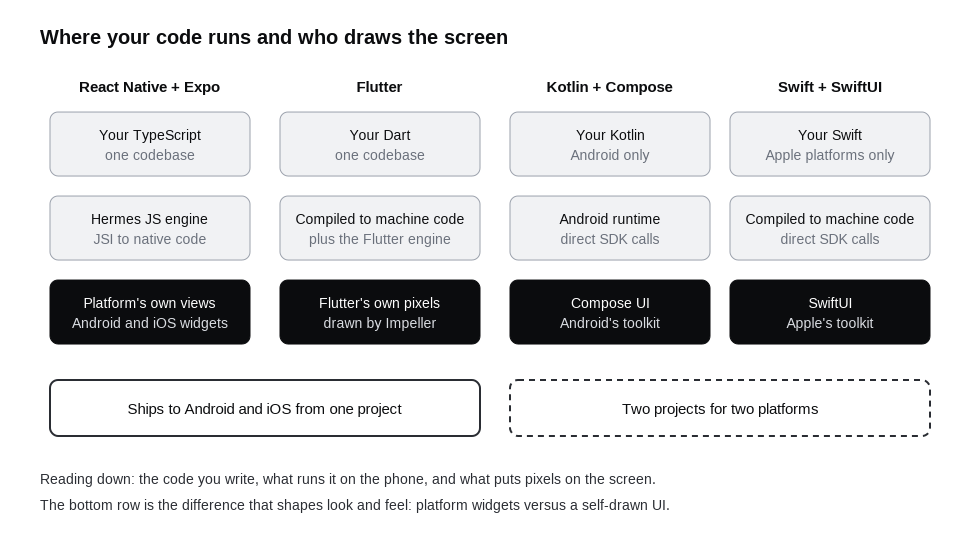
React Native with Expo. You write TypeScript or JavaScript with React. The code runs in the Hermes JavaScript engine on the phone, and React Native turns your components into the platform's own views, so a button is a real Android or iOS control. Since React Native 0.76 the New Architecture is on by default: JavaScript talks to native code through JSI, a direct interface, instead of the old message bridge. Expo is the framework and tool set most new React Native projects start from. Expo SDK 58 targets React Native 0.88 and supports Android 7 and later and iOS 16.4 and later. When you need something Expo does not cover, you write a native module in Swift and Kotlin with the Expo Modules API.
Flutter. You write Dart. Release builds compile to machine code and ship with the Flutter engine, which draws every pixel itself rather than using the platform's controls. Impeller is the rendering engine: it is the only one on iOS, and the default on Android 10 (API 29) and later. On older Android phones, or ones without Vulkan graphics support, Flutter falls back to its older OpenGL renderer. Flutter 3.50 supports Android API 24 (Android 7) to 37 and iOS 15 to 27. You reach native features through plugins or by writing platform channels in Kotlin and Swift.
Kotlin with Jetpack Compose. Google's recommended way to build Android interfaces. Your Kotlin calls the Android SDK directly with no layer in between. It builds Android apps only. Kotlin Multiplatform can share business logic with an iPhone app, and Compose Multiplatform for iOS is marked stable by JetBrains, but that is a separate decision with its own trade-offs.
Swift with SwiftUI. Apple's framework for building interfaces on iPhone, iPad, Mac and its other devices. Swift calls Apple's SDKs directly. It needs a Mac with Xcode and builds Apple apps only.
"Fully native" for both platforms means two apps: one in Kotlin, one in Swift, usually built by two people or two teams.
Check it worked
Under a new heading "Options" in your document, write one sentence per option in your own words: the language, what draws the screen, and which platforms it builds for. If you cannot write the sentence for one of them, re-read its paragraph before moving on.
Step 3 · Check native API access for your feature list
Go back to the device features you marked in the first step. For each one, find out how each option reaches it. You are looking for three answers: there is a maintained official or widely used package, there is a community package with recent releases, or you would write native code yourself.
- For React Native, search the Expo SDK reference at docs.expo.dev first, then the React Native Directory at reactnative.directory.
- For Flutter, search pub.dev and check each package's publisher, last release date and supported platforms.
- For native, the feature is in the Android or iOS SDK by definition. The question is only whether your team knows that API.
Under a heading "Native access", write one line per feature with an answer for each option, like this:
- Camera with barcode scan: React Native, Expo package · Flutter, pub.dev package from a verified publisher · Native, in the SDK
- Home-screen widget: React Native, write native code · Flutter, write native code · Native, in the SDK
Home-screen widgets and similar system extensions are a common case where both cross-platform options still need some Swift and Kotlin. That does not rule them out, but someone on the team has to be able to write it.
Check it worked
Every marked device feature has an answer for all three options, with a package name or "write native code". Count the "write native code" cells for React Native and Flutter. If the count is high, write that number next to the table: you will use it when scoring.
Step 4 · Weigh app size and speed on the phones your users have
On a phone with 32 GB of storage, mostly full, and a prepaid data bundle, a large download is a reason not to install. Size and smooth scrolling on cheap hardware matter more for some audiences than any other row on your sheet.
Three rules keep this comparison honest:
- Only compare release builds. Debug builds of every option are much larger and slower than what users get. Flutter's own docs warn that debug builds are not representative of what users download.
- Use the store's figure. Google Play delivers only the code and assets a given device needs from an Android App Bundle, and Play Console reports the download size. App Store Connect does the same for iOS. The file on your laptop is not the download.
- Test on a low-end phone. Buy or borrow one of the cheaper Android phones popular with your users. If you have a developer on the team, ask them to run a sample app in each option you are still considering and scroll a long list; otherwise mark it as not measured yet. A modern laptop emulator hides the problems.
Each option has a starting size that you pay before writing a line: React Native carries the JavaScript engine and runtime, Flutter carries its engine, and native apps carry the least. After that, your own images, fonts and libraries usually decide the size. A careful cross-platform app can be smaller than a careless native one.
If you can spare two days, build the same one-screen sample (a list of 200 items with images) in your top two options, make a release build, and note the Play Console download size and how scrolling feels on the low-end phone.
Check it worked
Your document has a "Size and speed" section that names the test phone, or the phone you plan to borrow, and records either your own measurements or "not measured yet" next to each option. No figure in it comes from a debug build.
Step 5 · Weigh team skills, hiring and long-term upkeep
The team you have today usually matters more than the framework's merits. A team of web developers who know React will ship a React Native app sooner than they will learn Dart. An Android team with years of Kotlin will be slower in any cross-platform tool for the first months.
Then look ahead. Somebody has to maintain this app for years, and people leave.
- Hiring. Do not trust anyone's general claim about which skill is easier to hire for. Count for yourself. Over two weeks, search the job boards and communities you actually hire from (local boards and developer communities in Lagos or Nairobi, and remote-first boards if you hire remotely) for each of "React Native", "Flutter", "Kotlin Android" and "SwiftUI". Note how many people list the skill, not only how many jobs ask for it.
- Upgrades. Every option releases new versions several times a year, and the phone operating systems change every year. Cross-platform apps have one more layer to upgrade: the framework and its packages. Check each project's release notes for how often breaking changes appear.
- Fixes after release. Expo apps can ship JavaScript-only fixes with EAS Update without a new store review, within each store's rules. That shortens the time from bug to fix. Flutter has third-party code push services such as Shorebird, under the same store rules. Otherwise, Flutter and native code changes go through store review.
Check it worked
Your document has a "People" section with the language each current team member knows, your own two-week hiring count per skill (or the dates you will collect it), and one line on who will own upgrades.
Step 6 · Count what "write once" really saves
"Write once, run anywhere" is partly true. One React Native or Flutter codebase shares the screens, the business rules and most of the tests. It does not share everything.
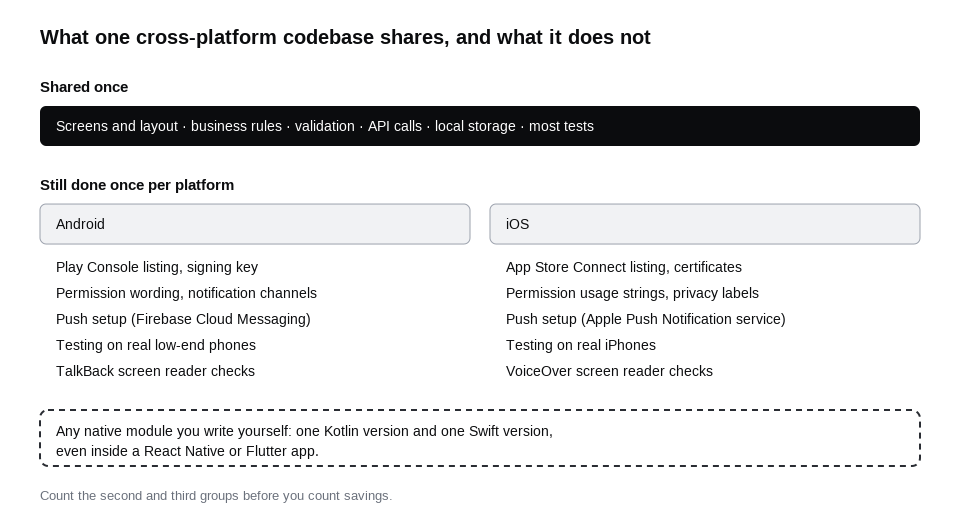
Make a list of the work in your app's first release, then mark each item "shared" or "per platform". Be honest about the per-platform items: two store listings, signing for each store, permission wording, push notification setup with Firebase Cloud Messaging and Apple's push service, testing on real Android phones and real iPhones, and accessibility checks with TalkBack and VoiceOver. Add one "per platform" item for each "write native code" cell from your native access table.
A rough rule for your own estimate: if most of the work is screens and business logic, a shared codebase saves a lot. If much of it is device features and system integrations, the saving shrinks, and you may be writing three languages instead of two.
Check it worked
Your list has every first-release task marked "shared" or "per platform", and you can say in one sentence what share of the work is shared. If that sentence surprises you, the step has done its job.
Step 7 · Fill in the scoring sheet
Now turn your notes into numbers. Open your spreadsheet and set up these columns: Criterion, Weight, then one column per option you are still considering. Add these rows:
- Team skills today
- Design needs (platform look or custom brand look)
- Native API access
- App size and low-end phones
- Hiring where you are
- Time to first release
- Long-term upkeep
Give each criterion a weight from 1 (nice to have) to 3 (decides the project). Then score each option from 1 (poor fit) to 5 (strong fit), using the evidence from your earlier steps, not general reputation. In a final row, multiply each score by its weight and add up the results for each option.
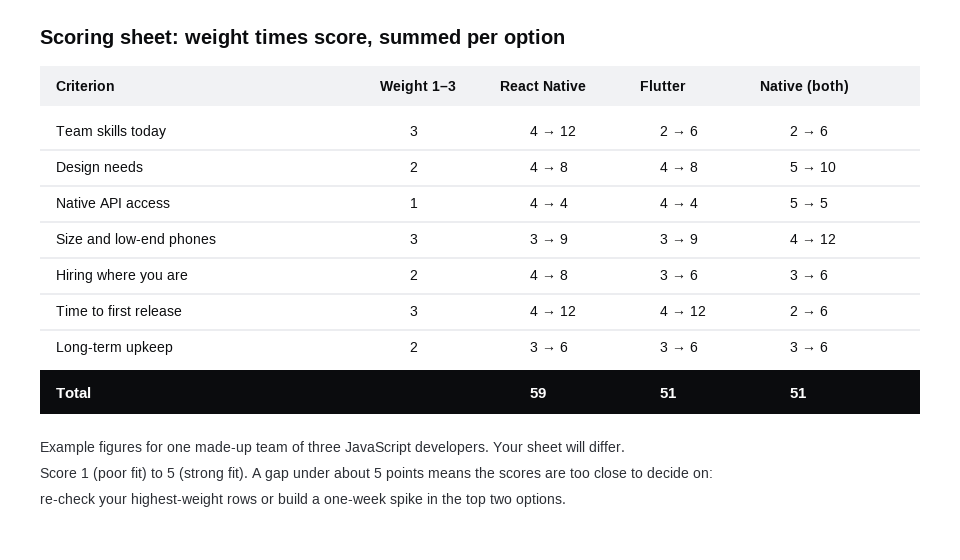
Two cautions. Set the weights before you score, or you will adjust them to fit the answer you wanted. And if the top two totals are within about five points, the numbers are not telling you anything: look again at your weight-3 rows, or build the same small sample in both options for a week and score again.
If you used an AI assistant to help fill in any cell, check each claim it made against the project's own docs before it goes in the sheet. Package availability and platform support change between releases.
Check it worked
Your spreadsheet has all seven rows, a weight on every row, a score in every cell, and a total for each option. For every score of 1 or 5 you can point to the note in stack-decision.md that justifies it.
Step 8 · Write the decision note
A decision that lives only in a spreadsheet gets reopened every time someone new joins. Add a short section at the top of stack-decision.md:
- Decision. "We will build the first release in React Native with Expo SDK 58." One line.
- Why. The two or three rows that decided it, in plain words.
- What we give up. The honest cost: "Home-screen widgets need Swift and Kotlin, which nobody on the team writes yet."
- What would change our mind. Concrete triggers, such as "if more than three core features need native code" or "if the release build is over a size limit we agree on".
- Review date. Six to twelve months out, or after the first release.
Share it with the people who will build and fund the app, and ask each of them for one objection. If an objection points to a row you scored on reputation rather than evidence, go back and gather the evidence.
Check it worked
Your decision note fits on one page, names one option, lists at least one thing you give up and one trigger to revisit, and has a review date in the calendar of whoever owns the app.
Next steps
Try the option you picked with a small first app:
- Create your first Expo app for React Native.
- Install Flutter and run your first app for Flutter.
- Build your first iOS app with SwiftUI or build your first Android screen with Jetpack Compose for native.
If low-end Android phones scored high on your sheet, read Speed up a React Native app on low-end Android next.
Related tutorials
- Write end-to-end mobile tests with MaestroYou will have a small Maestro suite for a mobile app, with stable test IDs in React Native or Flutter, a shared sign-in flow fed by environment variables, smoke and full runs split by tags, and a CI job that runs the smoke flows on an Android emulator.
- Store data in a SwiftUI app with SwiftDataYou will build a small shop stock app that saves suppliers and products on the iPhone with SwiftData, lists them with sorted and filtered queries, survives a schema change through a migration plan, and is checked by tests that run against an in-memory store.
- Store data in a Flutter app with Drift and SQLiteYou will build a small shop credit book in Flutter 3.50 that keeps customers and what they owe in SQLite through Drift 2.35, with typed queries, a join, a list that redraws itself from a watch() stream, a tested schema migration and in-memory tests for all of it.
Need this done for you?
Padding does this work for growing companies, from the first diagnosis to a system that keeps working.
Get new tutorials