APIs · Intermediate · 28 min
Collect M-Pesa payments with the Daraja STK Push API
By Padding · Updated 18 Nov 2026
Node.js 26.13 LTS · Express 5.3 · node:26 image (Debian)
You will build a Node.js 26 payment server that sends an M-Pesa Express (STK Push) prompt through Safaricom's Daraja API, handles the callback, confirms every result with a status query and refuses forged callbacks.
On this page
M-Pesa Express, usually called STK Push, lets your app start a payment. You send Safaricom the customer's phone number and the amount. The customer's phone shows a prompt with your business name and the amount, they enter their M-Pesa PIN, and the money moves. Nobody types a paybill number, an account number or an amount by hand, so wrong payments mostly disappear.
The API behind it is Daraja, Safaricom's developer platform (Daraja 3.0 at the time of writing, at developer.safaricom.co.ke). It is asynchronous. Your request only says "prompt sent". The result arrives later, as a POST from Safaricom to a callback URL you choose, or not at all if that request is lost. Two facts shape the code in this tutorial:
- The callback is not signed. Safaricom's documentation describes no signature or shared secret, so anyone who learns your callback URL can post a fake "payment succeeded" to it.
- You can ask Daraja for the result yourself with the STK Push Query API.
So you will treat the callback as a doorbell, not as proof, and confirm every result with a query before you mark an order paid.
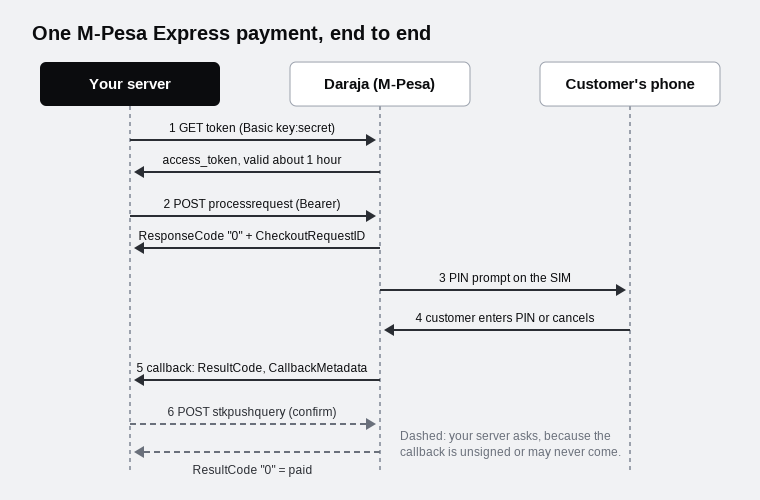
You build everything against a small practice copy of Daraja that runs on your computer and follows the request and response shapes in Safaricom's documentation. That way you can see a payment succeed, a customer cancel, and a callback go missing without an account or a phone. The second-to-last step switches the same code to the real Daraja sandbox.
The prompt is sent to the SIM by the network, not to an app, so it works on basic feature phones as well as smartphones, and the customer does not need mobile data.
Step 1 · Create the project and its settings
Make a folder, add Express 5.3 and mark the project as using ES modules:
mkdir -p ~/mpesa-demo
cd ~/mpesa-demo
npm init -y > /dev/null
npm pkg set type=module
npm install express@5.3.0
Now create .env, the file that holds the settings. umask 077 makes it readable only by you from the moment it exists. For now it points at the practice Daraja on port 4000, with practice credentials that mean nothing anywhere else. In a later step you replace them with your sandbox values:
cd ~/mpesa-demo
(
  umask 077
  cat > .env <<'EOF'
DARAJA_BASE_URL=http://127.0.0.1:4000
DARAJA_CONSUMER_KEY=practice-consumer-key
DARAJA_CONSUMER_SECRET=practice-consumer-secret
DARAJA_SHORTCODE=174379
DARAJA_PASSKEY=practice-passkey
PUBLIC_BASE_URL=http://127.0.0.1:3000
EOF
  printf 'CALLBACK_TOKEN=%s\n' "$(node -e 'console.log(require("node:crypto").randomBytes(24).toString("base64url"))')" >> .env
)
ls -l .env
CALLBACK_TOKEN is a random value that becomes part of your callback URL. It is the only thing that stops strangers posting to that URL, so it is generated, never typed. If the project is in Git, add .env to .gitignore before your first commit: see keep secrets out of Git.
Check it worked
cd ~/mpesa-demo
node -p "require('express/package.json').version"
grep -c '=' .env
The listing above starts with -rw-------, the version is 5.3.0, and .env has 7 settings.
Step 2 · Run a practice Daraja on your machine
This server plays Safaricom. It issues tokens, accepts STK Push requests, posts callbacks and answers status queries, using the field names and sample values from the Daraja documentation. It decides each outcome from the amount, so you can trigger every case on purpose:
- any amount not listed below: the customer pays, and a callback arrives
2: the customer cancels (result code1032)3: the customer pays, but the callback is lost4: the customer never answers
cd ~/mpesa-demo
cat > practice-daraja.js <<'JS'
// A practice stand-in for the Daraja sandbox. It copies the documented
// request and response shapes. It is not Safaricom's code.
import crypto from 'node:crypto';
import http from 'node:http';

const { DARAJA_CONSUMER_KEY: KEY, DARAJA_CONSUMER_SECRET: SECRET,
        DARAJA_SHORTCODE: SHORTCODE, DARAJA_PASSKEY: PASSKEY } = process.env;

let currentToken = null; // a new token replaces the previous one
const checkouts = new Map(); // CheckoutRequestID -> { merchantRequestId, result }

const PAID = { code: 0, desc: 'The service request is processed successfully.', callback: true };
const OUTCOMES = {
  2: { code: 1032, desc: 'Request cancelled by user', callback: true },
  3: { ...PAID, callback: false },
  4: null, // no answer, ever
};

const send = (res, status, body) => {
  res.writeHead(status, { 'Content-Type': 'application/json' });
  res.end(JSON.stringify(body));
};
const fail = (res, status, errorCode, errorMessage) =>
  send(res, status, { requestId: crypto.randomUUID(), errorCode, errorMessage });

const stamp = () => new Date().toISOString().replace(/\D/g, '').slice(0, 14);

async function readJson(req) {
  let raw = '';
  for await (const chunk of req) raw += chunk;
  try { return JSON.parse(raw); } catch { return null; }
}

async function finish(id, request) {
  const amount = Number(request.Amount);
  const outcome = Object.hasOwn(OUTCOMES, amount) ? OUTCOMES[amount] : PAID;
  if (!outcome) return;
  const entry = checkouts.get(id);
  entry.result = outcome;
  if (!outcome.callback) return;

  const stkCallback = {
    MerchantRequestID: entry.merchantRequestId,
    CheckoutRequestID: id,
    ResultCode: outcome.code,
    ResultDesc: outcome.desc,
  };
  if (outcome.code === 0) {
    stkCallback.CallbackMetadata = { Item: [
      { Name: 'Amount', Value: amount },
      { Name: 'MpesaReceiptNumber', Value: crypto.randomBytes(5).toString('hex').toUpperCase() },
      { Name: 'TransactionDate', Value: Number(stamp()) },
      { Name: 'PhoneNumber', Value: Number(request.PhoneNumber) },
    ] };
  }
  try {
    await fetch(request.CallBackURL, {
      method: 'POST',
      headers: { 'Content-Type': 'application/json' },
      body: JSON.stringify({ Body: { stkCallback } }),
      signal: AbortSignal.timeout(5000),
    });
    console.log(`callback sent for ${id}`);
  } catch (err) {
    console.log(`callback for ${id} failed: ${err.message}`);
  }
}

http.createServer(async (req, res) => {
  const url = new URL(req.url, 'http://localhost');

  if (req.method === 'GET' && url.pathname === '/oauth/v1/generate') {
    if (url.searchParams.get('grant_type') !== 'client_credentials') {
      return fail(res, 400, '400.008.02', 'Invalid grant type passed');
    }
    const expected = 'Basic ' + Buffer.from(`${KEY}:${SECRET}`).toString('base64');
    if (req.headers.authorization !== expected) {
      return fail(res, 400, '400.008.01', 'Invalid authentication type passed');
    }
    currentToken = crypto.randomBytes(21).toString('base64url');
    return send(res, 200, { access_token: currentToken, expires_in: 3599 });
  }

  if (req.method !== 'POST') return fail(res, 405, '405.001', 'Method Not Allowed');
  if (!currentToken || req.headers.authorization !== `Bearer ${currentToken}`) {
    return fail(res, 404, '404.001.03', 'Invalid Access Token');
  }
  const body = await readJson(req);
  if (!body) return fail(res, 400, '400.002.02', 'Bad Request - Invalid JSON');
  const password = Buffer.from(`${SHORTCODE}${PASSKEY}${body.Timestamp}`).toString('base64');
  if (String(body.BusinessShortCode) !== SHORTCODE || body.Password !== password) {
    return fail(res, 500, '500.001.1001', 'Wrong credentials');
  }

  if (url.pathname === '/mpesa/stkpush/v1/processrequest') {
    if (!/^254[17]\d{8}$/.test(String(body.PhoneNumber))) return fail(res, 400, '400.002.02', 'Bad Request - Invalid PhoneNumber');
    if (!(Number(body.Amount) >= 1)) return fail(res, 400, '400.002.02', 'Bad Request - Invalid Amount');
    if (!/^https?:\/\//.test(body.CallBackURL ?? '')) return fail(res, 400, '400.002.02', 'Bad Request - Invalid CallBackURL');
    if (String(body.AccountReference ?? '').length > 12) return fail(res, 400, '400.002.02', 'Bad Request - Invalid AccountReference');

    const id = `ws_CO_${stamp()}${crypto.randomInt(1e6, 1e7)}`;
    const merchantRequestId = crypto.randomUUID();
    checkouts.set(id, { merchantRequestId, result: null });
    setTimeout(() => finish(id, body), 1500);
    return send(res, 200, {
      MerchantRequestID: merchantRequestId,
      CheckoutRequestID: id,
      ResponseCode: '0',
      ResponseDescription: 'Success. Request accepted for processing',
      CustomerMessage: 'Success. Request accepted for processing',
    });
  }

  if (url.pathname === '/mpesa/stkpushquery/v1/query') {
    const entry = checkouts.get(body.CheckoutRequestID);
    if (!entry) return fail(res, 400, '400.002.02', 'Bad Request - Invalid CheckoutRequestID');
    if (!entry.result) return fail(res, 500, '500.001.1001', 'The transaction is being processed');
    return send(res, 200, {
      ResponseCode: '0',
      ResponseDescription: 'The service request has been accepted successfully',
      MerchantRequestID: entry.merchantRequestId,
      CheckoutRequestID: body.CheckoutRequestID,
      ResultCode: String(entry.result.code),
      ResultDesc: entry.result.desc,
    });
  }

  fail(res, 404, '404.001.01', 'Resource not found');
}).listen(4000, '127.0.0.1', () => console.log('practice Daraja on http://127.0.0.1:4000'));
JS
Start it in a second terminal and leave it running:
cd ~/mpesa-demo
node --env-file=.env practice-daraja.jsCheck it worked
The terminal prints practice Daraja on http://127.0.0.1:4000. In your first terminal, ask for a token without credentials:
curl -s 'http://127.0.0.1:4000/oauth/v1/generate?grant_type=client_credentials'
echo
The answer is the documented error shape: {"requestId":"...","errorCode":"400.008.01","errorMessage":"Invalid authentication type passed"}.
Step 3 · Get an access token and build the password
Every Daraja call needs a bearer token. You get one by sending your consumer key and secret with HTTP Basic authentication to the Authorization API. A token lasts an hour, and Safaricom's FAQ says each new token request invalidates the previous token, so fetching a fresh one per payment is slow and can break requests already in flight. Cache it and renew it a minute before it expires.
The STK Push request also carries a Password. It is not your account password: it is the base64 encoding of three values joined together, and the Timestamp you used goes in the same request.
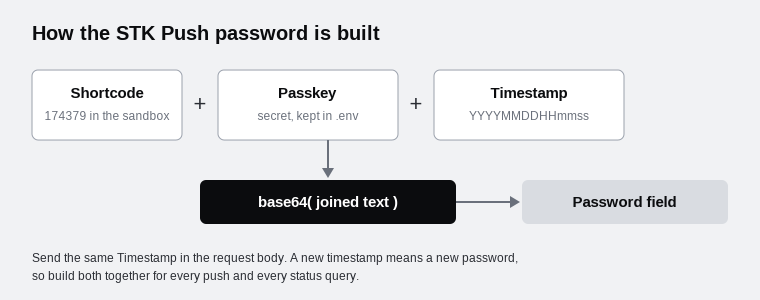
Create daraja.js with these pieces:
cd ~/mpesa-demo
cat > daraja.js <<'JS'
import { Buffer } from 'node:buffer';

function setting(name) {
  const value = process.env[name];
  if (!value) throw new Error(`${name} is not set`);
  return value;
}

let cachedToken = null; // { value, expiresAt }

export async function getAccessToken() {
  if (cachedToken && Date.now() < cachedToken.expiresAt) return cachedToken.value;
  const basic = Buffer.from(
    `${setting('DARAJA_CONSUMER_KEY')}:${setting('DARAJA_CONSUMER_SECRET')}`,
  ).toString('base64');
  const res = await fetch(
    `${setting('DARAJA_BASE_URL')}/oauth/v1/generate?grant_type=client_credentials`,
    { headers: { Authorization: `Basic ${basic}` }, signal: AbortSignal.timeout(10_000) },
  );
  if (!res.ok) throw new Error(`token request failed: ${res.status} ${await res.text()}`);
  const body = await res.json();
  // expires_in is in seconds. Renew a minute early.
  const lifetime = (Number(body.expires_in) || 3599) - 60;
  cachedToken = { value: body.access_token, expiresAt: Date.now() + lifetime * 1000 };
  return cachedToken.value;
}

// YYYYMMDDHHmmss in Kenyan time (East Africa Time, UTC+3).
export function timestamp(date = new Date()) {
  const parts = Object.fromEntries(
    new Intl.DateTimeFormat('en-GB', {
      timeZone: 'Africa/Nairobi', hourCycle: 'h23',
      year: 'numeric', month: '2-digit', day: '2-digit',
      hour: '2-digit', minute: '2-digit', second: '2-digit',
    }).formatToParts(date).map((p) => [p.type, p.value]),
  );
  return `${parts.year}${parts.month}${parts.day}${parts.hour}${parts.minute}${parts.second}`;
}

export function password(shortcode, passkey, ts) {
  return Buffer.from(`${shortcode}${passkey}${ts}`).toString('base64');
}

// Accepts 0712345678, 712345678, +254712345678 or 254 712 345 678 (and 01... numbers).
// Returns 2547XXXXXXXX / 2541XXXXXXXX, or null.
export function normalisePhone(input) {
  const digits = String(input ?? '').replace(/[\s-]/g, '');
  const match = digits.match(/^(?:\+?254|0)?([17]\d{8})$/);
  return match ? `254${match[1]}` : null;
}
JS- Daraja wants phone numbers as
2547XXXXXXXX. Customers type them every way imaginable, so normalise once, at the edge, and refuse anything that does not fit. Safaricom numbers also start with011, which becomes2541.... - The documentation gives the timestamp format but not the time zone. Kenyan time is the safe choice, and producing it with
Intlmeans your server's own time zone does not matter.
Check it worked
Ask for two tokens, print a timestamp, and rebuild the sample Password printed in Safaricom's M-Pesa Express documentation from its own parts:
cd ~/mpesa-demo
cat > check-basics.js <<'JS'
import { getAccessToken, normalisePhone, password, timestamp } from './daraja.js';

const first = await getAccessToken();
console.log('token cached:', first === (await getAccessToken()));
console.log('timestamp:', timestamp());

// The sample request in the M-Pesa Express docs uses this Password.
const sample = 'MTc0Mzc5YmZiMjc5ZjlhYTliZGJjZjE1OGU5N2RkNzFhNDY3Y2QyZTBjODkzMDU5YjEwZjc4ZTZiNzJhZGExZWQyYzkxOTIwMjEwNjI4MDkyNDA4';
const plain = Buffer.from(sample, 'base64').toString();
const [shortcode, ts, passkey] = [plain.slice(0, 6), plain.slice(-14), plain.slice(6, -14)];
console.log('sample parts:', shortcode, ts, `${passkey.length}-character passkey`);
console.log('password matches the docs:', password(shortcode, passkey, ts) === sample);

console.log(normalisePhone('0712 345 678'), normalisePhone('+254 110 123 456'), normalisePhone('0812345678'));
JS
node --env-file=.env check-basics.js
The output looks like this, with your own timestamp:
token cached: true
timestamp: 20261118143005
sample parts: 174379 20210628092408 64-character passkey
password matches the docs: true
254712345678 254110123456 null
Decoding the sample shows the structure: the sandbox shortcode 174379, a 64-character passkey and the timestamp 20210628092408.
Step 4 · Send the STK Push and query requests
Add the two calls that do the work. stkPush asks Daraja to prompt the phone. stkQuery asks what happened to a prompt, identified by the CheckoutRequestID that the push returned:
cd ~/mpesa-demo
cat >> daraja.js <<'JS'

function signedFields() {
  const shortcode = setting('DARAJA_SHORTCODE');
  const ts = timestamp();
  return { BusinessShortCode: shortcode, Password: password(shortcode, setting('DARAJA_PASSKEY'), ts), Timestamp: ts };
}

async function post(path, body, timeoutMs) {
  const token = await getAccessToken();
  const res = await fetch(`${setting('DARAJA_BASE_URL')}${path}`, {
    method: 'POST',
    headers: { Authorization: `Bearer ${token}`, 'Content-Type': 'application/json' },
    body: JSON.stringify(body),
    signal: AbortSignal.timeout(timeoutMs),
  });
  return { httpStatus: res.status, body: await res.json().catch(() => ({})) };
}

// reference: up to 12 characters, shown to the customer. description: up to 13.
export async function stkPush({ phone, amount, reference, description }) {
  const fields = signedFields();
  const { httpStatus, body } = await post('/mpesa/stkpush/v1/processrequest', {
    ...fields,
    TransactionType: 'CustomerPayBillOnline', // CustomerBuyGoodsOnline for a till
    Amount: amount,
    PartyA: phone,
    PartyB: fields.BusinessShortCode, // the paybill (or till) that receives the money
    PhoneNumber: phone,
    CallBackURL: `${setting('PUBLIC_BASE_URL')}/mpesa/callback/${setting('CALLBACK_TOKEN')}`,
    AccountReference: reference,
    TransactionDesc: description,
  }, 15_000);
  if (httpStatus !== 200 || body.ResponseCode !== '0') {
    throw new Error(`push refused: ${httpStatus} ${body.errorCode ?? body.ResponseCode} ${body.errorMessage ?? body.ResponseDescription}`);
  }
  return body; // MerchantRequestID, CheckoutRequestID, CustomerMessage
}

export function stkQuery(checkoutRequestId) {
  return post('/mpesa/stkpushquery/v1/query', { ...signedFields(), CheckoutRequestID: checkoutRequestId }, 10_000);
}
JS
ResponseCode: "0" on the push means only that Safaricom accepted the request and sent the prompt. It says nothing about whether the customer paid. Note that ResponseCode and the query's ResultCode are strings, while the callback's ResultCode is a number, so compare with Number(...) everywhere.
Check it worked
Push one prompt directly, query it at once, then query it again after the practice customer has paid:
cd ~/mpesa-demo
cat > check-push.js <<'JS'
import { stkPush, stkQuery } from './daraja.js';

const push = await stkPush({ phone: '254712345678', amount: 1, reference: 'TEST1', description: 'Test' });
console.log('push:', push.ResponseCode, push.CheckoutRequestID.startsWith('ws_CO_'));

const now = await stkQuery(push.CheckoutRequestID);
console.log('query now:', now.httpStatus, now.body.errorMessage);

await new Promise((resolve) => setTimeout(resolve, 2500));
const later = await stkQuery(push.CheckoutRequestID);
console.log('query later:', later.httpStatus, later.body.ResultCode, later.body.ResultDesc);
JS
node --env-file=.env check-push.js
The output is:
push: 0 true
query now: 500 The transaction is being processed
query later: 200 0 The service request is processed successfully.
While the customer has not answered, the query returns an error body, not a ResultCode. Treat that as "still pending" and ask again later. The practice Daraja's second terminal also shows callback ... failed, because nothing listens on port 3000 yet.
Step 5 · Write the payment server
The server has four routes: one to start a payment, one to read an order, one to ask Daraja about an order on demand, and the callback. Orders live in memory here; in production they are rows in your database.
cd ~/mpesa-demo
cat > server.js <<'JS'
import crypto from 'node:crypto';
import express from 'express';
import { normalisePhone, stkPush, stkQuery } from './daraja.js';

const CALLBACK_TOKEN = process.env.CALLBACK_TOKEN;
if (!CALLBACK_TOKEN) throw new Error('CALLBACK_TOKEN is not set');

const app = express();
app.use(express.json({ limit: '16kb' }));

const orders = new Map(); // order id -> order (use a database table in production)
const byCheckout = new Map(); // CheckoutRequestID -> order

const view = ({ id, amount, status, receipt, resultDesc, checkoutRequestId }) =>
  ({ id, amount, status, receipt, resultDesc, checkoutRequestId });

app.post('/orders', async (req, res) => {
  const phone = normalisePhone(req.body?.phone);
  const amount = Number(req.body?.amount);
  if (!phone) return res.status(400).json({ error: 'phone must be a Safaricom number such as 0712345678' });
  if (!Number.isInteger(amount) || amount < 1) {
    return res.status(400).json({ error: 'amount must be a whole number of shillings, at least 1' });
  }

  const order = {
    id: `ORD${crypto.randomInt(100000, 1000000)}`, phone, amount, status: 'starting',
    checkoutRequestId: null, reportedReceipt: null, receipt: null, resultDesc: null, createdAt: Date.now(),
  };
  orders.set(order.id, order);
  try {
    const push = await stkPush({ phone, amount, reference: order.id, description: 'Shop order' });
    order.checkoutRequestId = push.CheckoutRequestID;
    order.status = 'pending';
    byCheckout.set(push.CheckoutRequestID, order);
    console.log(`order ${order.id}: prompt sent`);
    res.status(202).json(view(order));
  } catch (err) {
    order.status = 'not-started';
    console.log(`order ${order.id}: ${err.message}`);
    res.status(502).json({ error: 'could not start the M-Pesa payment, try again' });
  }
});

app.get('/orders/:id', (req, res) => {
  const order = orders.get(req.params.id);
  if (!order) return res.status(404).json({ error: 'no such order' });
  res.json(view(order));
});

// Ask Daraja for the result. The only place an order becomes paid or failed.
async function checkStatus(order) {
  if (order.status !== 'pending') return;
  let answer;
  try {
    answer = await stkQuery(order.checkoutRequestId);
  } catch (err) {
    return console.log(`order ${order.id}: query failed: ${err.message}`);
  }
  const { httpStatus, body } = answer;
  if (httpStatus !== 200 || body.ResultCode === undefined) {
    return console.log(`order ${order.id}: still pending (${body.errorMessage ?? httpStatus})`);
  }
  if (order.status !== 'pending') return; // another check finished first
  const code = Number(body.ResultCode);
  order.status = code === 0 ? 'paid' : 'failed';
  order.receipt = code === 0 ? order.reportedReceipt : null;
  order.resultDesc = body.ResultDesc;
  console.log(`order ${order.id}: ${order.status} (${code} ${body.ResultDesc})`);
}

app.post('/orders/:id/check', async (req, res) => {
  const order = orders.get(req.params.id);
  if (!order) return res.status(404).json({ error: 'no such order' });
  await checkStatus(order);
  res.json(view(order));
});

function tokenMatches(given) {
  const a = Buffer.from(String(given));
  const b = Buffer.from(CALLBACK_TOKEN);
  return a.length === b.length && crypto.timingSafeEqual(a, b);
}

app.post('/mpesa/callback/:token', (req, res) => {
  if (!tokenMatches(req.params.token)) {
    console.log('callback rejected: wrong token');
    return res.status(404).end();
  }
  res.json({ ResultCode: 0, ResultDesc: 'Accepted' }); // answer first, work after

  const cb = req.body?.Body?.stkCallback;
  const order = cb && byCheckout.get(cb.CheckoutRequestID);
  if (!order) return console.log('callback ignored: unknown CheckoutRequestID');
  if (order.status !== 'pending') return console.log(`order ${order.id}: duplicate callback`);

  if (Number(cb.ResultCode) === 0) {
    const meta = Object.fromEntries((cb.CallbackMetadata?.Item ?? []).map((i) => [i.Name, i.Value]));
    if (Number(meta.Amount) === order.amount) order.reportedReceipt = String(meta.MpesaReceiptNumber ?? '') || null;
    else console.log(`order ${order.id}: callback amount ${meta.Amount} does not match ${order.amount}`);
  }
  // The callback is not signed, so it only triggers a check. Daraja decides.
  checkStatus(order);
});

// Safety net: re-check orders still pending after a minute, every 30 seconds.
setInterval(() => {
  for (const order of orders.values()) {
    if (order.status === 'pending' && Date.now() - order.createdAt > 60_000) checkStatus(order);
  }
}, 30_000).unref();

app.listen(3000, '127.0.0.1', () => console.log('payments on http://127.0.0.1:3000'));
JS
How it fits together:
- The order is saved before the push, with status
starting. If the push fails, the order records that, and you never have money arriving for an order you have no record of. - The callback checks the token in the URL with
crypto.timingSafeEqual, which takes the same time wherever two values differ, so the token cannot be guessed one character at a time. A wrong token gets a plain404. - The callback answers straight away. Slow work belongs after the response.
- The receipt number from a successful callback is kept aside as
reportedReceipt. It only becomes the order'sreceiptonce the query says the payment succeeded, and only if the callback's amount matches the order. checkStatusis the single place that changes an order's state, and only frompending. A duplicate callback, or a callback and a manual check arriving together, cannot change a settled order.
Start the server in a third terminal:
cd ~/mpesa-demo
node --env-file=.env server.jsCheck it worked
The terminal prints payments on http://127.0.0.1:3000. Send an order with a number that is not a Safaricom mobile number:
curl -s -X POST http://127.0.0.1:3000/orders -H 'Content-Type: application/json' -d '{"phone":"0812345678","amount":1}'
echo
The answer is {"error":"phone must be a Safaricom number such as 0712345678"}, and no request reaches Daraja.
Step 6 · Take a payment, a cancellation and a lost callback
Start a payment of 1 shilling, keep the order id, wait for the practice customer to enter their PIN, then read the order:
cd ~/mpesa-demo
paid=$(curl -s -X POST http://127.0.0.1:3000/orders -H 'Content-Type: application/json' \
  -d '{"phone":"0712 345 678","amount":1}' | node -p 'JSON.parse(require("fs").readFileSync(0, "utf8")).id')
sleep 3
curl -s "http://127.0.0.1:3000/orders/$paid"
echo
The order shows "status":"paid" and a 10-character receipt. The server terminal shows order ORD...: prompt sent and then order ORD...: paid (0 The service request is processed successfully.).
Now an amount of 2, which the practice customer cancels:
cd ~/mpesa-demo
cancelled=$(curl -s -X POST http://127.0.0.1:3000/orders -H 'Content-Type: application/json' \
  -d '{"phone":"0712345678","amount":2}' | node -p 'JSON.parse(require("fs").readFileSync(0, "utf8")).id')
sleep 3
curl -s "http://127.0.0.1:3000/orders/$cancelled"
echo
The order is "status":"failed" with "resultDesc":"Request cancelled by user" and no receipt. Show the customer a clear message and a way to try again. The result codes you will meet most often are 1032 (cancelled), 1037 (the phone could not be reached, often because it is off or out of coverage), 2001 (wrong PIN), 1 (not enough money) and 1019 (the prompt expired). Code 17 means the same amount was requested from the same customer within about two minutes, so do not resend a failed prompt in a loop.
Finally an amount of 3: the customer pays, but the callback never arrives. This happens for real when your server is down or restarting, or the request is lost on the way:
cd ~/mpesa-demo
lost=$(curl -s -X POST http://127.0.0.1:3000/orders -H 'Content-Type: application/json' \
  -d '{"phone":"0712345678","amount":3}' | node -p 'JSON.parse(require("fs").readFileSync(0, "utf8")).id')
sleep 3
curl -s "http://127.0.0.1:3000/orders/$lost"
echo
curl -s -X POST "http://127.0.0.1:3000/orders/$lost/check"
echoCheck it worked
The first read of the lost order still says "status":"pending". The check asks Daraja, which knows the customer paid, and the order becomes "status":"paid". Its receipt is null, because the receipt number only travels in the callback. Your app also checks on its own: the interval at the bottom of server.js re-checks any order still pending after a minute, so a lost callback costs the customer a short wait, not their goods. For receipts on such orders, reconcile against your M-Pesa statement.
Step 7 · Protect the callback URL
Anyone can POST to a URL. Two layers stop a forged callback from marking an order paid: the secret token in the path, and the status query that confirms every result. Prove both with an order the practice customer never answers (amount 4) and a script that pretends to be Safaricom:
cd ~/mpesa-demo
cat > forge.js <<'JS'
// Posts a fake "payment succeeded" callback for an order.
const [orderId, which] = process.argv.slice(2);
const order = await (await fetch(`http://127.0.0.1:3000/orders/${orderId}`)).json();
const token = which === 'right-token' ? process.env.CALLBACK_TOKEN : 'a-guessed-token';
const res = await fetch(`http://127.0.0.1:3000/mpesa/callback/${token}`, {
  method: 'POST',
  headers: { 'Content-Type': 'application/json' },
  body: JSON.stringify({ Body: { stkCallback: {
    MerchantRequestID: 'forged',
    CheckoutRequestID: order.checkoutRequestId,
    ResultCode: 0,
    ResultDesc: 'The service request is processed successfully.',
    CallbackMetadata: { Item: [
      { Name: 'Amount', Value: order.amount },
      { Name: 'MpesaReceiptNumber', Value: 'FAKE000000' },
    ] },
  } } }),
});
console.log(`${which}: ${res.status}`);
JS
waiting=$(curl -s -X POST http://127.0.0.1:3000/orders -H 'Content-Type: application/json' \
  -d '{"phone":"0712345678","amount":4}' | node -p 'JSON.parse(require("fs").readFileSync(0, "utf8")).id')
node --env-file=.env forge.js "$waiting" wrong-token
node --env-file=.env forge.js "$waiting" right-token
sleep 1
curl -s "http://127.0.0.1:3000/orders/$waiting"
echoCheck it worked
The script prints wrong-token: 404, then right-token: 200. Even with the right token, the order stays "status":"pending" with "receipt":null. The server terminal shows callback rejected: wrong token for the first attempt and order ORD...: still pending (The transaction is being processed) for the second, because Daraja does not confirm a payment that never happened.
More protections for a live service:
- Serve the callback only over HTTPS, so the token in the URL is not readable on the way. Keep it out of access logs, or log paths with the token removed.
- If the token leaks, generate a new one. New pushes carry the new URL straight away.
- Keep the query rate low. Daraja enforces request limits and answers
Spike Arrest Violationwhen you exceed them, so check pending orders on a timer, not in a tight loop. - Store orders in a database with a unique constraint on
CheckoutRequestID, and change status only frompending, inside a transaction.
Step 8 · Switch to the Daraja sandbox
When the flow works locally, point the same code at Safaricom's sandbox:
- Create an account on the Daraja portal at developer.safaricom.co.ke and create a sandbox app with the M-Pesa Express Sandbox product.
- From the app, copy the Consumer Key and Consumer Secret. From the M-Pesa Express simulator's test data, copy the sandbox shortcode (
174379) and the passkey. - Make your server reachable at a public HTTPS address, for example behind Nginx as in Nginx as a reverse proxy for a Node app. Daraja cannot reach
127.0.0.1.
Stop the practice Daraja with Ctrl+C in its terminal. Then open .env in a text editor, not on the command line, and set these lines. Replace every value in angle brackets, and keep CALLBACK_TOKEN as it is:
DARAJA_BASE_URL=https://sandbox.safaricom.co.ke
DARAJA_CONSUMER_KEY=<your consumer key>
DARAJA_CONSUMER_SECRET=<your consumer secret>
DARAJA_SHORTCODE=174379
DARAJA_PASSKEY=<the sandbox passkey>
PUBLIC_BASE_URL=https://<your public domain>
Restart the payment server with Ctrl+C and node --env-file=.env server.js, then start a 1-shilling payment to a Safaricom number you own:
curl -s -X POST http://127.0.0.1:3000/orders -H 'Content-Type: application/json' -d '{"phone":"<your Safaricom number>","amount":1}'For production, Safaricom moves the app to live credentials after the Go Live process, and you change DARAJA_BASE_URL to https://api.safaricom.co.ke, the shortcode to your own paybill or till, and the passkey to the one Safaricom emails you. For a till, use CustomerBuyGoodsOnline and put the till number in PartyB.
Check it worked
The curl answers with "status":"pending" and a checkoutRequestId starting ws_CO_, and your phone shows the prompt. After you respond, the server terminal shows a paid or failed line for the order. If no callback arrives within a minute, the interval check settles the order on its own. If the push fails with Wrong credentials, the shortcode, passkey or timestamp do not belong together. If it fails with Invalid Access Token, check the consumer key and secret belong to the app with the M-Pesa Express product.
Step 9 · Clean up
Stop the payment server and, if still running, the practice Daraja with Ctrl+C in their terminals. Then delete the folder, which holds your keys:
cd ~
rm -rf ~/mpesa-demoCheck it worked
ls ~/mpesa-demo reports that the folder does not exist. If you used real sandbox keys, you can also delete the app on the Daraja portal.
Next steps
- Take card and bank payments across West Africa with the same confirm-before-fulfil pattern: accept payments with the Paystack API.
- See how signed webhooks work when a provider does sign them: verify webhook signatures in Node.js.
- Stop a double-tapped Pay button from sending two prompts: make POST requests safe to retry with idempotency keys.
- Text the customer their receipt: send SMS with the Africa's Talking API.
Part of these paths
Related tutorials
- Accept card and bank payments with the Paystack APIYou will build a small Node.js 26 and Express 5.3 checkout that starts Paystack transactions from the server, prices everything in kobo, confirms each payment by verifying it with Paystack, accepts only correctly signed charge.success webhooks, and records every order as paid exactly once.
- How to Receive and Verify Webhooks Safely in Node.jsYou will build an Express 5.3 webhook receiver on Node.js 26 that checks an HMAC-SHA256 signature over the raw request body, compares it in constant time, rejects stale timestamps and duplicate events, and a small sender that proves each rejection works.
- Make POST requests safe to retry with idempotency keysYou will add Idempotency-Key handling to a Node.js 26 payments endpoint backed by SQLite, so a retried, duplicated or simultaneous request charges the customer exactly once.
Need this done for you?
Padding does this work for growing companies, from the first diagnosis to a system that keeps working.
Get new tutorials