Databases · Beginner · 18 min
Combine tables with SQL joins: inner, left, self and anti-joins
By Padding · Updated 18 Nov 2026
Ubuntu 26.04 · PostgreSQL 18.7
You will join customers, orders, products and reviews in PostgreSQL 18, predict which rows each kind of join keeps, find customers who never ordered, and spot the join that silently doubles your counts.
On this page
A well-designed database splits facts into separate tables: one row per customer, one row per product, one row per order. The order row does not repeat the customer's name. It stores the customer's id, and a join puts the two back together when you ask a question.
Joins are where most beginner SQL goes quietly wrong. The query runs, the numbers look plausible, and rows have gone missing or been counted twice. In this tutorial you build a small shop database with four tables, then write each kind of join and predict its row count before you run it. You will use inner joins, left joins, a table joined to itself, a three-table join, USING, two ways to find rows with no match, and the fix for a join that multiplies rows.
The commands use PostgreSQL 18. PostgreSQL 19 came out in November 2026, and everything here works the same on it. The SQL itself is standard and runs with small changes on MySQL, SQLite and SQL Server.
Step 1 · Build a small shop database
Create a database called shop:
sudo -u postgres createdb shopNow create four tables and fill them. Read the data before you run it, because every result later in the tutorial follows from these rows:
- Six customers. Some were referred by another customer, recorded in
referred_by. - Four products. Nobody has bought the rice cooker.
- Six orders, one product each. Order 106 was a guest checkout, so its
customer_idisNULL. - Three product reviews, two by Amara and one by Kofi.
sudo -u postgres psql -d shop -v ON_ERROR_STOP=1 <<'SQL'
CREATE TABLE customers (
  customer_id integer PRIMARY KEY,
  name        text NOT NULL,
  city        text NOT NULL,
  referred_by integer REFERENCES customers (customer_id)
);

CREATE TABLE products (
  product_id integer PRIMARY KEY,
  name       text NOT NULL,
  price      numeric(10, 2) NOT NULL
);

CREATE TABLE orders (
  order_id    integer PRIMARY KEY,
  customer_id integer REFERENCES customers (customer_id),
  product_id  integer NOT NULL REFERENCES products (product_id),
  quantity    integer NOT NULL CHECK (quantity > 0),
  ordered_at  date NOT NULL
);

CREATE TABLE reviews (
  review_id   integer PRIMARY KEY,
  customer_id integer NOT NULL REFERENCES customers (customer_id),
  product_id  integer NOT NULL REFERENCES products (product_id),
  stars       integer NOT NULL CHECK (stars BETWEEN 1 AND 5)
);

INSERT INTO customers VALUES
  (1, 'Amara Okafor',  'Lagos',        NULL),
  (2, 'Kofi Mensah',   'Accra',        1),
  (3, 'Wanjiru Kamau', 'Nairobi',      1),
  (4, 'Thabo Nkosi',   'Johannesburg', 2),
  (5, 'Lina Haddad',   'Cairo',        NULL),
  (6, 'Tunde Bello',   'Ibadan',       3);

INSERT INTO products VALUES
  (1, 'Solar lantern', 45.00),
  (2, 'Phone charger', 12.00),
  (3, 'Water filter',  80.00),
  (4, 'Rice cooker',  150.00);

INSERT INTO orders VALUES
  (101, 1,    1, 2, '2026-10-02'),
  (102, 1,    2, 1, '2026-10-20'),
  (103, 2,    1, 1, '2026-10-05'),
  (104, 3,    3, 1, '2026-11-01'),
  (105, 4,    2, 3, '2026-11-03'),
  (106, NULL, 3, 1, '2026-11-04');

INSERT INTO reviews VALUES
  (1, 1, 1, 5),
  (2, 1, 2, 4),
  (3, 2, 1, 3);
SQL
-v ON_ERROR_STOP=1 makes psql stop at the first error and exit with a failure code. Without it, psql reports the error, carries on with the next statement and exits as if all went well, which hides mistakes in a long script. Every block in this tutorial uses it.
The REFERENCES clauses are foreign keys. They stop an order pointing at a customer who does not exist, and they document which column joins to which. A join does not need a foreign key to work, but a join on columns that are not related by one deserves a second look.
If you prefer to type queries at a prompt, open a session with sudo -u postgres psql -d shop and paste the SQL between the <<'SQL' and SQL lines.
Check it worked
sudo -u postgres psql -d shop -c "SELECT (SELECT count(*) FROM customers) AS customers, (SELECT count(*) FROM products) AS products, (SELECT count(*) FROM orders) AS orders, (SELECT count(*) FROM reviews) AS reviews;"The single row reads 6, 4, 6 and 3.
Step 2 · Match rows with an inner join
Ask for each order with the name of the customer who placed it. Before you run it, count what you expect: six orders, six customers.
sudo -u postgres psql -d shop -v ON_ERROR_STOP=1 <<'SQL'
SELECT c.name, o.order_id, o.ordered_at
FROM customers AS c
JOIN orders AS o ON o.customer_id = c.customer_id
ORDER BY o.order_id;
SQL name | order_id | ordered_at
---------------+----------+------------
Amara Okafor | 101 | 2026-10-02
Amara Okafor | 102 | 2026-10-20
Kofi Mensah | 103 | 2026-10-05
Wanjiru Kamau | 104 | 2026-11-01
Thabo Nkosi | 105 | 2026-11-03
(5 rows)JOIN on its own means INNER JOIN. PostgreSQL pairs every customer row with every order row and keeps only the pairs where the ON condition is true. Three things follow from that:
- Amara appears twice, once per order. A join returns one row per matching pair, not one row per customer.
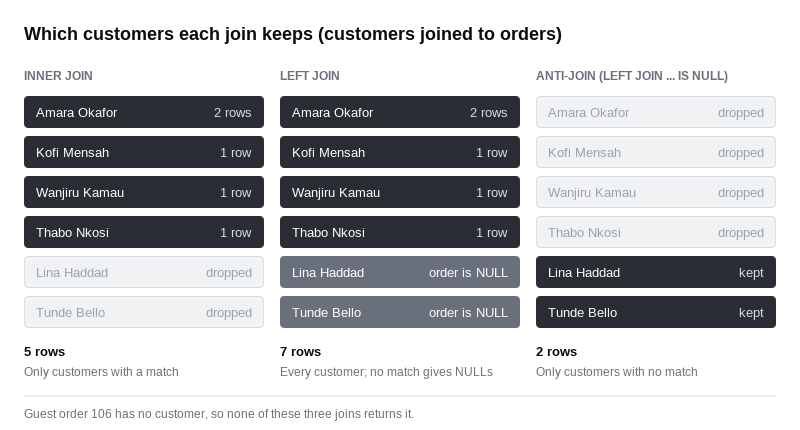
- Lina and Tunde have no orders, so no pair includes them, and they vanish.
- Guest order 106 has a
NULLcustomer.NULL = 1is not true (it is unknown), so that order matches nobody and vanishes too.
The short names c and o are table aliases. Once a query has two tables, prefix every column with its table. Both tables have a customer_id, and customers and products both have a name, so an unprefixed column is either an error or a trap for the next person.
Check it worked
The result has 5 rows, not 6. Lina Haddad, Tunde Bello and order 106 are missing. An inner join only ever returns rows that found a partner on both sides.
Step 3 · Keep every customer with a left join
To list every customer, including those with no orders, use LEFT JOIN. It keeps every row from the table on the left of the keyword and fills the right-hand columns with NULL where nothing matched.
sudo -u postgres psql -d shop -v ON_ERROR_STOP=1 <<'SQL'
SELECT c.name, o.order_id, o.ordered_at
FROM customers AS c
LEFT JOIN orders AS o ON o.customer_id = c.customer_id
ORDER BY c.customer_id, o.order_id;
SQL name | order_id | ordered_at
---------------+----------+------------
Amara Okafor | 101 | 2026-10-02
Amara Okafor | 102 | 2026-10-20
Kofi Mensah | 103 | 2026-10-05
Wanjiru Kamau | 104 | 2026-11-01
Thabo Nkosi | 105 | 2026-11-03
Lina Haddad | |
Tunde Bello | |
(7 rows)psql prints NULL as an empty cell. The guest order is still missing: a left join keeps unmatched rows from the left table only. RIGHT JOIN keeps unmatched rows from the right instead, and FULL JOIN keeps both. Most people write every outer join as a LEFT JOIN and put the table they must not lose first, which makes queries easier to read.
Where you put a condition matters
Now ask for every customer with their November orders. The obvious query puts the date test in WHERE:
sudo -u postgres psql -d shop -v ON_ERROR_STOP=1 <<'SQL'
SELECT c.name, o.order_id
FROM customers AS c
LEFT JOIN orders AS o ON o.customer_id = c.customer_id
WHERE o.ordered_at >= '2026-11-01'
ORDER BY c.customer_id;
SQL
It returns 2 rows, Wanjiru and Thabo. WHERE runs after the join, and for Lina, Tunde and Amara's October orders the date is either NULL or too early, so the filter throws those rows away. The left join has turned into an inner join. Move the condition into ON, so it decides which orders match instead of which rows survive:
sudo -u postgres psql -d shop -v ON_ERROR_STOP=1 <<'SQL'
SELECT c.name, o.order_id
FROM customers AS c
LEFT JOIN orders AS o
  ON o.customer_id = c.customer_id
 AND o.ordered_at >= '2026-11-01'
ORDER BY c.customer_id;
SQL
The rule: with a left join, conditions on the right-hand table go in ON. Conditions on the left-hand table, such as c.city = 'Lagos', go in WHERE.
Check it worked
The plain left join returns 7 rows and the last two have an empty order_id. The November query with the condition in ON returns 6 rows, one per customer, with order numbers only for Wanjiru (104) and Thabo (105).
Step 4 · Join a table to itself
referred_by holds another customer's id. To show the referrer's name, join customers to itself. The aliases are what make this possible: c is the customer and r is a second copy of the same table playing the referrer.
sudo -u postgres psql -d shop -v ON_ERROR_STOP=1 <<'SQL'
SELECT c.name AS customer, r.name AS referred_by
FROM customers AS c
LEFT JOIN customers AS r ON r.customer_id = c.referred_by
ORDER BY c.customer_id;
SQL customer | referred_by
---------------+---------------
Amara Okafor |
Kofi Mensah | Amara Okafor
Wanjiru Kamau | Amara Okafor
Thabo Nkosi | Kofi Mensah
Lina Haddad |
Tunde Bello | Wanjiru Kamau
(6 rows)Read the ON clause aloud to check the direction: "the referrer's id equals the customer's referred_by". Swap the two sides (r.referred_by = c.customer_id) and you get the opposite question, the people each customer referred. Amara would then appear twice, once for Kofi and once for Wanjiru.
The same pattern handles any table that points at itself: an employee and their manager, a reply and the comment it answers, a category and its parent category.
Check it worked
Six rows, one per customer. Amara and Lina have an empty referred_by because nobody referred them. Change LEFT JOIN to JOIN and run it again: you get 4 rows, because the inner join drops the two customers with no referrer.
Step 5 · Join three tables, with ON or USING
An order row holds two foreign keys, so you can join it to both customers and products. Each extra JOIN adds one table to the rows built so far.
sudo -u postgres psql -d shop -v ON_ERROR_STOP=1 <<'SQL'
SELECT c.name,
       p.name AS product,
       o.quantity,
       o.quantity * p.price AS line_total
FROM orders AS o
JOIN customers AS c ON c.customer_id = o.customer_id
JOIN products  AS p ON p.product_id  = o.product_id
ORDER BY o.order_id;
SQL name | product | quantity | line_total
---------------+---------------+----------+------------
Amara Okafor | Solar lantern | 2 | 90.00
Amara Okafor | Phone charger | 1 | 12.00
Kofi Mensah | Solar lantern | 1 | 45.00
Wanjiru Kamau | Water filter | 1 | 80.00
Thabo Nkosi | Phone charger | 3 | 36.00
(5 rows)The guest order has gone again, because the inner join to customers cannot match a NULL. If a report of sales must include guest orders, make that join a LEFT JOIN. The rule of thumb: once you have used a left join to keep rows, later joins to the right of it usually need to be left joins too, or they drop the rows you kept.
When the two columns you join on have the same name in both tables, USING is a shorter way to write the condition:
sudo -u postgres psql -d shop -v ON_ERROR_STOP=1 <<'SQL'
SELECT * FROM orders JOIN products USING (product_id) WHERE order_id = 101;
SELECT * FROM orders AS o JOIN products AS p ON p.product_id = o.product_id WHERE o.order_id = 101;
SQL
Compare the column headings of the two results. With USING (product_id), product_id appears once, as the first column, and you can refer to it without a table prefix. With ON, it appears twice, once from each table. USING also needs no aliases in simple queries, which is why many people use it when their keys are named customer_id and product_id everywhere rather than plain id.
Avoid NATURAL JOIN, which joins on every column with a matching name without you listing them. customers NATURAL JOIN products would match on name, because both tables have one, and return no rows. Add a created_at column to two tables a year from now and every natural join between them changes meaning without any query changing.
Check it worked
The three-table query returns 5 rows and the line_total column adds up to 263.00. The first USING result starts with a product_id column; the ON result shows product_id twice.
Step 6 · Find customers who never ordered
Finding rows with no match is called an anti-join. It answers questions like "which customers have never ordered" or "which products have never sold". There are two good ways to write it.
The first is a left join that keeps only the rows where the right side came back empty:
sudo -u postgres psql -d shop -v ON_ERROR_STOP=1 <<'SQL'
SELECT c.name
FROM customers AS c
LEFT JOIN orders AS o ON o.customer_id = c.customer_id
WHERE o.order_id IS NULL
ORDER BY c.name;
SQL
Test a column that can never be NULL in a real match, such as the primary key o.order_id. Testing a column that is sometimes empty on matched rows would let real matches through.
The second way says what you mean directly, with NOT EXISTS:
sudo -u postgres psql -d shop -v ON_ERROR_STOP=1 <<'SQL'
SELECT c.name
FROM customers AS c
WHERE NOT EXISTS (
  SELECT 1 FROM orders AS o WHERE o.customer_id = c.customer_id
)
ORDER BY c.name;
SQL
Both return Lina Haddad and Tunde Bello. PostgreSQL usually runs both forms with the same plan, so choose the one you find clearer. NOT EXISTS has the advantage that it can never return a customer twice.
The NOT IN trap
A third version looks equally reasonable:
sudo -u postgres psql -d shop -v ON_ERROR_STOP=1 <<'SQL'
SELECT c.name
FROM customers AS c
WHERE c.customer_id NOT IN (SELECT o.customer_id FROM orders AS o);
SQL
It returns (0 rows). The subquery's list includes the NULL from guest order 106. For Lina, SQL asks whether 5 differs from 1, 2, 3, 4 and NULL. It cannot know whether 5 differs from an unknown value, so the answer is unknown rather than true, and her row is filtered out. One NULL in the list empties the whole result. Prefer NOT EXISTS, or add WHERE o.customer_id IS NOT NULL inside the subquery if you must use NOT IN.
Check it worked
The left join and NOT EXISTS versions both list exactly two names, Lina Haddad and Tunde Bello, and NOT IN lists none. Now write the same question for products yourself: which product has never been ordered? Your query should return only the Rice cooker.
Step 7 · Stop one join from doubling another
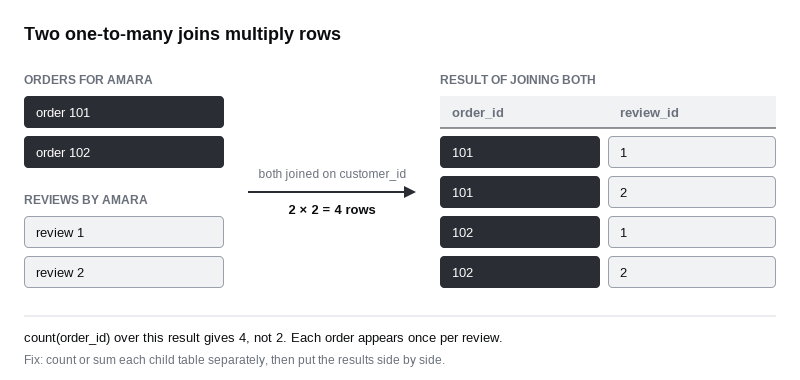
The most expensive join bug is one that returns believable numbers. It happens when you join one parent table to two child tables at once. Each customer can have many orders and many reviews. Join both to Amara and look at the rows:
sudo -u postgres psql -d shop -v ON_ERROR_STOP=1 <<'SQL'
SELECT c.name, o.order_id, r.review_id
FROM customers AS c
JOIN orders  AS o ON o.customer_id = c.customer_id
JOIN reviews AS r ON r.customer_id = c.customer_id
WHERE c.customer_id = 1
ORDER BY o.order_id, r.review_id;
SQL
Amara has 2 orders and 2 reviews, and the result has 4 rows. Orders and reviews are not related to each other, so PostgreSQL pairs every order with every review.
Now count them per customer, the way a report might. GROUP BY collapses the rows for each customer into one, and count counts the non-null values in each group. The next tutorial covers it in full.
sudo -u postgres psql -d shop -v ON_ERROR_STOP=1 <<'SQL'
SELECT c.name,
       count(o.order_id)  AS orders,
       count(r.review_id) AS reviews
FROM customers AS c
LEFT JOIN orders  AS o ON o.customer_id = c.customer_id
LEFT JOIN reviews AS r ON r.customer_id = c.customer_id
GROUP BY c.customer_id, c.name
ORDER BY c.customer_id;
SQL name | orders | reviews
---------------+--------+---------
Amara Okafor | 4 | 4
Kofi Mensah | 1 | 1
Wanjiru Kamau | 1 | 0
Thabo Nkosi | 1 | 0
Lina Haddad | 0 | 0
Tunde Bello | 0 | 0
(6 rows)Amara shows 4 orders and 4 reviews. Every other row is correct, because nobody else has more than one of both, which is exactly why this bug survives testing on small data. A sum of order values would be inflated the same way.
The fix is to work out each child table's figure on its own before it meets the other. A subquery in the select list does that, one customer at a time:
sudo -u postgres psql -d shop -v ON_ERROR_STOP=1 <<'SQL'
SELECT c.name,
       (SELECT count(*) FROM orders  AS o WHERE o.customer_id = c.customer_id) AS orders,
       (SELECT count(*) FROM reviews AS r WHERE r.customer_id = c.customer_id) AS reviews
FROM customers AS c
ORDER BY c.customer_id;
SQL
count(DISTINCT o.order_id) would also fix this count, but not a sum: two different orders with the same value would be counted once. Keeping the child tables apart fixes counts and sums alike. A quick test for any join you are unsure of: count the rows with and without the extra join, and if the number grows when you expected it to stay the same, a one-to-many join is multiplying your rows.
Check it worked
The raw query for Amara returns 4 rows. The grouped query shows 4 and 4 for her, and the subquery version shows the true figures, 2 orders and 2 reviews.
Step 8 · Remove the practice database
When you have finished experimenting, drop the shop database. This deletes all four tables and their rows, so make sure you are not keeping anything you added to it.
sudo -u postgres dropdb shopCheck it worked
sudo -u postgres psql -Atc "SELECT count(*) FROM pg_database WHERE datname = 'shop';"It prints 0.
Next steps
- Turn joined rows into totals, averages and per-group counts: /tutorials/summarise-data-with-group-by-and-having.
- Go back over filtering and sorting if any
WHEREclause here felt unfamiliar: /tutorials/query-a-table-with-select-where-and-order-by. - When a join gets slow on real data, read its plan and index the join columns: /tutorials/speed-up-slow-postgres-queries-with-explain.
- The PostgreSQL 18 manual's section on joined tables, under "Table Expressions" at postgresql.org/docs/18, covers
FULL JOIN,CROSS JOINandLATERAL.
Related tutorials
- Query a table in SQL with SELECT, WHERE and ORDER BYYou will load 500 market stall sales into PostgreSQL 18 and answer ten questions about them with SELECT, WHERE, ORDER BY, LIMIT, DISTINCT and CASE, saved in a .sql file you can run again with psql -f.
- Summarise data in SQL with GROUP BY, HAVING and aggregatesYou will turn twelve order rows into a PostgreSQL 18 revenue report by month and region, with subtotals, saved as a view and a CSV file that matches a hand check.
- How to Install PostgreSQL 18 on Ubuntu 26.04 and Create Your First DatabaseYou will install PostgreSQL 18 from the official PostgreSQL apt repository, create a database and a user for your app, and connect to it with a password.
Need this done for you?
Padding does this work for growing companies, from the first diagnosis to a system that keeps working.
Get new tutorials