APIs · Intermediate · 24 min
Configure CORS for an API without opening it to everyone
By Padding · Updated 18 Nov 2026
Node.js 26.13 LTS (node:26 image) · Express 5.3.0 · checked in Chromium with Playwright 1.65.1
You will reproduce a browser CORS error with a page and an API on different ports, then fix it in Express 5.3 with an origin allowlist, preflight handling, credentials, Vary and preflight caching, and prove each header with curl and Playwright.
On this page
Sooner or later a front end on one address calls an API on another and the browser console fills with a red message about CORS. The quick fixes found online, such as Access-Control-Allow-Origin: * or echoing back whatever Origin the request sent, make the error go away by letting every website on the internet read your API's responses in your users' browsers.
In this tutorial you build the problem first, then fix it properly by hand. One small Node.js script serves a page on port 8080 and an Express 5.3 API on port 3000. The page has three buttons: one reads notes, one adds a note with a JSON body, and one asks who is signed in using a cookie. Each button needs a different part of CORS. You add an allowlist of origins, answer preflight requests, allow credentials without a wildcard, set Vary: Origin and cache preflights. Every header is checked twice: with curl -H Origin to see what the server sends, and with a short Playwright script to see what a real browser does with it.
By the end you will also know what CORS does not do. It decides which web pages may read responses in a browser. It does not stop anyone from calling your API.
Step 1 · Create the project and install the tools
Make a throwaway folder and install Express 5.3 and Playwright 1.65 at exact versions. Playwright then downloads a copy of Chromium; on Linux, --with-deps also installs the system libraries it needs and may ask for your sudo password:
mkdir -p ~/cors-demo/public
cd ~/cors-demo
npm init -y > /dev/null
npm install express@5.3.0 playwright@1.65.1
npx playwright install --with-deps chromium
The Chromium download is roughly 100 to 200 MB. On a metered or prepaid connection, run it on Wi-Fi.
Check it worked
cd ~/cors-demo
npm ls express playwright
The tree lists express@5.3.0 and playwright@1.65.1.
Step 2 · Serve a page and an API on two origins
An origin is the scheme, host and port of a URL taken together. Change any one of the three and you have a different origin, even on the same machine:
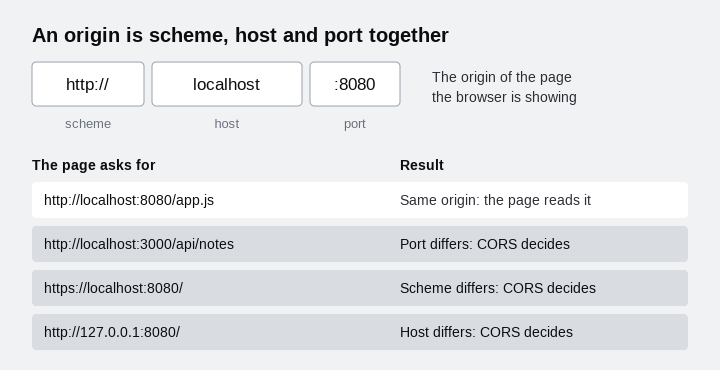
So two Express apps in one script, one on port 8080 and one on port 3000, are enough to reproduce the problem. Create server.mjs. The API logs every request with its Origin header, which you will use to see what reaches the server:
cd ~/cors-demo
cat > server.mjs <<'JS'
import express from 'express';
import { cors } from './cors.mjs';

// The page: static files from ./public on port 8080.
const site = express();
site.use(express.static('public'));
site.listen(8080, () => console.log('Page: http://localhost:8080'));

// The API: JSON on port 3000.
const api = express();
const notes = [
  { id: 1, text: 'Water the tomatoes' },
  { id: 2, text: 'Top up the data bundle' },
];

api.use((req, res, next) => {
  console.log(`API ${req.method} ${req.path} from ${req.get('Origin') ?? 'no Origin header'}`);
  next();
});
api.use(cors);
api.use(express.json());

// Stands in for a real sign-in: sets a session-style cookie on the API's origin.
api.get('/login', (req, res) => {
  res.cookie('demo_user', 'amara', { httpOnly: true, sameSite: 'lax' });
  res.type('text').send('Demo cookie set for localhost:3000. Go back to http://localhost:8080\n');
});

api.get('/api/me', (req, res) => {
  const match = /(?:^|;\s*)demo_user=([^;]+)/.exec(req.get('Cookie') ?? '');
  res.json({ user: match ? match[1] : null });
});

api.get('/api/notes', (req, res) => res.json(notes));

api.post('/api/notes', (req, res) => {
  if (!req.is('application/json')) return res.status(415).json({ error: 'Send JSON' });
  if (typeof req.body?.text !== 'string') return res.status(400).json({ error: 'text is required' });
  const note = { id: notes.length + 1, text: req.body.text };
  notes.push(note);
  res.status(201).json(note);
});

// Public data with no cookies involved, which any site may read.
api.get('/api/open-data', (req, res) => {
  res.set('Access-Control-Allow-Origin', '*');
  res.json({ dataset: 'Sample market days', updated: '2026-11-18' });
});

api.listen(3000, () => console.log('API:  http://localhost:3000'));
JS
cat > cors.mjs <<'JS'
// No CORS headers yet.
export function cors(req, res, next) {
  next();
}
JS
The cookie route is a stand-in for a real sign-in. The user name is hard-coded, so never copy this pattern into a real app.
Now the page. Each button writes its result, or the name of the error, next to itself:
cd ~/cors-demo
cat > public/index.html <<'HTML'
<!doctype html>
<html lang="en">
<head>
  <meta charset="utf-8">
  <meta name="viewport" content="width=device-width, initial-scale=1">
  <title>Notes page on port 8080</title>
</head>
<body>
  <h1>Notes</h1>
  <p><button id="notes-button" type="button">Load notes</button> <output id="notes-result"></output></p>
  <p><button id="add-button" type="button">Add a note</button> <output id="add-result"></output></p>
  <p><button id="me-button" type="button">Who am I?</button> <output id="me-result"></output></p>
  <script type="module" src="app.js"></script>
</body>
</html>
HTML
cat > public/app.js <<'JS'
const API = 'http://localhost:3000';

function button(id, request) {
  const result = document.querySelector(`#${id}-result`);
  document.querySelector(`#${id}-button`).addEventListener('click', async () => {
    try {
      result.textContent = await request();
    } catch (err) {
      result.textContent = `Failed: ${err.name}`;
    }
  });
}

// A simple request: GET with no custom headers.
button('notes', async () => {
  const notes = await (await fetch(`${API}/api/notes`)).json();
  return `${notes.length} notes: ${notes.map((n) => n.text).join(', ')}`;
});

// A preflighted request: the JSON Content-Type is not on the safelist.
button('add', async () => {
  const res = await fetch(`${API}/api/notes`, {
    method: 'POST',
    headers: { 'Content-Type': 'application/json' },
    body: JSON.stringify({ text: 'Buy bread' }),
  });
  const note = await res.json();
  return `Added note ${note.id} (status ${res.status})`;
});

// A credentialed request: sends the API's cookie along.
button('me', async () => {
  const me = await (await fetch(`${API}/api/me`, { credentials: 'include' })).json();
  return me.user ? `Signed in as ${me.user}` : 'Not signed in';
});
JS
Start both servers in a second terminal, from ~/cors-demo, and leave it running:
cd ~/cors-demo
node server.mjsCheck it worked
The second terminal prints Page: http://localhost:8080 and API: http://localhost:3000. In your first terminal, call the API directly:
curl -s http://localhost:3000/api/notes
echo
It prints [{"id":1,"text":"Water the tomatoes"},{"id":2,"text":"Top up the data bundle"}]. curl has no idea what CORS is and reads the API without complaint. Keep that in mind for the last step.
Step 3 · Watch the browser block the page
Open http://localhost:3000/login in your browser once, so the API sets its demo cookie. Then open http://localhost:8080, open the developer tools console, and press each of the three buttons. Each shows Failed: TypeError, and the console has a message for each one, something like Access to fetch at 'http://localhost:3000/api/notes' from origin 'http://localhost:8080' has been blocked by CORS policy.
To repeat this without clicking, write a small Playwright script. It does what you just did, in a headless Chromium, and prints each button's result. You will run it after every change:
cd ~/cors-demo
cat > check.mjs <<'JS'
import { chromium } from 'playwright';

const browser = await chromium.launch();
const page = await browser.newPage();

await page.goto('http://localhost:3000/login'); // gets the demo cookie
await page.goto('http://localhost:8080/');

for (const id of ['notes', 'add', 'me']) {
  await page.click(`#${id}-button`);
  const result = page.locator(`#${id}-result:not(:empty)`);
  await result.waitFor();
  console.log(`${id}: ${await result.textContent()}`);
}

await browser.close();
JS
node check.mjs
This is the same-origin policy at work. A page may send requests to other origins, but by default it may not read the answers. Without that rule, any website you visit could use your browser, with your cookies and your access to your office network, to read your webmail or an internal dashboard and send the contents home. CORS (Cross-Origin Resource Sharing) is the way for a server to tell the browser that a particular other origin is allowed to read its responses.
Check it worked
The script prints notes: Failed: TypeError, add: Failed: TypeError and me: Failed: TypeError. Now look at the API's log in the second terminal. It is the most important thing in this step:
API GET /api/notes from http://localhost:8080andAPI GET /api/me from http://localhost:8080are there. Those requests reached the server and ran. The browser blocked the page from reading the answers, not the requests themselves.- For the note you tried to add there is
API OPTIONS /api/notes, but noPOST. ThatOPTIONSrequest is a preflight: the browser asked first, did not get permission, and never sent the real request.
Step 4 · Allow one origin for simple requests
A simple request is a GET, HEAD or POST that uses only safelisted headers and, for a body, a Content-Type of text/plain, application/x-www-form-urlencoded or multipart/form-data. The browser sends it straight away and checks the response for Access-Control-Allow-Origin. If that header names the page's origin, the page may read the response.
Replace cors.mjs. The allowed origins come from an environment variable, so each environment (local, staging, production) can list its own front ends without a code change:
cd ~/cors-demo
cat > cors.mjs <<'JS'
const allowed = new Set(
  (process.env.ALLOWED_ORIGINS ?? '').split(',').map((o) => o.trim()).filter(Boolean),
);

export function cors(req, res, next) {
  // The answer depends on Origin, so caches must store one copy per Origin.
  res.vary('Origin');

  const origin = req.get('Origin');
  if (origin !== undefined && allowed.has(origin)) {
    res.set('Access-Control-Allow-Origin', origin);
  }
  next();
}
JS
Three details matter here:
- The check is an exact match against a list. Never send back whatever
Originthe request had, and do not use loose tests such asorigin.endsWith('example.com'), which also matcheshttps://evilexample.com. - Never put
nullon the list. Browsers sendOrigin: nullfrom sandboxed iframes and local files, so any attacker can produce it. Vary: Origingoes on every response, including those for origins that are not allowed. A shared cache or CDN in front of the API then keeps a separate copy per origin, instead of serving one origin's permission to another, or a copy without the header to an origin that is allowed.
Stop the server with Ctrl+C in the second terminal and start it again with the allowlist:
ALLOWED_ORIGINS=http://localhost:8080 node server.mjsLook at the headers the API sends to an allowed origin and to one that is not on the list. -D - prints the response headers and -o /dev/null drops the body:
curl -s -D - -o /dev/null -H 'Origin: http://localhost:8080' http://localhost:3000/api/notes
curl -s -D - -o /dev/null -H 'Origin: https://attacker.example' http://localhost:3000/api/notesCheck it worked
The first response includes Vary: Origin and Access-Control-Allow-Origin: http://localhost:8080. The second is still 200 OK with Vary: Origin, but has no Access-Control-Allow-Origin line, so a browser on that origin may not read it. Now run the browser check:
cd ~/cors-demo
node check.mjs
The first line is now notes: 2 notes: Water the tomatoes, Top up the data bundle. Adding a note and the cookie request still fail.
Step 5 · Answer preflight requests
The page sends its new note with Content-Type: application/json, which is not one of the three safelisted types. For a request like that, or one with a custom header such as Authorization, or a method such as PUT or DELETE, the browser first sends an OPTIONS request with Access-Control-Request-Method and Access-Control-Request-Headers. Only if the answer allows that method and those headers does it send the real request:
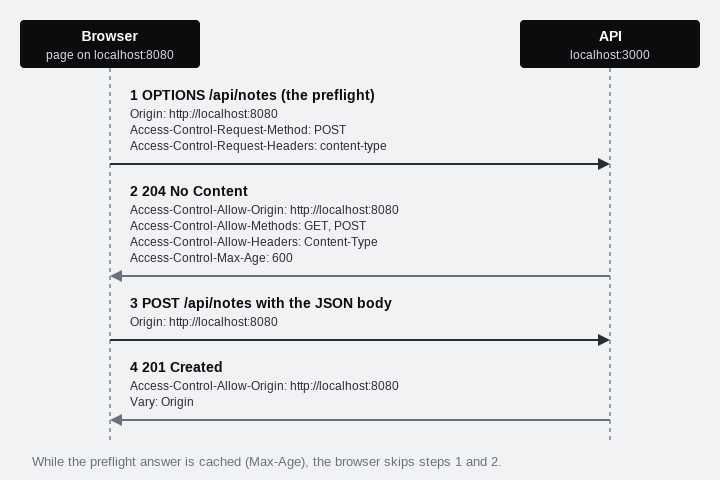
Replace cors.mjs again. Preflights from allowed origins get the full answer and a 204. Preflights from anywhere else get a 403 with no CORS headers, which the browser treats as a refusal:
cd ~/cors-demo
cat > cors.mjs <<'JS'
const allowed = new Set(
  (process.env.ALLOWED_ORIGINS ?? '').split(',').map((o) => o.trim()).filter(Boolean),
);

export function cors(req, res, next) {
  res.vary('Origin');

  const origin = req.get('Origin');
  const isAllowed = origin !== undefined && allowed.has(origin);
  const isPreflight = req.method === 'OPTIONS' && req.get('Access-Control-Request-Method') !== undefined;

  if (isAllowed) {
    res.set('Access-Control-Allow-Origin', origin);
  }
  if (!isPreflight) return next();
  if (!isAllowed) return res.sendStatus(403);

  res.set({
    'Access-Control-Allow-Methods': 'GET, POST',
    'Access-Control-Allow-Headers': 'Content-Type',
    'Access-Control-Max-Age': '600',
  });
  res.sendStatus(204);
}
JS
List only the methods and headers your API really accepts. If you later add PUT routes or an Authorization header, add them here too, or browsers will refuse those requests.
Access-Control-Max-Age: 600 lets the browser reuse this preflight answer for ten minutes for the same page, URL and request shape, so later POSTs go out without an OPTIONS first. Without the header, browsers cache it for only five seconds. Browsers also cap the value: Chromium at two hours and Firefox at 24 hours, so a larger number buys nothing. Each preflight is a full extra round trip, which users on high-latency mobile networks feel most, so a cache of some minutes is worth having. Keep it short enough that a change to your allowed headers reaches browsers soon.
Restart the server with the same command as before (Ctrl+C, then ALLOWED_ORIGINS=http://localhost:8080 node server.mjs):
Send the same preflight the browser sends, first from the page's origin and then from another one:
curl -s -D - -o /dev/null -X OPTIONS \
  -H 'Origin: http://localhost:8080' \
  -H 'Access-Control-Request-Method: POST' \
  -H 'Access-Control-Request-Headers: content-type' \
  http://localhost:3000/api/notes
curl -s -o /dev/null -w '%{http_code}\n' -X OPTIONS \
  -H 'Origin: https://attacker.example' \
  -H 'Access-Control-Request-Method: POST' \
http://localhost:3000/api/notesCheck it worked
The first response is HTTP/1.1 204 No Content with Access-Control-Allow-Origin: http://localhost:8080, Access-Control-Allow-Methods: GET, POST, Access-Control-Allow-Headers: Content-Type and Access-Control-Max-Age: 600. The second command prints 403. Then:
cd ~/cors-demo
node check.mjs
The second line is now add: Added note 3 (status 201), and the API log shows an OPTIONS followed by a POST. Only the cookie request still fails.
Step 6 · Allow credentials without the wildcard
By default, fetch does not send cookies to another origin. The page asks for them with credentials: 'include'. The cookie is sent here because localhost:8080 and localhost:3000 count as the same site (the port is not part of a site), and the cookie is SameSite=Lax. For a credentialed request the browser applies stricter rules to the response:
- It must include
Access-Control-Allow-Credentials: true. Access-Control-Allow-Originmust name the exact origin.*is refused.- In
Access-Control-Allow-MethodsandAccess-Control-Allow-Headers,*is no longer a wildcard either; list the names.
The reason for the second rule is the whole point of CORS: * together with cookies would let every website read the signed-in user's data. Add the credentials header for allowed origins, in this final version of cors.mjs:
cd ~/cors-demo
cat > cors.mjs <<'JS'
const allowed = new Set(
  (process.env.ALLOWED_ORIGINS ?? '').split(',').map((o) => o.trim()).filter(Boolean),
);

export function cors(req, res, next) {
  res.vary('Origin');

  const origin = req.get('Origin');
  const isAllowed = origin !== undefined && allowed.has(origin);
  const isPreflight = req.method === 'OPTIONS' && req.get('Access-Control-Request-Method') !== undefined;

  if (isAllowed) {
    res.set({
      'Access-Control-Allow-Origin': origin,
      'Access-Control-Allow-Credentials': 'true',
    });
  }
  if (!isPreflight) return next();
  if (!isAllowed) return res.sendStatus(403);

  res.set({
    'Access-Control-Allow-Methods': 'GET, POST',
    'Access-Control-Allow-Headers': 'Content-Type',
    'Access-Control-Max-Age': '600',
  });
  res.sendStatus(204);
}
JS
Restart the server again (Ctrl+C, then ALLOWED_ORIGINS=http://localhost:8080 node server.mjs):
cd ~/cors-demo
node check.mjs
All three lines succeed, and the last is me: Signed in as amara.
The /api/open-data route shows where * does belong. It sets Access-Control-Allow-Origin: * itself, which is right for public data with no cookies, such as open datasets or exchange rates. Ask for it from the page with and without credentials:
cd ~/cors-demo
cat > wildcard.mjs <<'JS'
import { chromium } from 'playwright';

const browser = await chromium.launch();
const page = await browser.newPage();
await page.goto('http://localhost:8080/');

const results = await page.evaluate(async () => {
  const attempt = async (credentials) => {
    try {
      const res = await fetch('http://localhost:3000/api/open-data', { credentials });
      return `read, status ${res.status}`;
    } catch (err) {
      return `blocked (${err.name})`;
    }
  };
  return [await attempt('same-origin'), await attempt('include')];
});

console.log(`without cookies: ${results[0]}`);
console.log(`with cookies:    ${results[1]}`);
await browser.close();
JS
node wildcard.mjsCheck it worked
node check.mjs ends with me: Signed in as amara. node wildcard.mjs prints without cookies: read, status 200 and with cookies: blocked (TypeError): the same * response is fine for an anonymous request and refused as soon as credentials are involved. (same-origin is the default for fetch; it sends cookies only to the page's own origin.)
Step 7 · Remember that CORS is not access control
The browser enforces CORS for the pages it runs. Nothing else does. Any program can call your API and set the Origin header to whatever it likes:
curl -s -H 'Origin: http://localhost:8080' -H 'Cookie: demo_user=amara' http://localhost:3000/api/me
echo
curl -s -o /dev/null -w '%{http_code}\n' -X POST \
  -H 'Origin: https://attacker.example' \
  -H 'Content-Type: text/plain' \
  --data '{"text":"spam"}' \
  http://localhost:3000/api/notes
The first command gets {"user":"amara"}. It claimed an allowed origin and brought the cookie, and the API believed both. The second is the kind of request any web page, or a plain HTML form, can send to your API from any origin without a preflight. It reached the route and got 415 only because the route refuses bodies that are not JSON. Without that check it would have added a note.
So treat CORS as a rule about who may read responses in a browser, and keep these jobs elsewhere:
- Authentication and authorisation on every request, as in protect an API with API keys. Check who the caller is and what they may do; never decide based on
Origin. - Protection against cross-site request forgery when you use cookies:
SameSitecookies, requiring JSON (which forces a preflight for browser callers) or a CSRF token. - Set CORS headers in one place. If Nginx or a gateway in front of the API also adds
Access-Control-Allow-Origin, the response carries two values and browsers reject it.
Check it worked
The terminal shows {"user":"amara"} and then 415, and the server log has a line API POST /api/notes from https://attacker.example: the request from a disallowed origin reached your code.
Step 8 · Stop the server and clean up
Press Ctrl+C in the second terminal, then remove the demo folder, which also removes the local Express and Playwright packages:
cd ~
rm -rf ~/cors-demo
The Chromium that Playwright downloaded stays in its shared cache. If you no longer need it, run npx playwright uninstall --all from any Node project.
Check it worked
curl -s http://localhost:3000/api/notes prints nothing and exits with an error, because nothing is listening, and ls ~/cors-demo reports that there is no such file or directory.
Next steps
- Handle what happens after the browser lets the page read the answer, in fetch JSON and show it with loading and error states.
- Put real authentication in front of the API with protect an API with API keys.
- Build out the API itself in build a REST API with Express 5.
- Add the rest of the security headers a site needs in add security headers in Nginx.
Part of these paths
Related tutorials
- Fetch JSON from an API and show it with loading and error statesYou will build a market price search that loads JSON with fetch, shows loading, empty, error and success states, gives up after five seconds and never shows results out of order.
- How to Add Security Headers to Your Site in NginxYou will add the HTTP security headers every site should send, keep them in one reusable file, avoid the add_header inheritance trap, and roll out Content-Security-Policy and HSTS in the safe order.
- How to Build a REST API with Express 5You will build a small items API with Express 5.3 on Node.js 26 that validates its input, returns the right HTTP status codes, never sends a stack trace to callers, and has automated tests that use only Node's built-in test runner.
Need this done for you?
Padding does this work for growing companies, from the first diagnosis to a system that keeps working.
Get new tutorials