AI and machine learning · Intermediate · 20 min
Cut LLM costs and latency with prompt caching
By Padding · Updated 18 Nov 2026
Python 3.15 · anthropic SDK 2.14.0 · Claude Sonnet 5.5
You will cache the stable start of a Claude Sonnet 5.5 prompt with Anthropic's Python SDK 2.14.0, read the cache fields in every response, catch the changes that silently break the cache, and price each request with a small cost calculator.
On this page
Most LLM features send the same long text on every request: a system prompt with rules, a policy or product document, a list of tool definitions. Only the last few lines change. Without caching, the API reads that whole prompt from scratch each time and bills every token at the full input price.
Prompt caching lets the API keep the processed start of your prompt for a few minutes. When the next request begins with exactly the same bytes, the API reads that part from its cache. On Claude Sonnet 5.5 a cached token costs 5% of the normal input price, and the model starts answering sooner because it has less new text to process. The catch is the word "exactly". The cache is a prefix match: one changed character early in the prompt and everything after it is processed, and billed, again.
You will build a small support assistant for a made-up online shop, Kora Market, in ~/cache-demo. It has a policy document of about a thousand tokens and two tools. You will mark the stable part for caching, send requests and read the usage fields that say what was written to and read from the cache, follow a multi-turn chat, choose between the two cache lifetimes, catch three bugs that quietly turn every request into a cache miss, and finish with a calculator that prices each request from its usage.
Step 1 · Create the project and load your key
Load the key you saved in the earlier tutorial into this terminal. set -a exports every variable the file defines, so the SDK can read ANTHROPIC_API_KEY:
set -a
. ~/.config/llm-demo/env
set +a
Create the project and add the SDK at the exact version this tutorial uses:
mkdir -p ~/cache-demo
cd ~/cache-demo
uv init --no-package
uv add "anthropic==2.14.0"Check it worked
uv run python -c "import anthropic; print(anthropic.__version__)"The command prints 2.14.0. If it fails with an import error, check that you are inside ~/cache-demo.
Step 2 · Put the stable text first
The API reads a request in a fixed order: tools, then system, then messages. A cache entry covers everything from the start of that order up to a point you mark with cache_control, called a breakpoint. So the rule for a cache-friendly prompt is simple to state: everything that is the same on every request goes first, and everything that changes goes after the breakpoint.
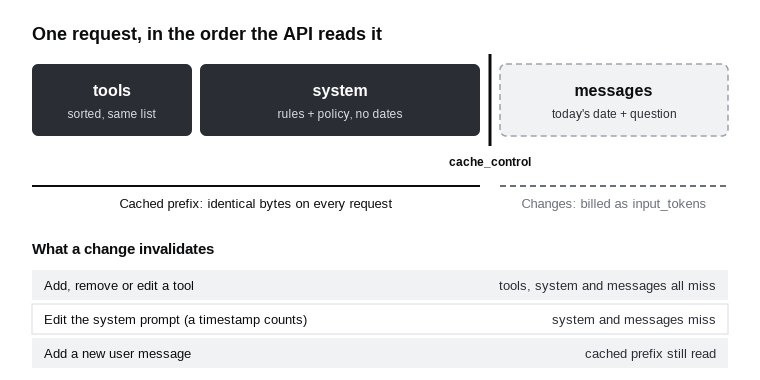
Save the shop's policy as policy.md. In a real product this is the long, slow-changing document your assistant answers from:
cat > policy.md <<'MD'
# Kora Market customer policy

## Orders
- An order is confirmed by SMS and email within 10 minutes of payment.
- A customer can change the delivery address until the order is packed. Packing usually happens within 2 hours on working days.
- We accept cards, bank transfer, mobile money (M-Pesa in Kenya, MTN MoMo in Ghana) and pay on delivery in Lagos and Abuja for orders under NGN 150,000.
- An unpaid bank transfer order is cancelled after 48 hours.

## Delivery
- Lagos, Abuja, Nairobi and Accra: 1 to 2 working days.
- Other cities in Nigeria, Kenya and Ghana, including Ibadan, Port Harcourt, Mombasa, Kisumu and Kumasi: 3 to 5 working days.
- Rural addresses: 5 to 8 working days. The courier phones the customer before arriving.
- Delivery is free on orders over NGN 40,000, KES 3,500 or GHS 350. Below that, the fee is shown at checkout before payment.
- If a delivery fails twice, the parcel returns to our warehouse and the customer can collect it or pay for a third attempt.

## Returns
- Most items can be returned within 14 days of delivery, unused and in the original packaging.
- Shoes and clothing can be tried on indoors but must not be worn outside.
- These cannot be returned: underwear, opened cosmetics, food, and gift cards.
- To start a return the customer needs the order number. A courier collects the item free of charge in the cities listed under Delivery; elsewhere the customer drops it at a partner pickup point.
- Refunds go to the original payment method within 5 working days of the item reaching our warehouse. Mobile money refunds arrive within 24 hours of that.

## Damaged or wrong items
- The customer must report a damaged or wrong item within 48 hours of delivery, with a photo.
- We replace the item or refund it in full, including the delivery fee, at the customer's choice.

## Warranty
- Electronics carry the manufacturer's 12-month warranty. Kora Market handles the claim: the customer sends the item back and we deal with the manufacturer.
- The warranty does not cover water damage, a cracked screen or a broken seal.

## Languages
- Customers may write in English, French, Swahili, Yoruba, Hausa, Igbo or Twi. Reply in the language the customer used.

## When to pass the customer to a person
- The customer asks for a person.
- The question is about a payment that left their account but shows no order.
- The customer reports a safety problem with a product.
- The policy does not answer the question.
MD
Now create prompt.py, which builds every request the same way. The tools are sorted by name and never change between requests. The rules and the policy form one system block with the breakpoint on it, so the cached prefix is the tools plus the system prompt:
cat > prompt.py <<'PY'
from pathlib import Path

MODEL = "claude-sonnet-5-5"
POLICY = Path("policy.md").read_text(encoding="utf-8")

RULES = (
    "You are the support assistant for Kora Market, an online shop. "
    "Answer only from the policy below. If the policy does not cover the question, "
    "say so and offer to pass the customer to a person. Reply in the customer's "
    "language, in at most four sentences.\n\n"
)

TOOLS = sorted(
    [
        {
            "name": "lookup_order",
            "description": "Look up an order by its number. Returns its status, items and delivery date.",
            "input_schema": {
                "type": "object",
                "properties": {"order_number": {"type": "string", "description": "Order number such as KM-104233"}},
                "required": ["order_number"],
            },
        },
        {
            "name": "start_return",
            "description": "Start a return for one item in a delivered order. Returns a pickup or drop-off reference.",
            "input_schema": {
                "type": "object",
                "properties": {
                    "order_number": {"type": "string"},
                    "item": {"type": "string", "description": "The item name as it appears on the order"},
                },
                "required": ["order_number", "item"],
            },
        },
    ],
    key=lambda tool: tool["name"],
)


def build_request(question, ttl=None):
    """Return the keyword arguments for messages.create. Only `question` varies."""
    marker = {"type": "ephemeral"}
    if ttl:
        marker["ttl"] = ttl
    return {
        "model": MODEL,
        "max_tokens": 16000,
        "tools": TOOLS,
        "system": [{"type": "text", "text": RULES + POLICY, "cache_control": marker}],
        "messages": [{"role": "user", "content": question}],
    }
PY
A prefix is only cached if it is long enough. On Claude Sonnet 5.5 the minimum is 512 tokens. A shorter prefix is processed normally: there is no error, the response simply reports zero tokens written to the cache. Check the size with the token counting endpoint, which is free to call. Create count.py:
cat > count.py <<'PY'
import anthropic

from prompt import RULES, build_request

client = anthropic.Anthropic()
MINIMUM = 512

full = build_request("Hello")
short = {**full, "tools": [], "system": [{"type": "text", "text": RULES}]}

for label, request in [("tools + rules + policy", full), ("rules only", short)]:
    count = client.messages.count_tokens(
        model=request["model"], system=request["system"], messages=request["messages"],
        **({"tools": request["tools"]} if request["tools"] else {}),
    )
    verdict = "can be cached" if count.input_tokens >= MINIMUM else "too short to cache"
    print(f"{label}: {count.input_tokens} tokens, {verdict}")
PY
Run it:
uv run count.pyThe count includes the one-word message, so it is a few tokens more than the prefix alone.
Check it worked
You see two lines such as tools + rules + policy: 1065 tokens, can be cached and rules only: 82 tokens, too short to cache. Your numbers differ, but the first should be well above 512 and the second well below it. If your own system prompt lands just under 512, caching it does nothing until it grows.
Step 3 · Send two requests and read the cache fields
Every response carries a usage object. Three fields split the input tokens:
cache_creation_input_tokens: tokens written to the cache by this request. They cost more than normal input.cache_read_input_tokens: tokens read from the cache. They cost much less.input_tokens: tokens after the last breakpoint, processed and billed at the normal price.
The total input for the request is the sum of the three. cache_creation splits the written tokens by lifetime, which you need in the step on lifetimes.
The changing part goes in the user message. A support assistant needs today's date to judge a 14-day return window, so the date goes there, after the breakpoint, and never in the system prompt. Create report.py with two helpers, one that turns a response into text and one that prints and saves its usage:
cat > report.py <<'PY'
import json


def reply_text(message):
    texts = [block.text for block in message.content if block.type == "text"]
    if message.stop_reason == "max_tokens":
        if not texts:
            return "[cut off by max_tokens before any text: thinking used it all; raise max_tokens]"
        return "".join(texts).strip() + " [cut off by max_tokens]"
    if message.stop_reason == "refusal":
        return "[the model declined this request]"
    if message.stop_reason == "tool_use":
        names = [block.name for block in message.content if block.type == "tool_use"]
        return "[wants to call " + ", ".join(names) + "]"
    return "".join(texts).strip()


def show_usage(message, log_path="usage.jsonl"):
    u = message.usage
    written = u.cache_creation_input_tokens or 0
    split = ""
    if u.cache_creation is not None:
        split = f" (5m {u.cache_creation.ephemeral_5m_input_tokens}, 1h {u.cache_creation.ephemeral_1h_input_tokens})"
    print(f"  written: {written}{split} | read: {u.cache_read_input_tokens or 0} | uncached: {u.input_tokens} | output: {u.output_tokens}")
    with open(log_path, "a", encoding="utf-8") as f:
        f.write(json.dumps({"model": message.model, **u.model_dump(exclude_none=True)}) + "\n")
PY
Then create ask.py, which sends two customer questions one after the other:
cat > ask.py <<'PY'
import sys
from datetime import date

import anthropic

from prompt import build_request
from report import reply_text, show_usage

client = anthropic.Anthropic()
ttl = sys.argv[1] if len(sys.argv) > 1 else None
if ttl not in (None, "5m", "1h"):
    raise SystemExit("usage: ask.py [5m|1h]")

questions = [
    "Can I return shoes I bought nine days ago?",
    "How long does delivery to Kisumu take?",
]
for question in questions:
    request = build_request(f"Today is {date.today().isoformat()}. {question}", ttl=ttl)
    message = client.messages.create(**request)
    print(question)
    print(" ", reply_text(message))
    show_usage(message)
PY
Run it:
uv run ask.pymax_tokens=16000 in prompt.py leaves room for thinking. Claude Sonnet 5.5 can think before it answers, those tokens count towards max_tokens and are billed as output, so a low ceiling can end a reply before any text appears. reply_text reports that case instead of printing nothing.
Check it worked
Each question prints a short answer, then a usage line. The first request writes the prefix and the second reads it:
  written: 1050 (5m 1050, 1h 0) | read: 0 | uncached: 22 | output: 180
  written: 0 (5m 0, 1h 0) | read: 1050 | uncached: 21 | output: 150
Your numbers differ. What matters is the pattern: the second read equals the first written, and uncached is only the small question. If the second line also shows read: 0, something in the prefix changed between the two requests; the step on silent invalidators shows how to find it. The file usage.jsonl now holds one line per request, ready for the calculator at the end.
Step 4 · Let automatic caching follow a conversation
In a chat the whole history is resent on every turn, and it grows. A fixed breakpoint on the system prompt caches the policy but not the earlier turns. Automatic caching handles that part: put one cache_control field at the top level of the request, and the API places a breakpoint on the last block it can cache and moves it forward as the conversation grows. On the next turn it finds the entry the previous turn wrote, because it looks back up to 20 blocks from each breakpoint for an earlier write.
You can combine the two. The explicit breakpoint on the system prompt gives the expensive shared part its own entry, and the automatic one follows the conversation. A request can carry at most four breakpoints, and automatic caching uses one of them. Create chat.py, which plays three customer turns:
cat > chat.py <<'PY'
import anthropic

from prompt import build_request
from report import reply_text, show_usage

client = anthropic.Anthropic()

turns = [
    "Hello, my sandals arrived with a broken strap.",
    "It came yesterday. Do I get the delivery fee back too?",
    "Thanks. And how long will the refund take to reach my M-Pesa?",
]
history = []
for turn in turns:
    history.append({"role": "user", "content": turn})
    request = build_request(turn)
    request["messages"] = history
    message = client.messages.create(**request, cache_control={"type": "ephemeral"})
    print("customer:", turn)
    print("  assistant:", reply_text(message))
    show_usage(message)
    history.append({"role": "assistant", "content": message.content})
PY
Run it:
uv run chat.pymessage.content goes back into the history whole, not just its text, so any thinking blocks return to the API unchanged. Changing the thinking or effort settings between turns invalidates the cached messages, so pick them once per feature and keep them.
Check it worked
The read number grows on every turn while uncached stays small:
customer: Hello, my sandals arrived with a broken strap.
  written: 25 (5m 25, 1h 0) | read: 1050 | uncached: 0 | output: 160
customer: It came yesterday. Do I get the delivery fee back too?
  written: 80 (5m 80, 1h 0) | read: 1075 | uncached: 0 | output: 140
customer: Thanks. And how long will the refund take to reach my M-Pesa?
  written: 75 (5m 75, 1h 0) | read: 1155 | uncached: 0 | output: 170
The first turn reads the policy that ask.py cached a moment ago. If more than five minutes have passed, that entry has expired and the first turn writes it again instead.
Step 5 · Choose the 5-minute or the 1-hour lifetime
A cache entry lives five minutes by default. Each request that reads it starts the five minutes again at no extra cost, and the clock runs from the start of the request, so a long reply uses up part of the window. As long as requests that share a prefix start less than five minutes apart, the entry never expires.
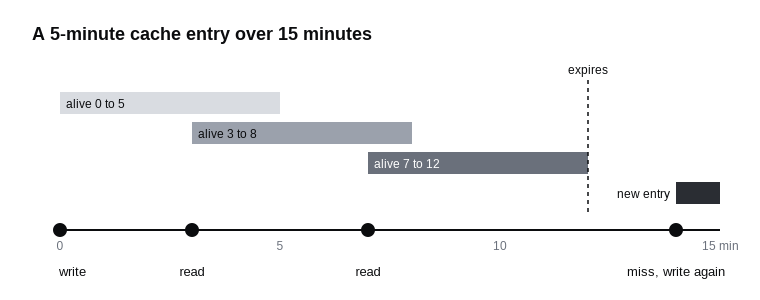
For traffic with longer gaps, such as an internal tool used a few times an hour, you can ask for a 1-hour lifetime with "ttl": "1h". It costs more to write:
- A 5-minute write costs 1.25 times the base input price. It pays for itself after one read.
- A 1-hour write costs 2 times the base input price. It pays for itself after two reads.
- Every read costs 0.05 times the base input price on Claude Sonnet 5.5 (0.1 times on most older models).
If one request in a conversation uses both lifetimes, the 1-hour breakpoints must come before the 5-minute ones. ask.py takes the lifetime as an argument. Run it again more than five minutes after the last request, when the 5-minute entries have expired:
uv run ask.py 1hUse the 1-hour lifetime only when you measure gaps of five minutes to an hour between requests that share the prefix. Under five minutes it buys nothing except the dearer write.
Check it worked
The first usage line now reports the write under 1h, something like written: 1050 (5m 0, 1h 1050) | read: 0, and the second line reads the same number. If the first line shows read instead of written, the earlier 5-minute entry was still alive and the request read it; wait a few more minutes and run it again.
Step 6 · Catch the silent invalidators
A broken cache raises no error. Requests work, answers look right, and the bill is simply higher than it should be. Three bugs cause most of it:
- A timestamp in the system prompt.
datetime.now()in the rules changes the prefix every request. - JSON with keys in a different order.
json.dumps(settings)keeps the order the keys were added, so the same settings loaded by two code paths can produce different text. - A tool list that changes. Offering
start_returnonly to signed-in customers means two prefixes, and adding or removing a tool invalidates the tools, the system prompt and the messages.
You can catch all three without calling the API. Fingerprint the part of the request that should never change, build two requests the way your code really would, and compare. Create fingerprint.py:
cat > fingerprint.py <<'PY'
import hashlib
import json


def prefix_fingerprint(request):
    """Hash the model, tools and system exactly as they will be sent, in their own key order."""
    prefix = {"model": request["model"], "tools": request.get("tools", []), "system": request.get("system", "")}
    raw = json.dumps(prefix, ensure_ascii=False, separators=(",", ":"))
    return hashlib.sha256(raw.encode("utf-8")).hexdigest()[:12]
PY
Then create check_prefix.py, with one faulty builder for each bug and the fixed versions next to them:
cat > check_prefix.py <<'PY'
import json
from datetime import datetime

from fingerprint import prefix_fingerprint
from prompt import POLICY, RULES, TOOLS, build_request

SETTINGS_FROM_DB = {"currency": "NGN", "return_days": 14, "region": "Lagos"}
SETTINGS_FROM_CACHE = {"region": "Lagos", "currency": "NGN", "return_days": 14}


def with_timestamp(question):
    request = build_request(question)
    text = f"Current time: {datetime.now().isoformat()}\n" + RULES + POLICY
    request["system"] = [{"type": "text", "text": text, "cache_control": {"type": "ephemeral"}}]
    return request


def with_settings(question, settings, sort_keys):
    request = build_request(question)
    text = RULES + "Shop settings: " + json.dumps(settings, sort_keys=sort_keys) + "\n\n" + POLICY
    request["system"] = [{"type": "text", "text": text, "cache_control": {"type": "ephemeral"}}]
    return request


def with_tools_per_user(question, signed_in):
    request = build_request(question)
    request["tools"] = [t for t in TOOLS if signed_in or t["name"] != "start_return"]
    return request


def check(name, first, second):
    same = prefix_fingerprint(first) == prefix_fingerprint(second)
    print(f"{name:<30} {'stable' if same else 'CHANGES: every request misses'}")


check("timestamp in system prompt", with_timestamp("Hi"), with_timestamp("Hello"))
check("settings JSON, unsorted", with_settings("Hi", SETTINGS_FROM_DB, False), with_settings("Hello", SETTINGS_FROM_CACHE, False))
check("tool list per user", with_tools_per_user("Hi", True), with_tools_per_user("Hello", False))
check("fixed: settings JSON sorted", with_settings("Hi", SETTINGS_FROM_DB, True), with_settings("Hello", SETTINGS_FROM_CACHE, True))
check("fixed: build_request", build_request("Today is 2026-11-26. Hi"), build_request("Today is 2026-11-27. Hello"))
PY
Run it:
uv run check_prefix.pyThe fixes follow one idea: move whatever varies out of the prefix.
- Put the date or time in the user message, as
ask.pydoes. - Serialise any data in the prompt with
sort_keys=True, or write it in a fixed order yourself. - Send the same full tool list to everyone, sorted by name, and check permissions in your own code when the model asks to call a tool. If a customer is not allowed to start a return, your
start_returnhandler refuses and tells the model why.
Turn the last two check lines into assertions in your project's checks, so a future change that breaks the prefix fails before it reaches production.
Check it worked
The output is:
timestamp in system prompt     CHANGES: every request misses
settings JSON, unsorted        CHANGES: every request misses
tool list per user             CHANGES: every request misses
fixed: settings JSON sorted    stable
fixed: build_request           stable
If a fixed line says CHANGES, something in prompt.py varies between calls. Print the two system texts and compare them.
Step 7 · Price each request from its usage
The usage fields are enough to work out what a request cost and what it would have cost without caching. These are Claude Sonnet 5.5 list prices on the Claude API, in US dollars per million tokens, checked on 26 November 2026. Prices change, so check the pricing page before you rely on them, and add any other model you use:
| Token kind | Price per million tokens |
| --- | --- |
| Input, not cached | $2.00 |
| Cache write, 5-minute | $2.50 |
| Cache write, 1-hour | $4.00 |
| Cache read | $0.10 |
| Output, thinking included | $10.00 |
Create cost.py. It reads the usage.jsonl file your scripts have been writing:
cat > cost.py <<'PY'
import json
import sys

# US dollars per million tokens, Claude API list prices, checked 2026-11-26.
# https://platform.claude.com/docs/en/about-claude/pricing
PRICES = {
    "claude-sonnet-5-5": {"input": 2.00, "write_5m": 2.50, "write_1h": 4.00, "read": 0.10, "output": 10.00},
}


def request_cost(usage, price):
    written = usage.get("cache_creation_input_tokens") or 0
    split = usage.get("cache_creation")
    if split:
        write_5m = split.get("ephemeral_5m_input_tokens") or 0
        write_1h = split.get("ephemeral_1h_input_tokens") or 0
    else:
        write_5m, write_1h = written, 0
    read = usage.get("cache_read_input_tokens") or 0
    fresh = usage.get("input_tokens") or 0
    output = usage.get("output_tokens") or 0
    actual = (
        fresh * price["input"] + write_5m * price["write_5m"] + write_1h * price["write_1h"]
        + read * price["read"] + output * price["output"]
    ) / 1_000_000
    without_cache = ((fresh + written + read) * price["input"] + output * price["output"]) / 1_000_000
    return actual, without_cache


path = sys.argv[1] if len(sys.argv) > 1 else "usage.jsonl"
total = total_without = 0.0
count = 0
with open(path, encoding="utf-8") as f:
    for line in f:
        usage = json.loads(line)
        price = PRICES.get(usage.get("model"))
        if price is None:
            print(f"no price for {usage.get('model')}; add it to PRICES")
            continue
        actual, without_cache = request_cost(usage, price)
        count += 1
        total += actual
        total_without += without_cache
        print(f"request {count}: ${actual:.6f} (without caching ${without_cache:.6f})")

if count:
    saved = 100 * (1 - total / total_without) if total_without else 0
    print(f"total: ${total:.6f} for {count} requests, ${total_without:.6f} without caching, saved {saved:.1f}%")
PY
Try it first on two requests whose numbers you can check by hand: a 1,000-token prefix written and then read, a 100-token question and a 300-token answer each time:
cat > example-usage.jsonl <<'JSON'
{"model": "claude-sonnet-5-5", "input_tokens": 100, "cache_creation_input_tokens": 1000, "cache_read_input_tokens": 0, "cache_creation": {"ephemeral_5m_input_tokens": 1000, "ephemeral_1h_input_tokens": 0}, "output_tokens": 300}
{"model": "claude-sonnet-5-5", "input_tokens": 100, "cache_creation_input_tokens": 0, "cache_read_input_tokens": 1000, "output_tokens": 300}
JSON
uv run cost.py example-usage.jsonl
Then run it on your own requests:
uv run cost.pyCheck it worked
The example prints:
request 1: $0.005700 (without caching $0.005200)
request 2: $0.003300 (without caching $0.005200)
total: $0.009000 for 2 requests, $0.010400 without caching, saved 13.5%
Check the first line by hand: (100 × $2 + 1,000 × $2.50 + 300 × $10) ÷ 1,000,000 = $0.0057. The first request costs more than it would without caching, because of the write premium. The second makes it back and more.
The saving here is only 13.5% because output dominates this example: 300 output tokens at $10 cost more than the whole prefix. Caching cuts input cost, so the bigger the stable prefix compared with the answer, and the more requests read each write, the more you save. A 20,000-token document read by fifty questions a few minutes apart saves far more than this. Your own usage.jsonl run ends with a total: line for every request you made in this tutorial.
Caching changes what the API processes, not what travels over the network: each request still carries the whole prompt. Keep LLM calls on your server, so a customer on a low-end Android phone with prepaid data sends only their question, and the long prefix moves between your server and the API.
Step 8 · Clean up
Delete the demo project. The key file stays for the other LLM tutorials:
cd ~
rm -rf ~/cache-demoCheck it worked
test ! -e ~/cache-demo && echo "demo removed"The output is demo removed. Entries in the API's cache expire on their own after their lifetime; there is nothing to delete there.
Next steps
- Combine caching with the other speed levers: make an LLM feature respond faster.
- For work that can wait, halve the price again: process thousands of prompts at half price with the Message Batches API.
- Write the stable rules your prefix holds: write a system prompt with a role, rules and a format.
- Check caching code without spending money: test Claude API code offline against a stub server.
Related tutorials
- Test Claude API code offline against a stub serverYou will have a pytest suite that checks your Claude API code against a local stub of the Messages API, covering the request it sends, text and tool_use replies, a max_tokens stop and 429 and 529 errors, with a folder of fixtures and a rule for refreshing them.
- Send images and PDF documents to Claude from PythonYou will send Claude a receipt photo as base64 and by URL, a multi-page PDF with page citations, and a file uploaded once through the Files API, after checking each file against the documented limits and shrinking large photos with Pillow.
- Process thousands of prompts at half price with the Message Batches APIYou will tag 2,000 product reviews with Claude Haiku 5.5 through the Message Batches API, match results by custom_id, retry only the requests that failed or expired, and finish with a script you can stop and resume.
Need this done for you?
Padding does this work for growing companies, from the first diagnosis to a system that keeps working.
Get new tutorials