AI and machine learning · Advanced · 30 min
Fine-tune a small language model with LoRA on a CPU
By Padding · Updated 18 Nov 2026
Python 3.15 (python:3.15-slim) · PyTorch 2.15.0 (CPU) · Transformers 5.24.1 · PEFT 0.22.0 · Datasets 5.2.0 · SmolLM2-135M-Instruct
You will teach SmolLM2-135M-Instruct to rewrite messy postal addresses in one fixed format by training a LoRA adapter of under 4 MB on a CPU, measure it against the base model on 40 held-out cases, then load and merge the adapter.
On this page
Fine-tuning changes a model's weights so that it behaves differently without being told how every time. It is the right tool for a narrow, repeated job where the form of the answer matters: a fixed output format, a house style, a label set, or getting a small, cheap model to do one task as well as a much bigger one. It is the wrong tool for teaching a model facts. A model fine-tuned on your product catalogue will happily invent products that sound right; retrieval, which puts the real catalogue text into the prompt at question time, is cheaper to update and easier to check.
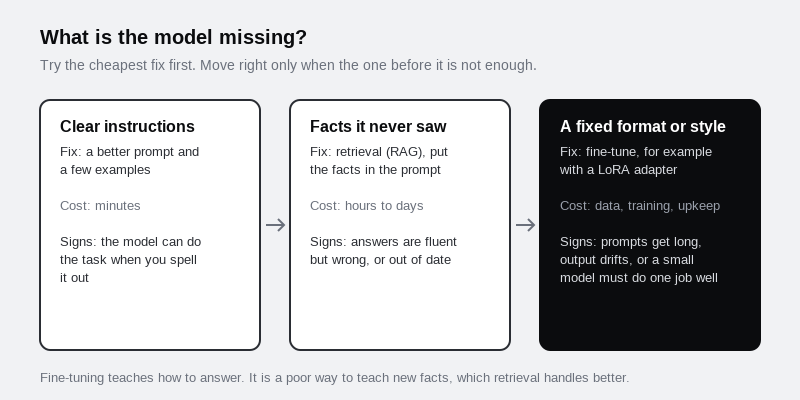
Full fine-tuning updates every weight, which needs a lot of memory and produces a full-size copy of the model for each task. LoRA (low-rank adaptation) freezes the original weights and trains two thin matrices beside some of them. The result is an adapter of a few megabytes that you can keep, share and swap, and later fold into the model.
In this tutorial you do the whole loop on a CPU with SmolLM2-135M-Instruct, a 135-million-parameter chat model under the Apache 2.0 licence. The task is address clean-up: turn no. 37, oak ln. abuja nig into 37 Oak Lane, Abuja, Nigeria. Delivery, KYC and billing systems across Africa and elsewhere see this kind of input every day, typed on phone keyboards in a hurry. You generate 340 example pairs, score the base model on 40 it never trains on, add an adapter, train it, score it again, and merge it.
Step 1 · Create the project and install the libraries
Make a throwaway folder and a virtual environment. Install PyTorch from its CPU wheel index first, so pip does not fetch the much larger CUDA build, then the Hugging Face libraries at fixed versions:
mkdir -p ~/lora-demo
cd ~/lora-demo
python3 -m venv .venv
source .venv/bin/activate
pip install --quiet torch==2.15.0 --index-url https://download.pytorch.org/whl/cpu
pip install --quiet transformers==5.24.1 peft==0.22.0 datasets==5.2.0 accelerate==1.16.0
PEFT is the Hugging Face library that adds LoRA and similar adapters to a Transformers model. Datasets loads and tokenises the training file. PEFT needs Accelerate, so it is pinned too. On Windows, activate the environment with .venv\Scripts\activate.
The installs come to about 250 MB, and the model adds about 270 MB the first time a script loads it. On prepaid mobile data, run the first two steps on Wi-Fi; after that the model sits in the Hugging Face cache in ~/.cache/huggingface and nothing else needs the network.
Check it worked
python -c "import torch, transformers, peft, datasets; print(torch.__version__, transformers.__version__, peft.__version__, datasets.__version__)"On Linux the output is 2.15.0+cpu 5.24.1 0.22.0 5.2.0. On macOS the first version reads 2.15.0, because the macOS wheel has no CUDA variant.
Step 2 · Build 300 training pairs and 40 held-out cases
Fine-tuning data is pairs of input and the exact output you want. Real projects take these from logs and have a person correct them. Here a script generates them so the run is repeatable: street names, cities and countries are combined, then made messy with abbreviations (Rd., Cl), country codes (NG, RSA), odd separators, shouting capitals, stray spaces and the house number in the wrong place. The target is always number street, city, country with everything spelt out.
cat > make_data.py <<'PY'
import json
import random

random.seed(7)

STREETS = [
    ("Allen", "Avenue"), ("Awolowo", "Road"), ("Moi", "Avenue"), ("Kenyatta", "Avenue"),
    ("Oxford", "Street"), ("Nelson Mandela", "Drive"), ("Independence", "Avenue"),
    ("Ring", "Road"), ("Church", "Street"), ("Market", "Street"), ("Station", "Road"),
    ("Garden", "Close"), ("Harbour", "Lane"), ("Victoria", "Street"), ("Lake", "Drive"),
    ("Admiralty", "Way"), ("Ngong", "Road"), ("Oak", "Lane"), ("Cedar", "Close"), ("Hill", "Road"),
]
SHORT = {
    "Avenue": ["Ave", "Ave.", "Av"], "Road": ["Rd", "Rd."], "Street": ["St", "St.", "Str"],
    "Drive": ["Dr", "Dr."], "Close": ["Cl", "Cl."], "Lane": ["Ln", "Ln."], "Way": ["Wy"],
}
CITIES = [
    ("Ikeja", "Nigeria", ["NG", "Nig"]), ("Abuja", "Nigeria", ["NG", "Nig"]),
    ("Nairobi", "Kenya", ["KE"]), ("Mombasa", "Kenya", ["KE"]), ("Accra", "Ghana", ["GH"]),
    ("Kampala", "Uganda", ["UG"]), ("Kigali", "Rwanda", ["RW"]),
    ("Cape Town", "South Africa", ["ZA", "RSA"]), ("Durban", "South Africa", ["ZA", "RSA"]),
    ("Manchester", "United Kingdom", ["UK", "GB"]), ("Leeds", "United Kingdom", ["UK", "GB"]),
    ("Toronto", "Canada", ["CA"]), ("Pune", "India", ["IN"]), ("Lyon", "France", ["FR"]),
]


def messy(number, name, kind, city, country, codes):
    street = f"{name} {random.choice([kind] + SHORT[kind])}"
    house = random.choice([f"{number}", f"No {number}", f"No. {number},", f"{number},"])
    parts = [f"{house} {street}", city, random.choice([country] + codes)]
    if random.random() < 0.25:
        parts = [f"{street} {number}", city, parts[2]]
    text = random.choice([", ", " ", " - ", " / "]).join(parts)
    text = random.choice([str.lower, str.upper, str.title, lambda s: s])(text)
    if random.random() < 0.3:
        text = "  " + text.replace(" ", "  ", 1) + "."
    return text


pairs, seen = [], set()
while len(pairs) < 340:
    number = random.randint(1, 250)
    name, kind = random.choice(STREETS)
    city, country, codes = random.choice(CITIES)
    source = messy(number, name, kind, city, country, codes)
    if source in seen:
        continue
    seen.add(source)
    pairs.append({"input": source, "output": f"{number} {name} {kind}, {city}, {country}"})

for path, rows in [("train.jsonl", pairs[:300]), ("test.jsonl", pairs[300:])]:
    with open(path, "w", encoding="utf-8") as f:
        for row in rows:
            f.write(json.dumps(row, ensure_ascii=False) + "\n")
    print(f"wrote {len(rows)} pairs to {path}")
PY
python make_data.py
The seed makes the output the same on every machine. The first 300 pairs are for training; the last 40 are held out, and no input appears in both. Never tune anything by looking at the held-out cases, or the score stops telling you how the model does on input it has not seen.
Check it worked
wc -l train.jsonl test.jsonl
head -n 3 test.jsonl
wc reports 300 and 40 lines. The first test case is " oxford st. 166 / accra / ghana." with the expected output "166 Oxford Street, Accra, Ghana".
Step 3 · Score the base model first
Measure before you train, or you cannot tell whether training helped. Create common.py with the model name, a pinned revision (the commit of the model repository, so a later upload cannot change your results) and the instruction the model gets:
cat > common.py <<'PY'
MODEL = "HuggingFaceTB/SmolLM2-135M-Instruct"
REVISION = "12fd25f77366fa6b3b4b768ec3050bf629380bac"

SYSTEM = (
    "Rewrite the address in this exact format: number street, city, country. "
    "Write street types and countries in full. Reply with the address only."
)


def prompt_text(tokenizer, address):
    messages = [
        {"role": "system", "content": SYSTEM},
        {"role": "user", "content": address},
    ]
    return tokenizer.apply_chat_template(messages, add_generation_prompt=True, tokenize=False)
PY
Then create score.py. It runs each held-out input through the model with greedy decoding (no sampling, so the same input always gives the same output), counts exact matches, prints the first three cases and saves every answer to results/<label>.json. The model is loaded as float32 because it is stored as bfloat16, and training small adapter weights in bfloat16 on a CPU is slow and imprecise. The --adapter and --model options are for later steps.
cat > score.py <<'PY'
import argparse
import json
from pathlib import Path

import torch
from transformers import AutoModelForCausalLM, AutoTokenizer

from common import MODEL, REVISION, prompt_text

parser = argparse.ArgumentParser()
parser.add_argument("label")
parser.add_argument("--adapter", help="folder with a saved LoRA adapter")
parser.add_argument("--model", default=MODEL, help="model id or a local folder")
args = parser.parse_args()

revision = REVISION if args.model == MODEL else None
tokenizer = AutoTokenizer.from_pretrained(MODEL, revision=REVISION)
model = AutoModelForCausalLM.from_pretrained(args.model, revision=revision, dtype=torch.float32)
if args.adapter:
    from peft import PeftModel

    model = PeftModel.from_pretrained(model, args.adapter)
model.eval()

rows = [json.loads(line) for line in Path("test.jsonl").read_text(encoding="utf-8").splitlines()]
results = []
for row in rows:
    inputs = tokenizer(prompt_text(tokenizer, row["input"]), return_tensors="pt", add_special_tokens=False)
    with torch.no_grad():
        out = model.generate(**inputs, max_new_tokens=32, do_sample=False, pad_token_id=tokenizer.eos_token_id)
    reply = tokenizer.decode(out[0, inputs["input_ids"].shape[1]:], skip_special_tokens=True)
    reply = reply.strip().splitlines()[0].strip() if reply.strip() else ""
    results.append({**row, "reply": reply, "correct": reply == row["output"]})

correct = sum(r["correct"] for r in results)
for r in results[:3]:
    print(f"{r['input']!r}\n  expected {r['output']!r}\n  got      {r['reply']!r}")
print(f"{args.label}: {correct}/{len(results)} exact matches")

Path("results").mkdir(exist_ok=True)
Path(f"results/{args.label}.json").write_text(json.dumps({"correct": correct, "total": len(results), "rows": results}, indent=2))
PY
python score.py baseCheck it worked
The last line reads something like base: 1/40 exact matches. The examples show why: the base model mostly echoes the input with small changes, keeps ZA instead of South Africa, and in one case turns Mombasa into Mother Basa. A careful system prompt would do better on a larger model, but a 135M model cannot follow a detailed format reliably from instructions alone. That is the situation fine-tuning is for.
Step 4 · Add a LoRA adapter to the attention layers
Inside each of the model's 30 layers, the attention block has four projections: q_proj, k_proj, v_proj and o_proj. Each is a matrix W. LoRA leaves W frozen and adds two new matrices: A, which squeezes the input down to r numbers, and B, which expands it back. The layer's output becomes Wx + (alpha / r) · BAx. B starts at zero, so before training the adapter changes nothing.
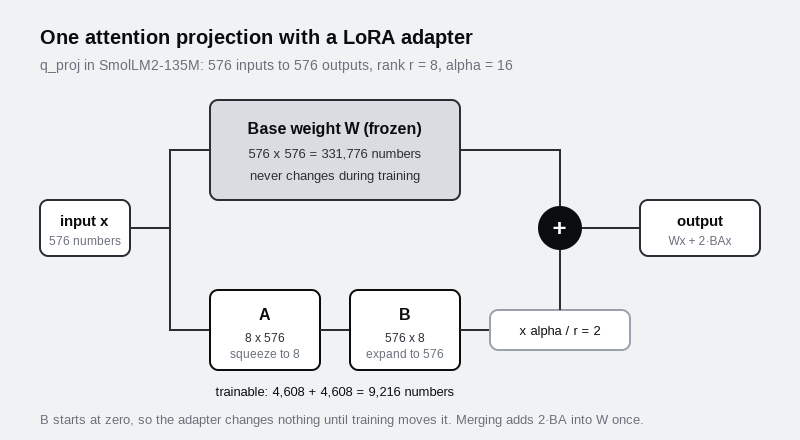
Three settings decide what the adapter can learn:
- Rank
ris the width ofAandB. Higher ranks can learn more complicated changes and cost more memory. 8 is a sensible start for a format task; try 16 or 32 if the score stalls and you have more data. lora_alphascales the update. Because the scale isalpha / r, setting alpha to twice the rank is a common habit that keeps the learning rate meaningful when you changer.target_modulesnames the layers that get an adapter. The attention projections are the usual choice. Adding the feed-forward layers (gate_proj,up_proj,down_projin this model) gives the adapter more capacity at the cost of size and time. Names differ between model families, so read them frommodel.named_modules()when you switch models.
Put the configuration in lora_setup.py so training uses exactly what you inspect here:
cat > lora_setup.py <<'PY'
from peft import LoraConfig, get_peft_model

CONFIG = LoraConfig(
    r=8,                # rank: width of the two small matrices
    lora_alpha=16,      # scale: the update is multiplied by alpha / r
    lora_dropout=0.05,  # light dropout on the adapter input during training
    target_modules=["q_proj", "k_proj", "v_proj", "o_proj"],  # attention projections
    task_type="CAUSAL_LM",
)


def add_lora(model):
    return get_peft_model(model, CONFIG)


if __name__ == "__main__":
    import torch
    from transformers import AutoModelForCausalLM

    from common import MODEL, REVISION

    model = add_lora(AutoModelForCausalLM.from_pretrained(MODEL, revision=REVISION, dtype=torch.float32))
    model.print_trainable_parameters()
    wrapped = [name for name, _ in model.named_modules() if name.endswith("q_proj.lora_A")]
    print(f"{len(wrapped)} layers have an adapter on q_proj, for example {wrapped[0]}")
PY
python lora_setup.pyCheck it worked
The output includes:
trainable params: 921,600 || all params: 135,436,608 || trainable%: 0.6805
30 layers have an adapter on q_proj, for example base_model.model.model.layers.0.self_attn.q_proj.lora_A
Under 1% of the parameters will train. You can check the count by hand: in each layer, q_proj and o_proj adapters have 8 × (576 + 576) = 9,216 numbers each, and k_proj and v_proj (which output 192 numbers, because the model shares keys and values across heads) have 8 × (576 + 192) = 6,144 each. That is 30,720 per layer, and 921,600 over 30 layers.
Step 5 · Train the adapter
Create train.py. Two details matter more than the rest:
- Only the answer is learned. Each example is the chat prompt followed by the expected address and an end-of-turn token. The labels for the prompt tokens are set to
-100, which PyTorch's cross-entropy loss ignores, so the model is trained to produce the answer, not to predict the instruction. The end-of-turn token teaches it to stop. - The learning rate is high for fine-tuning.
1e-3suits a small adapter trained for a few hundred steps. For full fine-tuning you would use something nearer1e-5.
The loop is plain PyTorch, so nothing is hidden: 200 steps of 8 examples each, which is a little over five passes through the 300 pairs. The LORA_STEPS environment variable overrides the step count.
cat > train.py <<'PY'
import os
import random
import time

import torch
from datasets import load_dataset
from transformers import AutoModelForCausalLM, AutoTokenizer

from common import MODEL, REVISION, prompt_text
from lora_setup import add_lora

STEPS = int(os.environ.get("LORA_STEPS", "200"))
BATCH = 8
LEARNING_RATE = 1e-3

random.seed(0)
torch.manual_seed(0)

tokenizer = AutoTokenizer.from_pretrained(MODEL, revision=REVISION)
model = add_lora(AutoModelForCausalLM.from_pretrained(MODEL, revision=REVISION, dtype=torch.float32))


def encode(row):
    prompt = tokenizer(prompt_text(tokenizer, row["input"]), add_special_tokens=False)["input_ids"]
    answer = tokenizer(row["output"] + tokenizer.eos_token, add_special_tokens=False)["input_ids"]
    # Only the answer counts towards the loss; -100 tells PyTorch to ignore the prompt tokens.
    return {"input_ids": prompt + answer, "labels": [-100] * len(prompt) + answer}


data = load_dataset("json", data_files="train.jsonl", split="train").map(encode, remove_columns=["input", "output"])
rows = list(data)


def batches():
    while True:
        random.shuffle(rows)
        for i in range(0, len(rows) - BATCH + 1, BATCH):
            yield rows[i : i + BATCH]


def collate(batch):
    width = max(len(r["input_ids"]) for r in batch)
    pad = tokenizer.pad_token_id if tokenizer.pad_token_id is not None else tokenizer.eos_token_id
    ids, labels, mask = [], [], []
    for r in batch:
        gap = width - len(r["input_ids"])
        ids.append(r["input_ids"] + [pad] * gap)
        labels.append(r["labels"] + [-100] * gap)
        mask.append([1] * len(r["input_ids"]) + [0] * gap)
    return torch.tensor(ids), torch.tensor(labels), torch.tensor(mask)


optimizer = torch.optim.AdamW([p for p in model.parameters() if p.requires_grad], lr=LEARNING_RATE)
model.train()
start, running = time.time(), 0.0
for step, batch in zip(range(1, STEPS + 1), batches()):
    ids, labels, mask = collate(batch)
    loss = model(input_ids=ids, attention_mask=mask, labels=labels).loss
    loss.backward()
    optimizer.step()
    optimizer.zero_grad()
    running += loss.item()
    if step % 20 == 0:
        print(f"step {step:>3}  loss {running / 20:.3f}  {time.time() - start:.0f}s")
        running = 0.0

model.save_pretrained("adapter")
print("saved the adapter to adapter/")
PY
python train.py
Training takes several minutes on a laptop CPU. It took between six and seven minutes on the machine used to write this. If your machine is much slower, run LORA_STEPS=120 python train.py instead; the loss is already low by then on this task.
Check it worked
The loss is printed every 20 steps and falls quickly, from something like 0.36 at step 20 to around 0.001 by the end, followed by saved the adapter to adapter/. Look at the adapter:
ls adapter
du -h adapter/adapter_model.safetensors
The folder holds adapter_config.json (the rank, alpha, target modules and base model name) and adapter_model.safetensors, which du reports as about 3.5M (3.7 million bytes): 921,600 float32 numbers. That is small enough to send over a mobile connection or keep one per customer, while the 135M base model is shared.
Step 6 · Load the adapter and score it on the held-out cases
A saved adapter is useless on its own; it is loaded on top of the same base model it was trained on. score.py does that when you pass --adapter, with PeftModel.from_pretrained. Score the same 40 cases:
python score.py lora --adapter adapterCheck it worked
The three examples now match exactly, and the last line reads something like lora: 40/40 exact matches. Your count may be a point or two lower; the examples and the trend are what matter.
Be honest about what this score means. The held-out cases come from the same generator as the training data, so they are easier than real input. Before you rely on an adapter like this, collect a few hundred real addresses, have a person write the correct output for each, and score on those. Look at the failures in results/lora.json, add pairs that cover them to the training set, and keep a check in your application that flags output that does not fit the format instead of trusting it.
Step 7 · Merge the adapter into the model
For deployment you often want one ordinary model rather than a base model plus an adapter. merge_and_unload() adds (alpha / r) · BA into each frozen W once and removes the adapter layers, so the merged model runs at exactly the base model's speed. Create merge.py:
cat > merge.py <<'PY'
import torch
from peft import PeftModel
from transformers import AutoModelForCausalLM, AutoTokenizer

from common import MODEL, REVISION

base = AutoModelForCausalLM.from_pretrained(MODEL, revision=REVISION, dtype=torch.float32)
model = PeftModel.from_pretrained(base, "adapter")
merged = model.merge_and_unload()
merged.save_pretrained("merged")
AutoTokenizer.from_pretrained(MODEL, revision=REVISION).save_pretrained("merged")
print(type(merged).__name__, "saved to merged/")
PY
python merge.py
python score.py merged --model merged
Then compare all three runs:
cat > compare.py <<'PY'
import json
from pathlib import Path

scores = {name: json.loads(Path(f"results/{name}.json").read_text()) for name in ["base", "lora", "merged"]}
for name, s in scores.items():
    print(f"{name:<7} {s['correct']:>2}/{s['total']}")

assert scores["lora"]["correct"] >= scores["base"]["correct"] + 20, "the adapter should beat the base model clearly"
assert scores["merged"]["correct"] == scores["lora"]["correct"], "merging should not change the answers"
print("the adapter beats the base model, and the merged model matches the adapter")
PY
python compare.pyCheck it worked
merge.py prints LlamaForCausalLM saved to merged/, which shows the PEFT wrapper is gone. compare.py prints the three scores, for example base 1/40, lora 40/40 and merged 40/40, and ends with the adapter beats the base model, and the merged model matches the adapter. If an assertion fails instead, read its message: either training did not help enough, or the merge changed the answers.
The merged folder is about 520 MB, because it is a full float32 copy of the model. Keep the small adapter as your source of truth and merge when you ship. To remove everything this tutorial created, delete ~/lora-demo; the downloaded model stays in ~/.cache/huggingface/hub until you delete its models--HuggingFaceTB--SmolLM2-135M-Instruct folder.
Next steps
The same code works for bigger models, but memory changes the picture. A 7B or 8B model in float32 needs around 28 GB for its weights alone, which is beyond a laptop CPU in time and memory. On a GPU you would load the base model in bfloat16 and train the same adapter. QLoRA goes further: it loads the frozen base model in 4-bit precision with the bitsandbytes library and trains LoRA adapters on top in higher precision, which is how its authors fine-tuned a 65B model on a single 48 GB GPU. The LoRA configuration, the masked labels and the merge step stay the same; only the loading and the hardware change. Rent a GPU by the hour for the training run, and keep the scoring script exactly as it is so the numbers stay comparable.
- Learn the generation side of the same library in Run a small language model with Hugging Face Transformers.
- Turn the 40 held-out cases into a proper test set with Build a golden set to test an LLM feature.
- Revisit the loop in
train.pystep by step in Write a PyTorch training loop from scratch. - If your problem turned out to be missing facts, not format, build a RAG question-answering endpoint instead.
Part of these paths
Related tutorials
- Use MCP server tools from your own Claude appYou will connect a Python app to the stdio clinic-hours MCP server, hand an allowlisted set of its tools to Claude, pass every tool call through to the server with a tested bridge, and know when the API's MCP connector can do the connecting for you.
- Trace LLM calls with OpenTelemetryYou will have a Python app whose Claude calls, retries and tool runs appear as one OpenTelemetry trace with GenAI attributes, token and latency metrics, prompts kept out by default, and an export path from the console to an OpenTelemetry Collector.
- Serve an MCP server over Streamable HTTP with authenticationYou will run an MCP server over Streamable HTTP on localhost that checks the Origin header, accepts only bearer tokens your token verifier knows, limits each tool to the right scope, and refuses calls without a token.
Need this done for you?
Padding does this work for growing companies, from the first diagnosis to a system that keeps working.
Get new tutorials