AI and machine learning · Intermediate · 24 min
Let Claude call your Python functions with tool use
By Padding · Updated 18 Nov 2026
python:3.15-slim · Python 3.15 · anthropic 2.14.0 · pytest 9.2.0 · claude-opus-5-5
You will give Claude two Python functions as strict tools, write the tool-use loop by hand with parallel results, error reporting and a round limit, and prove it works with pytest against a local stub of the Messages API.
On this page
A language model cannot look anything up by itself. It knows what it was trained on and what you put in the prompt. Tool use is how you let it ask your code for the rest: you describe a few functions, the model replies with a request to call one, your code runs it, and you send the result back so the model can carry on. The model never runs anything. Your code decides what runs, with what arguments, and how many times.
You will build this for Kora Market, a made-up online grocery shop in Lagos and Ilé-Ifẹ̀. A customer asks something like "Where is order KM-1042, and can it come tomorrow?". Claude can call two functions to answer: one that looks up an order and one that lists delivery slots for an area and a date. By the end you have:
- two plain Python functions with unit tests
- tool definitions with JSON Schema and
strict: true, so the arguments Claude sends always match the schema - a hand-written loop that sends the request, runs every
tool_useblock, returns all the results in one message, reports failures withis_error, and stops after a fixed number of rounds - a pytest suite that runs the whole loop against a small local stand-in for the Messages API, with no API key and no network
The SDK also has a beta tool runner that writes this loop for you. Writing it by hand once shows you what the runner does, and it is the version you need when you want your own rules about errors, limits and logging.
Step 1 · Create the project
Make a throwaway project, add the SDK and pytest with exact versions, and create a folder for the tests:
mkdir -p ~/tools-demo
cd ~/tools-demo
uv init --no-package
uv add "anthropic==2.14.0"
uv add --dev "pytest==9.2.0"
rm main.py
mkdir -p tests
Tell pytest to import modules from the project folder and where the tests live. This appends a new table to the pyproject.toml that uv init made:
cat >> pyproject.toml <<'TOML'

[tool.pytest.ini_options]
pythonpath = ["."]
testpaths = ["tests"]
TOMLCheck it worked
uv run python -c "import anthropic, pytest; print(anthropic.__version__, pytest.__version__)"The output is 2.14.0 9.2.0.
Step 2 · Write the two shop functions
Start with ordinary Python that knows nothing about Claude. Tools are only as good as the functions behind them, so write and test these first. The data is a small dictionary here; in your app the same functions would query your database.
cat > shop_tools.py <<'PY'
"""Two shop functions Claude may call, and their tool definitions."""
import datetime
import json
import logging
import unicodedata

log = logging.getLogger("shop_tools")

ORDERS = {
    "KM-1042": {"status": "packed", "items": 6, "area": "Yaba", "total_ngn": 18450},
    "KM-1043": {"status": "out_for_delivery", "items": 2, "area": "Ilé-Ifẹ̀", "total_ngn": 5200},
}

SLOTS_BY_AREA = {
    "Yaba": {"2026-12-03": ["09:00-11:00", "15:00-17:00"], "2026-12-04": ["09:00-11:00"]},
    "Ikeja": {"2026-12-03": ["12:00-14:00"]},
    "Ilé-Ifẹ̀": {"2026-12-03": [], "2026-12-04": ["10:00-12:00"]},
}


class ToolFailure(Exception):
    """A problem the model should hear about, in words safe to show it."""


def area_key(area):
    # The same accented name can arrive as different code points, so normalise first.
    return unicodedata.normalize("NFC", area).strip().casefold()


SLOTS = {area_key(area): days for area, days in SLOTS_BY_AREA.items()}


def lookup_order(order_id):
    key = order_id.strip().upper()
    if key not in ORDERS:
        raise ToolFailure(f"No order with ID {order_id!r}. Order IDs look like KM-1042.")
    return {"order_id": key, **ORDERS[key]}


def check_delivery_slots(area, date):
    try:
        day = datetime.date.fromisoformat(date).isoformat()
    except ValueError:
        raise ToolFailure(f"date must be YYYY-MM-DD, got {date!r}") from None
    days = SLOTS.get(area_key(area))
    if days is None:
        raise ToolFailure(f"Kora Market does not deliver to {area!r}.")
    return {"area": area, "date": day, "slots": days.get(day, [])}
PY
ToolFailure is for problems the customer can act on: a mistyped order ID, a date in the wrong form, an area you do not serve. The message is written for the model to read, because it will be sent back to Claude in the next step. Keep stack traces and internal details out of it.
area_key matters if your customers write Yoruba, Igbo or French place names. "Ilé-Ifẹ̀" can be typed as one code point per accented letter or as a letter followed by combining marks, depending on the phone keyboard. The two look identical but compare unequal, so the function normalises to NFC (the composed form) and ignores case before it looks the area up.
Check it worked
uv run python -c "from shop_tools import lookup_order, check_delivery_slots; print(lookup_order('km-1042')['status']); print(check_delivery_slots('yaba', '2026-12-03')['slots'])"The output is two lines: packed and ['09:00-11:00', '15:00-17:00']. The lower-case order ID and area still match.
Step 3 · Describe the functions as strict tools
A tool definition has a name, a description and an input_schema, which is JSON Schema for the arguments. The description is the only thing Claude knows about your function, so say what it returns and when to use it. Append the definitions and a dispatcher to shop_tools.py:
cat >> shop_tools.py <<'PY'


TOOLS = [
    {
        "name": "lookup_order",
        "description": (
            "Look up a Kora Market order by its ID. Returns the status (packed, "
            "out_for_delivery or delivered), the number of items, the delivery area "
            "and the total in naira. Use it whenever the customer mentions an order ID."
        ),
        "strict": True,
        "input_schema": {
            "type": "object",
            "properties": {
                "order_id": {"type": "string", "description": "The order ID, such as KM-1042."},
            },
            "required": ["order_id"],
            "additionalProperties": False,
        },
    },
    {
        "name": "check_delivery_slots",
        "description": (
            "List the free two-hour delivery slots for one area on one date. "
            "An empty list means the day is full. Use it before offering any delivery time."
        ),
        "strict": True,
        "input_schema": {
            "type": "object",
            "properties": {
                "area": {"type": "string", "description": "Delivery area, such as Yaba or Ikeja."},
                "date": {"type": "string", "description": "Delivery date as YYYY-MM-DD."},
            },
            "required": ["area", "date"],
            "additionalProperties": False,
        },
    },
]

HANDLERS = {"lookup_order": lookup_order, "check_delivery_slots": check_delivery_slots}


def run_tool(name, tool_input):
    """Run one tool call and return (content, is_error). Never raises."""
    handler = HANDLERS.get(name)
    if handler is None:
        return f"There is no tool called {name!r}.", True
    try:
        result = handler(**tool_input)
    except ToolFailure as error:
        return str(error), True
    except Exception:
        log.exception("tool %s failed with input %s", name, json.dumps(tool_input))
        return "The tool failed unexpectedly. Tell the customer you could not check this.", True
    return json.dumps(result, ensure_ascii=False), False
PY
With strict: true, the API constrains Claude's output so a tool's input always matches the schema: every required field present, every type right, no extra keys. Strict mode needs additionalProperties: false on each object. It guarantees shape, not meaning. "date": "next Tuesday" is a valid string, which is why check_delivery_slots still checks the date itself.
run_tool is the one place where model output turns into a function call, so it never raises. An unknown tool name, a known failure or an unexpected crash all become a short message plus True for is_error. Only names in HANDLERS can run, so the model cannot reach any other function in your code however it phrases a request. If you later add a tool that changes data, such as cancelling an order, read /tutorials/defend-an-llm-app-against-prompt-injection first: text inside a customer message or a tool result can try to talk the model into calling it.
Now write unit tests for the functions and the dispatcher:
cat > tests/test_tools.py <<'PY'
import json
import unicodedata

from shop_tools import TOOLS, check_delivery_slots, lookup_order, run_tool


def test_lookup_order_ignores_case_and_spaces():
    assert lookup_order(" km-1042 ")["status"] == "packed"


def test_unknown_order_comes_back_as_an_error():
    content, is_error = run_tool("lookup_order", {"order_id": "KM-9999"})
    assert is_error is True
    assert "KM-9999" in content


def test_area_names_match_however_the_accents_were_typed():
    decomposed = unicodedata.normalize("NFD", "Ilé-Ifẹ̀")
    assert decomposed != "Ilé-Ifẹ̀"
    assert check_delivery_slots(decomposed, "2026-12-04")["slots"] == ["10:00-12:00"]


def test_a_date_in_words_is_reported_not_guessed():
    content, is_error = run_tool("check_delivery_slots", {"area": "Yaba", "date": "next Tuesday"})
    assert is_error is True
    assert "YYYY-MM-DD" in content


def test_unknown_tools_and_bad_arguments_never_raise():
    assert run_tool("cancel_order", {"order_id": "KM-1042"})[1] is True
    assert run_tool("lookup_order", {"id": "KM-1042"})[1] is True


def test_results_are_json():
    content, is_error = run_tool("check_delivery_slots", {"area": "Ikeja", "date": "2026-12-03"})
    assert is_error is False
    assert json.loads(content)["slots"] == ["12:00-14:00"]


def test_every_tool_is_strict():
    for tool in TOOLS:
        schema = tool["input_schema"]
        assert tool["strict"] is True
        assert schema["additionalProperties"] is False
        assert set(schema["required"]) == set(schema["properties"])
PYCheck it worked
uv run pytest tests/test_tools.py -qThe summary line is 7 passed. The bad-arguments case also writes a traceback to the shop_tools log, which pytest captures and shows only if a test fails. That is the unexpected-crash branch at work: the full detail goes to your log, and the model only gets the short message.
Step 4 · Write the request, tool_use, tool_result loop
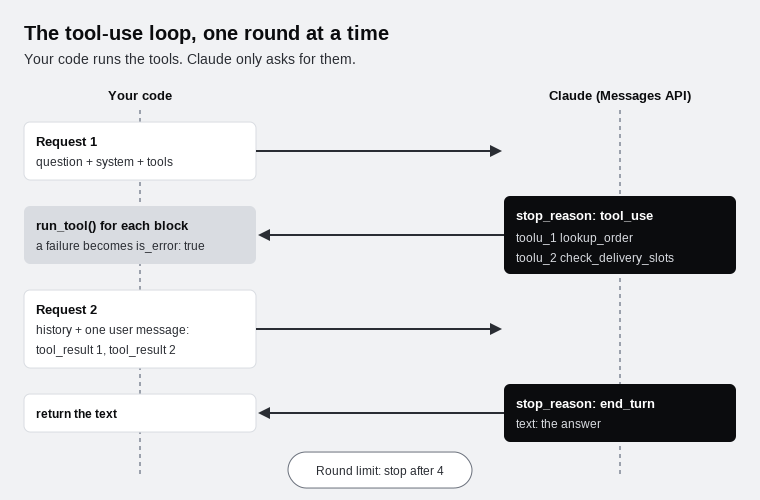
Each round of the loop is one request. Claude's reply ends with a stop_reason that tells your code what to do next:
tool_use: the reply holds one or moretool_useblocks. Run each one and send the results back.end_turn: Claude has finished. The text blocks are the answer.- anything else, such as
max_tokensorrefusal: there is no usable answer. Stop and say why.
Create assistant.py:
cat > assistant.py <<'PY'
"""Answer a Kora Market customer, letting Claude call the shop tools."""
import datetime
import json
import logging
import sys

import anthropic

from shop_tools import TOOLS, run_tool

MODEL = "claude-opus-5-5"
MAX_ROUNDS = 4
log = logging.getLogger("assistant")

SYSTEM = """You answer customers of Kora Market, an online grocery shop in Lagos and Ilé-Ifẹ̀.
Today is {today}.
Use lookup_order whenever the customer gives an order ID, and check_delivery_slots
before you offer any delivery time. When you need both, call them together.
Never guess an order status or a slot. If a tool returns an error, tell the customer
plainly what you could not check. Reply in the customer's language, in at most three
short sentences."""


class AssistantError(Exception):
    pass


def answer(question, client, today, max_rounds=MAX_ROUNDS):
    messages = [{"role": "user", "content": question}]
    for round_number in range(1, max_rounds + 1):
        response = client.messages.create(
            model=MODEL,
            max_tokens=8000,
            output_config={"effort": "medium"},
            system=SYSTEM.format(today=today),
            tools=TOOLS,
            messages=messages,
        )

        if response.stop_reason == "end_turn":
            text = "".join(block.text for block in response.content if block.type == "text")
            if not text:
                raise AssistantError(f"round {round_number}: the reply has no text")
            return text
        if response.stop_reason != "tool_use":
            raise AssistantError(f"round {round_number}: stopped with stop_reason={response.stop_reason}")

        # Send the whole reply back, thinking blocks included, exactly as it came.
        messages.append({"role": "assistant", "content": response.content})

        results = []
        for block in response.content:
            if block.type != "tool_use":
                continue
            log.info("round %d: %s %s", round_number, block.name, json.dumps(block.input, ensure_ascii=False))
            content, is_error = run_tool(block.name, block.input)
            results.append({
                "type": "tool_result",
                "tool_use_id": block.id,
                "content": content,
                "is_error": is_error,
            })
        # Every result for this round goes back in one user message.
        messages.append({"role": "user", "content": results})

    raise AssistantError(f"no answer after {max_rounds} rounds of tool calls")


if __name__ == "__main__":
    logging.basicConfig(level=logging.INFO, format="%(message)s")
    client = anthropic.Anthropic()  # reads ANTHROPIC_API_KEY from the environment
    print(answer(sys.argv[1], client, today=datetime.date.today().isoformat()))
PY
The parts that are easy to get wrong:
- All results in one message. When Claude asks for two tools in one reply, both
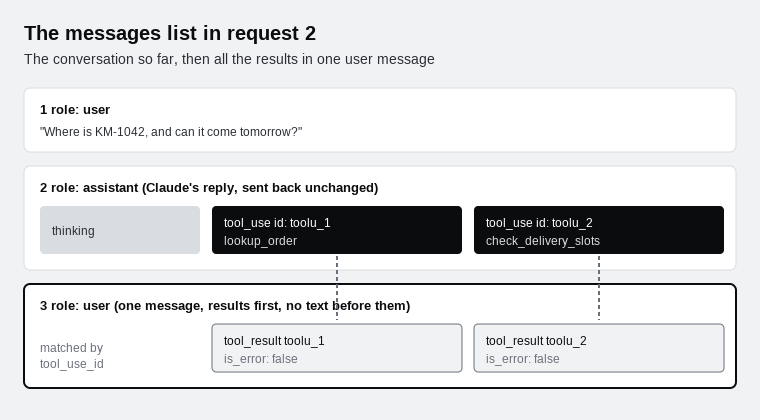
tool_resultblocks go in the same user message, matched to their calls bytool_use_id, with nothing before them. Sending one message per result breaks the turn structure, and Anthropic's docs warn that it teaches the model to stop making parallel calls. The two lookups here are independent and read-only, so running them one after the other is fine; tools that write data may need a fixed order. - Failures are results too. Every
tool_useblock gets atool_result, even when the tool failed.is_error: truetells Claude the call did not work, so it can apologise, ask for a corrected order ID or try another tool. Dropping a failed call leaves an unansweredtool_useblock, and the API rejects the next request. block.inputis already a Python dict. The SDK parses the JSON for you. Read fields from the dict and never search the raw JSON text: models can escape the same string in different ways, such as\u00e9foréor\/for/, and a string match on the serialised form misses them. The log line usesjson.dumpsfor the same reason.- The round limit. A model that keeps calling tools, or a tool that keeps failing, would otherwise loop for as long as you keep paying. Four rounds is plenty for two tools. When the limit is hit, the function raises an error rather than returning a half answer.
- The whole reply goes back. Claude Opus 5.5 always thinks before it answers, so a reply can start with
thinkingblocks. Appendingresponse.contentas it came keeps them in the conversation. Thinking tokens also count towardmax_tokens, which is why the limit is 8,000 for a reply of a few sentences.
Steering without forcing a tool
Older Claude models let you force a call with tool_choice set to any or to a named tool. On Claude Opus 5.5 and Claude Sonnet 5.5 those settings return a 400 error. The code leaves tool_choice out, which means auto: Claude decides whether to call a tool. The system prompt does the steering instead ("Use lookup_order whenever the customer gives an order ID"), and strict: true keeps the arguments valid. With auto, a reply can also come back with no tool call at all, which this loop treats as a finished answer. If a question must always trigger a lookup, check in code that the call happened.
Check it worked
uv run python -c "import assistant; print(assistant.MODEL, assistant.MAX_ROUNDS, [t['name'] for t in assistant.TOOLS])"The output is claude-opus-5-5 4 ['lookup_order', 'check_delivery_slots']. The module imports and sends nothing yet. The next step runs the loop.
Step 5 · Run the loop against a scripted stub
To test the loop without an API key, point the SDK at a small HTTP server on your machine that answers POST /v1/messages with the response shape from the API reference: an id, type, role, a list of content blocks, a stop_reason and usage. Each test scripts the replies it wants, in order, and the stub records every request your code sends, so the test can read them back.
The stub also writes its JSON the awkward way: every non-ASCII character as a \u escape and every / as \/. Both are valid JSON, and the escaped-input test in a later step checks that your code reads parsed values rather than raw text.
cat > tests/conftest.py <<'PY'
import json
import threading
from http.server import BaseHTTPRequestHandler, ThreadingHTTPServer

import anthropic
import pytest


class StubMessages(BaseHTTPRequestHandler):
    script = []  # replies still to give, in order
    seen = []  # request bodies received, parsed
    raw = []  # response bodies sent, as text

    def reply(self, status, payload):
        text = json.dumps(payload, ensure_ascii=True).replace("/", "\\/")
        StubMessages.raw.append(text)
        body = text.encode()
        self.send_response(status)
        self.send_header("content-type", "application/json")
        self.send_header("content-length", str(len(body)))
        self.end_headers()
        self.wfile.write(body)

    def do_POST(self):
        request = json.loads(self.rfile.read(int(self.headers["content-length"])))
        StubMessages.seen.append(request)
        if not StubMessages.script:
            return self.reply(500, {"type": "error", "error": {
                "type": "api_error", "message": "the stub has no more scripted replies"}})
        stop_reason, blocks = StubMessages.script.pop(0)
        content = [{"type": "thinking", "thinking": "", "signature": "stub"}, *blocks]
        self.reply(200, {
            "id": f"msg_stub_{len(StubMessages.seen)}", "type": "message", "role": "assistant",
            "model": request["model"], "content": content, "stop_reason": stop_reason,
            "stop_sequence": None, "usage": {"input_tokens": 450, "output_tokens": 90},
        })

    def log_message(self, *args):
        pass


class Script:
    """What a test uses to queue replies and read back requests."""

    def __init__(self):
        self.calls = 0
        StubMessages.script.clear()
        StubMessages.seen.clear()
        StubMessages.raw.clear()

    def tools(self, *calls):
        blocks = []
        for name, tool_input in calls:
            self.calls += 1
            blocks.append({"type": "tool_use", "id": f"toolu_{self.calls}", "name": name, "input": tool_input})
        StubMessages.script.append(("tool_use", blocks))

    def text(self, text):
        StubMessages.script.append(("end_turn", [{"type": "text", "text": text}]))

    def stop(self, stop_reason):
        StubMessages.script.append((stop_reason, []))

    @property
    def seen(self):
        return StubMessages.seen

    @property
    def raw(self):
        return StubMessages.raw


@pytest.fixture(scope="session")
def stub_url():
    server = ThreadingHTTPServer(("127.0.0.1", 0), StubMessages)
    threading.Thread(target=server.serve_forever, daemon=True).start()
    yield f"http://127.0.0.1:{server.server_port}"
    server.shutdown()


@pytest.fixture
def stub():
    return Script()


@pytest.fixture
def client(stub_url):
    return anthropic.Anthropic(api_key="stub-key", base_url=stub_url, max_retries=0)
PY
max_retries=0 stops the SDK from retrying the stub's 500 reply, so a test that runs out of scripted replies fails at once instead of after a back-off.
Now the first loop test. The stub answers the first request with two parallel tool_use blocks and the second with the final text:
cat > tests/test_assistant.py <<'PY'
import json

import pytest

from assistant import MODEL, AssistantError, answer

TODAY = "2026-12-02"


def test_parallel_calls_go_back_in_one_message(client, stub):
    stub.tools(
        ("lookup_order", {"order_id": "KM-1042"}),
        ("check_delivery_slots", {"area": "Yaba", "date": "2026-12-03"}),
    )
    stub.text("KM-1042 is packed. Tomorrow you can pick 09:00-11:00 or 15:00-17:00.")

    reply = answer("Where is KM-1042, and can it come tomorrow?", client, today=TODAY)

    assert reply.startswith("KM-1042 is packed")
    first, second = stub.seen
    assert first["model"] == MODEL
    assert "tool_choice" not in first
    assert all(tool["strict"] is True for tool in first["tools"])
    assert "Today is 2026-12-02." in first["system"]

    assistant_turn, results_turn = second["messages"][-2:]
    assert [block["type"] for block in assistant_turn["content"]] == ["thinking", "tool_use", "tool_use"]
    assert results_turn["role"] == "user"
    results = results_turn["content"]
    assert [r["type"] for r in results] == ["tool_result", "tool_result"]
    assert [r["tool_use_id"] for r in results] == ["toolu_1", "toolu_2"]
    assert [r["is_error"] for r in results] == [False, False]
    assert json.loads(results[0]["content"])["status"] == "packed"
    assert json.loads(results[1]["content"])["slots"] == ["09:00-11:00", "15:00-17:00"]
PYCheck it worked
uv run pytest tests/test_assistant.py -vYou see test_parallel_calls_go_back_in_one_message PASSED. The test shows that two requests were sent, that the second one carried Claude's reply back with its thinking block, and that both results travelled in a single user message with the right IDs.
Step 6 · Test failures, escaped input and the round limit
The happy path is the least interesting part of a tool loop. Add tests for the cases that break real apps: a tool that fails, input that arrives escaped, a model that keeps calling tools, and a reply cut off by max_tokens.
cat >> tests/test_assistant.py <<'PY'


def test_a_failed_lookup_goes_back_with_is_error(client, stub):
    stub.tools(("lookup_order", {"order_id": "KM-9999"}))
    stub.text("I could not find order KM-9999. Please check the ID on your receipt.")

    reply = answer("Where is order KM-9999?", client, today=TODAY)

    assert "could not find" in reply
    (result,) = stub.seen[1]["messages"][-1]["content"]
    assert result["is_error"] is True
    assert "KM-9999" in result["content"]


def test_escaped_input_is_read_as_parsed_json(client, stub):
    stub.tools(("check_delivery_slots", {"area": "Ilé-Ifẹ̀", "date": "2026-12-04"}))
    stub.text("On 4 December (04/12) we can deliver to Ilé-Ifẹ̀ between 10:00 and 12:00.")

    reply = answer("Can you deliver to Ilé-Ifẹ̀ on 4 December?", client, today=TODAY)

    assert "\\u00e9" in stub.raw[0]  # the area arrived as Il\u00e9-If..., not as é
    assert "Ilé" not in stub.raw[0]
    assert "04\\/12" in stub.raw[1]  # the slash arrived escaped as \/
    assert "04/12" in reply
    (result,) = stub.seen[1]["messages"][-1]["content"]
    assert result["is_error"] is False
    assert json.loads(result["content"])["slots"] == ["10:00-12:00"]


def test_the_loop_stops_after_max_rounds(client, stub):
    for _ in range(10):
        stub.tools(("lookup_order", {"order_id": "KM-1042"}))

    with pytest.raises(AssistantError, match="no answer after 4 rounds"):
        answer("Keep checking KM-1042", client, today=TODAY)
    assert len(stub.seen) == 4


def test_a_reply_cut_off_by_max_tokens_raises(client, stub):
    stub.stop("max_tokens")
    with pytest.raises(AssistantError, match="stop_reason=max_tokens"):
        answer("Where is KM-1042?", client, today=TODAY)
PY
The second test keeps the Yoruba tone marks in the area name so escaped text goes through every part of the loop. The stub sends the area as Il\u00e9-If\u1eb9\u0300 in the raw body; the SDK turns it back into Ilé-Ifẹ̀, area_key normalises it, and the slot lookup works.
Check it worked
Run the whole suite:
uv run pytest -qThe summary is 12 passed: seven tool tests and five loop tests. If you break the loop on purpose, for example by moving messages.append({"role": "user", "content": results}) inside the for loop, test_parallel_calls_go_back_in_one_message fails because the second request now holds two user messages. Put it back before you go on.
Step 7 · Ask Claude a real question
The tests prove your plumbing. They do not show what the model does with your tools; only a real request does that. Load the key you stored in /tutorials/call-an-llm-api-from-python and ask a question that needs both tools. This makes up to four billed requests:
cd ~/tools-demo
set -a; . ~/.config/llm-demo/env; set +a
uv run python assistant.py "Where is my order KM-1042, and can you bring it to Yaba on 3 December?"
On prepaid data, each round trip here is a few kilobytes of JSON. The tool descriptions are sent with every request, so keep them short and specific; they also count as input tokens on every round.
Check it worked
Before the answer you see one log line per tool call, something like:
round 1: lookup_order {"order_id": "KM-1042"}
round 1: check_delivery_slots {"area": "Yaba", "date": "2026-12-03"}
Both calls usually come in round 1, because the prompt says to call them together. Then comes an answer of a few sentences that says the order is packed and offers the 09:00-11:00 and 15:00-17:00 slots. The wording differs on every run. Read it against the data in shop_tools.py before you trust it: the model can still misread a result, which is why a person should check a sample of real conversations before the assistant talks to customers. Try KM-9999 and a date in words, such as "next Friday", to watch is_error and the date handling at work. The log shows whether Claude turned "next Friday" into a YYYY-MM-DD date from the Today is line or passed the words through and got an error back.
When you have finished, delete the demo:
rm -rf ~/tools-demoNext steps
- Turn this loop into a small agent that plans, keeps state and decides when it is done: /tutorials/build-a-small-agent-loop-from-scratch
- Protect a tool-using app from instructions hidden in customer messages and tool results: /tutorials/defend-an-llm-app-against-prompt-injection
- When you only need JSON back and no function calls, use structured output instead: /tutorials/get-structured-json-output-from-an-llm
- Build a fuller stub of the Messages API, with error responses and recorded fixtures: /tutorials/test-llm-code-offline-with-a-stub-messages-api
Related tutorials
- Use MCP server tools from your own Claude appYou will connect a Python app to the stdio clinic-hours MCP server, hand an allowlisted set of its tools to Claude, pass every tool call through to the server with a tested bridge, and know when the API's MCP connector can do the connecting for you.
- Trace LLM calls with OpenTelemetryYou will have a Python app whose Claude calls, retries and tool runs appear as one OpenTelemetry trace with GenAI attributes, token and latency metrics, prompts kept out by default, and an export path from the console to an OpenTelemetry Collector.
- Serve an MCP server over Streamable HTTP with authenticationYou will run an MCP server over Streamable HTTP on localhost that checks the Origin header, accepts only bearer tokens your token verifier knows, limits each tool to the right scope, and refuses calls without a token.
Need this done for you?
Padding does this work for growing companies, from the first diagnosis to a system that keeps working.
Get new tutorials