Programming fundamentals · Beginner · 18 min
Make decisions in code with if, elif and boolean logic
By Padding · Updated 18 Nov 2026
Python 3.15.2 · python:3.15-slim image (Debian)
You will build a small exam-grade and fee-discount checker in Python, using comparisons, and, or, not, truthy values and match/case, and prove every branch works with a truth table and a set of checks.
On this page
A program that does the same thing whatever happens is a calculator. Almost every useful program has to choose: let this user in or not, charge this price or that one, show this message or another. In Python those choices are written with if, and the questions they ask are answered with two values, True and False.
In this tutorial you build two small checkers. The first turns an exam score into a grade. The second works out a school fee, with a discount for families who pay early and have nothing owing. On the way you meet comparisons, and, or and not, values that count as true or false, nested and flat conditions, and match/case for a menu. You finish by testing every branch, so you know the checker is right rather than hoping it is.
If you have done part 3 of Learn to program from zero, warn when spending goes over budget, you have already written one if/elif/else. This tutorial goes deeper into the logic behind it. Amounts are whole units of any currency; the examples use a school fee of 120000.
Step 1 · Ask yes-or-no questions with comparisons
Make a folder for this tutorial and write a script that asks Python some questions about a score:
mkdir -p ~/decisions-demo
cd ~/decisions-demo
cat > compare.py <<'PY'
score = 67

print(score >= 70)
print(score >= 60)
print(score == 67)
print(score != 67)
print(0 <= score <= 100)
print(0 <= 140 <= 100)
print("67" == 67)
print(type(score >= 70))
PY
python3 compare.py
Each line after score = 67 asks a question and prints the answer:
score >= 70asks "is score greater than or equal to 70?". The other comparison operators are>,<,<=,==(equal to) and!=(not equal to).==has two equals signs. A single=stores a value in a variable;==compares two values. Mixing them up is the most common beginner mistake, and Python stops with aSyntaxErrorif you writeif score = 67:.0 <= score <= 100is a chained comparison. It means "0 is less than or equal to score, and score is less than or equal to 100", which is how you check that a value sits inside a range. Many languages need two separate tests for this; Python reads it the way you would write it in maths."67" == 67compares text with a number. They are different types, so they are never equal. This matters becauseinput()always gives you text.type(score >= 70)shows that the answer to a comparison is a value of its own, of typebool, short for boolean.
If you use uv as in hello-world-in-python, you can run uv run compare.py instead of python3 compare.py, here and in every later step.
Check it worked
The output is eight lines: False, True, True, False, True, False, False and <class 'bool'>. Change score = 67 to score = 70, run it again and predict the first line before you look.
Step 2 · Choose one branch with if, elif and else
Now use those answers to choose what to print. Many schools grade 70 and over as A, 60 to 69 as B, 50 to 59 as C, 40 to 49 as D and below 40 as F. If your school uses other bands, change the numbers.
cat > grade.py <<'PY'
score = int(input("Score out of 100: "))

if score < 0:
    print("Not a valid score")
elif score > 100:
    print("Not a valid score")
elif score >= 70:
    print("Grade A")
elif score >= 60:
    print("Grade B")
elif score >= 50:
    print("Grade C")
elif score >= 40:
    print("Grade D")
else:
    print("Grade F")
PY
printf '67\n' | python3 grade.py
Line by line:
int(input(...))reads what you type and turns the text into a whole number, so it can be compared with numbers.if score < 0:asks the first question. The colon ends the question, and the indented line under it runs only when the answer isTrue. Indentation is part of Python's grammar: four spaces mark which lines belong to the branch.- Each
elif(short for "else if") is asked only when every question above it wasFalse. else:has no question. It catches everything the other branches did not.
Python stops at the first True. A score of 85 is also >= 60 and >= 50, but the program prints only Grade A, because the A branch comes first. That is why the bands run from highest to lowest: if score >= 40 came first, everyone with 40 or more would get a D.
printf '67\n' | python3 grade.py sends 67 and a press of Enter into the program, as if you had typed it. You can also run python3 grade.py and type the score yourself.
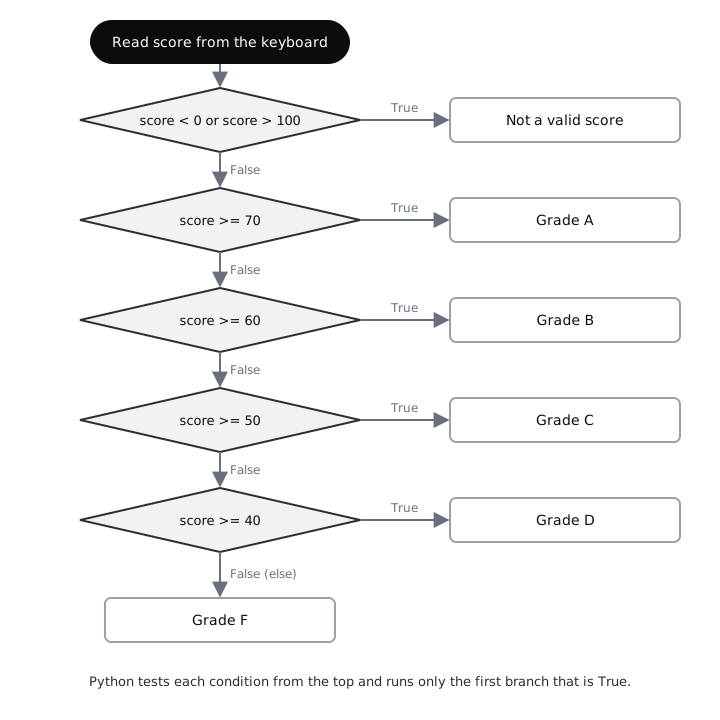
Check it worked
The output is Score out of 100: Grade B. The prompt and the result share a line because the piped 67 is not shown on the screen the way typed input is.
Bugs in conditions hide at the edges, so test the values on each side of every boundary. This shell loop runs the program once for each score after in:
for score in 85 70 69 55 40 39 -5 101; do printf '%s\n' "$score" | python3 grade.py; doneYou see eight lines ending in Grade A, Grade A, Grade B, Grade C, Grade D, Grade F, Not a valid score and Not a valid score. 70 and 69 sit either side of the A/B boundary; 40 and 39 either side of the pass mark.
Step 3 · Combine conditions with and, or and not
The grade checker asks two separate questions to reject a bad score. You can join questions into one with three words:
a and bisTrueonly when both areTrue.a or bisTruewhen at least one isTrue.not aflipsTruetoFalseand back.
Try them on the fee rules. A family gets a discount if they paid early and owe nothing from last term. The registration fee is waived for scholarship holders or staff children.
cat > logic.py <<'PY'
paid_early = True
has_arrears = False
scholarship = False
staff_child = True

print(paid_early and has_arrears)
print(paid_early or has_arrears)
print(not has_arrears)
print(paid_early and not has_arrears)
print(scholarship or staff_child)
print(scholarship and staff_child or paid_early)
print(scholarship and (staff_child or paid_early))
PY
python3 logic.py
The last two lines contain the same words in the same order, yet give different answers. Python works out not first, then and, then or, the way multiplication comes before addition. So scholarship and staff_child or paid_early means (scholarship and staff_child) or paid_early. When you mix and and or, add brackets so the reader does not have to remember the rule.
Now simplify the grade checker. Write the whole file again with one combined test for a bad score:
cat > grade.py <<'PY'
score = int(input("Score out of 100: "))

if score < 0 or score > 100:
    print("Not a valid score")
elif score >= 70:
    print("Grade A")
elif score >= 60:
    print("Grade B")
elif score >= 50:
    print("Grade C")
elif score >= 40:
    print("Grade D")
else:
    print("Grade F")
PY
for score in -5 101 50; do printf '%s\n' "$score" | python3 grade.py; done
if not 0 <= score <= 100: would work just as well: "if the score is not inside the range". Pick whichever reads more clearly to you.
Check it worked
logic.py prints False, True, True, True, True, True and False. The new grade.py prints Not a valid score twice, then Grade C, which is the same behaviour as before with two fewer lines.
Step 4 · Draw a truth table and test every row
A rule with two yes-or-no conditions has exactly four combinations. Writing them all down, in a truth table, is the surest way to see what a rule does. Here is the discount rule paid_early and not has_arrears:
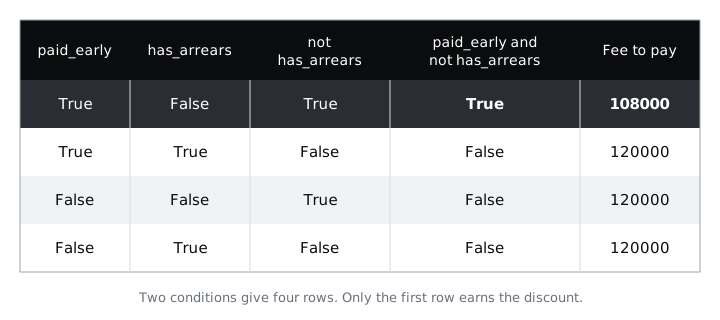
Draw the same table on paper before you run anything, with your own prediction in the last column. Then write the fee calculator:
cat > fees.py <<'PY'
fee = 120000

paid_early = input("Paid before the deadline? (y/n) ").strip().lower() == "y"
has_arrears = input("Unpaid fees from last term? (y/n) ").strip().lower() == "y"

if paid_early and not has_arrears:
    fee = fee * 90 // 100
    print("Early-payment discount applied")

print("Fee to pay:", fee)
PY
The two input lines turn an answer into a boolean. .strip() removes stray spaces, .lower() turns Y into y, and == "y" compares the result with "y", giving True or False. Anything other than y, including a typo, counts as no.
fee * 90 // 100 takes 90% of the fee. // divides and drops any fraction, which keeps the fee a whole number. There is no else here: when the condition is False, Python skips the indented lines and carries on.
Now feed in each row of the table, in the same order as the diagram:
printf 'y\nn\n' | python3 fees.py
printf 'y\ny\n' | python3 fees.py
printf 'n\nn\n' | python3 fees.py
printf 'n\ny\n' | python3 fees.pyCheck it worked
Only the first run prints Early-payment discount applied (after the two prompts) and then Fee to pay: 108000. The other three print Fee to pay: 120000 after the prompts. Compare each line with your paper table. If a prediction was wrong, find which column you got wrong; that is the part of the logic to reread.
Step 5 · Use values that count as true or false
if does not need a comparison. Give it any value and Python decides whether that value counts as true ("truthy") or false ("falsy"). The rule is short: zero, empty things and None are falsy; almost everything else is truthy.
cat > truthy.py <<'PY'
print(bool(0), bool(0.0), bool(""), bool([]), bool(None))
print(bool(5), bool(-1), bool("0"), bool(" "), bool([0]))

name = input("Your name: ").strip()
if name:
    print("Hello,", name)
else:
    print("Hello, guest")

choice = "c"
if choice == "a" or "b":
    print("Trap: this line always runs")
if choice == "a" or choice == "b":
    print("You picked a or b")
else:
    print("You picked something else")
PY
printf 'Amaka\n' | python3 truthy.py
printf '   \n' | python3 truthy.py
What each part shows:
bool(...)tells you howifwould treat a value.""is an empty string,[]an empty list andNonemeans "no value"."0"and" "are truthy. They are strings with something in them, even if what is in them looks like nothing.if name:reads as "if name is not empty". After.strip(), a reply of only spaces becomes"", which is falsy, so the program greets a guest. This is the usual way to check that someone typed something, and it works the same for names in any script or language, such as Adébáyọ̀ or Nkosazana.if choice == "a" or "b":is a trap. Python reads it as(choice == "a") or "b". The first half isFalse, but"b"is a non-empty string, so the whole thing is truthy and the line always runs. Repeat the variable on each side ofor, as the secondifdoes, or writeif choice in ("a", "b"):.
Check it worked
Both runs start with False False False False False and True True True True True. The first run then prints Your name: Hello, Amaka; the second prints Your name: Hello, guest. Both runs end with Trap: this line always runs and You picked something else.
Step 6 · Flatten nested conditions
You can put an if inside another if. That is called nesting. It is sometimes the clearest way to write a rule, but each level pushes the code further right and makes it harder to see which else belongs to which if. Here is a version of the discount rule that explains each refusal, written both ways:
cat > nested.py <<'PY'
paid_early = input("Paid before the deadline? (y/n) ").strip().lower() == "y"
has_arrears = input("Unpaid fees from last term? (y/n) ").strip().lower() == "y"

if paid_early:
    if has_arrears:
        print("No discount: clear last term's balance first")
    else:
        print("10% discount")
else:
    print("No discount: paid after the deadline")
PY
cat > flat.py <<'PY'
paid_early = input("Paid before the deadline? (y/n) ").strip().lower() == "y"
has_arrears = input("Unpaid fees from last term? (y/n) ").strip().lower() == "y"

if not paid_early:
    print("No discount: paid after the deadline")
elif has_arrears:
    print("No discount: clear last term's balance first")
else:
    print("10% discount")
PY
The flat version deals with the refusals first, one per branch, and leaves the success case for else. Every branch sits at the same depth and reads as a list of rules from top to bottom.
Two pieces of code are only interchangeable if they agree on every input. You have a truth table, so check all four rows for both files and compare the results:
printf 'y\nn\n' | python3 nested.py > nested.txt
printf 'y\ny\n' | python3 nested.py >> nested.txt
printf 'n\nn\n' | python3 nested.py >> nested.txt
printf 'n\ny\n' | python3 nested.py >> nested.txt
printf 'y\nn\n' | python3 flat.py > flat.txt
printf 'y\ny\n' | python3 flat.py >> flat.txt
printf 'n\nn\n' | python3 flat.py >> flat.txt
printf 'n\ny\n' | python3 flat.py >> flat.txt
cat flat.txt
diff nested.txt flat.txt && echo "Same answers for all four rows"
Each printf line feeds one row of the truth table: 'y\nn\n' is two answers, each followed by \n (a new line), so the first input() reads y and the second reads n. The first line for each file uses >, which creates the file fresh; the next three use >>, which adds to the end. This form works the same in bash and in zsh, the default shell on macOS. diff prints nothing when two files match, which lets echo run.
Check it worked
cat flat.txt shows four lines ending in 10% discount, No discount: clear last term's balance first, No discount: paid after the deadline and No discount: paid after the deadline. The last line of output is Same answers for all four rows.
Step 7 · Handle a menu choice with match and case
When one value can be one of several fixed options, such as a menu choice, a long if/elif chain of choice == ... tests gets repetitive. Since Python 3.10, match and case say the same thing more directly:
cat > menu.py <<'PY'
print("1  Check a grade")
print("2  Work out a fee")
print("0  Quit")
choice = input("Choose: ").strip().lower()

match choice:
    case "1" | "grade":
        print("You chose: grade checker")
    case "2" | "fee":
        print("You chose: fee calculator")
    case "0" | "q" | "quit":
        print("Goodbye")
    case _:
        print("Unknown choice:", choice)
PY
for choice in 1 fee Q 7; do printf '%s\n' "$choice" | python3 menu.py | tail -n 1; done
match choice:names the value to look at.- Each
caselists what it matches.|means "or", so"1" | "grade"accepts either the number or the word. case _:matches anything. Likeelse, it goes last and catches every other input.- Python checks the cases from the top and runs only the first one that matches, just like
if/elif.
Numbered menus like this are how USSD services and many SMS tools work, because they need no smartphone and no mobile data. Accepting a number and a word is a cheap way to be forgiving.
| tail -n 1 in the shell loop keeps only the last line of each run, so you see the result without the menu.
Check it worked
You see four lines that end You chose: grade checker, You chose: fee calculator, Goodbye (because .lower() turned Q into q) and Unknown choice: 7.
Step 8 · Test every branch of the finished checker
A branch you have never run is a branch you do not know works. Put the grading and fee rules into functions, so another file can call them with any input, then check every branch, including both sides of each boundary. A function is a named block of code: def starts it, the values in brackets are its inputs, and return hands back the answer. Organise the budget tracker into functions covers them in detail.
cat > checker.py <<'PY'
def grade(score):
    if score < 0 or score > 100:
        return "invalid"
    elif score >= 70:
        return "A"
    elif score >= 60:
        return "B"
    elif score >= 50:
        return "C"
    elif score >= 40:
        return "D"
    else:
        return "F"


def fee_to_pay(fee, paid_early, has_arrears):
    if paid_early and not has_arrears:
        return fee * 90 // 100
    return fee
PY
cat > test_checker.py <<'PY'
from checker import grade, fee_to_pay

checks = [
    (grade(-1), "invalid"),
    (grade(101), "invalid"),
    (grade(100), "A"),
    (grade(70), "A"),
    (grade(69), "B"),
    (grade(60), "B"),
    (grade(59), "C"),
    (grade(50), "C"),
    (grade(49), "D"),
    (grade(40), "D"),
    (grade(39), "F"),
    (grade(0), "F"),
    (fee_to_pay(120000, True, False), 108000),
    (fee_to_pay(120000, True, True), 120000),
    (fee_to_pay(120000, False, False), 120000),
    (fee_to_pay(120000, False, True), 120000),
]

failures = 0
for got, expected in checks:
    if got != expected:
        print("FAIL: got", got, "expected", expected)
        failures = failures + 1

print(len(checks) - failures, "of", len(checks), "checks passed")
if failures:
    raise SystemExit(1)
PY
python3 test_checker.py
How the test file works:
from checker import grade, fee_to_payloads the two functions fromchecker.pyin the same folder.checksis a list of pairs: what the function returned, and what it should have returned. The first twelve cover every grade branch at both ends; the last four are the four rows of your truth table.- The
forloop takes each pair in turn and prints a line only for a mismatch. Loop over lists, ranges and dictionaries with for explains loops properly. if failures:uses truthiness again: 0 failures is falsy. With one or more failures,raise SystemExit(1)ends the program with exit status 1, so any script that runs your checks can tell they failed.
Check it worked
The output is 16 of 16 checks passed. Now break it on purpose: in checker.py, change score >= 70 to score > 70 and run python3 test_checker.py again. You see FAIL: got B expected A and 15 of 16 checks passed, because a score of exactly 70 now falls into the wrong band. Change it back before you finish.
When you are done, delete the demo folder:
cd ~
rm -rf ~/decisions-demo
Next steps
- Plan a rule in plain words before you code it: write pseudocode before you code.
- See why
"67" == 67isFalseand what other types Python has: understand values and types in Python. - Run a decision once for every item in a list: loop over lists, ranges and dictionaries with for.
- Apply one
if/elif/elseto a real project: warn when spending goes over budget.
Part of these paths
Related tutorials
- Warn when spending goes over budget with if and elseYou will teach your Python budget tracker to make decisions, so it warns you when you overspend, cautions you when less than a tenth of the budget is left, and otherwise shows the balance.
- Understand values and types in Python: int, float, str, bool and NoneYou will explore Python's five basic types in the REPL and in small scripts, convert between them, see why 0.1 + 0.2 is not 0.3, and end with a self-checking cheat sheet built from what you ran.
- Write pseudocode before you codeYou will plan a bus-fare calculator in pseudocode, trace it by hand to find and fix a gap in the plan, draw it as a flowchart and turn it line by line into a Python script that gives the same answers.
Need this done for you?
Padding does this work for growing companies, from the first diagnosis to a system that keeps working.
Get new tutorials