APIs · Intermediate · 24 min
Paginate API results with cursors instead of offsets
By Padding · Updated 18 Nov 2026
Python 3.15 · FastAPI 0.165 · SQLite 3 (python:3.15-slim)
You will replace offset pagination in a FastAPI orders endpoint with keyset pagination behind an opaque cursor, so that 100,000 rows page quickly and stay in order while new rows arrive.
On this page
Most APIs start with ?page=3 or ?offset=40. It takes a few lines to build and it works while the table is small and nobody writes to it while you read. Two things go wrong as the data grows. Deep pages get slow, because the database has to count past every earlier row before it can return yours. And when rows are added or deleted between two requests, the page boundaries move, so a client sees the same row twice or never sees one at all.
Keyset pagination, usually exposed as a cursor, fixes both. Instead of "skip 99,980 rows", the client says "give me the orders that come after this one". The database finds that position in an index and reads only the next page.
In this tutorial you build a small orders API with FastAPI 0.165 and SQLite on Python 3.15. You fill it with 100,000 orders, build offset pagination and watch it fail, then replace it with a cursor endpoint that returns next links in the body and in a Link header, caps the page size, and uses an index. You end with a script that walks every page and a timing comparison. The same SQL works in PostgreSQL.
Paging matters on mobile too. A phone app on a slow or prepaid connection, which is common in much of Africa and elsewhere, should fetch small pages as the user scrolls. Repeated rows waste data that the user pays for, and missing rows look like lost orders.
Step 1 · Create the project and 100,000 orders
Make a folder and add FastAPI with its standard extras, which bring the fastapi command and the Uvicorn server, plus httpx for the client scripts you write later. The ranges allow patch releases only:
mkdir -p ~/orders-api
cd ~/orders-api
uv init --no-package
uv add "fastapi[standard]>=0.165,<0.166" "httpx>=0.28,<0.29"
Now write seed.py. It creates an orders table in shop.db and inserts 100,000 rows with random timestamps across October 2026. The totals are whole numbers in the currency's smallest unit (cents, kobo, pesewas), which avoids rounding errors. The random generator has a fixed seed, so you get the same data every time you run it:
cat > seed.py <<'PY'
import random
import sqlite3
from contextlib import closing
from datetime import datetime, timedelta, timezone

ROWS = 100_000
rng = random.Random(42)
start = datetime(2026, 10, 1, tzinfo=timezone.utc)

with closing(sqlite3.connect("shop.db")) as db:
    db.executescript(
        """
        DROP TABLE IF EXISTS orders;
        CREATE TABLE orders (
            id INTEGER PRIMARY KEY,
            customer TEXT NOT NULL,
            total_minor INTEGER NOT NULL,
            created_at TEXT NOT NULL
        );
        """
    )
    rows = []
    for _ in range(ROWS):
        moment = start + timedelta(seconds=rng.randrange(30 * 24 * 3600))
        rows.append(
            (
                f"customer-{rng.randrange(1, 5000)}",
                rng.randrange(500, 500_000),
                moment.strftime("%Y-%m-%dT%H:%M:%SZ"),
            )
        )
    db.executemany(
        "INSERT INTO orders (customer, total_minor, created_at) VALUES (?, ?, ?)", rows
    )
    db.commit()
    total, moments = db.execute(
        "SELECT count(*), count(DISTINCT created_at) FROM orders"
    ).fetchone()
    print(f"{total} orders, {total - moments} share a timestamp with another order")
PY
uv run seed.py
created_at is stored as ISO 8601 text in UTC. Text in that fixed format sorts in time order, which is what the queries below rely on.
Check it worked
The script prints a line like 100000 orders, 1863 share a timestamp with another order. That second number matters: created_at alone is not unique, so it cannot mark an exact position in the list. You will pair it with id to break ties.
Step 2 · Serve pages with LIMIT and OFFSET
Replace main.py with an API that has one endpoint, /orders/offset. It sorts newest first and returns limit orders after skipping offset of them. id DESC comes second in the sort so that orders with the same timestamp always come back in the same order:
cat > main.py <<'PY'
import sqlite3
from contextlib import closing
from typing import Annotated

from fastapi import FastAPI, Query

DB_PATH = "shop.db"
MAX_LIMIT = 100
COLUMNS = "id, customer, total_minor, created_at"

app = FastAPI(title="Orders API")


def fetch(sql: str, params: tuple = ()) -> list[dict]:
    with closing(sqlite3.connect(DB_PATH)) as db:
        db.row_factory = sqlite3.Row
        return [dict(row) for row in db.execute(sql, params)]


@app.get("/orders/offset")
def list_orders_offset(
    limit: Annotated[int, Query(ge=1, le=MAX_LIMIT)] = 20,
    offset: Annotated[int, Query(ge=0)] = 0,
):
    items = fetch(
        f"SELECT {COLUMNS} FROM orders"
        " ORDER BY created_at DESC, id DESC LIMIT ? OFFSET ?",
        (limit, offset),
    )
    return {"items": items}
PY
COLUMNS is a fixed string in your own code, so putting it in the f-string is safe. Every value that comes from the request goes in as a ? parameter.
Start the development server in a second terminal, in the project folder, and leave it running. It reloads when you save a Python file:
cd ~/orders-api
uv run fastapi dev main.pyCheck it worked
Back in the first terminal, ask for the first three orders:
curl -s -w '\n' "http://127.0.0.1:8000/orders/offset?limit=3"The output is {"items":[...]} with three orders, the first one created on 2026-10-30 close to midnight. Change the URL to limit=500 and you get a 422 response saying the input should be less than or equal to 100.
Step 3 · Watch offset pagination break
First, the moving boundaries. Write a small helper that adds and removes an order directly in the database, as another user of your app would:
cat > orders_db.py <<'PY'
import sqlite3
from contextlib import closing


def add_order(created_at: str) -> int:
    with closing(sqlite3.connect("shop.db")) as db:
        cur = db.execute(
            "INSERT INTO orders (customer, total_minor, created_at)"
            " VALUES ('customer-new', 1500, ?)",
            (created_at,),
        )
        db.commit()
        return cur.lastrowid


def remove_order(order_id: int) -> None:
    with closing(sqlite3.connect("shop.db")) as db:
        db.execute("DELETE FROM orders WHERE id = ?", (order_id,))
        db.commit()
PY
Then a script that reads page 1, lets a new order arrive, reads page 2, and reports any order it saw twice. It removes the new order at the end so the table is back to 100,000 rows:
cat > drift_offset.py <<'PY'
import httpx

from orders_db import add_order, remove_order

API = "http://127.0.0.1:8000/orders/offset"

page1 = httpx.get(API, params={"limit": 20}).json()["items"]
new_id = add_order("2026-11-01T09:00:00Z")  # newer than every seeded order
page2 = httpx.get(API, params={"limit": 20, "offset": 20}).json()["items"]
remove_order(new_id)

seen = {order["id"] for order in page1}
print("repeated on page 2:", [o["id"] for o in page2 if o["id"] in seen])
PY
uv run drift_offset.py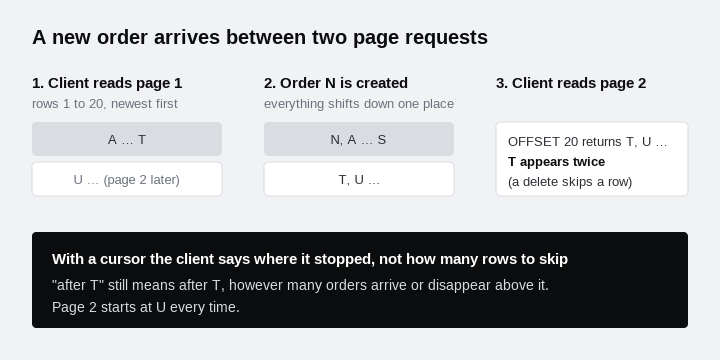
The new order goes to the top, every row moves down one place, and the last order of page 1 becomes the first order of page 2. A deleted row does the opposite: everything moves up one place and the client never sees one order.
Now the cost of deep pages. Time the first page and the last page:
curl -s -o /dev/null -w 'first page: %{time_total}s\n' "http://127.0.0.1:8000/orders/offset?limit=20"
curl -s -o /dev/null -w 'last page:  %{time_total}s\n' "http://127.0.0.1:8000/orders/offset?limit=20&offset=99980"
Ask SQLite how it runs the query. Python 3.15 includes a small SQLite command line as python -m sqlite3:
uv run python -m sqlite3 shop.db "EXPLAIN QUERY PLAN SELECT id FROM orders ORDER BY created_at DESC, id DESC LIMIT 20 OFFSET 99980"Check it worked
- The drift script prints
repeated on page 2:followed by a list with one order ID in it, such as[65805]. - The last page takes many times longer than the first. The exact times depend on your machine; something like 0.01 s against 0.17 s is typical.
- The plan shows
SCAN ordersandUSE TEMP B-TREE FOR ORDER BY: SQLite reads the whole table and sorts it in a temporary structure on every request.
Step 4 · Page by position with a cursor
A keyset query remembers the sort key of the last row the client saw, here the pair (created_at, id), and asks for rows that sort after it. Because the list is newest first, "after" means smaller:
SELECT ... FROM orders
WHERE (created_at, id) < (?, ?)
ORDER BY created_at DESC, id DESC
LIMIT 21
(created_at, id) < (?, ?) is a row-value comparison. It is true when created_at is earlier, or when created_at is equal and id is smaller. SQLite and PostgreSQL both support it. Including id is what makes the position exact when two orders share a second. The ORDER BY must use the same columns, in the same direction, as the comparison.
The query asks for one row more than the page size. If that extra row comes back, there is another page; you drop it from the response and do not need a separate COUNT.
Clients should not build that pair themselves. Wrap it in a cursor: the two values as compact JSON, encoded with URL-safe base64 so it travels in a query string without escaping. Clients treat it as an opaque string and pass it back unchanged, which leaves you free to change what is inside later.
Replace main.py with the full version. It keeps the offset endpoint for comparison and adds /orders:
cat > main.py <<'PY'
import base64
import json
import sqlite3
from contextlib import closing
from typing import Annotated

from fastapi import FastAPI, HTTPException, Query, Request, Response

DB_PATH = "shop.db"
MAX_LIMIT = 100
COLUMNS = "id, customer, total_minor, created_at"

app = FastAPI(title="Orders API")


def fetch(sql: str, params: tuple = ()) -> list[dict]:
    with closing(sqlite3.connect(DB_PATH)) as db:
        db.row_factory = sqlite3.Row
        return [dict(row) for row in db.execute(sql, params)]


def encode_cursor(created_at: str, order_id: int) -> str:
    raw = json.dumps([created_at, order_id], separators=(",", ":")).encode()
    return base64.urlsafe_b64encode(raw).decode().rstrip("=")


def decode_cursor(cursor: str) -> tuple[str, int]:
    try:
        padded = cursor + "=" * (-len(cursor) % 4)
        created_at, order_id = json.loads(base64.urlsafe_b64decode(padded))
        if not isinstance(created_at, str) or type(order_id) is not int:
            raise ValueError("wrong types")
        if not 0 < order_id < 2**63:
            raise ValueError("id out of range")
    except (ValueError, TypeError):
        raise HTTPException(status_code=400, detail="Invalid cursor")
    return created_at, order_id


@app.get("/orders/offset")
def list_orders_offset(
    limit: Annotated[int, Query(ge=1, le=MAX_LIMIT)] = 20,
    offset: Annotated[int, Query(ge=0)] = 0,
):
    items = fetch(
        f"SELECT {COLUMNS} FROM orders"
        " ORDER BY created_at DESC, id DESC LIMIT ? OFFSET ?",
        (limit, offset),
    )
    return {"items": items}


@app.get("/orders")
def list_orders(
    request: Request,
    response: Response,
    limit: Annotated[int, Query(ge=1, le=MAX_LIMIT)] = 20,
    cursor: str | None = None,
):
    if cursor is None:
        rows = fetch(
            f"SELECT {COLUMNS} FROM orders"
            " ORDER BY created_at DESC, id DESC LIMIT ?",
            (limit + 1,),
        )
    else:
        created_at, order_id = decode_cursor(cursor)
        rows = fetch(
            f"SELECT {COLUMNS} FROM orders"
            " WHERE (created_at, id) < (?, ?)"
            " ORDER BY created_at DESC, id DESC LIMIT ?",
            (created_at, order_id, limit + 1),
        )
    items = rows[:limit]
    next_url = None
    if len(rows) > limit:
        last = items[-1]
        next_cursor = encode_cursor(last["created_at"], last["id"])
        next_url = str(request.url.include_query_params(cursor=next_cursor, limit=limit))
        response.headers["Link"] = f'<{next_url}>; rel="next"'
    return {"items": items, "next": next_url}
PY
What each part does:
decode_cursorturns any malformed cursor, whether bad base64, bad JSON, the wrong shape, the wrong types or an id outside SQLite's 64-bit integer range, into a400 Invalid cursor. A client that edits a cursor gets an error, never a stack trace. The values still go into the query as parameters, so a crafted cursor cannot change the SQL.limitis capped atMAX_LIMIT. Without a cap, one request for a million rows can tie up the server and the database. Asking for more returns422with a clear message. Some APIs quietly lower the value instead; whichever you choose, document it.- The cursor is not encrypted. Anyone can decode it, so never put anything private in it. If clients must not be able to make their own cursors, sign it with an HMAC and reject cursors whose signature does not match.
Check it worked
Ask for two orders, then send a cursor that is not valid:
curl -s -w '\n' "http://127.0.0.1:8000/orders?limit=2"
curl -s -w '\n' "http://127.0.0.1:8000/orders?cursor=not-a-cursor"
The first response has two items and a next field holding a URL like http://127.0.0.1:8000/orders?cursor=WyIyMDI2LTEwLTMw...&limit=2. The second is {"detail":"Invalid cursor"}.
Step 5 · Follow the next links to the end
The response gives the next page in two places. The next field in the body suits front-end code. The Link header, defined in RFC 8288, is the standard place for it, and generic HTTP clients and tools can follow it without knowing your body format. Look at the header:
curl -s -D - -o /dev/null "http://127.0.0.1:8000/orders?limit=2" | grep -i '^link:'The link is built from request.url, so it uses the host and scheme the request came in on. Behind a reverse proxy, make sure the proxy passes the original host and scheme, or return relative links instead.
Now a client that walks every page by following the header. httpx parses Link headers into response.links:
cat > walk.py <<'PY'
import httpx

url = "http://127.0.0.1:8000/orders?limit=100"
ids, pages = [], 0
with httpx.Client(timeout=10.0) as client:
    while url:
        response = client.get(url)
        response.raise_for_status()
        ids.extend(order["id"] for order in response.json()["items"])
        pages += 1
        url = response.links.get("next", {}).get("url")

print(f"{pages} pages, {len(ids)} orders, {len(set(ids))} unique")
PY
uv run walk.py
On the last page there is no extra row, so there is no next link and the loop stops.
Check it worked
- The
curlcommand prints a line likelink: <http://127.0.0.1:8000/orders?cursor=...&limit=2>; rel="next". walk.pyprints1000 pages, 100000 orders, 100000 unique: every order exactly once.
Step 6 · Add the index the query needs
Without an index, the cursor query still scans and sorts the whole table to find its 21 rows. An index on the sort columns lets SQLite seek to the cursor's timestamp and read forward, checking id only on the few rows that share that exact second. SQLite can read an index in either direction, so (created_at, id) serves the newest-first order as well:
uv run python -m sqlite3 shop.db "CREATE INDEX IF NOT EXISTS orders_created_at_id ON orders (created_at, id)"In a real project, add the index in a migration so every environment gets it. Then look at the plan for the cursor query, selecting the same columns the API returns:
uv run python -m sqlite3 shop.db "EXPLAIN QUERY PLAN SELECT id, customer, total_minor, created_at FROM orders WHERE (created_at, id) < ('2026-10-02T00:00:00Z', 1) ORDER BY created_at DESC, id DESC LIMIT 21"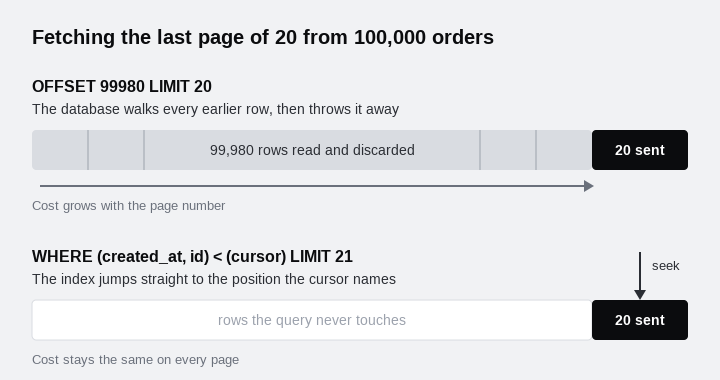
If the API filters too, for example by customer, the index needs the filter column first: (customer, created_at, id). Check every new filter with EXPLAIN QUERY PLAN before you ship it.
Check it worked
The plan shows SEARCH orders USING INDEX orders_created_at_id (created_at<?) and no TEMP B-TREE line. SEARCH means SQLite looks up a range in the index; SCAN means it reads everything. The (created_at<?) part is the seek: SQLite jumps to the timestamp, then the row-value comparison filters id on rows tied at that second. If you select only id, the line reads USING COVERING INDEX instead, because the index already holds every column that query needs.
Step 7 · Prove the pages are stable and fast
Run the drift test again, this time against the cursor endpoint. Page 2 comes from the next link of page 1:
cat > drift_cursor.py <<'PY'
import httpx

from orders_db import add_order, remove_order

first = httpx.get("http://127.0.0.1:8000/orders", params={"limit": 20}).json()
new_id = add_order("2026-11-01T09:00:00Z")  # newer than every seeded order
second = httpx.get(first["next"]).json()
remove_order(new_id)

seen = {order["id"] for order in first["items"]}
print("repeated on page 2:", [o["id"] for o in second["items"] if o["id"] in seen])
last, following = first["items"][-1], second["items"][0]
print("page 2 starts after page 1:", (following["created_at"], following["id"]) < (last["created_at"], last["id"]))
PY
uv run drift_cursor.py
Then compare the last page through both endpoints. bench.py imports the cursor helper from main.py, builds the cursor for the row just before the last page, and takes the median of 11 requests for each case:
cat > bench.py <<'PY'
import statistics
import time

import httpx

from main import encode_cursor, fetch

DEEP = 99_980  # the last page of 20 orders


def median_ms(client: httpx.Client, path: str, params: dict) -> float:
    times = []
    for _ in range(11):
        started = time.perf_counter()
        client.get(path, params=params).raise_for_status()
        times.append(time.perf_counter() - started)
    return statistics.median(times) * 1000


row = fetch(
    "SELECT created_at, id FROM orders"
    " ORDER BY created_at DESC, id DESC LIMIT 1 OFFSET ?",
    (DEEP - 1,),
)[0]
cursor = encode_cursor(row["created_at"], row["id"])

with httpx.Client(base_url="http://127.0.0.1:8000", timeout=10.0) as client:
    results = {
        "offset, first page": median_ms(client, "/orders/offset", {"limit": 20}),
        "offset, last page": median_ms(client, "/orders/offset", {"limit": 20, "offset": DEEP}),
        "cursor, last page": median_ms(client, "/orders", {"limit": 20, "cursor": cursor}),
    }

for name, ms in results.items():
    print(f"{name:20} {ms:7.2f} ms")
PY
uv run bench.pyCheck it worked
drift_cursor.pyprintsrepeated on page 2: []andpage 2 starts after page 1: True. The new order did not move the cursor.bench.pyprints three timings. The cursor's last page is about as fast as the first page, while the offset's last page is several times slower. On the writer's laptop the result was something like 2 ms, 7 ms and 2 ms. The index helped the offset query too, compared with the previous step, but it still walks 99,980 index entries on every request, and that cost keeps growing with the table.
When offsets are still fine
Cursors cannot jump to page 37, and they do not give a total page count for free. For a small admin table that people browse by page number, offset pagination is simpler and good enough. Use cursors for feeds, infinite scroll, exports, sync jobs and any large or busy table.
Step 8 · Clean up
Stop the development server with Ctrl+C in the second terminal. Then remove the project, which also deletes shop.db:
cd ~
rm -rf ~/orders-apiCheck it worked
ls ~/orders-api reports that there is no such file or directory, and curl http://127.0.0.1:8000/orders fails to connect.
Next steps
- Let clients filter and sort the same endpoint safely, and carry the sort into the cursor: add filtering and sorting to an API without opening an injection hole.
- Read query plans on a bigger database: speed up slow Postgres queries with EXPLAIN.
- Go back over the basics of routes, models and status codes: build a REST API with FastAPI.
- Decide which resources need list endpoints in the first place: design REST endpoints, resources, methods and status codes.
Part of these paths
Related tutorials
- Add filtering and sorting to an API without opening an injection holeYou will turn a products endpoint into one that accepts status, price, search and sort parameters, and prove that the injection attacks which break a naive version are rejected by yours.
- How to Find and Fix Slow PostgreSQL Queries with EXPLAIN ANALYZEYou will read a PostgreSQL 18 query plan, add an index that turns a 40 ms table scan into a 0.2 ms lookup, and use pg_stat_statements to find which queries deserve that effort.
- How to Build a REST API with FastAPIYou will build a small items API with FastAPI 0.163 on Python 3.15 that validates its input, returns the right HTTP status codes, never shows a stack trace to callers, documents itself, and has automated tests.
Need this done for you?
Padding does this work for growing companies, from the first diagnosis to a system that keeps working.
Get new tutorials