UX and research · Beginner · 14 min
Plan a project with the double diamond
By Padding · Updated 18 Nov 2026
Any notes app, a spreadsheet and a calendar · November 2026
You will have a two-week project plan drawn as a double diamond, with dated phases, the activities and outputs for each, two decision gates and a note of what each shortcut would cost.
On this page
The double diamond is usually shown as a picture of how design thinking works: spread out, narrow down, spread out again, narrow down again. That picture is more useful as a schedule. Each half of each diamond is a phase with a start date, an end date, a piece of work it produces and a decision that closes it. Once you write those down, you can see where your time goes and what you lose if a phase gets squeezed.
In this tutorial you plan a real-sized project with it. The example is Larkfield Clinic, a fictional community clinic that wants patients to book appointments online: choose a service, pick a time, enter their details, confirm, and get a reminder. The team is one designer, one product manager and two developers who join at the end. The budget is two working weeks, Monday 23 November to Friday 4 December 2026.
You will end with one page you can share: the four phases with dates, what happens in each, what each phase hands to the next, two decision gates with named owners, and a short list of the cuts you would make under pressure and what each would cost. Use your own project instead of Larkfield if you have one; the steps are the same.
Step 1 · Fix the question, the deadline and the people
Before you split any time, write down the three things the plan has to respect. Open a new document and add these headings with one or two lines under each:
- The question. What the project is trying to find out or change, phrased as a question rather than a feature. For Larkfield: "How might patients book a routine appointment without phoning the clinic?" Not "Build an online booking app", which decides the answer before you start.
- The fixed end. The date the work must be handed over, and what "handed over" means. For Larkfield: Friday 4 December, final screens and notes ready for the two developers to start building on Monday 7 December.
- Who you need, and when. People outside the team whose time you have to book. For Larkfield: three or four patients to interview, the two reception staff who take booking calls, the clinic manager who signs off decisions, and five patients for a test session.
Count the working days between your start and end dates. Larkfield has ten. That number is the whole budget; every phase you plan comes out of it.
Check it worked
Your document has three headings: the question, the fixed end and the people. The question ends in a question mark and names no screens or features. You have written down the number of working days, and it matches a count on your calendar.
Step 2 · Split the days across the four phases
Now divide the working days between the four phases. A useful starting split for a short project is about 30 per cent discover, 10 per cent define, 40 per cent develop and 20 per cent deliver. On ten days that gives:
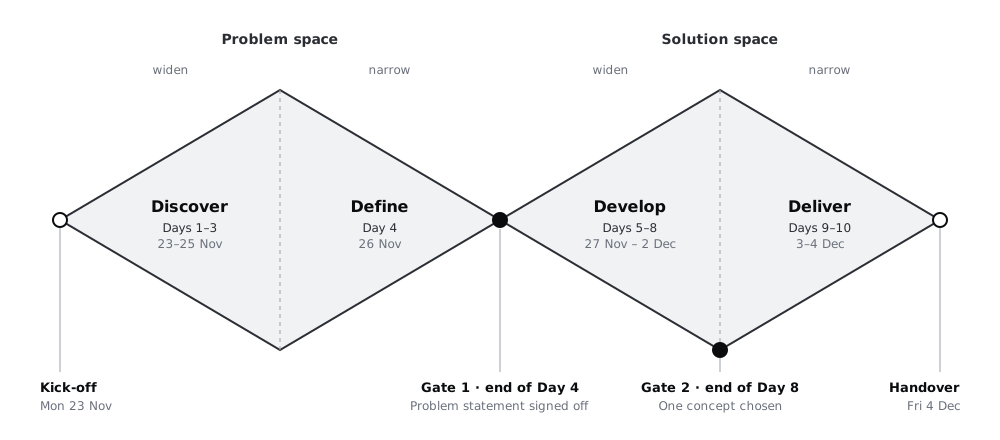
- Discover: Days 1–3, Monday 23 to Wednesday 25 November
- Define: Day 4, Thursday 26 November
- Develop: Days 5–8, Friday 27 November to Wednesday 2 December
- Deliver: Days 9–10, Thursday 3 and Friday 4 December
Adjust the split to your project, not the other way round. If you already have recent research on the people you are designing for, discover can shrink. If the problem is new to everyone, give discover more and take it from develop, not from define.
Put the phases in your calendar as all-day blocks so everyone on the team sees the same dates. Then add one row to your spreadsheet per day (Day 1 to Day 10, with the real date beside it) and a column for the phase.
Check it worked
Your spreadsheet has one row per working day, each with a date and a phase, and the phase totals add up to the number of days you counted in the first step. The same four blocks appear in your calendar.
Step 3 · Plan discover as a list of questions with sources
Discover is the first widening: you collect more than you will use, on purpose, because you do not yet know which part of the problem matters most. The risk is that it never ends. Planning it as a short list of questions, each with a source, gives it an end.
Write three to five questions you need answered before you can define the problem. Beside each, name where the answer will come from and which day you will get it. For Larkfield:
- Why do patients phone instead of using the clinic's website now? From interviews with three or four patients on Days 1 and 2.
- What does reception do during a booking call that a screen would have to do? From sitting with the reception staff for a morning on Day 1.
- Which appointment types could be booked without a clinician's judgement? From the clinic manager on Day 2.
- What do patients miss or forget after booking? From the interviews, and from the clinic's record of missed appointments if it keeps one.
Keep Day 3 free of new sessions. Use it to sort your notes into themes and write down what surprised you. That day is easy to give away; if you do, you start define with raw notes instead of findings.
The output of discover is a page of findings: short statements, each traced back to a note or a person. It is not a solution list. If ideas for screens come up, park them at the bottom of the page for develop.
Check it worked
Your plan lists three to five discover questions, and every one has a named source and a day. Day 3 has no interviews or observation booked. You have a heading for the findings page and a separate "parked ideas" heading under it.
Step 4 · Plan define and the first decision gate
Define is the first narrowing. It turns the findings into a single problem statement the whole team agrees to design for. On a two-week project it is one day, and the day ends in a decision.
Plan the day as two blocks. In the morning, the designer and product manager go through the findings and draft two or three candidate problem statements. In the afternoon, they meet the clinic manager for an hour, choose one, and write it into the plan. A statement for Larkfield might read: "Patients who book routine appointments need to see and choose a free slot without waiting on the phone, because the line is busiest when they are free to call."
Write the gate into the plan as its own line:
- Gate 1, end of Day 4. Decision: which problem statement the team designs for. Owner: the clinic manager. Input: the findings page and the candidate statements. If no decision is made: develop does not start; Day 5 becomes a second define day and develop loses a day.
Naming the owner matters more than the format. A gate without an owner turns into a discussion that carries on into develop, where every sketch reopens it.
Check it worked
Day 4 in your spreadsheet has a morning and an afternoon entry, and the afternoon one names the person who decides. Your plan has a "Gate 1" line with a decision, an owner, its inputs and what happens if it slips.
Step 5 · Plan develop as widen, test, then choose
Develop is the second widening. The team produces several different answers to the problem statement before committing to one. On Larkfield this phase has four days, and it is where the screens (Home, Choose a service, Pick a time, Your details, Confirm, Booked) first appear.
Give each day one job:
- Day 5: sketch widely. Each person sketches at least three different ways to get a patient from Home to Booked. Different means different: a calendar-first flow and a service-first flow, not the same flow with two button styles.
- Day 6: pick two and make them clickable. Choose the two strongest directions and turn each into a rough, clickable prototype. Rough is fine; testers need to tap through it, not admire it.
- Day 7: test with five patients. Ask each to book a routine appointment on both versions. Book these sessions during the first step, because people need notice.
- Day 8: choose and firm up. Compare what you saw, pick one direction, and fold in the best parts of the other.
Add the second gate:
- Gate 2, end of Day 8. Decision: which concept goes into deliver. Owner: the product manager, with the clinic manager informed. Input: test notes from Day 7. If no decision is made: deliver starts late and the handover on Day 10 carries open questions.
Check it worked
Days 5 to 8 each have a single job written beside them. Day 7 names how many people will test and when they are booked. Your plan has a "Gate 2" line with a decision, an owner, its inputs and what happens if it slips.
Step 6 · Plan deliver around the handover
Deliver is the second narrowing. The chosen concept becomes something the developers can build from. Work backwards from the handover: write down exactly what the developers will receive, then fit the two days to it.
For Larkfield, the handover pack is:
- final versions of the six screens, including what Pick a time shows when no slots are free
- the reminder message text and when it is sent
- a short list of decisions made in testing, so nobody reverses them by accident
- open questions, each with an owner
Plan Day 9 for finishing the screens and the empty, error and loading states that testing showed up. Plan Day 10 morning for a review with the clinic manager and the afternoon for a one-hour walkthrough with the developers.
Check it worked
Your plan lists every item in the handover pack, and Day 10 has a walkthrough booked with the people who will build it. Nothing in the pack is new work that has not been planned for Day 9.
Step 7 · Write down the cuts and what they cost
Two-week plans get squeezed. Decide now where you would cut, so the cut is a choice and not an accident. Add a short section called "If we lose time" with one line per cut.
These are the cuts teams most often make, and what they cost on a project like Larkfield:
- Skipping discover and starting from the request. The team builds what was asked for, an online booking app, without learning that most missed appointments come from patients forgetting, not from booking. The reminder gets one line in the spec instead of the attention it needed. Cost: you design for the wrong problem and find out after launch.
- Folding define into develop. No problem statement is agreed, so each sketch is judged against a different idea of success. Cost: Days 5 to 8 turn into a debate, and the chosen concept is the one with the loudest supporter.
- Developing one idea only. The first sketch goes straight to a polished prototype. Cost: the test on Day 7 can only tell you whether that idea is usable, never whether another would have been better.
- Dropping the test. Cost: the first real patients find the problems, after the developers have built it.
- Squeezing deliver to an hour. Cost: the developers fill the gaps themselves, and the states nobody drew (no free slots, a failed booking) ship in whatever form is quickest.
For your own plan, pick the one cut you would accept first and the one you would refuse. On Larkfield, a sensible first cut is reducing interviews from four to three; the cut to refuse is dropping the Day 7 test.
Check it worked
Your plan has an "If we lose time" section with at least three cuts, each with a sentence on what it costs. One cut is marked as acceptable first and one as refused.
Step 8 · Draw the plan on one page
Finish by putting the plan in a form people will read: a ten-column grid, one column per working day, with rows for phase, main output, decision and who is involved. Build it in your spreadsheet by merging cells across each phase, or draw it in any whiteboard or slides tool. Put the double-diamond drawing above it so readers see the shape and the dates together.
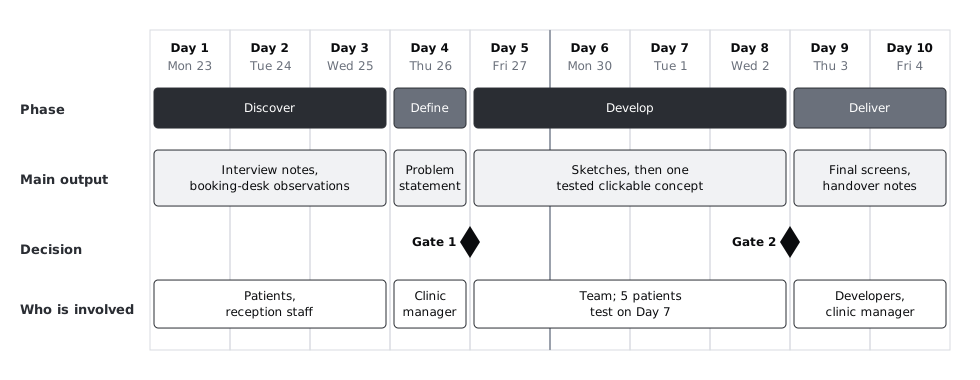
Share the page with everyone named in it, and ask the two gate owners to confirm their dates in writing. A gate owner who has not seen the date is the most common reason a gate slips.
Check it worked
You have one page with the diamond drawing and the ten-day grid. Every phase has dates and an output, both gates have an owner, and every person named in the plan has been sent the page.
Next steps
- Before discover starts, turn the Larkfield request into a user-centred brief.
- Plan the discover interviews in detail: write a one-page research plan.
- Get the Gate 1 statement right: write a problem statement before you design.
Part of these paths
Related tutorials
- Turn a feature request into a user-centred design briefYou will turn a one-line request into a one-page brief that names the people affected, what they are trying to get done, what is known and what is guessed, ready to hand to a team.
- Write a one-page research planYou will have a research plan that fits on one page, with every question tied to a decision, and a stakeholder sign-off you got in a five-minute read.
Need this done for you?
Padding does this work for growing companies, from the first diagnosis to a system that keeps working.
Get new tutorials