Programming fundamentals · Beginner · 17 min
Read a Python traceback and fix the error it points to
By Padding · Updated 18 Nov 2026
Python 3.15.2 · python:3.15-slim (Debian)
You will run six short broken Python scripts, read each traceback from the bottom up to find the exception, the message and the line at fault, fix all six and keep a personal error log for the next time.
On this page
When a Python program stops with an error, it prints a traceback: a block of text that says what went wrong, on which line, and how the program got there. Beginners often scroll past it, or read the first line and give up. The first line is the least useful part. The answer is almost always at the bottom.
In this tutorial you write six short scripts, each with one mistake that beginners make every week. You run each one, read the traceback from the bottom up, fix the line it points to and run it again. The scripts use a small spending example, with amounts as whole numbers in your own currency: naira, shillings, cedis, rand or anything else. By the end all six run cleanly, and you have a plain text error log that records what each error meant and how you fixed it.
The examples use python3. On Windows outside WSL, type py instead. On an Android phone, the Termux app installs Python with pkg install python; nothing in this tutorial downloads anything after that, so it runs offline and uses no mobile data.
Step 1 · Read a traceback from the bottom up
Make a folder for this tutorial and check your Python version:
mkdir -p ~/traceback-demo
cd ~/traceback-demo
python3 --version
Now write a script with three functions calling each other and one typo in the last of them:
cat > spending.py <<'PY'
def add_up(amounts):
    total = 0
    for amount in amounts:
        total = total + amount
    return totl


def report(amounts):
    total = add_up(amounts)
    print("Spent this week:", total)


report([1200, 450, 3000])
PY
python3 spending.py || echo "exit status $?"
The || echo "exit status $?" part runs only when the script fails, and prints the exit status Python returned. Any status other than 0 means the program stopped with an error.
The output looks something like this. The path in each File line is your own folder:
Traceback (most recent call last):
  File "/home/you/traceback-demo/spending.py", line 13, in <module>
    report([1200, 450, 3000])
    ~~~~~~^^^^^^^^^^^^^^^^^^^
  File "/home/you/traceback-demo/spending.py", line 9, in report
    total = add_up(amounts)
  File "/home/you/traceback-demo/spending.py", line 5, in add_up
    return totl
           ^^^^
NameError: name 'totl' is not defined. Did you mean: 'total'?
exit status 1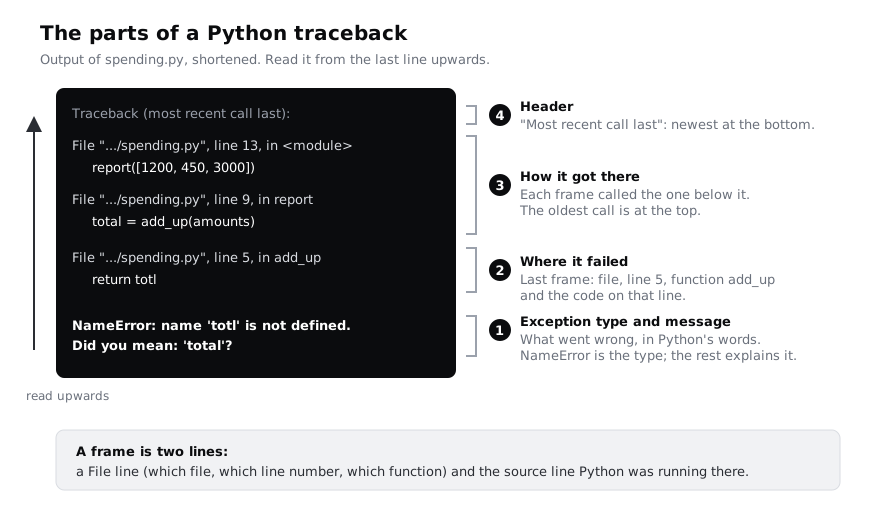
Read it in this order:
- The last line names the exception type,
NameError, and a message. ANameErrormeans Python met a name it has never been given a value for. Since Python 3.10 the message often ends with a suggestion, hereDid you mean: 'total'?. - The last
Fileline above it says where it happened:spending.py, line 5, inside the functionadd_up. The line below it is the code Python was running, and the^^^^markers underline the exact part that failed. - The
Filelines further up are the call chain. Each pair of lines is one frame: a function that was running when the error happened.<module>means the top level of the file. Line 13 calledreport, line 9 insidereportcalledadd_up, and line 5 insideadd_upfailed. You need the chain when the failing line is fine and the bad value came from the caller. - The header,
Traceback (most recent call last), tells you the order: the most recent call is at the bottom, which is why you read upwards.
In a terminal, Python 3.13 and later colour the traceback. If the colours are hard to read on your screen, set the environment variable PYTHON_COLORS=0 to turn them off.
The fix is on line 5. Rewrite the script with total spelled correctly:
cat > spending.py <<'PY'
def add_up(amounts):
    total = 0
    for amount in amounts:
        total = total + amount
    return total


def report(amounts):
    total = add_up(amounts)
    print("Spent this week:", total)


report([1200, 450, 3000])
PY
python3 spending.pyCheck it worked
The first run printed a traceback ending in NameError: name 'totl' is not defined, followed by exit status 1. After the fix the script prints Spent this week: 4650 and no traceback.
Step 2 · Fix a TypeError from adding text and a number
A TypeError means an operation got a value of the wrong type. The classic case is joining text and a number with +:
cat > receipt.py <<'PY'
item = "Bread"
price = 1500
line = item + ": " + price
print(line)
PY
python3 receipt.py || echo "exit status $?"
There is only one frame this time, because no function was called: the error is at the top level, line 3. The last line reads TypeError: can only concatenate str (not "int") to str. Translated: + with text on the left can only add more text (str), and it was given a whole number (int). The ^ under the second + shows which of the two additions failed: item + ": " worked, and adding price did not.
Python never turns a number into text by itself. Convert it with str():
cat > receipt.py <<'PY'
item = "Bread"
price = 1500
line = item + ": " + str(price)
print(line)
PY
python3 receipt.py
An f-string, f"{item}: {price}", does the same job and is what most Python code uses.
Check it worked
The broken version ends with TypeError: can only concatenate str (not "int") to str. The fixed version prints Bread: 1500.
Step 3 · Fix an IndexError and then a KeyError
Two errors come from asking a container for something it does not have. This script makes both mistakes, one after the other:
cat > lookups.py <<'PY'
days = ["Mon", "Tue", "Wed", "Thu", "Fri", "Sat", "Sun"]
print("Last day:", days[7])

budget = {"food": 20000, "transport": 8000, "data": 5000}
print("Airtime budget:", budget["airtime"])
PY
python3 lookups.py || echo "exit status $?"
The last line is IndexError: list index out of range, on line 2. The list has seven items, and positions count from 0, so the last one is days[6]. There is no days[7]. Notice that only the first mistake is reported: Python stops at the first error, so line 5 never ran. Fix line 2 using days[-1], which always means the last item:
cat > lookups.py <<'PY'
days = ["Mon", "Tue", "Wed", "Thu", "Fri", "Sat", "Sun"]
print("Last day:", days[-1])

budget = {"food": 20000, "transport": 8000, "data": 5000}
print("Airtime budget:", budget["airtime"])
PY
python3 lookups.py || echo "exit status $?"
Now the script gets further. It prints Last day: Sun, then a new traceback ending in KeyError: 'airtime'. A KeyError message is only the key that was missing, with no explanation, which puzzles people the first time. It means the dictionary has no entry called 'airtime'; it has food, transport and data.
Fixing one error and meeting the next is normal. It means progress, not a new problem. Decide what a missing key should mean. Here, a category with no budget should count as 0, which is what dict.get with a default does:
cat > lookups.py <<'PY'
days = ["Mon", "Tue", "Wed", "Thu", "Fri", "Sat", "Sun"]
print("Last day:", days[-1])

budget = {"food": 20000, "transport": 8000, "data": 5000}
print("Airtime budget:", budget.get("airtime", 0))
PY
python3 lookups.py
If the key should always be there, .get would hide a real mistake. In that case fix the spelling of the key, or add the entry to the dictionary.
Check it worked
You saw two different tracebacks: first IndexError: list index out of range on line 2, then KeyError: 'airtime' on line 5. The fixed script prints Last day: Sun and Airtime budget: 0.
Step 4 · Fix an AttributeError on None
This error looks like it is about one line, but the cause is somewhere else. The function below looks for an item in a basket. It returns the item when it finds it, and nothing when it does not:
cat > find_item.py <<'PY'
def find_item(items, wanted):
    for item in items:
        if item.lower() == wanted.lower():
            return item


basket = ["Rice", "Beans", "Palm oil"]
found = find_item(basket, "sugar")
print("Found:", found.upper())
PY
python3 find_item.py || echo "exit status $?"
The last line is AttributeError: 'NoneType' object has no attribute 'upper', on line 9. An attribute is anything after a dot, such as .upper. NoneType is the type of None, Python's value for "nothing". So found was None, and None has no .upper().
Line 9 is where the program noticed, not where the None came from. Follow the value back: found was set on line 8 by find_item, and a Python function that ends without reaching a return gives back None. "sugar" is not in the basket, so the loop finished and the function returned None. The fix is to handle the "not found" case before using the result:
cat > find_item.py <<'PY'
def find_item(items, wanted):
    for item in items:
        if item.lower() == wanted.lower():
            return item


basket = ["Rice", "Beans", "Palm oil"]
found = find_item(basket, "sugar")
if found is None:
    print("Not in the basket")
else:
    print("Found:", found.upper())
PY
python3 find_item.py
When you see 'NoneType' object has no attribute, ask "which function returned nothing?", not "what is wrong with this line?".
Check it worked
The broken script ends with AttributeError: 'NoneType' object has no attribute 'upper'. The fixed script prints Not in the basket. Change "sugar" to "beans" and run it again, and it prints Found: BEANS.
Step 5 · Fix a SyntaxError reported on the wrong line
A SyntaxError is different from the errors so far. Python reads the whole file before running any of it, and if the file is not valid Python it runs nothing. There is no Traceback (most recent call last) header and no call chain, because no code ran: you get one File line, the code, a ^ marker and the message.
cat > budget.py <<'PY'
budget = {
    "food": 20000,
    "transport": [8000, 2000,
    "data": 5000,
}
print(budget)
PY
python3 budget.py || echo "exit status $?"
The output is something like this:
  File "/home/you/traceback-demo/budget.py", line 5
    }
    ^
SyntaxError: closing parenthesis '}' does not match opening parenthesis '[' on line 3
exit status 1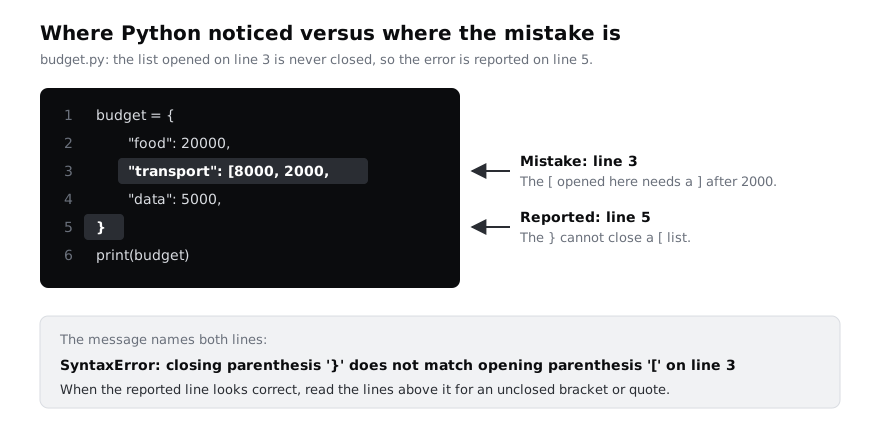
Python reports line 5, and there is nothing wrong with the } on line 5. Python noticed the problem there: it was still inside the list that started on line 3, and a } cannot close a list. The real mistake is the missing ] on line 3, and here the message says so: on line 3. Not every message is that helpful, so keep one habit: when the reported line looks correct, look at the lines above it for an unclosed bracket, quote or brace.
Close the list on line 3:
cat > budget.py <<'PY'
budget = {
    "food": 20000,
    "transport": [8000, 2000],
    "data": 5000,
}
print(budget)
PY
python3 budget.pyCheck it worked
The broken file printed no Traceback header, only the File ... line 5 line and a SyntaxError. The fixed file prints {'food': 20000, 'transport': [8000, 2000], 'data': 5000}.
Step 6 · Fix an IndentationError
In Python, indentation is part of the syntax: the lines that belong to a function, loop or if are the ones indented under it. An IndentationError is a kind of SyntaxError, so again nothing runs:
cat > average.py <<'PY'
def average(prices):
total = sum(prices)
    return total / len(prices)


print(average([1200, 450, 3000]))
PY
python3 average.py || echo "exit status $?"
The message reads IndentationError: expected an indented block after function definition on line 1, and the marker points at line 2. Python saw def average(prices): on line 1, so it expected the next line to be indented. Line 2 starts at the left edge, which ends the function before it has a body. Here the reported line is the one to fix. Indent it by four spaces, the same as line 3:
cat > average.py <<'PY'
def average(prices):
    total = sum(prices)
    return total / len(prices)


print(average([1200, 450, 3000]))
PY
python3 average.py
A related error, TabError: inconsistent use of tabs and spaces in indentation, comes from mixing tab characters and spaces. Set your editor to insert four spaces when you press Tab, and it does not happen.
Check it worked
The broken file ends with IndentationError: expected an indented block after function definition on line 1. The fixed file prints 1550.0.
Step 7 · Search an error and start your error log
You will meet errors this tutorial did not cover. When the traceback alone is not enough, search for it in a way that finds people who had the same problem:
- Copy the last line only, not the whole traceback.
- Remove what is yours: your variable names (
'totl','airtime'), file paths and numbers. Nobody else has them, so they make results worse. - Keep the exception type and Python's fixed wording, add the word
python, and put the wording in quotes. For the receipt error that ispython TypeError "can only concatenate str". - Check the date and the Python version on any answer. Advice written for Python 2 is still online and often wrong now.
The official list of built-in exceptions, at docs.python.org under Library, Built-in Exceptions, explains every type you met here. Python also carries that documentation offline, which saves data on a prepaid plan. Save the help for KeyError to a file and look at the start of it:
python3 -m pydoc KeyError > keyerror-help.txt
head -n 4 keyerror-help.txt
If you paste an error into an AI assistant, paste the whole traceback and the code it points to, not only the last line. Treat the answer as a suggestion: apply the fix, run the script again and read the new output yourself before you trust it.
Finally, start a personal error log. Each time an error costs you more than a few minutes, write down the last line, what it meant and what fixed it. The file below holds the six from this tutorial; change the wording to your own as you go, because explaining it to yourself is what makes it stick:
cat > error-log.txt <<'TXT'
NameError: name 'totl' is not defined
  Meant: I used a name that was never given a value.
  Fix: a typo; spell it the same as where it was created.

TypeError: can only concatenate str (not "int") to str
  Meant: I added text and a number with +.
  Fix: str(number), or an f-string.

IndexError: list index out of range
  Meant: I asked for a position past the end of a list. Positions start at 0.
  Fix: use the right index; items[-1] is the last item.

KeyError: 'airtime'
  Meant: the dictionary has no key called 'airtime'.
  Fix: correct the key, or use .get(key, default) when missing is allowed.

AttributeError: 'NoneType' object has no attribute 'upper'
  Meant: the value was None. Find the function that returned nothing.
  Fix: handle the None case before using the value.

SyntaxError: closing parenthesis '}' does not match opening parenthesis '['
  Meant: a bracket opened earlier was never closed.
  Fix: look above the reported line for the unclosed bracket or quote.

IndentationError: expected an indented block
  Meant: a line after def, if, for or while was not indented.
  Fix: indent the body by four spaces.
TXT
for script in spending receipt lookups find_item budget average; do
  python3 "$script.py"
done
The for loop runs all six fixed scripts in turn. If any of them still failed, its traceback would appear between the others' output.
Check it worked
head prints Help on class KeyError in module builtins:, a blank line, then class KeyError(LookupError) and its one-line description. The loop prints seven lines and no traceback: Spent this week: 4650, Bread: 1500, Last day: Sun, Airtime budget: 0, Not in the basket, the budget dictionary and 1550.0. Run cat error-log.txt to see your log.
Keep error-log.txt somewhere you will find it again, for example in your notes folder. When you are done with the scripts, delete the demo folder:
cd ~
rm -rf ~/traceback-demo
Next steps
- Handle errors you expect, such as a bad number typed at the keyboard, instead of letting them crash the program: handle errors with try and except in Python.
- When there is no traceback and the program gives the wrong answer, use a method: find a bug step by step.
- Stop a program on any line and look at its values while it runs: debug Python with breakpoint and pdb.
Part of these paths
Related tutorials
- Handle errors with try and except in PythonYou will break a small file-averaging script three ways on purpose, then catch each error by name, raise your own clear errors, and end with a script that reports exactly what went wrong and exits with the right status.
- Find a bug step by step: reproduce, isolate, fix and checkYou will track down a wrong total in a short Python script by reproducing it, shrinking the input, testing one hypothesis at a time, fixing it, adding a test and writing a bug report.
- Step through Python code with breakpoint() and pdbYou will pause a Python script that prints the wrong average, step through it line by line with pdb, find and fix the bug without adding a single print, and inspect a crash after it happens.
Need this done for you?
Padding does this work for growing companies, from the first diagnosis to a system that keeps working.
Get new tutorials