Business tech · Intermediate · 17 min
Reconcile online payments with your accounts
By Padding · Updated 18 Nov 2026
Any accounting tool and a provider settlement export · November 2026
You will reconcile one month of online payments through a clearing account, so every fee, refund, chargeback and payout is recorded and the account ends the month at zero, and you will have a written routine for doing it again each month.
On this page
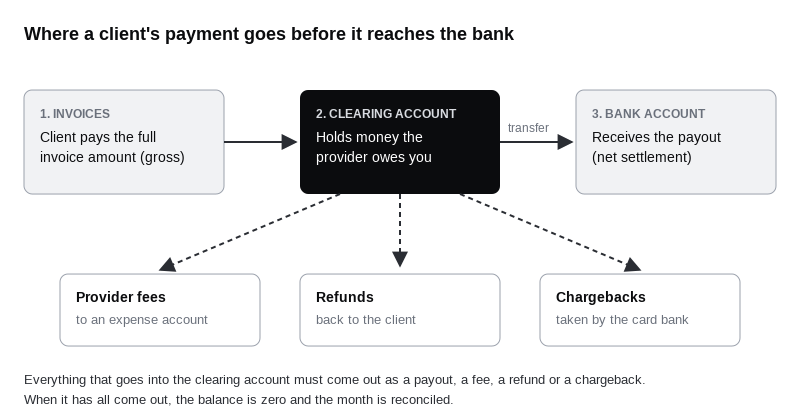
When a client pays an invoice online, the money does not go straight to your bank. The payment provider collects the full amount, takes its fee, holds back any refunds or chargebacks, and some days later pays the rest into your bank in one lump that may cover several clients. Your bank statement shows that lump. Your invoices show the full amounts. Neither matches the other, and if you try to tick one against the other the fees and refunds disappear from your books.
The fix is a clearing account: an account in your books that stands for "money the provider is holding for us". Client payments go in at their full amount. Fees, refunds, chargebacks and payouts come out. When every item has come out, the balance is zero, and you know the month is complete.
This tutorial reconciles November for Ember Studio, a fictional seven-person design agency based in Lagos. Ember uses Zoho Books (Nigeria edition, home currency naira) and takes card and transfer payments through Paystack, which pays out to its naira account. The method works the same in any accounting tool and with any provider that gives you a settlement or payout report; the menu names differ, so this tutorial names a menu only where the vendor's own help page does. All amounts and fees in the example are invented.
This is not accounting or tax advice. Ask your accountant to approve the accounts you create in the first step before you post real entries to them.
Step 1 · Create the clearing account and two helper accounts
Open your chart of accounts and add three accounts. Use names your accountant will recognise, and write the names down, because you will use them every month.
- Paystack clearing (or the name of your provider). In Zoho Books, choose the account type Payment Clearing; in other tools, use a bank or current-asset type that you can transfer to and from. Set its currency to the currency your provider settles in, here naira.
- Payment provider fees: an expense account for the fees the provider keeps.
- Unidentified receipts: a current-liability account for money that arrives and matches no invoice. It is a holding place, never income.
If your provider settles in more than one currency (for example a naira payout and a dollar payout to a domiciliary account), create one clearing account per settlement currency.
Check it worked
Your chart of accounts lists all three accounts, each with a zero balance and the type you chose. Your accountant has replied in writing to say the types and names are acceptable.
Step 2 · Export the month's reports from your provider
You need four exports from the provider and one from your bank, all for the same month:
- Payouts (sometimes called settlements): one row per payout to your bank, with its date and amount.
- Transactions: one row per client payment, with the gross amount, the fee and the customer's email or reference.
- Refunds: each refund, its amount and the payment it refunds.
- Disputes or chargebacks: each one, its amount and its outcome.
- Bank statement: from your bank feed, or a statement file downloaded from your bank and imported into your accounting tool.
On Paystack, the Transactions, Refunds, Disputes and Payouts pages each have an export button, and large exports arrive by email. Set each page to the month before you export, then check the first and last rows of every file fall inside it.
Use the payment date to decide which month a payment belongs to, and the payout date for payouts. The two do not line up at the edges: a payment taken on 30 November may be paid out on 1 or 2 December, and payouts often skip weekends and public holidays. A payment taken in the month but paid out in the next is in transit. Note the net amount (gross minus fee) of each in-transit payment at the start of the month (from last month's working sheet) and at the end of this one. For the end of the month, look at the first payouts of the next month and see which of your payments they contain.
If you work over prepaid mobile data, download the exports on a laptop over Wi-Fi where you can: CSV files are small, but dashboards are not, and a half-loaded export page wastes data.
Put the provider's totals at the top of a working sheet:
Month: November 2026              Settlement currency: NGN
In transit at 31 Oct (net)                0
Gross payments taken in Nov       3,515,000
Fees                                -42,975
Refunds                             -30,000
Chargebacks                        -120,000
In transit at 30 Nov (net)                0
Expected payouts                  3,322,025
Payouts in report                 3,322,025
Difference 0Check it worked
The difference line on your working sheet is zero: last month's in-transit amount, plus gross payments, minus fees, refunds, chargebacks and this month's in-transit amount, equals the total of the payouts report. Ember had nothing in transit at either end of November, so both in-transit lines are zero. If the difference is not zero, the exports cover different dates, one export is missing a page, or an in-transit payment has been missed. Fix that before you touch your books.
Step 3 · Match each payout to a bank deposit
Open the bank account in your accounting tool and list the deposits from your provider for the month. Put them in your working sheet next to the payouts report, one row each:
Payout date | Payout amount | Bank date | Bank amount | Payments in this payout
04 Nov      |   247,000     | 04 Nov    |   247,000   | INV-1041
09 Nov      |   597,000     | 09 Nov    |   597,000   | INV-1043
13 Nov      |   177,300     | 13 Nov    |   177,300   | INV-1046
17 Nov      |    73,875     | 17 Nov    |    73,875   | (no invoice)
23 Nov      | 1,949,850     | 23 Nov    | 1,949,850   | INV-1048, less refund on INV-1046
27 Nov      |   277,000     | 27 Nov    |   277,000   | INV-1050, less chargeback on INV-1032
To fill the last column, open the payout in your provider's dashboard and use its own list of the payments it contains, if it shows one. If it does not, match by amount: each payment's gross minus its fee, less any refund or chargeback taken from that payout, should add up to the payout.
Now record each deposit in your accounting tool as a transfer from the clearing account into the bank, not as income and not as a payment on an invoice. In Zoho Books this is categorising the deposit as Transfer From Another Account and choosing the clearing account as the source; the tool then posts the matching credit to the clearing account for you.
A bank deposit that is a few naira lower than the payout usually means your bank charged a fee for receiving it. Record the difference as a bank charge, not a provider fee.
Check it worked
Every payout in the report has one bank deposit with the same amount, and every provider deposit in the bank has a payout. In your accounting tool, the bank account shows no unmatched provider deposits for the month, and the clearing account now has a balance equal to last month's in-transit amount minus the payouts total (for Ember, with nothing in transit at 31 October, minus 3,322,025). That negative balance is expected; the next step fills it.
Step 4 · Record each client payment at its gross amount
For each row in the transactions export, open the matching invoice and record a payment for the full amount the client paid, with the clearing account as the account the money was paid into. Use the payment date from the provider, not the payout date, so each payment lands in the month it was taken.
Record the fee on the same entry if your tool allows it. Zoho Books lets you enter bank charges while recording an invoice payment; enter the provider fee there and point it at Payment provider fees if your accountant agrees. If your tool has no fee field, record the payment at the gross amount and post the fees in the next step.
Ember's November payments, gross and fee. The fees here are illustrative round numbers for the example, not Paystack's rates; use the fee column from your own export.
03 Nov  INV-1041  Adeyemi Foods     250,000   fee  3,000
07 Nov  INV-1043  Kora Health       600,000   fee  3,000
12 Nov  INV-1046  Lumen Books       180,000   fee  2,700
14 Nov  (none)    t.okafor@...       75,000   fee  1,125
20 Nov  INV-1048  Harbour Lane Ltd  GBP 1,000 (settled as 2,010,000)  fee 30,150
26 Nov  INV-1050  Adeyemi Foods     400,000   fee  3,000
Leave the payment with no invoice and the GBP payment for later steps.
Check it worked
INV-1041, INV-1043, INV-1046 and INV-1050 show as paid in full in your accounting tool, each with a payment dated on the provider's payment date and paid into the clearing account. None of them shows a balance due of the fee amount, which is what happens if you record the net figure by mistake.
Step 5 · Record refunds and chargebacks
Refunds and chargebacks reduce your payouts, so they must come out of the clearing account too.
Refunds. Ember refunded Lumen Books 30,000 on 20 November for an item it had charged twice. Paystack took the refund from the next pending payout, which is why the 23 November payout is lower. In your accounting tool, raise a credit note against INV-1046 for 30,000 and record the refund as paid from the clearing account. The fee on the original payment stays as a cost: Paystack does not return the transaction charge when you refund, and many providers work the same way. Check your own provider's refund policy.
Chargebacks. On 25 November a cardholder's bank reversed an October payment of 120,000 for INV-1032, and Paystack deducted it from the 27 November payout. Do not edit or delete the October payment: October is already reconciled and locked. Instead, post a journal entry dated 25 November that takes 120,000 out of the clearing account and puts it into accounts receivable for that client (or a chargebacks receivable account, if your accountant prefers one), with a note naming INV-1032 and the dispute reference. The client then owes 120,000 again, in November's books. Ask your accountant to confirm the entry before you post it. Then decide with whoever owns the client relationship whether to ask the client to pay another way or write the amount off. If your provider charges a separate dispute fee, post it to Payment provider fees.
Chargebacks have short deadlines. On Paystack, a business based in Nigeria must respond within 16 hours or the chargeback is accepted automatically, so someone needs dispute notifications on their phone, not only in a finance inbox that is read once a week.
Check it worked
INV-1046 shows a credit note of 30,000 and a refund from the clearing account. The clearing account shows 120,000 out on 25 November, and the client's statement or receivables balance shows 120,000 owing again, with a note naming INV-1032. The October payment on INV-1032 is unchanged. The refund and chargeback totals on your working sheet match the amounts you recorded in this step.
Step 6 · Handle a payment in another currency
Harbour Lane Ltd, a UK client, paid INV-1048 for GBP 1,000. Ember's provider settled it in naira, and the transactions export shows 2,010,000 gross with a 30,150 fee. When Ember raised the invoice, the tool valued it at the invoice-date rate of 1,980 naira to the pound, which is 1,980,000.
Record the payment in the invoice's currency, GBP 1,000, paid into the clearing account, and set the exchange rate so the naira amount equals what the provider actually settled: 2,010,000 divided by 1,000 is 2,010. The tool then shows the invoice as paid and posts the 30,000 difference between 1,980,000 and 2,010,000 to an exchange gain or loss account. Post the 30,150 fee to Payment provider fees.
Two cautions:
- Use the provider's settled amount, not a rate from a currency website. The settled amount is what reached your clearing account; any other rate leaves a balance behind.
- Some tools restrict which currencies a payment can be recorded in. Zoho Books, for example, cannot record a payment in a currency that is neither the customer's currency nor your base currency. If your tool refuses, or posts no gain or loss, ask your accountant for the entry instead of forcing the figures.
Check it worked
INV-1048 shows as paid with a balance due of zero. The payment entry shows GBP 1,000 at a rate of 2,010, and your exchange gain or loss account shows a gain of 30,000 for November.
Step 7 · Deal with a payment that matches no invoice
On 14 November, 75,000 arrived from t.okafor@ with no invoice number. Before guessing, work through these in order:
- Search your open invoices for the exact amount, then for half and double the amount (deposits and repeat payments).
- Search your contacts for the email address and for the surname.
- Look at the payment's reference or description in the provider dashboard; clients sometimes type the invoice number there.
- Email the payer from your business address and ask what the payment is for.
While you wait for an answer, record the payment into the clearing account against Unidentified receipts. That keeps the clearing account complete without counting the money as income you have not earned.
Ember's office manager emailed the payer, who turned out to be Tolu Okafor, a new client paying a 50 per cent deposit on a logo project that had been quoted but not yet invoiced. Ember raised INV-1051 for 150,000, moved the 75,000 from Unidentified receipts to the invoice as a customer advance, and posted the 1,125 fee as usual.
If a payment stays unidentified for more than a month, do not keep it. Refund it to the payer through the provider, so it does not sit in your books indefinitely.
Check it worked
Unidentified receipts has either a zero balance or one line per open item, each with the date you contacted the payer. INV-1051 exists and shows 75,000 paid and 75,000 due.
Step 8 · Close the month and confirm the clearing account is zero
Open the clearing account's ledger, or its account transactions report, for November. Every entry should trace to a line on your working sheet: six payments in, fees, one refund, one chargeback and six payouts out.
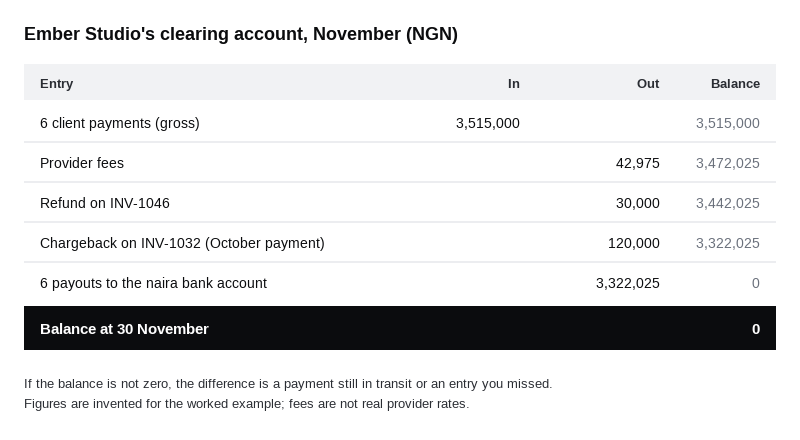
If the balance is not zero, find the difference:
- Equal to one payment's net amount: a payment taken near month end has not been paid out yet. It is in transit. It stays recorded in this month, on its payment date, and the payout is recorded next month when it reaches your bank, so nothing has to be posted into a locked period. Add it to the "In transit at 30 Nov" line on the working sheet with its expected payout date, and check the difference line is still zero.
- Equal to one fee: a fee was recorded twice, or not at all.
- Equal to a refund or chargeback: it was recorded against the bank account instead of the clearing account.
- Any other amount: sort both the ledger and your working sheet by amount and compare line by line.
When the balance is right, reconcile the bank account in your accounting tool for the month as you normally would, and lock or close the period if your tool supports it so no one posts to November by accident.
Check it worked
The clearing account balance at 30 November equals the "In transit at 30 Nov" line on your working sheet: zero for Ember, or the net total of payments taken in November that appear as payouts in your bank in the first days of December. The bank account in your accounting tool is reconciled to the bank statement's closing balance for 30 November.
Step 9 · Write the monthly routine
Write the routine down while the month is fresh, in a shared document your bookkeeper or accountant can follow without you. Keep it to one page. Ember's looks like this:
Monthly payment reconciliation (owner: office manager, reviewer: accountant)

By the 5th working day of the month:
1. Export Payouts, Transactions, Refunds and Disputes from Paystack for last month; check first and last rows.
2. Import the naira bank statement into Zoho Books if the feed has not pulled it in.
3. Fill in the working sheet totals, including in transit at the start and end of the month.
   Payments count by payment date, payouts by payout date. Difference must be zero before going on.
4. Match each payout to a bank deposit; record as transfer from Paystack clearing.
5. Record each payment at gross against its invoice, into Paystack clearing, with the fee.
6. Record refunds as credit notes refunded from Paystack clearing.
7. Chargebacks: journal entry on the chargeback date, out of Paystack clearing into the
   client's receivable, noting the invoice. Never edit a locked month. Tell the account owner the same day.
8. Foreign currency payments: rate = settled NGN / invoice amount.
9. Unidentified payments: to Unidentified receipts; email the payer; refund after 30 days.
10. Paystack clearing balance = in transit at month end (often 0). Save the working sheet.
11. Reconcile the bank account and lock the month.

Dispute alerts go to: <name and phone>, every day. Deadline is 16 hours.
Store each month's working sheet and exports in one folder per month, named by year and month (2026-11), so your accountant can find them at year end.
Check it worked
The routine document exists, names an owner and a reviewer, gives a deadline day, and someone other than you has read it and could carry out the next month from it. November's working sheet and exports are saved in a folder named 2026-11.
Next steps
You have a reconciled month and a routine for every month after it. From here:
- If you are still choosing a tool, or want to re-check yours, see Choose invoicing and accounting software.
- Set up the payment link behind these payments in Take a first payment with a Paystack payment page.
- Adding a provider in another country means another clearing account; compare your options in Compare payment providers for a business in Africa.
- If you build your own checkout, payments still arrive the same way; see Take payments with Stripe Checkout.
Related tutorials
- Choose invoicing and accounting software for a small businessYou will end with a scored shortlist of accounting tools tested against your own banks, currencies and tax rules, a written choice, and a branded test invoice in GBP with a way to pay on it.
- Take a first payment with a Paystack payment pageYou will have a test-mode Paystack payment page for a fixed-price service, with two custom fields, and a test payment you can find in your dashboard with those fields filled in.
- Compare payment providers for a business in AfricaYou will end with a sourced comparison of Paystack, Flutterwave, M-Pesa and Stripe for each country your business operates in, and a written provider choice per country that your developer can build from.
Need this done for you?
Padding does this work for growing companies, from the first diagnosis to a system that keeps working.
Get new tutorials