Security and hardening · Advanced · 24 min
Rotate a leaked database password and API key without downtime
By Padding · Updated 18 Nov 2026
Ubuntu 26.04 · PostgreSQL 18 · Python 3.14 · psycopg 3.3
You will replace a leaked PostgreSQL 18 password and a leaked API key while a small app keeps answering every request, then check the logs for misuse and retire the old values for good.
On this page
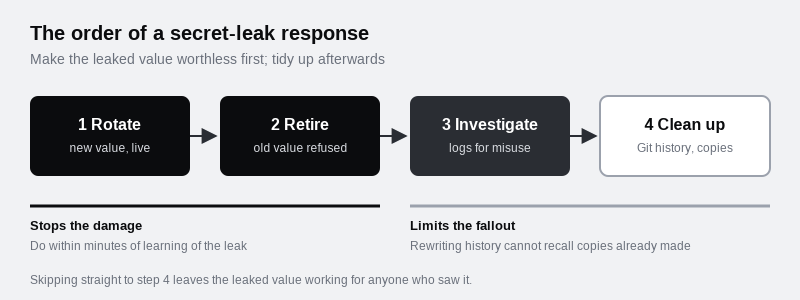
A leaked secret is an emergency with an order of operations. The first job is to make the leaked value worthless, by issuing a new one and refusing the old one. Cleaning the secret out of a Git repository, a chat log or a ticket comes later. Rewriting history first feels productive, but anyone who already copied the value, including automated scanners that watch public repositories, can still use it until you change it.
The second job is to change it without taking your app down. A PostgreSQL role has one password at a time, so if you run ALTER ROLE ... PASSWORD and then update the app, every connection in between fails. The way round it is two credentials that both work for a short overlap: a second login role with a new password, which the app moves to before the first is switched off. API keys work the same way when the provider lets you hold two active keys at once, as many do.
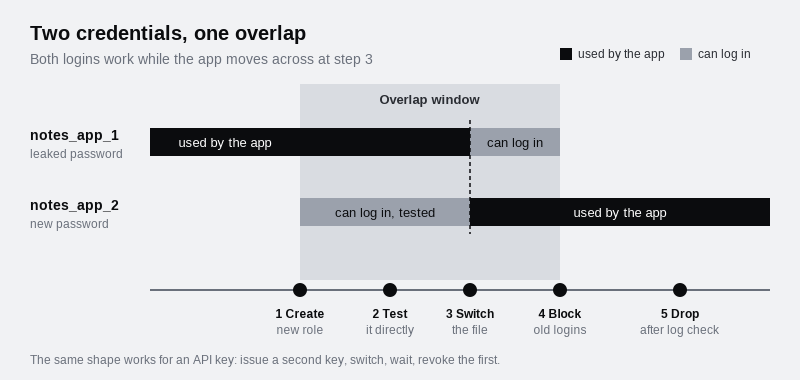
In this tutorial you build a small app that reads a database password and an API key from files, plus a stand-in for an API provider that you control. You then treat both values as leaked and rotate them while a loop calls the app about five times a second. At the end the loop's log shows that no request failed.
Step 1 · Build an app that reads its secrets from files
Install Python's PostgreSQL driver and curl from the Ubuntu archive:
sudo apt-get update
sudo apt-get install -y python3 python3-psycopg curl
Make a demo folder with a private secrets directory. Every command in this tutorial runs from ~/rotate-demo:
mkdir -p ~/rotate-demo/provider
install -d -m 700 ~/rotate-demo/secrets
cd ~/rotate-demo
The app answers GET /health. For each request it reads secrets/db.env, opens a connection to PostgreSQL with those credentials, reads secrets/api-key, and calls the provider with that key. Reading the files on every request is what lets you rotate without a restart:
cat > app.py <<'PY'
import json
import urllib.request
from http.server import BaseHTTPRequestHandler, ThreadingHTTPServer
from pathlib import Path

import psycopg

SECRETS = Path(__file__).resolve().parent / "secrets"
PROVIDER_URL = "http://127.0.0.1:9090/v1/ping"


def read_env(path):
    values = {}
    for line in Path(path).read_text().splitlines():
        if "=" in line:
            key, value = line.split("=", 1)
            values[key.strip()] = value.strip()
    return values


def db_status(env_path=SECRETS / "db.env"):
    env = read_env(env_path)
    with psycopg.connect(host="127.0.0.1", dbname="notes", user=env["PGUSER"],
                         password=env["PGPASSWORD"], connect_timeout=3,
                         application_name="notes-app") as conn:
        return conn.execute(
            "SELECT current_user, (SELECT count(*) FROM notes)").fetchone()


def api_status(key_path=SECRETS / "api-key"):
    key = Path(key_path).read_text().strip()
    request = urllib.request.Request(
        PROVIDER_URL, headers={"Authorization": f"Bearer {key}"})
    with urllib.request.urlopen(request, timeout=3) as response:
        return json.load(response)["key_id"]


class Handler(BaseHTTPRequestHandler):
    def do_GET(self):
        if self.path != "/health":
            self.send_error(404)
            return
        try:
            user, count = db_status()
            body = {"db_user": user, "notes": count, "api_key_id": api_status()}
            status = 200
        except Exception as error:  # never put the secret in the reply
            body, status = {"error": type(error).__name__}, 503
        data = json.dumps(body).encode()
        self.send_response(status)
        self.send_header("Content-Type", "application/json")
        self.send_header("Content-Length", str(len(data)))
        self.end_headers()
        self.wfile.write(data)

    def log_message(self, *args):
        pass


if __name__ == "__main__":
    ThreadingHTTPServer(("127.0.0.1", 8080), Handler).serve_forever()
PY
This app opens a new connection per request to keep the code short. With a connection pool, two settings matter instead: the pool must read the file each time it opens a connection, and it needs a maximum connection lifetime, so connections made with an old password retire on their own.
Next, a stand-in for an API provider on port 9090. It keeps SHA-256 hashes of its keys in provider/keys.json, never the keys themselves, reads that file on every request, and writes one line per request to provider/access.log: time, client address, key ID and status.
cat > provider.py <<'PY'
import hashlib
import json
import time
from http.server import BaseHTTPRequestHandler, ThreadingHTTPServer
from pathlib import Path

HERE = Path(__file__).resolve().parent / "provider"


class Handler(BaseHTTPRequestHandler):
    def do_GET(self):
        token = self.headers.get("Authorization", "").removeprefix("Bearer ")
        digest = hashlib.sha256(token.encode()).hexdigest()
        keys = json.loads((HERE / "keys.json").read_text())
        match = next((k for k in keys if k["active"] and k["sha256"] == digest), None)
        status, body = (200, {"key_id": match["id"]}) if match else (401, {"error": "invalid key"})
        with open(HERE / "access.log", "a") as log:
            log.write(f"{time.strftime('%Y-%m-%dT%H:%M:%S')} {self.client_address[0]} "
                      f"{match['id'] if match else '-'} {status}\n")
        data = json.dumps(body).encode()
        self.send_response(status)
        self.send_header("Content-Type", "application/json")
        self.send_header("Content-Length", str(len(data)))
        self.end_headers()
        self.wfile.write(data)

    def log_message(self, *args):
        pass


if __name__ == "__main__":
    ThreadingHTTPServer(("127.0.0.1", 9090), Handler).serve_forever()
PY
Its admin script plays the part of the provider's dashboard. create writes a new key straight into a file with mode 600, so the key is never printed to your terminal. list and revoke do what they say:
cat > provider_admin.py <<'PY'
import hashlib
import json
import os
import secrets
import sys
import time
from pathlib import Path

KEYS = Path(__file__).resolve().parent / "provider" / "keys.json"


def load():
    return json.loads(KEYS.read_text()) if KEYS.exists() else []


def save(keys):
    tmp = KEYS.with_suffix(".tmp")
    tmp.write_text(json.dumps(keys, indent=2))
    os.replace(tmp, KEYS)


command = sys.argv[1]
keys = load()
if command == "create":
    key = "demo_" + secrets.token_urlsafe(24)
    key_id = f"k{len(keys) + 1}"
    fd = os.open(sys.argv[2], os.O_WRONLY | os.O_CREAT | os.O_EXCL, 0o600)
    with os.fdopen(fd, "w") as out:
        out.write(key + "\n")
    keys.append({"id": key_id, "sha256": hashlib.sha256(key.encode()).hexdigest(),
                 "created": time.strftime("%Y-%m-%dT%H:%M:%S"), "active": True})
    save(keys)
    print(f"created {key_id}, written to {sys.argv[2]}")
elif command == "list":
    for k in keys:
        print(k["id"], k["created"], "active" if k["active"] else "revoked")
elif command == "revoke":
    for k in keys:
        if k["id"] == sys.argv[2]:
            k["active"] = False
    save(keys)
    print(f"revoked {sys.argv[2]}")
PY
Two small helpers finish the set. new_db_secret.py prints a fresh credentials file for a role. make_verifier.py reads that file and prints an ALTER ROLE statement with a SCRAM-SHA-256 hash of the password, in the format PostgreSQL stores. PostgreSQL accepts a hash in place of a password and stores it as it is, so the plain password never reaches the server, its logs or your shell history:
cat > new_db_secret.py <<'PY'
import secrets
import sys

print(f"PGUSER={sys.argv[1]}")
print(f"PGPASSWORD={secrets.token_urlsafe(32)}")
PY
cat > make_verifier.py <<'PY'
import base64
import hashlib
import hmac
import os
import re
import sys

role = sys.argv[1]
if not re.fullmatch(r"[a-z_][a-z0-9_]*", role):
    sys.exit("role names here are lowercase letters, digits and _")
password = next(line.split("=", 1)[1].strip() for line in sys.stdin
                if line.startswith("PGPASSWORD="))
salt, iterations = os.urandom(16), 4096
salted = hashlib.pbkdf2_hmac("sha256", password.encode(), salt, iterations)
client_key = hmac.new(salted, b"Client Key", "sha256").digest()
stored_key = hashlib.sha256(client_key).digest()
server_key = hmac.new(salted, b"Server Key", "sha256").digest()
b64 = lambda b: base64.b64encode(b).decode()
print(f"ALTER ROLE {role} PASSWORD "
      f"'SCRAM-SHA-256${iterations}:{b64(salt)}${b64(stored_key)}:{b64(server_key)}';")
PY
cat > check_secret.py <<'PY'
import sys

from app import api_status, db_status

kind, path = sys.argv[1], sys.argv[2]
try:
    print(db_status(path) if kind == "db" else api_status(path))
except Exception as error:
    print(f"refused: {error}")
    sys.exit(1)
PY
check_secret.py tests one credentials file on its own, before the app depends on it.
Now the database. Privileges go to a group role, notes_app, that cannot log in. The login roles the app uses are members of it, so a new login role gets the same rights in one line:
sudo -u postgres psql -v ON_ERROR_STOP=1 <<'SQL'
CREATE DATABASE notes;
\c notes
CREATE ROLE notes_app NOLOGIN;
CREATE TABLE notes (id serial PRIMARY KEY, body text NOT NULL);
INSERT INTO notes (body) VALUES ('first note'), ('second note');
GRANT SELECT, INSERT ON notes TO notes_app;
GRANT USAGE ON SEQUENCE notes_id_seq TO notes_app;
CREATE ROLE notes_app_1 LOGIN IN ROLE notes_app;
SQL
Give notes_app_1 a password and create the first API key. The subshell with umask 077 makes db.env private from the moment it exists:
( umask 077; python3 new_db_secret.py notes_app_1 > secrets/db.env )
python3 make_verifier.py notes_app_1 < secrets/db.env | sudo -u postgres psql -v ON_ERROR_STOP=1 -d notes
python3 provider_admin.py create secrets/api-key
psql prints ALTER ROLE, and the admin script prints created k1, written to secrets/api-key.
Start the provider in your second terminal and the app in your third. Leave both running:
cd ~/rotate-demo && python3 provider.pycd ~/rotate-demo && python3 app.pyCheck it worked
Back in the first terminal:
curl -s http://127.0.0.1:8080/health
ls -l secrets
The reply is {"db_user": "notes_app_1", "notes": 2, "api_key_id": "k1"}. Both files in secrets show -rw-------. From here on, treat the password of notes_app_1 and the key k1 as leaked: say someone pasted db.env into a public issue.
Step 2 · Watch for downtime while you work
A rotation is only zero-downtime if you can show it. Write a loop that calls the app about five times a second and records each status code:
cat > watch.sh <<'SH'
#!/bin/sh
# Calls the app about five times a second and appends each HTTP status to watch.log.
while true; do
  curl -s -o /dev/null -w '%{http_code}\n' --max-time 3 http://127.0.0.1:8080/health >> watch.log
  sleep 0.2
done
SH
Open a fourth terminal, or split one, and leave it running for the rest of the tutorial:
cd ~/rotate-demo && sh watch.shCheck it worked
tail -n 5 watch.logEach line is 200. A failed request would show as 503, or 000 if the app stopped answering.
Step 3 · Contain first: log connections and find every copy
Before you change anything, turn on connection logging, so you can later see who used the old role. In PostgreSQL 18, log_connections takes a list of what to log; authorization logs each successful login with its user and database. The new log_line_prefix adds the user, database and client address to each line:
sudo -u postgres psql -c "ALTER SYSTEM SET log_connections = 'authorization'" -c "ALTER SYSTEM SET log_line_prefix = '%m [%p] %q%u@%d %h '" -c "SELECT pg_reload_conf()"The log only covers the time from now on. For the time before, look wherever else connections were recorded: a managed database's own logs, firewall logs, or a connection pooler.
Next, list every place the leaked values live, because each one must be updated or cleaned. Put both values in a private pattern file and search with grep -F -f, which reads the patterns from the file, so the secrets never appear on a command line. The test -s stops the search if the file came out empty, since an empty pattern matches every line:
( umask 077; sed -n 's/^PGPASSWORD=//p' secrets/db.env > secrets/leaked.pattern; cat secrets/api-key >> secrets/leaked.pattern )
test -s secrets/leaked.pattern && grep -rlF -f secrets/leaked.pattern --exclude=leaked.pattern ~/rotate-demo
In the demo the search finds only secrets/db.env and secrets/api-key. On a real system, run the same search over your repositories, /etc, deploy scripts and backups you can read, then go through the places a search cannot reach:
- CI and deploy variables, and the settings of any hosting platform.
- Other servers, cron jobs and one-off scripts that connect with the same login.
- Teammates' laptops,
.envfiles and password managers. - Chat threads, tickets and the place where it leaked.
- Mobile app builds. A key shipped inside an Android or iOS app stays in every old install until people update, and many users, especially those on prepaid data or low-end phones, update months later. That is why a server-side secret should never be in an app bundle: if one leaks from there, move the call behind your own backend and revoke the key.
Check it worked
sudo -u postgres psql -Atc "SHOW log_connections"
sudo tail -n 3 /var/log/postgresql/postgresql-18-main.log
The first command prints authorization. The log lines read something like 2026-11-18 10:42:07.311 UTC [5123] notes_app_1@notes 127.0.0.1 LOG: connection authorized: user=notes_app_1 database=notes application_name=notes-app, one for each request the watch loop makes.
Step 4 · Create a second role with a new password
Add the second login role to the same group, then generate its credentials into db.env.next and set its password from the hash:
sudo -u postgres psql -v ON_ERROR_STOP=1 -d notes -c "CREATE ROLE notes_app_2 LOGIN IN ROLE notes_app;"
( umask 077; python3 new_db_secret.py notes_app_2 > secrets/db.env.next )
python3 make_verifier.py notes_app_2 < secrets/db.env.next | sudo -u postgres psql -v ON_ERROR_STOP=1 -d notes
At this point both roles can log in, and the app is still using the first.
Check it worked
Test the new file directly, before the app relies on it:
python3 check_secret.py db secrets/db.env.nextThe output is ('notes_app_2', 2): the new role logged in with its password and can read the table through the group. If it prints refused: with password authentication failed, run the make_verifier.py line again; nothing has changed for the app yet.
Step 5 · Switch the app to the new role
Keep a link to the current file as a way back, then move the new file into place. mv within one directory is a rename, which replaces db.env in a single step: every read sees either the whole old file or the whole new one, never a half-written file and never a missing one.
ln -f secrets/db.env secrets/db.env.prev
mv secrets/db.env.next secrets/db.env
If something goes wrong after the switch, mv secrets/db.env.prev secrets/db.env puts the old credentials back, as long as you have not yet done the next step.
With several app servers, repeat the switch on each one. The old role keeps working until you retire it, so there is no rush between servers.
Check it worked
curl -s http://127.0.0.1:8080/health
tail -n 5 watch.log
The reply now shows "db_user": "notes_app_2", and the watch log still shows only 200. The newest lines of the PostgreSQL log name notes_app_2@notes.
Step 6 · Retire the old role
Block new logins for the old role first. NOLOGIN does not end sessions that are already open, so then end any that remain. In the demo there are none, because the app opens a connection per request, but an attacker holding the leaked password could have one open:
sudo -u postgres psql -v ON_ERROR_STOP=1 -c "ALTER ROLE notes_app_1 NOLOGIN;" -c "SELECT pid, client_addr, pg_terminate_backend(pid) FROM pg_stat_activity WHERE usename = 'notes_app_1';"psql prints ALTER ROLE, then a result with (0 rows). Any row it does list is a session that was still open, with its client address: write that address down for the next step.
Keep the role itself for now. Dropping it comes after the log check, so that the role name in the logs still means something while you investigate.
Check it worked
Try the old credentials:
python3 check_secret.py db secrets/db.env.prev || echo "old password refused"The output ends with role "notes_app_1" is not permitted to log in and then old password refused. Meanwhile the watch log is still all 200.
Step 7 · Look for misuse in the logs
Summarise who logged in as each role, and from where:
sudo grep 'connection authorized' /var/log/postgresql/postgresql-18-main.log | grep -oE 'notes_app_[0-9]+@notes [^ ]+' | sort | uniq -c
sudo grep -E 'FATAL: .*notes_app_1' /var/log/postgresql/postgresql-18-main.log | tail -n 3
The first command prints a count per role and address, all 127.0.0.1 in the demo. The second shows the refused login you just made. On a real system, these are the lines that matter:
- Logins as the leaked role from an address that is not one of your app servers.
- Logins at times your app does not run, such as from a batch job that does not exist.
- Refused logins as the old role after you retired it. They mean someone still holds the password: either a copy you missed in the inventory, or an attacker.
Connection logs show who connected, not what they did. If you find a login you cannot explain, treat it as a breach: keep the logs, check the data that role could reach, follow your incident process, and check the breach-notification rules that apply to you.
The provider's log answers the same questions for the API key:
cut -d' ' -f2,3,4 provider/access.log | sort | uniq -cCheck it worked
The PostgreSQL summary lists notes_app_1@notes 127.0.0.1 and notes_app_2@notes 127.0.0.1, and nothing else. The provider summary lists 127.0.0.1 k1 200 with a count, because the app still uses k1. That is the next secret to rotate.
Step 8 · Rotate the API key with an overlap window
Create a second key. With a real provider, you do this in its dashboard or API and paste the key straight into the file with an editor, never into a command:
python3 provider_admin.py create secrets/api-key.next
python3 provider_admin.py list
python3 check_secret.py api secrets/api-key.next
list shows k1 and k2, both active, and the check prints k2. Now switch the file the same way as before:
ln -f secrets/api-key secrets/api-key.prev
mv secrets/api-key.next secrets/api-key
Before revoking k1, wait until nothing has used it for longer than your slowest reader of the file. With one server and per-request reads, that is seconds. With several servers, a deploy that rolls out over twenty minutes, or a cache that keeps the key for an hour, the window is that long. Watch the provider's log until the old key stops appearing:
sleep 2
tail -n 5 provider/access.log
Every new line shows k2. Then revoke the old key:
python3 provider_admin.py revoke k1With your own provider, take the key ID from its list, not from this example.
Check it worked
python3 check_secret.py api secrets/api-key.prev || echo "old key refused"
curl -s http://127.0.0.1:8080/health
The first command prints refused: HTTP Error 401: Unauthorized and old key refused. The app replies with "db_user": "notes_app_2" and "api_key_id": "k2".
Step 9 · Close the incident and clean up
Once the log check is done, drop the old role and delete the files that still hold the leaked values. The role owns no objects, because the table belongs to postgres and the rights belong to the group. A role that does own objects needs REASSIGN OWNED BY and DROP OWNED BY in each database first.
sudo -u postgres psql -v ON_ERROR_STOP=1 -c "DROP ROLE notes_app_1;"
rm secrets/db.env.prev secrets/api-key.prev secrets/leaked.pattern
Only now clean up where the secret leaked. Delete the issue comment or chat message, and if it reached a Git repository, follow the clean-up in /tutorials/keep-secrets-out-of-git and scan the whole history with /tutorials/scan-a-repository-for-leaked-secrets-with-gitleaks. Rewriting history stops new clones from carrying the value, but it does not reach copies already made, which is why the rotation had to come first.
Write down what happened while it is fresh: when the leak happened, when you learned of it, when each value was rotated and retired, and what the logs showed. The time between learning and retiring is the number to bring down next time.
Check it worked
Stop the watch loop with Ctrl+C in its terminal, then count the results:
awk '$0 != 200 {bad++} END {print NR " requests, " bad+0 " failed"}' watch.log
sudo -u postgres psql -Atc "SELECT count(*) FROM pg_roles WHERE rolname = 'notes_app_1'"
ls secrets
The first line reads something like 412 requests, 0 failed: the app answered every request through both rotations. The role count is 0, and secrets holds only api-key and db.env.
To remove the demo, stop the app and the provider with Ctrl+C in their terminals. The next commands delete the demo database, its roles and the whole ~/rotate-demo folder, so check that you have nothing of your own in it. The last line puts the logging settings back to their defaults; keep them if you want connection logging from now on.
sudo -u postgres psql -v ON_ERROR_STOP=1 -c "DROP DATABASE notes WITH (FORCE);" -c "DROP ROLE notes_app_2;" -c "DROP ROLE notes_app;"
cd ~ && rm -rf ~/rotate-demo
sudo -u postgres psql -c "ALTER SYSTEM RESET log_connections" -c "ALTER SYSTEM RESET log_line_prefix" -c "SELECT pg_reload_conf()"
Next steps
- Stop the next leak at the source: /tutorials/keep-secrets-out-of-git.
- Find secrets already in your history, and block new ones before they are committed: /tutorials/scan-a-repository-for-leaked-secrets-with-gitleaks.
- Keep encrypted secrets in the repository, readable only by the people and servers that need them: /tutorials/encrypt-secrets-in-git-with-sops-and-age.
- Revisit the database setup and how PostgreSQL decides who may connect: /tutorials/install-postgresql-18-on-ubuntu-26-04.
Related tutorials
- Write custom Fail2ban jails and filters for your own appsYou will have Fail2ban 1.1 banning repeated failed sign-ins to your own app and to an nginx basic-auth area, with filters you tested against sample logs, your own addresses allow-listed, and longer bans for repeat offenders.
- Validate file uploads before you store or serve themYou will take a FastAPI image upload route that trusts everything the browser sends, prove its flaws with pytest, and rebuild it with size limits, type checks from the file's own bytes, Pillow re-encoding, random storage names and safe download headers.
- Use SSH certificates instead of copying keys to every serverYou will run a small SSH certificate authority with ssh-keygen, log in to an Ubuntu 26.04 server with an eight-hour user certificate, give the server a host certificate so clients stop asking about fingerprints, and revoke a certificate the server then refuses.
Need this done for you?
Padding does this work for growing companies, from the first diagnosis to a system that keeps working.
Get new tutorials