Programming languages · Intermediate · 25 min
Run work concurrently in Go with goroutines and channels
By Padding · Updated 18 Nov 2026
golang:1.27 (Debian) · Go 1.27.4
You will build a Go 1.27 status checker that tests 30 URLs on a local server, first in a loop and then with goroutines, channels, a worker pool, a deadline and a mutex, and finish with a race-free checker that never runs more than a set number of requests at once.
On this page
A goroutine is a function that runs at the same time as the rest of your program. Starting one costs a few kilobytes of memory, so a Go program can run thousands of them, and the Go runtime spreads them over your CPU cores. Channels are typed pipes that goroutines use to hand values to each other and to say "I am finished".
Concurrency pays off most when a program spends its time waiting: on the network, a disk or another service. This tutorial uses that case. You write a small test server whose pages take 50 to 150 milliseconds to answer, then a checker that requests 30 of its pages and reports which ones fail. The first version checks them one by one and takes about three seconds. Each later version adds one concurrency tool and is a separate mode of the same program, so you can compare them side by side.
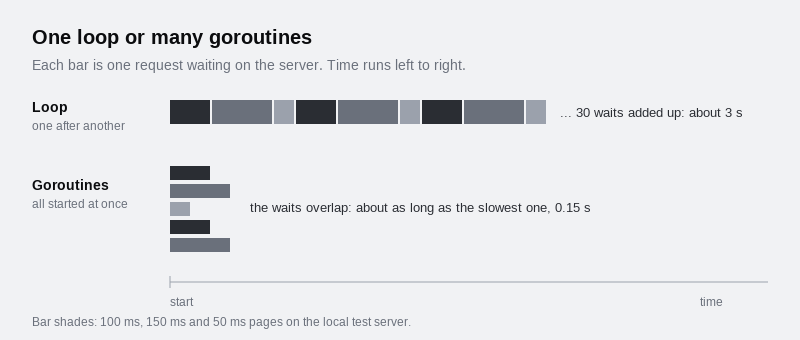
The test server also counts how many requests it is handling at once. That number lets you see each pattern's concurrency instead of guessing it.
Step 1 · Write a test server to check
Create the project and a folder for the server. The project is one Go module with two programs: the server in testserver/, and the checker in the top folder:
mkdir -p ~/statuscheck-demo/testserver
cd ~/statuscheck-demo
go mod init example.com/statuscheck
Create the server. Page n waits 50, 100 or 150 milliseconds depending on n, and every seventh page answers 503 Service Unavailable. /slow takes five seconds, for a later step. /stats reports the highest number of requests that were in progress at the same moment since the last time you asked, then resets it:
cat > testserver/main.go <<'GO'
package main

import (
	"fmt"
	"log"
	"net/http"
	"strconv"
	"sync"
	"time"
)

var (
	mu          sync.Mutex
	inFlight    int
	maxInFlight int
)

// track counts requests that are in progress and remembers the peak.
func track(next http.HandlerFunc) http.HandlerFunc {
	return func(w http.ResponseWriter, r *http.Request) {
		mu.Lock()
		inFlight++
		maxInFlight = max(maxInFlight, inFlight)
		mu.Unlock()
		defer func() {
			mu.Lock()
			inFlight--
			mu.Unlock()
		}()
		next(w, r)
	}
}

func page(w http.ResponseWriter, r *http.Request) {
	n, err := strconv.Atoi(r.PathValue("n"))
	if err != nil {
		http.Error(w, "bad page number", http.StatusBadRequest)
		return
	}
	time.Sleep(time.Duration(50+(n%3)*50) * time.Millisecond)
	if n%7 == 0 {
		http.Error(w, "unavailable", http.StatusServiceUnavailable)
		return
	}
	fmt.Fprintf(w, "page %d\n", n)
}

func slow(w http.ResponseWriter, r *http.Request) {
	select {
	case <-time.After(5 * time.Second):
		fmt.Fprintln(w, "finally")
	case <-r.Context().Done():
	}
}

func stats(w http.ResponseWriter, r *http.Request) {
	mu.Lock()
	peak := maxInFlight
	maxInFlight = 0
	mu.Unlock()
	fmt.Fprintf(w, "max_in_flight=%d\n", peak)
}

func main() {
	mux := http.NewServeMux()
	mux.HandleFunc("GET /page/{n}", track(page))
	mux.HandleFunc("GET /slow", track(slow))
	mux.HandleFunc("GET /stats", stats)

	srv := &http.Server{
		Addr:              "127.0.0.1:8090",
		Handler:           mux,
		ReadHeaderTimeout: 5 * time.Second,
	}
	log.Println("test server on", srv.Addr)
	log.Fatal(srv.ListenAndServe())
}
GO
The server already uses two of the tools in this tutorial. Go's HTTP server runs each request in its own goroutine, so the counter is shared between goroutines and every read or write of it sits between mu.Lock() and mu.Unlock(). The select in slow waits for whichever comes first: five seconds passing, or the client going away. You will write both kinds of code yourself further on.
Build it and start it in the background, so you can keep using the same terminal:
go build -o bin/testserver ./testserver
./bin/testserver &Check it worked
Ask for two pages and the stats:
curl -s http://127.0.0.1:8090/page/1
curl -s -o /dev/null -w '%{http_code}\n' http://127.0.0.1:8090/page/7
curl -s http://127.0.0.1:8090/stats
The three lines are page 1, 503 and max_in_flight=1: two requests, one after the other, so never more than one at a time. The server also printed a time stamp and test server on 127.0.0.1:8090 when it started. If you see Connection refused, wait a second and try again; if you see address already in use, another program has port 8090, so stop it or change the port in both programs.
Step 2 · Check the URLs in a loop
The checker is split into small files. main.go holds the URL list, a table of modes and the summary. Each later step adds one file that registers one mode in the table, so you never have to edit main.go or an earlier mode file:
cat > main.go <<'GO'
package main

import (
	"flag"
	"fmt"
	"log"
	"slices"
	"strings"
	"time"
)

const base = "http://127.0.0.1:8090"

// modes maps a -mode name to a function that checks a list of URLs.
// Each mode file adds itself in an init function.
var modes = map[string]func(urls []string) []Result{}

func testURLs(n int) []string {
	urls := make([]string, 0, n)
	for i := 1; i <= n; i++ {
		urls = append(urls, fmt.Sprintf("%s/page/%d", base, i))
	}
	return urls
}

func main() {
	mode := flag.String("mode", "loop", "how to run the checks")
	verbose := flag.Bool("v", false, "print every result, not only failures")
	flag.Parse()

	run, found := modes[*mode]
	if !found {
		names := make([]string, 0, len(modes))
		for name := range modes {
			names = append(names, name)
		}
		slices.Sort(names)
		log.Fatalf("unknown mode %q, choose one of: %s", *mode, strings.Join(names, ", "))
	}

	start := time.Now()
	results := run(testURLs(30))
	took := time.Since(start)

	ok := 0
	for _, r := range results {
		if r.OK() {
			ok++
		}
		if *verbose || !r.OK() {
			fmt.Println(r)
		}
	}
	fmt.Printf("%d checked, %d ok, %d failed in %s\n", len(results), ok, len(results)-ok, took.Round(10*time.Millisecond))
}
GO
check.go does one check. The http.Client has a ten-second timeout, because the default client waits forever. The body is read to the end and closed so that the connection can be reused for the next request:
cat > check.go <<'GO'
package main

import (
	"fmt"
	"io"
	"net/http"
	"time"
)

type Result struct {
	URL    string
	Status int
	Err    error
	Took   time.Duration
}

func (r Result) OK() bool {
	return r.Err == nil && r.Status < 400
}

func (r Result) String() string {
	if r.Err != nil {
		return fmt.Sprintf("ERR  %s (%v)", r.URL, r.Err)
	}
	return fmt.Sprintf("%d  %s (%s)", r.Status, r.URL, r.Took.Round(time.Millisecond))
}

var client = &http.Client{Timeout: 10 * time.Second}

func check(url string) Result {
	start := time.Now()
	resp, err := client.Get(url)
	if err != nil {
		return Result{URL: url, Err: err, Took: time.Since(start)}
	}
	io.Copy(io.Discard, resp.Body)
	resp.Body.Close()
	return Result{URL: url, Status: resp.StatusCode, Took: time.Since(start)}
}
GO
Now the first mode, a plain loop:
cat > loop.go <<'GO'
package main

func init() { modes["loop"] = checkLoop }

func checkLoop(urls []string) []Result {
	results := make([]Result, 0, len(urls))
	for _, url := range urls {
		results = append(results, check(url))
	}
	return results
}
GO
gofmt -l .
go run . -mode loop
gofmt -l . prints the name of any file that is not in standard Go format, so no output from it is what you want. An init function runs before main, once per file, which is how each mode puts itself in the table.
Check it worked
The output lists the four failures and ends with the summary:
503  http://127.0.0.1:8090/page/7 (101ms)
503  http://127.0.0.1:8090/page/14 (152ms)
503  http://127.0.0.1:8090/page/21 (51ms)
503  http://127.0.0.1:8090/page/28 (102ms)
30 checked, 26 ok, 4 failed in 3.04s
Your times differ a little, but the total is just over three seconds: the 30 waits added together. Nearly all of that time the program is idle, waiting for the server.
Step 3 · Start a goroutine per URL and wait with a WaitGroup
The go keyword in front of a function call starts that call in a new goroutine and moves on at once, without waiting for it. The program then needs a way to know when every goroutine is done. sync.WaitGroup counts running tasks: wg.Go(f) starts f in a goroutine and counts it, and wg.Wait() blocks until every counted function has returned. WaitGroup.Go arrived in Go 1.25. Code written before that does the same with wg.Add(1) before the go statement and defer wg.Done() inside it.
Each goroutine writes its result into its own slot of a slice made at full length beforehand. No two goroutines touch the same element, so they need no further coordination:
cat > waitgroup.go <<'GO'
package main

import "sync"

func init() { modes["wg"] = checkWaitGroup }

func checkWaitGroup(urls []string) []Result {
	results := make([]Result, len(urls))
	var wg sync.WaitGroup
	for i, url := range urls {
		wg.Go(func() {
			results[i] = check(url)
		})
	}
	wg.Wait()
	return results
}
GO
gofmt -l .
go run . -mode wg
curl -s http://127.0.0.1:8090/stats
Since Go 1.22, i and url are new variables on each pass of the loop, so every goroutine sees its own pair. In older Go versions, all the goroutines could share one url and check the last URL 30 times. If you read older code, that is why it often copies the variable (url := url) or passes it as an argument.
Check it worked
The summary still says 30 checked, 26 ok, 4 failed, but the time is now in milliseconds, something like in 160ms: about the slowest single page plus start-up. The stats line shows max_in_flight= with a number close to 30, because every request was in progress at the same moment. The failures print in page order, because each result went into its own slot.
Step 4 · Send results over a channel
A slice with one slot per task works when you know the number of tasks up front. A channel is more general: goroutines send values into it with ch <- v, and another goroutine receives them with <-ch, in the order they arrive. Add a mode that collects results this way:
cat > channel.go <<'GO'
package main

func init() { modes["chan"] = checkChannel }

func checkChannel(urls []string) []Result {
	ch := make(chan Result)
	for _, url := range urls {
		go func() {
			ch <- check(url)
		}()
	}

	results := make([]Result, 0, len(urls))
	for range urls {
		results = append(results, <-ch)
	}
	return results
}
GO
gofmt -l .
go run . -mode chan -v
There is no WaitGroup here. The receiving loop runs exactly len(urls) times, and each receive waits until some goroutine sends, so when the loop ends every goroutine has delivered its result.
make(chan Result) creates an unbuffered channel. A send on it blocks until another goroutine receives, so each send is also a handshake. make(chan Result, 10) creates a buffered channel with room for ten values: a send only blocks when the buffer is full. The difference matters when the receiver might stop early, which you will see in the deadline step.
Check it worked
With -v you see all 30 results, and they are no longer in page order. The 50 ms pages (3, 6, 9 and so on) tend to come first, then the 100 ms pages, then the 150 ms ones, because results arrive as each request finishes. The summary is 30 checked, 26 ok, 4 failed in a time of a couple of hundred milliseconds or less.
Step 5 · Limit the work with a worker pool
Starting one goroutine per URL is fine for 30 URLs. For 30,000 it would open 30,000 connections at once to the same server, which can look like an attack, exhaust file descriptors and swamp a slow link. A worker pool fixes the number of goroutines doing the work. A fixed set of workers reads URLs from a jobs channel and sends results to a results channel:
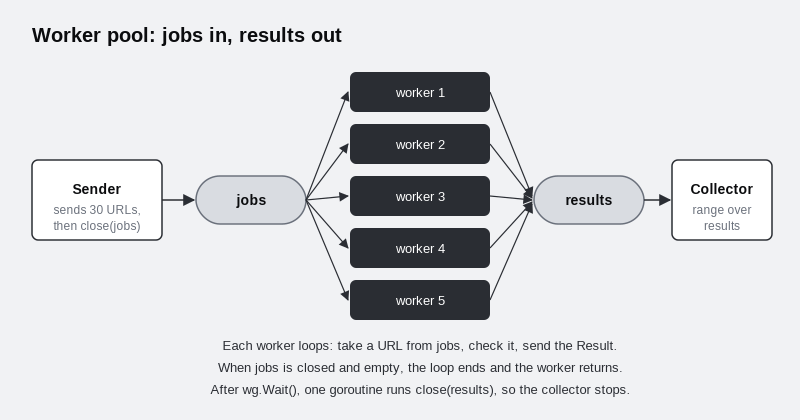
Closing a channel is how a sender says "nothing more is coming". A for url := range jobs loop receives until the channel is closed and empty, then ends. Only the sender closes a channel, and only once: sending on a closed channel panics.
cat > pool.go <<'GO'
package main

import (
	"flag"
	"sync"
)

var workers = flag.Int("workers", 5, "how many workers -mode pool runs")

func init() { modes["pool"] = checkPool }

func checkPool(urls []string) []Result {
	jobs := make(chan string)
	results := make(chan Result)

	var wg sync.WaitGroup
	for range *workers {
		wg.Go(func() {
			for url := range jobs {
				results <- check(url)
			}
		})
	}

	// Feed the jobs, then close the channel so each worker's loop ends.
	go func() {
		for _, url := range urls {
			jobs <- url
		}
		close(jobs)
	}()

	// Close results once every worker has returned, so the loop below ends.
	go func() {
		wg.Wait()
		close(results)
	}()

	collected := make([]Result, 0, len(urls))
	for r := range results {
		collected = append(collected, r)
	}
	return collected
}
GO
gofmt -l .
go run . -mode pool -workers 5
curl -s http://127.0.0.1:8090/stats
Two small goroutines do the bookkeeping. The first feeds URLs into jobs and closes it. The second waits for the workers and then closes results. If checkPool itself called wg.Wait() before reading results, it would deadlock: the workers would block sending to results, which nobody reads yet, and never return. A package-level flag.Int in this file adds the -workers option without touching main.go.
Check it worked
The summary takes something like in 620ms: 3 seconds of waiting shared between 5 workers. The stats line is max_in_flight=5, never more. Run it again with -workers 10 and the time roughly halves, and the stats show 10. Choosing the worker count is a trade-off between speed and the load you put on the server and your own connection.
Step 6 · Stop waiting with select and a timeout
Some checks never answer in time. select waits on several channel operations and runs whichever is ready first. time.After(d) returns a channel that receives one value after d, so a select with that channel as one of its cases is a deadline. This mode adds /slow to the list and stops collecting when the deadline passes:
cat > deadline.go <<'GO'
package main

import (
	"flag"
	"fmt"
	"time"
)

var deadline = flag.Duration("deadline", 2*time.Second, "how long -mode deadline waits for all checks")

func init() { modes["deadline"] = checkDeadline }

func checkDeadline(urls []string) []Result {
	all := append([]string{base + "/slow"}, urls...)

	// Room for every result, so a late goroutine can always send and exit.
	results := make(chan Result, len(all))
	for _, url := range all {
		go func() {
			results <- check(url)
		}()
	}

	timeout := time.After(*deadline)
	collected := make([]Result, 0, len(all))
	for len(collected) < len(all) {
		select {
		case r := <-results:
			collected = append(collected, r)
		case <-timeout:
			fmt.Printf("deadline of %s reached: %d of %d checks unfinished\n", *deadline, len(all)-len(collected), len(all))
			return collected
		}
	}
	return collected
}
GO
gofmt -l .
go run . -mode deadline -deadline 2s
go run . -mode deadline -deadline 6s
The results channel is buffered with room for every check, and this is why. When the deadline passes, checkDeadline returns and nobody receives from results again. With an unbuffered channel, the goroutine still waiting on /slow would block on its send forever. That is a goroutine leak: here the program exits a moment later and nothing is lost, but in a long-running server leaked goroutines pile up and hold memory until it falls over. With the buffer, the late send succeeds and the goroutine returns.
The /slow request itself keeps running after the deadline, until the server answers five seconds in (or the client's ten-second timeout, whichever comes first). To cancel it when the deadline passes, you need a context.Context, which the cancel slow work with context tutorial covers.
Check it worked
The first run prints deadline of 2s reached: 1 of 31 checks unfinished, then the four failures and 30 checked, 26 ok, 4 failed in 2s. Every page was collected and only /slow was left behind. The second run, with six seconds to spare, has no deadline line and ends 31 checked, 27 ok, 4 failed in 5s, since /slow takes five seconds and counts as one more success.
Step 7 · Catch a data race, then fix it with a mutex
So far each goroutine has kept to its own data, or handed values over through a channel. Sometimes goroutines must update one shared value, such as a count of passes and failures. Write that counter the naive way first. This version has a bug on purpose:
cat > tally.go <<'GO'
package main

// tally counts passes and failures. This version is NOT safe to use
// from several goroutines at once.
type tally struct {
	ok     int
	failed int
}

func (t *tally) add(r Result) {
	if r.OK() {
		t.ok++
	} else {
		t.failed++
	}
}

func (t *tally) counts() (ok, failed int) {
	return t.ok, t.failed
}
GO
cat > tally_test.go <<'GO'
package main

import (
	"net/http"
	"sync"
	"testing"
)

func TestTallyFromManyGoroutines(t *testing.T) {
	var tl tally
	var wg sync.WaitGroup
	for i := range 200 {
		wg.Go(func() {
			status := http.StatusOK
			if i%4 == 0 {
				status = http.StatusServiceUnavailable
			}
			tl.add(Result{Status: status})
		})
	}
	wg.Wait()

	ok, failed := tl.counts()
	if ok != 150 || failed != 50 {
		t.Fatalf("got %d ok and %d failed, want 150 and 50", ok, failed)
	}
}
GO
gofmt -l .
go vet ./...
t.ok++ reads the value, adds one and writes it back. When two goroutines do that at the same time, both can read 41 and both write 42, and one update is lost. A plain go test may pass or fail depending on timing, which is the worst kind of bug. The race detector finds it reliably. It needs cgo, and on Linux that means a C compiler. On Ubuntu, install gcc if you do not have it (macOS needs nothing extra):
sudo apt update
sudo apt install -y gcc
Run the test with the race detector:
go test -race .The output starts with WARNING: DATA RACE, then a Write at or Read at line naming (*tally).add() and a line in tally.go, then the other goroutine that touched the same memory. It ends with something like race detected during execution of test, --- FAIL: TestTallyFromManyGoroutines and FAIL. The detector watches memory accesses as the program runs, so it only finds races in code that runs. That is why the test starts 200 goroutines that all call add.
Fix it with sync.Mutex. Only one goroutine can hold the lock at a time, so the read, add and write happen as one step. counts takes the lock too, because reading while another goroutine writes is also a race. Replace tally.go:
cat > tally.go <<'GO'
package main

import "sync"

// tally counts passes and failures. It is safe to use from many goroutines.
type tally struct {
	mu     sync.Mutex
	ok     int
	failed int
}

func (t *tally) add(r Result) {
	t.mu.Lock()
	defer t.mu.Unlock()
	if r.OK() {
		t.ok++
	} else {
		t.failed++
	}
}

func (t *tally) counts() (ok, failed int) {
	t.mu.Lock()
	defer t.mu.Unlock()
	return t.ok, t.failed
}
GO
gofmt -l .
go test -race -v .
Keep the mutex next to the fields it protects, and never copy a tally after first use: a copied mutex no longer guards the original fields. go vet warns about such copies.
Check it worked
The race run printed WARNING: DATA RACE and FAIL. After the fix, go test -race -v . prints --- PASS: TestTallyFromManyGoroutines and a line starting ok example.com/statuscheck, with no race warning.
Step 8 · Build the bounded-concurrency checker
The last mode puts the pieces together in a shape you can reuse for any batch of slow work. A buffered channel of empty structs acts as a semaphore: each check puts a token in before it starts and takes it out when it ends, so no more than -limit checks run at once. wg.Go waits for them all, and the mutex-protected tally counts the outcomes as they happen:
cat > bounded.go <<'GO'
package main

import (
	"flag"
	"fmt"
	"sync"
)

var limit = flag.Int("limit", 4, "most checks -mode bounded runs at once")

func init() { modes["bounded"] = checkBounded }

func checkBounded(urls []string) []Result {
	sem := make(chan struct{}, *limit)
	results := make([]Result, len(urls))
	var t tally
	var wg sync.WaitGroup

	for i, url := range urls {
		sem <- struct{}{} // blocks while limit checks are already running
		wg.Go(func() {
			defer func() { <-sem }()
			results[i] = check(url)
			t.add(results[i])
		})
	}
	wg.Wait()

	ok, failed := t.counts()
	fmt.Printf("tally: %d ok, %d failed\n", ok, failed)
	return results
}
GO
gofmt -l .
go vet ./...
go test -race ./...
go build -o bin/statuscheck .
./bin/statuscheck -mode bounded -limit 4
curl -s http://127.0.0.1:8090/stats
Unlike the worker pool, this version starts a fresh goroutine per URL, but never more than limit of them exist at once, because the loop blocks on sem before starting the next one. Results go into their own slots, so they print in page order. Both patterns are common. A pool suits a stream of jobs whose length you do not know. A semaphore is shorter when you already have the full list.
A low limit is also kind to slow or shared connections. If you run checks like these over a mobile hotspot or a busy office line, firing every request at once can fill the link so that all of them time out. A limit of 4 or 8 lets each one finish.
Check it worked
go test -race ./... passes, with no test files for the server package. The checker prints tally: 26 ok, 4 failed, the four 503 lines, and a summary such as 30 checked, 26 ok, 4 failed in 770ms. The stats line shows max_in_flight=4. Run ./bin/statuscheck -mode nope and the error lists all six modes you built: bounded, chan, deadline, loop, pool, wg.
Step 9 · Clean up
Stop the test server and remove the project folder. kill %1 and wait work in the terminal where you started the server with &; if you ran it in the foreground elsewhere, press Ctrl+C there instead. Go and gcc stay installed:
kill %1
wait || true
cd ~
rm -rf ~/statuscheck-demoCheck it worked
curl -s http://127.0.0.1:8090/stats now fails with a connection error, and ls ~/statuscheck-demo says there is no such directory.
Next steps
- Cancel the slow request instead of only abandoning it: cancel slow work in Go with context and timeouts.
- Turn the checks into proper tests and measure the pool sizes: test Go code with table tests, fuzzing and benchmarks.
- Put the same patterns behind HTTP: write your first Go web server.
- New to Go: start with Hello World in Go.
Related tutorials
- Write safer PHP with strict types, enums and readonly classesYou will take a loosely typed PHP 8.5 order script that gets totals quietly wrong and turn it into a typed domain model with strict types, a backed enum, readonly value objects and match, then prove it with a clean PHPStan 2.3 run.
- Write reusable TypeScript with genericsYou will replace three copy-pasted lookup functions with one generic function, then build a type-safe pluck, a Result type, a hand-written mapped type and a tested fetchJson helper in TypeScript 7.
- Write regular expressions you can read and testYou will build a small, tested Python module that pulls dates, money amounts and Nigerian and Kenyan phone numbers out of messy SMS text, and know how to port its patterns to JavaScript and when to stop using a regex.
Need this done for you?
Padding does this work for growing companies, from the first diagnosis to a system that keeps working.
Get new tutorials