APIs · Intermediate · 25 min
Send webhooks with signatures, retries and backoff
By Padding · Updated 18 Nov 2026
Node.js 26.13 · node:26 image
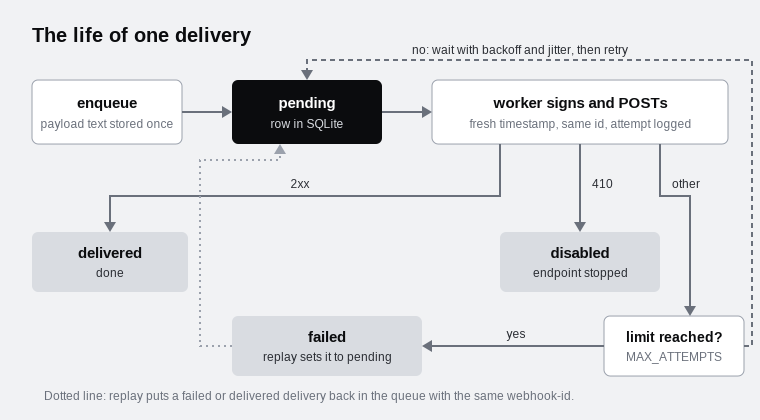
You will build a Node.js 26 webhook sender that signs each delivery the Standard Webhooks way, keeps a queue and an attempt log in SQLite, retries failures with exponential backoff and jitter, gives up after a limit, and replays a delivery on request.
On this page
When your app tells another system that something happened, such as an invoice paid or a parcel shipped, it usually does so with a webhook: an HTTP POST to a URL your partner gave you. Sending one is a single fetch. Sending them so partners can rely on them takes more work. The partner must be able to prove a request came from you, a delivery must survive their server being down for an hour, a dead endpoint must not be hammered forever, and when something does go wrong, both sides need a record of what happened and a way to send it again.
This tutorial builds that sender in plain Node.js 26 with no npm packages. It follows the Standard Webhooks specification, an open format several webhook providers share, so a partner can verify your requests with an off-the-shelf library. It is the other half of receiving and verifying webhooks in Node.js.
You will end with six small files:
sign.jssigns a payload.db.jskeeps the queue and the attempt log in SQLite, using thenode:sqlitemodule built into Node.js.backoff.jsdecides how long to wait before the next try.enqueue.mjs,worker.mjsandreplay.mjsadd, send and resend deliveries, andstatus.mjsprints the log.
To test it, you also write a receiver that verifies signatures and fails on purpose. Everything runs on 127.0.0.1, so you need no partner and no account anywhere.
Step 1 · Create the project and the signing secret
Make a folder, set it up as an ES module project and check the Node.js version:
mkdir -p ~/webhook-sender-demo
cd ~/webhook-sender-demo
npm init -y > /dev/null
npm pkg set type=module
node --version
Each partner endpoint gets its own secret. Standard Webhooks secrets are 24 to 64 random bytes, base64-encoded, with a whsec_ prefix. Create one with Node's own random generator, straight into a file only you can read. umask 077 makes the file private from the moment it exists, and the secret never appears on a command line or in your shell history:
cd ~/webhook-sender-demo
(umask 077; node -e "console.log('WEBHOOK_SECRET=whsec_' + require('node:crypto').randomBytes(32).toString('base64'))" > .env)
ls -l .env
Node.js reads this file when you start a script with --env-file=.env. If the folder is in Git, add .env to .gitignore before anything else: see keep secrets out of Git. In a real system you show the secret to the partner once, when they register their endpoint, and store it per endpoint.
Check it worked
node --version prints v26.13.1 or a later 26 release. The listing for .env starts with -rw-------.
Step 2 · Sign a payload
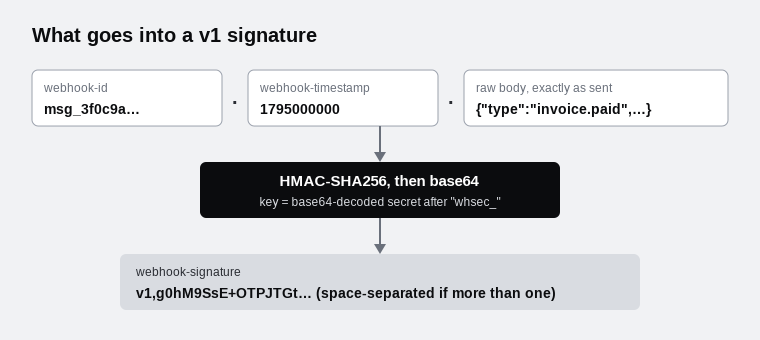
A signature lets the partner check two things: the request came from someone holding the secret, and nobody changed it on the way. Standard Webhooks signs more than the body. It signs three values joined by dots: the message id, the Unix timestamp in seconds, and the exact body text. All three also travel as headers, so the receiver can rebuild the same string.
Write sign.js:
cd ~/webhook-sender-demo
cat > sign.js <<'JS'
import crypto from 'node:crypto';

// "whsec_<base64>" -> the raw key bytes. The prefix is not part of the key.
export function secretKey(secret) {
  if (!secret?.startsWith('whsec_')) throw new Error('secret must start with whsec_');
  const key = Buffer.from(secret.slice('whsec_'.length), 'base64');
  if (key.length < 24 || key.length > 64) throw new Error('secret must decode to 24-64 bytes');
  return key;
}

// v1 = HMAC-SHA256 over "<id>.<timestamp>.<body>", base64-encoded.
export function sign(secret, id, timestamp, body) {
  const mac = crypto
    .createHmac('sha256', secretKey(secret))
    .update(`${id}.${timestamp}.${body}`)
    .digest('base64');
  return `v1,${mac}`;
}

// Headers for one attempt. The timestamp is the time of this attempt,
// so a retry an hour later is not rejected as stale.
export function webhookHeaders(secret, id, body, now = Date.now()) {
  const timestamp = Math.floor(now / 1000);
  return {
    'content-type': 'application/json',
    'webhook-id': id,
    'webhook-timestamp': String(timestamp),
    'webhook-signature': sign(secret, id, timestamp, body),
  };
}
JS- The id stays the same on every attempt and every replay. Receivers use it to spot a delivery they have already handled.
- The timestamp is fresh on each attempt. Receivers reject old timestamps to stop replay attacks, so a retry signed with the original time would fail.
- The body is signed exactly as it is sent. Build the JSON text once, store it, and send that same string every time. Never re-serialise an object between signing and sending: key order or spacing can change, and the signature stops matching.
- The
webhook-signatureheader can hold several signatures separated by spaces. That lets you rotate a secret: for a while, sign with the old and the new secret and send both.
Check it worked
Sign a fixed example and compare it with a known answer. With a fixed secret, id, timestamp and body, the output never changes:
cd ~/webhook-sender-demo
cat > check-sign.mjs <<'JS'
import { sign } from './sign.js';

console.log(sign(
  'whsec_MfKQ9r8GKYqrTwjUPD8ILPZIo2LaLaSw',
  'msg_p5jXN8AQM9LWM0D4loKWxJek',
  1614265330,
  '{"test": 2432232314}',
));
JS
node check-sign.mjs
The output is v1,g0hM9SsE+OTPJTGt/tmIKtSyZlE3uFJELVlNIOLJ1OE=. A different value means the string being signed is not id.timestamp.body, or the key was not base64-decoded after removing whsec_.
Step 3 · Write a receiver that fails on purpose
To watch retries happen, you need an endpoint that misbehaves in known ways. This receiver verifies every request the way a partner would, then:
- answers
503to the firstFAIL_FIRSTattempts of each message, then200, - answers
410 Goneon/gone, the Standard Webhooks signal for "stop sending to this URL", - answers
200without processing again when it sees a message id it has already handled.
cd ~/webhook-sender-demo
cat > receiver.mjs <<'JS'
import http from 'node:http';
import crypto from 'node:crypto';
import { secretKey } from './sign.js';

const key = secretKey(process.env.WEBHOOK_SECRET);
const port = Number(process.env.PORT ?? 4000);
const failFirst = Number(process.env.FAIL_FIRST ?? 0);
const TOLERANCE_SECONDS = 300;
const failuresServed = new Map(); // webhook-id -> 503s sent so far
const handled = new Set(); // webhook-ids already processed

function problemWith(headers, body) {
  const id = headers['webhook-id'];
  const timestamp = headers['webhook-timestamp'];
  if (!id || !/^\d+$/.test(timestamp ?? '')) return 'missing headers';
  const expected = crypto
    .createHmac('sha256', key)
    .update(`${id}.${timestamp}.`)
    .update(body)
    .digest();
  const match = (headers['webhook-signature'] ?? '').split(' ').some((entry) => {
    const [version, value] = entry.split(',');
    if (version !== 'v1' || !value) return false;
    const given = Buffer.from(value, 'base64');
    return given.length === expected.length && crypto.timingSafeEqual(given, expected);
  });
  if (!match) return 'signature mismatch';
  if (Math.abs(Date.now() / 1000 - Number(timestamp)) > TOLERANCE_SECONDS) return 'stale timestamp';
  return null;
}

function reply(res, status, text) {
  res.writeHead(status, { 'content-type': 'text/plain' }).end(text);
}

http.createServer((req, res) => {
  const chunks = [];
  req.on('data', (chunk) => chunks.push(chunk));
  req.on('end', () => {
    const body = Buffer.concat(chunks);
    if (req.method !== 'POST') return reply(res, 405, 'method not allowed');
    if (req.url === '/gone') {
      console.log('answered 410: this endpoint is retired');
      return reply(res, 410, 'gone');
    }
    if (req.url !== '/webhooks') return reply(res, 404, 'not found');

    const problem = problemWith(req.headers, body);
    if (problem) {
      console.log(`rejected: ${problem}`);
      return reply(res, 400, 'invalid webhook');
    }

    const id = req.headers['webhook-id'];
    const served = failuresServed.get(id) ?? 0;
    if (served < failFirst) {
      failuresServed.set(id, served + 1);
      console.log(`failing on purpose: ${id} (${served + 1} of ${failFirst})`);
      return reply(res, 503, 'try again later');
    }
    if (handled.has(id)) {
      console.log(`duplicate, already handled: ${id}`);
      return reply(res, 200, 'ok');
    }
    handled.add(id);
    const event = JSON.parse(body.toString('utf8'));
    console.log(`accepted: ${id} ${event.type} ${event.data.customer}`);
    reply(res, 200, 'ok');
  });
}).listen(port, '127.0.0.1', () => {
  console.log(`receiver listening on http://127.0.0.1:${port}`);
});
JS
Start it in a second terminal, from the project folder, failing the first two attempts of each message:
cd ~/webhook-sender-demo
FAIL_FIRST=2 node --env-file=.env receiver.mjs
The receiver uses the same .env file because, in this demo, you play both sides. A real partner holds their own copy of the secret you gave them.
Check it worked
The second terminal prints receiver listening on http://127.0.0.1:4000 and stays open. Leave it running and go back to the first terminal.
Step 4 · Store deliveries and attempts in SQLite
A webhook that lives only in memory is lost when your process restarts. Write each delivery to a database first and send it from there, so a crash between "invoice paid" and "partner told" delays the webhook but never loses it. db.js opens webhooks.db and creates three tables: the queue, one row per attempt, and endpoints that asked you to stop.
cd ~/webhook-sender-demo
cat > db.js <<'JS'
import { Database } from 'node:sqlite';

export const db = new Database(process.env.WEBHOOK_DB ?? 'webhooks.db');

db.exec(`
  CREATE TABLE IF NOT EXISTS deliveries (
    id              TEXT PRIMARY KEY,               -- sent as webhook-id
    endpoint        TEXT NOT NULL,
    event_type      TEXT NOT NULL,
    payload         TEXT NOT NULL,                  -- the exact body, signed and sent as is
    status          TEXT NOT NULL DEFAULT 'pending', -- pending, delivered, failed, disabled
    attempt_count   INTEGER NOT NULL DEFAULT 0,      -- attempts in the current round
    next_attempt_at INTEGER NOT NULL,                -- Unix time in milliseconds
    created_at      INTEGER NOT NULL
  ) STRICT;
  CREATE INDEX IF NOT EXISTS deliveries_due ON deliveries (status, next_attempt_at);

  CREATE TABLE IF NOT EXISTS attempts (
    id           INTEGER PRIMARY KEY,
    delivery_id  TEXT NOT NULL REFERENCES deliveries (id),
    attempted_at INTEGER NOT NULL,
    status_code  INTEGER,                           -- null when no response came back
    error        TEXT,                              -- ECONNREFUSED, TimeoutError, ...
    duration_ms  INTEGER NOT NULL
  ) STRICT;

  CREATE TABLE IF NOT EXISTS disabled_endpoints (
    endpoint    TEXT PRIMARY KEY,
    disabled_at INTEGER NOT NULL
  ) STRICT;
`);
JS
Now enqueue.mjs, which adds one delivery. It builds the payload once, in the Standard Webhooks shape of type, timestamp and data, and stores the text. It refuses endpoints that have asked you to stop:
cd ~/webhook-sender-demo
cat > enqueue.mjs <<'JS'
import crypto from 'node:crypto';
import { db } from './db.js';

const [endpoint, type, data] = process.argv.slice(2);
if (!endpoint || !type || !data) {
  console.error('usage: node enqueue.mjs <endpoint-url> <event-type> <json-data>');
  process.exit(2);
}
if (db.prepare('SELECT 1 FROM disabled_endpoints WHERE endpoint = ?').get(endpoint)) {
  console.error(`endpoint disabled, not queued: ${endpoint}`);
  process.exit(1);
}

const id = `msg_${crypto.randomUUID().replaceAll('-', '')}`;
const now = Date.now();
const payload = JSON.stringify({
  type,
  timestamp: new Date(now).toISOString(),
  data: JSON.parse(data),
});

db.prepare(`
  INSERT INTO deliveries (id, endpoint, event_type, payload, next_attempt_at, created_at)
  VALUES (?, ?, ?, ?, ?, ?)
`).run(id, endpoint, type, payload, now, now);

console.log(id);
JS
In your own app you would not call a script: you would insert the delivery row in the same database transaction as the change it reports, so the invoice and its webhook are saved together or not at all. This is often called the outbox pattern.
Check it worked
Queue an invoice.paid event for the receiver and keep its id in a shell variable. The customer name has Yoruba diacritics on purpose: the payload is UTF-8, and because you sign and send the same stored text, the bytes the partner checks are the bytes you signed. Names in Yoruba, Amharic or Arabic script need no special handling.
cd ~/webhook-sender-demo
FIRST=$(node enqueue.mjs http://127.0.0.1:4000/webhooks invoice.paid '{"invoice":"inv_1001","customer":"Adébáyọ̀ Okafor","amount":250000,"currency":"NGN"}')
echo "$FIRST"
ls webhooks.db
The first command prints an id such as msg_3f0c9a..., 36 characters in all, and webhooks.db now exists. Depending on your exact Node.js release, the first use of node:sqlite may also print a warning about its stability level. It goes to standard error and does not change the id.
Step 5 · Decide how long to wait between attempts
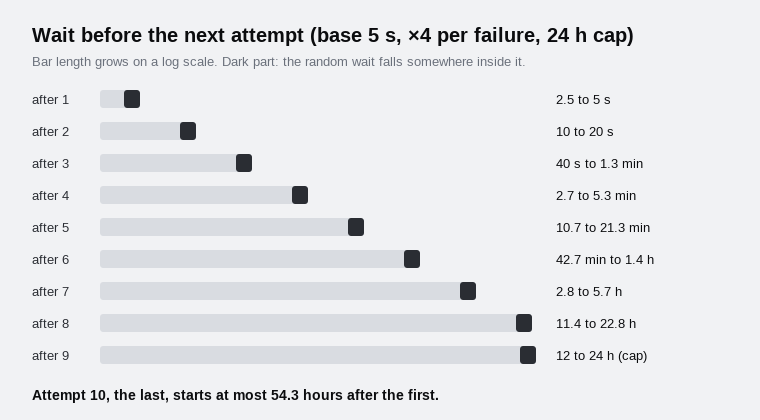
If an endpoint is down, retrying immediately and constantly only adds load to a server that is already struggling. Wait longer after each failure (exponential backoff), and add randomness (jitter) so thousands of deliveries that failed in the same outage do not all come back in the same second. Write backoff.js:
cd ~/webhook-sender-demo
cat > backoff.js <<'JS'
export const MAX_ATTEMPTS = Number(process.env.MAX_ATTEMPTS ?? 10);
const BASE_MS = Number(process.env.RETRY_BASE_MS ?? 5_000);
const CAP_MS = 24 * 60 * 60 * 1000;

// How long to wait after `failed` attempts have failed (failed starts at 1).
// The window grows four times per failure, up to a day. The wait is a random
// point in the upper half of the window, so endpoints that failed together
// do not all get retried in the same second.
export function retryDelay(failed, random = Math.random) {
  const window = Math.min(CAP_MS, BASE_MS * 4 ** (failed - 1));
  return Math.round(window / 2 + random() * (window / 2));
}
JS
The defaults (a 5 second base and 10 attempts) spread the tries over a little more than two days, close to what the Standard Webhooks spec suggests: a partner can be down over a weekend and still get every event. RETRY_BASE_MS and MAX_ATTEMPTS can be overridden from the environment, which you use below to make the demo finish in seconds.
Check it worked
Print the whole schedule using the smallest and largest value the random part can take:
cd ~/webhook-sender-demo
cat > schedule.mjs <<'JS'
import { MAX_ATTEMPTS, retryDelay } from './backoff.js';

const human = (ms) =>
  ms < 60_000 ? `${(ms / 1000).toFixed(1)} s`
  : ms < 3_600_000 ? `${(ms / 60_000).toFixed(1)} min`
  : `${(ms / 3_600_000).toFixed(1)} h`;

let latest = 0;
for (let failed = 1; failed < MAX_ATTEMPTS; failed++) {
  const shortest = retryDelay(failed, () => 0);
  const longest = retryDelay(failed, () => 1);
  latest += longest;
  console.log(`after attempt ${failed} fails: wait ${human(shortest)} to ${human(longest)}`);
}
console.log(`attempt ${MAX_ATTEMPTS} starts at most ${human(latest)} after the first`);
JS
node schedule.mjs
The first line is after attempt 1 fails: wait 2.5 s to 5.0 s, the waits grow to 11.4 h to 22.8 h after attempt 8, the cap holds attempt 9 at 12.0 h to 24.0 h, and the last line is attempt 10 starts at most 54.3 h after the first.
Step 6 · Send deliveries with a worker
The worker picks due deliveries from the queue, signs each one with a fresh timestamp, posts it and records the attempt. Then it applies the rules:
2xx: delivered, done.410 Gone: the partner retired this URL. Mark the endpoint disabled and stop, including for anything else queued for it.- Anything else, including a timeout, a refused connection or a redirect: schedule a retry with
retryDelay, or mark the delivery failed once it reachesMAX_ATTEMPTS.
cd ~/webhook-sender-demo
cat > worker.mjs <<'JS'
import { db } from './db.js';
import { webhookHeaders, secretKey } from './sign.js';
import { MAX_ATTEMPTS, retryDelay } from './backoff.js';

const secret = process.env.WEBHOOK_SECRET;
secretKey(secret); // fail at start-up, not on the first delivery
const untilIdle = process.argv.includes('--until-idle');
const TIMEOUT_MS = 15_000;

const dueNow = db.prepare(`
  SELECT * FROM deliveries
  WHERE status = 'pending' AND next_attempt_at <= ?
  ORDER BY next_attempt_at LIMIT 20
`);
const nextDue = db.prepare(`SELECT MIN(next_attempt_at) AS at FROM deliveries WHERE status = 'pending'`);
const logAttempt = db.prepare(`
  INSERT INTO attempts (delivery_id, attempted_at, status_code, error, duration_ms)
  VALUES (?, ?, ?, ?, ?)
`);
const setState = db.prepare(`
  UPDATE deliveries SET status = ?, attempt_count = ?, next_attempt_at = ? WHERE id = ?
`);
const disableEndpoint = db.prepare(`
  INSERT OR IGNORE INTO disabled_endpoints (endpoint, disabled_at) VALUES (?, ?)
`);
const disableQueued = db.prepare(`
  UPDATE deliveries SET status = 'disabled' WHERE endpoint = ? AND status = 'pending'
`);

async function deliver(d) {
  const started = Date.now();
  let statusCode = null;
  let error = null;
  try {
    const res = await fetch(d.endpoint, {
      method: 'POST',
      headers: webhookHeaders(secret, d.id, d.payload, started),
      body: d.payload,
      redirect: 'manual', // a redirect is a failure, never followed
      signal: AbortSignal.timeout(TIMEOUT_MS),
    });
    statusCode = res.status;
    await res.body?.cancel(); // only the status matters
  } catch (err) {
    error = err.cause?.code ?? err.name; // ECONNREFUSED, TimeoutError, ...
  }

  const attempt = d.attempt_count + 1;
  logAttempt.run(d.id, started, statusCode, error, Date.now() - started);
  const outcome = statusCode ?? error;

  if (statusCode >= 200 && statusCode < 300) {
    setState.run('delivered', attempt, started, d.id);
    console.log(`${d.id} attempt ${attempt}: ${outcome}, delivered`);
  } else if (statusCode === 410) {
    db.exec('BEGIN');
    disableEndpoint.run(d.endpoint, Date.now());
    setState.run('disabled', attempt, started, d.id);
    disableQueued.run(d.endpoint);
    db.exec('COMMIT');
    console.log(`${d.id} attempt ${attempt}: 410, endpoint disabled`);
  } else if (attempt >= MAX_ATTEMPTS) {
    setState.run('failed', attempt, started, d.id);
    console.log(`${d.id} attempt ${attempt}: ${outcome}, gave up after ${attempt} attempts`);
  } else {
    const wait = retryDelay(attempt);
    setState.run('pending', attempt, Date.now() + wait, d.id);
    console.log(`${d.id} attempt ${attempt}: ${outcome}, retry in ${wait} ms`);
  }
}

while (true) {
  const batch = dueNow.all(Date.now());
  for (const d of batch) await deliver(d);
  if (batch.length > 0) continue;

  const { at } = nextDue.get();
  if (at === null && untilIdle) break;
  const pause = at === null ? 1000 : Math.min(1000, Math.max(0, at - Date.now()));
  await new Promise((resolve) => setTimeout(resolve, pause));
}
JS- The 15 second timeout is the low end of the 15 to 30 seconds the spec recommends. Partners should answer fast and do slow work afterwards. A sender that waits minutes per request ties itself up with one broken endpoint.
redirect: 'manual'stops the worker following a redirect to somewhere the partner did not register.- Normally the worker runs forever, as a service.
--until-idlemakes it exit once nothing is pending, which is handy for this demo and for scripts.
Run it in the first terminal, with a 100 ms base delay so the retries happen in under a second:
cd ~/webhook-sender-demo
RETRY_BASE_MS=100 node --env-file=.env worker.mjs --until-idleCheck it worked
The first terminal shows three lines for your message: attempt 1: 503, retry in ... ms, attempt 2: 503, retry in ... ms and attempt 3: 200, delivered. The retry times differ on every run because of the jitter. The receiver terminal shows failing on purpose twice, then accepted: msg_... invoice.paid Adébáyọ̀ Okafor. That last line proves the signature verified: the receiver rejects anything that does not match.
Step 7 · Read the attempt log
When a partner says "we never got the webhook for invoice 1001", you need an answer in seconds. status.mjs prints each delivery with its status and the result of every attempt, oldest first:
cd ~/webhook-sender-demo
cat > status.mjs <<'JS'
import { db } from './db.js';

const only = process.argv[2];
const deliveries = only
  ? db.prepare('SELECT * FROM deliveries WHERE id = ?').all(only)
  : db.prepare('SELECT * FROM deliveries ORDER BY created_at').all();
const attemptsFor = db.prepare(`
  SELECT status_code, error FROM attempts WHERE delivery_id = ? ORDER BY id
`);

for (const d of deliveries) {
  const results = attemptsFor.all(d.id).map((a) => a.status_code ?? a.error);
  console.log(`${d.id} ${d.status} ${d.event_type} ${results.join(' ')}`);
}
JS
node status.mjs "$FIRST"Check it worked
One line: your message id, then delivered invoice.paid 503 503 200. That line is the evidence you show a partner, and the same query works with an attempted_at range when they ask about a whole afternoon.
Step 8 · Give up on an endpoint that stays down, then replay
Queue an event for port 4001, where nothing is listening yet. This stands in for a partner whose server is off. Run the worker with a limit of four attempts:
cd ~/webhook-sender-demo
DOWN=$(node enqueue.mjs http://127.0.0.1:4001/webhooks invoice.paid '{"invoice":"inv_1002","customer":"Wanjiru Kamau","amount":150000,"currency":"KES"}')
RETRY_BASE_MS=100 MAX_ATTEMPTS=4 node --env-file=.env worker.mjs --until-idle
node status.mjs "$DOWN"
The worker tries four times over about two seconds, then prints gave up after 4 attempts. With the default settings the same thing takes a little over two days, and that is when you would alert the partner by email or in their dashboard.
Now the partner brings their server back. Start a second receiver on port 4001 in a third terminal, this time not failing anything:
cd ~/webhook-sender-demo
PORT=4001 node --env-file=.env receiver.mjs
A replay puts a delivery back in the queue with a fresh round of attempts. The id stays the same, so a receiver that did process it the first time can recognise it and skip the work. The old attempts stay in the log. Write replay.mjs:
cd ~/webhook-sender-demo
cat > replay.mjs <<'JS'
import { db } from './db.js';

const id = process.argv[2];
const d = db.prepare('SELECT endpoint, status FROM deliveries WHERE id = ?').get(id ?? '');
if (!d) {
  console.error(`no delivery with id ${id}`);
  process.exit(1);
}
if (db.prepare('SELECT 1 FROM disabled_endpoints WHERE endpoint = ?').get(d.endpoint)) {
  console.error(`endpoint disabled, re-enable it before replaying: ${d.endpoint}`);
  process.exit(1);
}
db.prepare(`
  UPDATE deliveries SET status = 'pending', attempt_count = 0, next_attempt_at = ? WHERE id = ?
`).run(Date.now(), id);
console.log(`${id} was ${d.status}, queued for replay`);
JS
In a product, this is what the "Resend" button next to each delivery in the partner's dashboard calls, after checking the delivery belongs to that partner. Replay the failed delivery, and replay the first one too, which was already delivered:
cd ~/webhook-sender-demo
node replay.mjs "$DOWN"
node replay.mjs "$FIRST"
RETRY_BASE_MS=100 node --env-file=.env worker.mjs --until-idle
node status.mjsCheck it worked
After the four failed attempts, the first status.mjs line ends with failed invoice.paid ECONNREFUSED ECONNREFUSED ECONNREFUSED ECONNREFUSED. After the replay, status.mjs prints both deliveries:
- the first ends
delivered invoice.paid 503 503 200 200, - the second ends
delivered invoice.paid ECONNREFUSED ECONNREFUSED ECONNREFUSED ECONNREFUSED 200.
The third terminal shows accepted: msg_... invoice.paid Wanjiru Kamau. The second terminal shows duplicate, already handled for the first message: the receiver answered 200 without doing the work twice, which is how partners should treat the webhook-id.
Step 9 · Stop sending when an endpoint says 410 Gone
Queue an event for the receiver's /gone route, run the worker, and then try to queue another for the same URL:
cd ~/webhook-sender-demo
GONE=$(node enqueue.mjs http://127.0.0.1:4000/gone invoice.paid '{"invoice":"inv_1003","customer":"Leïla Benali","amount":9900,"currency":"MAD"}')
RETRY_BASE_MS=100 node --env-file=.env worker.mjs --until-idle
node status.mjs "$GONE"
node enqueue.mjs http://127.0.0.1:4000/gone invoice.paid '{"invoice":"inv_1004"}' || echo "refused as expected"Check it worked
The worker prints a single line ending attempt 1: 410, endpoint disabled, with no retries. status.mjs shows disabled invoice.paid 410. The last command prints endpoint disabled, not queued: http://127.0.0.1:4000/gone and then refused as expected. Re-enabling an endpoint is a deliberate act: delete its row from disabled_endpoints, usually when the partner registers it again.
Step 10 · Take it to production, then clean up
The demo has the full shape of a production sender. Before partners depend on it, add:
- HTTPS endpoints only, and no private addresses. Partners type in their own URLs, so check each one at registration and before each attempt: refuse
http://, and refuse hosts that resolve to127.0.0.0/8,10.0.0.0/8,172.16.0.0/12,192.168.0.0/16,169.254.0.0/16or IPv6 local ranges. Otherwise anyone can make your server call your own internal services. The demo posts to127.0.0.1only because it is a demo. - One secret per endpoint, stored encrypted, with rotation: for a day or so, sign with both secrets and send both signatures, space-separated.
- Safe parallel workers. A single worker processes one delivery at a time. To run several, claim rows before sending, for example with a
locked_untilcolumn set in the sameUPDATEthat selects the row, so two workers never send the same attempt. A slow endpoint should not hold up the rest: limit how many deliveries run at once per endpoint. - A service manager such as systemd to keep
worker.mjsrunning and restart it after a crash, withWEBHOOK_SECRETloaded from a root-owned environment file rather than your home folder. - Retention. Prune old rows from
attemptsafter the period partners can ask about, such as 30 days. - Small payloads for slow networks. Partners on prepaid mobile data or low-end Android-based point-of-sale devices pay for every byte. Send ids and the fields that changed, and let them fetch the rest from your API.
To finish, press Ctrl+C in the second and third terminals to stop both receivers. Then delete the demo folder, which holds the secret and the database:
cd ~
rm -rf ~/webhook-sender-demoCheck it worked
ls ~/webhook-sender-demo reports that there is no such file or directory, and neither receiver terminal is still running.
Next steps
- Build the receiving side properly, with raw bodies, constant-time comparison and duplicate detection: verify webhook signatures in Node.js.
- Apply the same "safe to send twice" idea to your own API: make POST requests safe to retry with idempotency keys.
- Use timeouts and backoff when you are the one calling someone else's API: call third-party APIs with timeouts and retries.
Part of these paths
Related tutorials
- How to Receive and Verify Webhooks Safely in Node.jsYou will build an Express 5.3 webhook receiver on Node.js 26 that checks an HMAC-SHA256 signature over the raw request body, compares it in constant time, rejects stale timestamps and duplicate events, and a small sender that proves each rejection works.
- Make POST requests safe to retry with idempotency keysYou will add Idempotency-Key handling to a Node.js 26 payments endpoint backed by SQLite, so a retried, duplicated or simultaneous request charges the customer exactly once.
- Call third-party APIs reliably with timeouts, retries and a circuit breakerYou will build a reusable Node.js 26 API client that gives every request a deadline, retries only what is safe with backoff and jitter, honours Retry-After, stops calling a dead service with a circuit breaker and logs each attempt without leaking the API key.
Need this done for you?
Padding does this work for growing companies, from the first diagnosis to a system that keeps working.
Get new tutorials