Security and hardening · Intermediate · 20 min
Set up a deliberately vulnerable Node app to practise security fixes
By Padding · Updated 18 Nov 2026
Node.js 26.13 · Express 5.3.0 · node:sqlite · node:26 image
You will build Noticeboard, a small Express 5.3 app with known OWASP Top 10 flaws, run it on 127.0.0.1 only, map each flaw to the part of the series that fixes it, and prove your first fix with a security test that fails before the change and passes after it.
On this page
The fastest way to learn web security is to fix real flaws in code you can read end to end. This series gives you that code. You build Noticeboard, a small office noticeboard: people sign in, publish posts or keep them as drafts, comment, attach files and paste links that get a preview. It is written with the mistakes the OWASP Top 10:2025 lists, on purpose, and each later part takes one group of them, proves the flaw with a test, and fixes it.
In this first part you build the app, start it so that only your own machine can reach it, map every flaw to the part that fixes it, and set up the test layout the series uses. Then you run the whole loop once on a small flaw: a failing security test, a fix, and the same test passing.
Before you start, the ground rules. They are not a formality:
- Practise only on your own app. Everything in this series runs against Noticeboard on
127.0.0.1. Never point these checks at a site, server or network you do not own or have written permission to test. In most countries that is a crime, whatever the intent. - Keep it local. The app listens on the loopback address only, so other devices on your Wi-Fi or office network cannot reach it. Do not deploy it, put it behind a tunnel or open a port for it.
- Use harmless markers. When a later part proves a flaw, the input is a marker string such as
nb-marker-42, never anything that deletes, downloads or calls out. - Do not copy the vulnerable code. Lines marked
FLAWare the lesson. The fixed versions are what belong in real projects.
Step 1 · Create the project and install Express
Make the project folder and a package.json. The test script runs the ordinary tests, and test:security runs the security tests that each part adds:
mkdir -p ~/noticeboard-demo
cd ~/noticeboard-demo
cat > package.json <<'JSON'
{
  "name": "noticeboard",
  "version": "1.0.0",
  "private": true,
  "type": "module",
  "engines": { "node": ">=26" },
  "scripts": {
    "start": "node --env-file=.env server.js",
    "test": "node --test \"test/*.test.js\"",
    "test:security": "node --test \"test/security/*.test.js\""
  }
}
JSON
cat > .gitignore <<'TXT'
node_modules/
.env
noticeboard.db
data/thumbnails/
TXT
npm install express@5.3.0 --save-exact
--save-exact writes 5.3.0 into package.json with no range, so every part of the series runs on the same Express. The only other pieces are built into Node.js 26: node:sqlite for the database and node:test for the tests. The .gitignore keeps the secret file and the database you are about to create out of any repository you make later.
Check it worked
npm ls expressThe output ends with express@5.3.0. If npm reports an EBADENGINE warning, your Node.js is older than 26; run node --version and upgrade before you go on.
Step 2 · Add the database
Noticeboard keeps users, posts and comments in one SQLite file. Create db.js. It creates the tables if they are missing and, on first run, adds three demo users and two posts, one of them a draft:
cat > db.js <<'JS'
import { DatabaseSync } from 'node:sqlite'

export function openDb(file, seedPassword) {
  const db = new DatabaseSync(file)
  db.exec(`
    CREATE TABLE IF NOT EXISTS users (
      id INTEGER PRIMARY KEY,
      name TEXT UNIQUE NOT NULL,
      password TEXT NOT NULL,
      role TEXT NOT NULL DEFAULT 'member'
    );
    CREATE TABLE IF NOT EXISTS posts (
      id INTEGER PRIMARY KEY,
      owner_id INTEGER NOT NULL REFERENCES users(id),
      title TEXT NOT NULL,
      body TEXT NOT NULL,
      published INTEGER NOT NULL DEFAULT 0
    );
    CREATE TABLE IF NOT EXISTS comments (
      id INTEGER PRIMARY KEY,
      post_id INTEGER NOT NULL REFERENCES posts(id),
      author_id INTEGER NOT NULL REFERENCES users(id),
      body TEXT NOT NULL
    );
  `)
  const { n } = db.prepare('SELECT COUNT(*) AS n FROM users').get()
  if (n === 0) seed(db, seedPassword)
  return db
}

function seed(db, password) {
  if (!password) throw new Error('Set SEED_PASSWORD to create the demo users')
  // FLAW (A06, not fixed in this series): passwords are stored in plain text.
  const addUser = db.prepare('INSERT INTO users (name, password, role) VALUES (?, ?, ?)')
  addUser.run('amara', password, 'member')
  addUser.run('bola', password, 'member')
  addUser.run('chen', password, 'admin')
  const addPost = db.prepare(
    'INSERT INTO posts (owner_id, title, body, published) VALUES (?, ?, ?, ?)',
  )
  addPost.run(1, 'Welcome to Noticeboard', '<p>Notices for the <strong>whole office</strong>.</p>', 1)
  addPost.run(2, 'Draft: team lunch plans', '<p>Not ready to share yet.</p>', 0)
  db.prepare('INSERT INTO comments (post_id, author_id, body) VALUES (?, ?, ?)').run(1, 2, 'Thanks, Amara.')
}
JS
Every query uses ? parameters, so this app has no SQL injection; that flaw has its own tutorial. The demo password comes from the SEED_PASSWORD environment variable rather than from the code, and the plain-text storage is left as it is: hashing passwords with Argon2id covers the fix.
Check it worked
Open an in-memory copy of the database and list the users:
node --input-type=module -e "
import { openDb } from './db.js'
const db = openDb(':memory:', crypto.randomUUID())
console.log(db.prepare('SELECT name, role FROM users').all())
"
The output lists amara and bola as member and chen as admin. Depending on your 26.x release, Node.js may also print a one-line note about SQLite; it does no harm.
Step 3 · Write the app
Now the app itself. Error handling lives in its own small file, errors.js, because it is the first thing you fix. Create it as it is now, with a handler that shows the whole error to whoever caused it:
cat > errors.js <<'JS'
// FLAW (A10, fixed in part 1): sends the stack trace and server paths to the browser.
export function errorHandler(err, req, res, next) {
  res.status(500).type('text/plain').send(`Something went wrong.\n\n${err.stack}`)
}
JS
Then create app.js. It exports createApp, which builds the app around a database and a data folder without starting a server, so the tests can start their own copy. Read the FLAW comments as you go; the label in brackets is the OWASP Top 10:2025 category, and the part is where you fix it:
cat > app.js <<'JS'
import express from 'express'
import { randomUUID } from 'node:crypto'
import { exec } from 'node:child_process'
import { readFile } from 'node:fs/promises'
import path from 'node:path'
import { promisify } from 'node:util'
import { errorHandler } from './errors.js'

// Deliberately vulnerable. Every FLAW comment is fixed in a later part of the series.
const run = promisify(exec)

function parseCookies(header = '') {
  const cookies = {}
  for (const pair of header.split(';')) {
    const i = pair.indexOf('=')
    if (i > 0) cookies[pair.slice(0, i).trim()] = decodeURIComponent(pair.slice(i + 1).trim())
  }
  return cookies
}

function page(title, user, body) {
  const who = user
    ? `Signed in as ${user.name} <form method="post" action="/signout"><button>Sign out</button></form>`
    : '<a href="/signin">Sign in</a>'
  return `<!doctype html>
<html lang="en">
<head><meta charset="utf-8"><meta name="viewport" content="width=device-width, initial-scale=1">
<title>${title} - Noticeboard</title></head>
<body>
<header><a href="/">Noticeboard</a> ${who}</header>
<main>${body}</main>
</body>
</html>`
}

export function createApp({ db, dataDir }) {
  const app = express()
  const sessions = new Map() // session ID -> user ID, kept in memory

  app.use(express.urlencoded({ extended: false }))
  app.use(express.json())

  app.use((req, res, next) => {
    req.cookies = parseCookies(req.get('cookie'))
    const userId = sessions.get(req.cookies.sid)
    req.user = userId
      ? db.prepare('SELECT id, name, role FROM users WHERE id = ?').get(userId)
      : undefined
    next()
  })

  const signedIn = (req, res, next) =>
    req.user ? next() : res.status(401).send(page('Sign in', undefined, '<p>Sign in first.</p>'))

  app.get('/', (req, res) => {
    const posts = db.prepare('SELECT id, title FROM posts WHERE published = 1 ORDER BY id DESC').all()
    const items = posts.map((p) => `<li><a href="/posts/${p.id}">${p.title}</a></li>`).join('')
    const form = req.user
      ? `<form method="post" action="/posts">
<label>Title <input name="title"></label>
<label>Body <textarea name="body"></textarea></label>
<label><input type="checkbox" name="published"> Publish now</label>
<button>Save post</button></form>`
      : ''
    res.send(page('Home', req.user, `<h1>Notices</h1><ul>${items}</ul>
<form action="/search"><label>Search <input name="q"></label><button>Search</button></form>${form}`))
  })

  app.get('/signin', (req, res) => {
    res.send(page('Sign in', req.user, `<form method="post" action="/signin">
<label>Name <input name="name" autocomplete="username"></label>
<label>Password <input name="password" type="password" autocomplete="current-password"></label>
<button>Sign in</button></form>`))
  })

  app.post('/signin', (req, res) => {
    const { name = '', password = '' } = req.body ?? {}
    const user = db
      .prepare('SELECT id, role FROM users WHERE name = ? AND password = ?')
      .get(String(name), String(password))
    if (!user) return res.status(401).send(page('Sign in', undefined, '<p>Wrong name or password.</p>'))
    // FLAW (A07, part 7): keeps a session ID the browser already had (session fixation).
    const sid = req.cookies.sid || randomUUID()
    sessions.set(sid, user.id)
    // FLAW (A07, part 7): no HttpOnly, Secure or SameSite flags on the session cookie.
    res.cookie('sid', sid)
    // FLAW (A01, part 2): the role is kept in a cookie the browser can change.
    res.cookie('role', user.role)
    res.redirect(303, '/')
  })

  app.post('/signout', (req, res) => {
    // FLAW (A07, part 7): the session stays valid on the server after sign-out.
    res.clearCookie('sid')
    res.redirect(303, '/')
  })

  app.post('/posts', signedIn, (req, res) => {
    const { title = '', body = '', published } = req.body ?? {}
    const { lastInsertRowid } = db
      .prepare('INSERT INTO posts (owner_id, title, body, published) VALUES (?, ?, ?, ?)')
      .run(req.user.id, String(title), String(body), published === 'on' ? 1 : 0)
    res.redirect(303, `/posts/${lastInsertRowid}`)
  })

  app.get('/posts/:id', (req, res) => {
    // FLAW (A01, part 2): anyone who changes the ID in the URL can read a draft.
    const post = db
      .prepare(`SELECT p.id, p.title, p.body, p.published, u.name AS author
                FROM posts p JOIN users u ON u.id = p.owner_id WHERE p.id = ?`)
      .get(req.params.id)
    const comments = db
      .prepare(`SELECT c.body, u.name AS author FROM comments c
                JOIN users u ON u.id = c.author_id WHERE c.post_id = ? ORDER BY c.id`)
      .all(post.id)
    // FLAW (A05, part 3): titles and comments go into the page unescaped,
    // and the formatted post body is not sanitised.
    const list = comments.map((c) => `<li><strong>${c.author}</strong>: ${c.body}</li>`).join('')
    res.send(page(post.title, req.user, `<article><h1>${post.title}</h1>
<p>By ${post.author}${post.published ? '' : ' (draft)'}</p>
${post.body}
</article>
<h2>Comments</h2>
<ul>${list}</ul>
<form method="post" action="/posts/${post.id}/comments">
<label>Comment <textarea name="body"></textarea></label><button>Add comment</button></form>
<form method="post" action="/posts/${post.id}/delete"><button>Delete post</button></form>`))
  })

  app.post('/posts/:id/edit', signedIn, (req, res) => {
    // FLAW (A01, part 2): any signed-in user can edit anyone's post.
    const { title = '', body = '' } = req.body ?? {}
    db.prepare('UPDATE posts SET title = ?, body = ? WHERE id = ?').run(String(title), String(body), req.params.id)
    res.redirect(303, `/posts/${req.params.id}`)
  })

  app.post('/posts/:id/comments', signedIn, (req, res) => {
    db.prepare('INSERT INTO comments (post_id, author_id, body) VALUES (?, ?, ?)')
      .run(req.params.id, req.user.id, String(req.body?.body ?? ''))
    res.redirect(303, `/posts/${req.params.id}`)
  })

  // FLAW (A01 CSRF, part 4): no CSRF defence, and a plain GET link can delete too.
  const deletePost = (req, res) => {
    const own = db.prepare('SELECT id FROM posts WHERE id = ? AND owner_id = ?').get(req.params.id, req.user.id)
    if (!own) return res.status(404).send(page('Not found', req.user, '<p>No such post.</p>'))
    db.prepare('DELETE FROM comments WHERE post_id = ?').run(own.id)
    db.prepare('DELETE FROM posts WHERE id = ?').run(own.id)
    res.redirect(303, '/')
  }
  app.post('/posts/:id/delete', signedIn, deletePost)
  app.get('/posts/:id/delete', signedIn, deletePost)

  app.get('/search', (req, res) => {
    const q = String(req.query.q ?? '')
    const rows = db
      .prepare("SELECT id, title FROM posts WHERE published = 1 AND title LIKE '%' || ? || '%'")
      .all(q)
    // FLAW (A05, part 3): the search term is echoed into the page unescaped.
    const items = rows.map((p) => `<li><a href="/posts/${p.id}">${p.title}</a></li>`).join('')
    res.send(page('Search', req.user, `<h1>Results for ${q}</h1><ul>${items}</ul>`))
  })

  app.get('/admin', (req, res) => {
    // FLAW (A01, part 2): trusts the role cookie the browser sent.
    if (req.cookies.role !== 'admin') return res.status(403).send(page('Admin', req.user, '<p>Admins only.</p>'))
    const users = db.prepare('SELECT name, role FROM users ORDER BY name').all()
    res.send(page('Admin', req.user, `<h1>Users</h1><ul>${users.map((u) => `<li>${u.name} (${u.role})</li>`).join('')}</ul>`))
  })

  app.post('/preview', signedIn, async (req, res) => {
    // FLAW (A01 SSRF, part 5): fetches any URL, including addresses inside your own network.
    const response = await fetch(String(req.body?.url ?? ''))
    const html = await response.text()
    const title = /<title[^>]*>([^<]*)<\/title>/i.exec(html)?.[1]?.trim() ?? ''
    res.json({ title })
  })

  app.get('/internal/stats', (req, res) => {
    // Meant only for a monitoring script on the same machine.
    const local = ['127.0.0.1', '::1', '::ffff:127.0.0.1'].includes(req.socket.remoteAddress)
    if (!local) return res.status(404).end()
    const { posts } = db.prepare('SELECT COUNT(*) AS posts FROM posts').get()
    res.json({ posts, sessions: sessions.size })
  })

  app.get('/files', async (req, res) => {
    // FLAW (A01 path traversal, part 6): joins a name from the URL onto the folder.
    const file = path.join(dataDir, 'files', String(req.query.name ?? ''))
    res.type('text/plain').send(await readFile(file, 'utf8'))
  })

  app.post('/files/thumbnail', signedIn, async (req, res) => {
    // FLAW (A05 command injection, part 6): the name is pasted into a shell command.
    // A stand-in for a real thumbnailer: it copies the file.
    const name = String(req.body?.name ?? '')
    await run(`cp files/${name} thumbnails/${name}`, { cwd: dataDir })
    res.json({ thumbnail: `thumbnails/${name}` })
  })

  app.use(errorHandler)
  return app
}
JS
A few things in this file are correct and stay that way: every SQL query is parameterised, deleting a post already checks that you own it (part 4 is about a different problem with that route), and Express 5 passes a thrown error or a rejected promise from any handler to errorHandler, so no route needs its own try/catch.
Check it worked
node --input-type=module -e "import('./app.js').then((m) => console.log(typeof m.createApp))"The command prints function. A SyntaxError here means a heredoc was cut short; run that block again.
Step 4 · Start it on 127.0.0.1 only
Create server.js. The host is fixed to the loopback address in the code, not read from the environment, so no setting can expose the app by mistake. The port can change with PORT:
cat > server.js <<'JS'
import path from 'node:path'
import { createApp } from './app.js'
import { openDb } from './db.js'

// Loopback only: other machines cannot connect. Do not change this for Noticeboard.
const HOST = '127.0.0.1'
const PORT = Number(process.env.PORT ?? 3000)

const db = openDb(process.env.DB_FILE ?? path.join(import.meta.dirname, 'noticeboard.db'), process.env.SEED_PASSWORD)
const app = createApp({ db, dataDir: path.join(import.meta.dirname, 'data') })

const server = app.listen(PORT, HOST, (err) => {
  if (err) throw err
  const { address, port } = server.address()
  console.log(`Noticeboard listening on http://${address}:${port}`)
})
JS
mkdir -p data/files data/thumbnails
printf 'Welcome to Noticeboard. Attachments live in this folder.\n' > data/files/welcome.txt
(umask 077 && node -p "'SEED_PASSWORD=' + require('node:crypto').randomBytes(12).toString('hex')" > .env)
The last line writes a random demo password to .env. The umask 077 in the subshell makes the file readable by you alone from the moment it exists. Run cat .env when you want to sign in as amara, bola or chen; all three share it.
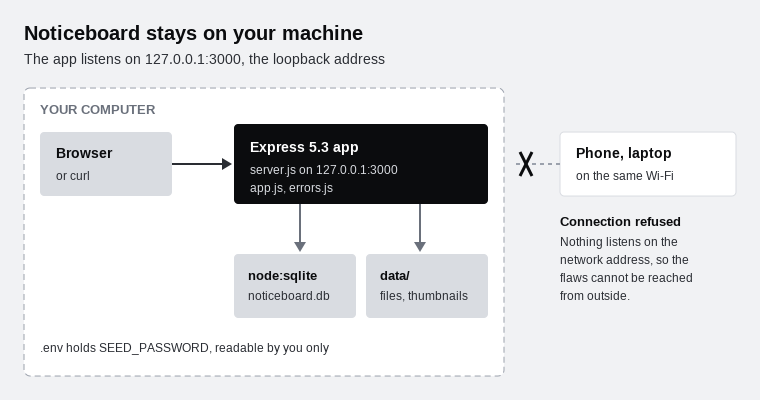
In a second terminal, go to the project and start the app. npm start runs node --env-file=.env server.js, which loads the password into the environment:
cd ~/noticeboard-demo
npm start
Leave it running. Back in your first terminal, ask for the home page:
curl -s http://127.0.0.1:3000/ | grep -o "Welcome to Noticeboard"Check it worked
The second terminal shows Noticeboard listening on http://127.0.0.1:3000, and the curl command prints Welcome to Noticeboard. Open http://127.0.0.1:3000 in a browser on the same machine and sign in as amara with the password from .env; the header changes to "Signed in as amara". If you open the same address with your computer's network IP instead (for example http://192.168.1.20:3000 from your phone), the connection is refused. That refusal is the point.
If you are on a laptop that also serves as a hotspot, or on a shared office network, this matters more than it seems: an app bound to every interface is reachable by everyone on that network, and a vulnerable one is an open door. Loopback keeps your practice private, and it uses no data, which helps if you pay for bundles by the gigabyte.
Step 5 · Map the flaws to the OWASP Top 10
The FLAW comments in app.js, errors.js and db.js cover five of the ten OWASP Top 10:2025 categories: A01, A05, A06, A07 and A10. The loopback binding adds a sixth, A02, which you have already handled. Here is the plan for the series, with the route or file where each flaw lives:
- Part 1 (this one), A10:2025 Mishandling of Exceptional Conditions.
errors.jssends stack traces and server paths to the browser. The loopback binding you just set is the A02:2025 Security Misconfiguration half of this part. - Part 2, A01:2025 Broken Access Control.
GET /posts/:idshows drafts to anyone,POST /posts/:id/editlets anyone edit, andGET /admintrusts arolecookie. - Part 3, A05:2025 Injection (cross-site scripting). Titles and comments in
GET /posts/:id, and the search term inGET /search, reach the page unescaped. - Part 4, cross-site request forgery (listed under A01:2025).
POST /posts/:id/deleteaccepts a form from any site, andGET /posts/:id/deletechanges data on a GET. - Part 5, server-side request forgery (listed under A01:2025).
POST /previewfetches any URL, including/internal/statson the same machine. - Part 6, path traversal (A01:2025) and command injection (A05:2025).
GET /filesjoins a user-supplied name onto a folder, andPOST /files/thumbnailpastes a name into a shell. - Part 7, A07:2025 Authentication Failures.
POST /signinkeeps a session ID the browser already had, sets no cookie flags, and sign-out leaves the session alive. - Not in this series, A06:2025 Insecure Design.
db.jsstores passwords in plain text (CWE-256, unprotected storage of credentials). Hashing passwords with Argon2id covers the fix. - Part 8. Regression tests and custom Semgrep rules keep all of the above fixed when new routes arrive.
You can see one of these from the command line now, with a harmless marker. Search for a term that contains a bold tag:
curl -s "http://127.0.0.1:3000/search?q=%3Cb%3Enb-marker-42%3C%2Fb%3E" | grep -o "Results for <b>nb-marker-42</b>"Then ask for a post that does not exist:
curl -s http://127.0.0.1:3000/posts/999999 | head -n 4Check it worked
The first command prints Results for <b>nb-marker-42</b>: the tag you typed reached the page as markup, not as text. A browser would show the marker in bold, and a script tag would run the same way. Part 3 fixes it.
The second command prints Something went wrong., a blank line, and the start of a stack trace: TypeError: Cannot read properties of undefined (reading 'id') followed by a line like at file:///home/you/noticeboard-demo/app.js:115:14. Anyone can now see your username, where the code lives and which line failed. That is the flaw you fix in this part.
Step 6 · Set up node:test with baseline tests
Each part follows the same loop. First a security test that describes the safe behaviour, which fails because the flaw is there. Then the fix. Then the same test, now passing, which stays in the suite for good. The ordinary tests run alongside, to show that a fix has not broken a feature.
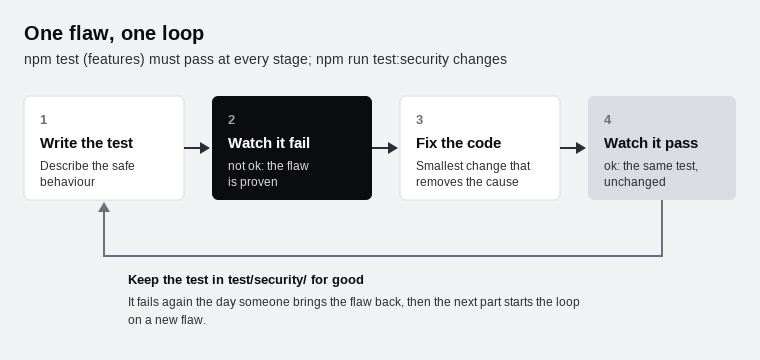
Start with a helper that every test file shares. It starts a fresh copy of the app on a random free port, with an in-memory database, a throwaway data folder and a random password, and signs users in:
mkdir -p test/security
cat > test/helpers.js <<'JS'
import { mkdtemp, mkdir, writeFile, rm } from 'node:fs/promises'
import { tmpdir } from 'node:os'
import path from 'node:path'
import { randomBytes } from 'node:crypto'
import { createApp } from '../app.js'
import { openDb } from '../db.js'

export async function startApp() {
  const dataDir = await mkdtemp(path.join(tmpdir(), 'noticeboard-test-'))
  await mkdir(path.join(dataDir, 'files'))
  await mkdir(path.join(dataDir, 'thumbnails'))
  await writeFile(path.join(dataDir, 'files', 'welcome.txt'), 'Welcome to Noticeboard.\n')
  const password = randomBytes(12).toString('hex')
  const db = openDb(':memory:', password)
  const app = createApp({ db, dataDir })
  const server = await new Promise((resolve, reject) => {
    const s = app.listen(0, '127.0.0.1', (err) => (err ? reject(err) : resolve(s)))
  })
  const base = `http://127.0.0.1:${server.address().port}`

  return {
    base,
    dataDir,
    password,
    // Signs in and returns a Cookie header to send with later requests.
    async signIn(name, pass = password) {
      const res = await fetch(`${base}/signin`, {
        method: 'POST',
        body: new URLSearchParams({ name, password: pass }),
        redirect: 'manual',
      })
      return { status: res.status, cookie: res.headers.getSetCookie().map((c) => c.split(';')[0]).join('; ') }
    },
    async close() {
      server.closeAllConnections()
      await new Promise((resolve) => server.close(resolve))
      db.close()
      await rm(dataDir, { recursive: true, force: true })
    },
  }
}
JS
Now the baseline tests, one per feature. They must pass before and after every fix in the series:
cat > test/app.test.js <<'JS'
import { test, before, after } from 'node:test'
import assert from 'node:assert/strict'
import { startApp } from './helpers.js'

let app
before(async () => { app = await startApp() })
after(() => app.close())

test('home lists published posts and hides drafts', async () => {
  const html = await (await fetch(`${app.base}/`)).text()
  assert.match(html, /Welcome to Noticeboard/)
  assert.doesNotMatch(html, /team lunch/)
})

test('sign-in with the right password starts a session', async () => {
  const { status, cookie } = await app.signIn('amara')
  assert.equal(status, 303)
  const html = await (await fetch(`${app.base}/`, { headers: { cookie } })).text()
  assert.match(html, /Signed in as amara/)
})

test('sign-in with a wrong password is refused', async () => {
  const { status } = await app.signIn('amara', 'not-the-password')
  assert.equal(status, 401)
})

test('a signed-in user can publish a post and comment on it', async () => {
  const { cookie } = await app.signIn('bola')
  const created = await fetch(`${app.base}/posts`, {
    method: 'POST',
    headers: { cookie },
    body: new URLSearchParams({ title: 'Fire drill on Friday', body: '<p>At 10:00.</p>', published: 'on' }),
    redirect: 'manual',
  })
  assert.equal(created.status, 303)
  const url = `${app.base}${created.headers.get('location')}`
  await fetch(`${url}/comments`, {
    method: 'POST',
    headers: { cookie },
    body: new URLSearchParams({ body: 'Noted.' }),
    redirect: 'manual',
  })
  const html = await (await fetch(url)).text()
  assert.match(html, /Fire drill on Friday/)
  assert.match(html, /Noted\./)
})

test('attachments are served from the files folder', async () => {
  const res = await fetch(`${app.base}/files?name=welcome.txt`)
  assert.equal(res.status, 200)
  assert.match(await res.text(), /Welcome to Noticeboard/)
})
JS
npm testCheck it worked
Each test gets a ✔ and the run ends with a summary that includes ℹ tests 5, ℹ pass 5 and ℹ fail 0. The tests never touch the app in your second terminal or its noticeboard.db: each file starts its own copy and deletes its data folder when it finishes.
Step 7 · Write a security test that fails
The first security test describes what should happen when something breaks inside a request: the visitor gets a short message and the details stay on the server. It asks for a missing post and a missing attachment, the two errors you can trigger without signing in:
cat > test/security/error-details.test.js <<'JS'
import { test } from 'node:test'
import assert from 'node:assert/strict'
import { startApp } from '../helpers.js'

test('errors do not show stack traces or server paths', async (t) => {
  const app = await startApp()
  t.after(() => app.close())
  for (const url of ['/posts/999999', '/files?name=missing.txt']) {
    const res = await fetch(`${app.base}${url}`)
    const text = await res.text()
    assert.ok(res.status >= 400, `${url} should be an error`)
    assert.doesNotMatch(text, /\bat .+:\d+:\d+/, `${url} shows a stack trace`)
    assert.ok(!text.includes(app.dataDir), `${url} shows a server path`)
  }
})
JS
Add a second test that guards a setting which is already right: it starts server.js on a random port and checks the address it reports. A test like this passes today and fails the day someone changes HOST, which is exactly when you want to know:
cat > test/security/loopback.test.js <<'JS'
import { test } from 'node:test'
import assert from 'node:assert/strict'
import { spawn } from 'node:child_process'
import { once } from 'node:events'
import { randomBytes } from 'node:crypto'
import { fileURLToPath } from 'node:url'

test('server.js listens on 127.0.0.1 only', async (t) => {
  const server = fileURLToPath(new URL('../../server.js', import.meta.url))
  const child = spawn(process.execPath, [server], {
    env: { ...process.env, PORT: '0', DB_FILE: ':memory:', SEED_PASSWORD: randomBytes(12).toString('hex') },
    stdio: ['ignore', 'pipe', 'inherit'],
  })
  t.after(() => child.kill())
  const [chunk] = await once(child.stdout, 'data')
  assert.match(String(chunk), /listening on http:\/\/127\.0\.0\.1:\d+/)
})
JS
Run the security tests:
npm run test:securityCheck it worked
npm reports an error, and that is the result you want. The summary shows ℹ pass 1 and ℹ fail 1. The loopback test passes with a ✔. The error-details test gets a ✖ next to errors do not show stack traces or server paths and fails with the message /posts/999999 shows a stack trace: the test has caught the flaw you saw with curl in the previous step.
Step 8 · Fix the error handler and watch the test pass
Replace errors.js. The new handler writes the full error to the server log with a short reference, and sends the visitor only that reference. A support request that quotes it ("I got reference 3f9c2a1b") lets you find the log line without the visitor ever seeing a stack trace. It keeps the status of client errors such as a malformed JSON body (400), which Express marks with err.status, and treats everything else as 500:
cat > errors.js <<'JS'
import { randomUUID } from 'node:crypto'

// Full details go to the server log; the visitor gets a reference to quote.
export function errorHandler(err, req, res, next) {
  const ref = randomUUID().slice(0, 8)
  console.error(`[error ${ref}] ${req.method} ${req.path}`, err)
  if (res.headersSent) return next(err)
  const status = Number.isInteger(err.status) && err.status >= 400 && err.status < 500 ? err.status : 500
  res.status(status).type('text/plain').send(`Something went wrong. Reference: ${ref}`)
}
JS
npm run test:security
npm test
The handler logs req.path rather than the full URL, so query strings, which can carry search terms or tokens, stay out of the log.
Restart the app so it loads the new handler: press Ctrl+C in the second terminal and run npm start again.
Ask for the missing post again:
curl -s http://127.0.0.1:3000/posts/999999 | grep -Eq '^Something went wrong. Reference: [0-9a-f]{8}$' && echo "Safe error message"Check it worked
Both test runs pass, with a ✔ for every test: ℹ pass 2 and ℹ fail 0 for the security tests, ℹ pass 5 and ℹ fail 0 for the baseline. The security run also prints the logged errors with their [error ...] references; that output is the handler doing its job. The curl command prints Safe error message, because the response is exactly one line, Something went wrong. Reference: ` followed by eight characters (drop the `| grep ... part to see it), and the second terminal shows the matching [error ...] line with the full stack trace, where only you can read it.
A missing post still answers 500, which is honest but rough; a 404 would be better, and part 2 reworks that lookup anyway. The important change is that an error no longer teaches a visitor anything about your server.
When you are done for now, stop the app with Ctrl+C. Keep ~/noticeboard-demo and its .env: every later part builds on them, and part 8 removes them.
Next steps
- Fix the first group of flaws in part 2: fix broken access control and insecure direct object references.
- Revisit how the routes and error handler fit together: structure an Express 5 app with routers and error handling.
- See the one injection flaw this app does not have, and why: prevent SQL injection in Python and Node.js.
- Read the OWASP Top 10:2025 at owasp.org/Top10/2025 alongside the series; each part names the category it covers.
Related tutorials
- Write custom Fail2ban jails and filters for your own appsYou will have Fail2ban 1.1 banning repeated failed sign-ins to your own app and to an nginx basic-auth area, with filters you tested against sample logs, your own addresses allow-listed, and longer bans for repeat offenders.
- Validate file uploads before you store or serve themYou will take a FastAPI image upload route that trusts everything the browser sends, prove its flaws with pytest, and rebuild it with size limits, type checks from the file's own bytes, Pillow re-encoding, random storage names and safe download headers.
- Use SSH certificates instead of copying keys to every serverYou will run a small SSH certificate authority with ssh-keygen, log in to an Ubuntu 26.04 server with an eight-hour user certificate, give the server a host certificate so clients stop asking about fingerprints, and revoke a certificate the server then refuses.
Need this done for you?
Padding does this work for growing companies, from the first diagnosis to a system that keeps working.
Get new tutorials