Frontend development · Advanced · 28 min
Speed up slow interactions and improve Interaction to Next Paint
By Padding · Updated 18 Nov 2026
Node.js 26.13 · Playwright 1.65.1 · checked in Chromium 159 on node:26
You will take a filter box that freezes the page on every key press, measure each interaction's input delay, processing time and presentation delay, and fix it by batching layout reads and writes, yielding to the browser, chunking the work and debouncing it, until a scripted measurement on a slowed-down CPU shows the worst interaction under 200 ms.
On this page
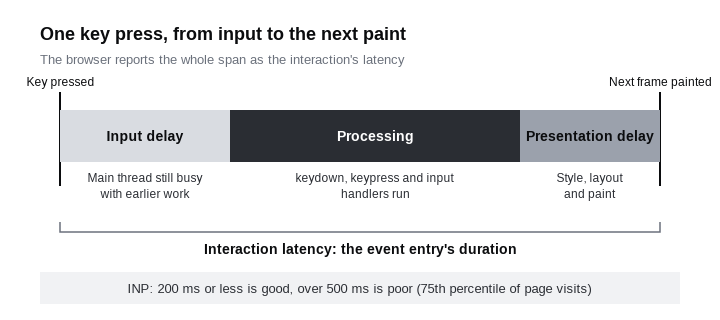
Interaction to Next Paint (INP) measures how long a page takes to show a response after someone clicks, taps or presses a key. The browser times every such interaction during a visit and INP reports one of the slowest. web.dev, the Chrome team's performance guidance, calls 200 ms or less good and anything over 500 ms poor, judged at the 75th percentile of real visits. It is one of the three Core Web Vitals, alongside Largest Contentful Paint and Cumulative Layout Shift.
Slow interactions are rarely caused by the network. They come from JavaScript and layout work on the main thread, the one thread that also handles input and paints the screen. While your code runs, the browser cannot draw the letter the person just typed.
In this tutorial you build a filter box over 4,000 market listings (Balogun, Kejetia, Gikomba, Kariakoo and others) that does everything a slow filter tends to do: it normalises every name on every key press, rebuilds the list, and measures each row straight after adding it. On a budget Android phone, the kind many people across Africa browse on with prepaid data, the first key press, which renders all 4,000 rows, freezes the page for several seconds, and each later key press for about half a second. You measure it, then fix it one technique at a time:
- batch layout reads and writes, so the browser lays out the page once instead of thousands of times
- show feedback first, then yield to the browser with
scheduler.yield()and asetTimeoutfallback - break the long loop into short chunks that a newer key press can cancel
- debounce the expensive work, so it runs once when typing pauses
Every interaction has three phases, and each fix targets one of them. Keep this picture in mind while you read the measurements.
Step 1 · Build the slow filter page
Make a demo folder with five files: the page, a stylesheet, the data, the app script, and (in the next step) a measuring script. The listings are generated in a loop, so every run sees the same 4,000 names. Some names carry Yoruba tone marks (Ẹ̀wà, Àmàlà) or a French accent (Marché), which is why the search strips accents: someone typing ewa on a phone keyboard without tone marks should still find Ẹ̀wà.
mkdir -p ~/inp-demo
cd ~/inp-demo
cat > index.html <<'HTML'
<!doctype html>
<html lang="en">
<head>
  <meta charset="utf-8">
  <meta name="viewport" content="width=device-width, initial-scale=1">
  <title>Market listings</title>
  <link rel="stylesheet" href="style.css">
</head>
<body>
  <main>
    <h1>Market listings</h1>
    <label for="filter">Filter items</label>
    <input id="filter" type="search" autocomplete="off">
    <p id="status" role="status">Type to search 4,000 listings</p>
    <ul id="results"></ul>
  </main>
  <script src="measure.js"></script>
  <script src="data.js"></script>
  <script src="app.js"></script>
</body>
</html>
HTML
cat > style.css <<'CSS'
body { margin: 0; font: 16px/1.5 system-ui, sans-serif; color: #1b1f24; background: #f6f7f8; }
main { max-width: 40rem; margin: 0 auto; padding: 1rem; }
label { display: block; font-weight: 600; }
input { width: 100%; box-sizing: border-box; font: inherit; padding: 0.5rem; }
#results { list-style: none; padding: 0; }
#results li { max-width: 20rem; padding: 0.25rem 0; border-bottom: 1px solid #d9dce1;
  white-space: nowrap; overflow: hidden; text-overflow: ellipsis; }
CSS
cat > data.js <<'JS'
// 4,000 made-up market listings, built the same way every time.
const produce = ['Tomatoes', 'Onions', 'Yams', 'Plantain', 'Cassava', 'Garri', 'Ẹ̀wà (beans)',
  'Àmàlà flour', 'Nyanya (tomatoes)', 'Sukuma wiki', 'Maize', 'Groundnuts', 'Ata rodo (pepper)',
  'Okra', 'Local rice', 'Palm oil', 'Egusi', 'Ugali flour', 'Mangoes', 'Avocados'];
const units = ['1 kg bag', '5 kg sack', 'crate', 'basin', 'bunch', 'tin', '25 kg sack', 'heap'];
const markets = ['Balogun', 'Kejetia', 'Gikomba', 'Wuse', 'Makola', 'Kariakoo', 'Oshodi',
  'Owino', 'Sandaga', 'Marché Kermel'];
const ITEMS = [];
for (let i = 0; i < 4000; i++) {
  ITEMS.push(`${produce[i % 20]}, ${units[(i * 7) % 8]} · ${markets[(i * 3) % 10]} stall ${100 + i}`);
}
JS
Now the app script. Read the render function closely. For each match it adds a row and then immediately asks for scrollWidth and clientWidth, to decide whether the name is cut off and needs a title to show it in full on hover. Adding the row changed the page, so the browser must work out the layout again before it can answer. Doing that once per row is called layout thrashing.
cd ~/inp-demo
cat > app.js <<'JS'
const input = document.querySelector('#filter');
const list = document.querySelector('#results');
const status = document.querySelector('#status');

// Lower case and strip accents, so "ewa" finds "Ẹ̀wà".
function normalise(text) {
  return text.normalize('NFD').replace(/\p{M}/gu, '').toLowerCase();
}

function render(names) {
  list.textContent = '';
  for (const name of names) {
    const row = document.createElement('li');
    row.textContent = name;
    list.append(row);
    // Show the full name on hover when the row is cut off.
    if (row.scrollWidth > row.clientWidth) row.title = name;
  }
}

function filter() {
  const query = normalise(input.value.trim());
  const found = ITEMS.filter((name) => normalise(name).includes(query));
  render(found);
  status.textContent = `${found.length} items`;
}

input.addEventListener('input', filter);
JS
Open index.html in Chrome (double-click it, or drag it into a window). The DevTools console reports that measure.js cannot be loaded; you write it in the next step.
Check it worked
Type s into the box. The letter takes a visible moment to appear, then the status reads 4000 items. Clear the box and type ewa: the status reads 200 items and every row starts with Ẹ̀wà (beans). Clear it again and type sack at normal speed: the letters arrive in bursts rather than as you type them, and the status settles on 1000 items.
Step 2 · Log each interaction and its three phases
The Event Timing API reports interactions to a PerformanceObserver. Each entry has a startTime (when the key was pressed), processingStart and processingEnd (when the event handlers started and finished) and a duration that runs to the next paint. Entries for clicks, taps and key presses carry a non-zero interactionId; that is how you tell them apart from events such as mousemove.
One key press produces several events, keydown, keypress and input, that are all handled before the same paint. The filter runs in the input handler, so the script below takes the latest processingEnd of every event in that frame as the end of processing. Without that, the filter's work would be misreported as presentation delay.
cd ~/inp-demo
cat > measure.js <<'JS'
// Log each slow interaction and split it into its three phases.
window.worstInteraction = 0;
window.interactionCount = 0;
const recentEvents = [];
const logged = new Set();

new PerformanceObserver((list) => {
  recentEvents.push(...list.getEntries());
  recentEvents.splice(0, recentEvents.length - 100);

  for (const entry of list.getEntries()) {
    if (!entry.interactionId) continue; // not a click, tap or key press
    const end = entry.startTime + entry.duration;
    const frame = `${entry.interactionId}@${Math.round(end / 8)}`;
    if (logged.has(frame)) continue; // keypress shares the keydown's frame
    if (![...logged].some((f) => f.startsWith(`${entry.interactionId}@`))) {
      window.interactionCount++;
    }
    logged.add(frame);

    // keydown, keypress and input that finish before the same paint all count.
    const sameFrame = recentEvents.filter((e) =>
      e.startTime >= entry.startTime && Math.abs(e.startTime + e.duration - end) <= 8);
    const handlersDone = Math.max(...sameFrame.map((e) => e.processingEnd));
    const inputDelay = entry.processingStart - entry.startTime;
    const processing = handlersDone - entry.processingStart;
    const presentation = Math.max(0, end - handlersDone);

    window.worstInteraction = Math.max(window.worstInteraction, entry.duration);
    console.log(`${entry.name} ${entry.duration} ms = input delay ${Math.round(inputDelay)}` +
      ` + processing ${Math.round(processing)} + presentation ${Math.round(presentation)}`);
  }
}).observe({ type: 'event', durationThreshold: 16, buffered: true });
JS
durationThreshold: 16 asks for every event that took 16 ms or more, the lowest value the API accepts; the default of 104 ms would hide the smaller ones you want to see later. Durations are rounded to 8 ms, so presentation delay is only accurate to about 8 ms, and rounding each phase to whole milliseconds can make them add up to a millisecond or two more or less than the total.
Your laptop is probably several times faster than the phones your visitors use. In DevTools, open the Performance panel, open its capture settings (the gear icon) and set CPU throttling to 4x slowdown. The setting only applies while DevTools stays open.
Check it worked
Reload the page with the console open, then type sack. Each key press logs a line such as keydown 584 ms = input delay 1 + processing 563 + presentation 20. Your numbers will differ, but processing should be almost all of the total, and the first key, which renders all 4,000 rows, should be several times slower than the rest.
Step 3 · Measure the worst interaction with a script
Typing by hand is never the same twice. A short Playwright script types the same keys at the same speed every time, with the CPU slowed four times through the Chrome DevTools Protocol, and prints the worst interaction. Install Playwright and its Chromium into the demo folder. --with-deps also installs the system libraries Chromium needs on Linux, which can ask for your password:
cd ~/inp-demo
npm init -y > /dev/null
npm install playwright@1.65.1
npx playwright install --with-deps chromium
The script types sack one key every 120 ms, counts the rows, deletes two letters, and reads what measure.js collected. With --budget 200 it also sets a failing exit code when the worst interaction is over 200 ms, which you can use in CI later.
cd ~/inp-demo
cat > measure.mjs <<'JS'
import { chromium } from 'playwright';

const at = process.argv.indexOf('--budget');
const budget = at > 0 ? Number(process.argv[at + 1]) : Infinity;

const browser = await chromium.launch();
const page = await browser.newPage();
page.on('console', (message) => console.log(`  ${message.text()}`));

// Run the page's JavaScript four times slower, like a budget Android phone.
const cdp = await page.context().newCDPSession(page);
await cdp.send('Emulation.setCPUThrottlingRate', { rate: 4 });

await page.goto(new URL('./index.html', import.meta.url).href);

// Type like a person: "sack", a pause, then delete two letters.
await page.locator('#filter').focus();
await page.keyboard.type('sack', { delay: 120 });
await page.waitForTimeout(1500);
const sackRows = await page.locator('#results li').count();
for (let n = 0; n < 2; n++) {
  await page.keyboard.press('Backspace');
  await page.waitForTimeout(120);
}
await page.waitForTimeout(1500);

const worst = await page.evaluate(() => window.worstInteraction);
const count = await page.evaluate(() => window.interactionCount);
await browser.close();

console.log(`Rows for "sack": ${sackRows}`);
console.log(`Interactions over 16 ms: ${count}`);
console.log(`Worst interaction: ${worst} ms`);
if (worst > budget) {
  console.log(`Over the ${budget} ms budget`);
  process.exitCode = 1;
}
JS
node measure.mjs | tee baseline.txt
The run takes a while: the slow page really is slow. tee keeps a copy in baseline.txt so you can compare later runs with it.
Check it worked
The output ends with three summary lines. Rows for "sack": 1000 shows the filter gives the right answer. Worst interaction: is far over 200 ms; on the writer's laptop it was over 8,000 ms, from the first key, which renders all 4,000 rows one forced layout at a time. The logged lines above it show processing as almost the whole of every slow interaction.
Step 4 · Batch layout reads and writes
The cure for layout thrashing is to do all the writes, then all the reads, then any writes that do not affect layout. The browser then lays the page out once, at the first read, and answers every later read from that layout. A title attribute does not change layout, so setting it in the last pass is free.
cd ~/inp-demo
cat > app.js <<'JS'
const input = document.querySelector('#filter');
const list = document.querySelector('#results');
const status = document.querySelector('#status');

// Lower case and strip accents, so "ewa" finds "Ẹ̀wà".
function normalise(text) {
  return text.normalize('NFD').replace(/\p{M}/gu, '').toLowerCase();
}

function render(names) {
  // 1. Writes: build every row and add them in one go.
  const rows = names.map((name) => {
    const row = document.createElement('li');
    row.textContent = name;
    return row;
  });
  list.replaceChildren(...rows);
  // 2. Reads: the first one lays the page out, the rest reuse that layout.
  const cut = rows.map((row) => row.scrollWidth > row.clientWidth);
  // 3. Writes that do not change layout.
  rows.forEach((row, i) => { if (cut[i]) row.title = names[i]; });
}

function filter() {
  const query = normalise(input.value.trim());
  const found = ITEMS.filter((name) => normalise(name).includes(query));
  render(found);
  status.textContent = `${found.length} items`;
}

input.addEventListener('input', filter);
JS
node measure.mjs
The same pattern applies anywhere you mix the two: offsetHeight, getBoundingClientRect(), getComputedStyle() and scrollTop are reads; changing classes, styles, attributes or content is a write. If you catch yourself reading inside a loop that writes, split the loop.
Check it worked
Rows for "sack": 1000 is unchanged, so the result is the same. The worst interaction drops by an order of magnitude compared with baseline.txt; on the writer's laptop it went from over 8,000 ms to a few hundred. That is a big win, but under 4x throttling it is likely still over 200 ms, because the work still runs inside the event handler and the browser cannot paint until it ends.
Step 5 · Show feedback first, then yield
The person typing mostly needs to see that the page heard them. Update the status straight away, then hand control back to the browser so it can paint that update, and only then do the heavy work. scheduler.yield() returns a promise that resolves after the browser has had a chance to handle pending input and paint. It is available in Chrome and Edge from version 129 and in Firefox from version 142, but not in Safari at the time of writing, so yieldToMain falls back to setTimeout. The fallback works everywhere; the difference is that code after scheduler.yield() is resumed ahead of other queued tasks, while a setTimeout callback goes to the back of the queue.
cd ~/inp-demo
cat > app.js <<'JS'
const input = document.querySelector('#filter');
const list = document.querySelector('#results');
const status = document.querySelector('#status');

// Lower case and strip accents, so "ewa" finds "Ẹ̀wà".
function normalise(text) {
  return text.normalize('NFD').replace(/\p{M}/gu, '').toLowerCase();
}

// Let the browser paint and handle input, then carry on.
function yieldToMain() {
  if (globalThis.scheduler?.yield) return scheduler.yield();
  return new Promise((resolve) => setTimeout(resolve, 0));
}

function render(names) {
  const rows = names.map((name) => {
    const row = document.createElement('li');
    row.textContent = name;
    return row;
  });
  list.replaceChildren(...rows);
  const cut = rows.map((row) => row.scrollWidth > row.clientWidth);
  rows.forEach((row, i) => { if (cut[i]) row.title = names[i]; });
}

function filter() {
  const query = normalise(input.value.trim());
  const found = ITEMS.filter((name) => normalise(name).includes(query));
  render(found);
  status.textContent = `${found.length} items`;
  list.removeAttribute('aria-busy');
}

input.addEventListener('input', async () => {
  // Cheap feedback first, so the next paint shows something.
  status.textContent = 'Searching…';
  list.setAttribute('aria-busy', 'true');
  await yieldToMain();
  filter();
});
JS
node measure.mjs
aria-busy tells assistive technology the list is being updated, and the status paragraph has role="status", so a screen reader announces the result count when it changes without moving focus.
Check it worked
The keydown lines now show only a few milliseconds of processing: the handler sets the status and returns. Look for lines where most of the time has moved into input delay instead, such as keyup 144 ms = input delay 98 + processing 1 + presentation 45. The filter still runs as one long task, just one paint later, and a key press that arrives while it runs has to wait for it to finish. Yielding once moves the cost; it does not remove it.
Step 6 · Break the work into chunks
The second picture shows the problem and the fix. A key press that lands during one long task waits for all of it. A key press that lands during a series of short tasks waits for one of them.
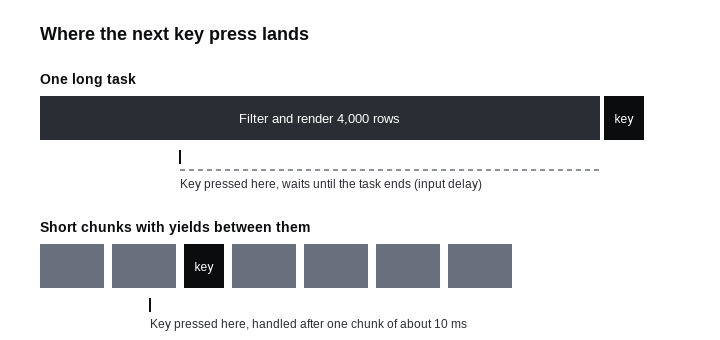
This version makes three changes. It normalises every name once, when the page loads, instead of 4,000 times per key press. The matching loop checks the clock and yields after about 10 ms of work. Rendering adds 100 rows at a time, with one batched read per chunk, and yields between chunks. Each run also gets a number, and when a newer key press starts a newer run the old one stops at its next yield instead of finishing work nobody will see.
cd ~/inp-demo
cat > app.js <<'JS'
const input = document.querySelector('#filter');
const list = document.querySelector('#results');
const status = document.querySelector('#status');

// Lower case and strip accents, so "ewa" finds "Ẹ̀wà".
function normalise(text) {
  return text.normalize('NFD').replace(/\p{M}/gu, '').toLowerCase();
}

// Normalise every name once, not on every key press.
const index = ITEMS.map((name) => ({ name, key: normalise(name) }));

// Let the browser paint and handle input, then carry on.
function yieldToMain() {
  if (globalThis.scheduler?.yield) return scheduler.yield();
  return new Promise((resolve) => setTimeout(resolve, 0));
}

const ROWS_PER_CHUNK = 100;
let latestRun = 0;

function renderChunk(names) {
  const rows = names.map((name) => {
    const row = document.createElement('li');
    row.textContent = name;
    return row;
  });
  list.append(...rows);
  const cut = rows.map((row) => row.scrollWidth > row.clientWidth);
  rows.forEach((row, i) => { if (cut[i]) row.title = names[i]; });
}

async function filter(query) {
  const run = ++latestRun;
  const found = [];
  let deadline = performance.now() + 10;
  for (const item of index) {
    if (item.key.includes(query)) found.push(item.name);
    if (performance.now() > deadline) {
      await yieldToMain();
      if (run !== latestRun) return; // a newer key press took over
      deadline = performance.now() + 10;
    }
  }
  list.replaceChildren();
  for (let i = 0; i < found.length; i += ROWS_PER_CHUNK) {
    renderChunk(found.slice(i, i + ROWS_PER_CHUNK));
    await yieldToMain();
    if (run !== latestRun) return;
  }
  status.textContent = `${found.length} items`;
  list.removeAttribute('aria-busy');
}

input.addEventListener('input', () => {
  status.textContent = 'Searching…';
  list.setAttribute('aria-busy', 'true');
  filter(normalise(input.value.trim()));
});
JS
node measure.mjs
The 10 ms budget and the 100-row chunk are starting points, not rules. A chunk should be small enough to finish well inside the 200 ms target on the slowest phone you support; DevTools throttling is the quickest way to check. If the work is pure computation with no DOM access, such as ranking thousands of records, moving it off the main thread altogether with a web worker is often the better fix.
Check it worked
No logged line shows a large input delay any more, and the worst interaction is now well under 200 ms; on the writer's laptop it was around 30 ms. Rows for "sack": 1000 still holds, so the cancelled runs did not leave stale rows behind. In the browser, results now stream into the list in quick batches while the letters you type appear at once.
Step 7 · Debounce the expensive work
Chunking keeps the page responsive, but it still starts a search for s, sa, sac and sack, and throws most of that work away. On a cheap phone that wastes battery as well as time. Debouncing waits until the typing pauses for a moment, 150 ms here, before starting the search. The feedback in the status line stays instant; only the expensive part waits.
cd ~/inp-demo
cat > app.js <<'JS'
const input = document.querySelector('#filter');
const list = document.querySelector('#results');
const status = document.querySelector('#status');

// Lower case and strip accents, so "ewa" finds "Ẹ̀wà".
function normalise(text) {
  return text.normalize('NFD').replace(/\p{M}/gu, '').toLowerCase();
}

// Normalise every name once, not on every key press.
const index = ITEMS.map((name) => ({ name, key: normalise(name) }));

// Let the browser paint and handle input, then carry on.
function yieldToMain() {
  if (globalThis.scheduler?.yield) return scheduler.yield();
  return new Promise((resolve) => setTimeout(resolve, 0));
}

const ROWS_PER_CHUNK = 100;
const WAIT_MS = 150;
let latestRun = 0;
let timer;

function renderChunk(names) {
  const rows = names.map((name) => {
    const row = document.createElement('li');
    row.textContent = name;
    return row;
  });
  list.append(...rows);
  const cut = rows.map((row) => row.scrollWidth > row.clientWidth);
  rows.forEach((row, i) => { if (cut[i]) row.title = names[i]; });
}

async function filter(query) {
  const run = ++latestRun;
  const found = [];
  let deadline = performance.now() + 10;
  for (const item of index) {
    if (item.key.includes(query)) found.push(item.name);
    if (performance.now() > deadline) {
      await yieldToMain();
      if (run !== latestRun) return; // a newer key press took over
      deadline = performance.now() + 10;
    }
  }
  list.replaceChildren();
  for (let i = 0; i < found.length; i += ROWS_PER_CHUNK) {
    renderChunk(found.slice(i, i + ROWS_PER_CHUNK));
    await yieldToMain();
    if (run !== latestRun) return;
  }
  status.textContent = `${found.length} items`;
  list.removeAttribute('aria-busy');
}

input.addEventListener('input', () => {
  status.textContent = 'Searching…';
  list.setAttribute('aria-busy', 'true');
  clearTimeout(timer);
  timer = setTimeout(() => filter(normalise(input.value.trim())), WAIT_MS);
});
JS
node measure.mjs --budget 200 | tee final.txt
Keep the chunking even with the debounce in place. Debouncing decides when the work starts; chunking keeps a key press that arrives after it has started from waiting behind it. A debounce longer than about 300 ms starts to feel like lag in its own right, so tune WAIT_MS by typing, not by measuring alone.
Check it worked
The output has no Over the 200 ms budget line and the command succeeds. Compare final.txt with baseline.txt: the worst interaction has dropped from seconds to tens of milliseconds, and Interactions over 16 ms is lower too, because most key presses now finish too quickly to be reported. In the browser with 4x throttling, every letter appears as you type it and the list fills in once you stop.
Step 8 · Clean up
Remove the demo folder, which also removes the local Playwright install. The browser Playwright downloaded stays in its shared cache; npx playwright uninstall removes that too if you no longer need it. Set CPU throttling in DevTools back to no throttling as well.
cd ~
rm -rf ~/inp-demoCheck it worked
ls ~/inp-demo reports that there is no such file or directory.
Next steps
- Collect INP from real visitors, with the slowest element and phase attached, in measure Core Web Vitals with Lighthouse and web-vitals.
- Take pure computation off the main thread entirely in move heavy work off the main thread with a web worker.
- Fix the loading side of performance in improve Largest Contentful Paint.
- Try the page the way many visitors meet it in test and speed up a page on a slow phone connection.
Part of these paths
Related tutorials
- Measure Core Web Vitals with Lighthouse and the web-vitals libraryYou will measure a page's Core Web Vitals twice, once in the lab with the Lighthouse CLI and once from real visits with the web-vitals library sending LCP, INP and CLS to your own collector, and end with a budget check that fails when LCP goes over 2.5 seconds.
- Move heavy work off the main thread with a Web WorkerYou will total a 100,000-row sales CSV in the browser, watch it freeze the page, then move the work into a Vite module worker that receives the file's bytes by transfer, reports progress, passes errors back and can be cancelled, with before and after measurements and a Playwright test to prove it.
- How to Improve Largest Contentful Paint (LCP) on Your WebsiteYou will measure Largest Contentful Paint on a deliberately slow page, find which of its four parts is wasting time, fix it by making the hero image discoverable early and by serving a smaller one, and learn how to check the result with field data, because 2.5 seconds is the line between good and not good.
Need this done for you?
Padding does this work for growing companies, from the first diagnosis to a system that keeps working.
Get new tutorials