Containers and Kubernetes · Intermediate · 22 min
Store data in Kubernetes with persistent volumes and claims
By Padding · Updated 18 Nov 2026
Ubuntu 26.04 · Kubernetes 1.37 · kind 0.33 · kubeconform 0.8.0
You will claim storage on a Kubernetes 1.37 kind cluster, prove the data outlives its pod, see which access modes and reclaim policies keep or lose data, and know how expansion and snapshots work on a cloud CSI driver.
On this page
A container's filesystem lives and dies with the container. When a pod is rescheduled, restarted or replaced by a new release, anything it wrote to its own filesystem is gone. Kubernetes keeps data across those events with three objects that split the job between the person running an app and the person running the cluster:
- A PersistentVolumeClaim (PVC) is your request: "1 GiB, writable by one node, from this class". It lives in your namespace, and pods mount it by name.
- A PersistentVolume (PV) is a real piece of storage: a cloud disk, an NFS share, or a folder on a node. It is cluster-wide, and binds to exactly one claim.
- A StorageClass says how to make volumes on demand: which provisioner creates them, what happens to them when the claim goes, and when to create them.
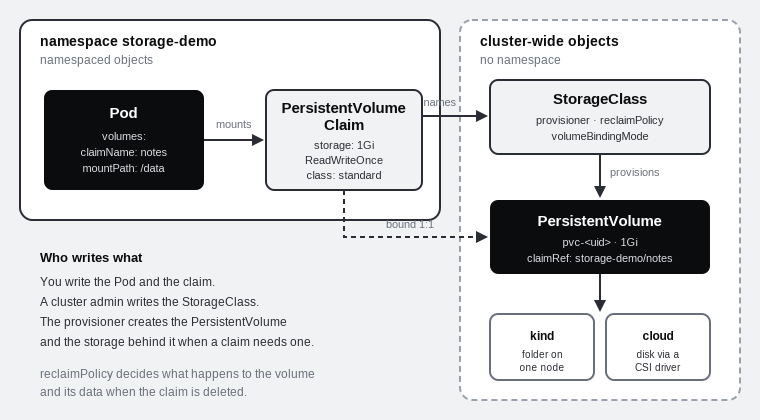
In this tutorial you work through those objects on a kind cluster, break them in the two ways that lose data most often, and finish with the parts kind cannot show (growing a volume and taking snapshots) written for a cloud CSI driver. The files live in ~/pv-demo and the objects in a namespace called storage-demo.
Step 1 · Install kubeconform and create the demo namespace
kubeconform validates manifests against the Kubernetes API schemas, so a typo such as acessModes: fails on your machine instead of on the cluster. Install release 0.8.0:
ARCH="$(dpkg --print-architecture)"
cd /tmp
curl -fsSLO "https://github.com/yannh/kubeconform/releases/download/v0.8.0/kubeconform-linux-${ARCH}.tar.gz"
curl -fsSLO "https://github.com/yannh/kubeconform/releases/download/v0.8.0/CHECKSUMS"
grep " kubeconform-linux-${ARCH}.tar.gz$" CHECKSUMS | sha256sum -c
sudo tar -xzf "kubeconform-linux-${ARCH}.tar.gz" -C /usr/local/bin kubeconform
rm "kubeconform-linux-${ARCH}.tar.gz" CHECKSUMS
cd ~
kubeconform -v
mkdir -p ~/pv-demo
The sha256sum -c line prints OK when the download matches the checksum the project published; if it prints FAILED, stop and download again. This is the same check /tutorials/validate-kubernetes-manifests-before-they-reach-a-cluster uses in its install script. On macOS, brew install kubeconform does the same job. A binary installed by hand gets no apt updates; to upgrade, repeat the commands with a newer version number from the project's releases page.
Write the namespace and create it:
cat > ~/pv-demo/namespace.yaml <<'YAML'
apiVersion: v1
kind: Namespace
metadata:
  name: storage-demo
YAML
kubeconform -strict -summary -kubernetes-version 1.37.3 ~/pv-demo/namespace.yamlkubectl apply -f ~/pv-demo/namespace.yamlCheck it worked
The checksum line ends in OK, kubeconform -v prints v0.8.0, the summary line reports Valid: 1, Invalid: 0, Errors: 0, and kubectl get namespace storage-demo shows Active.
Step 2 · Read kind's storage class and add one that keeps data
Look at what the cluster already offers:
kubectl get storageclass
kubectl get storageclass standard -o yaml
kind ships one class, standard, marked (default). Three fields in its YAML decide how your data behaves:
provisioner: rancher.io/local-pathcreates each volume as a folder under/var/local-path-provisioneron one node. It is quick and free, and it is tied to that node for good.reclaimPolicy: Deleteremoves the volume, and the folder with your data, when its claim is deleted.volumeBindingMode: WaitForFirstConsumerwaits until a pod using the claim is scheduled, then creates the volume on that pod's node. WithImmediate, the volume is made first and the pod must follow it, which can leave a pod unschedulable if the volume landed in the wrong zone or on a full node. Most cloud classes useWaitForFirstConsumerfor the same reason.
A claim that leaves out storageClassName gets the default class. Add a second class with the same provisioner that keeps volumes when their claims go. StorageClasses are cluster-wide and most of their fields cannot be changed after creation, so pick the name with care:
cat > ~/pv-demo/storageclass-keep.yaml <<'YAML'
apiVersion: storage.k8s.io/v1
kind: StorageClass
metadata:
  name: local-keep
provisioner: rancher.io/local-path
reclaimPolicy: Retain
volumeBindingMode: WaitForFirstConsumer
YAML
kubeconform -strict -summary -kubernetes-version 1.37.3 ~/pv-demo/storageclass-keep.yamlkubectl apply -f ~/pv-demo/storageclass-keep.yamlCheck it worked
kubectl get storageclass lists both classes: standard (default) with Delete, and local-keep with Retain in the RECLAIMPOLICY column. Both show WaitForFirstConsumer.
Step 3 · Claim storage and mount it in a pod
Write a 1 GiB claim on the default class, and a pod that appends one line to a file on the volume each time it starts:
cat > ~/pv-demo/notes.yaml <<'YAML'
apiVersion: v1
kind: PersistentVolumeClaim
metadata:
  name: notes
  namespace: storage-demo
spec:
  storageClassName: standard
  accessModes:
    - ReadWriteOnce
  resources:
    requests:
      storage: 1Gi
YAML
cat > ~/pv-demo/writer.yaml <<'YAML'
apiVersion: v1
kind: Pod
metadata:
  name: writer
  namespace: storage-demo
spec:
  containers:
    - name: app
      image: busybox:1.37
      command:
        - sh
        - -c
        - echo "started $(date -u +%FT%TZ)" >> /data/notes.txt && exec sleep 3600
      volumeMounts:
        - name: notes
          mountPath: /data
  volumes:
    - name: notes
      persistentVolumeClaim:
        claimName: notes
YAML
kubeconform -strict -summary -kubernetes-version 1.37.3 ~/pv-demo/notes.yaml ~/pv-demo/writer.yaml
Apply the claim on its own first, and look at it before any pod needs it:
kubectl apply -f ~/pv-demo/notes.yaml
kubectl get pvc notes -n storage-demo
kubectl describe pvc notes -n storage-demo
The claim is Pending, and its events say something like waiting for first consumer to be created before binding. That is WaitForFirstConsumer doing its job, not a fault. Now start the pod:
kubectl apply -f ~/pv-demo/writer.yaml
kubectl wait --for=condition=Ready pod/writer -n storage-demo --timeout=120s
kubectl get pvc notes -n storage-demo
kubectl get pvCheck it worked
The claim is now Bound with a VOLUME named pvc- followed by a UID, CAPACITY 1Gi and ACCESS MODES RWO. kubectl get pv lists that volume with CLAIM storage-demo/notes, RECLAIM POLICY Delete and STATUS Bound. kubectl exec writer -n storage-demo -- cat /data/notes.txt prints one started ... line.
Step 4 · Show the data outlives the pod
Delete the pod, then create it again from the same file:
kubectl delete pod writer -n storage-demo
kubectl apply -f ~/pv-demo/writer.yaml
kubectl wait --for=condition=Ready pod/writer -n storage-demo --timeout=120s
kubectl exec writer -n storage-demo -- cat /data/notes.txt
The new pod is a different container with a fresh filesystem, but /data is the same volume. With local-path, that volume is a folder on the kind node, which is itself a Docker container. You can see it:
docker exec kind-control-plane ls /var/local-path-provisionerIf you gave your cluster a name other than kind, the node container is <name>-control-plane. The folder name joins the volume name, the namespace and the claim, such as pvc-..._storage-demo_notes.
On a cluster with more than one node, the volume also pins the pod: local-path volumes carry node affinity, so the scheduler only places the new pod on the node holding the folder. If that node is gone, the pod stays Pending. A cloud disk can move between nodes in the same zone, which is the main reason production clusters use a CSI driver instead.
Check it worked
cat prints two started ... lines, one per pod start, and the ls output shows a folder ending in _storage-demo_notes.
Step 5 · Pick an access mode
The access mode says how many nodes, or pods, may mount a volume at once:
ReadWriteOnce(RWO): read-write from one node. Several pods can share it only if they run on that node.ReadWriteOncePod(RWOP): read-write from exactly one pod in the whole cluster. Use it when two writers would corrupt the data, such as a database's files.ReadOnlyMany(ROX): read-only from many nodes.ReadWriteMany(RWX): read-write from many nodes at once.
Most block storage, including cloud disks and local-path folders, offers only RWO and RWOP. A disk holds one filesystem that one kernel mounts; two nodes writing the same ext4 or xfs filesystem without coordination would corrupt it. RWX needs a network filesystem built for shared access, such as NFS, CephFS or a cloud file service, through its own provisioner.
Ask for RWX from local-path and see what happens:
cat > ~/pv-demo/shared.yaml <<'YAML'
apiVersion: v1
kind: PersistentVolumeClaim
metadata:
  name: shared
  namespace: storage-demo
spec:
  storageClassName: standard
  accessModes:
    - ReadWriteMany
  resources:
    requests:
      storage: 1Gi
---
apiVersion: v1
kind: Pod
metadata:
  name: shared-reader
  namespace: storage-demo
spec:
  containers:
    - name: app
      image: busybox:1.37
      command: ["sleep", "3600"]
      volumeMounts:
        - name: shared
          mountPath: /data
  volumes:
    - name: shared
      persistentVolumeClaim:
        claimName: shared
YAML
kubeconform -strict -summary -kubernetes-version 1.37.3 ~/pv-demo/shared.yamlkubectl apply -f ~/pv-demo/shared.yaml
kubectl describe pvc shared -n storage-demoThe manifest is valid, because the API accepts any mode. The provisioner is what refuses: the claim stays Pending with a ProvisioningFailed event saying something like NodePath only supports ReadWriteOnce and ReadWriteOncePod (1.22+) access modes, and the pod stays Pending with it. You see the same pattern on a cloud cluster when you ask a disk class for RWX. Remove both:
kubectl delete -f ~/pv-demo/shared.yamlCheck it worked
You saw the ProvisioningFailed event in the describe output, and after the delete kubectl get pvc -n storage-demo lists only notes.
Step 6 · Delete claims under Delete and Retain
This is the step that loses data in real clusters. Make a second claim and pod on the local-keep class:
cat > ~/pv-demo/keep.yaml <<'YAML'
apiVersion: v1
kind: PersistentVolumeClaim
metadata:
  name: keep
  namespace: storage-demo
spec:
  storageClassName: local-keep
  accessModes:
    - ReadWriteOncePod
  resources:
    requests:
      storage: 1Gi
---
apiVersion: v1
kind: Pod
metadata:
  name: keeper
  namespace: storage-demo
spec:
  containers:
    - name: app
      image: busybox:1.37
      command:
        - sh
        - -c
        - echo "kept $(date -u +%FT%TZ)" >> /data/notes.txt && exec sleep 3600
      volumeMounts:
        - name: keep
          mountPath: /data
  volumes:
    - name: keep
      persistentVolumeClaim:
        claimName: keep
YAML
kubeconform -strict -summary -kubernetes-version 1.37.3 ~/pv-demo/keep.yamlkubectl apply -f ~/pv-demo/keep.yaml
kubectl wait --for=condition=Ready pod/keeper -n storage-demo --timeout=120s
PV="$(kubectl get pvc keep -n storage-demo -o jsonpath='{.spec.volumeName}')"
echo "$PV"Keep that terminal open: the PV variable holds the retained volume's name for the rest of this step.
A claim that a pod still uses cannot be removed: the kubernetes.io/pvc-protection finalizer holds it in Terminating until the pod is gone. So delete the pods first.
The next commands delete the notes claim on the standard class. Under reclaimPolicy: Delete that destroys its volume and the two lines written to it. Run them only in this demo namespace:
kubectl delete pod writer keeper -n storage-demo
kubectl delete pvc notes keep -n storage-demo
kubectl get pv
docker exec kind-control-plane ls /var/local-path-provisioner
The notes volume has gone from kubectl get pv, and its folder has gone from the node. The keep volume is still listed with STATUS Released, and its folder is still there. Released means the data is safe but the volume will not bind to a new claim on its own, because it still records the old claim in spec.claimRef. To reuse it, clear that reference, then write a claim that names the volume:
kubectl patch pv "$PV" --type json -p '[{"op":"remove","path":"/spec/claimRef"}]'cat > ~/pv-demo/keep-again.yaml <<YAML
apiVersion: v1
kind: PersistentVolumeClaim
metadata:
name: keep-again
namespace: storage-demo
spec:
storageClassName: local-keep
volumeName: ${PV}
accessModes:
- ReadWriteOncePod
resources:
requests:
storage: 1Gi
YAML
cat > ~/pv-demo/keeper-again.yaml <<'YAML'
apiVersion: v1
kind: Pod
metadata:
name: keeper
namespace: storage-demo
spec:
containers:
- name: app
image: busybox:1.37
command:
- sh
- -c
- echo "kept $(date -u +%FT%TZ)" >> /data/notes.txt && exec sleep 3600
volumeMounts:
- name: keep
mountPath: /data
volumes:
- name: keep
persistentVolumeClaim:
claimName: keep-again
YAML
kubeconform -strict -summary -kubernetes-version 1.37.3 ~/pv-demo/keep-again.yaml ~/pv-demo/keeper-again.yamlThe first heredoc uses <<YAML without quotes so that the shell fills in ${PV}. The second file is the keeper pod again, mounting the new claim. Apply both and read the file:
kubectl apply -f ~/pv-demo/keep-again.yaml -f ~/pv-demo/keeper-again.yaml
kubectl wait --for=condition=Ready pod/keeper -n storage-demo --timeout=120s
kubectl exec keeper -n storage-demo -- cat /data/notes.txt
Use Retain for classes that hold data you cannot rebuild, and remember the cost: every released volume stays until someone deletes it by hand. On a cloud cluster each one is a disk billed per GB per month, which adds up quietly on a prepaid or credit-funded account. List them now and then with kubectl get pv and look for Released.
Check it worked
kubectl get pvc keep-again -n storage-demo shows Bound to the same volume name that echo "$PV" printed earlier, and cat prints the kept ... line from before the claim was deleted, followed by a new one.
Step 7 · Expand a claim
You can grow a claim by raising spec.resources.requests.storage, but only if its StorageClass sets allowVolumeExpansion: true and its driver supports it. Neither of the kind classes here sets it, so try it on the retained claim and watch it fail:
kubectl patch pvc keep-again -n storage-demo -p '{"spec":{"resources":{"requests":{"storage":"2Gi"}}}}'The API server rejects the patch with something like only dynamically provisioned pvc can be resized and the storageclass that provisions the pvc must support resize. Nothing changes, and the data is untouched.
On a cloud cluster, the class is where you allow it. This example is for the AWS EBS CSI driver; Google, Azure, DigitalOcean and other providers each document their own provisioner name and parameters, and the rest of the file stays the same:
cat > ~/pv-demo/cloud-storageclass.yaml <<'YAML'
apiVersion: storage.k8s.io/v1
kind: StorageClass
metadata:
  name: disk-expandable
provisioner: ebs.csi.aws.com
parameters:
  type: gp3
  csi.storage.k8s.io/fstype: ext4
reclaimPolicy: Delete
volumeBindingMode: WaitForFirstConsumer
allowVolumeExpansion: true
YAML
cat > ~/pv-demo/cloud-claim.yaml <<'YAML'
apiVersion: v1
kind: PersistentVolumeClaim
metadata:
  name: uploads
  namespace: storage-demo
spec:
  storageClassName: disk-expandable
  accessModes:
    - ReadWriteOnce
  resources:
    requests:
      storage: 20Gi
YAML
kubeconform -strict -summary -kubernetes-version 1.37.3 ~/pv-demo/cloud-storageclass.yaml ~/pv-demo/cloud-claim.yaml
To grow uploads on such a cluster, change 20Gi to the new size in cloud-claim.yaml and run kubectl apply -f on it again, so the file stays the record of what you asked for. The driver resizes the disk and then the filesystem, usually while the pod keeps running. kubectl describe pvc uploads shows the progress, and CAPACITY changes once the filesystem has grown. Two rules: claims only grow, never shrink, and some clouds limit how often one disk can be resized (on AWS EBS, a volume must wait after one change before the next), so pick a size with room for a few months of growth.
Check it worked
On kind, the patch was refused and kubectl get pvc keep-again -n storage-demo still shows 1Gi. The kubeconform summary for the two cloud files reports Valid: 2.
Step 8 · Know where snapshots fit, then clean up
A VolumeSnapshot is a point-in-time copy of a claim's volume, made by the storage system, from which you can create a new claim. It works only with a CSI driver that supports snapshots, plus the snapshot CRDs and snapshot controller from the kubernetes-csi external-snapshotter project, which many managed clusters install for you. kind's local-path provisioner is not a CSI driver, so it cannot take them. For practice on kind, the CSI hostpath driver from the same organisation supports snapshots.
The three objects, written for the same EBS driver as above, are a class that says which driver takes the snapshot, the snapshot itself, and a claim restored from it:
cat > ~/pv-demo/snapshot.yaml <<'YAML'
apiVersion: snapshot.storage.k8s.io/v1
kind: VolumeSnapshotClass
metadata:
  name: disk-snapshots
driver: ebs.csi.aws.com
deletionPolicy: Delete
---
apiVersion: snapshot.storage.k8s.io/v1
kind: VolumeSnapshot
metadata:
  name: uploads-before-upgrade
  namespace: storage-demo
spec:
  volumeSnapshotClassName: disk-snapshots
  source:
    persistentVolumeClaimName: uploads
---
apiVersion: v1
kind: PersistentVolumeClaim
metadata:
  name: uploads-restored
  namespace: storage-demo
spec:
  storageClassName: disk-expandable
  dataSource:
    apiGroup: snapshot.storage.k8s.io
    kind: VolumeSnapshot
    name: uploads-before-upgrade
  accessModes:
    - ReadWriteOnce
  resources:
    requests:
      storage: 20Gi
YAML
kubeconform -strict -summary -kubernetes-version 1.37.3 \
  -schema-location default \
  -schema-location 'https://raw.githubusercontent.com/datreeio/CRDs-catalog/main/{{.Group}}/{{.ResourceKind}}_{{.ResourceAPIVersion}}.json' \
  ~/pv-demo/snapshot.yaml
The second -schema-location points kubeconform at community schemas for CRDs, since snapshot kinds are not in the core API. On a cluster with the driver, kubectl get volumesnapshot -n storage-demo shows READYTOUSE true once the copy exists. A snapshot usually lives in the same storage system and region as the disk, so it guards against mistakes and bad upgrades, not against losing that region; keep real backups somewhere else too.
Now remove everything this tutorial made on kind. Deleting the namespace deletes the pod and claim in it, and the local-keep volume goes back to Released, so delete that volume and its folder on the node too. The folder pattern only matches volumes from the storage-demo namespace; check that nothing else of yours lives there before you run this:
kubectl delete namespace storage-demo
kubectl get pv -o jsonpath='{range .items[?(@.spec.storageClassName=="local-keep")]}{.metadata.name}{"\n"}{end}' | xargs -r kubectl delete pv
kubectl delete storageclass local-keep
docker exec kind-control-plane sh -c 'rm -rf /var/local-path-provisioner/*_storage-demo_*'rm -r ~/pv-demoCheck it worked
kubectl get namespace storage-demo reports NotFound once deletion finishes, kubectl get pv lists no volume with class local-keep, kubectl get storageclass shows only standard, the docker exec ... ls /var/local-path-provisioner listing from earlier has no _storage-demo_ folders, and ~/pv-demo is gone. Keep the kind cluster for the next tutorial, or remove it with kind delete cluster.
Next steps
- Give each replica of a database its own claim with
volumeClaimTemplates: /tutorials/run-postgresql-for-snip-in-a-statefulset. - Compare with how Docker keeps data on a single host: /tutorials/keep-container-data-with-docker-volumes.
- Work out why a pod is stuck
Pendingon an unbound claim: /tutorials/debug-a-failing-kubernetes-pod-with-kubectl.
Related tutorials
- Validate Kubernetes manifests before they reach a clusterYou will have one script that checks plain, Kustomize, Helm, generated and custom-resource manifests against the Kubernetes 1.37 schemas and a set of lint rules, with no cluster, and a GitHub Actions job that runs it on every pull request.
- Use secrets in Docker builds without leaking them into the imageYou will find a token and a private key leaking through a Docker build with Trivy 0.76, then fix the build with secret and SSH mounts, carry the fix into Compose and GitHub Actions, and prove with a rescan that the build context is clean.
- Sign and verify container images with cosignYou will sign an image by digest with a password-protected cosign key, prove the signature verifies and that tampering fails, attach a signed SBOM attestation, and have a GitHub Actions workflow ready that signs keylessly through Sigstore.
Need this done for you?
Padding does this work for growing companies, from the first diagnosis to a system that keeps working.
Get new tutorials