Testing and QA · Intermediate · 19 min
Test against a real PostgreSQL database in integration tests
By Padding · Updated 18 Nov 2026
Ubuntu 26.04 · Python 3.14 · PostgreSQL 18 (PGDG apt) · pytest 9.2.0 · psycopg 3.3.9 · pytest-xdist 3.8.0
You will have a pytest suite that builds a fresh PostgreSQL 18 database for each run, applies your migrations once, rolls back every test, gives each parallel worker its own database and can start a throwaway database in Docker with Testcontainers.
On this page
Many projects run their tests against SQLite because it needs no server. The tests pass, the code ships, and PostgreSQL rejects it in production. SQLite stores text in an integer column, ignores the length in varchar(80) and matches LIKE without regard to case. PostgreSQL does none of those things. Tests can only catch what the engine under them enforces, so test against the engine you run.
In this tutorial you build a small event-booking module in Python with psycopg 3 and test it against PostgreSQL 18. The suite:
- creates its own database at the start of each run and drops it at the end;
- applies the project's migrations once per run, with the same code you would use in production;
- wraps every test in a transaction that is always rolled back, so tests never see each other's rows;
- switches to committed data and cleanup for the code that the rollback pattern cannot reach;
- gives each parallel pytest-xdist worker a database of its own;
- can start a throwaway PostgreSQL 18 in Docker with Testcontainers, for developers and CI jobs that have no database server.
Step 1 · Give yourself a database role and create the project
The tests connect over the local Unix socket as a PostgreSQL role with the same name as your Linux user. PostgreSQL's default peer rule for local connections then checks your Linux account instead of a password, so there is no secret to store anywhere. The role needs CREATEDB because the suite creates and drops its own databases. It does not need to be a superuser.
sudo -u postgres createuser --createdb "$(whoami)"If the command says the role already exists, give it the permission instead with sudo -u postgres psql -c "ALTER ROLE \"$(whoami)\" CREATEDB".
Install Python's virtual environment support, then make a throwaway project with pinned test dependencies. psycopg[binary] brings its own copy of the PostgreSQL client library, so there is nothing to compile.
sudo apt-get update
sudo apt-get install -y python3 python3-venv
mkdir -p ~/pg-integration-demo
cd ~/pg-integration-demo
python3 -m venv .venv
cat > requirements-dev.txt <<'TXT'
pytest==9.2.0
psycopg[binary]==3.3.9
pytest-xdist==3.8.0
TXT
.venv/bin/pip install --quiet -r requirements-dev.txt
mkdir -p migrations tests
cat > pyproject.toml <<'TOML'
[tool.pytest.ini_options]
pythonpath = ["."]
testpaths = ["tests"]
TOML
pythonpath lets the tests import the modules in the project folder, and testpaths tells pytest where to look.
Check it worked
psql -d postgres -Atc "SELECT current_user, rolcreatedb FROM pg_roles WHERE rolname = current_user"
.venv/bin/python -c "import psycopg, pytest; print(psycopg.__version__, pytest.__version__)"
The first line is your user name followed by |t, meaning the role can create databases. The second line is 3.3.9 9.2.0.
Step 2 · See what SQLite lets through
Before writing the real code, run the same four statements against SQLite (which is part of Python) and against your PostgreSQL server, and compare:
cat > sqlite_vs_postgres.py <<'PY'
import sqlite3

import psycopg

STATEMENTS = [
    "CREATE TEMP TABLE people (name varchar(5), age integer)",
    "INSERT INTO people VALUES ('Chukwuemeka', 30)",
    "INSERT INTO people VALUES ('Ada', 'thirty')",
    "INSERT INTO people VALUES ('Ada', 31)",
    "SELECT count(*) FROM people WHERE name LIKE 'ada'",
]


def run(label, execute):
    for statement in STATEMENTS:
        try:
            print(f"{label:8} ok     {execute(statement)}")
        except psycopg.Error as err:
            print(f"{label:8} error  {type(err).__name__}")


lite = sqlite3.connect(":memory:")
run("sqlite", lambda s: lite.execute(s).fetchall())

with psycopg.connect("host=/var/run/postgresql dbname=postgres", autocommit=True) as pg:

    def pg_execute(statement):
        cursor = pg.execute(statement)
        return cursor.fetchall() if cursor.description else []

    run("postgres", pg_execute)
PY
.venv/bin/python sqlite_vs_postgres.py
autocommit=True makes each PostgreSQL statement its own transaction, so one failure does not block the next. host=/var/run/postgresql is the directory where Ubuntu's PostgreSQL puts its socket; it is spelled out because the client library bundled with psycopg[binary] may look elsewhere by default.
Check it worked
SQLite accepts every statement and its final count is [(2,)]: it stored an eleven-letter name in a five-character column, the word thirty in an integer column, and matched Ada with LIKE 'ada'. PostgreSQL prints error StringDataRightTruncation and error InvalidTextRepresentation for the two bad rows, and its count is [(0,)], because PostgreSQL's LIKE is case-sensitive. Each of those differences is a bug that a SQLite-backed suite would wave through.
Step 3 · Write the migrations and the code under test
Keep the schema in numbered SQL files. A short migration script applies the files it has not applied before and records each one in a schema_migrations table. Production deploys run this script, and so will the tests, so the test schema is built exactly the way the live one is.
cat > migrations/001_customers.sql <<'SQL'
CREATE TABLE customers (
  id    bigint GENERATED ALWAYS AS IDENTITY PRIMARY KEY,
  name  varchar(80) NOT NULL,
  email text NOT NULL UNIQUE
);
SQL

cat > migrations/002_events_and_bookings.sql <<'SQL'
CREATE TABLE events (
  id    bigint GENERATED ALWAYS AS IDENTITY PRIMARY KEY,
  title text NOT NULL,
  seats integer NOT NULL CHECK (seats > 0)
);

CREATE TABLE bookings (
  event_id    bigint NOT NULL REFERENCES events (id),
  customer_id bigint NOT NULL REFERENCES customers (id),
  booked_at   timestamptz NOT NULL DEFAULT now(),
  PRIMARY KEY (event_id, customer_id)
);
SQL

cat > migrate.py <<'PY'
import sys
from pathlib import Path

import psycopg

MIGRATIONS = Path(__file__).parent / "migrations"


def migrate(conninfo):
    applied = []
    with psycopg.connect(conninfo, autocommit=True) as conn:
        conn.execute(
            "CREATE TABLE IF NOT EXISTS schema_migrations ("
            " name text PRIMARY KEY,"
            " applied_at timestamptz NOT NULL DEFAULT now())"
        )
        done = {row[0] for row in conn.execute("SELECT name FROM schema_migrations")}
        for path in sorted(MIGRATIONS.glob("*.sql")):
            if path.name in done:
                continue
            with conn.transaction():
                conn.execute(path.read_text())
                conn.execute("INSERT INTO schema_migrations (name) VALUES (%s)", (path.name,))
            applied.append(path.name)
    return applied


if __name__ == "__main__":
    for name in migrate(sys.argv[1]):
        print("applied", name)
PY
Each file runs inside its own transaction, so a migration that fails halfway leaves nothing behind. A file can hold several statements because execute() is called without parameters.
Now the booking code. Every function takes an open connection and leaves the decision to commit to its caller. book_seat groups its three statements with conn.transaction(): on its own that is a transaction, and inside a transaction that is already open, psycopg turns it into a savepoint.
cat > bookings.py <<'PY'
class SoldOut(Exception):
    pass


def add_customer(conn, name, email):
    row = conn.execute(
        "INSERT INTO customers (name, email) VALUES (%s, %s) RETURNING id", (name, email)
    ).fetchone()
    return row[0]


def add_event(conn, title, seats):
    row = conn.execute(
        "INSERT INTO events (title, seats) VALUES (%s, %s) RETURNING id", (title, seats)
    ).fetchone()
    return row[0]


def book_seat(conn, event_id, customer_id):
    with conn.transaction():
        event = conn.execute(
            "SELECT seats FROM events WHERE id = %s FOR UPDATE", (event_id,)
        ).fetchone()
        if event is None:
            raise LookupError(f"no event {event_id}")
        taken = conn.execute(
            "SELECT count(*) FROM bookings WHERE event_id = %s", (event_id,)
        ).fetchone()[0]
        if taken >= event[0]:
            raise SoldOut(f"event {event_id} is full")
        conn.execute(
            "INSERT INTO bookings (event_id, customer_id) VALUES (%s, %s)",
            (event_id, customer_id),
        )
PY

cat > search.py <<'PY'
def find_customers(conn, text):
    rows = conn.execute(
        "SELECT name FROM customers WHERE name LIKE %s ORDER BY name", (f"%{text}%",)
    ).fetchall()
    return [row[0] for row in rows]
PY
search.py has the same LIKE you saw pass in SQLite. The tests will find it.
Check it worked
.venv/bin/python -m py_compile migrate.py bookings.py search.py && echo compiled
ls migrations
The output is compiled, then the two migration files in order: 001_customers.sql and 002_events_and_bookings.sql.
Step 4 · Create the database once per run and roll back every test
The fixtures live in conftest.py at the project root:
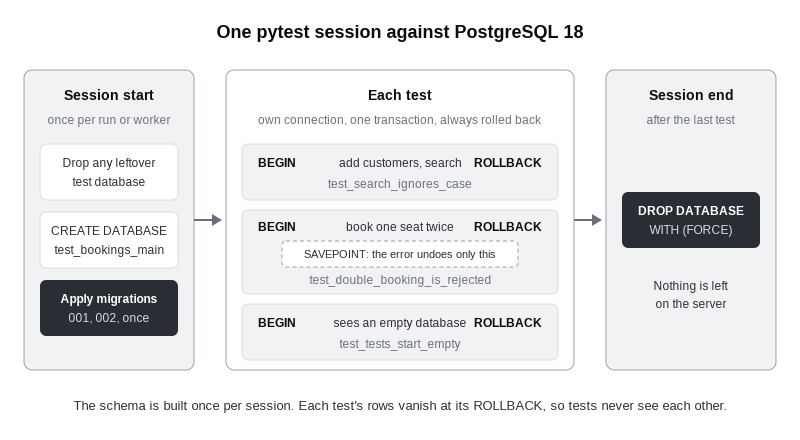
admin_dsnis how the suite reaches the server. It readsTEST_ADMIN_DSNfrom the environment and falls back to the local socket, so CI can point it elsewhere without a code change. Put any password in that variable, never in the file.database_urlis session-scoped, so it runs once. It drops any database a crashed earlier run left behind, creates a fresh one, runsmigrate()and hands out the connection string. When the session ends it drops the database.CREATE DATABASEcannot run inside a transaction, which is why the admin connection usesautocommit=True. The database is created fromtemplate0with UTF-8 and theC.UTF-8locale, so the results do not depend on how the server happened to be installed.conngives each test its own connection with one open transaction thatforce_rollback=Truealways rolls back, pass or fail.
cat > conftest.py <<'PY'
import os

import psycopg
import pytest
from psycopg import sql
from psycopg.conninfo import make_conninfo

from migrate import migrate

DEFAULT_ADMIN_DSN = "host=/var/run/postgresql dbname=postgres"


@pytest.fixture(scope="session")
def admin_dsn():
    return os.environ.get("TEST_ADMIN_DSN", DEFAULT_ADMIN_DSN)


@pytest.fixture(scope="session")
def database_url(admin_dsn):
    worker = os.environ.get("PYTEST_XDIST_WORKER", "main")
    name = f"test_bookings_{worker}"
    ident = sql.Identifier(name)
    with psycopg.connect(admin_dsn, autocommit=True) as admin:
        admin.execute(sql.SQL("DROP DATABASE IF EXISTS {} WITH (FORCE)").format(ident))
        admin.execute(
            sql.SQL(
                "CREATE DATABASE {} TEMPLATE template0 ENCODING 'UTF8' LOCALE 'C.UTF-8'"
            ).format(ident)
        )
    url = make_conninfo(admin_dsn, dbname=name)
    migrate(url)
    yield url
    with psycopg.connect(admin_dsn, autocommit=True) as admin:
        admin.execute(sql.SQL("DROP DATABASE {} WITH (FORCE)").format(ident))


@pytest.fixture
def conn(database_url):
    with psycopg.connect(database_url, autocommit=True) as connection:
        with connection.transaction(force_rollback=True):
            yield connection
PY
sql.Identifier quotes the database name safely; never build SQL names with an f-string. The PYTEST_XDIST_WORKER part matters in a later step. Without parallel workers it is unset and the database is called test_bookings_main.
Now the tests. The second search test checks that varchar(80) really rejects 81 characters, and the third that it counts characters, not bytes: a name written in Yoruba letters with dots below takes three bytes per letter in UTF-8 and still fits. The booking tests check the seat limit and the primary key that stops a double booking.
cat > tests/test_search.py <<'PY'
import psycopg
import pytest

from bookings import add_customer
from search import find_customers


def test_search_ignores_case(conn):
    add_customer(conn, "Ada Obi", "ada@example.com")
    add_customer(conn, "Kwame Mensah", "kwame@example.com")
    assert find_customers(conn, "ada") == ["Ada Obi"]


def test_name_longer_than_column_is_rejected(conn):
    with pytest.raises(psycopg.errors.StringDataRightTruncation):
        add_customer(conn, "x" * 81, "long@example.com")


def test_name_length_counts_characters(conn):
    add_customer(conn, "Ọ" * 80, "yoruba@example.com")
    assert find_customers(conn, "Ọ") == ["Ọ" * 80]
PY

cat > tests/test_bookings.py <<'PY'
import os

import psycopg
import pytest

from bookings import SoldOut, add_customer, add_event, book_seat


def test_last_seat_can_be_booked_once(conn):
    event = add_event(conn, "Testing meetup, Lagos", seats=1)
    ada = add_customer(conn, "Ada Obi", "ada@example.com")
    kwame = add_customer(conn, "Kwame Mensah", "kwame@example.com")
    book_seat(conn, event, ada)
    with pytest.raises(SoldOut):
        book_seat(conn, event, kwame)


def test_double_booking_is_rejected(conn):
    event = add_event(conn, "Testing meetup, Nairobi", seats=10)
    ada = add_customer(conn, "Ada Obi", "ada@example.com")
    book_seat(conn, event, ada)
    with pytest.raises(psycopg.errors.UniqueViolation):
        book_seat(conn, event, ada)
    assert conn.execute("SELECT count(*) FROM bookings").fetchone()[0] == 1


def test_tests_start_empty(conn):
    assert conn.execute("SELECT count(*) FROM customers").fetchone()[0] == 0


def test_runs_in_its_own_database(conn):
    worker = os.environ.get("PYTEST_XDIST_WORKER", "main")
    name = conn.execute("SELECT current_database()").fetchone()[0]
    assert name == f"test_bookings_{worker}"
PY
Look at test_double_booking_is_rejected. After the UniqueViolation, the test runs another query on the same connection. That works only because the failed insert happened inside book_seat's savepoint, and the savepoint rolled back on its own. A failed statement outside any savepoint would leave the whole test transaction aborted, and every later query would fail with InFailedSqlTransaction.
Run the suite:
.venv/bin/pytest -qOne test fails: test_search_ignores_case, because find_customers returned an empty list. PostgreSQL's LIKE is case-sensitive. Fix the search with ILIKE, the case-insensitive form:
cat > search.py <<'PY'
def find_customers(conn, text):
    rows = conn.execute(
        "SELECT name FROM customers WHERE name ILIKE %s ORDER BY name", (f"%{text}%",)
    ).fetchall()
    return [row[0] for row in rows]
PY
.venv/bin/pytest -qCheck it worked
The run ends with 7 passed. test_tests_start_empty passes even though earlier tests added customers, because every one of those rows was rolled back. Confirm the session dropped its database:
psql -d postgres -Atc "SELECT datname FROM pg_database WHERE datname LIKE 'test_bookings%'"The command prints nothing.
Step 5 · Handle the code that rollback cannot reach
A rolled-back transaction is invisible to every other connection. That is what keeps tests apart, and it is also where the pattern stops working. It breaks when the code under test:
- opens its own connection, as a report, a background job or a connection pool does;
- calls
conn.commit()itself. Inside a psycopgtransaction()block that raisesProgrammingError, which at least fails loudly; - needs two sessions to see the same rows, as a test of locking or concurrent bookings does.
Here is the first case: a report that opens its own connection, with a test that uses the rolled-back conn fixture.
cat > report.py <<'PY'
import psycopg


def attendee_count(conninfo, event_id):
    with psycopg.connect(conninfo) as conn:
        row = conn.execute(
            "SELECT count(*) FROM bookings WHERE event_id = %s", (event_id,)
        ).fetchone()
    return row[0]
PY

cat > tests/test_report.py <<'PY'
from bookings import add_customer, add_event, book_seat
from report import attendee_count


def test_report_counts_bookings(conn, database_url):
    event = add_event(conn, "Testing meetup, Accra", seats=5)
    book_seat(conn, event, add_customer(conn, "Ama Owusu", "ama@example.com"))
    assert attendee_count(database_url, event) == 1
PY.venv/bin/pytest -q tests/test_report.pyIt fails with assert 0 == 1. The booking exists only inside the test's open transaction, and the report's connection cannot see it.
For tests like this, commit for real and clean up afterwards. Add a second fixture that hands out a plain autocommit connection and empties the tables when the test finishes. pytest runs the code after yield even when the test fails, so the next test still starts empty. RESTART IDENTITY resets the ID counters as well.
cat >> conftest.py <<'PY'


@pytest.fixture
def committed_conn(database_url):
    with psycopg.connect(database_url, autocommit=True) as connection:
        yield connection
        connection.execute("TRUNCATE bookings, events, customers RESTART IDENTITY")
PY

cat > tests/test_report.py <<'PY'
from bookings import add_customer, add_event, book_seat
from report import attendee_count


def test_report_counts_bookings(committed_conn, database_url):
    event = add_event(committed_conn, "Testing meetup, Accra", seats=5)
    book_seat(committed_conn, event, add_customer(committed_conn, "Ama Owusu", "ama@example.com"))
    assert attendee_count(database_url, event) == 1
PY

cat > tests/test_z_isolation.py <<'PY'
from psycopg import sql


def test_committed_rows_were_truncated(committed_conn):
    for table in ("customers", "events", "bookings"):
        query = sql.SQL("SELECT count(*) FROM {}").format(sql.Identifier(table))
        count = committed_conn.execute(query).fetchone()[0]
        assert count == 0, f"{table} still has {count} rows"
PY
.venv/bin/pytest -q
test_z_isolation.py checks the cleanup. pytest collects test files in alphabetical order, so it runs after test_report.py. It reads through its own committed connection rather than the rolled-back conn, so it would see any row the report test had left behind.
Use committed_conn only where you must. Truncating is slower than a rollback, and a committed test that shares a database with another test running at the same moment would see that test's rows. The next step makes sure that never happens.
Check it worked
The full run ends with 9 passed. The report test now passes, and test_committed_rows_were_truncated passes after it, which proves the TRUNCATE removed the rows the report test committed. (test_tests_start_empty cannot prove this: it lives in test_bookings.py, which runs before test_report.py.)
Step 6 · Give each parallel worker its own database
pytest-xdist runs tests in several worker processes at once. Each worker is a separate pytest session, so the session-scoped database_url fixture runs once in every worker. Each worker also has PYTEST_XDIST_WORKER set to its name (gw0, gw1 and so on), which the fixture already puts into the database name. Two workers therefore never share a database, and the committed test in one cannot disturb a rolled-back test in another.
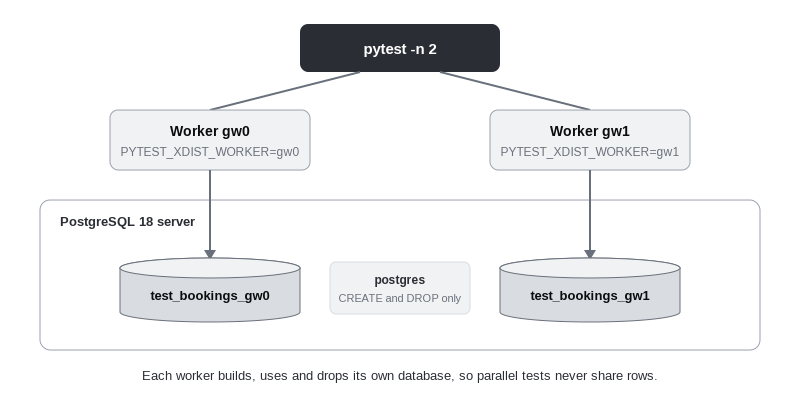
Run the suite on two workers, with -v so each result shows which worker ran it:
.venv/bin/pytest -n 2 -vUse -n auto to start one worker per CPU core. On a small laptop or a shared CI runner, a fixed number such as -n 2 keeps the database server from being swamped.
Check it worked
Results are labelled [gw0] or [gw1], and the run ends with 9 passed. test_runs_in_its_own_database passed on whichever worker ran it, so that worker was connected to test_bookings_gw0 or test_bookings_gw1. Both databases are gone afterwards:
psql -d postgres -Atc "SELECT datname FROM pg_database WHERE datname LIKE 'test_bookings%'"The command prints nothing.
Step 7 · Optional, get a throwaway database from Testcontainers
The suite so far needs a PostgreSQL server that the developer or the CI job already has. Testcontainers removes that requirement: the test session starts a postgres:18 container, runs against it and removes it when the session ends. Any machine with Docker can run the suite, and every run starts from a clean server of exactly the version you name.
Install the library, pinned:
.venv/bin/pip install "testcontainers[postgres]==4.15.0"Then replace the admin_dsn fixture in conftest.py with this version. Nothing else changes, because every other fixture only asks for admin_dsn:
@pytest.fixture(scope="session")
def admin_dsn():
    if "TEST_ADMIN_DSN" in os.environ:
        yield os.environ["TEST_ADMIN_DSN"]
        return
    from testcontainers.community.postgres import PostgresContainer

    with PostgresContainer("postgres:18", driver=None) as postgres:
        yield postgres.get_connection_url()
In version 4.15 the class lives in testcontainers.community.postgres; the older testcontainers.postgres import still works but warns that it is deprecated. driver=None makes get_connection_url() return a plain postgresql:// URL that psycopg accepts, instead of one with a +psycopg2 driver suffix for SQLAlchemy. The user name, password and database all default to test. That is acceptable only because the container exists for the length of one test session; never reuse those values for anything else.
With this fixture, a run with TEST_ADMIN_DSN set uses that server, as before. A run without it starts a container. Under pytest-xdist each worker starts its own container, which is the simplest form of isolation but costs a few seconds per worker.
The first run downloads the postgres:18 image, which is large on a prepaid mobile data bundle. Pull it once on a fixed connection with docker pull postgres:18; later runs start from the local copy. In CI, the runner downloads it.
Check it worked
env -u TEST_ADMIN_DSN .venv/bin/pytest -qThe run takes a few seconds longer than before and ends with 9 passed. While it runs, docker ps in another terminal shows a postgres:18 container; afterwards it is gone.
Step 8 · Clean up
The suite already dropped its databases. Remove the project folder:
cd ~
rm -rf ~/pg-integration-demo
If you created the PostgreSQL role only for this tutorial, remove it too. It owns nothing now, so the drop succeeds:
sudo -u postgres dropuser "$(whoami)"Check it worked
ls ~/pg-integration-demo reports that there is no such file or directory, and psql -d postgres now fails with a message that your role does not exist.
Next steps
- Build realistic rows for these tests without long setup code: manage test data with factories and builders.
- Run the same kind of suite in CI with a PostgreSQL service container: run integration tests against PostgreSQL in GitHub Actions.
- Test a web API on top of a database by swapping its dependencies in tests: test a FastAPI app with pytest and dependency overrides.
- Need a server first? Install PostgreSQL 18 on Ubuntu 26.04.
Related tutorials
- Write unit tests that stay useful as the code changesYou will replace a brittle pytest suite with behaviour tests that catch a real boundary bug and stay green when the code under them is rewritten.
- Write property-based tests in TypeScript with fast-checkYou will use fast-check and Vitest to find a rounding bug in a TypeScript money module, replay the failure from its seed, fix it, and model-test a shopping cart with generated command sequences.
- Write negative tests for an API: bad input, auth and limitsYou will build a pytest and httpx suite that attacks a small FastAPI ordering API with missing and extra fields, wrong types, boundary values, long and multilingual text, bad tokens, another user's data, rate limits and reused idempotency keys, and proves every error comes back in one RFC 9457 format.
Need this done for you?
Padding does this work for growing companies, from the first diagnosis to a system that keeps working.
Get new tutorials