AI and machine learning · Beginner · 20 min
Turn text into embeddings and compare meaning with sentence-transformers
By Padding · Updated 18 Nov 2026
Python 3.15 · sentence-transformers 6.3 · PyTorch 2.15 (CPU)
You will run a small embedding model on your own CPU, turn a dozen sentences into vectors, and check with cosine similarity that paraphrases score high while sentences that only share keywords do not.
On this page
An embedding is a list of numbers that stands for a piece of text. A model reads the text and writes out, say, 384 numbers. On their own the numbers mean nothing you can read, but they are arranged so that texts with similar meaning get similar lists. That one property is what semantic search, duplicate detection, clustering and the retrieval half of a RAG app are built on.
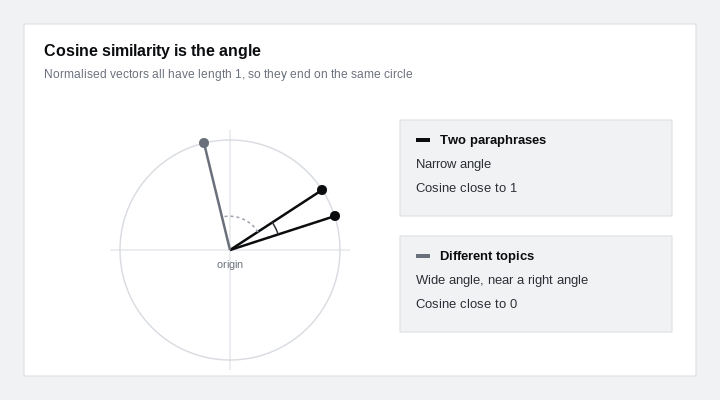
You can picture each list as a point, or an arrow from the origin, in a space with 384 directions. Sentences about the same thing end up pointing roughly the same way. Comparing two texts becomes comparing two arrows, and the usual measure is the angle between them, called cosine similarity.
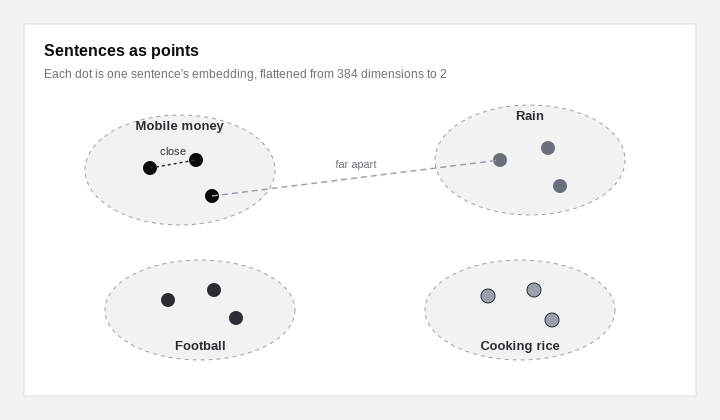
In this tutorial you run a small open model, all-MiniLM-L6-v2 (Apache 2.0, about 91 MB), on your own CPU with the sentence-transformers library. No API key, no account and no cost per call. You embed twelve sentences, compare them, test a keyword trap, then look at three practical details: normalisation, batching and the model's length limit.
Step 1 · Create a project and install the libraries
Make a throwaway folder and a virtual environment:
mkdir -p ~/embeddings-demo
cd ~/embeddings-demo
python3 -m venv .venv
source .venv/bin/activate
Install PyTorch first, from PyTorch's CPU-only package index. If you let pip pick PyTorch as a dependency on Linux, it can fetch the much larger build with GPU libraries, which you do not need here. The PyTorch download is a few hundred megabytes. If you are on prepaid mobile data, run this step on Wi-Fi: it is a one-off, and the rest of the tutorial needs only the model download.
pip install --quiet torch==2.15.0 --index-url https://download.pytorch.org/whl/cpu
pip install --quiet sentence-transformers==6.3.0Check it worked
python -c "import torch, sentence_transformers; print(torch.__version__, sentence_transformers.__version__, torch.cuda.is_available())"On Linux the output is 2.15.0+cpu 6.3.0 False: the +cpu suffix and False confirm you have the CPU build. On macOS the first value is plain 2.15.0, because the CPU index serves the standard macOS wheel, so there False alone confirms PyTorch is not using a CUDA GPU.
Step 2 · Load the model and embed one sentence
Put the model loading and the sample sentences in one file, so every later script uses the same ones. The revision pins the exact model files, so your numbers stay the same if the model page is updated later:
cat > common.py <<'PY'
from sentence_transformers import SentenceTransformer

MODEL_ID = "sentence-transformers/all-MiniLM-L6-v2"
REVISION = "1110a243fdf4706b3f48f1d95db1a4f5529b4d41"

SENTENCES = [
    ("money", "How do I send money to my sister with my phone?"),
    ("money", "What is the quickest way to transfer cash to a relative by mobile?"),
    ("money", "Can I pay someone from my mobile wallet without a bank?"),
    ("rain", "It has been raining heavily since this morning."),
    ("rain", "The storm flooded the road outside our house."),
    ("rain", "Take an umbrella, there is a downpour coming."),
    ("football", "Our team won the match two goals to one."),
    ("football", "The striker scored a late goal in the final."),
    ("football", "The referee showed the defender a red card."),
    ("cooking", "Rinse the rice before you boil it."),
    ("cooking", "Simmer the rice in tomato and pepper sauce until soft."),
    ("cooking", "Cook the grains on low heat with the lid on."),
]


def load_model():
    return SentenceTransformer(MODEL_ID, revision=REVISION, device="cpu")
PY
Now embed one sentence and look at what comes back:
cat > first.py <<'PY'
from common import load_model

model = load_model()
vector = model.encode("How do I send money to my sister with my phone?")

print("type:", type(vector).__name__, vector.dtype)
print("length:", len(vector))
print("first five numbers:", vector[:5].round(4))
print("model dimension:", model.get_embedding_dimension())
PY
python first.py
The first run downloads the model (about 91 MB) into ~/.cache/huggingface. Later runs read it from there.
Check it worked
The output says the result is a NumPy ndarray of float32, its length is 384, and the model dimension is also 384. The first five numbers are small values between -1 and 1, something like [-0.03 0.05 0.01 -0.07 0.02]. Every sentence you encode, short or long, becomes exactly 384 numbers. That fixed size is what makes texts of any length comparable.
Step 3 · Compare all twelve sentences
Cosine similarity runs from -1 to 1. A score near 1 means the two arrows point the same way; near 0 means they are unrelated. With this model, real text rarely goes much below 0. The library's model.similarity computes it for every pair at once:
cat > compare.py <<'PY'
import numpy as np

from common import SENTENCES, load_model

model = load_model()
topics = [topic for topic, _ in SENTENCES]
texts = [text for _, text in SENTENCES]

embeddings = model.encode(texts)
scores = model.similarity(embeddings, embeddings).numpy()
np.fill_diagonal(scores, -1.0)  # ignore each sentence's match with itself

same_topic = 0
for i, text in enumerate(texts):
    j = int(scores[i].argmax())
    match = topics[i] == topics[j]
    same_topic += match
    print(f"{scores[i, j]:.3f}  {text[:45]:<45} -> {texts[j][:45]}")

within = [scores[i, j] for i in range(12) for j in range(12) if i != j and topics[i] == topics[j]]
across = [scores[i, j] for i in range(12) for j in range(12) if topics[i] != topics[j]]
print(f"nearest neighbour in the same topic: {same_topic} of {len(texts)}")
print(f"average within a topic: {np.mean(within):.3f}")
print(f"average across topics:  {np.mean(across):.3f}")

assert same_topic == len(texts)
assert np.mean(within) > np.mean(across) + 0.2
PY
python compare.pyCheck it worked
Each line shows a sentence, its closest neighbour and their score. Every neighbour comes from the same topic, so the summary line reads nearest neighbour in the same topic: 12 of 12. The average within a topic is clearly higher than the average across topics, something like 0.5 against 0.05. Your exact scores may differ in the third decimal place on another CPU.
Look at the cooking group. "Cook the grains on low heat with the lid on" does not contain the word "rice", yet its neighbour is a rice sentence. The model has learned that grains, boiling and simmering belong together.
Step 4 · Test the keyword trap
Search that matches words, not meaning, would rank a sentence higher the more words it shares with the query. Embeddings should not fall for that. Compare one query with a true paraphrase that shares almost no words, and a decoy that shares several:
cat > trap.py <<'PY'
import re

from common import load_model


def words(text):
    return set(re.findall(r"[a-z]+", text.lower()))


query = "How do I send money to my sister?"
paraphrase = "What is the way to transfer cash to a family member?"
decoy = "My sister sent me a photo of her money plant."

model = load_model()
q, p, d = model.encode([query, paraphrase, decoy])

for name, text, vec in [("paraphrase", paraphrase, p), ("decoy", decoy, d)]:
    shared = sorted(words(query) & words(text))
    cosine = float(model.similarity(q, vec)[0][0])
    print(f"{name:<10} shared words: {len(shared)} {shared}  cosine: {cosine:.3f}")

assert len(words(query) & words(decoy)) > len(words(query) & words(paraphrase))
assert float(model.similarity(q, p)[0][0]) > float(model.similarity(q, d)[0][0])
PY
python trap.pyCheck it worked
The paraphrase shares one word with the query (to) and the decoy shares three (money, my, sister). The cosine scores go the other way: the paraphrase scores higher than the decoy, something like 0.6 against 0.3. That reversal is the reason to use embeddings for search.
Do not read the score as a probability or a pass mark. A cosine of 0.6 is "close" for this model, but another model can give the same pair 0.85. When you later choose a threshold for "this is a match", choose it from your own examples, with a person checking a sample of the results.
Step 5 · Normalise vectors so a dot product equals cosine
Cosine similarity divides the dot product of two vectors by both their lengths. If every vector already has length 1, the division does nothing, and the much cheaper dot product gives the same answer. Databases and search libraries rely on this. Check the lengths this model returns:
cat > normalise.py <<'PY'
import numpy as np

from common import SENTENCES, load_model

model = load_model()
texts = [text for _, text in SENTENCES]

raw = model.encode(texts)
print("lengths:", np.linalg.norm(raw, axis=1).round(4)[:4], "...")

normed = model.encode(texts, normalize_embeddings=True)
dots = normed @ normed.T
cosines = model.similarity(normed, normed).numpy()
print("largest gap between dot product and cosine:", float(np.abs(dots - cosines).max()))

stretched = raw.copy()
stretched[0] *= 3
print("dot, stretched vector:", round(float(stretched[0] @ stretched[1]), 3))
print("cosine, stretched vector:", round(float(model.similarity(stretched[0], stretched[1])[0][0]), 3))
print("cosine, original vector: ", round(float(model.similarity(raw[0], raw[1])[0][0]), 3))

assert np.allclose(np.linalg.norm(normed, axis=1), 1.0, atol=1e-5)
assert np.allclose(dots, cosines, atol=1e-5)
PY
python normalise.pyCheck it worked
The lengths are all 1.0. This particular model ends with a normalisation layer, so its vectors arrive with length 1 even without the flag. Many models do not, which is why you pass normalize_embeddings=True anyway: it costs nothing and protects you when you swap models. The largest gap between dot product and cosine is tiny, around 1e-07, which is rounding noise.
The stretched vector shows why it matters. Multiplying a vector by 3 triples its dot product with its neighbour, but the cosine stays the same as the original. If you store vectors that are not normalised and then rank by dot product, longer vectors win for no good reason.
Step 6 · Encode in batches
encode takes a list and processes it in batches, 32 texts at a time by default. Batching lets the CPU work on many sentences in one pass instead of paying the overhead for each one. Time 240 sentences one at a time and in batches:
cat > batch.py <<'PY'
import time

import numpy as np

from common import SENTENCES, load_model

model = load_model()
texts = [text for _, text in SENTENCES] * 20  # 240 sentences

model.encode(texts[:8])  # warm up, so the first timing is fair

start = time.perf_counter()
one_by_one = np.vstack([model.encode([t]) for t in texts])
single = time.perf_counter() - start

start = time.perf_counter()
batched = model.encode(texts, batch_size=64)
together = time.perf_counter() - start

print(f"one at a time: {single:.2f} s")
print(f"batches of 64: {together:.2f} s")
print("same vectors:", np.allclose(one_by_one, batched, atol=1e-4))
print("shape:", batched.shape)

assert batched.shape == (240, 384)
assert np.allclose(one_by_one, batched, atol=1e-4)
PY
python batch.pyCheck it worked
The shape is (240, 384): one row of 384 numbers per sentence. same vectors: True confirms batching changes only the speed, not the result. The batched run is usually several times faster; the exact times depend on your CPU, so expect your own figures rather than a set number. On a low-end laptop, batching tends to make the largest difference. If memory runs short, lower batch_size rather than going back to one sentence at a time.
Step 7 · Check the length limit before you trust a vector
A model reads at most a fixed number of tokens (word pieces). For all-MiniLM-L6-v2 the limit is 256, and anything after it is dropped without an error. Make two long texts that are identical for 300 tokens and differ only at the end:
cat > truncate.py <<'PY'
from common import load_model

model = load_model()
print("max_seq_length:", model.max_seq_length)

filler = "The quarterly report covers sales, staffing and stock levels across all regional offices. " * 20
a = filler + "The board decided to close the Lagos office."
b = filler + "The board decided to open three new offices in Nairobi."


def token_count(text):
    return len(model.tokenizer(text)["input_ids"])


print("tokens in text a:", token_count(a))
va, vb = model.encode([a, b])
long_score = float(model.similarity(va, vb)[0][0])
print(f"cosine of the two long texts: {long_score:.4f}")

endings = model.encode(["The board decided to close the Lagos office.",
                        "The board decided to open three new offices in Nairobi."])
short_score = float(model.similarity(endings[0], endings[1])[0][0])
print(f"cosine of the two endings alone: {short_score:.4f}")

assert model.max_seq_length == 256
assert token_count(a) > 256
assert long_score > 0.9999
assert short_score < 0.95
PY
python truncate.pyCheck it worked
max_seq_length is 256 and text a has over 300 tokens. The two long texts score 1.0000, or within a hair of it: the model never saw the sentences that make them different. Their endings on their own score much lower. A document that is all one long string will be represented only by its opening.
The fix is to split long text into pieces that fit before you embed it. Split documents into chunks for a RAG app shows how. The model card also notes that the model was trained on inputs of up to 128 tokens, so pieces well under the limit tend to embed best.
A note on language: this model was trained on English. Text in Yoruba, Hausa, Swahili or Amharic, or a message that mixes English with Pidgin, gets a vector, but the scores are much less reliable. For multilingual text, try sentence-transformers/paraphrase-multilingual-MiniLM-L12-v2, which is also Apache 2.0, and test it on your own examples the same way you tested the keyword trap above.
Step 8 · Run offline and clean up
The model is now in your cache, so you can work without a connection. Tell the Hugging Face library not to check the network:
HF_HUB_OFFLINE=1 python trap.pyCheck it worked
The same two lines print as before, with no download. This is also how to stop a long job wasting data checking for model updates.
When you have finished, leave the virtual environment and remove the project folder:
deactivate
cd ~
rm -rf ~/embeddings-demo
ls ~/embeddings-demo 2>/dev/null || echo "removed"
The last command prints removed.
Skip this next command if you are going on to build semantic search with embeddings in Python: keeping the cached model saves downloading it again. Otherwise, remove the cached model:
rm -rf ~/.cache/huggingface/hub/models--sentence-transformers--all-MiniLM-L6-v2
ls ~/.cache/huggingface/hub/models--sentence-transformers--all-MiniLM-L6-v2 2>/dev/null || echo "cache removed"
This prints cache removed.
Next steps
- Use these vectors to search a real set of answers and measure the results: build semantic search over an FAQ with embeddings in Python.
- Store embeddings in a database and query them with SQL: vector similarity search in PostgreSQL with pgvector.
- Prepare long documents so nothing is lost to truncation: split documents into chunks for a RAG app.
Part of these paths
Related tutorials
- How to Do Vector Similarity Search in PostgreSQL with pgvectorYou will install PostgreSQL 18 with the pgvector extension on Ubuntu 26.04, store and compare vectors with SQL, load the chunks from the previous tutorial into a table, and add an HNSW index to make nearest-neighbour search fast.
- Build semantic search over an FAQ with embeddings in PythonYou will index 150 FAQ answers with a local embedding model, search them with a matrix product, reject questions the FAQ cannot answer, and measure the result against a BM25 keyword baseline and a hybrid of the two on 20 labelled queries.
- How to Split Documents into Chunks for a RAG AppYou will write a Python chunker with no dependencies that splits Markdown help pages at their headings and sentences into overlapping pieces, saves them with their source and heading, and checks that no text was lost and no piece is too long.
Need this done for you?
Padding does this work for growing companies, from the first diagnosis to a system that keeps working.
Get new tutorials