Cloud and deployment · Beginner · 20 min
Understand AWS IAM: users, groups, roles and how policies are evaluated
By Padding · Updated 18 Nov 2026
Ubuntu 26.04 · AWS CLI 2.42.4
You will know how AWS decides whether a request is allowed, have read three real policies line by line, and have built a group with a managed policy, a teammate user and a role you can assume for temporary credentials, then cleaned it all up.
On this page
Sooner or later someone asks you for access to AWS: a new teammate who needs to read reports in S3, or an app that has to upload files. Before you click anything, it helps to know what AWS Identity and Access Management (IAM) actually checks when a request arrives, because most access problems, and most security incidents, come from a policy that says more or less than its author thought.
This tutorial gives you the model first and the commands second. You will learn the words AWS uses (principal, identity policy, resource policy, trust policy), walk through the order in which AWS evaluates a request, and read three policies line by line. Then you build a small setup with the AWS CLI: a group with two managed policies, a teammate user in that group, and a role that hands out temporary credentials. You finish by asking AWS what each principal can do, and by deleting everything.
IAM itself has no charge, and nothing here creates a billable resource. IAM is also global: users, groups, roles and policies are not tied to a Region, so the same commands work whether your workloads run in London, Virginia or Cape Town (af-south-1).
Everything you create is named iam-demo-... and your working files live in ~/iam-demo, so nothing collides with what your account already has.
Step 1 · Install the AWS CLI and find out who you are
Install curl, unzip and jq, then version 2.42.4 of the AWS CLI from Amazon's versioned installer. uname -m prints x86_64 or aarch64, which matches Amazon's file names:
sudo apt update
sudo apt install -y curl unzip jq ca-certificates
AWS_CLI_VERSION=2.42.4
cd "$(mktemp -d)"
curl -fsSLo awscliv2.zip "https://awscli.amazonaws.com/awscli-exe-linux-$(uname -m)-${AWS_CLI_VERSION}.zip"
unzip -q -o awscliv2.zip
sudo ./aws/install
aws --version
If the AWS CLI is already installed, the installer stops and tells you so; run sudo ./aws/install --update instead. The CLI does not get updates from apt, so to upgrade later you run the same commands with a newer version number. The archive is a large download; on a prepaid mobile bundle, fetch it once on Wi-Fi and keep the zip.
Point the CLI at your sandbox account. If you use a named profile, run export AWS_PROFILE=<your-sandbox-profile> first (replace the placeholder); /tutorials/set-up-the-aws-cli-with-sso-and-named-profiles shows how to set one up. Then ask AWS who it thinks you are:
aws sts get-caller-identityThe answer has three fields. Account is the 12-digit account ID. Arn is the identity making the call, and UserId is its internal ID. That identity is a principal: something that can make a request to AWS. There are three kinds you meet every day:
- An IAM user is a long-lived identity with a name, and optionally a console password and access keys. Keys do not expire until someone deletes them.
- An IAM role is an identity with no password and no keys of its own. A person, an app or an AWS service assumes it and gets credentials that expire.
- A federated user, such as someone signed in through IAM Identity Center (AWS SSO), is a person from your company's identity provider who ends up working through a role.
A group is not a principal. It is a way to attach the same policies to several users at once. You cannot sign in as a group or name a group as the principal in a policy.
Check it worked
aws --version starts with aws-cli/2.42.4. get-caller-identity prints your sandbox account ID. If you signed in with SSO, the Arn contains assumed-role/AWSReservedSSO_..., which shows that even you are working through a role.
Step 2 · Learn the order AWS evaluates a request in
Every request carries four things: the principal, the action (such as s3:GetObject), the resource (an ARN such as arn:aws:s3:::iam-demo-reports/q3.csv) and the context (time, source IP, whether TLS was used, whether the caller signed in with MFA). AWS collects every policy that applies to that request and answers it in this order:
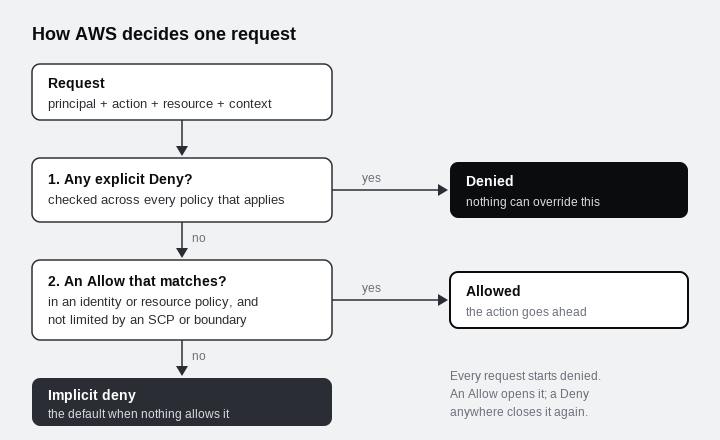
- Explicit deny. If any applicable policy has a statement with
"Effect": "Deny"that matches, the answer is no. No Allow anywhere can override it. - Allow. If there is no deny, AWS looks for a statement with
"Effect": "Allow"that matches. Within one account, an Allow in either the principal's identity policies or the resource's own policy is enough. Guard rails can still narrow it: an organisation's service control policies (SCPs) or a permissions boundary on the user or role must also allow the action. - Implicit deny. If nothing allows the request, it is refused. This is the default for everything: a brand new user can do nothing at all.
The policies come in a few types, and the two you will write most are:
- Identity-based policies, attached to a user, group or role. They say what that identity may do, so they have no
Principalline. - Resource-based policies, attached to a resource such as an S3 bucket or an SQS queue. They say who may do what to that resource, so they always have a
Principalline. A role's trust policy is a resource-based policy on the role, and it says who may assume it.
A policy can also be AWS managed (written and updated by AWS, such as AmazonS3ReadOnlyAccess), customer managed (written by you, reusable, versioned), or inline (embedded in one user, group or role and deleted with it). Prefer managed policies: you can attach them to many identities and see where they are used.
Check it worked
Answer these before reading on; the answers follow.
- A user's group allows
s3:*on a bucket, and the bucket policy deniess3:DeleteObjectto everyone. Can the user delete an object? - A new role has a trust policy but no permissions policy. Can it list buckets?
- A user has no policies, but a bucket policy in the same account allows that user's ARN to
s3:GetObject. Can they read objects?
Answers: 1. No, the explicit deny wins. 2. No, implicit deny. 3. Yes, within one account a resource policy's Allow is enough on its own.
Step 3 · Read three policies line by line
Make the working folder:
mkdir -p ~/iam-demo
cd ~/iam-demo
The first policy is an identity-based policy you will attach to a group and a role. It lets someone list one bucket and read the objects in it:
cat > reports-read.json <<'JSON'
{
  "Version": "2012-10-17",
  "Statement": [
    {
      "Sid": "ListTheReportsBucket",
      "Effect": "Allow",
      "Action": "s3:ListBucket",
      "Resource": "arn:aws:s3:::iam-demo-reports"
    },
    {
      "Sid": "ReadReportFiles",
      "Effect": "Allow",
      "Action": "s3:GetObject",
      "Resource": "arn:aws:s3:::iam-demo-reports/*"
    }
  ]
}
JSONVersionis the policy language version, not your policy's version. Always use2012-10-17; the older value disables features such as policy variables.Statementis a list. Each statement is checked on its own.Sidis an optional label. Give it a name a reviewer will understand.EffectisAlloworDeny.Actionnames the API calls, asservice:Operation. Wildcards such ass3:Get*work, but each one widens what you grant.Resourceis the ARN the action applies to. Notice there are two:ListBucketacts on the bucket (arn:aws:s3:::iam-demo-reports), whileGetObjectacts on objects inside it (.../*). Mixing these up is the most common reason an S3 policy "does not work".
If you already have a bucket for reports, replace iam-demo-reports with its name. The policy is valid even if no bucket of that name exists yet.
The second policy is a resource-based policy, a bucket policy. It refuses any request to the bucket that does not use HTTPS:
cat > bucket-https-only.json <<'JSON'
{
  "Version": "2012-10-17",
  "Statement": [
    {
      "Sid": "RefusePlainHttp",
      "Effect": "Deny",
      "Principal": "*",
      "Action": "s3:*",
      "Resource": [
        "arn:aws:s3:::iam-demo-reports",
        "arn:aws:s3:::iam-demo-reports/*"
      ],
      "Condition": {
        "Bool": { "aws:SecureTransport": "false" }
      }
    }
  ]
}
JSONPrincipalsays who the statement is about."*"means everyone, including your own administrators. On a Deny that is what you want; on an Allow it would make the bucket public.Conditionnarrows when the statement applies. Here it reads: when the request context keyaws:SecureTransportisfalse. So the Deny only fires for plain HTTP, and HTTPS requests fall through to the normal Allow check.- Because this is a Deny, it beats any Allow in the first policy. That is the evaluation order from the last step at work.
You will not attach this one in this tutorial, because that needs a real bucket; /tutorials/host-a-static-site-on-s3-and-cloudfront works with bucket policies.
The third policy is a trust policy for a role. It decides who may assume the role, not what the role can do. Read your account ID into a variable and write the file with it:
ACCOUNT_ID=$(aws sts get-caller-identity --query Account --output text)
cat > reports-reader-trust.json <<JSON
{
  "Version": "2012-10-17",
  "Statement": [
    {
      "Sid": "LetThisAccountAssume",
      "Effect": "Allow",
      "Principal": { "AWS": "arn:aws:iam::${ACCOUNT_ID}:root" },
      "Action": "sts:AssumeRole"
    }
  ]
}
JSONPrincipalnames your own account. Despite the:rootin the ARN, this does not mean only the root user. It means "any principal in this account whose own identity policies allowsts:AssumeRoleon this role". The account hands the decision back to its IAM policies.Actionissts:AssumeRole, the one action a trust policy usually grants.- There is no
Resource: the resource is the role the policy is attached to.
For an app on EC2 or Lambda you would put the service there instead, for example "Principal": { "Service": "lambda.amazonaws.com" }.
Check that all three files are valid JSON:
for f in *.json; do jq -e . "$f" > /dev/null && echo "$f ok"; doneOn a real account you can also ask IAM Access Analyzer to check a policy for errors and risky patterns, such as an Allow with "Principal": "*":
aws accessanalyzer validate-policy --policy-type IDENTITY_POLICY \
--policy-document file://reports-read.jsonCheck it worked
The loop prints bucket-https-only.json ok, reports-read.json ok and reports-reader-trust.json ok. grep arn:aws:iam reports-reader-trust.json shows your own 12-digit account ID, not ${ACCOUNT_ID}. validate-policy returns an empty findings list for the first policy.
Step 4 · Create a group and attach managed policies
Create a group for everyone who reads reports, and turn your first policy into a customer managed policy:
aws iam create-group --group-name iam-demo-readers
POLICY_ARN=$(aws iam create-policy --policy-name iam-demo-reports-read \
  --description "List and read the reports bucket" \
  --policy-document file://reports-read.json \
  --query Policy.Arn --output text)
echo "$POLICY_ARN"
Attach that policy and one AWS managed policy to the group:
aws iam attach-group-policy --group-name iam-demo-readers --policy-arn "$POLICY_ARN"
aws iam attach-group-policy --group-name iam-demo-readers \
  --policy-arn arn:aws:iam::aws:policy/AmazonS3ReadOnlyAccess
aws iam list-attached-group-policies --group-name iam-demo-readers
The two ARNs show the difference between the policy kinds. Yours contains your account ID (arn:aws:iam::<account>:policy/...); AWS's contains aws where the account would be. You would not normally attach both: AmazonS3ReadOnlyAccess reads every bucket in the account, which is far wider than your policy. It is here so you can read a real AWS policy and compare. Fetch its current version:
S3RO=arn:aws:iam::aws:policy/AmazonS3ReadOnlyAccess
aws iam get-policy-version --policy-arn "$S3RO" \
  --version-id "$(aws iam get-policy --policy-arn "$S3RO" --query Policy.DefaultVersionId --output text)" \
  --query PolicyVersion.Document
You will see something like a single Allow statement for actions such as s3:Get* and s3:List* on "Resource": "*". AWS updates its managed policies over time, so the exact list may differ from what you read elsewhere.
Check it worked
list-attached-group-policies lists two entries, iam-demo-reports-read and AmazonS3ReadOnlyAccess. The managed policy document has "Resource": "*", while yours names one bucket.
Step 5 · Add a teammate user to the group
Create a user for a teammate, here called Amara, and add her to the group:
aws iam create-user --user-name iam-demo-amara
aws iam add-user-to-group --user-name iam-demo-amara --group-name iam-demo-readers
aws iam get-group --group-name iam-demo-readers --query 'Users[].UserName'
Notice what you did not do: you did not create access keys or a password. This user exists to show how groups pass permissions on. For real people, AWS recommends signing in through IAM Identity Center or another identity provider instead of IAM users, so everyone gets short-lived credentials and leaving the company means one account to disable. An IAM user with access keys is a password that never expires, sitting in a file on a laptop. If a team member does need one, give it the narrowest group you can and rotate the keys.
Check it worked
get-group prints a list with one name, iam-demo-amara. aws iam list-access-keys --user-name iam-demo-amara prints an empty AccessKeyMetadata list.
Step 6 · Create a role and assume it for temporary credentials
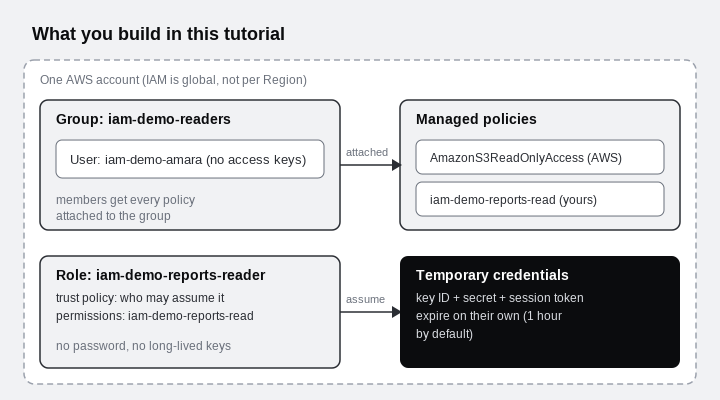
Create the role with the trust policy, then give it your reports policy as its permissions:
ROLE_ARN=$(aws iam create-role --role-name iam-demo-reports-reader \
  --assume-role-policy-document file://reports-reader-trust.json \
  --query Role.Arn --output text)
aws iam attach-role-policy --role-name iam-demo-reports-reader --policy-arn "$POLICY_ARN"
echo "$ROLE_ARN"
A role has two policies for two questions: the trust policy answers "who may become this role?" and the permissions policy answers "what can the role do once someone has become it?". Both must allow something before it is usable.
IAM changes can take a few seconds to reach every AWS endpoint. If the next command says AccessDenied straight after you created the role, wait ten seconds and run it again. Now assume the role:
aws sts assume-role --role-arn "$ROLE_ARN" --role-session-name iam-demo-session \
  --query '{Who: AssumedRoleUser.Arn, KeyId: Credentials.AccessKeyId, Expires: Credentials.Expiration}'
The command prints a new identity, arn:aws:sts::<account>:assumed-role/iam-demo-reports-reader/iam-demo-session, an access key ID and an expiry time one hour from now, which is the default. The full response, which you filtered out here, also holds a secret key and a session token. Those three values together are temporary credentials: an app that uses them can list and read the reports bucket and nothing else, and when they expire they are useless to anyone who copied them. That is why roles beat users with keys. Apps on EC2, Lambda, ECS or GitHub Actions can assume a role automatically, so no key ever has to be stored.
Check it worked
assume-role prints a Who ARN that contains assumed-role/iam-demo-reports-reader/iam-demo-session and an Expires time in the future. aws iam list-attached-role-policies --role-name iam-demo-reports-reader shows iam-demo-reports-read.
Step 7 · List what a principal can do
When someone asks "what can Amara actually do?", the answer is spread over her own policies and her groups' policies. get-account-authorization-details collects them for every user in one call:
aws iam get-account-authorization-details --filter User \
  --query 'UserDetailList[?UserName==`iam-demo-amara`].{Groups: GroupList, OwnPolicies: AttachedManagedPolicies}'
aws iam list-attached-group-policies --group-name iam-demo-readers \
  --query 'AttachedPolicies[].PolicyName' --output text
The first command shows Amara is in iam-demo-readers and has no policies of her own. The second shows what that group brings. Do the same for the role:
aws iam list-attached-role-policies --role-name iam-demo-reports-reader \
  --query 'AttachedPolicies[].PolicyName' --output text
aws iam get-role --role-name iam-demo-reports-reader \
  --query 'Role.AssumeRolePolicyDocument.Statement[].Principal'
Lists of policies still leave you to run the evaluation in your head. On a real account, the IAM policy simulator does it for you. It takes a principal, actions and a resource, applies every policy attached to that principal, including its groups' policies, and gives a decision for each action:
aws iam simulate-principal-policy \
  --policy-source-arn "arn:aws:iam::${ACCOUNT_ID}:user/iam-demo-amara" \
  --action-names s3:GetObject s3:DeleteObject \
  --resource-arns arn:aws:s3:::iam-demo-reports/q3.csv \
  --query 'EvaluationResults[].[EvalActionName,EvalDecision]' --output text
Expect something like s3:GetObject allowed and s3:DeleteObject implicitDeny: neither policy allows deleting, so the default wins. The simulator only reads policies; it never touches the bucket.
Check it worked
The first query shows Groups with iam-demo-readers and an empty OwnPolicies list. The group lists both policies, the role lists only iam-demo-reports-read, and the role's principal is your account's :root ARN.
Step 8 · Clean up
IAM will not delete a policy that is still attached, a group that still has members, or a user who is still in a group, so remove things in this order. Every name below starts with iam-demo-; check that before you run it, so nothing else in the account is touched:
cd ~/iam-demo
POLICY_ARN="arn:aws:iam::$(aws sts get-caller-identity --query Account --output text):policy/iam-demo-reports-read"
aws iam detach-role-policy --role-name iam-demo-reports-reader --policy-arn "$POLICY_ARN"
aws iam delete-role --role-name iam-demo-reports-reader
aws iam remove-user-from-group --user-name iam-demo-amara --group-name iam-demo-readers
aws iam delete-user --user-name iam-demo-amara
aws iam detach-group-policy --group-name iam-demo-readers --policy-arn "$POLICY_ARN"
aws iam detach-group-policy --group-name iam-demo-readers \
  --policy-arn arn:aws:iam::aws:policy/AmazonS3ReadOnlyAccess
aws iam delete-group --group-name iam-demo-readers
aws iam delete-policy --policy-arn "$POLICY_ARN"
cd ~
rm -rf ~/iam-demoCheck it worked
aws iam get-group --group-name iam-demo-readers, aws iam get-user --user-name iam-demo-amara and aws iam get-role --role-name iam-demo-reports-reader each fail with NoSuchEntity, and ~/iam-demo is gone.
Next steps
- Put a bucket policy to work on a real site: host a static site on S3 and CloudFront.
- In your own account, list users that still have access keys with
aws iam list-usersandaws iam list-access-keys, and plan to move each one to a role or to IAM Identity Center.
Need this done for you?
Padding does this work for growing companies, from the first diagnosis to a system that keeps working.
Get new tutorials