Cloud and deployment · Intermediate · 22 min
Understand blue-green, canary and rolling deployments
By Padding · Updated 18 Nov 2026
Ubuntu 26.04 · Nginx 1.30.8 stable (nginx.org repo) · Python 3
You will know what rolling, blue-green and canary releases need and how each rolls back, and you will have run a canary on one server that sends 10% of users to a new version with Nginx split_clients, judged it from the logs and rolled it back.
On this page
Every release has the same risk: the new version behaves differently once real users hit it. Release strategies do not remove that risk. They decide how many users meet a fault, how long it takes to notice, and how fast you can get back to the version that worked.
This tutorial covers the three strategies you will meet on almost every platform: rolling, blue-green and canary. It covers what each needs from your infrastructure, how each rolls back, and the two problems none of them solve for you: database changes and user sessions. Then you build a canary on one Ubuntu server. Nginx sends 10% of users to version 2 of a small app, keeps each user on the same version, logs which version answered, and you roll back when the canary misbehaves.
The same ideas carry over to load balancers, Cloud Run and Kubernetes. Only the switch you flip changes.
Step 1 · Compare rolling, blue-green and canary
All three start with version 1 serving everyone and end with version 2 serving everyone. They differ in what happens in between.
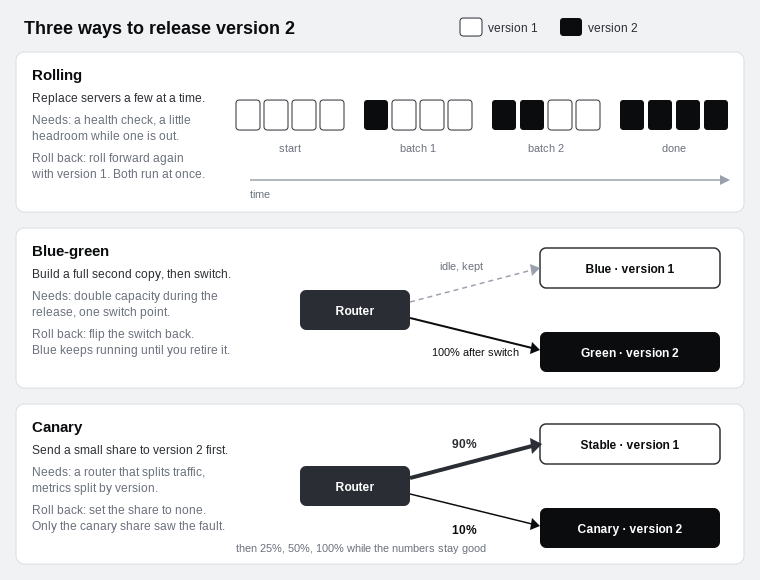
- Blue-green. You build a complete second environment (green) next to the live one (blue), test green while no user can reach it, then move all traffic in one switch at the router or load balancer. Everyone changes version at once. You pay for double capacity while both run.
- Canary. You run version 2 next to version 1 and send it a small share of real traffic, say 10%. You watch its errors and latency against the stable version. If they hold, you widen the share in stages; if not, you send the share back to zero. A fault reaches only the canary share.
A canary is often run on top of the other two: a blue-green setup with a weighted switch can send 10% to green first, and some platforms pause a rolling update after the first batch for the same reason.
Check it worked
Write one line for an app you work on: which of the three it uses today (if you redeploy the only copy in place, it is none of them), and which you would choose next. You should be able to give one reason tied to capacity or risk, such as "we cannot afford double capacity, so rolling, with a pause after the first batch".
Step 2 · Know what each strategy needs and how it rolls back
Before choosing, check what your platform gives you. Each strategy needs a different mix of three things.
- Spare capacity. Rolling needs room for one extra batch, or accepts running one batch short. Blue-green needs a full second copy for as long as you keep the old one for rollback. A canary needs one extra instance or a small pool.
- A router that can split traffic. Rolling only needs a load balancer that drops unhealthy instances. Blue-green needs one switch point you can flip and flip back: a load balancer listener, an upstream in Nginx, a DNS record (slow to take effect because of caching, so a poor choice). A canary needs a router that splits by percentage, and ideally keeps a user on one side.
- Metrics split by version. Rolling and blue-green can get by with overall error rates. A canary is useless without them: 10% of traffic failing badly shows as a small bump in a total. You need errors and latency per version, and a rule written down before the release, such as "roll back if the canary's 5xx rate is more than 1 percentage point above stable for 10 minutes".
Rollback differs too:
- Rolling: you roll forward again with version 1, batch by batch. It takes as long as the rollout did.
- Blue-green: you flip the switch back to blue. It takes seconds, as long as blue is still running.
- Canary: you set the canary share to none. Only the users in the canary share ever saw the fault.
Feature flags are a separate switch
A feature flag hides new code behind a setting that the app reads at run time. It separates deploying code (version 2 is running) from releasing a feature (users can see it). You can ship version 2 everywhere with the flag off, then turn the feature on for 5% of users. That is a canary for one feature rather than for the whole build, and turning it off is a config change, not a redeploy. Flags and deployment strategies work together: a flag cannot undo a crash on start-up or a memory leak, and a canary cannot hide one feature while keeping the rest.
Check it worked
For the app from the last step, write down the three needs and whether you have each: spare capacity (how much), the switch point (its name in your setup, such as "Nginx upstream on lb-1"), and per-version metrics (where you would see them). Any "no" is the first thing to fix before trying that strategy.
Step 3 · Plan for the database and sessions
Every strategy above runs two versions at once, even blue-green for the seconds of the switch and for any rollback. Two problems follow, and no router setting fixes them.
The database is shared
Both versions talk to the same database. If version 2 renames a column, version 1 breaks the moment the migration runs, and rollback no longer works because the old code expects the old column. Use expand and contract:
- Expand: add the new column or table, keep the old one. Both versions work.
- Release version 2, which writes to both and reads from the new one. Backfill old rows.
- Contract: once no version 1 is left and rollback is no longer needed, drop the old column in a later release.
Each step is its own release, so every point in the sequence is safe to roll back to. /tutorials/deploy-a-new-version-with-zero-downtime-behind-nginx shows this on a running app.
Sessions and caches
If the app keeps sessions in process memory, a user moved to another instance is logged out, and a rollback logs out every canary user. Keep sessions in a shared store (the database, or Valkey or Redis) in a format both versions can read. The same applies to cached data and queued jobs: a job queued by version 2 may be picked up by a version 1 worker, so make job formats backwards compatible for at least one release.
A canary should also keep each user on one version. Someone who loads a page from version 2 and its next request from version 1 can see a mix of old and new behaviour. The canary you build next does this with a cookie.
Check it worked
Take the last schema change your team shipped. Write down whether version 1 would still have worked after the migration ran. If not, split it into expand and contract steps on paper. Then note where your app keeps sessions: if the answer is "in memory", that is the blocker for every strategy here.
Step 4 · Run two versions side by side
Now the practical part. You need Nginx from nginx.org, installed as in /tutorials/install-nginx-on-ubuntu-26-04. Ubuntu includes python3, which runs two copies of a tiny app.
The app answers with its version. Version 2 has a bug on purpose: its /checkout page returns HTTP 500. You will catch that with the canary.
mkdir -p ~/release-demo
cat > ~/release-demo/app.py <<'PY'
import sys
from http.server import BaseHTTPRequestHandler, ThreadingHTTPServer

port, version = int(sys.argv[1]), sys.argv[2]

class Handler(BaseHTTPRequestHandler):
    def do_GET(self):
        status, body = 200, f"version {version}\n"
        if version == "2" and self.path == "/checkout":
            status, body = 500, "version 2 checkout failed\n"
        data = body.encode()
        self.send_response(status)
        self.send_header("Content-Type", "text/plain")
        self.send_header("Content-Length", str(len(data)))
        self.end_headers()
        self.wfile.write(data)

    def log_message(self, *args):
        pass

ThreadingHTTPServer(("127.0.0.1", port), Handler).serve_forever()
PY
nohup python3 ~/release-demo/app.py 9101 1 > /dev/null 2>&1 &
nohup python3 ~/release-demo/app.py 9102 2 > /dev/null 2>&1 &
sleep 1
Version 1, the stable release, listens on port 9101. Version 2, the canary, listens on 9102. Both bind to 127.0.0.1, so only Nginx on this server can reach them. On a real fleet they would be separate machines or containers, and you would write their private addresses instead.
Check it worked
curl -s http://127.0.0.1:9101/
curl -s http://127.0.0.1:9102/
curl -s -o /dev/null -w '%{http_code}\n' http://127.0.0.1:9102/checkout
You see version 1, version 2, then 500 for the broken checkout page.
Step 5 · Send 10% of users to the canary with split_clients
Nginx's split_clients directive takes a string, hashes it with MurmurHash2 to a 32-bit number, and sets a variable according to where that number falls. 10% canary; claims the first tenth of the range, and * takes the rest. Because the same string always gives the same hash, the same user always lands on the same side.
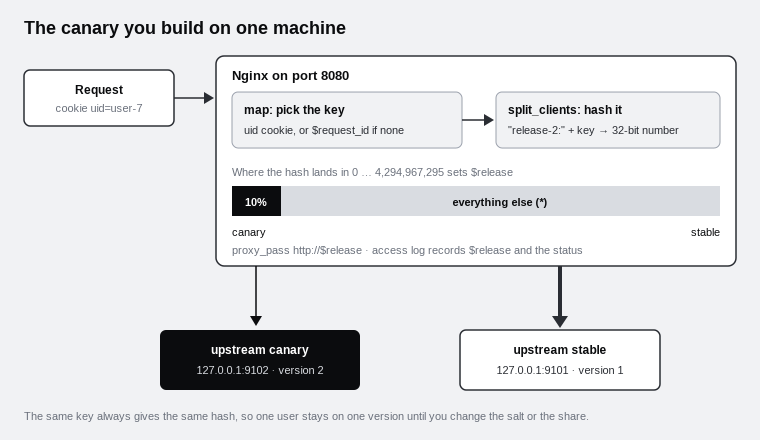
The key is a uid cookie, the kind of random visitor ID many apps already set. A request without the cookie uses $request_id, a random value per request, so first-time visitors are spread too instead of all landing in one bucket. The release-2: prefix is a salt: change it for the next release and a different 10% of users become the canary, so the same people are not always the testers.
Keep the split in its own file, so a rollback is a change to one small file:
sudo tee /etc/nginx/conf.d/release-split.conf > /dev/null <<'CONF'
map $cookie_uid $release_key {
    ""      $request_id;
    default $cookie_uid;
}

split_clients "release-2:${release_key}" $release {
    10%     canary;
    *       stable;
}
CONF
Then the upstreams and the server block. proxy_pass http://$release; works because the variable's value is the name of an upstream group. The access log records which version answered, which is the per-version metric a canary depends on:
sudo tee /etc/nginx/conf.d/release-demo.conf > /dev/null <<'CONF'
upstream stable {
    zone stable 64k;
    server 127.0.0.1:9101;
}

upstream canary {
    zone canary 64k;
    server 127.0.0.1:9102;
}

log_format release '$time_iso8601 $release $status $request_uri';

server {
    listen 8080;
    server_name _;
    access_log /var/log/nginx/release-demo.log release;

    location / {
        proxy_pass http://$release;
        proxy_set_header Host $host;
        add_header X-Release $release always;
    }
}
CONF
sudo nginx -t
The block listens on port 8080 only, so it does not touch any site you already serve on port 80. Apply it:
sudo systemctl reload nginxCheck it worked
Send 1,000 requests as 1,000 different users and count which version answered:
for i in $(seq 1 1000); do
  curl -s -b "uid=user-$i" http://127.0.0.1:8080/
done | sort | uniq -c
You see two lines, something like 893 version 1 and 107 version 2. The canary share is close to 100 but rarely exactly 100: the split is by hash, not a counter, so it evens out over many users rather than per batch of ten.
Step 6 · Keep each user on one version
Send 20 requests as one user:
for i in $(seq 1 20); do
  curl -s -b "uid=user-7" http://127.0.0.1:8080/
done | sort | uniq -c
Now 20 requests with no cookie, as a first-time visitor's browser would send before the app sets one:
for i in $(seq 1 20); do
  curl -s http://127.0.0.1:8080/
done | sort | uniq -c
Retries and reloads mean a user's next request can land on the other version, so set the uid cookie on the first response, with a long expiry, so the second request already has a stable key.
Check it worked
The first loop prints a single line with a count of 20: every request from user-7 reached the same version. The second loop usually prints two lines, most from version 1 and a few from version 2, because each cookie-less request is hashed on its own random ID. The response header shows the same decision:
curl -s -o /dev/null -D - -b "uid=user-7" http://127.0.0.1:8080/ | grep -i '^x-release'It prints X-Release: canary or X-Release: stable, and the same value every time you run it.
Step 7 · Judge the canary from the logs
Real users now reach the checkout page. Simulate 200 of them:
for i in $(seq 1 200); do
  curl -s -o /dev/null -b "uid=user-$i" http://127.0.0.1:8080/checkout
done
Overall, most of those requests worked, and a dashboard showing the total error rate would show a modest rise. Split the log by version and the picture changes:
awk '$4 == "/checkout" { print $2, $3 }' /var/log/nginx/release-demo.log | sort | uniq -cThe fields are the ones you put in log_format: time, version, status, path. Nginx does not retry a backend's 500 on the other upstream (its default proxy_next_upstream retries only connection errors and timeouts), so the canary's failures reach the user and the log, which is what you want here.
Check it worked
You see two lines, something like 176 stable 200 and 24 canary 500. Every canary request to /checkout failed and no stable request did. Against a rule such as "roll back if the canary's 5xx rate is more than 1 point above stable", this canary fails by about 100 points.
Step 8 · Roll back, or promote when the canary is healthy
Rolling back means sending the canary share to stable. Replace the split file so every key maps to stable:
sudo tee /etc/nginx/conf.d/release-split.conf > /dev/null <<'CONF'
map $cookie_uid $release_key {
    ""      $request_id;
    default $cookie_uid;
}

split_clients "release-2:${release_key}" $release {
    *       stable;
}
CONF
sudo nginx -tsudo systemctl reload nginxA reload starts new worker processes with the new config and lets the old ones finish the requests they are serving, so no request is dropped. Version 2 is still running on port 9102, so you can debug it with the real traffic that broke it in the log, and a fixed build can go out as the next canary.
When a canary is healthy, promotion is the same edit in the other direction, in stages. Each stage runs long enough to see real traffic through the busiest part of your day:
split_clients "release-2:${release_key}" $release {
    25%     canary;
    *       stable;
}
Then 50%, then a single * canary; line. At that point version 2 is the stable release: point the stable upstream at it, retire version 1, and use a new salt for the next canary.
Check it worked
Send the 200 checkout requests again and count the status codes:
for i in $(seq 1 200); do
  curl -s -o /dev/null -w '%{http_code}\n' -b "uid=user-$i" http://127.0.0.1:8080/checkout
done | sort | uniq -c
One line: 200 200. All 200 requests got status 200, including those from the users who hit the bug a minute ago.
Step 9 · Clean up
Remove the demo's Nginx files and log, reload, then stop the two app processes and delete their folder:
sudo rm -f /etc/nginx/conf.d/release-demo.conf /etc/nginx/conf.d/release-split.conf /var/log/nginx/release-demo.log
sudo nginx -tsudo systemctl reload nginxpkill -f 'release-demo/app.py' || true
sleep 1
rm -rf ~/release-demoCheck it worked
curl -s -o /dev/null -w '%{http_code}\n' http://127.0.0.1:8080/ || trueIt prints 000: nothing listens on port 8080 any more. pgrep -f release-demo prints nothing.
Next steps
- Do a zero-downtime switch with health checks, draining and an expand-and-contract migration in
/tutorials/deploy-a-new-version-with-zero-downtime-behind-nginx. - Split traffic between revisions for a canary on Google Cloud in
/tutorials/split-traffic-between-cloud-run-revisions-for-a-canary. - Roll out a new version on Kubernetes, watch it with
kubectl rollout statusand roll it back in/tutorials/deploy-and-expose-an-app-on-kubernetes. - Go further with weights, backups and failure handling in
/tutorials/load-balance-with-nginx-upstream.
Related tutorials
- Deploy a new app version with zero downtime behind NginxYou will have a deploy script that starts a new Node.js release on a spare port, waits for its health check, switches Nginx over with a reload, drains the old release and stops it, with a curl loop proving that no request failed.
- How to Load Balance Traffic Across Servers with NginxYou will spread requests across three backends with an Nginx upstream block, weight them, keep a spare in reserve, and watch Nginx route around a backend that stops answering.
- Release a Cloud Run revision gradually with traffic splittingYou will release a new Cloud Run revision to 10, then 50, then 100 per cent of traffic behind its own test URL, judge each stage on error rate and latency, roll back in one command, and describe the same split in a service YAML file.
Need this done for you?
Padding does this work for growing companies, from the first diagnosis to a system that keeps working.
Get new tutorials