Security and hardening · Advanced · 26 min
Understand CodeQL and GitHub code scanning
By Padding · Updated 18 Nov 2026
Ubuntu 26.04 · CodeQL CLI 2.27.6 (CodeQL bundle)
You will install the CodeQL 2.27.6 bundle, build CodeQL databases for a small Express app and a Flask app, run the security-extended queries, trace a finding from user input to a dangerous call in the SARIF output, fix it and prove the alert is gone, and know what GitHub code scanning adds on top.
On this page
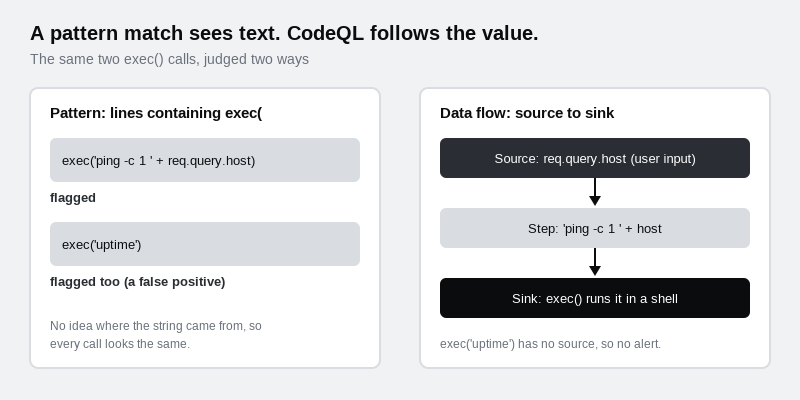
Most security scanners look for text: a function name, a suspicious string, a shape of code. CodeQL works differently. It first turns your source into a database (every function, call, variable and the ways values move between them), and then runs queries over that database. A security query asks a question such as "is there any path along which a value from an HTTP request reaches a function that runs shell commands?" That is why it can tell a dangerous exec() call from a harmless one, and why each finding comes with the route the data took.
In this tutorial you build that picture by hand. You install the CodeQL bundle, write a small Express app with three planted bugs and one decoy, build a database, run the security-extended query suite, and read the SARIF file it produces with jq. You then fix the bugs and prove the alerts are gone, repeat the exercise for a Flask app, and finish with what GitHub code scanning does with the same engine: scans on every pull request, alerts that persist across commits, and the licensing rules that decide where you may use it.
Everything here is defensive and runs against code you write on your own machine. No server is started.
Step 1 · Install the CodeQL bundle
The CodeQL CLI on its own can build databases, but it has no queries. The CodeQL bundle is the CLI plus the standard query packs for every supported language, released together, and it is what GitHub's own code scanning uses. Install the tools the tutorial needs first: curl to download, jq to read the results and Python 3 for the Python extractor.
sudo apt update
sudo apt install -y curl ca-certificates jq python3 tar gzip
Now download the 2.27.6 bundle for your processor and check it against the published checksum. The download is around 700 MB. If you are on metered or prepaid mobile data, as many developers in Nigeria, Kenya and elsewhere are, run it on Wi-Fi: the -C - flag lets you run the same curl line again to resume a broken download instead of starting over.
mkdir -p ~/codeql-demo
cd ~/codeql-demo
CODEQL_VERSION=2.27.6
case "$(uname -m)" in
  x86_64) BUNDLE=codeql-bundle-linux64.tar.gz ;;
  aarch64 | arm64) BUNDLE=codeql-bundle-linux-arm64.tar.gz ;;
  *) BUNDLE=unsupported; echo "No CodeQL bundle for $(uname -m)" ;;
esac
BASE_URL="https://github.com/github/codeql-action/releases/download/codeql-bundle-v$CODEQL_VERSION"
curl -fL --retry 3 -C - -o "$BUNDLE" "$BASE_URL/$BUNDLE"
curl -fsSL -o "$BUNDLE.checksum.txt" "$BASE_URL/$BUNDLE.checksum.txt"
sha256sum -c "$BUNDLE.checksum.txt"
sha256sum prints the file name followed by OK. If it prints FAILED, delete the file and download it again; do not unpack it.
Unpack it into its own versioned folder under /opt and link the codeql command onto your PATH. Then delete the archive to get the disk space back:
cd ~/codeql-demo
sudo mkdir -p "/opt/codeql-$CODEQL_VERSION"
sudo tar -xzf "$BUNDLE" -C "/opt/codeql-$CODEQL_VERSION" --strip-components=1
sudo ln -sfn "/opt/codeql-$CODEQL_VERSION/codeql" /usr/local/bin/codeql
rm "$BUNDLE" "$BUNDLE.checksum.txt"
codeql version
A hand-installed bundle gets no updates from apt. New bundles come out every few weeks with new and improved queries. To upgrade, repeat this step with the new version number, which unpacks it next to the old one, re-points the link, and then remove the old folder with sudo rm -rf /opt/codeql-2.27.6.
Check it worked
codeql version starts with CodeQL command-line toolchain release 2.27.6. Ask the CLI which languages it can extract:
codeql resolve languagesThe list includes javascript and python, each with the path of its extractor inside /opt/codeql-2.27.6.
Step 2 · Write an app with planted bugs
Create a small Express app with four routes. Three have a real flaw: a shell command built from the query string, a file path built from the query string, and a query string value echoed into HTML. The fourth, /uptime, calls the same exec() function with a fixed string and is safe.
mkdir -p ~/codeql-demo/js-app/reports
cd ~/codeql-demo/js-app
cat > package.json <<'JSON'
{
  "name": "codeql-demo-js",
  "private": true,
  "dependencies": {
    "express": "5.3.0"
  }
}
JSON
cat > server.js <<'JS'
const express = require('express')
const { exec } = require('child_process')
const fs = require('fs')
const path = require('path')

const app = express()
const REPORTS = path.join(__dirname, 'reports')

// Runs a shell command built from the query string.
app.get('/ping', (req, res) => {
  exec('ping -c 1 ' + req.query.host, (err, stdout) => {
    res.type('text/plain').send(stdout)
  })
})

// Runs a fixed command. Same function, no user input.
app.get('/uptime', (req, res) => {
  exec('uptime', (err, stdout) => {
    res.type('text/plain').send(stdout)
  })
})

// Reads a file named in the query string.
app.get('/report', (req, res) => {
  fs.readFile(path.join(REPORTS, req.query.name), 'utf8', (err, text) => {
    if (err) return res.status(404).send('not found')
    res.type('text/plain').send(text)
  })
})

// Echoes a name into HTML.
app.get('/hello', (req, res) => {
  res.send('<p>Hello, ' + req.query.name + '</p>')
})

app.listen(3000, '127.0.0.1')
JS
echo "January figures" > reports/january.txt
You do not need to run npm install. CodeQL reads the source and recognises Express from require('express'); it does not execute the app and skips node_modules by default.
Before CodeQL, try the pattern-matching approach. Search for calls that run shell commands:
cd ~/codeql-demo/js-app
grep -n "exec(" server.jsCheck it worked
grep prints two lines, 11 and 18. It cannot tell them apart: line 11 is command injection, line 18 is harmless. Keep that in mind for the next two steps.
Step 3 · Build a CodeQL database
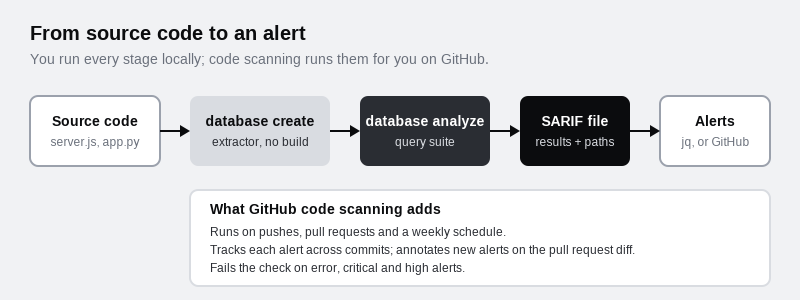
A CodeQL database holds a relational copy of your code: the syntax tree, the names and types the extractor could work out, and the control flow and data flow between them. For compiled languages, CodeQL watches the build to see what was compiled. JavaScript, TypeScript and Python need no build, so you point the extractor at the folder:
cd ~/codeql-demo
codeql database create js-db --language=javascript-typescript --source-root js-app
The command prints the extractor's progress and ends with a line saying it successfully created the database at js-db. --language=javascript-typescript covers both languages in one database.
Check it worked
The database is a folder. Look at its metadata file:
cd ~/codeql-demo
ls js-db
grep -i language js-db/codeql-database.yml
You see codeql-database.yml, a db-javascript folder and a src.zip archive of the files that were extracted, and the YAML names javascript as the primary language. If you edit the code, you build the database again; it is a snapshot, not a live view.
Step 4 · Run the security-extended suite
Queries come in suites. GitHub maintains three:
default(also calledcode-scanning): high-precision security queries with few false positives. This is what GitHub's default setup runs unless you change it.security-extended: everything indefault, plus security queries with slightly lower precision or severity. Expect a few more false positives, and more real findings.security-and-quality: everything insecurity-extended, plus maintainability and reliability queries.
See how many queries security-extended holds for JavaScript. The suite ships inside the bundle, so nothing is downloaded:
codeql resolve queries codeql/javascript-queries:codeql-suites/javascript-security-extended.qls | wc -lThe number is in the low hundreds and grows with most releases. Now run the suite against the database and write the results as SARIF, the standard JSON format for static analysis results that GitHub and most editors read. --threads=0 uses every processor core, and --sarif-category labels the run so GitHub can keep results for each language apart if you upload them later:
cd ~/codeql-demo
codeql database analyze js-db \
  codeql/javascript-queries:codeql-suites/javascript-security-extended.qls \
  --format=sarif-latest --output=js-results.sarif --threads=0 \
  --sarif-category=javascript
The first run on a machine takes a few minutes, mostly compiling the queries; later runs reuse that work and are faster. The command exits with status 0 even when it finds problems, so in a script you decide what counts as a failure by reading the results.
Check it worked
Count the results by rule:
cd ~/codeql-demo
jq -r '.runs[0].results[].ruleId' js-results.sarif | sort | uniq -c
You see one result each for js/command-line-injection, js/path-injection and js/reflected-xss, plus probably several for js/missing-rate-limiting, which flags route handlers that run commands or touch the file system with no rate limiter in front of them. There is no command injection result for /uptime.
Step 5 · Read a finding and its path
A SARIF file has one entry in runs per tool run. Inside it, results holds the findings, and tool.extensions describes the query packs, including each rule's security-severity score from 0 to 10. That score is how GitHub sorts alerts into critical, high, medium and low. Print each finding with its score, rule and location, most severe first:
cd ~/codeql-demo
jq -r '
  .runs[0] as $run
  | [$run.tool.driver.rules[]?, $run.tool.extensions[]?.rules[]?] as $rules
  | $run.results[]
  | .ruleId as $id
  | ($rules | map(select(.id == $id)) | first | .properties["security-severity"] // "-") as $sev
  | "\($sev)\t\($id)\t\(.locations[0].physicalLocation.artifactLocation.uri):\(.locations[0].physicalLocation.region.startLine)\t\(.message.text)"
' js-results.sarif | sort -rn
Each line reads something like 9.8 js/command-line-injection server.js:11 This command line depends on a [user-provided value](1). The [user-provided value](1) is a link to a related location: the source of the data.
The command injection, path injection and XSS queries are path queries. Their results carry a codeFlows entry: the steps the value took from source to sink. Print the path for the command injection:
cd ~/codeql-demo
jq -r '
  .runs[0].results[]
  | select(.ruleId == "js/command-line-injection")
  | .codeFlows[0].threadFlows[0].locations[]
  | "line \(.location.physicalLocation.region.startLine): \(.location.message.text)"
' js-results.sarif
The output lists a few steps, all on line 11: req.query.host (where the value enters), the concatenation 'ping -c 1 ' + req.query.host, and the argument passed to exec. In a larger app the same path would cross functions and files, which is where this view earns its keep: it shows you where to put the fix.
Check it worked
You can answer three questions for each result from your own output: which rule fired, where the value came from, and where it ended up. For the /hello route, run the path query again with js/reflected-xss in place of js/command-line-injection: the path starts at req.query.name and ends in the argument to res.send on line 33.
Step 6 · Fix the bugs and prove the alerts are gone
Replace server.js with a fixed version. Each fix removes the dangerous path rather than hiding the finding:
/pingusesexecFilewith an argument list, so no shell ever parses the input, and it checks the host name against a strict pattern first. The pattern also stops a value starting with-from being read as apingoption./reportresolves the full path and refuses anything that does not stay inside thereportsfolder./helloescapes HTML special characters before the value goes into the page.
cd ~/codeql-demo/js-app
cat > server.js <<'JS'
const express = require('express')
const { exec, execFile } = require('child_process')
const fs = require('fs')
const path = require('path')
const app = express()
const REPORTS = path.resolve(__dirname, 'reports')
const HOST_NAME = /^[a-z0-9][a-z0-9.-]{0,252}$/i
function escapeHtml(value) {
return String(value)
.replace(/&/g, '&')
.replace(/</g, '<')
.replace(/>/g, '>')
.replace(/"/g, '"')
.replace(/'/g, ''')
}
// No shell: the host is one argument, checked first.
app.get('/ping', (req, res) => {
const host = String(req.query.host || '')
if (!HOST_NAME.test(host)) return res.status(400).send('bad host')
execFile('ping', ['-c', '1', host], (err, stdout) => {
res.type('text/plain').send(stdout)
})
})
app.get('/uptime', (req, res) => {
exec('uptime', (err, stdout) => {
res.type('text/plain').send(stdout)
})
})
// The resolved path must stay inside the reports folder.
app.get('/report', (req, res) => {
const file = path.resolve(REPORTS, String(req.query.name || ''))
if (!file.startsWith(REPORTS + path.sep)) return res.status(400).send('bad name')
fs.readFile(file, 'utf8', (err, text) => {
if (err) return res.status(404).send('not found')
res.type('text/plain').send(text)
})
})
app.get('/hello', (req, res) => {
res.send('<p>Hello, ' + escapeHtml(req.query.name) + '</p>')
})
app.listen(3000, '127.0.0.1')
JSThe database is a snapshot of the old code, so delete it, build it again and re-run the same suite:
cd ~/codeql-demo
rm -rf js-db
codeql database create js-db --language=javascript-typescript --source-root js-app
codeql database analyze js-db \
  codeql/javascript-queries:codeql-suites/javascript-security-extended.qls \
  --format=sarif-latest --output=js-results-fixed.sarif --threads=0 \
  --sarif-category=javascript
A warning about one detail of how CodeQL decides a fix is real. It recognises your escapeHtml because the name contains both "html" and "escape". It trusts the name, not the body. A function called escapeHtml that only replaced < would also silence the alert, so a sanitiser deserves its own unit test. CodeQL is evidence, not a proof.
Check it worked
Compare the rules in the two runs:
cd ~/codeql-demo
jq -r '.runs[0].results[].ruleId' js-results-fixed.sarif | sort | uniq -cjs/command-line-injection, js/path-injection and js/reflected-xss are gone. If js/missing-rate-limiting is still listed, that is correct: nothing you changed limits how often someone can call /ping. It is a real denial-of-service concern, and the fix is a rate-limiting middleware in front of the routes, which is a separate decision for your app.
Step 7 · Do the same for a Python app
The workflow is identical for Python. Write a Flask route with the same command injection flaw. As with Express, you do not need Flask installed: the Python extractor reads the imports and CodeQL's Flask model knows that request.args is user input.
mkdir -p ~/codeql-demo/py-app
cd ~/codeql-demo/py-app
cat > app.py <<'PY'
import subprocess

from flask import Flask, request

app = Flask(__name__)


@app.route("/ping")
def ping():
    host = request.args.get("host", "")
    result = subprocess.run(f"ping -c 1 {host}", shell=True, capture_output=True, text=True)
    return result.stdout, 200, {"Content-Type": "text/plain"}
PY
cd ~/codeql-demo
codeql database create py-db --language=python --source-root py-app
codeql database analyze py-db \
  codeql/python-queries:codeql-suites/python-security-extended.qls \
  --format=sarif-latest --output=py-results.sarif --threads=0 \
  --sarif-category=python
jq -r '.runs[0].results[] | "\(.ruleId)\t\(.locations[0].physicalLocation.artifactLocation.uri):\(.locations[0].physicalLocation.region.startLine)"' py-results.sarif
The output includes py/command-line-injection at app.py:11. Now fix it the same way: an argument list with no shell, and a strict check on the input first.
cd ~/codeql-demo/py-app
cat > app.py <<'PY'
import re
import subprocess

from flask import Flask, request

app = Flask(__name__)
HOST_NAME = re.compile(r"[a-z0-9][a-z0-9.-]{0,252}", re.IGNORECASE)


@app.route("/ping")
def ping():
    host = request.args.get("host", "")
    if not HOST_NAME.fullmatch(host):
        return "bad host", 400
    result = subprocess.run(["ping", "-c", "1", host], capture_output=True, text=True)
    return result.stdout, 200, {"Content-Type": "text/plain"}
PY
cd ~/codeql-demo
rm -rf py-db
codeql database create py-db --language=python --source-root py-app
codeql database analyze py-db \
  codeql/python-queries:codeql-suites/python-security-extended.qls \
  --format=sarif-latest --output=py-results-fixed.sarif --threads=0 \
--sarif-category=pythonCheck it worked
cd ~/codeql-demo
jq '[.runs[0].results[] | select(.ruleId == "py/command-line-injection")] | length' py-results.sarif py-results-fixed.sarif
The first number is 1 (the original app) and the second is 0 (the fixed one).
Step 8 · Know what GitHub code scanning adds
Everything so far ran on your machine and produced a file. GitHub code scanning runs the same engine on GitHub's runners and turns the results into alerts attached to your repository. What it adds:
- Scans without setup work. Default setup scans pull requests to the default branch or a protected branch, every push to those branches, and on a weekly schedule. It picks the languages it finds and builds the databases for you.
- Alerts with a lifecycle. An alert keeps its identity across commits: it opens when a query first fires, closes when a commit fixes it, and can be dismissed with a reason (false positive, used in tests, won't fix) so it does not come back as noise.
- Pull request feedback. A check named "Code scanning results" annotates new alerts on the lines a pull request changed. By default the check fails for alerts of error, critical or high severity, and you can make that check required before merging.
To turn on default setup, open the repository on GitHub and go to Settings, then Advanced Security in the "Security and quality" section. Next to CodeQL analysis, choose Set up, then Default. To run security-extended instead of the default suite, choose Extended in the query suite option before you select Enable CodeQL.
If you need more control, such as a custom build, extra query packs or a different schedule, use advanced setup: a workflow file in your repository. A minimal one for this tutorial's two languages:
# .github/workflows/codeql.yml
name: CodeQL
on:
  push:
    branches: [main]
  pull_request:
    branches: [main]
  schedule:
    - cron: '23 4 * * 1'
permissions:
  contents: read
  security-events: write
jobs:
  analyze:
    runs-on: ubuntu-latest
    strategy:
      matrix:
        language: [javascript-typescript, python]
    steps:
      - uses: actions/checkout@v7
      - uses: github/codeql-action/init@v4
        with:
          languages: ${{ matrix.language }}
          queries: security-extended
      - uses: github/codeql-action/analyze@v4
        with:
          category: /language:${{ matrix.language }}
You can also upload a SARIF file you produced locally or in another CI system. The command needs a token with write access to code scanning alerts; it reads the token from standard input so it does not land in your shell history. Replace your-name/your-repo with a repository you own and ~/path/to/your-repo with your local checkout of it. --checkout-path points the CLI at that checkout, and it reads the branch and commit from there. Do this before the Clean up step, which deletes ~/codeql-demo and the SARIF file with it:
cd ~/path/to/your-repo  # replace this with your checkout
read -rs -p "GitHub token: " GH_UPLOAD_TOKEN; echo
printf '%s' "$GH_UPLOAD_TOKEN" | codeql github upload-results \
  --repository=your-name/your-repo \
  --checkout-path="$PWD" \
  --sarif="$HOME/codeql-demo/js-results.sarif" --github-auth-stdin
unset GH_UPLOAD_TOKEN
The category travels inside the SARIF file: you gave it to codeql database analyze with --sarif-category. Give each language's analysis its own category, or the second upload replaces the first.
Licensing: where you may use CodeQL
Check this before you run CodeQL at work. Code scanning is free on public repositories. For private and internal repositories you must buy GitHub Code Security (one of the two products that make up GitHub Advanced Security), which needs a GitHub Team or Enterprise plan. The CodeQL CLI licence permits analysis only of codebases released under an OSI-approved licence, plus a few narrow uses such as academic research and demonstrating the software. To stay clearly inside those terms with the demo apps, put them in a public repository under an open source licence such as MIT, and read the licence before you scan any code that is not open source.
Check it worked
On a public test repository with default setup on, the Security tab shows Code scanning with a completed analysis, and the Actions tab shows a CodeQL run. Push the vulnerable server.js to a branch and open a pull request: the "Code scanning results" check fails and the exec line carries a command injection annotation. Push the fixed file to the same branch, and the alert closes.
Step 9 · Clean up
Remove the demo folder, the bundle and the link. The bundle takes about 2 GB once unpacked:
rm -rf ~/codeql-demo
sudo rm -rf /opt/codeql-2.27.6
sudo rm -f /usr/local/bin/codeql
If you enabled default setup on a test repository, turn it off under Settings, Advanced Security, or delete the repository.
Check it worked
command -v codeql prints nothing, and ls /opt no longer lists codeql-2.27.6.
Next steps
- Compare CodeQL with a faster pattern-based scanner you can run on every commit: /tutorials/find-security-bugs-with-semgrep
- Decide which alerts to fix, dismiss or accept, without drowning in them: /tutorials/triage-security-scanner-findings
- Write and run your first GitHub Actions workflow before adapting the CodeQL one above: /tutorials/github-actions-first-workflow
- Turn the bugs you fixed into regression tests and custom rules: /tutorials/add-security-regression-tests-and-semgrep-rules-to-the-app
Related tutorials
- Write custom Fail2ban jails and filters for your own appsYou will have Fail2ban 1.1 banning repeated failed sign-ins to your own app and to an nginx basic-auth area, with filters you tested against sample logs, your own addresses allow-listed, and longer bans for repeat offenders.
- Validate file uploads before you store or serve themYou will take a FastAPI image upload route that trusts everything the browser sends, prove its flaws with pytest, and rebuild it with size limits, type checks from the file's own bytes, Pillow re-encoding, random storage names and safe download headers.
- Use SSH certificates instead of copying keys to every serverYou will run a small SSH certificate authority with ssh-keygen, log in to an Ubuntu 26.04 server with an eight-hour user certificate, give the server a host certificate so clients stop asking about fingerprints, and revoke a certificate the server then refuses.
Need this done for you?
Padding does this work for growing companies, from the first diagnosis to a system that keeps working.
Get new tutorials