APIs · Intermediate · 32 min
Understand OAuth 2.1 and OpenID Connect: the authorization code flow with PKCE
By Padding · Updated 18 Nov 2026
Node.js 26.13 (node:26 image) · oauth2-mock-server 9.3.0 · jose 6.2.18
You will run a local OpenID provider, a protected notes API and a small Node.js client, sign in through the authorization code flow with PKCE, validate the ID token, call the API with the access token and rotate a refresh token, then watch the provider refuse a stolen code and the grants OAuth 2.1 removes.
On this page
"Sign in with your company account" and "let this app read your calendar" look like one feature to the person clicking. Underneath they are two standards stacked on top of each other. OAuth is about authorisation: it lets an app get a limited, revocable permission (an access token) to call an API on someone's behalf, without ever seeing their password. OpenID Connect (OIDC) adds authentication on top: the same flow also returns an ID token, a signed statement from the provider that says who signed in.
Four roles take part:
- The resource owner is the person whose data it is.
- The client is the app that wants access. Here it is a small Node.js web app.
- The authorization server signs people in and issues tokens. With OIDC it is called the OpenID provider.
- The resource server is the API that accepts access tokens. Here it is a notes API.
OAuth 2.1 is the cleaned-up version of OAuth 2.0. It folds in a decade of security advice and removes the parts that went wrong. At the time of writing it is still an IETF Internet-Draft, draft-ietf-oauth-v2-1-17 from 31 October 2026, not yet an RFC, so providers describe themselves as following OAuth 2.0 plus its security best practice. The changes that matter to you are already the norm:
- The implicit grant is gone. It returned tokens in the browser's address bar, where history, logs and other scripts could read them.
- The password grant is gone. It had apps collect the user's password and pass it on, which is exactly what OAuth exists to avoid, and it does not fit multi-factor or federated sign-in.
- PKCE is required for the authorization code flow, for every kind of client. It stops a stolen authorization code from being worth anything.
- Redirect URIs must match exactly, and refresh tokens for public clients must be one-time use or bound to the client.
You will build all three parties on your own machine. The provider is oauth2-mock-server, a test provider that signs real JWTs with a real key and auto-approves every sign-in. You add a few lines to it so it enforces the OAuth 2.1 rules it leaves out. No account with any company is involved, and nothing here is fit to protect real data.
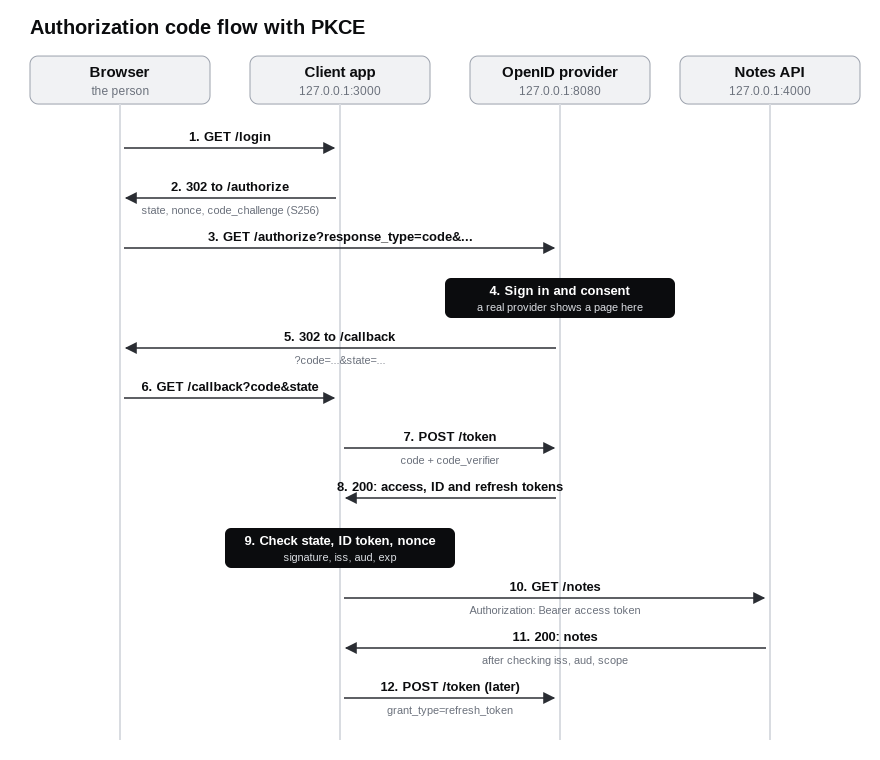
The same flow is how mobile apps should sign people in. If you build for Android phones, which is most phones in Nigeria, Kenya and much of Africa, the app opens the provider's page in the system browser or a Custom Tab rather than an embedded web view, and uses PKCE because an app on a phone cannot keep a client secret.
Step 1 · Create the project and install the tools
Make a throwaway folder and install the two packages at exact versions. oauth2-mock-server is the provider. jose is a widely used JavaScript library for JSON Web Tokens and JSON Web Key Sets, and the client and API use it to check token signatures:
mkdir -p ~/oidc-demo
cd ~/oidc-demo
npm init -y > /dev/null
npm install --save-exact oauth2-mock-server@9.3.0 jose@6.2.18
All the code in this tutorial uses .mjs files, so Node treats them as ES modules without any change to package.json.
Check it worked
cd ~/oidc-demo
npm ls --depth=0
The list shows jose@6.2.18 and oauth2-mock-server@9.3.0.
Step 2 · Run a local OpenID provider
Create provider.mjs. It starts the mock provider on 127.0.0.1:8080 with a fresh RS256 signing key, then hooks into three of its events to add the rules a real provider enforces:
- Registered clients. The provider knows one client,
notes-web, and the one redirect URI it may use. Anything else is refused before any redirect happens, so a code can never be sent to an attacker's address. - PKCE with S256 only. An authorize request without an S256 code challenge gets an
invalid_requesterror. Theplainmethod sends the secret itself and is only for clients that cannot hash. - Audience and scope on access tokens. Each access token names the notes API as its audience (
aud) and carries the scope approved at sign-in. The mock signs the ID token with the client as its audience, so the hook leaves that one alone. - One-time codes and refresh token rotation. A code works once and only with a
code_verifier. Each refresh token works once and is replaced. Every other grant type is refused.
cd ~/oidc-demo
cat > provider.mjs <<'JS'
import { AssertionError } from 'node:assert';
import { OAuth2Server, Events } from 'oauth2-mock-server';

// Registered clients: client_id -> the one redirect URI it may use.
const clients = new Map([['notes-web', 'http://127.0.0.1:3000/callback']]);
const API_AUDIENCE = 'notes-api';
const scopeByCode = new Map();
const scopeByRefreshToken = new Map();

const server = new OAuth2Server();
await server.issuer.keys.generate('RS256');
server.issuer.url = 'http://127.0.0.1:8080'; // otherwise the mock names itself localhost

// GET /authorize: check the client, insist on PKCE S256, remember the scope for this code.
server.service.on(Events.BeforeAuthorizeRedirect, ({ url }, req) => {
  const { client_id: clientId, redirect_uri: redirectUri, scope, code_challenge_method: method } = req.query;
  if (clients.get(clientId) !== redirectUri) {
    throw new AssertionError({ message: 'unknown client_id or redirect_uri' });
  }
  const code = url.searchParams.get('code');
  if (!code) return;
  if (method !== 'S256') {
    url.searchParams.delete('code');
    url.searchParams.set('error', 'invalid_request');
    url.searchParams.set('error_description', 'PKCE with S256 is required');
    return;
  }
  scopeByCode.set(code, scope ?? 'openid');
});

// POST /token: access tokens are for the notes API and carry the approved scope.
server.service.on(Events.BeforeTokenSigning, (token, req) => {
  if (token.payload.aud !== undefined) return; // the ID token: its audience is already the client
  const { grant_type: grant, code, refresh_token: refreshToken, client_id: clientId } = req.body;
  const scope = grant === 'refresh_token' ? scopeByRefreshToken.get(refreshToken) : scopeByCode.get(code);
  Object.assign(token.payload, { aud: API_AUDIENCE, scope, client_id: clientId });
});

// POST /token: codes work once and need a verifier; refresh tokens rotate; other grants are refused.
server.service.on(Events.BeforeResponse, (response, req) => {
  const { grant_type: grant, code, code_verifier: verifier, refresh_token: refreshToken } = req.body;
  let scope;
  if (grant === 'authorization_code' && verifier && scopeByCode.has(code)) {
    scope = scopeByCode.get(code);
    scopeByCode.delete(code);
  } else if (grant === 'refresh_token' && scopeByRefreshToken.has(refreshToken)) {
    scope = scopeByRefreshToken.get(refreshToken);
    scopeByRefreshToken.delete(refreshToken);
  } else {
    const known = grant === 'authorization_code' || grant === 'refresh_token';
    response.statusCode = 400;
    response.body = { error: known ? 'invalid_grant' : 'unsupported_grant_type' };
    return;
  }
  scopeByRefreshToken.set(response.body.refresh_token, scope);
  response.body.scope = scope;
});

await server.start(8080, '127.0.0.1');
console.log(`provider ready, issuer ${server.issuer.url}`);
JS
Start it in your first terminal, from the same folder, and leave it running:
cd ~/oidc-demo
node provider.mjs
It prints provider ready, issuer http://127.0.0.1:8080. The script sets the issuer explicitly because the mock would otherwise call itself http://localhost:8080 even when bound to 127.0.0.1, and every token, discovery URL and redirect would then carry a host name the API and client do not expect. Run every other command from a second terminal unless a step says otherwise.
Check it worked
Every OpenID provider publishes a discovery document at /.well-known/openid-configuration. Clients read it to find the provider's endpoints and keys instead of hard-coding them. Print the parts you will use:
curl -s http://127.0.0.1:8080/.well-known/openid-configuration | node -e "
const d = JSON.parse(require('node:fs').readFileSync(0, 'utf8'));
for (const k of ['issuer', 'authorization_endpoint', 'token_endpoint', 'jwks_uri']) console.log(k, d[k]);
console.log('code_challenge_methods_supported', d.code_challenge_methods_supported.join(' '));"
You see the issuer http://127.0.0.1:8080, the endpoints /authorize, /token and /jwks under it, and plain S256 as the PKCE methods. The mock still advertises plain, but your hook refuses it.
Then ask it to send a code somewhere it should not:
curl -s "http://127.0.0.1:8080/authorize?response_type=code&client_id=notes-web&redirect_uri=http%3A%2F%2Fevil.example%2Fcb"; echoThe answer is a 400 with the detail unknown client_id or redirect_uri, and no redirect.
Step 3 · Make a PKCE verifier and challenge
PKCE (Proof Key for Code Exchange, RFC 7636, said "pixy") works like a cloakroom ticket torn in two. Before sign-in, the client makes a long random secret, the code verifier, and keeps it. It sends only the SHA-256 hash of it, the code challenge, in the authorize request. The provider stores the challenge with the code it issues. When the client trades the code for tokens it must send the verifier, and the provider checks that it hashes to the stored challenge. Someone who intercepts the code from the redirect does not have the verifier, so the code is useless to them.
Create pkce.mjs. Run on its own, it prints a new verifier and its challenge; given a verifier, it prints that verifier's challenge:
cd ~/oidc-demo
cat > pkce.mjs <<'JS'
import { createHash, randomBytes } from 'node:crypto';

// 32 random bytes in base64url: 43 characters, the minimum length RFC 7636 allows.
export function newVerifier() {
  return randomBytes(32).toString('base64url');
}

// S256: BASE64URL(SHA256(ASCII(verifier))), with no padding.
export function challengeFor(verifier) {
  return createHash('sha256').update(verifier, 'ascii').digest('base64url');
}

if (import.meta.main) {
  const given = process.argv[2];
  if (given) console.log(challengeFor(given));
  else {
    const verifier = newVerifier();
    console.log(verifier, challengeFor(verifier));
  }
}
JS
node pkce.mjs
The output is two strings on one line, each 43 characters of letters, digits, - and _. They change every time you run it.
Check it worked
RFC 7636 publishes a worked example in Appendix B. Feed its verifier in and compare:
cd ~/oidc-demo
node pkce.mjs dBjftJeZ4CVP-mB92K27uhbUJU1p1r_wW1gFWFOEjXk
The output is E9Melhoa2OwvFrEMTJguCHaoeK1t8URWbuGJSstw-cM, the challenge printed in the RFC. If yours differs, check you used base64url and not base64.
Step 4 · Protect an API with access tokens
The notes API is the resource server. It never talks to the person and never sees a password. For each request it checks the bearer token: the signature against the provider's published keys, the issuer, the audience, the expiry, and that the scope includes notes:read. createRemoteJWKSet downloads the keys from the provider's jwks_uri and caches them, so the API needs no shared secret with the provider.
cd ~/oidc-demo
cat > api.mjs <<'JS'
import { createServer } from 'node:http';
import { createRemoteJWKSet, jwtVerify } from 'jose';

const ISSUER = 'http://127.0.0.1:8080';
const jwks = createRemoteJWKSet(new URL(`${ISSUER}/jwks`));

function send(res, status, body, challenge) {
  if (challenge) res.setHeader('WWW-Authenticate', challenge);
  res.writeHead(status, { 'Content-Type': 'application/json' });
  res.end(JSON.stringify(body));
}

createServer(async (req, res) => {
  if (req.method !== 'GET' || req.url !== '/notes') return send(res, 404, { error: 'not_found' });
  const match = /^Bearer (\S+)$/.exec(req.headers.authorization ?? '');
  if (!match) return send(res, 401, { error: 'missing_token' }, 'Bearer');
  let claims;
  try {
    ({ payload: claims } = await jwtVerify(match[1], jwks, {
      issuer: ISSUER,
      audience: 'notes-api',
      algorithms: ['RS256'],
    }));
  } catch {
    return send(res, 401, { error: 'invalid_token' }, 'Bearer error="invalid_token"');
  }
  const scopes = String(claims.scope ?? '').split(' ');
  if (!scopes.includes('notes:read')) {
    return send(res, 403, { error: 'insufficient_scope' }, 'Bearer error="insufficient_scope", scope="notes:read"');
  }
  send(res, 200, { owner: claims.sub, notes: ['Renew library card', 'Buy a data bundle', 'Call Amara'] });
}).listen(4000, '127.0.0.1', () => console.log('notes API on http://127.0.0.1:4000'));
JS
Start it in a second terminal and leave it running:
cd ~/oidc-demo
node api.mjs
It prints notes API on http://127.0.0.1:4000. A 401 means "who are you?": no token, or one that fails a check. A 403 means "I know who you are, but this token does not allow that". The WWW-Authenticate header tells the client which, as RFC 6750 describes.
Check it worked
From a third terminal, call the API with no token and with a made-up one:
curl -s -i http://127.0.0.1:4000/notes | head -n 1
curl -s http://127.0.0.1:4000/notes -H 'Authorization: Bearer not.a.token'; echo
The first prints a status line ending in 401 Unauthorized. The second prints {"error":"invalid_token"}.
Step 5 · Write the client app
The client is a server-side web app on 127.0.0.1:3000. It keeps each visitor's state in memory, keyed by an HttpOnly session cookie, so tokens never reach the browser's JavaScript. It does four jobs:
/loginbuilds the authorize redirect. It makes three random values and stores them in the session:state(ties the callback to this browser and blocks cross-site request forgery),nonce(goes into the ID token so an old ID token cannot be replayed) and the PKCEverifier. It sends the browser to the provider with the challenge, never the verifier./callbackchecks and exchanges. It rejects the callback unlessstatematches, then posts the code and the verifier to the token endpoint, from the server, not the browser.- It validates the ID token before trusting it: signature with the provider's keys,
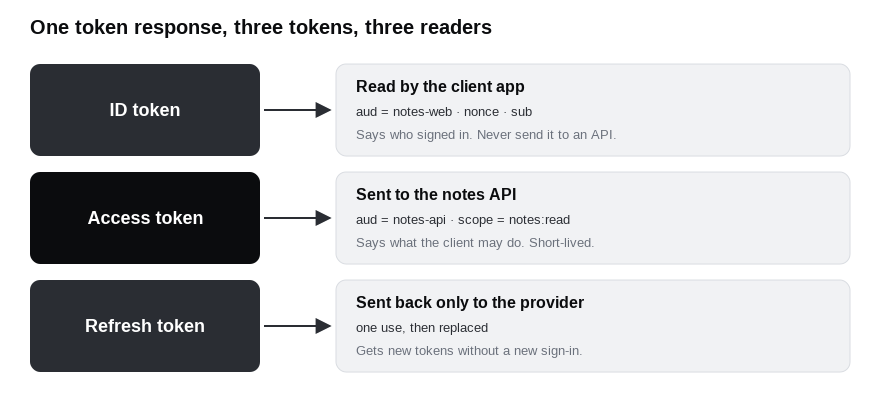
issequal to the issuer,audequal to its own client ID, not expired, andnonceequal to the one it stored. Only then does it treat the person as signed in. It treats the access token as an opaque string meant for the API and does not read it. /refreshswaps the refresh token for new tokens, keeping the new refresh token because the old one is now dead.
notes-web is a public client: it has no client secret, which is allowed in OAuth 2.1 when PKCE is used. If your provider gives your server-side app a client secret, read it from an environment variable such as process.env.OIDC_CLIENT_SECRET, send it with the token request, and keep it out of your code and your repository.
cd ~/oidc-demo
cat > client.mjs <<'JS'
import { createServer } from 'node:http';
import { randomBytes } from 'node:crypto';
import { createRemoteJWKSet, jwtVerify } from 'jose';
import { newVerifier, challengeFor } from './pkce.mjs';

const ISSUER = 'http://127.0.0.1:8080';
const CLIENT_ID = 'notes-web';
const REDIRECT_URI = 'http://127.0.0.1:3000/callback';
const SCOPE = 'openid profile notes:read';
const API_URL = 'http://127.0.0.1:4000/notes';

// Discovery: ask the provider where its endpoints and keys are.
const provider = await (await fetch(`${ISSUER}/.well-known/openid-configuration`)).json();
const jwks = createRemoteJWKSet(new URL(provider.jwks_uri));

// Session id -> { pending, tokens, user, issued }. Memory only, so a restart signs everyone out.
const sessions = new Map();
const random = () => randomBytes(32).toString('base64url');
const esc = (s) => String(s).replace(/[&<>"']/g, (c) => `&#${c.charCodeAt(0)};`);

function sessionFor(req, res) {
  const sid = /(?:^|;\s*)sid=([\w-]+)/.exec(req.headers.cookie ?? '')?.[1];
  if (sid && sessions.has(sid)) return sessions.get(sid);
  const id = random();
  const session = {};
  sessions.set(id, session);
  res.setHeader('Set-Cookie', `sid=${id}; HttpOnly; SameSite=Lax; Path=/`);
  return session;
}

async function tokenRequest(params) {
  const response = await fetch(provider.token_endpoint, {
    method: 'POST',
    body: new URLSearchParams({ client_id: CLIENT_ID, ...params }),
  });
  const body = await response.json();
  if (!response.ok) throw new Error(`token endpoint answered ${response.status} ${JSON.stringify(body)}`);
  return body;
}

function page(res, status, html) {
  res.writeHead(status, { 'Content-Type': 'text/html; charset=utf-8', 'Cache-Control': 'no-store' });
  res.end(`<!doctype html><html lang="en"><meta charset="utf-8"><title>Notes</title><main>${html}</main></html>`);
}

function redirect(res, status, location) {
  res.writeHead(status, { Location: location });
  res.end();
}

createServer(async (req, res) => {
  const url = new URL(req.url, 'http://127.0.0.1:3000');
  const session = sessionFor(req, res);
  try {
    if (req.method === 'GET' && url.pathname === '/login') {
      session.pending = { state: random(), nonce: random(), verifier: newVerifier() };
      const authorize = new URL(provider.authorization_endpoint);
      authorize.search = new URLSearchParams({
        response_type: 'code',
        client_id: CLIENT_ID,
        redirect_uri: REDIRECT_URI,
        scope: SCOPE,
        state: session.pending.state,
        nonce: session.pending.nonce,
        code_challenge: challengeFor(session.pending.verifier),
        code_challenge_method: 'S256',
      });
      return redirect(res, 302, authorize.href);
    }

    if (req.method === 'GET' && url.pathname === '/callback') {
      const pending = session.pending;
      delete session.pending; // each sign-in attempt can be completed once
      if (url.searchParams.has('error')) {
        return page(res, 400, `<p>Sign-in failed: ${esc(url.searchParams.get('error'))}</p>`);
      }
      if (!pending || url.searchParams.get('state') !== pending.state) {
        return page(res, 400, '<p>State mismatch: sign-in refused.</p>');
      }
      const tokens = await tokenRequest({
        grant_type: 'authorization_code',
        code: url.searchParams.get('code') ?? '',
        redirect_uri: REDIRECT_URI,
        code_verifier: pending.verifier,
      });
      const { payload } = await jwtVerify(tokens.id_token, jwks, {
        issuer: provider.issuer,
        audience: CLIENT_ID,
        algorithms: ['RS256'],
      });
      if (payload.nonce !== pending.nonce) return page(res, 400, '<p>Nonce mismatch: sign-in refused.</p>');
      Object.assign(session, { tokens, user: payload.sub, issued: 1 });
      return redirect(res, 302, '/');
    }

    if (req.method === 'POST' && url.pathname === '/refresh' && session.tokens) {
      session.tokens = await tokenRequest({ grant_type: 'refresh_token', refresh_token: session.tokens.refresh_token });
      session.issued += 1;
      return redirect(res, 303, '/');
    }

    if (req.method === 'GET' && url.pathname === '/') {
      if (!session.user) return page(res, 200, '<h1>Notes</h1><p><a href="/login">Sign in</a></p>');
      const api = await fetch(API_URL, { headers: { Authorization: `Bearer ${session.tokens.access_token}` } });
      const data = await api.json();
      const items = (data.notes ?? []).map((n) => `<li>${esc(n)}</li>`).join('');
      return page(res, 200, `<h1>Signed in as ${esc(session.user)}</h1>
<p>The notes API answered ${api.status}.</p><ul>${items}</ul>
<p>Tokens issued: ${session.issued}</p>
<form method="post" action="/refresh"><button>Refresh access token</button></form>`);
    }

    page(res, 404, '<p>Not found</p>');
  } catch (err) {
    console.error('sign-in error:', err.message);
    page(res, 502, '<p>Sign-in failed. The client terminal says why.</p>');
  }
}).listen(3000, '127.0.0.1', () => console.log('client on http://127.0.0.1:3000'));
JS
The client reads the discovery document when it starts, so start the provider first. Start the client in a third terminal and leave it running:
cd ~/oidc-demo
node client.mjs
It prints client on http://127.0.0.1:3000.
Check it worked
Ask the client to start a sign-in, but do not follow the redirect. Print the address it sends the browser to, one query parameter per line:
curl -s -o /dev/null -w '%{redirect_url}' http://127.0.0.1:3000/login | node -e "
const u = new URL(require('node:fs').readFileSync(0, 'utf8'));
console.log(u.origin + u.pathname);
for (const [k, v] of u.searchParams) console.log(' ', k, '=', v);"
The first line is http://127.0.0.1:8080/authorize. Below it are response_type = code, client_id = notes-web, the redirect URI, the scope openid profile notes:read, random state and nonce values, a 43-character code_challenge and code_challenge_method = S256. There is no code_verifier in the list: it never leaves the client's server.
Step 6 · Sign in from the browser
Open http://127.0.0.1:3000 in a browser on the same machine and select Sign in. Use 127.0.0.1, not localhost: the provider only accepts the redirect URI written exactly as registered, and the session cookie belongs to the host name you used.
The browser goes to the provider, which signs you in as the test user johndoe straight away, because the mock has no login page. A real provider shows its own sign-in and consent screen at this point, on its own domain, so your app never sees the password. The provider then sends the browser back to /callback with a code, the client finishes the exchange on the server side, and you land on the home page.
Select Refresh access token. The client trades its refresh token for a new set of tokens, and the page loads again using the new access token.
Check it worked
The page heading says Signed in as johndoe. Below it, The notes API answered 200. and the three notes from the API: Renew library card, Buy a data bundle and Call Amara. Tokens issued: 1 changes to Tokens issued: 2 after you refresh. If the page says Sign-in failed, the client terminal prints a sign-in error: line with the provider's answer.
Step 7 · Walk the flow by hand and watch PKCE stop a stolen code
The browser hid the moving parts. Do the same requests with curl so you can see each one, and so you can play the attacker. Run these in your spare terminal.
First, play the client: make a verifier and challenge, ask the provider for a code, and pull the code out of the redirect. The variables stay set for the rest of this step and the next, so keep using the same terminal:
cd ~/oidc-demo
AUTHORIZE='http://127.0.0.1:8080/authorize?response_type=code&client_id=notes-web&redirect_uri=http%3A%2F%2F127.0.0.1%3A3000%2Fcallback&scope=openid%20notes%3Aread&state=by-hand'
read -r VERIFIER CHALLENGE < <(node pkce.mjs)
LOCATION=$(curl -s -o /dev/null -w '%{redirect_url}' "$AUTHORIZE&code_challenge=$CHALLENGE&code_challenge_method=S256")
echo "$LOCATION"
CODE=$(node -p "new URL(process.argv[1]).searchParams.get('code')" "$LOCATION")
The redirect is http://127.0.0.1:3000/callback?code=<a random id>&state=by-hand.
Now play an attacker who copied that code from a log or a malicious app on the phone, but does not have the verifier. They make up their own:
cd ~/oidc-demo
read -r GUESS _ < <(node pkce.mjs)
curl -s http://127.0.0.1:8080/token -d grant_type=authorization_code -d client_id=notes-web \
  -d "code=$CODE" -d redirect_uri=http://127.0.0.1:3000/callback -d "code_verifier=$GUESS"; echo
The provider answers 400 with the detail code_verifier provided does not match code_challenge. A real provider answers {"error":"invalid_grant"}; the mock uses a problem-details body for the same refusal. Now try the right verifier with the same code:
cd ~/oidc-demo
curl -s http://127.0.0.1:8080/token -d grant_type=authorization_code -d client_id=notes-web \
  -d "code=$CODE" -d redirect_uri=http://127.0.0.1:3000/callback -d "code_verifier=$VERIFIER"; echo
That fails too, with code_challenge required: the failed attempt used up the code. Start again for a clean exchange, this time saving the response:
cd ~/oidc-demo
read -r VERIFIER CHALLENGE < <(node pkce.mjs)
LOCATION=$(curl -s -o /dev/null -w '%{redirect_url}' "$AUTHORIZE&code_challenge=$CHALLENGE&code_challenge_method=S256")
CODE=$(node -p "new URL(process.argv[1]).searchParams.get('code')" "$LOCATION")
curl -s http://127.0.0.1:8080/token -d grant_type=authorization_code -d client_id=notes-web \
  -d "code=$CODE" -d redirect_uri=http://127.0.0.1:3000/callback -d "code_verifier=$VERIFIER" > tokens.json
node -p "Object.keys(require('./tokens.json')).join(' ')"
The keys are access_token token_type expires_in scope refresh_token id_token.
These are throwaway tokens from a local test provider. With a real provider, do not paste tokens into commands or logs: they work for anyone who holds them until they expire.
Check it worked
Decode the two JWTs. Decoding is not validating, anyone can read a JWT, but it shows what each one is for:
cd ~/oidc-demo
node -e "
const t = require('./tokens.json');
const claims = (jwt) => JSON.parse(Buffer.from(jwt.split('.')[1], 'base64url'));
const { aud, scope, sub } = claims(t.access_token);
console.log('access token:', { aud, scope, sub });
const id = claims(t.id_token);
console.log('ID token:', { aud: id.aud, sub: id.sub, iss: id.iss });"
The access token says aud: 'notes-api' and scope: 'openid notes:read'. The ID token says aud: 'notes-web'. Now give each to the API:
cd ~/oidc-demo
ACCESS=$(node -p "require('./tokens.json').access_token")
ID_TOKEN=$(node -p "require('./tokens.json').id_token")
curl -s http://127.0.0.1:4000/notes -H "Authorization: Bearer $ACCESS"; echo
curl -s http://127.0.0.1:4000/notes -H "Authorization: Bearer $ID_TOKEN"; echo
The access token returns the owner johndoe and the three notes. The ID token is refused with {"error":"invalid_token"}, because its audience is the client, not the API. An ID token tells the client who signed in; it is never a key to an API.
Step 8 · Refresh the tokens and see the removed grants refused
Access tokens are short-lived on purpose (one hour here, often five to sixty minutes elsewhere), so a leaked one stops working soon. The refresh token gets a new set without sending the person through sign-in again. Use the one from tokens.json, then try to use it a second time:
cd ~/oidc-demo
OLD_REFRESH=$(node -p "require('./tokens.json').refresh_token")
curl -s http://127.0.0.1:8080/token -d grant_type=refresh_token -d client_id=notes-web \
  -d "refresh_token=$OLD_REFRESH" > refreshed.json
node -p "const r = require('./refreshed.json'); [r.scope, r.refresh_token !== '$OLD_REFRESH'].join(' ')"
curl -s http://127.0.0.1:8080/token -d grant_type=refresh_token -d client_id=notes-web \
  -d "refresh_token=$OLD_REFRESH"; echo
The first refresh prints openid notes:read true: the same scope, with a new refresh token. The second use of the old one gets {"error":"invalid_grant"}. That is rotation. If an attacker and the real client both hold a refresh token, whichever uses it second fails, and many providers treat that reuse as a sign of theft and revoke the whole family of tokens, as the OAuth 2.1 draft recommends.
Then ask for the two grants OAuth 2.1 drops. The password grant posts a username and password straight to the token endpoint; the implicit grant asks the authorize endpoint for response_type=token:
curl -s http://127.0.0.1:8080/token -d grant_type=password -d client_id=notes-web -d username=johndoe -d password=made-up; echo
curl -s -o /dev/null -w '%{redirect_url}\n' "http://127.0.0.1:8080/authorize?response_type=token&client_id=notes-web&redirect_uri=http%3A%2F%2F127.0.0.1%3A3000%2Fcallback&state=old-style"Check it worked
The password grant gets {"error":"unsupported_grant_type"}. The implicit request is redirected to http://127.0.0.1:3000/callback?error=unsupported_response_type&...&state=old-style, with no token anywhere in the address. When you choose a provider or a library, check that it supports the authorization code flow with PKCE and that you have not switched on either legacy grant.
Step 9 · Clean up
Stop the three servers with Ctrl+C in their terminals: the client, the API and the provider. Then remove the demo folder. Node.js stays installed:
cd ~
rm -rf ~/oidc-demoCheck it worked
ls ~/oidc-demo reports that there is no such file or directory, and http://127.0.0.1:3000 no longer loads in your browser.
Next steps
- Learn what to check, and what goes wrong, when an API validates tokens: avoid the JWT mistakes that break API security.
- Put an access-token check in front of a Java API: protect a Spring Boot API with Spring Security.
- Issue and check your own tokens in Python: add JWT authentication to FastAPI.
- For a real app, register a client with your provider's sandbox, keep PKCE, state and nonce exactly as here, and use a maintained OIDC client library rather than hand-written token requests.
Part of these paths
Related tutorials
- Avoid the JWT mistakes that break API securityYou will break a deliberately weak Node.js API with forged, misdirected and expired JSON Web Tokens, then replace its checks with a jose 6.2 verifier that pins the algorithm and every claim, so each attack ends in a 401.
- Protect a Spring Boot API with Spring SecurityYou will lock down a Spring Boot 4.1 notes API with Spring Security 7 so that it accepts only signed JWTs from your issuer, turns scopes and roles into authorities, guards methods with @PreAuthorize, and proves each rule with tests.
- How to Add JWT Authentication to a FastAPI APIYou will add login to a FastAPI 0.163 API on Python 3.15 with Argon2 password hashes, PyJWT access tokens that expire after 15 minutes, a signing secret kept out of your code, a protected route, and tests that prove expired, tampered and unsigned tokens are refused.
Need this done for you?
Padding does this work for growing companies, from the first diagnosis to a system that keeps working.
Get new tutorials