Programming languages · Intermediate · 24 min
Understand text encoding: bytes, UTF-8 and Unicode normalisation
By Padding · Updated 18 Nov 2026
python:3.15-slim (Debian) · Python 3.15.2
You will look at text as the bytes a computer stores, repair garbled names, handle bad bytes and byte order marks on purpose, and finish with a Python function that normalises names so search finds them however they were typed.
On this page
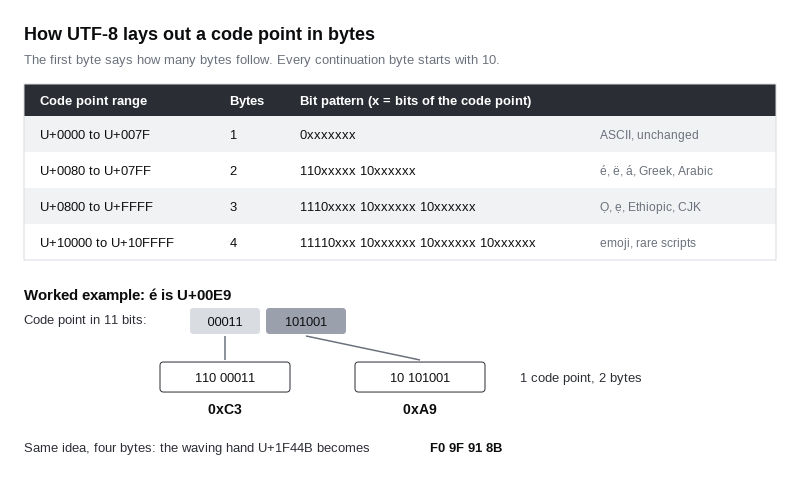
A Python string is a sequence of Unicode code points: numbered characters such as U+0041 for A and U+00E9 for é. Files, network messages and database columns do not hold code points. They hold bytes, and an encoding is the rule that turns one into the other. Almost everything today uses UTF-8, which stores a code point in one to four bytes.
Most text bugs come from a step where those two views meet: a file read with the wrong encoding, a byte limit that cuts a character in half, two names that look identical but are made of different code points, or a column that cannot store an emoji. This tutorial goes one level below work with text strings in Python. You will look at the bytes, cause each problem on purpose, fix it, and finish with a search_key() function that lets "ADÉ OKAFOR", "Ade Okafor" and a decomposed "Adé Okafor" find the same record.
Everything uses the Python 3.15 standard library. One step compares Node.js, which you can skip.
Step 1 · Create a demo folder and check Python's text defaults
Make a throwaway folder for the scripts:
mkdir -p ~/encoding-demo
cd ~/encoding-demo
python3 --version
python3 -c "import sys, unicodedata; print(sys.flags.utf8_mode, unicodedata.unidata_version)"
Python 3.15 is the first release where UTF-8 is the default encoding everywhere, whatever the system locale says. Before 3.15, open("names.txt") with no encoding= used the locale's encoding, which on many Windows machines was not UTF-8. The second line prints 1 when this UTF-8 mode is on, followed by the version of the Unicode database Python ships.
You can still switch the old behaviour back with PYTHONUTF8=0, and other programs that read your files make their own choices. So the rule stays the same as before: always pass encoding= when you open a text file.
Check it worked
The first line is Python 3.15.2 or a later 3.15 release. The second is something like 1 17.0.0.
Step 2 · Look at the bytes behind a string
Write a small script that prints every code point in a string next to its UTF-8 bytes and its Unicode name:
cd ~/encoding-demo
cat > codepoints.py <<'PY'
import sys
import unicodedata


def show(text):
    size = len(text.encode("utf-8"))
    print(f"{text!r}: {len(text)} code points, {size} UTF-8 bytes")
    for ch in text:
        hex_bytes = ch.encode("utf-8").hex(" ")
        print(f"  U+{ord(ch):04X}  {hex_bytes:<12} {unicodedata.name(ch, '?')}")


for arg in sys.argv[1:]:
    show(arg)
PY
python3 codepoints.py "Adé" "👋🏾"
str.encode("utf-8") turns code points into bytes, and bytes.hex(" ") prints them with spaces between. You can see the same bytes from the shell, outside Python:
printf '%s' 'Adé' | od -An -tx1The diagram shows why é takes two bytes and the emoji takes four. The first byte of each character announces how many bytes belong to it, and every following byte starts with the bits 10. That is what lets a program find character boundaries in the middle of a stream, and it is also why some byte sequences are simply invalid.
Check it worked
The script prints:
'Adé': 3 code points, 4 UTF-8 bytes
  U+0041  41           LATIN CAPITAL LETTER A
  U+0064  64           LATIN SMALL LETTER D
  U+00E9  c3 a9        LATIN SMALL LETTER E WITH ACUTE
'👋🏾': 2 code points, 8 UTF-8 bytes
  U+1F44B  f0 9f 91 8b  WAVING HAND SIGN
  U+1F3FE  f0 9f 8f be  EMOJI MODIFIER FITZPATRICK TYPE-5
od prints 41 64 c3 a9. The emoji with a skin tone is one symbol on screen but two code points: the hand and a modifier.
Step 3 · Cause mojibake and repair it
"Mojibake" is the garbled text you get when bytes written in one encoding are read in another. The classic case is UTF-8 read as Windows-1252 (Python calls it cp1252): é is the bytes c3 a9, and in Windows-1252 those two bytes are the characters à and ©.
Create a UTF-8 file of names, read it both ways, then repair the damaged strings:
cd ~/encoding-demo
cat > mojibake.py <<'PY'
from pathlib import Path


def repair_mojibake(text):
    """Undo one round of UTF-8 bytes that were decoded as Windows-1252 or Latin-1."""
    for wrong in ("cp1252", "latin-1"):
        try:
            fixed = text.encode(wrong).decode("utf-8")
        except UnicodeError:
            continue
        if fixed != text:
            return fixed
    return text


path = Path("names.txt")
path.write_text("Adé Okafor\nỌlá Bello\nZoë Mensah\n", encoding="utf-8")

garbled = path.read_text(encoding="cp1252").splitlines()
correct = path.read_text(encoding="utf-8").splitlines()

print("read as cp1252:", garbled)
print("read as UTF-8: ", correct)
print("repaired:      ", [repair_mojibake(name) for name in garbled])
print("left alone:    ", [repair_mojibake(name) for name in correct])
PY
python3 mojibake.py
The repair works because the mistake was lossless: encoding the garbled text back to Windows-1252 recovers the original bytes, which then decode correctly as UTF-8. repair_mojibake only accepts the result when those bytes are valid UTF-8, so text that was already correct, like Adé Okafor, comes back unchanged. Latin-1 is the fallback for the few bytes Windows-1252 leaves undefined.
The real fix is at the source: find the program that read or wrote with the wrong encoding and give it encoding="utf-8". Use a repair function only on data you know was damaged, and log every change so a person can review it, because a string that only looks like mojibake would be "repaired" into something wrong.
Check it worked
The output shows the damage and the fix:
read as cp1252: ['Adé Okafor', 'Ọlá Bello', 'Zoë Mensah']
read as UTF-8:  ['Adé Okafor', 'Ọlá Bello', 'Zoë Mensah']
repaired:       ['Adé Okafor', 'Ọlá Bello', 'Zoë Mensah']
left alone:     ['Adé Okafor', 'Ọlá Bello', 'Zoë Mensah']
Yoruba and Igbo letters such as Ọ take three bytes in UTF-8, so they turn into three garbled characters, Ọ.
Step 4 · Decide what happens to bad bytes and byte order marks
By default, decoding invalid UTF-8 raises UnicodeDecodeError. That is usually what you want, because it stops bad data at the door. When you need to keep going, the errors= argument says what to do instead. Encoding has the same argument for characters the target encoding cannot hold.
cd ~/encoding-demo
cat > errors_demo.py <<'PY'
data = "Adé".encode("utf-8") + b"\xff"

try:
    data.decode("utf-8")
except UnicodeDecodeError as err:
    print("strict:", err.reason, "at byte", err.start)

print("replace:         ", data.decode("utf-8", errors="replace"))
print("backslashreplace:", data.decode("utf-8", errors="backslashreplace"))
print("to ASCII:        ", "Adé".encode("ascii", errors="xmlcharrefreplace"))


def cut_to_bytes(text, limit):
    """Fit text into a byte budget without leaving half a character at the end."""
    return text.encode("utf-8")[:limit].decode("utf-8", errors="ignore")


print("5-byte cut:      ", cut_to_bytes("Ọlá Bello", 5))
PY
python3 errors_demo.py
What each handler is for:
strict(the default) raises. Use it for input you control or must reject.replaceswaps each bad byte for U+FFFD, the�symbol. Good for logs and previews, where showing something matters more than exactness.backslashreplacekeeps the bad byte visible as\xff, which helps when you are debugging where it came from.xmlcharrefreplace(encoding only) writes characters as HTML references such asé.ignoredrops bad bytes silently. Avoid it on whole strings.cut_to_bytesis the one safe use: the input was valid, so the only damage is a partial character at the end of the cut.Ọtakes three bytes,lone, and the first byte ofáis dropped instead of left broken.
A byte order mark (BOM) is the code point U+FEFF at the very start of a file. In UTF-8 it is the bytes ef bb bf. Some spreadsheet exports and Windows tools add one, and it quietly breaks header checks:
cd ~/encoding-demo
cat > bom.py <<'PY'
from pathlib import Path

path = Path("export.csv")
path.write_text("name,city\nAdé Okafor,Lagos\n", encoding="utf-8-sig")
print("first bytes:", path.read_bytes()[:3].hex(" "))

with path.open(encoding="utf-8") as f:
    header = f.readline().strip().split(",")
print("utf-8:    ", repr(header[0]), header[0] == "name")

with path.open(encoding="utf-8-sig") as f:
    header = f.readline().strip().split(",")
print("utf-8-sig:", repr(header[0]), header[0] == "name")
PY
python3 bom.py
The utf-8-sig codec writes a BOM, and when reading it removes one if it is there and changes nothing if it is not. That makes it the safe choice for reading files from outside, such as CSV uploads. Write your own files with plain utf-8.
Check it worked
errors_demo.py prints:
strict: invalid start byte at byte 4
replace:          Adé�
backslashreplace: Adé\xff
to ASCII:         b'Adé'
5-byte cut:       Ọl
bom.py prints:
first bytes: ef bb bf
utf-8:     '\ufeffname' False
utf-8-sig: 'name' True
The \ufeff at the start of the first header is the BOM, so the utf-8 check fails and the utf-8-sig check passes.
Step 5 · Compare names that look the same
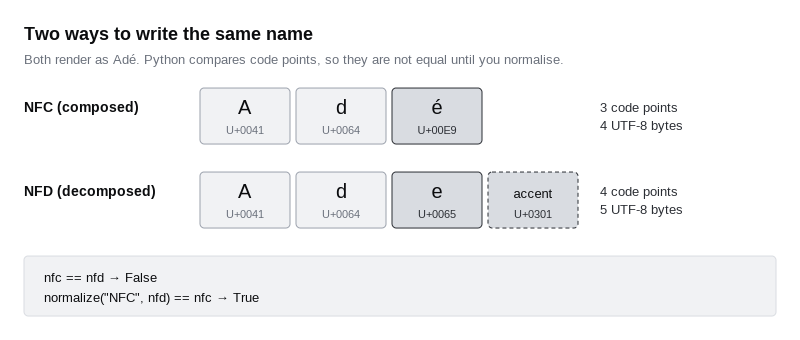
Unicode often has two ways to write the same visible text. é can be one code point, U+00E9, or two: a plain e followed by U+0301, a combining acute accent. Both render as é, but Python compares code points, so the strings are not equal. Which form you get depends on the keyboard, the operating system and where the text was pasted from. On phones this varies between keyboard apps, which matters for languages such as Yoruba that stack tone marks and dots on letters.
Normalisation converts text to one agreed form. NFC composes characters wherever it can, and NFD splits them into base letters and combining marks:
cd ~/encoding-demo
cat > normalise.py <<'PY'
import unicodedata

composed = "Adé"
decomposed = "Adé"

print(composed, decomposed, composed == decomposed)
print("lengths:", len(composed), len(decomposed))
print("decomposed is NFC:", unicodedata.is_normalized("NFC", decomposed))
print("after NFC:", unicodedata.normalize("NFC", decomposed) == composed)

for sample in ["file", "Ade", "x²"]:
    print(f"NFKC {sample!r} -> {unicodedata.normalize('NFKC', sample)!r}")
PY
python3 normalise.py
NFKC goes further. It also folds "compatibility" characters into their plain equivalents: the fi ligature becomes fi, full-width letters from East Asian keyboards become ordinary letters, and ² becomes 2. That is useful for search but changes meaning, so never store NFKC output in place of what the user typed.
A good default for a system: normalise to NFC when text comes in (forms, imports, API requests), store NFC, and use NFKC only for search keys.
Check it worked
The first line is Adé Adé False: identical on screen, unequal in code. Then lengths: 3 4, decomposed is NFC: False and after NFC: True. The NFKC lines end in 'file', 'Ade' and 'x2'.
Step 6 · Count what the reader sees
len() counts code points, which is not what a person counts. A grapheme cluster is one user-perceived character: a letter with its accents, a flag, or an emoji built from several code points joined by U+200D, the zero width joiner. Python 3.15 adds unicodedata.iter_graphemes(), which splits text into clusters by the Unicode rules:
cd ~/encoding-demo
cat > graphemes.py <<'PY'
import unicodedata
SAMPLES = {
"Adé, composed": "Adé",
"Adé, decomposed": "Adé",
"hand with skin tone": "\U0001F44B\U0001F3FE",
"Nigerian flag": "\U0001F1F3\U0001F1EC",
"woman technologist": "\U0001F469\U0001F3FE\U0001F4BB",
}
def graphemes(text):
return [str(cluster) for cluster in unicodedata.iter_graphemes(text)]
def shorten(text, limit):
parts = graphemes(text)
return text if len(parts) <= limit else "".join(parts[:limit]) + "…"
for label, text in SAMPLES.items():
size = len(text.encode("utf-8"))
print(f"{label:<20} len={len(text)} bytes={size} graphemes={len(graphemes(text))}")
name = "Adé Okafor"
print("sliced: ", repr(name[:3]))
print("shortened:", repr(shorten(name, 3)))
PY
python3 graphemes.pyUse grapheme counts for anything a person sees: "maximum 30 characters" on a form, truncating a name in a list, or moving a text cursor. Use byte counts for storage and transport limits. Slicing by code points can split a letter from its accent, which is what name[:3] does here.
If you also write JavaScript, its strings count differently again. .length counts UTF-16 code units, so an emoji outside the first 65,536 code points counts as two. This comparison needs Node.js 26:
node -e '
const hand = "\u{1F44B}\u{1F3FE}";
console.log("length (UTF-16 units):", hand.length);
console.log("code points:", [...hand].length);
console.log("UTF-8 bytes:", Buffer.byteLength(hand, "utf8"));
console.log("graphemes:", [...new Intl.Segmenter().segment(hand)].length);
console.log("NFC equal:", "Adé".normalize("NFC") === "Adé");
'
It prints a length of 4, then 2 code points, 8 UTF-8 bytes, 1 grapheme and NFC equal: true. The same text gives four different counts depending on what you ask, so a limit agreed between a browser form and a Python API has to name its unit.
Check it worked
The Python script prints:
Adé, composed        len=3 bytes=4 graphemes=3
Adé, decomposed      len=4 bytes=5 graphemes=3
hand with skin tone  len=2 bytes=8 graphemes=1
Nigerian flag        len=2 bytes=8 graphemes=1
woman technologist   len=4 bytes=15 graphemes=1
sliced:    'Ade'
shortened: 'Adé…'
The slice lost the accent. The grapheme-aware version kept é whole.
Step 7 · Know what a database column stores
A database column has a character set, which is the encoding the server uses to store its bytes, and a length limit, which may count characters or bytes. Two facts catch people out:
- In PostgreSQL,
varchar(30)means 30 characters, not bytes, and the database's encoding (normallyUTF8) is fixed when the database is created. - In MySQL, the old
utf8character set is a deprecated alias forutf8mb3, which stores at most three bytes per character. Anything above U+FFFF, which includes most emoji, does not fit. New tables should useutf8mb4.
Check which names in a list would break an old MySQL column, and how many bytes each takes:
cd ~/encoding-demo
cat > dbcheck.py <<'PY'
NAMES = ["Ọlá Bello", "Zoë Mensah", "Ngozi \U0001F44B\U0001F3FE"]

for name in NAMES:
    chars = len(name)
    size = len(name.encode("utf-8"))
    fits = all(ord(ch) <= 0xFFFF for ch in name)
    print(f"{name}: {chars} characters, {size} bytes, fits utf8mb3: {fits}")
PY
python3 dbcheck.py
On your own database server, check what you have. In PostgreSQL, inside psql:
SHOW server_encoding;In MySQL, replace clinic with your database name:
SELECT table_name, column_name, character_set_name, collation_name
FROM information_schema.columns
WHERE table_schema = 'clinic' AND character_set_name IS NOT NULL;
Any column showing utf8mb3 should move to utf8mb4. Converting rebuilds the table and can lock it, so take a backup and do it in a quiet period first. Replace patients with your table:
ALTER TABLE patients CONVERT TO CHARACTER SET utf8mb4 COLLATE utf8mb4_0900_ai_ci;The client connection has a character set too. Set your driver to UTF-8 (utf8mb4 for MySQL), or correct bytes can still be garbled on the way in, which is where much of the mojibake in real systems starts.
Check it worked
dbcheck.py prints:
Ọlá Bello: 9 characters, 12 bytes, fits utf8mb3: True
Zoë Mensah: 10 characters, 11 bytes, fits utf8mb3: True
Ngozi 👋🏾: 8 characters, 14 bytes, fits utf8mb3: False
On your server, SHOW server_encoding; returns UTF8, and the MySQL query lists no utf8mb3 columns once you have converted them.
Step 8 · Build a search key for names
Now put the pieces together. A search key is a second, hidden version of a name used only for matching. You keep the name exactly as the person typed it for display, and compare keys.
Case needs one more tool. str.lower() is made for display; str.casefold() is made for comparing. It is stricter, so German ß becomes ss and Straße matches STRASSE. Neither knows language-specific rules such as Turkish dotted and dotless i, so treat casefold as a good general match, not a perfect one for every language.
cd ~/encoding-demo
cat > searchkey.py <<'PY'
import unicodedata


def search_key(name: str, fold_accents: bool = True) -> str:
    """Return a key for matching names however they were typed. Never display it."""
    text = unicodedata.normalize("NFKC", name)
    text = text.casefold()
    if fold_accents:
        text = unicodedata.normalize("NFD", text)
        text = "".join(ch for ch in text if not unicodedata.combining(ch))
    text = unicodedata.normalize("NFC", text)
    return " ".join(text.split())
PY
cat > try_search.py <<'PY'
from searchkey import search_key

PAIRS = [
    ("Adé Okafor", "ADÉ  okafor"),
    ("Zoë Mensah", "zoe mensah"),
    ("Ọlá Bello", "OLA BELLO"),
    ("Straße", "STRASSE"),
    ("Ngozi", "Ngozi"),
    ("Adé Okafor", "Ada Okafor"),
]

for typed, stored in PAIRS:
    same = search_key(typed) == search_key(stored)
    print(f"{search_key(typed):<12} | {search_key(stored):<12} | {'match' if same else 'no match'}")

print("accents kept:", repr(search_key("Ọlá Bello", fold_accents=False)))
PY
python3 try_search.py
Each line of search_key does one job:
- NFKC folds full-width letters, ligatures and non-breaking spaces into plain characters, and composes accents.
casefold()removes case differences.- Decomposing to NFD and dropping every combining mark removes accents, tone marks and dots below, so
ỌlámatchesOla. Letters with no decomposition, such asøorł, stay as they are. - NFC puts what is left back into composed form, and
split()withjoincollapses any run of whitespace into single spaces.
Accent folding is a choice, not a default to apply blindly. In Yoruba, tone marks separate different words, so a search for an exact spelling may want fold_accents=False, which still matches case and composition differences. Many systems compare folded keys first and then rank exact matches above folded ones.
In a database, store the key in its own indexed column next to the original name, and fill it in the same code that saves the name, so the two never drift apart.
Check it worked
The output is:
ade okafor   | ade okafor   | match
zoe mensah   | zoe mensah   | match
ola bello    | ola bello    | match
strasse      | strasse      | match
ngozi        | ngozi        | match
ade okafor   | ada okafor   | no match
accents kept: 'ọlá bello'
The last pair is a different name, and it correctly does not match.
Step 9 · Clean up
Remove the demo folder. Python stays installed:
cd ~
rm -rf ~/encoding-demoCheck it worked
ls ~/encoding-demo now reports that there is no such file or directory.
Next steps
- Match and validate text with patterns that handle Unicode: write regular expressions you can read and test.
- Pass
encoding=everywhere you touch files: read and write files and JSON in Python. - The other value that goes wrong between systems: store and show dates and times correctly across time zones.
- Back to everyday string methods: work with text strings in Python.
Related tutorials
- Write safer PHP with strict types, enums and readonly classesYou will take a loosely typed PHP 8.5 order script that gets totals quietly wrong and turn it into a typed domain model with strict types, a backed enum, readonly value objects and match, then prove it with a clean PHPStan 2.3 run.
- Write reusable TypeScript with genericsYou will replace three copy-pasted lookup functions with one generic function, then build a type-safe pluck, a Result type, a hand-written mapped type and a tested fetchJson helper in TypeScript 7.
- Write regular expressions you can read and testYou will build a small, tested Python module that pulls dates, money amounts and Nigerian and Kenyan phone numbers out of messy SMS text, and know how to port its patterns to JavaScript and when to stop using a regex.
Need this done for you?
Padding does this work for growing companies, from the first diagnosis to a system that keeps working.
Get new tutorials