Programming fundamentals · Beginner · 15 min
Why changing one list changed another: references and mutability in Python
By Padding · Updated 18 Nov 2026
Python 3.15.2 · python:3.15-slim (Debian)
You will reproduce three classic Python bugs where a list changes behind your back, learn how names refer to objects and which types can change, and end with a script that proves all three bugs are fixed.
On this page
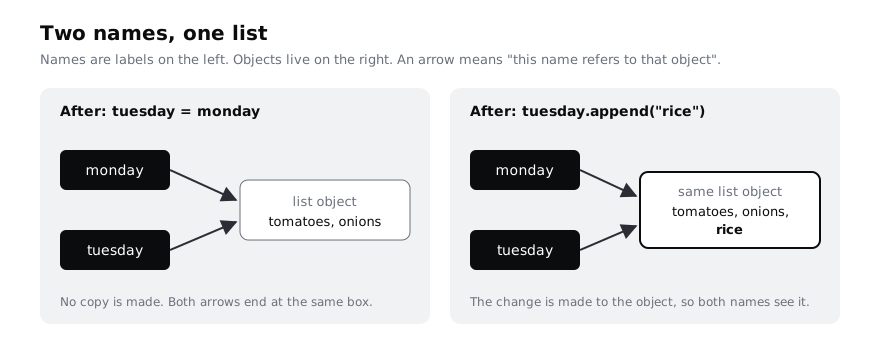
Sooner or later every Python learner writes tuesday = monday, adds something to tuesday, and finds that monday has changed too. Nothing is broken. Python is doing exactly what the code says, but the code says something different from what most people expect when they first read it.
The idea behind it fits in one sentence: a variable is a name that refers to an object, and = attaches a name to an object without copying it. Once you can picture names pointing at objects, the bug and its cousins stop being mysterious.
In this tutorial you reproduce the bug, look at it with id() and is, learn which types can change (mutable) and which cannot (immutable), make proper copies, see why a function can change a list you pass to it, and meet the mutable default argument trap. You finish with one script that reproduces three bugs in their fixed form and checks itself.
The examples use python3. On Windows outside WSL, type py instead. On an Android phone, the Termux app installs Python with pkg install python, and every step here then runs offline without using mobile data.
Step 1 · Reproduce the bug
Make a folder for this tutorial and write a script with a shopping list for Monday, then a list for Tuesday that starts the same:
mkdir -p ~/references-demo
cd ~/references-demo
cat > alias_bug.py <<'PY'
monday = ["tomatoes", "onions"]
tuesday = monday
tuesday.append("rice")

print("monday: ", monday)
print("tuesday:", tuesday)
PY
python3 alias_bug.py
Line by line:
monday = ["tomatoes", "onions"]creates a list object in memory and attaches the namemondayto it.tuesday = mondayattaches a second name,tuesday, to the same object. It does not make a second list.tuesday.append("rice")changes the object thattuesdayrefers to. That is also the objectmondayrefers to.- The two
printcalls show the one list twice, under two names.
Check it worked
Both lines end with 'rice':
monday:  ['tomatoes', 'onions', 'rice']
tuesday: ['tomatoes', 'onions', 'rice']
If you expected monday to stay at two items, you have reproduced the bug. The rest of the tutorial explains it and fixes it.
Step 2 · See names and objects with id() and is
Every object has an identity, a number that stays the same for as long as the object exists. The built-in id() returns it. The operator is asks "are these two names attached to the very same object?", while == asks "do these two objects hold equal values?"
cat > names.py <<'PY'
monday = ["tomatoes", "onions"]
tuesday = monday

print(id(monday))
print(id(tuesday))
print(tuesday is monday)

wednesday = ["tomatoes", "onions"]
print(wednesday == monday)
print(wednesday is monday)
PY
python3 names.py
wednesday is built from its own square brackets, so Python creates a new list that happens to hold the same items.
Check it worked
The first two lines are the same long number. The number itself differs from run to run and from computer to computer; only the fact that they match matters. Then you see True, True and False: tuesday is the same object as monday, and wednesday is equal to monday but is a separate object.
Step 3 · Compare mutable and immutable values
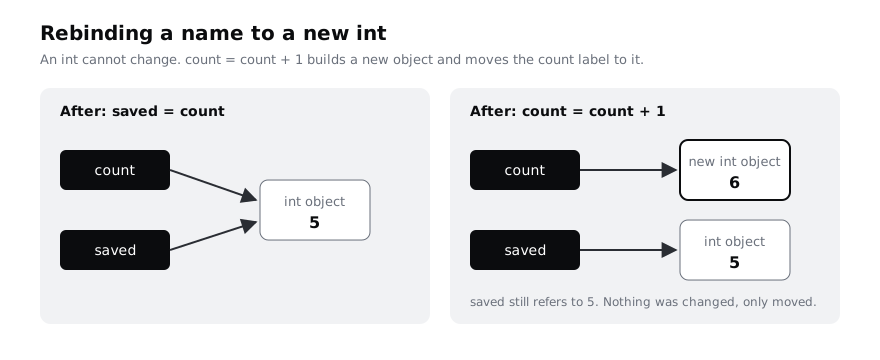
A mutable object can be changed after it is created: lists, dictionaries and sets are mutable. An immutable object can never change: int, float, str, bool, None and tuples are immutable. With an immutable value, the only thing you can do is attach the name to a different object, which is called rebinding.
cat > immutable.py <<'PY'
count = 5
saved = count
print(saved is count)

count = count + 1
print("count:", count, "saved:", saved)
print(saved is count)

name = "ada"
also_name = name
name = name.upper()
print(name, also_name)

prices = (200, 350)
try:
    prices[0] = 250
except TypeError as err:
    print("TypeError:", err)

stock = {"rice": 10}
same_stock = stock
stock["rice"] = 8
print(same_stock)
PY
python3 immutable.py
What each block shows:
saved = countattachessavedto the same int object, sosaved is countisTrue. Thencount + 1builds a new int,6, andcount = ...moves the namecountto it.savedstill refers to5.name.upper()cannot change the string"ada", because strings are immutable. It returns a new string,"ADA", and the assignment movesnameto it.- A tuple refuses item assignment.
tryandexceptcatch the error so the script keeps running and prints its message. - A dictionary is mutable, so changing
stock["rice"]is seen throughsame_stocktoo, exactly like the list.
Check it worked
The output is:
True
count: 6 saved: 5
False
ADA ada
TypeError: 'tuple' object does not support item assignment
{'rice': 8}
The wording of the TypeError message can differ slightly between Python versions; the type of error does not. The rule to remember: sharing only causes surprises with mutable objects, because only they can change while another name is looking at them.
Step 4 · Change the object or rebind the name
With a list you can do two different things that look alike. You can change the object in place, which every name attached to it sees, or you can build a new object and rebind one name to it, which leaves other names alone. += on a list does the first; x = x + [...] does the second.
cat > rebind.py <<'PY'
basket = ["rice"]
same = basket

basket += ["beans"]
print("after +=  basket:", basket, "same:", same)

basket = basket + ["salt"]
print("after = + basket:", basket, "same:", same)
print(basket is same)
PY
python3 rebind.py
basket += ["beans"] extends the existing list, like append does for one item. basket = basket + ["salt"] builds a third list from the two on the right and moves only the name basket to it.
Check it worked
after +=  basket: ['rice', 'beans'] same: ['rice', 'beans']
after = + basket: ['rice', 'beans', 'salt'] same: ['rice', 'beans']
False
same saw beans arrive but not salt. When a list changes and you did not expect it, look for a method call (append, extend, sort, remove), an item assignment (x[0] = ...) or a +=: those change the object.
Step 5 · Make real copies with copy() and deepcopy()
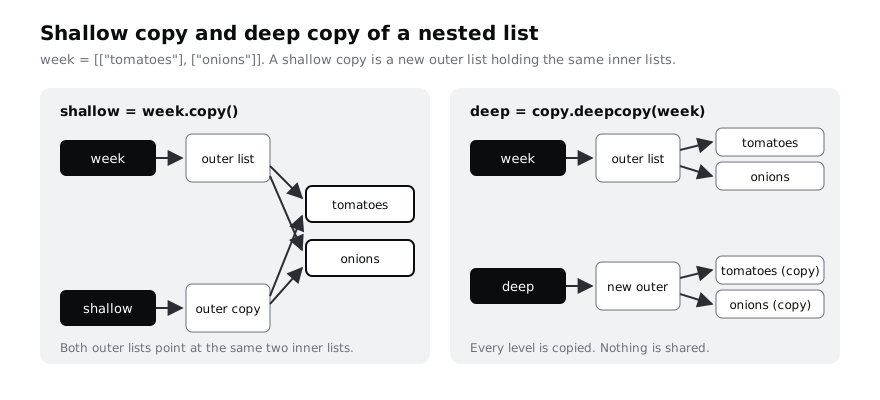
To give Tuesday its own list, ask for a copy. monday.copy(), list(monday) and monday[:] all make a new list holding the same items. That is a shallow copy: only the outer list is new. If the items are themselves lists, the inner lists are still shared. copy.deepcopy() copies every level.
cat > copies.py <<'PY'
import copy

monday = ["tomatoes", "onions"]
tuesday = monday.copy()
tuesday.append("rice")
print(monday, tuesday)

week = [["tomatoes"], ["onions"]]
shallow = week.copy()
deep = copy.deepcopy(week)

shallow[0].append("pepper")
print("week:   ", week)
print("shallow:", shallow)
print("deep:   ", deep)
print(shallow is week, shallow[0] is week[0], deep[0] is week[0])
PY
python3 copies.py
import copy loads the standard library module that holds deepcopy. week is a list of two lists, one per day. shallow[0].append("pepper") reaches into the first inner list, which week and shallow share.
Check it worked
['tomatoes', 'onions'] ['tomatoes', 'onions', 'rice']
week:    [['tomatoes', 'pepper'], ['onions']]
shallow: [['tomatoes', 'pepper'], ['onions']]
deep:    [['tomatoes'], ['onions']]
False True False
The first line shows the original bug fixed. The middle lines show that a shallow copy is not enough for nested data: pepper appeared in week too. Only deep stayed untouched. The last line confirms it: the outer lists differ, the shallow copy's first inner list is the same object as week's, and the deep copy's is not.
Use a shallow copy for a flat list of strings or numbers. Reach for deepcopy when the list holds lists or dictionaries you plan to change.
Step 6 · See why a function can change your list
When you call a function, Python attaches the parameter name to the object you passed in. No copy is made. So a function that changes its parameter in place changes the caller's list. A function that rebinds its parameter only moves its own local name.
cat > functions.py <<'PY'
def add_delivery(items):
    items.append("delivery")


def with_delivery(items):
    return items + ["delivery"]


def clear_badly(items):
    items = []


order = ["rice", "beans"]
add_delivery(order)
print("after add_delivery:", order)

order = ["rice", "beans"]
new_order = with_delivery(order)
print("order:    ", order)
print("new_order:", new_order)

order = ["rice"]
clear_badly(order)
print("after clear_badly:", order)
PY
python3 functions.pyadd_deliverycallsappendon the object it was given, which is the caller'sorderlist.with_deliverybuilds a new list with+and returns it, so the caller's list is left alone and the caller decides what to keep.clear_badlyattaches its local nameitemsto a new empty list. The caller'sordernever hears about it. To empty the caller's list in place you would callitems.clear().
Check it worked
after add_delivery: ['rice', 'beans', 'delivery']
order:     ['rice', 'beans']
new_order: ['rice', 'beans', 'delivery']
after clear_badly: ['rice']
Changing a list in place is sometimes what you want, for example a function called add_to_cart. The bug is doing it by surprise. A function that returns a new value, like with_delivery, is easier to reason about because nothing outside it changes.
Step 7 · Avoid the mutable default argument trap
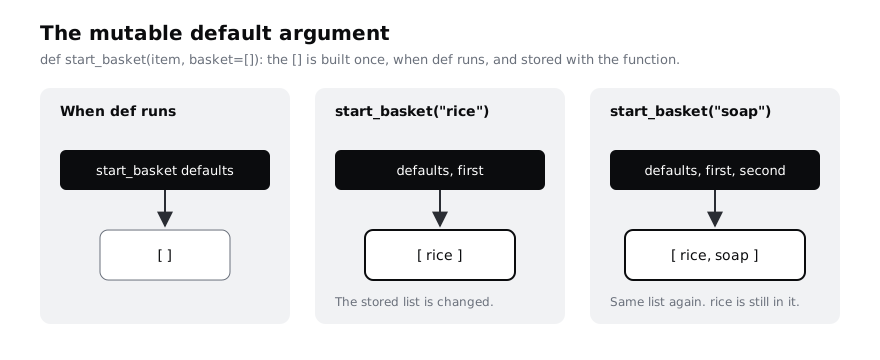
A default value is worked out once, when Python runs the def line, and stored with the function. If the default is a mutable object such as [], every call that relies on the default shares that one list.
cat > default_trap.py <<'PY'
def start_basket(item, basket=[]):
    basket.append(item)
    return basket


first = start_basket("rice")
second = start_basket("soap")
print(first)
print(second)
print(first is second)
print(start_basket.__defaults__)
PY
python3 default_trap.py
You expect two separate baskets, one with rice and one with soap. start_basket.__defaults__ is the tuple where Python keeps a function's default values, so you can look at the stored list directly.
Check it worked
['rice', 'soap']
['rice', 'soap']
True
(['rice', 'soap'],)
Both calls returned the same list, and it is the one stored in the function's defaults. The fix is to use None as the default and create a fresh list inside the function, as you do in the next step. Immutable defaults such as 0, "" or None are safe, because nothing can change them.
Step 8 · Fix all three bugs and prove it
Put the three fixes in one script. Each assert line checks that something is true and stops the script with an AssertionError if it is not, so a clean run is proof that the bugs are gone.
cat > fixed.py <<'PY'
import copy

# Bug 1: tuesday = monday shared one list. Fix: copy it.
monday = ["tomatoes", "onions"]
tuesday = monday.copy()
tuesday.append("rice")
assert monday == ["tomatoes", "onions"], monday

# Nested data needs a deep copy.
week = [["tomatoes"], ["onions"]]
plan = copy.deepcopy(week)
plan[0].append("pepper")
assert week == [["tomatoes"], ["onions"]], week


# Bug 2: a function changed the caller's list. Fix: return a new list.
def with_delivery(items):
    return items + ["delivery"]


order = ["rice", "beans"]
new_order = with_delivery(order)
assert order == ["rice", "beans"], order
assert new_order == ["rice", "beans", "delivery"], new_order


# Bug 3: a mutable default was shared. Fix: default to None.
def start_basket(item, basket=None):
    if basket is None:
        basket = []
    basket.append(item)
    return basket


assert start_basket("rice") == ["rice"]
assert start_basket("soap") == ["soap"]

print("all three bugs fixed")
PY
python3 fixed.py
The text after the comma in assert monday == [...], monday is what Python prints if the check fails, so you see the wrong value straight away. In start_basket, basket is None uses is because there is only ever one None object; this is the standard way to test for it.
Check it worked
The script prints one line, all three bugs fixed, and no traceback. To see an assert catch a bug, change monday.copy() back to monday and run it again: Python stops with AssertionError: ['tomatoes', 'onions', 'rice']. Change it back afterwards.
When you have finished, delete the demo folder:
cd ~
rm -rf ~/references-demo
Next steps
- Practise on lists without surprises: index, slice, sort and search lists in Python. Note that slicing, like
copy(), makes a shallow copy. - Write functions that hand back new values instead of changing their inputs: write functions that return values.
- When a value changes and you cannot see where, stop the program and inspect names with
id()andis: debug Python with breakpoint() and pdb. - Revisit the basic immutable types in detail: understand values and types in Python.
Part of these paths
Related tutorials
- Index, slice, sort and search lists in PythonYou will use a list of market prices to practise indexing, slicing, adding and removing items, searching, sorting and a first list comprehension, and end with a script that answers five questions about the prices.
- Write functions that return values instead of printing themYou will turn print-only functions into ones that return values, use parameters, defaults, keyword arguments and tuples, fix the UnboundLocalError, and end with four documented functions you can call and combine from the Python REPL.
- Step through Python code with breakpoint() and pdbYou will pause a Python script that prints the wrong average, step through it line by line with pdb, find and fix the bug without adding a single print, and inspect a crash after it happens.
Need this done for you?
Padding does this work for growing companies, from the first diagnosis to a system that keeps working.
Get new tutorials