AI and machine learning · Intermediate · 25 min
Validate a model honestly with cross-validation
By Padding · Updated 18 Nov 2026
Python 3.15 (python:3.15-slim) · scikit-learn 1.9.1 · NumPy 2.5.5
You will score a scikit-learn model with k-fold cross-validation, report its mean and spread, choose stratified, grouped or time-ordered folds to match your data, and catch two planted leaks that make a model look better than it is.
On this page
You train a model, hold back 20% of the rows, and it scores 0.65. Is that good? Is it better than last week's model, which scored 0.64? With one split you cannot tell. That number depends on which rows happened to land in the test set, and a different random seed can move it by more than the improvement you are trying to measure.
Cross-validation fixes the noise part: it trains and tests the model several times on different slices of the data and gives you a mean and a spread instead of one lucky or unlucky number. It does not fix the other way a score lies, which is when the test rows are not like the rows the model will meet in use. That happens when one customer has many rows, when the data has dates, and when information from the answer sneaks into the features. Each of those needs its own fold scheme or fix.
In this tutorial you work with 2,813 synthetic orders from an online shop, from 150 customers over one year, and predict which orders come back as returns. You measure how noisy a single split is, run k-fold cross-validation, then try stratified, grouped and time-ordered folds and see each one change the answer. Finally you plant two leaks on purpose and watch the score fall when you fix them. Everything runs on a laptop CPU in seconds, with fixed seeds.
Step 1 · Create the project and install scikit-learn
Make a throwaway folder and a virtual environment, then install pinned versions:
mkdir -p ~/cv-demo
cd ~/cv-demo
python3 -m venv .venv
source .venv/bin/activate
pip install --quiet scikit-learn==1.9.1 numpy==2.5.5
The download is around 50 MB, mostly scikit-learn, NumPy and SciPy. On prepaid mobile data, run it once on Wi-Fi; nothing after this needs a connection.
Check it worked
python -c "import sklearn, numpy; print(sklearn.__version__, numpy.__version__)"The output is 1.9.1 2.5.5.
Step 2 · Generate the orders
Each order has five features: price, items in the basket, whether it was discounted, delivery_days, and the customer's account_age in days. The label is 1 if the order was returned.
The generator hides two things that real shop data often has. First, each customer has a personal habit: some return a lot, most rarely do. That habit is not a column, but it shapes every one of their orders. Second, on day 240 the shop makes discounted items final sale, so a discount goes from making a return more likely to making it less likely. Save this as orders.py:
cat > orders.py <<'PY'
import numpy as np

FEATURES = ["price", "items", "discount", "delivery_days", "account_age"]


def make_orders(seed=7):
    """Synthetic online-shop orders: one row per order, label 1 if returned."""
    rng = np.random.default_rng(seed)
    n_customers = 150
    habit = rng.normal(0, 1.5, n_customers)            # hidden: how often each customer returns
    account_age = rng.integers(30, 2000, n_customers)  # days since sign-up, fixed per customer
    orders_each = rng.integers(8, 30, n_customers)

    customer = np.repeat(np.arange(n_customers), orders_each)
    n = customer.size
    day = np.sort(rng.integers(0, 365, n))
    rng.shuffle(customer)  # orders from all customers spread across the year

    price = rng.lognormal(3.2, 0.6, n)
    items = rng.integers(1, 6, n)
    discount = rng.integers(0, 2, n)
    delivery_days = rng.integers(1, 9, n)

    # From day 240 the shop makes discounted items final sale, so they stop coming back.
    discount_effect = np.where(day < 240, 0.9, -0.9)
    logit = (
        -1.7
        + 0.6 * (np.log(price) - 3.2)
        + 0.25 * (items - 1)
        + discount_effect * discount
        + 0.2 * (delivery_days - 4)
        + habit[customer]
    )
    returned = (rng.random(n) < 1 / (1 + np.exp(-logit))).astype(int)

    X = np.column_stack([price, items, discount, delivery_days, account_age[customer]]).astype(float)
    return X, returned, customer, day
PY
The function returns four arrays: the feature matrix X, the labels y, the customer ID of each row and the day of each order. The last two are not features. You use them only to decide how to split.
Check it worked
python -c "from orders import make_orders; X, y, c, d = make_orders(); print(X.shape, round(y.mean(), 3), len(set(c)))"The output is (2813, 5) 0.295 150: 2,813 orders with five features, 29.5% of them returned, from 150 customers.
Step 3 · See how noisy one train/test split is
Train the same model on 20 different random 80/20 splits and look at the range of scores. The model is a logistic regression behind a scaler, wrapped in a pipeline so both are fitted together. Save this as one_split.py:
cat > one_split.py <<'PY'
from sklearn.linear_model import LogisticRegression
from sklearn.metrics import roc_auc_score
from sklearn.model_selection import train_test_split
from sklearn.pipeline import make_pipeline
from sklearn.preprocessing import StandardScaler

from orders import make_orders

X, y, customer, day = make_orders()
print(f"{len(y)} orders, {y.mean():.1%} returned")

scores = []
for seed in range(20):
    X_train, X_test, y_train, y_test = train_test_split(X, y, test_size=0.2, random_state=seed)
    model = make_pipeline(StandardScaler(), LogisticRegression())
    model.fit(X_train, y_train)
    scores.append(roc_auc_score(y_test, model.predict_proba(X_test)[:, 1]))

print("seed 0 says ROC AUC =", round(scores[0], 3))
print("20 different splits range from", round(min(scores), 3), "to", round(max(scores), 3))
PY
python one_split.pyCheck it worked
The output is something like this:
2813 orders, 29.5% returned
seed 0 says ROC AUC = 0.65
20 different splits range from 0.616 to 0.705
Same data, same model, and the score runs from 0.62 to 0.71 depending only on the seed. A change to your features that moves the score by 0.02 is invisible inside that range. Report one split and you are partly reporting luck.
Step 4 · Run k-fold cross-validation with cross_validate
K-fold cuts the rows into k equal folds. It trains on k − 1 of them and tests on the one left out, and repeats until every fold has been the test set once. Every row is scored exactly once, by a model that never saw it.
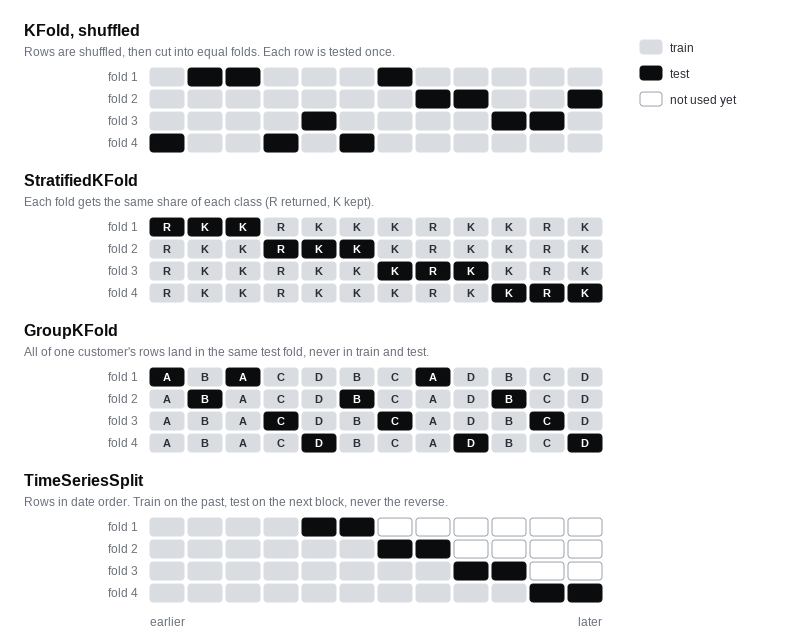
cross_validate runs the loop for you and can score several metrics at once. Ask for training scores too: a big gap between train and test is the first sign of overfitting. Save this as kfold.py:
cat > kfold.py <<'PY'
from sklearn.linear_model import LogisticRegression
from sklearn.model_selection import KFold, cross_validate
from sklearn.pipeline import make_pipeline
from sklearn.preprocessing import StandardScaler

from orders import make_orders

X, y, customer, day = make_orders()
model = make_pipeline(StandardScaler(), LogisticRegression())
cv = KFold(n_splits=5, shuffle=True, random_state=0)

result = cross_validate(model, X, y, cv=cv, scoring=["roc_auc", "accuracy"], return_train_score=True)

for i, (train_auc, test_auc) in enumerate(zip(result["train_roc_auc"], result["test_roc_auc"])):
    print(f"fold {i}: train AUC {train_auc:.3f}  test AUC {test_auc:.3f}")
auc = result["test_roc_auc"]
acc = result["test_accuracy"]
print(f"ROC AUC  {auc.mean():.3f} +/- {auc.std():.3f}")
print(f"accuracy {acc.mean():.3f} +/- {acc.std():.3f}")
print(f"always 'kept' would score accuracy {1 - y.mean():.3f}")
PY
python kfold.py
shuffle=True matters. Without it, KFold cuts the rows in the order they sit in the file, and if the file is sorted by anything (date, customer, label) each fold is a different kind of row.
Check it worked
You see five folds, then the summary, something like:
fold 0: train AUC 0.655  test AUC 0.650
fold 1: train AUC 0.659  test AUC 0.640
fold 2: train AUC 0.667  test AUC 0.603
fold 3: train AUC 0.653  test AUC 0.662
fold 4: train AUC 0.641  test AUC 0.699
ROC AUC  0.651 +/- 0.031
accuracy 0.704 +/- 0.017
always 'kept' would score accuracy 0.705
Write the result as "ROC AUC 0.651 ± 0.031 (5-fold)", never as 0.651 alone. Train and test scores are close, so this simple model is not overfitting. The accuracy line is a warning of a different kind: 70.4% sounds respectable until you see that predicting "kept" for every order scores 70.5%. That is why the rest of this tutorial uses ROC AUC, which measures how well the model ranks returns above non-returns.
Step 5 · Keep the class balance in every fold with StratifiedKFold
With plain KFold, the share of returns in each test fold is whatever the shuffle produced. On a large dataset that evens out. On a small one, or with a rare class, a fold can end up with almost no positives and its score means little. StratifiedKFold deals the rows so every fold has close to the same share of each class. Compare the two on the first 100 orders. Save this as stratified.py:
cat > stratified.py <<'PY'
from sklearn.model_selection import KFold, StratifiedKFold

from orders import make_orders

X, y, customer, day = make_orders()
small_X, small_y = X[:100], y[:100]  # a small sample makes the difference easy to see

for name, cv in [
    ("KFold          ", KFold(n_splits=5, shuffle=True, random_state=0)),
    ("StratifiedKFold", StratifiedKFold(n_splits=5, shuffle=True, random_state=0)),
]:
    rates = [small_y[test].mean() for _, test in cv.split(small_X, small_y)]
    print(name, "returned share per test fold:", " ".join(f"{r:.0%}" for r in rates))
print(f"whole sample: {small_y.mean():.0%}")
PY
python stratified.pyCheck it worked
KFold           returned share per test fold: 5% 35% 25% 40% 35%
StratifiedKFold returned share per test fold: 30% 30% 30% 25% 25%
whole sample: 28%
One plain fold has a single returned order in 20, so its ROC AUC rests on one row. The stratified folds all sit within one row of the 28% average.
You often get stratification without asking: when you pass cv=5 (an integer) to cross_validate with a classifier, scikit-learn uses StratifiedKFold without shuffling. Pass an explicit splitter, as in this tutorial, when you want shuffling and a fixed seed.
Step 6 · Keep each customer in one fold with GroupKFold
Row-by-row folds assume every row is independent. Here they are not: a customer with 25 orders has some in the training folds and some in the test fold, so the model can learn that customer's habit from their training rows and get credit for recognising them at test time. account_age is fixed per customer, so it works as a fingerprint. If the model will mostly score orders from customers it has never seen, that credit is fake.
GroupKFold takes a groups array and puts all rows of a group in the same fold. Compare a logistic regression with a random forest, which is much better at memorising fingerprints. Save this as groups.py:
cat > groups.py <<'PY'
from sklearn.ensemble import RandomForestClassifier
from sklearn.linear_model import LogisticRegression
from sklearn.model_selection import GroupKFold, StratifiedKFold, cross_validate
from sklearn.pipeline import make_pipeline
from sklearn.preprocessing import StandardScaler

from orders import make_orders

X, y, customer, day = make_orders()
print(f"{len(set(customer))} customers, {len(y)} orders")

models = {
    "logistic":      make_pipeline(StandardScaler(), LogisticRegression()),
    "random forest": RandomForestClassifier(n_estimators=200, min_samples_leaf=3, random_state=0, n_jobs=-1),
}
row_cv = StratifiedKFold(n_splits=5, shuffle=True, random_state=0)
group_cv = GroupKFold(n_splits=5, shuffle=True, random_state=0)

for name, model in models.items():
    by_row = cross_validate(model, X, y, cv=row_cv, scoring="roc_auc")["test_score"]
    by_customer = cross_validate(model, X, y, cv=group_cv, groups=customer, scoring="roc_auc")["test_score"]
    print(f"{name:13}  rows {by_row.mean():.3f} +/- {by_row.std():.3f}   customers {by_customer.mean():.3f} +/- {by_customer.std():.3f}")
PY
python groups.pyCheck it worked
150 customers, 2813 orders
logistic       rows 0.651 +/- 0.028   customers 0.653 +/- 0.012
random forest  rows 0.675 +/- 0.007   customers 0.621 +/- 0.033
Judged by rows, the random forest wins, 0.675 against 0.651. Judged by customers it has never seen, it loses, 0.621 against 0.653. The logistic regression is too simple to memorise customers, so its two numbers agree. If you had picked the forest from row-wise folds, you would have shipped the worse model for new customers.
Pick the group that matches how the model will be used: customer, patient, device, school, shop branch. If you predict for new members of the group, split by the group.
Step 7 · Train on the past and test on the future with TimeSeriesSplit
Shuffled folds let the model train on December and be tested on March. In use, it only ever has the past. When the world changes, as it does here on day 240, shuffled folds hide the damage, because every training fold already contains orders from after the change.
TimeSeriesSplit expects rows sorted by time and gives an expanding window: train on the first block, test on the next, then train on the first two, test on the third, and so on. Save this as timeseries.py:
cat > timeseries.py <<'PY'
import numpy as np
from sklearn.linear_model import LogisticRegression
from sklearn.model_selection import StratifiedKFold, TimeSeriesSplit, cross_validate
from sklearn.pipeline import make_pipeline
from sklearn.preprocessing import StandardScaler

from orders import make_orders

X, y, customer, day = make_orders()
order = np.argsort(day, kind="stable")  # TimeSeriesSplit assumes rows are in time order
X, y, day = X[order], y[order], day[order]

model = make_pipeline(StandardScaler(), LogisticRegression())
tscv = TimeSeriesSplit(n_splits=5)

for i, (train, test) in enumerate(tscv.split(X)):
    print(f"fold {i}: train days {day[train].min():3}-{day[train].max():3}   test days {day[test].min():3}-{day[test].max():3}")

shuffled = cross_validate(model, X, y, cv=StratifiedKFold(5, shuffle=True, random_state=0), scoring="roc_auc")["test_score"]
forward = cross_validate(model, X, y, cv=tscv, scoring="roc_auc")["test_score"]
print(f"shuffled folds  ROC AUC {shuffled.mean():.3f} +/- {shuffled.std():.3f}")
print(f"past -> future  ROC AUC {forward.mean():.3f} +/- {forward.std():.3f}")
print("past -> future per fold:", " ".join(f"{s:.3f}" for s in forward))
PY
python timeseries.py
TimeSeriesSplit splits by row position, not by date, so two orders from the same day can fall either side of a boundary. If a label takes time to arrive (a return can come in 30 days after the order), add gap= with a number of rows to leave out between train and test, so the model is not trained on orders whose outcome was not known yet.
Check it worked
fold 0: train days   0- 65   test days  65-124
fold 1: train days   0-124   test days 124-181
fold 2: train days   0-181   test days 181-247
fold 3: train days   0-247   test days 247-302
fold 4: train days   0-302   test days 303-364
shuffled folds  ROC AUC 0.651 +/- 0.028
past -> future  ROC AUC 0.631 +/- 0.066
past -> future per fold: 0.658 0.695 0.679 0.511 0.613
The training window grows and the test window always comes after it. The first three folds look like the shuffled score. Fold 3, the first test block after the policy change, drops to 0.511, barely better than guessing, because the model learned that discounts mean returns just as that stopped being true. Fold 4 recovers part of the way once a few weeks of new-policy orders are in training. The shuffled score of 0.651 hides all of this. The per-fold numbers are the useful output here: they show you how the model ages.
Step 8 · Plant a preprocessing leak and fix it
A leak is any route by which information about the test rows reaches the model before it is scored. The most common one is preparing the data (scaling, imputing, choosing columns) on all rows and only then cross-validating.
To make it obvious, use 200 rows of 5,000 columns of pure noise with random labels. No model can predict these labels, so an honest score is about 0.5. The leaky version picks the 20 columns most related to the labels using every row; the honest version puts the same steps in a pipeline so each fold picks its columns from its own training rows. Save this as leak_preprocessing.py:
cat > leak_preprocessing.py <<'PY'
import numpy as np
from sklearn.feature_selection import SelectKBest, f_classif
from sklearn.linear_model import LogisticRegression
from sklearn.model_selection import StratifiedKFold, cross_val_score
from sklearn.pipeline import make_pipeline
from sklearn.preprocessing import StandardScaler

rng = np.random.default_rng(0)
X = rng.normal(size=(200, 5000))  # 200 rows, 5,000 columns of pure noise
y = rng.integers(0, 2, 200)       # labels that nothing can predict
cv = StratifiedKFold(n_splits=5, shuffle=True, random_state=0)

# Leaky: scale and pick the 20 "best" columns using all 200 rows, then cross-validate.
X_prepared = SelectKBest(f_classif, k=20).fit_transform(StandardScaler().fit_transform(X), y)
leaky = cross_val_score(LogisticRegression(), X_prepared, y, cv=cv, scoring="roc_auc")

# Honest: the same steps inside a pipeline, so each fold fits them on its training rows only.
pipeline = make_pipeline(StandardScaler(), SelectKBest(f_classif, k=20), LogisticRegression())
honest = cross_val_score(pipeline, X, y, cv=cv, scoring="roc_auc")

print(f"prepared before the split  ROC AUC {leaky.mean():.3f}")
print(f"prepared inside each fold  ROC AUC {honest.mean():.3f}")
PY
python leak_preprocessing.py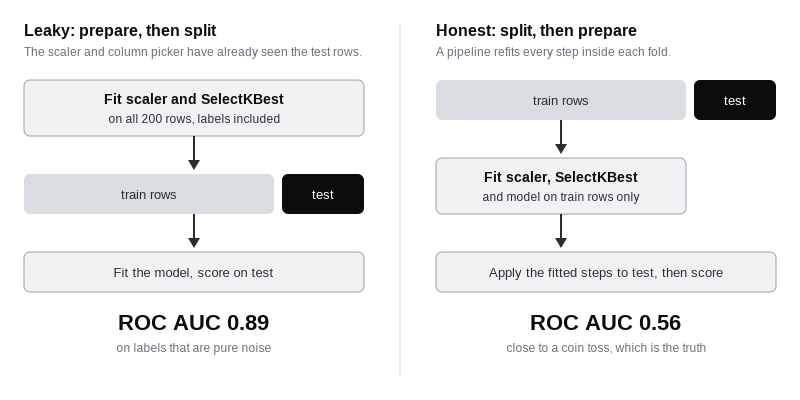
Check it worked
prepared before the split  ROC AUC 0.894
prepared inside each fold  ROC AUC 0.557
The leaky version claims 0.89 on labels that are coin flips. Out of 5,000 noise columns, some line up with the labels by chance across all 200 rows, test rows included, and the selection keeps exactly those. Inside a pipeline the score falls to about 0.56, which is what you get from noise on 200 rows.
Scaling on its own leaks much less. On the orders data, scaling before the split and scaling inside the pipeline give the same ROC AUC to three decimal places. It is still the same mistake, and an imputer or encoder fitted on all rows can do more damage, so put every fitted step in the pipeline and pass the pipeline to cross_validate, as every script before this one does.
Step 9 · Plant a target leak and fix it
The second leak is a feature built from the label. A per-customer "return rate" is a sensible feature: people who returned things before are likely to again. Computed carelessly, as each customer's return rate over all their orders, it includes the order being predicted, and its outcome along with it. Computed honestly, it uses only that customer's earlier orders, which you would know at the moment of predicting. Save this as leak_target.py:
cat > leak_target.py <<'PY'
import numpy as np
from sklearn.linear_model import LogisticRegression
from sklearn.model_selection import GroupKFold, cross_val_score
from sklearn.pipeline import make_pipeline
from sklearn.preprocessing import StandardScaler

from orders import make_orders

X, y, customer, day = make_orders()


def leaky_return_rate():
    """Share of each customer's orders that came back, using every order, this one included."""
    totals = np.bincount(customer, weights=y)
    counts = np.bincount(customer)
    return (totals / counts)[customer]


def past_return_rate(prior=0.3, weight=2):
    """Return rate over the customer's earlier orders only, pulled towards 30% when there are few."""
    rate = np.empty(len(y))
    returned, seen = {}, {}
    for i in np.lexsort((np.arange(len(y)), day)):  # walk through orders in date order
        c = customer[i]
        rate[i] = (returned.get(c, 0) + prior * weight) / (seen.get(c, 0) + weight)
        returned[c] = returned.get(c, 0) + y[i]
        seen[c] = seen.get(c, 0) + 1
    return rate


model = make_pipeline(StandardScaler(), LogisticRegression())
cv = GroupKFold(n_splits=5, shuffle=True, random_state=0)

for name, extra in [("no history feature    ", None),
                    ("rate from all orders  ", leaky_return_rate()),
                    ("rate from past orders ", past_return_rate())]:
    features = X if extra is None else np.column_stack([X, extra])
    auc = cross_val_score(model, features, y, cv=cv, groups=customer, scoring="roc_auc")
    print(f"{name} ROC AUC {auc.mean():.3f}")
PY
python leak_target.py
The folds are grouped by customer, so this is not a cross-validation problem: the honest splitter from earlier does nothing to stop it. The leak is inside the feature itself.
Check it worked
no history feature     ROC AUC 0.653
rate from all orders   ROC AUC 0.828
rate from past orders  ROC AUC 0.762
The leaky feature claims 0.828. The honest one gives 0.762: a real and large gain over 0.653, but 0.07 below what the leak promised. The gap is what you would have found out after launch. A quick test for this kind of leak: for every feature, ask "could I have computed this value at the moment of prediction?" If the answer needs the outcome, or anything recorded after it, the feature leaks. Suspiciously high scores are the other clue; when a simple model suddenly jumps, look for a leak before you celebrate.
Next steps
You now have five scripts that each answer one question: how noisy is my score, does the class balance hold, does the model only know customers it has seen, does it survive time, and are the features honest. Before you trust a new model, run the ones that fit its data and report the mean and spread from the splitter that matches how it will be used.
- Put imputation, encoding and scaling into one leak-proof object in Build a scikit-learn pipeline with ColumnTransformer.
- Choose settings with cross-validation inside the search in Tune hyperparameters with grid and random search.
- Apply the same checks to a regression model in Predict a number with regression in scikit-learn.
- Go back to the basics of logistic regression and decision trees in Classify data with logistic regression and decision trees.
To remove everything this tutorial created, delete the folder:
cd ~
rm -rf ~/cv-demo
Related tutorials
- Predict a number with regression in scikit-learnYou will train a model that predicts delivery times in minutes, prove it beats a do-nothing baseline on held-out orders, and use a residual plot to find where it is still wrong.
- Build a scikit-learn pipeline with ColumnTransformerYou will have one scikit-learn pipeline that imputes, scales and one-hot encodes a mixed customer table, trains a churn model, survives cross-validation and unseen categories, and is saved and reloaded with skops instead of pickle.
- Tune model settings with grid search and random searchYou will tune a gradient-boosting churn model with GridSearchCV, RandomizedSearchCV and HalvingRandomSearchCV, compare what each costs and finds, read cv_results_ to see how flat the top is, and report an honest score with nested cross-validation and an untouched test set.
Need this done for you?
Padding does this work for growing companies, from the first diagnosis to a system that keeps working.
Get new tutorials