Programming fundamentals · Intermediate · 22 min
Wait for slow work in JavaScript with promises and async/await
By Padding · Updated 18 Nov 2026
Node.js 26.13.1 LTS · node:26 image
You will see why JavaScript code seems to run out of order, wrap a timer in a promise, rewrite it with async/await and try/catch, time three requests one after another against all at once, and finish with a script that loads files in parallel and reports any that failed.
On this page
Some work takes time: reading a file, waiting for a timer, asking a server for data. JavaScript does not stop and stare at the clock while that happens. It starts the slow work, carries on with the next line, and comes back when the result is ready. That is why code that looks like it should run top to bottom sometimes prints its lines in a different order.
A promise is an object that stands for a result that is not ready yet. async and await are a way of writing code that uses promises so it reads top to bottom again. Once you understand these, you can make a program wait for one thing at a time when order matters, or wait for many things at once when it does not, which is often several times faster.
In this tutorial you watch code run out of order, build a promise around a timer, rewrite it with async/await, catch errors, start a small local server, time three requests one after another and then together, and finish with load-all.mjs, a script that reads several files in parallel and says which ones failed. Everything ships with Node.js, so there is nothing to download beyond Node itself. Commands are for a Linux or macOS shell; on Windows, use WSL.
Step 1 · Watch code run out of order
Make a folder for this tutorial and a small text file to read:
node --version
mkdir -p ~/async-demo
cd ~/async-demo
printf 'Buy airtime\nPay rent\nCall Amaka\n' > notes.txt
Now write order.mjs. Before you run it, guess the order of the four lines it prints:
cat > order.mjs <<'JS'
import { readFile } from 'node:fs';

console.log('start');

setTimeout(() => {
  console.log('timer finished');
}, 300);

readFile('notes.txt', 'utf8', (err, text) => {
  if (err) throw err;
  console.log(`file read: ${text.length} characters`);
});

console.log('last line of the script');
JS
node order.mjs
What each part does:
- The
.mjsending tells Node.js this file is a module that usesimport. You need nopackage.jsonfor this. import { readFile } from 'node:fs'loads the file-reading function from Node.js. Thenode:prefix marks a built-in module.setTimeout(fn, 300)asks Node.js to runfnafter at least 300 milliseconds. It does not pause the script. It returns at once.readFile(name, 'utf8', callback)asks Node.js to read the file and callcallbackwhen the read is done. It also returns at once. The callback gets an error (ornull) first and the text second.- The two
console.logcalls at the top level run straight away, in order.
Check it worked
The output is:
start
last line of the script
file read: 32 characters
timer finished
last line of the script came second, before either slow job. Your code runs to the end first. Only then does Node.js run the callbacks, in the order their work finished: the disk read took a millisecond or two, the timer took 300.
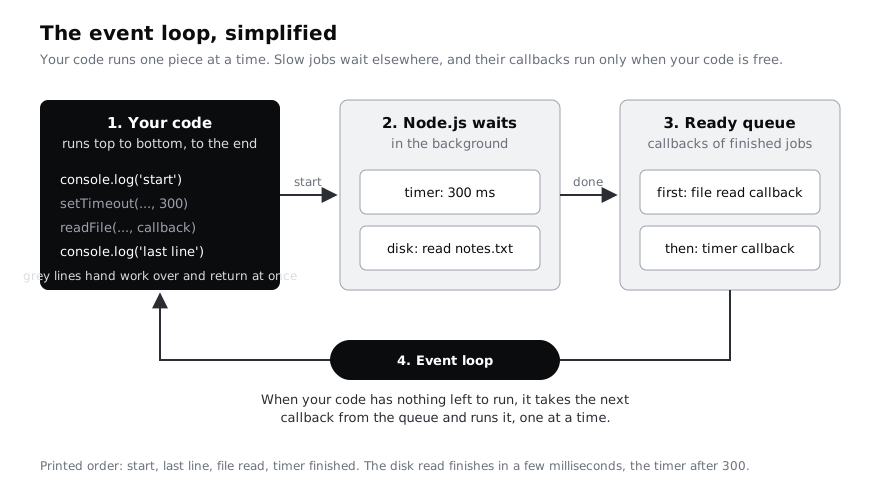
This is the event loop. JavaScript runs one piece of your code at a time. Slow jobs are handed to Node.js, which waits for them in the background. When a job finishes, its callback goes into a queue, and whenever your code has nothing left to run, the event loop takes the next callback from the queue and runs it.
Step 2 · Wrap a timer in a promise
Callbacks work, but they get hard to follow when one slow job depends on another. A promise is a value you can hold, pass around and attach work to. It is in one of three states: pending (still waiting), fulfilled (finished with a value) or rejected (failed with an error).
Write a small module that turns setTimeout into a promise, and a script that uses it with .then:
cat > wait.mjs <<'JS'
export function wait(ms, value) {
  return new Promise((resolve) => {
    setTimeout(() => resolve(value), ms);
  });
}
JS
cat > then-demo.mjs <<'JS'
import { wait } from './wait.mjs';

const promise = wait(500, 'the kettle has boiled');
console.log('right away:', promise);

promise.then((message) => {
  console.log('then received:', message);
  console.log('afterwards:', promise);
});

console.log('this line does not wait');
JS
node then-demo.mjs
How it works:
new Promise((resolve) => { ... })creates a pending promise. The function you pass runs immediately and receivesresolve, a function you call when the result is ready.- Inside,
setTimeoutwaitsmsmilliseconds and then callsresolve(value). That fulfils the promise withvalue. exportmakeswaitavailable to other files, andimport { wait } from './wait.mjs'uses it. The./means "in this folder".promise.then(fn)says: when this promise is fulfilled, callfnwith its value. LikesetTimeout,.thenreturns at once and does not block.
Check it worked
The output is:
right away: Promise { <pending> }
this line does not wait
then received: the kettle has boiled
afterwards: Promise { 'the kettle has boiled' }
The first line shows the promise while it is still pending. Half a second later, the last line shows the same object fulfilled, holding its value.
Step 3 · Rewrite it with async and await
await pauses one function until a promise settles, then hands you its value as if it were an ordinary return value. You can only use it inside a function marked async, or at the top level of a module. The rest of the program keeps running while that function waits.
Use wait and the promise version of readFile, one after the other:
cat > steps.mjs <<'JS'
import { readFile } from 'node:fs/promises';
import { wait } from './wait.mjs';

async function main() {
  console.log('boiling water...');
  const message = await wait(500, 'the kettle has boiled');
  console.log(message);

  const text = await readFile('notes.txt', 'utf8');
  const lines = text.split('\n').filter((line) => line !== '');
  console.log(`notes.txt has ${lines.length} lines, first: ${lines[0]}`);

  return 'done';
}

main().then((result) => console.log('main returned:', result));
console.log('main has started; this line runs while it waits');
JS
node steps.mjs
Line by line:
node:fs/promisesis the same file module as before, but itsreadFilereturns a promise instead of taking a callback. There is no callback argument.async function main()marksmainas a function that can useawait. Anasyncfunction always returns a promise, even when you writereturn 'done', which is why the bottom line uses.thento get the result.const message = await wait(500, ...)pausesmainfor half a second, then puts the fulfilled value inmessage.const text = await readFile(...)waits for the disk the same way. Because eachawaitwaits for the one before it, the steps happen in the order you wrote them.split('\n')cuts the text into lines, andfilterdrops the empty string left after the final newline.
Check it worked
The output is:
boiling water...
main has started; this line runs while it waits
the kettle has boiled
notes.txt has 3 lines, first: Buy airtime
main returned: done
The second line shows that await paused only main. The code after the call carried on, exactly as it did with .then. Inside main, though, the code reads top to bottom with no callbacks.
Step 4 · Catch a failure with try and catch
A promise that fails is rejected. With await, a rejection turns into an error thrown on that line, so you handle it with the try/catch you may know from other code. Write a function that reads a file or explains why it could not:
cat > errors.mjs <<'JS'
import { readFile } from 'node:fs/promises';

async function readOrExplain(name) {
  try {
    const text = await readFile(name, 'utf8');
    return `${name}: ${text.length} characters`;
  } catch (err) {
    return `${name}: could not read it (${err.code})`;
  }
}

console.log(await readOrExplain('notes.txt'));
console.log(await readOrExplain('missing.txt'));
JS
node errors.mjs
The two await calls at the bottom are outside any function. That is top-level await, and it works in .mjs files. Node.js waits for each line before running the next.
err.code is a short code Node.js gives system errors. ENOENT means "no such file or directory". Others you will meet are EACCES (no permission) and EISDIR (you asked for a file but named a folder).
Now see what happens when nobody catches a rejection. Promise.reject makes a promise that is already rejected:
node -e "Promise.reject(new Error('nobody caught me'))" || echo "exit status $?"Check it worked
errors.mjs prints notes.txt: 32 characters and then missing.txt: could not read it (ENOENT). The program did not crash on the missing file.
The second command prints the error and a stack trace, ending with your Node.js version, and the shell then prints exit status 1. Since Node.js 15, an unhandled rejection stops the whole program. Every promise that can fail needs a try/catch around its await, or a .catch(...) after it, somewhere up the chain.
Step 5 · Start a slow local server and call it
Network requests are the most common slow work. Instead of depending on a website that may change or be offline, run your own small server. It answers every request after a delay you choose, so the timings in the next step are predictable.
cat > server.mjs <<'JS'
import { createServer } from 'node:http';

const server = createServer((req, res) => {
  const url = new URL(req.url, 'http://127.0.0.1');
  const name = url.searchParams.get('name') ?? 'unknown';
  const ms = Number(url.searchParams.get('ms') ?? 600);

  setTimeout(() => {
    res.writeHead(200, { 'content-type': 'application/json' });
    res.end(JSON.stringify({ name, waitedMs: ms }));
  }, ms);
});

server.listen(3917, '127.0.0.1', () => {
  console.log('slow server on http://127.0.0.1:3917');
});
JS
node server.mjs &
SERVER_PID=$!
sleep 1createServertakes a function that runs once for every request.reqdescribes the request andresis how you answer.new URL(req.url, 'http://127.0.0.1')parses the path and query string, such as/?name=prices&ms=600.searchParams.getreads one value, and??supplies a default when it is missing.setTimeoutdelays the answer bymsmilliseconds. While one request waits, the server can accept others: the waiting is handled by the event loop, not by blocking.server.listen(3917, '127.0.0.1', ...)listens on port 3917 on your own machine only.- In the shell,
&runs the server in the background so you get your prompt back.SERVER_PID=$!saves its process ID so you can stop it at the end, andsleep 1gives it a moment to start.
Now call it with fetch, which is built into Node.js:
cat > fetch-one.mjs <<'JS'
const started = performance.now();

const response = await fetch('http://127.0.0.1:3917/?name=prices&ms=600');
const data = await response.json();

const seconds = ((performance.now() - started) / 1000).toFixed(1);
console.log(data, `in ${seconds} s`);
JS
node fetch-one.mjs
There are two awaits because a response arrives in two parts. fetch fulfils as soon as the status and headers arrive; response.json() waits for the body and parses it. performance.now() returns the time in milliseconds with fractions, which makes it good for measuring how long something took.
Check it worked
The server prints slow server on http://127.0.0.1:3917 once. fetch-one.mjs prints something like { name: 'prices', waitedMs: 600 } in 0.6 s. The first request in a new program can take a little longer while Node.js sets up its network code, so 0.7 s is normal too.
Step 6 · Run three requests one after another, then together
Say a page needs exchange rates, prices and stock levels, and none of them depends on the others. Compare waiting for each in turn with starting all three at once:
cat > compare.mjs <<'JS'
async function getJson(name) {
  const response = await fetch(`http://127.0.0.1:3917/?name=${name}&ms=600`);
  if (!response.ok) {
    throw new Error(`${name}: HTTP ${response.status}`);
  }
  return response.json();
}

function secondsSince(start) {
  return ((performance.now() - start) / 1000).toFixed(1);
}

let start = performance.now();
const rates = await getJson('rates');
const prices = await getJson('prices');
const stock = await getJson('stock');
console.log(`one after another: ${[rates.name, prices.name, stock.name].join(', ')} in ${secondsSince(start)} s`);

start = performance.now();
const all = await Promise.all([getJson('rates'), getJson('prices'), getJson('stock')]);
console.log(`together: ${all.map((item) => item.name).join(', ')} in ${secondsSince(start)} s`);
JS
node compare.mjs
What changed between the two halves:
- In the first half, each
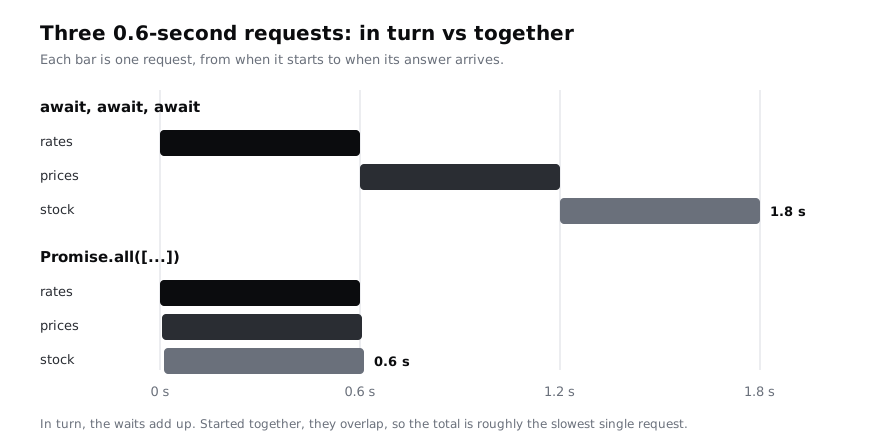
awaitwaits for its request to finish before the next line starts the next request. Three requests of 0.6 seconds take about 1.8 seconds. - In the second half, the three
getJson(...)calls run straight away, one after another, without waiting. Each returns a pending promise, so all three requests are in flight at the same moment. Promise.all([...])takes a list of promises and returns one promise. It fulfils when every promise in the list has fulfilled, with their values in the same order as the list, whichever finished first.fetchonly rejects when it cannot reach the server at all. A404or500answer still fulfils, sogetJsonchecksresponse.ok(true for statuses 200 to 299) and throws if not.
Check it worked
The output is close to:
one after another: rates, prices, stock in 1.8 s
together: rates, prices, stock in 0.6 s
Your figures may be a tenth of a second higher. The point is the ratio: three times faster, because the waits overlap.
On a mobile connection the gap is usually bigger, because each request spends most of its time travelling to the server and back. On a prepaid plan in Lagos or Nairobi, a page that makes its independent requests together feels much faster than one that makes them in turn, and it uses no extra data. Keep the one-after-another form for when a request needs the result of the one before it, such as fetching a user and then that user's orders.
Step 7 · Load several files and report the ones that failed
Promise.all has one catch: if any promise rejects, the combined promise rejects straight away with that one error, and you lose the results of the others. When you want every result, good or bad, use Promise.allSettled. It always fulfils, with one report per promise.
Create two more files and write the finished script:
printf 'bread 1200\nrice 3500\n' > prices.txt
printf 'USD 1\nNGN 1530\nKES 129\n' > rates.txt
cat > load-all.mjs <<'JS'
import { readFile } from 'node:fs/promises';

const names = process.argv.slice(2);
if (names.length === 0) {
  console.error('usage: node load-all.mjs <file> [more files...]');
  process.exit(2);
}

const results = await Promise.allSettled(
  names.map((name) => readFile(name, 'utf8')),
);

let failed = 0;
results.forEach((result, i) => {
  if (result.status === 'fulfilled') {
    console.log(`ok      ${names[i]} (${result.value.length} characters)`);
  } else {
    failed += 1;
    console.log(`failed  ${names[i]}: ${result.reason.code ?? result.reason.message}`);
  }
});

console.log(`${names.length - failed} loaded, ${failed} failed`);
if (failed > 0) {
  process.exitCode = 1;
}
JS
node load-all.mjs notes.txt prices.txt rates.txt
node load-all.mjs notes.txt prices.txt missing.txt || echo "exit status $?"
How the script works:
process.argvholds the command line. The first two entries are the path tonodeand to the script, soslice(2)keeps only the file names you typed. With none, the script prints how to use it and stops with exit status 2.names.map((name) => readFile(name, 'utf8'))starts every read at once and gives an array of pending promises. Nothing waits yet.await Promise.allSettled(...)waits until every read has either fulfilled or rejected. Each report has astatusof'fulfilled'with avalue, or'rejected'with areason(the error).forEach((result, i) => ...)walks the reports. They come back in the same order asnames, sonames[i]is the matching file name.result.reason.code ?? result.reason.messageshows the short system code, such asENOENT, and falls back to the error message for errors without one.process.exitCode = 1makes the program end with status 1 once it has finished, without cutting off any output. Scripts and other programs that callload-all.mjscan test that status.
Check it worked
The first run prints three ok lines, such as ok notes.txt (32 characters), then 3 loaded, 0 failed. The second run prints:
ok      notes.txt (32 characters)
ok      prices.txt (21 characters)
failed  missing.txt: ENOENT
2 loaded, 1 failed
exit status 1
The missing file did not stop the other two from loading, and the exit status tells a calling script that something went wrong.
Step 8 · Stop the server and clean up
Stop the background server with the process ID you saved, then delete the demo folder:
kill "$SERVER_PID"
cd ~
rm -rf ~/async-demo
If you opened a new terminal since starting the server, $SERVER_PID is empty there. Find the process with ps aux | grep server.mjs and stop it with kill <number>, replacing <number> with the process ID in the second column.
Check it worked
ls ~/async-demo reports that there is no such file or directory, and opening http://127.0.0.1:3917 in a browser fails to connect.
Next steps
- Use
awaitwith files in a complete program: build a to-do list command-line app in Node. names.map(...)turned a list of names into a list of promises. Learn the other array tools: work with arrays in JavaScript: map, filter and reduce.- See the same request-and-wait ideas in another language: call a web API from Python with httpx.
Part of these paths
Related tutorials
- Build a to-do list command-line app in Node.jsYou will build todo.js, a Node.js command-line app with add, list, done and remove commands that keeps your tasks in a JSON file, gives clear messages for mistakes and is covered by two passing tests.
- Work with arrays in JavaScript: map, filter and reduceYou will turn a list of shop products into prices with tax, in-stock lists, yes-or-no answers, totals and a sorted stock report, using map, filter, find, some, every, reduce and toSorted in Node.js 26.
- How to Call a Web API from Python with httpxYou will install httpx 0.28, write a small local API to practise on, then call it from Python by fetching JSON, add query parameters and a reusable client, handle bad statuses, timeouts and network failures, send JSON in a POST request, and make several requests at once with async code.
Need this done for you?
Padding does this work for growing companies, from the first diagnosis to a system that keeps working.
Get new tutorials