Programming fundamentals · Beginner · 18 min
What happens when you run a program: source code, compilers and interpreters
By Padding · Updated 18 Nov 2026
Ubuntu 26.04 · GCC 15.2 · OpenJDK 25 · Python 3.14
You will build and run the same small program in C, Java and Python, look at the files each route leaves on disk, and be able to explain source code, compiler, interpreter, runtime and executable in your own words.
On this page
You type python3 hello.py or double-click an app, and something happens. Between the text you wrote and the result on screen, at least one other program did a lot of work. Which program, and when it did that work, is the main difference between languages people call "compiled" and languages they call "interpreted".
In this tutorial you write one tiny program three times: in C, in Java and in Python. Each one prints a greeting and adds up the numbers from 1 to 10 million, which is enough work to time. You build and run each one, then look at what appeared on disk. The three routes look like this:
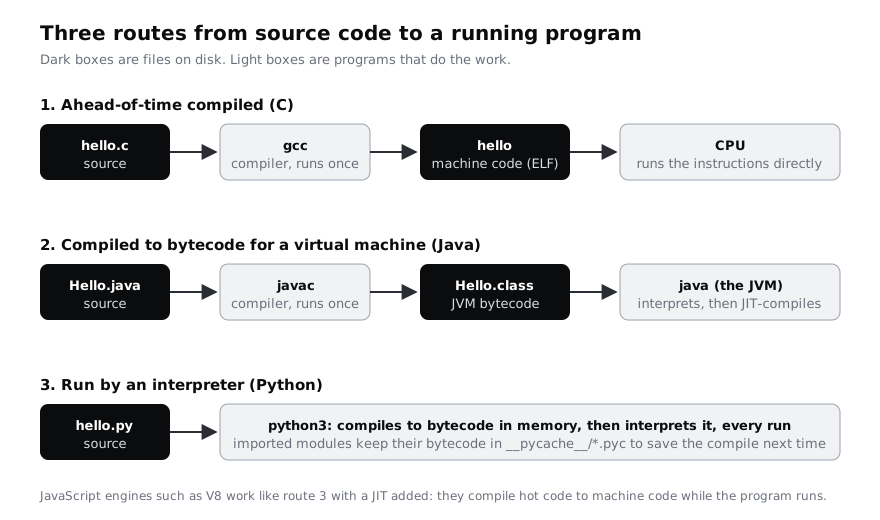
By the end you can explain five words that come up in every programming course and job advert: source code, compiler, interpreter, runtime and executable. You do not need to understand the C or Java syntax; each line is explained, and what matters is what the tools do with it.
Step 1 · Install a C compiler, a Java toolkit and Python
Install the three toolchains from Ubuntu's own packages. gcc is the GNU C compiler, libc6-dev holds the C standard library headers it needs, default-jdk-headless is the Java Development Kit without desktop parts, and python3 is the Python interpreter:
sudo apt update
sudo apt install -y gcc libc6-dev default-jdk-headless python3
The Java kit is the largest download, a few hundred megabytes. On a prepaid data bundle, run this on Wi-Fi, or install only gcc libc6-dev python3 and read the Java step without running it; you still see the idea.
Now ask each tool for its version:
gcc --version
javac -version
java -version
python3 --versionCheck it worked
You see four version reports. On Ubuntu 26.04 they look something like gcc (Ubuntu 15.2.0-...) 15.2.0, javac 25.0.1, an openjdk version "25..." block, and Python 3.14.3. The exact patch numbers move as Ubuntu ships updates. If a command prints command not found, the install line did not finish; run it again and read the last lines it prints.
Step 2 · Compile C ahead of time into an executable
Make a folder for the demo and write the C version of the program:
mkdir -p ~/run-demo
cd ~/run-demo
cat > hello.c <<'C'
#include <stdio.h>

int main(void) {
    long long total = 0;
    for (long long i = 1; i <= 10000000; i++) {
        total += i;
    }
    printf("Hello from C. 1 + 2 + ... + 10000000 = %lld\n", total);
    return 0;
}
C
What each part means:
#include <stdio.h>brings in the standard input and output functions, includingprintf.int main(void)is where every C program starts. Theintsays it hands a whole number back to the system when it ends.long long total = 0;makes a variable that can hold a very large whole number. C makes you say what type of value each variable holds, so the compiler knows exactly how much memory to set aside.- The
forline countsifrom 1 to 10,000,000, andtotal += iadds each one to the total. printfprints the text, with%lldreplaced by the value oftotal.return 0;tells the system the program finished without an error.
Now compile it. gcc reads hello.c, checks it, and translates it into instructions for your computer's processor. -o hello names the output file:
gcc -o hello hello.c
ls -l
This is the compiler at work. It runs once, before the program runs, which is why this route is called ahead-of-time compilation. The output, hello, is an executable: a file the operating system can load and the processor can run without any other tool.
Check it worked
ls -l lists two files: hello.c, a few hundred bytes, and hello, many thousands of bytes (tens of thousands on some processors), with x in its permissions (for example -rwxr-xr-x). The x means the file is executable. If gcc printed an error: line instead, compare your file with the code above; one missing ; is enough to stop it.
Step 3 · Run the executable and look inside it
Run the program. The ./ means "the file in this folder":
./helloIt prints Hello from C. 1 + 2 + ... + 10000000 = 50000005000000 almost at once.
Now look at the first four bytes of the file. head -c 4 takes them and od -c shows them as characters:
head -c 4 hello | od -cThe output starts with 177 E L F. ELF is the format Linux uses for executables. The rest of the file is machine code: numbers that only make sense to one family of processors. To see a readable version of that machine code, ask gcc to stop one stage early and write assembly language instead:
gcc -S -o hello.s hello.c
grep -n "main" hello.s
Assembly is a text form of processor instructions, one instruction per line. The exact lines depend on your processor: an Intel or AMD machine shows different instructions from an ARM one, such as a Raspberry Pi or a recent Mac running Linux.
Finally, prove the executable no longer needs its source code. Move hello.c out of the way and run the program again:
mv hello.c hello.c.bak
./hello
mv hello.c.bak hello.cCheck it worked
od -c shows 177 E L F on its first line, grep finds at least one line with main in hello.s, and ./hello prints the same greeting even while hello.c is renamed. The source was needed once, to build. The flip side: this hello file runs only on Linux and only on the processor type it was built for. To run it on Windows or on another type of processor, you compile the source again for that system.
Step 4 · Compile Java to bytecode and run it on a virtual machine
Write the Java version. Java needs the file name to match the class name, so the file is Hello.java with a capital H:
cd ~/run-demo
cat > Hello.java <<'JAVA'
public class Hello {
    public static void main(String[] args) {
        long total = 0;
        for (long i = 1; i <= 10_000_000; i++) {
            total += i;
        }
        System.out.println("Hello from Java. 1 + 2 + ... + 10000000 = " + total);
    }
}
JAVA
javac Hello.java
ls -l Hello.*
public class Hellowraps the program in a class. In Java, all code lives inside classes.public static void main(String[] args)is Java's starting point, likemainin C.long total = 0;is a large whole number, as in C. The underscores in10_000_000are only there to make the number easier to read.System.out.printlnprints a line, and+ totaljoins the number onto the text.
javac is also a compiler, but it does not produce machine code. It produces Hello.class, which holds bytecode: instructions for an imaginary computer called the Java Virtual Machine (JVM). Look at its first bytes, then ask javap to show the bytecode as text:
head -c 4 Hello.class | od -An -tx1
javap -c Hello
Now run it. You pass the class name, not the file name:
java HelloThe java command starts the JVM, which is the runtime: the program that loads your bytecode and carries it out. At first the JVM interprets the bytecode one instruction at a time. While it does that, it notices which parts run many times, such as your loop, and compiles those to machine code while the program is running. That is called just-in-time (JIT) compilation.
Check it worked
The first-bytes line is ca fe ba be: every Java class file starts with those four bytes. javap -c prints the main method as a numbered list of instructions, with names something like lconst_0, lstore_1 and ladd (the l means they work on long values). java Hello prints Hello from Java. 1 + 2 + ... + 10000000 = 50000005000000. Unlike ./hello, you cannot run Hello.class on its own; it needs java. In exchange, the same Hello.class runs on any machine with a JVM, on any operating system and processor.
Step 5 · Run Python and find its hidden bytecode
Write the Python version:
cd ~/run-demo
cat > hello.py <<'PY'
total = 0
for i in range(1, 10_000_001):
    total += i
print(f"Hello from Python. 1 + 2 + ... + 10000000 = {total}")
PY
python3 hello.py
ls -l
total = 0makes a variable. Python does not ask you for a type; it works out at run time what kind of value each variable holds.range(1, 10_000_001)produces the numbers 1 to 10,000,000. The end number is left out, which is why it says10_000_001.- The indented line under
forruns once for each number. print(f"...")prints the text with{total}replaced by its value.
There was no separate build step. python3 is the interpreter: you hand it the source code, and it runs it. Inside, it does compile your code first, into bytecode much like Java's, but it does that in memory every time you run the script, and ls -l shows no new file next to hello.py.
Python does save bytecode for code that other files import, so it can skip the compile next time. Ask it to compile hello.py the way it would for an import, and then look at the bytecode:
python3 -m py_compile hello.py
ls -l __pycache__
python3 -m dis hello.pyCheck it worked
python3 hello.py prints Hello from Python. 1 + 2 + ... + 10000000 = 50000005000000, a moment after you press Enter. ls -l __pycache__ shows a file named hello.cpython-314.pyc: the 314 is the Python version, because each version has its own bytecode format. dis prints numbered instructions with names something like LOAD_NAME, FOR_ITER, BINARY_OP and STORE_NAME. That is the code CPython's interpreter loop works through, one instruction at a time, every time round your loop.
JavaScript, which you may meet next, works much like Python here, with one addition. Engines such as V8 (in Chrome and Node.js) start by interpreting bytecode, then use a JIT, as the JVM does, to compile the busiest code to machine code while the page or program runs.
Step 6 · Time all three and test the speed myths
You often hear "C is fast" and "Python is slow". Time each program and see how true that is. time runs a command and reports how long it took; real is the wall-clock time:
cd ~/run-demo
time ./hello
time java Hello
time python3 hello.py
Now run the same sum in Python again, but let the built-in sum function do the adding:
time python3 -c "print(sum(range(1, 10_000_001)))"Here is what usually shows up, and why:
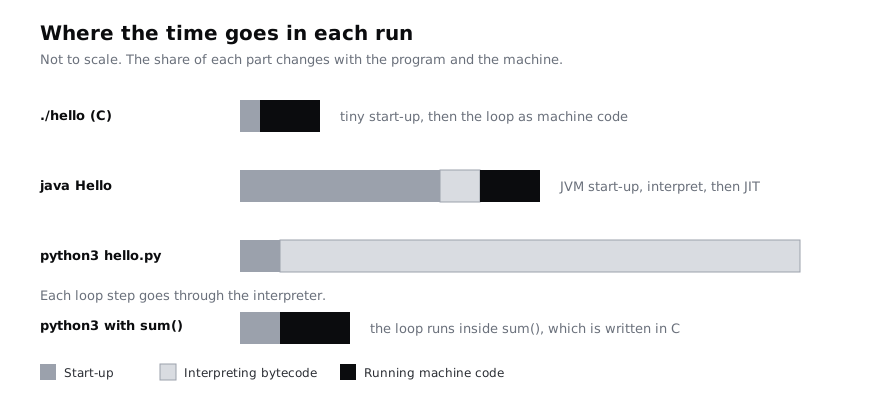
- C is the quickest here: nothing has to start up and the loop is already machine code.
- Java spends a good part of its time starting the JVM before your code runs. For a long-running server that cost is paid once, and the JIT often brings the hot code close to C's speed. For a tiny script it dominates.
- Python spends its time in the interpreter loop, working through bytecode instructions for each of the ten million steps. This is where "Python is slow" comes from.
- Python with
sumis much faster than the Python loop, because the loop now runs insidesum, which is written in C. Python's data and AI libraries, such as NumPy, work the same way: Python describes the work and compiled code does the heavy lifting.
So the half-truths: speed belongs to an implementation and a workload, not to a language. A C program with a poor algorithm is slower than a Python program with a good one, and the time a person spends writing and fixing the code often matters more than the milliseconds a run takes. On a low-end phone or a cheap cloud server, though, start-up time and memory use are real costs, and that is one reason compiled languages are popular for mobile apps and small servers.
Check it worked
You get four real times. Your numbers depend on your machine, but the pattern is what to look for: ./hello is the smallest, python3 hello.py is the largest, and the sum version is a fraction of the plain Python loop. If Java is slower than you expected for such a small job, that is JVM start-up, not your loop.
Step 7 · Name the parts and clean up
You have now seen every word from the introduction in action. Match each to what you ran:
- Source code: the text you wrote,
hello.c,Hello.javaandhello.py. People read and edit it. - Compiler: a program that translates source code into another form before it runs.
gccproduced machine code;javacproduced bytecode. Python has one built in, and you saw its output in__pycache__. - Executable: a file the operating system can run directly, like
hello. It starts with theELFbytes on Linux. - Interpreter: a program that carries out code step by step while it runs, as
python3does with its bytecode. - Runtime: what has to be present while the program runs. For
Hello.classit is the JVM; forhello.pyit is the Python interpreter; even./hellorelies on the C library that came with Ubuntu.
List what the three routes left behind:
cd ~/run-demo
ls -l . __pycache__
When you are done, delete the demo folder:
cd ~
rm -rf ~/run-demoCheck it worked
Before the clean-up, the listing shows the three source files plus hello (machine code), hello.s (assembly), Hello.class (JVM bytecode) and __pycache__/hello.cpython-314.pyc (Python bytecode). Test yourself: without scrolling up, say which of those files you could copy to another Linux computer of the same processor type and run with nothing else installed. The answer is hello alone. After rm -rf, running ls ~/run-demo prints No such file or directory.
Next steps
- Write a proper first program in one of these languages: Hello World in C, Hello World in Java or Hello World in Python. The Hello World hub has a first program for many more languages.
- Not sure which language to learn first? Choose your first programming language uses the ideas from this page to compare them.
- Get more comfortable with the commands you used here: use the terminal as a programmer.
Related tutorials
- Write your first class in Python: objects, attributes and methodsYou will model a library book loan as a Python class with attributes, methods, a readable __repr__ and a shared loan period, compare it with a dictionary version, rewrite it as a dataclass and end with a Loan class and a short script that uses it.
- Write your first JavaScript tests with the built-in Node.js test runnerYou will write a small price module in JavaScript, cover it with six passing tests using node:test and node:assert, and know how to read a failure and run one test on its own, with no packages installed.
- Write readable code: names, comments and a formatterYou will turn a working but cryptic Python script into a readable one with clear names, named constants, small functions and useful comments, tidy it with Ruff, prove its output has not changed and leave with your own style checklist.
Need this done for you?
Padding does this work for growing companies, from the first diagnosis to a system that keeps working.
Get new tutorials