Testing and QA · Advanced · 25 min
Write consumer contract tests with Pact
By Padding · Updated 18 Nov 2026
Node.js 26.13 · Pact JS 17.1.4 (V4 specification) · Vitest 5.1.1 · checked in the node:26 image
You will write Pact V4 consumer tests for a small frontend API client, using matchers and provider states, run them against Pact's mock server and end with a pact file the API team can verify.
On this page
A frontend and the API it calls are usually built by different people, often in different repositories. The classic way to check they still fit together is a shared staging environment: deploy both, click through, hope nothing else on staging is broken that day. That check is slow, it happens late, and when it fails it rarely says which side changed.
Consumer-driven contract testing moves the check earlier and makes it precise. The consumer (here, a frontend's API client) writes tests that say exactly which requests it sends and which parts of each response it relies on. Pact runs those tests against a mock server and records them in a JSON pact file. The provider (the API) later replays every interaction in that file against its real code. If both sides pass, they are compatible, and neither had to deploy anywhere to find out.
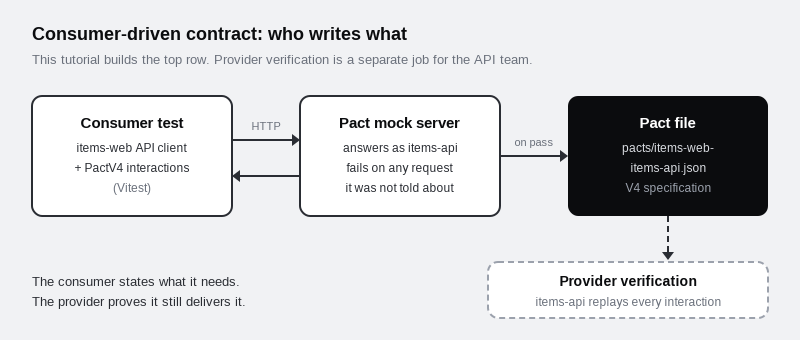
In this tutorial you build the consumer half. The API client belongs to items-web, a to-do style frontend, and it talks to items-api, the Express 5 items API from the REST API tutorial. You do not need that API running. You end with pacts/items-web-items-api.json, the file an API team would verify against its real code. The provider tutorial picks up pacts/items-web-items-api.json and verifies it against the items API.
Step 1 · Create the consumer project and install Pact
Make a folder for the frontend's API code and install Pact JS and Vitest as development dependencies, pinned to the versions this tutorial was written with:
mkdir -p ~/pact-demo/items-web/src ~/pact-demo/items-web/test
cd ~/pact-demo/items-web
npm init -y
npm pkg set type=module
npm install --save-dev --save-exact @pact-foundation/pact@17.1.4 vitest@5.1.1
@pact-foundation/pact pulls in pact-core, which ships the Pact mock server as a native library for your operating system and processor. npm picks the right one, so the same package.json works on Linux, macOS and Windows. The download happens once. After that the tests run with no network at all, which helps if you work on prepaid mobile data: there is no staging server to reach.
Pact sends an anonymous install event. To switch it off, set PACT_DO_NOT_TRACK=1 and SCARF_ANALYTICS=false in your shell before npm install.
Check it worked
npm ls @pact-foundation/pact vitestThe tree lists @pact-foundation/pact@17.1.4 and vitest@5.1.1 with no UNMET or invalid warnings.
Step 2 · Write the API client
This is the code under test. It has three methods: list the items that are not done, fetch one item (returning null if it does not exist) and add an item. Every request carries the signed-in user's token in an Authorization header. Your app passes the real token at runtime; the tests below only ever use a dummy value.
cat > src/items-client.js <<'JS'
export class ApiError extends Error {
  constructor(status, body) {
    super(`Items API answered ${status}`)
    this.status = status
    this.body = body
  }
}

export function createItemsClient({ baseUrl, token }) {
  async function call(path, options = {}) {
    const response = await fetch(`${baseUrl}${path}`, {
      ...options,
      headers: {
        Accept: 'application/json',
        Authorization: `Bearer ${token}`,
        ...options.headers,
      },
    })
    const body = response.status === 204 ? null : await response.json()
    return { status: response.status, headers: response.headers, body }
  }

  return {
    async listOpenItems() {
      const { status, body } = await call('/api/items?done=false')
      if (status !== 200) throw new ApiError(status, body)
      return body.map((item) => ({ id: item.id, title: item.title }))
    },

    async getItem(id) {
      const { status, body } = await call(`/api/items/${id}`)
      if (status === 404) return null
      if (status !== 200) throw new ApiError(status, body)
      return body
    },

    async addItem(title) {
      const { status, headers, body } = await call('/api/items', {
        method: 'POST',
        headers: { 'Content-Type': 'application/json' },
        body: JSON.stringify({ title }),
      })
      if (status !== 201) throw new ApiError(status, body)
      return { ...body, url: headers.get('location') }
    },
  }
}
JS
Note what listOpenItems reads: only id and title. That detail matters later, because a contract should describe what the consumer uses, not everything the provider happens to return.
Check it worked
node --check src/items-client.js && echo "client parses"The command prints client parses. A syntax error would print the line and column instead.
Step 3 · Configure Vitest and a shared Pact setup
Two Pact behaviours shape the configuration. First, each passing test merges its interaction into the pact file, so an interaction you delete from the tests would stay in the file forever. A global setup file removes the pacts folder at the start of every run. Second, several test files writing one pact file at the same moment can collide, so the files run one after another.
cat > vitest.config.js <<'JS'
import { defineConfig } from 'vitest/config'

export default defineConfig({
  test: {
    include: ['test/**/*.pact.test.js'],
    globalSetup: ['test/clean-pacts.js'],
    fileParallelism: false,
  },
})
JS

cat > test/clean-pacts.js <<'JS'
import { rmSync } from 'node:fs'

export default function cleanPacts() {
  rmSync(new URL('../pacts', import.meta.url), { recursive: true, force: true })
}
JS
Next, one module that every contract test imports. It names the two sides, says where the pact file goes and defines two reusable matchers. regex(pattern, example) tells Pact "any value matching this pattern is fine; use the example when you need a concrete one".
cat > test/pact.js <<'JS'
import { fileURLToPath } from 'node:url'
import { PactV4, MatchersV3 } from '@pact-foundation/pact'
import { createItemsClient } from '../src/items-client.js'

export const { eachLike, integer, string, boolean, regex } = MatchersV3

export const provider = new PactV4({
  consumer: 'items-web',
  provider: 'items-api',
  dir: fileURLToPath(new URL('../pacts', import.meta.url)),
  logLevel: 'warn',
})

export const authHeader = regex('^Bearer .+$', 'Bearer example-token')
export const jsonType = regex('^application/json(;.*)?$', 'application/json; charset=utf-8')

export function clientFor(mockServer) {
  return createItemsClient({ baseUrl: mockServer.url, token: 'example-token' })
}
JS
The authHeader matcher is deliberate. The provider will replay the request with its own test token, so the contract fixes the shape of the header (Bearer and something), not a value.
Check it worked
ls testYou see clean-pacts.js and pact.js. There are no tests yet, so do not run Vitest; it would report that no test files were found.
Step 4 · Describe the first interaction with matchers
An interaction has four parts: the state the provider must be in, a description, the request the consumer sends, and the response it expects. Then executeTest starts a mock server on a random local port, you point the real client at it, and assert on what the client returns.
cat > test/list-items.pact.test.js <<'JS'
import { it, expect } from 'vitest'
import { provider, eachLike, integer, string, boolean, authHeader, jsonType, clientFor } from './pact.js'

it('lists the items that are not done', async () => {
  await provider
    .addInteraction()
    .given('an open item exists', { title: 'Buy milk' })
    .uponReceiving('a request for open items')
    .withRequest('GET', '/api/items', (builder) => {
      builder.query({ done: 'false' }).headers({ Authorization: authHeader })
    })
    .willRespondWith(200, (builder) => {
      builder
        .headers({ 'Content-Type': jsonType })
        .jsonBody(eachLike({ id: integer(1), title: string('Buy milk'), done: boolean(false) }))
    })
    .executeTest(async (mockServer) => {
      const items = await clientFor(mockServer).listOpenItems()
      expect(items).toEqual([{ id: 1, title: 'Buy milk' }])
    })
})
JS
npx vitest run
Read the response body as a set of rules, not a fixture. eachLike means "an array of at least one element shaped like this". integer(1) accepts any whole number, string('Buy milk') any string and boolean(false) either boolean. Had you written the literal { id: 1, title: 'Buy milk' }, the provider would fail verification whenever its test data had a different title. With matchers it only fails when the shape breaks: id becomes a string, title disappears, the list turns into an object.
The string matcher also keeps the contract honest for real-world text. Titles in Yorùbá, Amharic or Arabic script are all strings, so a provider seeded with multilingual data still passes.
Check it worked
Vitest reports Test Files 1 passed (1) and Tests 1 passed (1). A new file has appeared:
ls pactsIt prints items-web-items-api.json, named after the consumer and provider.
Step 5 · Use provider states for a missing item
given(...) names a provider state: a sentence the provider team turns into setup code. In the previous step, 'an open item exists' came with a parameter, so the provider can seed an item with that title. For a 404 you need the opposite state. Without it, the provider would have no reason to make sure item 999 does not exist when it replays the request.
cat > test/missing-item.pact.test.js <<'JS'
import { it, expect } from 'vitest'
import { provider, string, authHeader, jsonType, clientFor } from './pact.js'

it('returns null for an item that does not exist', async () => {
  await provider
    .addInteraction()
    .given('no item has id 999')
    .uponReceiving('a request for a missing item')
    .withRequest('GET', '/api/items/999', (builder) => {
      builder.headers({ Authorization: authHeader })
    })
    .willRespondWith(404, (builder) => {
      builder.headers({ 'Content-Type': jsonType }).jsonBody({ error: string('Item not found') })
    })
    .executeTest(async (mockServer) => {
      expect(await clientFor(mockServer).getItem(999)).toBeNull()
    })
})
JS
npx vitest run
Write state names as plain facts about data ("no item has id 999"), not as instructions ("delete item 999"). The provider team decides how to make the fact true, and the same state can serve several consumers.
Check it worked
Vitest now reports Test Files 2 passed (2) and Tests 2 passed (2), running list-items and missing-item one after the other.
Step 6 · Add a POST interaction with a request body
Writes need a contract too. Here the request body is exact, because the consumer controls it. The response uses matchers where the provider decides the value (the new id and the Location header) and the literal title where the consumer relies on getting back what it sent.
cat > test/add-item.pact.test.js <<'JS'
import { it, expect } from 'vitest'
import { provider, integer, boolean, regex, authHeader, jsonType, clientFor } from './pact.js'

it('adds an item', async () => {
  await provider
    .addInteraction()
    .uponReceiving('a request to add an item')
    .withRequest('POST', '/api/items', (builder) => {
      builder
        .headers({ Authorization: authHeader, 'Content-Type': 'application/json' })
        .jsonBody({ title: 'Write a contract' })
    })
    .willRespondWith(201, (builder) => {
      builder
        .headers({
          'Content-Type': jsonType,
          Location: regex('^/api/items/\\d+$', '/api/items/7'),
        })
        .jsonBody({ id: integer(7), title: 'Write a contract', done: boolean(false) })
    })
    .executeTest(async (mockServer) => {
      const item = await clientFor(mockServer).addItem('Write a contract')
      expect(item).toEqual({ id: 7, title: 'Write a contract', done: false, url: '/api/items/7' })
    })
})
JS
npx vitest run
This interaction has no given. Adding an item works on an empty list, so the provider needs no setup.
Check it worked
Vitest reports Test Files 3 passed (3) and Tests 3 passed (3).
Step 7 · Read the pact file
The pact file is the contract the provider team receives, so it is worth knowing what is in it. Write a short script that prints one line per interaction:
cat > pact-summary.mjs <<'JS'
import { readFileSync } from 'node:fs'

const pact = JSON.parse(readFileSync('pacts/items-web-items-api.json', 'utf8'))
console.log(`${pact.consumer.name} -> ${pact.provider.name}, spec ${pact.metadata.pactSpecification.version}`)
for (const i of pact.interactions) {
  const states = (i.providerStates ?? []).map((s) => s.name).join(', ') || 'none'
  console.log(`${i.request.method} ${i.request.path} -> ${i.response.status} (state: ${states})`)
}
JS
node pact-summary.mjs
Open pacts/items-web-items-api.json in your editor as well. Each interaction has "type": "Synchronous/HTTP", the example request and response, and a matchingRules block. For the list, the rules include "$[*].id" with "match": "integer" and "$" with "match": "type", "min": 1: your matchers, written down for the provider.
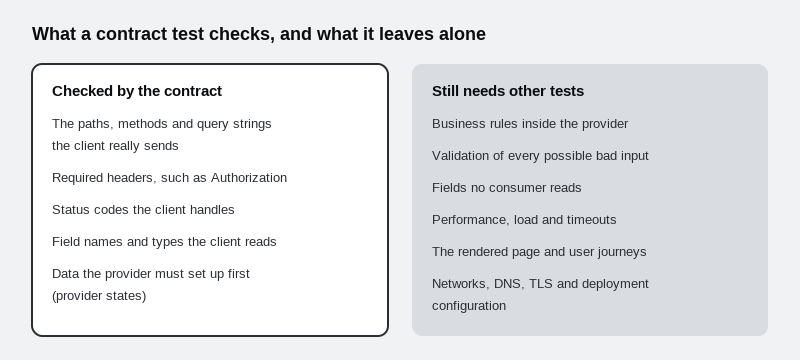
Notice what is missing. The 422 validation errors the API can return are not in the file, because this client never handles them. That is by design. A contract test is not a functional test of the provider: the API still needs its own tests for validation, business rules and edge cases. And a contract does not replace a few end-to-end checks of the real deployed system. What it does replace is relying on a shared staging environment to discover that two pieces no longer fit.
Check it worked
The summary prints four lines, something like:
items-web -> items-api, spec 4.0
GET /api/items/999 -> 404 (state: no item has id 999)
GET /api/items -> 200 (state: an open item exists)
POST /api/items -> 201 (state: none)
In the run this tutorial was checked with, the interactions appeared in this order. Yours may be listed differently; what matters is that all three are there.
Step 8 · Watch a contract test fail
The mock server is strict about requests. Suppose someone writes an interaction for finished items but the client still sends done=false. Add that test:
cat > test/drift.pact.test.js <<'JS'
import { it } from 'vitest'
import { provider, authHeader, clientFor } from './pact.js'

it('shows what a mismatch looks like', async () => {
  await provider
    .addInteraction()
    .uponReceiving('a request for finished items')
    .withRequest('GET', '/api/items', (builder) => {
      builder.query({ done: 'true' }).headers({ Authorization: authHeader })
    })
    .willRespondWith(200, (builder) => {
      builder.jsonBody([])
    })
    .executeTest(async (mockServer) => {
      await clientFor(mockServer).listOpenItems()
    })
})
JS
Run only that file:
npx vitest run test/drift.pact.test.jsThe test fails. Pact logs the mismatch (Expected query parameter 'done' with value 'true' but was 'false'), and the client throws Items API answered 500, because the mock server answers any request it was not told about with a 500. A failing interaction is never written to the pact file, so a broken expectation cannot reach the provider.
Running a single file still runs the global setup, so the pacts folder is gone now. Delete the drift test and run the whole suite to rebuild the contract:
rm test/drift.pact.test.js
npx vitest runCheck it worked
The failing run ended with Tests 1 failed (1). The final run reports Tests 3 passed (3), and node pact-summary.mjs prints the same four lines as before.
Next steps
Keep ~/pact-demo/items-web and its pact file. Verify an API provider against Pact contracts copies items-web-items-api.json into a new ~/pact-demo/items-api project, builds a lean items API, and writes state handlers for an open item exists and no item has id 999. It then removes title from the API's response to show verification failing, and sets up the Pact Broker workflow that replaces copying the file by hand: publishing pacts and verification results, can-i-deploy and record-deployment.
To test how the same client behaves on timeouts, slow responses and malformed JSON, which a contract does not cover, see Test code that calls other services with a fake HTTP server. To build the frontend itself before the API exists, try Mock an API during frontend development with Mock Service Worker.
Related tutorials
- Write unit tests that stay useful as the code changesYou will replace a brittle pytest suite with behaviour tests that catch a real boundary bug and stay green when the code under them is rewritten.
- Write property-based tests in TypeScript with fast-checkYou will use fast-check and Vitest to find a rounding bug in a TypeScript money module, replay the failure from its seed, fix it, and model-test a shopping cart with generated command sequences.
- Write negative tests for an API: bad input, auth and limitsYou will build a pytest and httpx suite that attacks a small FastAPI ordering API with missing and extra fields, wrong types, boundary values, long and multilingual text, bad tokens, another user's data, rate limits and reused idempotency keys, and proves every error comes back in one RFC 9457 format.
Need this done for you?
Padding does this work for growing companies, from the first diagnosis to a system that keeps working.
Get new tutorials