Mobile development · Advanced · 32 min
Accept mobile money in an app through your own server
By Padding · Updated 18 Nov 2026
Node.js 26.13 LTS · Express 5.3 · node:26 image (Debian)
You will build the Node.js 26 server half of a mobile money checkout, where the app never holds provider keys, the server starts each charge once with an idempotency key, signed callbacks are checked and re-queried, and a status query recovers payments whose callback never arrived.
On this page
Mobile money is how a large share of customers in East, West and Central Africa pay: M-Pesa, MTN MoMo, Airtel Money, and the card-and-mobile-money gateways such as Paystack and Flutterwave that sit in front of them. The flows look different on paper, but they share one shape. Your system asks the provider to charge a phone number. The provider sends the customer a prompt on their phone, an STK push or a USSD menu, and the customer approves it with their PIN. Some time later, seconds or minutes, the provider tells you how it went.
The mistake to avoid is letting the app talk to the provider. Provider secret keys in an app can be pulled out of the downloaded package by anyone, and an app that decides the amount or reports "paid" itself can be lied to. The safe pattern puts your own server in the middle:
- The app asks your server to pay for an item. It never sees a provider key and never sends a price.
- Your server saves the order first, then calls the provider with an idempotency key, so a retry can never create a second charge.
- The customer approves the prompt on their phone.
- The provider calls your callback URL. Your server checks the signature, then asks the provider for the charge's status before it believes anything.
- If the callback never arrives, a status query on a timer finds the result anyway.
- The app polls your server, and only your server, for the result.
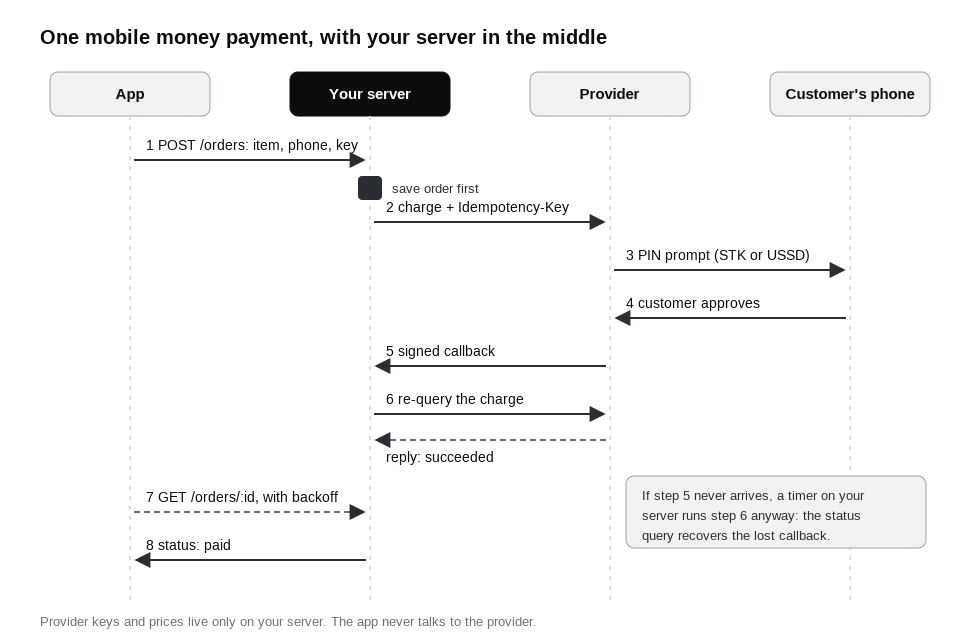
You will build that server with Node.js 26 and Express 5.3, against a practice provider you run on your own machine. It copies the parts that matter from the real providers' documentation: a charge request that returns at once with a pending status, a customer who approves or declines later, a signed callback, a callback that can go missing, and a status query. No account with any provider is needed. A last step maps each part to Daraja, MTN MoMo, Paystack and Flutterwave. The app's screens and payment states are the subject of the companion tutorial; here the app side is one small client module you test from Node.
Step 1 · Create the project and its secrets
Make a throwaway folder, add Express 5.3 and switch the project to ES modules:
mkdir -p ~/momo-demo
cd ~/momo-demo
npm init -y > /dev/null
npm pkg set type=module
npm install express@5.3.0
The server needs two secrets: the key it uses to call the provider, and the secret the provider signs callbacks with. With a real provider you copy both from its dashboard. Here you generate them. umask 077 makes the file readable only by you from the moment it exists, and the secrets never appear on a command line:
cd ~/momo-demo
(umask 077; node -e "
const c = require('node:crypto');
console.log('PROVIDER_SECRET_KEY=sk_practice_' + c.randomBytes(24).toString('hex'));
console.log('CALLBACK_SECRET=whsec_' + c.randomBytes(24).toString('hex'));
" > .env)
cat >> .env <<'ENV'
PROVIDER_URL=http://127.0.0.1:4010
PUBLIC_URL=http://127.0.0.1:3000
# Practice timings: look for lost callbacks every 5 s, once a payment has waited 10 s.
RECONCILE_EVERY_MS=5000
RECONCILE_AFTER_MS=10000
ENV
ls -l .env
Both the practice provider and your server read this file with Node's --env-file option, so no extra package is needed. If you put the project in Git, add .env to .gitignore before the first commit.
Check it worked
cd ~/momo-demo
ls -l .env
node -p "require('express/package.json').version"
The listing starts with -rw-------, and the version line is 5.3.0.
Step 2 · Run a practice provider
The practice provider plays the payment company. It has the two endpoints every mobile money API has in some form, create a charge and read a charge, plus a practice-only endpoint that stands in for the customer answering the prompt on their phone:
cd ~/momo-demo
cat > practice-provider.mjs <<'JS'
// A local stand-in for a mobile money provider. Practice only.
import crypto from 'node:crypto';
import express from 'express';

const SECRET_KEY = process.env.PROVIDER_SECRET_KEY;
const CALLBACK_SECRET = process.env.CALLBACK_SECRET;
if (!SECRET_KEY || !CALLBACK_SECRET) throw new Error('PROVIDER_SECRET_KEY and CALLBACK_SECRET must be set');

const app = express();
app.use(express.json());

const charges = new Map(); // charge id -> charge
const byKey = new Map(); // idempotency key -> { fingerprint, id }
let created = 0;

function authorised(req) {
  const given = Buffer.from(req.get('Authorization') ?? '');
  const expected = Buffer.from(`Bearer ${SECRET_KEY}`);
  return given.length === expected.length && crypto.timingSafeEqual(given, expected);
}

const view = (c) => ({
  id: c.id,
  reference: c.reference,
  amount: c.amount,
  currency: c.currency,
  status: c.status,
  reason: c.reason ?? null,
});

app.post('/v1/charges', (req, res) => {
  if (!authorised(req)) return res.status(401).json({ error: 'invalid key' });
  const key = req.get('Idempotency-Key');
  if (!key) return res.status(400).json({ error: 'Idempotency-Key header is required' });

  const { amount, currency, phone, reference, callback_url } = req.body ?? {};
  if (!Number.isInteger(amount) || amount < 1 || !currency || !/^\d{9,15}$/.test(phone ?? '') || !reference || !callback_url) {
    return res.status(400).json({ error: 'amount, currency, phone, reference and callback_url are required' });
  }

  // The same key with the same request returns the first charge, so a retry never charges twice.
  const fingerprint = JSON.stringify([amount, currency, phone, reference, callback_url]);
  const earlier = byKey.get(key);
  if (earlier) {
    if (earlier.fingerprint !== fingerprint) {
      return res.status(409).json({ error: 'Idempotency-Key was already used for a different request' });
    }
    return res.status(200).json(view(charges.get(earlier.id)));
  }

  const charge = { id: `ch_${crypto.randomUUID()}`, amount, currency, phone, reference, callback_url, status: 'pending' };
  charges.set(charge.id, charge);
  byKey.set(key, { fingerprint, id: charge.id });
  created += 1;
  console.log(`prompt sent to ${phone} for ${amount} ${currency} (${charge.id})`);
  res.status(202).json({ ...view(charge), display_text: 'Approve the payment prompt on your phone' });
});

app.get('/v1/charges/:id', (req, res) => {
  if (!authorised(req)) return res.status(401).json({ error: 'invalid key' });
  const charge = charges.get(req.params.id);
  if (!charge) return res.status(404).json({ error: 'no such charge' });
  res.json(view(charge));
});

async function sendCallback(charge) {
  const body = JSON.stringify({ event: 'charge.updated', data: view(charge) });
  const t = Math.floor(Date.now() / 1000);
  const sig = crypto.createHmac('sha256', CALLBACK_SECRET).update(`${t}.${body}`).digest('hex');
  try {
    const res = await fetch(charge.callback_url, {
      method: 'POST',
      headers: { 'Content-Type': 'application/json', 'X-Signature': `t=${t},v1=${sig}` },
      body,
    });
    console.log(`callback for ${charge.reference}: ${res.status}`);
  } catch (err) {
    console.log(`callback for ${charge.reference} failed: ${err.message}`);
  }
}

// Practice only: plays the customer answering the prompt. ?callback=lost skips the callback.
app.post('/_practice/payments/:reference/:answer', async (req, res) => {
  const charge = [...charges.values()].find((c) => c.reference === req.params.reference);
  if (!charge || charge.status !== 'pending') return res.status(404).json({ error: 'no pending charge for that reference' });
  if (req.params.answer === 'approve') {
    charge.status = 'succeeded';
  } else if (req.params.answer === 'decline') {
    charge.status = 'failed';
    charge.reason = 'customer_cancelled';
  } else {
    return res.status(400).json({ error: 'answer is approve or decline' });
  }
  const lost = req.query.callback === 'lost';
  if (!lost) await sendCallback(charge);
  else console.log(`callback for ${charge.reference} lost`);
  res.json({ reference: charge.reference, status: charge.status, callback: lost ? 'lost' : 'sent' });
});

app.get('/_practice/stats', (req, res) => res.json({ charges_created: created }));

app.listen(4010, '127.0.0.1', () => console.log('practice provider on http://127.0.0.1:4010'));
JS
What it copies from real providers, and where:
- The charge returns before the customer has paid. MTN MoMo answers a request to pay with
202 Acceptedand keeps itPENDINGuntil the customer approves or rejects. Paystack's mobile money charge comes back aspay_offline. Daraja's STK Push acknowledges the request and reports the result later. Your server must treat "request accepted" and "customer paid" as two different events. - An idempotency key. MTN MoMo has you send a UUID in
X-Reference-Idthat you generate and never reuse. The practice provider uses anIdempotency-Keyheader and refuses a reused key with a different body. - A signed callback. The
X-Signatureheader has the formt=<unix time>,v1=<hex HMAC-SHA256 of "<t>.<raw body>">, keyed withCALLBACK_SECRET. Real providers each do this differently, or not at all, as the last step shows. - Lost callbacks. MTN documents that its callback is sent once, with no retry.
?callback=lostlets you reproduce that.
Start it in a second terminal and leave it running:
cd ~/momo-demo
node --env-file=.env practice-provider.mjs
It prints practice provider on http://127.0.0.1:4010.
Check it worked
In your first terminal, try to create a charge without a key:
curl -s -w ' %{http_code}\n' -X POST http://127.0.0.1:4010/v1/charges \
  -H 'Content-Type: application/json' -d '{}'
The answer is {"error":"invalid key"} 401. Anyone who could read the key could charge your customers' phones in your name, which is why it never goes into the app.
Step 3 · Call the provider from the server, once per order
Put the provider calls in their own module. startCharge sends the order's paymentKey as the idempotency key on every attempt. If the network drops after the provider created the charge but before you read the answer, the retry gets the same charge back instead of a second prompt on the customer's phone:
cd ~/momo-demo
cat > provider.mjs <<'JS'
const { PROVIDER_URL, PROVIDER_SECRET_KEY } = process.env;

export class ProviderError extends Error {
  constructor(status, message) {
    super(message);
    this.status = status;
  }
}

async function call(method, path, body, extraHeaders = {}) {
  const res = await fetch(new URL(path, PROVIDER_URL), {
    method,
    headers: {
      Authorization: `Bearer ${PROVIDER_SECRET_KEY}`,
      'Content-Type': 'application/json',
      ...extraHeaders,
    },
    body: body === undefined ? undefined : JSON.stringify(body),
    signal: AbortSignal.timeout(10_000), // never wait forever on a provider
  });
  const data = await res.json().catch(() => ({}));
  if (!res.ok) throw new ProviderError(res.status, `provider answered ${res.status}: ${data.error ?? 'no detail'}`);
  return data;
}

export async function startCharge(order, callbackUrl) {
  const body = {
    amount: order.amount,
    currency: order.currency,
    phone: order.phone,
    reference: order.id,
    callback_url: callbackUrl,
  };
  for (let attempt = 1; ; attempt++) {
    try {
      return await call('POST', '/v1/charges', body, { 'Idempotency-Key': order.paymentKey });
    } catch (err) {
      // Retry timeouts, network errors and 5xx. A 4xx will fail the same way again.
      const retryable = !(err instanceof ProviderError) || err.status >= 500;
      if (!retryable || attempt === 3) throw err;
      await new Promise((resolve) => setTimeout(resolve, 500 * attempt));
    }
  }
}

export const getCharge = (chargeId) => call('GET', `/v1/charges/${encodeURIComponent(chargeId)}`);
JS
reference carries your own order ID. When a callback or a status answer comes back, the reference tells you which order it belongs to, and a mismatch tells you something is wrong.
Check it worked
Call startCharge twice for the same order, then once for an order with a new key:
cd ~/momo-demo
cat > try-provider.mjs <<'JS'
import crypto from 'node:crypto';
import { startCharge } from './provider.mjs';

const order = { id: 'ord_try', amount: 25000, currency: 'KES', phone: '254700000001', paymentKey: crypto.randomUUID() };
const first = await startCharge(order, 'http://127.0.0.1:3000/callbacks/payments');
const again = await startCharge(order, 'http://127.0.0.1:3000/callbacks/payments');
const other = await startCharge({ ...order, paymentKey: crypto.randomUUID() }, 'http://127.0.0.1:3000/callbacks/payments');
console.log('status:', first.status);
console.log('same key, same charge:', first.id === again.id);
console.log('new key, new charge:', first.id !== other.id);
JS
node --env-file=.env try-provider.mjs
The output is status: pending, same key, same charge: true and new key, new charge: true. The provider terminal shows two prompt sent lines, not three. Delete the script with rm try-provider.mjs when you have read it.
Step 4 · Check the callback signature
The callback URL is public, so anyone can post to it. Check the signature over the raw bytes, compare in constant time, and refuse old timestamps. Verify webhook signatures in Node explains each of these checks; this is the same idea for the practice provider's header:
cd ~/momo-demo
cat > signature.mjs <<'JS'
import crypto from 'node:crypto';

const TOLERANCE_SECONDS = 300;

// rawBody must be the exact bytes that arrived (a Buffer), not re-serialised JSON.
export function validSignature(rawBody, header, secret, now = Date.now() / 1000) {
  if (!Buffer.isBuffer(rawBody) || !header) return false;
  const parts = Object.fromEntries(header.split(',').map((part) => part.split('=')));
  if (!/^\d+$/.test(parts.t ?? '') || !/^[0-9a-f]{64}$/.test(parts.v1 ?? '')) return false;

  const expected = crypto.createHmac('sha256', secret).update(`${parts.t}.`).update(rawBody).digest();
  if (!crypto.timingSafeEqual(Buffer.from(parts.v1, 'hex'), expected)) return false;

  // The timestamp is signed, so it can be trusted once the signature is valid.
  return Math.abs(now - Number(parts.t)) <= TOLERANCE_SECONDS;
}
JS
The regular expression makes sure v1 is exactly 32 bytes of hex before timingSafeEqual runs, because that function throws when the two buffers differ in length.
Check it worked
cd ~/momo-demo
cat > try-signature.mjs <<'JS'
import crypto from 'node:crypto';
import { validSignature } from './signature.mjs';

const secret = process.env.CALLBACK_SECRET;
const body = Buffer.from('{"event":"charge.updated"}');
const sign = (t, key = secret) => crypto.createHmac('sha256', key).update(`${t}.`).update(body).digest('hex');
const now = Math.floor(Date.now() / 1000);

console.log('genuine:', validSignature(body, `t=${now},v1=${sign(now)}`, secret));
console.log('changed body:', validSignature(Buffer.from('{"event":"x"}'), `t=${now},v1=${sign(now)}`, secret));
console.log('wrong secret:', validSignature(body, `t=${now},v1=${sign(now, 'guess')}`, secret));
console.log('an hour old:', validSignature(body, `t=${now - 3600},v1=${sign(now - 3600)}`, secret));
console.log('no header:', validSignature(body, undefined, secret));
JS
node --env-file=.env try-signature.mjs
Only the first line says true. The other four say false. Delete the script with rm try-signature.mjs when you have read it.
Step 5 · Write the payment server
The server keeps orders in memory to stay short; the last step says what changes with a database. Read the comments: each one marks a rule of the pattern.
cd ~/momo-demo
cat > server.mjs <<'JS'
import crypto from 'node:crypto';
import express from 'express';
import { startCharge, getCharge } from './provider.mjs';
import { validSignature } from './signature.mjs';

const { PROVIDER_URL, PROVIDER_SECRET_KEY, CALLBACK_SECRET, PUBLIC_URL } = process.env;
for (const [name, value] of Object.entries({ PROVIDER_URL, PROVIDER_SECRET_KEY, CALLBACK_SECRET, PUBLIC_URL })) {
  if (!value) throw new Error(`${name} is not set`);
}
const RECONCILE_EVERY_MS = Number(process.env.RECONCILE_EVERY_MS ?? 30_000);
const RECONCILE_AFTER_MS = Number(process.env.RECONCILE_AFTER_MS ?? 60_000);
const CALLBACK_URL = `${PUBLIC_URL}/callbacks/payments`;

// Prices live on the server. The app names an item; it never sends an amount.
// Amounts are in the currency's smallest unit: 25000 cents is KES 250.
const CATALOGUE = {
  'class-pass': { amount: 25000, currency: 'KES', label: 'Weekly class pass' },
};

const FINAL = new Set(['paid', 'failed', 'needs_review']);
const orders = new Map(); // order id -> order (use a database table in production)
const appKeys = new Map(); // the app's Idempotency-Key -> order id

const publicView = (o) => ({
  id: o.id,
  item: o.item,
  amount: o.amount,
  currency: o.currency,
  status: o.status,
  reason: o.reason ?? null,
  message: o.message ?? null,
});

function applyCharge(order, charge, source) {
  if (FINAL.has(order.status)) return; // a final order never changes again
  if (charge.reference !== order.id || charge.amount !== order.amount || charge.currency !== order.currency) {
    order.status = 'needs_review';
    console.log(`order ${order.id} needs_review: charge does not match (via ${source})`);
    return;
  }
  order.chargeId = charge.id;
  const next = { pending: 'pending', succeeded: 'paid', failed: 'failed' }[charge.status] ?? 'pending';
  if (next === order.status) return;
  order.status = next;
  order.reason = charge.reason ?? null;
  order.message = next === 'pending' ? (charge.display_text ?? null) : null;
  order.updatedAt = Date.now();
  console.log(`order ${order.id} ${next} (via ${source})`);
}

// Ask the provider for the truth about an order. Used by callbacks and by the timer.
async function refresh(order, source) {
  if (FINAL.has(order.status)) return;
  const charge = order.chargeId ? await getCharge(order.chargeId) : await startCharge(order, CALLBACK_URL);
  applyCharge(order, charge, source);
}

const app = express();

app.post('/orders', express.json({ limit: '8kb' }), async (req, res) => {
  // The app sends one key per checkout attempt, so a double tap or a retry
  // after a dropped connection returns the same order.
  const appKey = req.get('Idempotency-Key') ?? '';
  if (!/^[0-9a-f-]{36}$/i.test(appKey)) {
    return res.status(400).json({ error: 'send an Idempotency-Key header holding a UUID' });
  }
  const existingId = appKeys.get(appKey);
  if (existingId) return res.status(200).json(publicView(orders.get(existingId)));

  const item = CATALOGUE[req.body?.item];
  const phone = String(req.body?.phone ?? '');
  if (!item || !/^\d{9,15}$/.test(phone)) {
    return res.status(400).json({ error: 'send a known item and a phone number in international format, digits only' });
  }

  // Save the order before calling the provider, with its own payment key.
  const order = {
    id: `ord_${crypto.randomUUID()}`,
    item: req.body.item,
    amount: item.amount,
    currency: item.currency,
    phone,
    status: 'created',
    paymentKey: crypto.randomUUID(),
    chargeId: null,
    updatedAt: Date.now(),
  };
  orders.set(order.id, order);
  appKeys.set(appKey, order.id);

  try {
    applyCharge(order, await startCharge(order, CALLBACK_URL), 'charge request');
  } catch (err) {
    // The order stays 'created'. The timer retries with the same payment key.
    console.log(`order ${order.id} could not start: ${err.message}`);
    order.message = 'We could not reach the payment provider yet. We will keep trying.';
  }
  res.status(202).json(publicView(order));
});

// The app polls this. Add your user authentication so people only see their own orders.
app.get('/orders/:id', (req, res) => {
  const order = orders.get(req.params.id);
  if (!order) return res.status(404).json({ error: 'no such order' });
  res.json(publicView(order));
});

app.post('/callbacks/payments', express.raw({ type: 'application/json', limit: '64kb' }), async (req, res) => {
  if (!validSignature(req.body, req.get('X-Signature'), CALLBACK_SECRET)) {
    console.log('callback rejected: bad signature');
    return res.status(400).json({ error: 'invalid callback' });
  }
  let event;
  try {
    event = JSON.parse(req.body.toString('utf8'));
  } catch {
    return res.status(400).json({ error: 'invalid callback' });
  }
  const order = orders.get(event?.data?.reference);
  if (!order || order.chargeId !== event.data.id) {
    console.log('callback ignored: unknown charge');
    return res.status(200).json({ received: true });
  }
  // Answer at once, then treat the callback as a signal and ask the provider.
  res.status(200).json({ received: true });
  try {
    await refresh(order, 'callback');
  } catch (err) {
    console.log(`order ${order.id} refresh failed: ${err.message}`); // the timer tries again
  }
});

// Reconciliation: find orders that have waited too long and ask the provider about them.
setInterval(async () => {
  for (const order of orders.values()) {
    if (FINAL.has(order.status) || Date.now() - order.updatedAt < RECONCILE_AFTER_MS) continue;
    try {
      await refresh(order, 'status query');
    } catch (err) {
      console.log(`order ${order.id} status query failed: ${err.message}`);
    }
  }
}, RECONCILE_EVERY_MS);

app.listen(3000, '127.0.0.1', () => console.log('payment server on http://127.0.0.1:3000'));
JS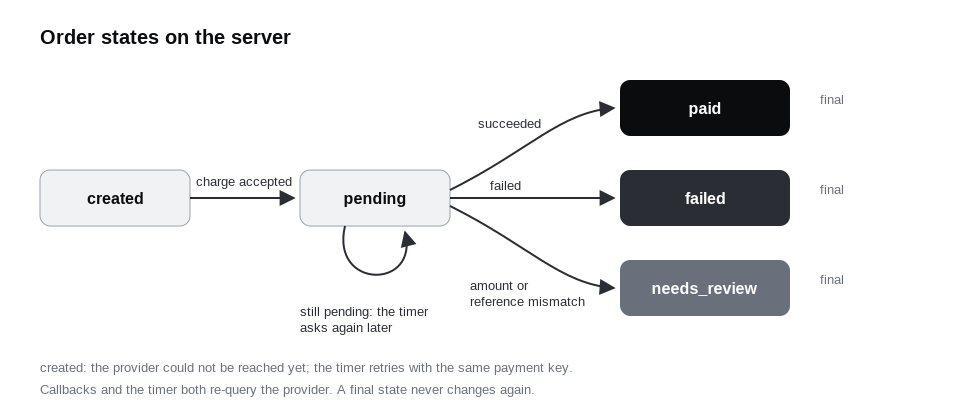
The rules it follows:
- The server sets the price. A modified app can send any amount it likes, so the request names an item and the server looks up the amount.
- Two idempotency keys, two jobs. The app's key stops a double tap creating two orders. The order's
paymentKeystops a retried provider call creating two charges. - Save before you call. If the server crashes between saving and calling, the order is still there in
created, and the timer starts the charge with the same key. - The callback is a signal, not the truth. After the signature check,
refreshasks the provider for the charge, andapplyChargechecks that the reference, amount and currency match the order. Flutterwave's and MTN's documentation both tell you to re-query rather than trust the payload. - A final status is final. Once an order is
paid,failedorneeds_review, a late or replayed callback cannot change it. - Answer callbacks quickly. Providers treat a slow answer as a failure, so the server replies
200before it calls the provider back.
Start it in a third terminal:
cd ~/momo-demo
node --env-file=.env server.mjs
It prints payment server on http://127.0.0.1:3000.
Check it worked
Place an order the way the app will, then play the customer and approve the prompt:
KEY="$(node -p 'crypto.randomUUID()')"
ORDER="$(curl -s -X POST http://127.0.0.1:3000/orders \
  -H 'Content-Type: application/json' -H "Idempotency-Key: $KEY" \
  -d '{"item":"class-pass","phone":"254700000001","amount":1}')"
echo "$ORDER"
ORDER_ID="$(echo "$ORDER" | node -p 'JSON.parse(require("fs").readFileSync(0, "utf8")).id')"
curl -s -X POST "http://127.0.0.1:4010/_practice/payments/$ORDER_ID/approve"; echo
sleep 1
curl -s "http://127.0.0.1:3000/orders/$ORDER_ID"; echo
The first line shows the order with "amount":25000 and "status":"pending", even though the request asked for an amount of 1. The practice provider answers "status":"succeeded","callback":"sent". The last line, read a second later, shows "status":"paid". The server terminal shows pending (via charge request) and then paid (via callback) for that order.
Step 6 · Recover a lost callback and refuse a forged one
Callbacks go missing: your server was restarting, a proxy timed out, or the provider sends only once. This time the customer approves but the callback is lost:
KEY="$(node -p 'crypto.randomUUID()')"
ORDER_ID="$(curl -s -X POST http://127.0.0.1:3000/orders \
  -H 'Content-Type: application/json' -H "Idempotency-Key: $KEY" \
  -d '{"item":"class-pass","phone":"254700000002"}' \
  | node -p 'JSON.parse(require("fs").readFileSync(0, "utf8")).id')"
curl -s -X POST "http://127.0.0.1:4010/_practice/payments/$ORDER_ID/approve?callback=lost"; echo
curl -s "http://127.0.0.1:3000/orders/$ORDER_ID"; echo
sleep 16
curl -s "http://127.0.0.1:3000/orders/$ORDER_ID"; echo
The customer has paid, but straight after the approval your server still says "status":"pending". After the wait it says "status":"paid", and the server terminal shows paid (via status query). With the practice timings the timer looks every 5 seconds at orders that have waited 10 seconds. The defaults in the code, every 30 seconds after a minute, are a gentler starting point for a provider's rate limits.
Now pretend to be an attacker who knows the callback URL but not the secret:
curl -s -w ' %{http_code}\n' -X POST http://127.0.0.1:3000/callbacks/payments \
  -H 'Content-Type: application/json' \
  -H "X-Signature: t=$(date +%s),v1=$(printf '0%.0s' $(seq 1 64))" \
-d '{"event":"charge.updated","data":{"reference":"ord_anything","status":"succeeded"}}'Check it worked
The forged callback gets {"error":"invalid callback"} 400, and the server terminal shows callback rejected: bad signature. The lost-callback order ended paid without any callback at all.
Step 7 · Write the app side and test the whole flow
The app needs very little: start the order with a fresh key, then poll your server with a growing delay until the order is final or the wait runs out. Write it as a plain module with no Node-only imports, so the same file works in an Expo app:
cd ~/momo-demo
cat > pay.mjs <<'JS'
// The app's whole view of payments: your server's two endpoints. No provider keys here.
const FINAL = ['paid', 'failed', 'needs_review'];

export async function payForItem({
  baseUrl,
  item,
  phone,
  key = globalThis.crypto.randomUUID(), // in Expo, pass Crypto.randomUUID() from expo-crypto
  maxWaitMs = 120_000,
  onUpdate = () => {},
}) {
  const start = await fetch(`${baseUrl}/orders`, {
    method: 'POST',
    headers: { 'Content-Type': 'application/json', 'Idempotency-Key': key },
    body: JSON.stringify({ item, phone }),
  });
  if (!start.ok) throw new Error(`could not start the payment: ${start.status}`);
  let order = await start.json();
  onUpdate(order);

  let delay = 2_000;
  const deadline = Date.now() + maxWaitMs;
  while (!FINAL.includes(order.status) && Date.now() < deadline) {
    await new Promise((resolve) => setTimeout(resolve, delay));
    delay = Math.min(delay * 1.5, 10_000); // back off: fewer requests on slow or costly data
    try {
      const res = await fetch(`${baseUrl}/orders/${encodeURIComponent(order.id)}`);
      if (res.ok) {
        order = await res.json();
        onUpdate(order);
      }
    } catch {
      // No signal for a moment. Keep the order ID and try again on the next round.
    }
  }
  // Still 'pending' here means "not known yet". Never start a second payment for it.
  return order;
}
JS
Polling with backoff costs a handful of small requests per payment, which matters to customers on prepaid data. A customer may also be paying from a basic phone held by someone else, or standing where the prompt takes a while to arrive, so give the wait a minute or two. Handle pending, failed and timed-out payments in the app turns these states into screens.
Now test the flow end to end with Node's built-in test runner, against the two servers you have running. Each test plays the customer through the practice provider:
cd ~/momo-demo
cat > flow.test.mjs <<'JS'
import assert from 'node:assert/strict';
import crypto from 'node:crypto';
import { test } from 'node:test';
import { payForItem } from './pay.mjs';

const SHOP = 'http://127.0.0.1:3000';
const PROVIDER = 'http://127.0.0.1:4010';

async function customer(orderId, answer, callback = 'sent') {
  const res = await fetch(`${PROVIDER}/_practice/payments/${orderId}/${answer}?callback=${callback}`, { method: 'POST' });
  assert.equal(res.status, 200);
}

async function payAndAnswer(answer, callback) {
  let answered;
  const order = await payForItem({
    baseUrl: SHOP,
    item: 'class-pass',
    phone: '254700000003',
    maxWaitMs: 40_000,
    onUpdate: (o) => {
      answered ??= customer(o.id, answer, callback);
    },
  });
  await answered;
  return order;
}

const chargesCreated = async () => (await (await fetch(`${PROVIDER}/_practice/stats`)).json()).charges_created;

test('an approved prompt ends paid', async () => {
  const order = await payAndAnswer('approve');
  assert.equal(order.status, 'paid');
  assert.equal(order.amount, 25000);
});

test('a declined prompt ends failed with a reason', async () => {
  const order = await payAndAnswer('decline');
  assert.equal(order.status, 'failed');
  assert.equal(order.reason, 'customer_cancelled');
});

test('a lost callback is recovered by the status query', async () => {
  const order = await payAndAnswer('approve', 'lost');
  assert.equal(order.status, 'paid');
});

test('a double tap makes one order and one charge', async () => {
  const before = await chargesCreated();
  const key = crypto.randomUUID();
  const send = () =>
    fetch(`${SHOP}/orders`, {
      method: 'POST',
      headers: { 'Content-Type': 'application/json', 'Idempotency-Key': key },
      body: JSON.stringify({ item: 'class-pass', phone: '254700000004' }),
    }).then((res) => res.json());
  const [first, second] = await Promise.all([send(), send()]);
  assert.equal(first.id, second.id);
  assert.equal((await chargesCreated()) - before, 1);
});

test('a callback signed with the wrong secret is refused', async () => {
  const body = JSON.stringify({ event: 'charge.updated', data: { reference: 'ord_x', status: 'succeeded' } });
  const t = Math.floor(Date.now() / 1000);
  const sig = crypto.createHmac('sha256', 'not-the-secret').update(`${t}.${body}`).digest('hex');
  const res = await fetch(`${SHOP}/callbacks/payments`, {
    method: 'POST',
    headers: { 'Content-Type': 'application/json', 'X-Signature': `t=${t},v1=${sig}` },
    body,
  });
  assert.equal(res.status, 400);
});
JS
node --test flow.test.mjsCheck it worked
The test runner lists five passing tests and ends with a summary that includes ℹ pass 5 and ℹ fail 0. The lost-callback test takes about 15 seconds, because it waits for the timer. If a test fails, the server and provider terminals show which order it was and what each side saw.
Step 8 · Move to a real provider
The server above has one provider module and one signature check. Moving to a real provider means rewriting those two files against its documentation and its sandbox. The rest of the server, and the app, stay as they are. What to look for in each:
- Safaricom Daraja (M-Pesa Express). Your server gets an OAuth token, sends the STK Push with a
CallBackURL, and readsResultCodefrom the callback. The documentation shows no signature on callbacks, so put a long random token for each order in the callback URL path, check it, and always confirm with the STK Push Query. Collect M-Pesa payments with the Daraja STK Push API builds this in full. - MTN MoMo (Collection). The request to pay takes your UUID in
X-Reference-Id, which doubles as the idempotency key, and your callback URL inX-Callback-Url. It answers202 Accepted. The callback is sent once and is not signed, so MTN's own best practice is a transaction-specific value in the callback URL path, IP checks, and pollingGETon the request to pay with backoff and a maximum duration. Your timer is that polling. - Paystack (mobile money in Ghana, Kenya and Côte d'Ivoire). The charge endpoint takes a
mobile_moneyobject with the phone and a provider code such asmtnormpesa, and answers with apay_offlinestatus while the customer approves. Webhooks carryx-paystack-signature, an HMAC-SHA512 of the raw body keyed with your secret key, and you confirm with the transaction verify endpoint. Accept payments with the Paystack API shows the signature and verify calls. - Flutterwave. Its webhooks carry a
verif-hashheader that must equal the secret hash you set in the dashboard. Compare it in constant time, then re-query the transaction before giving value, as Flutterwave's documentation says. Failed webhooks are retried three times, 30 minutes apart, only if you turn retries on.
For any of them, before you take real money:
- Keep both secrets on the server, in a file or your host's secret store, never in the app's code or its
EXPO_PUBLIC_variables, which are built into the app. - Store orders in a database with a unique constraint on the app's idempotency key and on the provider's charge ID, and run the reconciliation timer in one process only, or as a scheduled job.
- Stop waiting at the provider's timeout. Prompts expire if the customer ignores them. Read the provider's documented limit, and after it mark the order as expired in your own records while the status query keeps checking for a late success.
- Put the server behind HTTPS at a public address the provider can reach, as in the Nginx reverse proxy tutorial.
- Convert phone numbers on the server. Customers type local formats such as
0712…. Convert them to the international, digits-only form the provider documents before you charge.
Check it worked
Open provider.mjs and signature.mjs and list, for your chosen provider, its charge endpoint, its status endpoint, its idempotency field and its callback check. If your list has a callback with no signature and you have no plan for a per-order token and a status query, you are not ready to go live.
Step 9 · Stop the servers and clean up
Press Ctrl+C in the provider and server terminals. Then delete the folder, which holds both secrets:
cd ~
rm -rf ~/momo-demoCheck it worked
ls ~/momo-demo reports that there is no such file or directory.
Next steps
- Build the M-Pesa provider module for real: collect M-Pesa payments with the Daraja STK Push API.
- Go deeper on safe retries: make POST requests safe to retry with idempotency keys.
- Harden the callback route further: verify webhook signatures in Node.
Related tutorials
- Write end-to-end mobile tests with MaestroYou will have a small Maestro suite for a mobile app, with stable test IDs in React Native or Flutter, a shared sign-in flow fed by environment variables, smoke and full runs split by tags, and a CI job that runs the smoke flows on an Android emulator.
- Store data in a SwiftUI app with SwiftDataYou will build a small shop stock app that saves suppliers and products on the iPhone with SwiftData, lists them with sorted and filtered queries, survives a schema change through a migration plan, and is checked by tests that run against an in-memory store.
- Store data in a Flutter app with Drift and SQLiteYou will build a small shop credit book in Flutter 3.50 that keeps customers and what they owe in SQLite through Drift 2.35, with typed queries, a join, a list that redraws itself from a watch() stream, a tested schema migration and in-memory tests for all of it.
Need this done for you?
Padding does this work for growing companies, from the first diagnosis to a system that keeps working.
Get new tutorials