Cloud and deployment · Beginner · 16 min
Choose a cloud region for users in Africa: latency, cost and data rules
By Padding · Updated 18 Nov 2026
Ubuntu 26.04 · curl 8.18 · jq 1.8
You will shortlist the cloud regions in and near Africa, measure round-trip times to them from your own network with a small curl script, compare prices for the same machine across regions, check the data-protection rules that apply, and write the choice down with its reasons.
On this page
Where your servers sit decides how long every page load, API call and database query takes for the people using your product. For a team serving users in Lagos, Nairobi, Accra or Johannesburg, the honest answer to "which region?" is not always the closest one on a map. Undersea cables, peering between networks, the services each region offers, price, and the data-protection law in each country all pull in different directions.
This tutorial turns that decision into evidence. You build a short list of candidate regions, write a small Bash script that times connections to each one from your own network, pull real prices for the same machine in several regions, check which data rules apply to the data you hold, and record the choice in a file your team can review. Nothing here creates a billable resource, except one optional step that says so first.
The commands work on Ubuntu 26.04 and on macOS. The latency script uses only curl, awk and sort.
Step 1 · Build a shortlist of candidate regions
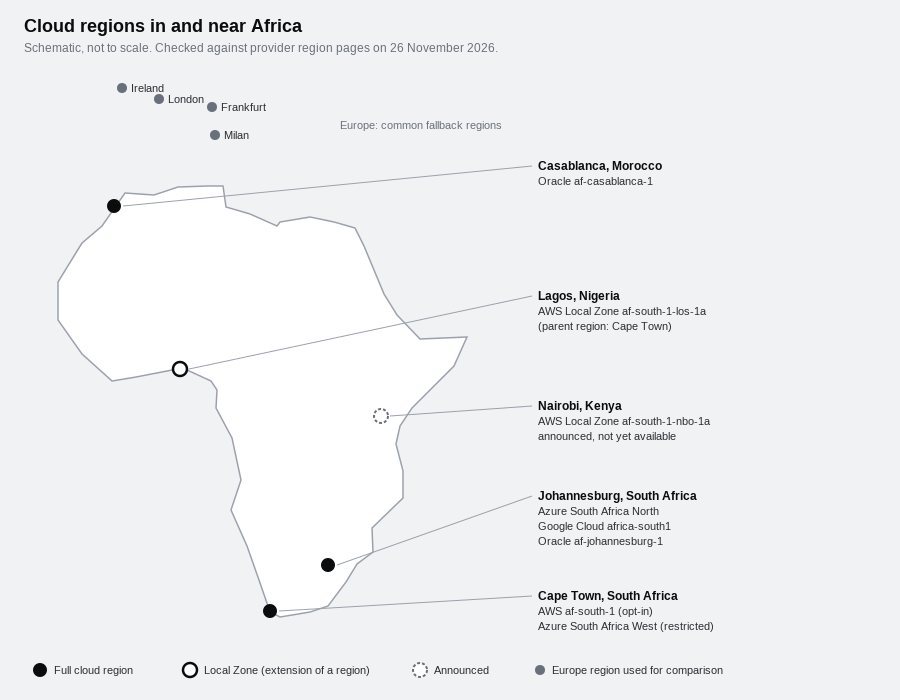
Start with what exists. As of 26 November 2026, the providers' own region pages list these locations on the continent:
- AWS af-south-1, Africa (Cape Town). A full region with three Availability Zones. It is an opt-in region: AWS turns off every region launched after 20 March 2019 until you enable it in your account (the last step shows how).
- AWS Local Zone in Lagos (af-south-1-los-1a). A Local Zone is a small extension of a parent region, here Cape Town, that runs a subset of services close to users. A Nairobi Local Zone (af-south-1-nbo-1a) is announced but not yet available.
- Azure South Africa North (Johannesburg,
southafricanorth). A full region with three availability zones. Its pair, South Africa West (Cape Town,southafricawest), is a restricted region: you request access, usually for disaster recovery. - Google Cloud africa-south1 (Johannesburg). Three zones:
africa-south1-a,-band-c. - Oracle Cloud af-johannesburg-1 (Johannesburg) and af-casablanca-1 (Casablanca).
Your realistic fallbacks are the Europe regions most African traffic already reaches through subsea cables: Ireland, London, Frankfurt and Milan for AWS, and their Azure and Google Cloud equivalents. Regions open and change status, so check the pages linked in Next steps before you commit.
Not every service runs in every region. Before you shortlist a region, open the provider's service availability list and confirm that the database, queue or AI service you depend on is offered there. A region that is 40 ms faster but lacks your managed database is not a candidate.
Install curl and jq, then make a folder for this work. On macOS, curl is already installed; install jq with brew install jq.
sudo apt update
sudo apt install -y curl jq
mkdir -p ~/region-demo
cd ~/region-demo
Write the shortlist as a plain list of endpoints, one per line: a label you choose, then a URL. AWS publishes a separate API hostname for each region, and each one is served from that region, which makes them a fair target for timing:
cat > endpoints.txt <<'TXT'
# label                         url
aws-af-south-1-cape-town        https://ec2.af-south-1.amazonaws.com/
aws-eu-west-1-ireland           https://ec2.eu-west-1.amazonaws.com/
aws-eu-west-2-london            https://ec2.eu-west-2.amazonaws.com/
aws-eu-central-1-frankfurt      https://ec2.eu-central-1.amazonaws.com/
aws-eu-south-1-milan            https://ec2.eu-south-1.amazonaws.com/
aws-us-east-1-virginia          https://ec2.us-east-1.amazonaws.com/
TXT
Virginia is there as a reference point. Many services default to it, and it shows what you lose by never thinking about region at all.
Check it worked
grep -c amazonaws.com endpoints.txtThe command prints 6, one line per candidate endpoint.
Step 2 · Write a script that times connections
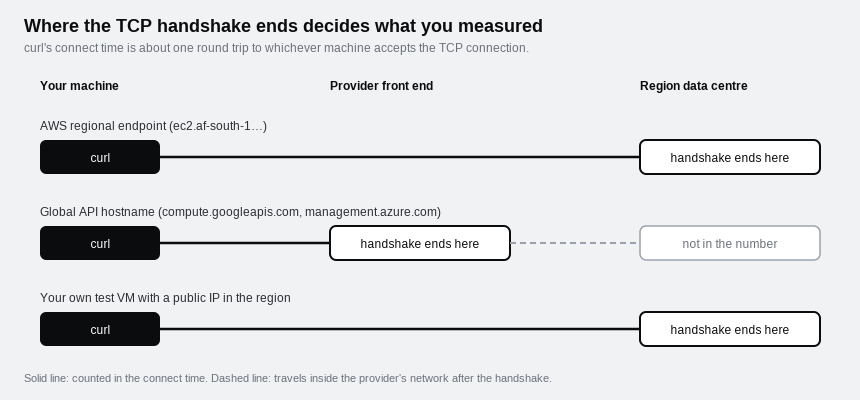
A single ping is a poor guide: many cloud endpoints drop ICMP, and one sample tells you little on a busy mobile network. The script below uses curl instead. curl reports how long DNS lookup took and how long until the TCP connection was open. The difference between the two is close to one network round trip to the machine that accepted the connection. The script takes several samples per endpoint, keeps the median so one slow sample does not skew the result, and saves everything to a dated CSV file.
cat > rtt.sh <<'SH'
#!/usr/bin/env bash
# rtt.sh: median TCP connect time from this machine to each endpoint in a list.
# Usage: ./rtt.sh [endpoints-file]   (TRIES=5 by default)
set -u
list="${1:-endpoints.txt}"
tries="${TRIES:-5}"
mkdir -p results
out="results/rtt-$(date +%Y-%m-%d-%H%M%S).csv"
echo "label,url,median_ms,samples" > "$out"

while read -r label url; do
  case "$label" in ''|'#'*) continue ;; esac
  samples=""
  for _ in $(seq "$tries"); do
    t=$(curl -s -o /dev/null --max-time 10 \
          -w '%{time_namelookup} %{time_connect}' "$url" < /dev/null || true)
    # time_connect is 0 when no connection was made
    ms=$(echo "$t" | awk '$2 > 0 {printf "%.0f", ($2 - $1) * 1000}')
    if [ -n "$ms" ]; then samples="$samples $ms"; fi
  done
  if [ -z "$samples" ]; then
    echo "$label,$url,unreachable,0" >> "$out"
  else
    median=$(printf '%s\n' $samples | sort -n | awk '{v[NR] = $1} END {print v[int((NR + 1) / 2)]}')
    echo "$label,$url,$median,$(echo $samples | wc -w | tr -d ' ')" >> "$out"
  fi
done < "$list"

echo "Saved $out"
tail -n +2 "$out" | awk -F, '$3 != "unreachable"' | sort -t, -k3,3n \
  | awk -F, '{printf "%-32s %6s ms  (%s samples)\n", $1, $3, $4}'
tail -n +2 "$out" | awk -F, '$3 == "unreachable" {printf "%-32s unreachable\n", $1}'
SH
chmod +x rtt.sh
A few choices worth knowing about:
|| trueafter curl keeps going when an endpoint refuses or times out. curl still prints its timings, and a connect time of0marks a failed attempt, which theawkfilter drops.< /dev/nullstops curl from reading the endpoint list that thewhileloop is feeding in.- Endpoints that never connect are listed as
unreachableat the end instead of stopping the run.
Check it worked
Run it once with a single sample per endpoint:
TRIES=1 ./rtt.shIt prints Saved results/rtt-<date>.csv, then one line per endpoint sorted from fastest to slowest, something like aws-af-south-1-cape-town 212 ms (1 samples). Your numbers will differ.
Step 3 · Measure from where your users are
The numbers only mean something if they come from a network like your users'. A laptop on office fibre in Lagos and a prepaid 4G phone hotspot in Kano can see very different paths to the same region, because each mobile operator and ISP peers with different networks and buys different cable capacity. Turn off any VPN first: it sends your traffic through the VPN's own exit point, so you would be timing that instead.
Run the full measurement, five samples per endpoint:
./rtt.shEach run makes about 30 short connections and moves only a few kilobytes, so it is safe on a metered data bundle.
Repeat it at a busy time of day (evening is often the peak on mobile networks) and, if you can, ask a colleague in each of your main markets to run the same two files and send you their CSV. Results from Nairobi and Accra can point to different answers, and that is useful to know before you choose one region for everyone.
Check it worked
ls results/You see at least two CSV files, one per run. Open the latest one: the median_ms column holds a number for each endpoint you could reach. Compare the Cape Town line with the best Europe line. If Cape Town is not clearly faster from your network, that is a real finding, not an error: from parts of West and North Africa, traffic to South Africa can travel a longer path than traffic to Europe.
Step 4 · Measure Google Cloud and Azure regions fairly
You cannot add Google Cloud or Azure to endpoints.txt in the same way. Their main API hostnames, such as compute.googleapis.com and management.azure.com, serve every region, so the connection is accepted by a front end that has nothing to do with the region you care about.
You have two options:
- No cost: use the provider's own tools. Google's Region Picker ranks Google Cloud regions by latency from your browser, price and carbon, and Microsoft publishes round-trip statistics between Azure regions. Neither measures your users' network the way your script does, but both are a useful cross-check.
- Small cost, exact answer: create the smallest Linux VM in the region (for example in
africa-south1orsouthafricanorth) with a public IP and SSH allowed, time a connection to its SSH port, then delete it.
The VM costs money from the moment it starts until you delete it, including its public IP and disk. Set an alert first if you have not (see the budgets tutorial in Next steps), and delete it straight after the measurement. Add a line for it to a separate list. Replace 203.0.113.10 with your VM's public IP:
cat > endpoints-vms.txt <<'TXT'
gcp-africa-south1-vm    http://203.0.113.10:22/
TXT
./rtt.sh endpoints-vms.txt
curl opens the TCP connection to port 22, then gives up because the SSH server does not speak HTTP. The connect time is still recorded, which is all you need.
Check it worked
The output has a line for the VM with a number in milliseconds, and the CSV in results/ has the same row. Then confirm the VM is gone: the provider's console lists no running VM or reserved IP address for that project or subscription in that region.
Step 5 · Compare prices for the same machine
The same virtual machine often costs more in an African region than in a large Europe region, and the gap differs by provider, machine type and service. Compare like with like: one machine size, one operating system, pay-as-you-go, in each candidate region.
Azure publishes its retail prices through a public API that needs no account. This loop asks for a small general-purpose VM, Standard_B2s, on Linux in four regions:
for region in southafricanorth westeurope northeurope uksouth; do
  curl -sG https://prices.azure.com/api/retail/prices \
    --data-urlencode "\$filter=serviceName eq 'Virtual Machines' and armRegionName eq '$region' and armSkuName eq 'Standard_B2s' and priceType eq 'Consumption'" \
  | jq -r --arg r "$region" '.Items[]
      | select(.productName | test("Windows") | not)
      | [$r, .meterName, .retailPrice, .currencyCode, .unitOfMeasure] | @tsv'
done | tee prices-azure.tsv
When this was checked on 26 November 2026, the API returned USD 0.0542 per hour in South Africa North against USD 0.048 in West Europe, USD 0.045 in North Europe and USD 0.0472 in UK South: about 13 to 20 per cent more for the same machine in Johannesburg. Treat these as an example of the method, not current prices; run the command again for today's figures.
For AWS and Google Cloud, use their pricing calculators: add one instance of the same size (for example 2 vCPU and 4 GB of memory), pick the region, note the monthly figure, then change only the region. Price these too, because they often differ by region as much as compute does:
- Data sent out to the internet (egress), which grows with every user.
- Managed databases and storage.
- Traffic between regions, if you keep a copy in Europe.
Check it worked
cat prices-azure.tsvYou see four lines, one per region, each with a price in USD per 1 Hour. Add the AWS and Google Cloud figures you got from the calculators to the same file or to your notes, with the date you checked them.
Step 6 · Check the data rules that apply
This step is not legal advice. Its job is to make sure you ask the right people the right questions before you choose a region, not after.
Write down what personal data you hold (names, phone numbers, BVN or national ID numbers, health or payment data), whose it is, and which countries those people are in. Then check each law that applies:
- Nigeria: Nigeria Data Protection Act 2023 (NDPA). Enforced by the Nigeria Data Protection Commission (NDPC), with its General Application and Implementation Directive (GAID) of 2025. Part VIII (sections 41 to 43) allows personal data to leave Nigeria when the receiving country or arrangement gives adequate protection, or when one of a listed set of grounds applies, such as consent. There is no blanket rule that all data must stay in Nigeria, but the NDPC can name categories that need more, and you must record the basis for each transfer.
- South Africa: Protection of Personal Information Act (POPIA). Enforced by the Information Regulator. Section 72 sets the conditions for sending personal information outside South Africa, so hosting South African users' data in Europe needs one of those conditions to hold. Hosting it in Johannesburg or Cape Town avoids that question for the primary copy, but not for backups or support tools in other countries.
- Kenya: Data Protection Act 2019, enforced by the Office of the Data Protection Commissioner (ODPC). The EU and UK GDPR apply if you also serve users there.
- Sector rules. Banking, telecoms, health and government work often have their own hosting rules on top of the general law. Ask your compliance lead or the sector regulator directly.
Remember that a region choice covers more than the main database: backups, log storage, analytics and support tools all hold personal data, and each one has a location.
Check it worked
You have a short list, in your notes or in the decision file in the next steps, that names each type of personal data, the law that covers it, and one of: "may leave the country under section …", "should stay in-country", or "question sent to <name> on <date>".
Step 7 · Enable the Cape Town region in your AWS account
If AWS af-south-1 is on your shortlist, enable it now: you cannot create anything in it, or even test its services from your account, until you do. Enabling a region is free; resources you create there are billed as usual. It needs an admin profile set up as in the AWS CLI tutorial linked in Next steps.
Check the current status first:
aws account get-region-opt-status --region-name af-south-1A new account shows "RegionOptStatus": "DISABLED". Enable it, then check again:
aws account enable-region --region-name af-south-1
aws account get-region-opt-status --region-name af-south-1
The status moves from ENABLING to ENABLED. AWS has to prepare your account in the region, which usually takes a few minutes and can take several hours. You cannot use the region, or disable it again, until that finishes. The Lagos Local Zone needs its own opt-in after the parent region is enabled; follow the Local Zones guide before you plan on it.
Check it worked
aws account list-regions --region-opt-status-contains ENABLED --query 'Regions[*].RegionName'The list includes "af-south-1".
Step 8 · Record the decision
A region choice outlives the person who made it. Write it down next to the evidence so that whoever revisits it in a year can see why. Create a decision file and fill in the angle-bracket fields with your own findings:
cat > decision.md <<'MD'
# Cloud region decision

Date: <today>
Decided by: <names>

## Users
Main markets: <countries and share of users>
Networks tested: <e.g. MTN 4G Lagos, office fibre Nairobi>

## Latency (median TCP connect, ms)
See results/*.csv. Summary:
- <region>: <ms> from <place>

## Price (same machine, pay-as-you-go)
See prices-azure.tsv and calculator notes. Summary:
- <region>: <price> on <date>

## Data rules
- <data type>: <law>, <may leave / stays in-country / question open>

## Services
Required services available in chosen region: <yes / list gaps>

## Decision
Primary region: <region>
Backup or second region: <region or none>
Revisit by: <date>
MD
Weigh the four factors honestly. If the African region is 120 ms faster for most of your users and the price gap is small, latency usually wins for an interactive app. If your users are spread from Dakar to Cairo and Europe is equally close for most of them, a Europe region with a CDN in front of it can be the better trade. If the law points one way, it decides for you.
Check it worked
grep -c '^## ' decision.mdThe command prints 6, one per section. Open decision.md: no field still contains a <...> placeholder, and every number in it points back to a file in results/ or a dated price.
Next steps
- Create your first server in the region you picked with Launch an EC2 instance and connect to it.
- Set up the profile the last AWS step needs with Set up the AWS CLI with SSO and named profiles.
- Put a spending limit in place before you start anything billable with Set an AWS budget and cost alerts.
- Cut latency for static files whichever region you choose with Prepare your site for a CDN.
Region lists change. Before you commit, recheck the AWS Regions page, the AWS Local Zones locations page, Microsoft's list of Azure regions and Google Cloud's regions and zones page.
Related tutorials
- Tag cloud resources so you know what costs whatYou will have a four-key tagging scheme applied to every AWS resource through Terraform default_tags, a script that lists resources missing a tag, a tag policy ready for your organisation and cost allocation tags that split the bill by project.
- Store and serve files with Cloudflare R2 from a WorkerYou will build a Worker that uploads, downloads and lists files in an R2 bucket, with a size limit, a content-type allowlist, ETag and range support and a bearer token, test it locally with Wrangler and Vitest, and reach the same bucket through R2's S3-compatible API.
- Store container images in Amazon ECR with scanning and lifecycle policiesYou will have a private Amazon ECR repository with immutable tags and scan on push, an nginx image copied into it with crane, its vulnerability findings read from the CLI, a lifecycle policy that keeps the ten newest tagged images, and pull access granted to a second AWS account.
Need this done for you?
Padding does this work for growing companies, from the first diagnosis to a system that keeps working.
Get new tutorials