Databases · Intermediate · 22 min
Design the clinic booking database: tables, keys and relationships
By Padding · Updated 18 Nov 2026
Ubuntu 26.04 · PostgreSQL 18.7
You will turn the clinic booking app's questions into a seven-table PostgreSQL 18 schema with identity keys, UUIDv7 public IDs and foreign keys, load it from schema.sql and confirm with \d that it matches your diagram.
On this page
A booking app is only as good as the tables underneath it. If the schema cannot say which practitioner offers which service, the app cannot show free slots. If a fee is stored as a floating-point number, the month's revenue report is off by a fraction of a kobo, and nobody can explain why. Fixing those mistakes once real patients have booked means migrations on a live table. Fixing them on paper costs a few minutes.
This is part 1 of eight. The running example is the clinic booking app from the design-a-product-end-to-end series: a small chain of clinics where patients book appointments with practitioners for services such as a general consultation or a physiotherapy session. In this part you work from the questions the app must answer to a diagram, then to keys and column types, and finally to a schema.sql file that you load into PostgreSQL 18 and check against the diagram.
This part settles the structure: which tables exist, how each row is identified, and how the tables point at each other. The business rules (required columns, a fee that cannot be negative, one email per patient, what happens when a clinic is deleted, no double-booking) come in part 2, each one proven by an INSERT that fails. So most columns accept NULL for now, on purpose.
The commands use PostgreSQL 18.7. PostgreSQL 19 came out in November 2026; everything here works the same on it. uuidv7() needs PostgreSQL 18 or later.
Step 1 · List the questions the database must answer
Start with what the app needs to ask, not with tables. Every table and column you add later should help answer one of these questions, and any question with no home in the schema is a gap you find now rather than after launch.
Talk to the people who will use the app, or read the screens from the design series, and write the questions in plain language. For the clinic app, create a working folder and a short list:
mkdir -p ~/clinic-demo
cat > ~/clinic-demo/questions.txt <<'TXT'
1. What is on Dr Okafor's diary today, in the clinic's local time?
2. Which practitioners at this clinic offer a physiotherapy session, and when are they free this week?
3. What has this patient booked before, and in which language do we send their reminders?
4. What does each service cost at each clinic?
5. How many appointments were no-shows at each clinic last month?
6. How much did each service earn last month?
TXT
Now underline the nouns. They are the candidate tables: clinic, practitioner, patient, service, appointment, plus the clinic's opening hours that question 2 depends on. The verbs and phrases between them ("offer", "booked", "at this clinic") are the relationships. Some details only show up in the questions: question 1 needs a time zone per clinic, question 3 needs a preferred language, and question 6 needs the fee that was actually charged, which may differ from today's price.
Check it worked
wc -l < ~/clinic-demo/questions.txtIt prints 6. Each question names at least one of the six nouns. If one of your own questions names something that is not on the list (for example "which room is free"), add that noun now or decide in writing that the first version will not answer it.
Step 2 · Sketch the entities and relationships
Draw a box per noun and a line per relationship. For each line, ask the same two questions from both ends: "can one A have many B?" and "can one B have many A?".
- A clinic has many opening-hours rows (one per weekday), many practitioners, many patients and many services. Each of those belongs to one clinic. These are one-to-many, and the "many" side carries a
clinic_idcolumn that points at the clinic. - A practitioner can offer many services, and a service such as a general consultation is offered by several practitioners. That is many-to-many, and a relational database stores it as a third table,
practitioner_services, with one row per pairing. - An appointment joins one patient, one practitioner and one service at one time. A patient has many appointments over the years, and so does each practitioner and service. So
appointmentssits at the centre with three foreign keys.
Some of these are decisions, not facts. Write them down so the next person knows they were deliberate:
- A practitioner belongs to one clinic. If your practitioners work across sites, clinics and practitioners become many-to-many, with a junction table like
practitioner_services. This series keeps one clinic per practitioner. - A patient registers at one clinic. Each clinic keeps its own patient list, which is how many small chains work, and it lets part 6 limit each clinic's staff to their own patients.
- Opening hours belong to the clinic, not to each practitioner. Individual rotas are a later feature.
- An appointment stores the fee it was booked at. That copies a value from
services, which normalisation usually avoids, but here the two values mean different things: the current price, and the price this patient agreed to. Without the copy, raising a fee would rewrite last month's revenue.
Your sketch should look something like this. It shows the key columns only; the full column list comes in step 5.
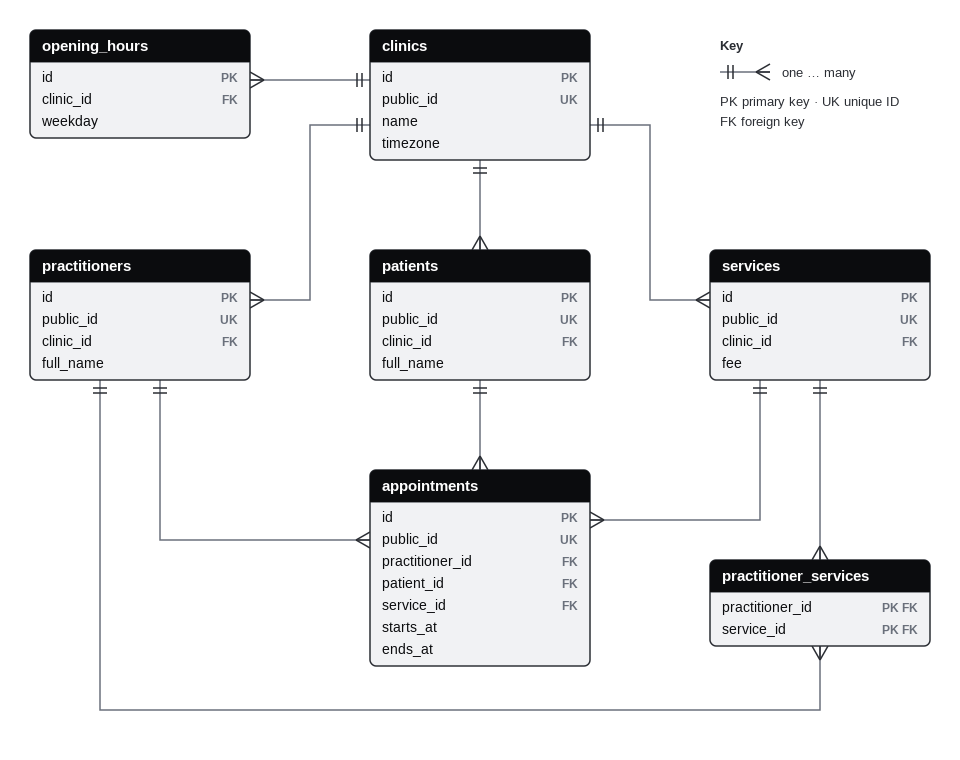
Two shortcuts make a sketch easier to check. A line always ends in a crow's foot at the table that holds the foreign key column. And a many-to-many relationship never appears as a direct line between two boxes: it always goes through a junction table.
Check it worked
Count your boxes and lines. You have seven boxes (clinics, opening_hours, practitioners, patients, services, practitioner_services, appointments) and nine lines. Every line has a crow's foot at exactly one end, and that end is a box with a matching _id column. Each of the six questions from step 1 can be answered by following lines from one box to another: question 5, for example, goes from appointments through practitioners to clinics.
Step 3 · Pick the keys
Every table needs a primary key: a column, or set of columns, that identifies one row and never changes. This schema gives each main table two keys, because rows are identified in two places with different needs.
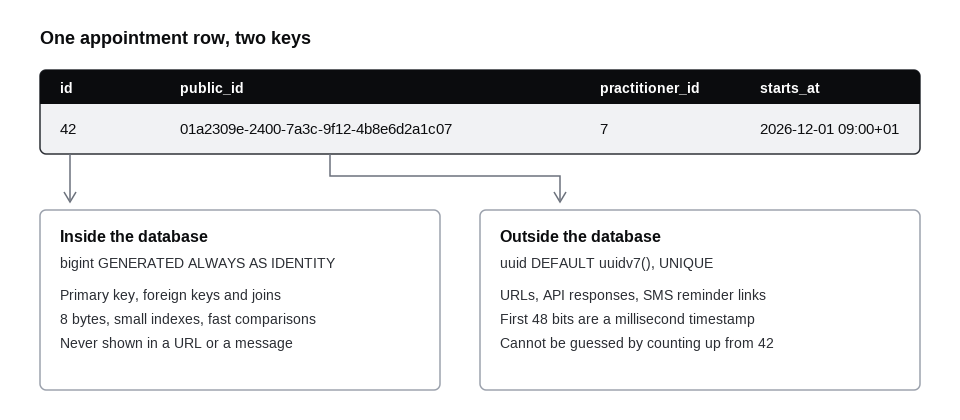
Inside the database, use id bigint GENERATED ALWAYS AS IDENTITY PRIMARY KEY. An identity column is the SQL-standard replacement for serial: PostgreSQL attaches the sequence to the column, and ALWAYS stops an application from inserting its own id by accident. A bigint is 8 bytes, so foreign keys and indexes stay small, and it does not run out the way a 4-byte integer can on a busy appointments table.
Outside the database, a counting number is a poor identifier. A link such as /appointments/42 tells anyone that 41 came before it and invites them to try 43. So each main table also gets public_id uuid NOT NULL DEFAULT uuidv7() UNIQUE, and the app puts only that value in URLs, API responses and the link in an SMS reminder.
PostgreSQL 18 generates version 7 UUIDs itself with uuidv7(). The first 48 bits are a millisecond timestamp, so new values sort roughly in creation order. That keeps the unique index on public_id compact, because new entries land at the end of the index rather than at random places as a fully random version 4 UUID (gen_random_uuid()) would. The flip side: anyone holding a v7 UUID can read the time it was created. For a booking that is fine; for a value whose creation time is itself private, use gen_random_uuid().
Try both functions:
sudo -u postgres psql -c "SELECT uuidv7() AS id, uuid_extract_version(uuidv7()) AS version, uuid_extract_timestamp(uuidv7()) AS created;"The junction table practitioner_services needs neither. Its primary key is the pair (practitioner_id, service_id), which also stops the same practitioner being linked to the same service twice.
Check it worked
The output has one row: a UUID, 7 in the version column, and a created timestamp within a second of now. Run the command again; the new UUID shares its first few characters with the old one, because they were generated a few seconds apart.
Step 4 · Choose the column types
Pick each type for what the value is, not for how it is typed on a form. Four choices matter most in this schema.
Money is numeric, never float. Floating-point types store binary approximations, so sums drift. Compare:
sudo -u postgres psql -Atc "SELECT 0.1::float8 + 0.2::float8, 0.1::numeric + 0.2::numeric;"The first value prints as 0.30000000000000004, the second as 0.3. Fees use numeric(12, 2): up to ten digits before the decimal point and exactly two after, which covers a ₦15,000 consultation or a KSh 4,500 physiotherapy session with room to spare. The currency belongs to the clinic, so clinics has a currency column holding an ISO 4217 code (NGN, KES, GHS). If you ever serve a currency with zero or three minor units, store amounts in a numeric without a fixed scale instead.
Times are timestamptz. PostgreSQL stores a timestamptz as an exact moment in UTC and converts it to whatever time zone the session asks for. Each clinic stores its IANA time zone name, such as Africa/Lagos or Africa/Nairobi, so the app can show the clinic's local time whatever zone the server runs in:
sudo -u postgres psql -Atc "SELECT timestamptz '2026-12-01 09:00+01' AT TIME ZONE 'Africa/Lagos', timestamptz '2026-12-01 09:00+01' AT TIME ZONE 'Africa/Nairobi';"The same moment prints as 2026-12-01 09:00:00 in Lagos and 2026-12-01 11:00:00 in Nairobi. A plain timestamp (without time zone) would store 09:00 and forget which clinic's nine o'clock it meant.
Time spans can be tstzrange. An appointment occupies a range of time, and PostgreSQL has a range type for exactly that. The && operator asks whether two ranges overlap, which is the core of "is this practitioner free?":
sudo -u postgres psql -Atc "SELECT tstzrange('2026-12-01 09:00+01', '2026-12-01 09:30+01') && tstzrange('2026-12-01 09:15+01', '2026-12-01 09:45+01'), tstzrange('2026-12-01 09:00+01', '2026-12-01 09:30+01') && tstzrange('2026-12-01 09:30+01', '2026-12-01 10:00+01');"The first pair overlaps (t). The second pair touches at 09:30 but does not overlap (f), because a range includes its start and excludes its end by default, written [). That is the behaviour you want: a 09:00 to 09:30 appointment and a 09:30 to 10:00 appointment can sit back to back. This schema stores starts_at and ends_at as two timestamptz columns, which every driver and ORM reads without help, and builds the range from them where it is needed. Part 2 does exactly that to make double-booking impossible.
Text is text. In PostgreSQL, varchar(n) and text are stored the same way and perform the same; the only difference is that varchar(n) rejects longer values. A limit that has to change later means a migration, and a limit picked by guessing cuts off real names. Use text, and add a CHECK on length in part 2 only where a real rule exists. text holds any UTF-8 text, so a patient called Adébáyọ̀ Ọlágúnjú or a clinic name in Amharic is stored exactly as typed, as long as the database encoding is UTF-8 (the default on Ubuntu).
The remaining types follow the same thinking: date for a date of birth, time for an opening time that repeats every week, smallint for an ISO weekday (1 is Monday, 7 is Sunday, matching extract(isodow ...)), and integer for a service's length in minutes.
Check it worked
The three commands printed 0.30000000000000004|0.3, 2026-12-01 09:00:00|2026-12-01 11:00:00 and t|f. If the Nairobi value is not two hours later, check the spelling of the zone name: SELECT name FROM pg_timezone_names WHERE name LIKE 'Africa/%'; lists the ones PostgreSQL knows.
Step 5 · Write schema.sql
Keep the schema in a file rather than typing it into psql. A file can be reviewed, kept in version control, and loaded again into a fresh database; in part 5 it becomes the first migration. Create it:
cat > ~/clinic-demo/schema.sql <<'SQL'
-- Clinic booking database, part 1: tables, keys and relationships.
-- Business rules (NOT NULL, CHECK, UNIQUE email, ON DELETE behaviour,
-- no double-booking) are added in part 2.

CREATE TABLE clinics (
  id         bigint GENERATED ALWAYS AS IDENTITY PRIMARY KEY,
  public_id  uuid NOT NULL DEFAULT uuidv7() UNIQUE,
  name       text,
  city       text,
  country    text,         -- ISO 3166-1 code, e.g. NG, KE
  timezone   text,         -- IANA name, e.g. Africa/Lagos
  currency   text,         -- ISO 4217 code, e.g. NGN, KES
  phone      text,
  created_at timestamptz DEFAULT now()
);

CREATE TABLE opening_hours (
  id        bigint GENERATED ALWAYS AS IDENTITY PRIMARY KEY,
  clinic_id bigint REFERENCES clinics (id),
  weekday   smallint,      -- ISO weekday: 1 = Monday ... 7 = Sunday
  opens     time,
  closes    time
);

CREATE TABLE practitioners (
  id         bigint GENERATED ALWAYS AS IDENTITY PRIMARY KEY,
  public_id  uuid NOT NULL DEFAULT uuidv7() UNIQUE,
  clinic_id  bigint REFERENCES clinics (id),
  full_name  text,
  specialty  text,
  email      text,
  created_at timestamptz DEFAULT now()
);

CREATE TABLE patients (
  id                 bigint GENERATED ALWAYS AS IDENTITY PRIMARY KEY,
  public_id          uuid NOT NULL DEFAULT uuidv7() UNIQUE,
  clinic_id          bigint REFERENCES clinics (id),  -- where they registered
  full_name          text,
  phone              text,  -- E.164 format, e.g. +2348000000001
  email              text,
  date_of_birth      date,
  preferred_language text,  -- language tag for reminders, e.g. en, yo, sw
  created_at         timestamptz DEFAULT now()
);

CREATE TABLE services (
  id               bigint GENERATED ALWAYS AS IDENTITY PRIMARY KEY,
  public_id        uuid NOT NULL DEFAULT uuidv7() UNIQUE,
  clinic_id        bigint REFERENCES clinics (id),
  name             text,
  duration_minutes integer,
  fee              numeric(12, 2)  -- current price, in the clinic's currency
);

CREATE TABLE practitioner_services (
  practitioner_id bigint REFERENCES practitioners (id),
  service_id      bigint REFERENCES services (id),
  PRIMARY KEY (practitioner_id, service_id)
);

CREATE TABLE appointments (
  id              bigint GENERATED ALWAYS AS IDENTITY PRIMARY KEY,
  public_id       uuid NOT NULL DEFAULT uuidv7() UNIQUE,
  practitioner_id bigint REFERENCES practitioners (id),
  patient_id      bigint REFERENCES patients (id),
  service_id      bigint REFERENCES services (id),
  starts_at       timestamptz,
  ends_at         timestamptz,
  status          text DEFAULT 'booked',  -- booked, completed, cancelled, no_show
  fee             numeric(12, 2),         -- price agreed when booked
  notes           text,
  created_at      timestamptz DEFAULT now()
);
SQL
A few things to notice as you read it:
- Tables are created parents first. A
REFERENCESclause can only point at a table that already exists, soclinicscomes before everything that points at it, andappointmentscomes last. REFERENCES clinics (id)is a foreign key: PostgreSQL refuses aclinic_idthat does not exist inclinics. With noON DELETEclause, it also refuses to delete a clinic that still has rows pointing at it. Part 2 decides, table by table, whether deleting should be refused or should cascade.- PostgreSQL indexes a primary key and a
UNIQUEcolumn automatically, but not the referencing side of a foreign key.appointments.practitioner_idhas no index yet. Part 4 adds indexes for the queries the app really runs, rather than one per column by habit. statusistextwith a comment listing the allowed values. Part 2 turns that comment into aCHECKconstraint, which is easier to extend later than a PostgreSQL enum type.- Table names are plural and columns are
snake_case. PostgreSQL folds unquoted names to lower case, so mixed-case names would need double quotes in every query.
Check it worked
grep -c '^CREATE TABLE' ~/clinic-demo/schema.sql
grep -c 'REFERENCES' ~/clinic-demo/schema.sql
The first count is 7, one per box in your diagram. The second is 9, one per line. If your own schema differs from the diagram, change one of them now so they agree.
Step 6 · Load the schema into a new database
Create a database called clinic. The rest of the series uses this name.
sudo -u postgres createdb clinicLoad the file in a single transaction with -1, and stop at the first error with ON_ERROR_STOP. Together they mean the load either creates all seven tables or none, so a typo never leaves you with half a schema to clean up:
sudo -u postgres psql -d clinic -1 -v ON_ERROR_STOP=1 -f - < ~/clinic-demo/schema.sql-f - tells psql to read the script from standard input, and the < is handled by your own shell, so the postgres user does not need permission to read your home folder. PostgreSQL prints CREATE TABLE seven times. If it prints an error instead, the message starts with psql:<stdin>: and the line number; fix it in the file and run the same command again.
For now the postgres superuser owns these tables. Part 6 moves ownership to a dedicated role and gives the app only the access it needs.
Check it worked
sudo -u postgres psql -d clinic -c '\dt'The list shows seven tables in the public schema, all owned by postgres: appointments, clinics, opening_hours, patients, practitioner_services, practitioners and services.
Step 7 · Add sample rows and answer a real question
A schema is only proven when it answers the questions from step 1. Add two clinics, one practitioner, one patient and one service at each, and one appointment. The inserts look parents up by name rather than assuming an id, which is how application code should do it too.
sudo -u postgres psql -d clinic -v ON_ERROR_STOP=1 <<'SQL'
INSERT INTO clinics (name, city, country, timezone, currency) VALUES
  ('Harbour Clinic', 'Lagos', 'NG', 'Africa/Lagos', 'NGN'),
  ('Riverside Clinic', 'Nairobi', 'KE', 'Africa/Nairobi', 'KES');

-- Monday to Friday, 08:00 to 17:00, at both clinics.
INSERT INTO opening_hours (clinic_id, weekday, opens, closes)
SELECT c.id, d, '08:00', '17:00'
FROM clinics AS c, generate_series(1, 5) AS d;

INSERT INTO practitioners (clinic_id, full_name, specialty, email) VALUES
  ((SELECT id FROM clinics WHERE name = 'Harbour Clinic'), 'Dr Ngozi Okafor', 'General practice', 'ngozi.okafor@example.com'),
  ((SELECT id FROM clinics WHERE name = 'Riverside Clinic'), 'Achieng Otieno', 'Physiotherapy', 'achieng.otieno@example.com');

INSERT INTO services (clinic_id, name, duration_minutes, fee) VALUES
  ((SELECT id FROM clinics WHERE name = 'Harbour Clinic'), 'General consultation', 30, 15000.00),
  ((SELECT id FROM clinics WHERE name = 'Riverside Clinic'), 'Physiotherapy session', 45, 4500.00);

INSERT INTO practitioner_services (practitioner_id, service_id)
SELECT p.id, s.id
FROM practitioners AS p
JOIN services AS s ON s.clinic_id = p.clinic_id;

INSERT INTO patients (clinic_id, full_name, phone, email, preferred_language) VALUES
  ((SELECT id FROM clinics WHERE name = 'Harbour Clinic'), 'Adébáyọ̀ Ọlágúnjú', '+2348000000001', 'adebayo@example.com', 'yo'),
  ((SELECT id FROM clinics WHERE name = 'Riverside Clinic'), 'Wanjiru Kamau', '+254700000001', 'wanjiru@example.com', 'sw');

-- Book a 30-minute consultation, copying the service's current fee.
INSERT INTO appointments (practitioner_id, patient_id, service_id, starts_at, ends_at, fee)
SELECT p.id, pa.id, s.id,
       timestamptz '2026-12-01 09:00+01',
       timestamptz '2026-12-01 09:00+01' + make_interval(mins => s.duration_minutes),
       s.fee
FROM practitioners AS p
JOIN services AS s ON s.name = 'General consultation'
JOIN patients AS pa ON pa.full_name = 'Adébáyọ̀ Ọlágúnjú'
WHERE p.full_name = 'Dr Ngozi Okafor';
SQL
Now answer question 1, Dr Okafor's diary for 1 December in her clinic's local time. The query walks the lines of your diagram: from appointments to practitioners to clinics, and out to patients and services.
sudo -u postgres psql -d clinic -v ON_ERROR_STOP=1 <<'SQL'
SELECT to_char(a.starts_at AT TIME ZONE c.timezone, 'HH24:MI') AS local_start,
       to_char(a.ends_at AT TIME ZONE c.timezone, 'HH24:MI') AS local_end,
       pa.full_name AS patient,
       s.name AS service,
       a.fee,
       c.currency
FROM appointments AS a
JOIN practitioners AS pr ON pr.id = a.practitioner_id
JOIN clinics AS c ON c.id = pr.clinic_id
JOIN patients AS pa ON pa.id = a.patient_id
JOIN services AS s ON s.id = a.service_id
WHERE pr.full_name = 'Dr Ngozi Okafor'
  AND (a.starts_at AT TIME ZONE c.timezone)::date = date '2026-12-01'
ORDER BY a.starts_at;
SQL
Finally, see a foreign key at work. This booking names a practitioner whose id does not exist:
sudo -u postgres psql -d clinic -c "INSERT INTO appointments (practitioner_id, patient_id, service_id) VALUES (999, 1, 1);"PostgreSQL refuses it with violates foreign key constraint "appointments_practitioner_id_fkey" and a detail line saying Key (practitioner_id)=(999) is not present in table "practitioners". No row is written.
Check it worked
The diary query returns one row: 09:00, 09:30, the patient's name with its tone marks intact, General consultation, 15000.00 and NGN. The failed insert left the table unchanged:
sudo -u postgres psql -d clinic -Atc "SELECT count(*) FROM appointments;"It prints 1. Keep ~/clinic-demo/schema.sql: part 2 rebuilds the clinic database from this same file, with a fresh set of sample rows, before it adds its rules.
Step 8 · Compare the database with your diagram
The last check is the one that catches drift: read the schema back from PostgreSQL and compare it with the sketch, line by line. \d describes one table:
sudo -u postgres psql -d clinic -c '\d appointments'Under the column list, look for two sections. Something like this:
Indexes:
    "appointments_pkey" PRIMARY KEY, btree (id)
    "appointments_public_id_key" UNIQUE CONSTRAINT, btree (public_id)
Foreign-key constraints:
    "appointments_patient_id_fkey" FOREIGN KEY (patient_id) REFERENCES patients(id)
    "appointments_practitioner_id_fkey" FOREIGN KEY (practitioner_id) REFERENCES practitioners(id)
    "appointments_service_id_fkey" FOREIGN KEY (service_id) REFERENCES services(id)
The three foreign keys are the three crow's feet that end at appointments in your diagram. The column list shows id as generated always as identity and public_id with the default uuidv7(). Look at the parent side too:
sudo -u postgres psql -d clinic -c '\d clinics'Its Referenced by: section lists four tables: opening_hours, patients, practitioners and services. Those are the four lines leaving the clinics box.
To see every relationship at once, list the foreign keys from the system catalogue:
sudo -u postgres psql -d clinic -c "SELECT conrelid::regclass AS child_table, confrelid::regclass AS parent_table, conname FROM pg_constraint WHERE contype = 'f' ORDER BY conrelid::regclass::text, confrelid::regclass::text;"Check it worked
The last query returns nine rows, and every row matches one line in your diagram, with child_table at the crow's foot end and parent_table at the other. practitioner_services appears twice, once for each side of the many-to-many relationship. If a line in the diagram has no row here, or a row has no line, one of them is wrong; fix it before part 2 builds rules on top.
Next steps
- For more on junction tables that carry their own data, and on storing trees: /tutorials/model-many-to-many-relationships-and-trees-in-sql.
- To move around the schema faster with
\d,\dtand friends: /tutorials/get-around-postgresql-with-psql-meta-commands.
Related tutorials
- Model many-to-many relationships and trees in SQLYou will build a PostgreSQL 18 junction table that carries its own data, then store one category tree as an adjacency list, an ltree path and a closure table, and move a branch in all three.
- How to Install PostgreSQL 18 on Ubuntu 26.04 and Create Your First DatabaseYou will install PostgreSQL 18 from the official PostgreSQL apt repository, create a database and a user for your app, and connect to it with a password.
Need this done for you?
Padding does this work for growing companies, from the first diagnosis to a system that keeps working.
Get new tutorials