Databases · Intermediate · 24 min
Model many-to-many relationships and trees in SQL
By Padding · Updated 18 Nov 2026
Ubuntu 26.04 · PostgreSQL 18.7
You will build a PostgreSQL 18 junction table that carries its own data, then store one category tree as an adjacency list, an ltree path and a closure table, and move a branch in all three.
On this page
Two shapes of data turn up in almost every application and do not fit a plain table with a foreign key. The first is many-to-many: a student takes several courses and a course has many students. The second is a tree: product categories, folders, comment threads, an organisation chart. Get either wrong and you end up with comma-separated ids in a text column, or a query that needs one more self-join every time the tree grows a level.
In this tutorial you build both in PostgreSQL 18. First a junction table between students and courses that holds its own facts (when the student enrolled and what grade they got) with a composite primary key that stops duplicate enrolments. Then a shop's category tree stored three ways: an adjacency list walked with a recursive CTE, a materialised path using the ltree extension, and a closure table. For each you answer "everything under Groceries", then you move a misfiled branch in all three and compare how much work each one took.
You need PostgreSQL 18 on Ubuntu 26.04, installed as in /tutorials/install-postgresql-18-on-ubuntu-26-04. PostgreSQL 19.0 came out on 19 November 2026; everything here works the same on it. The SQL is saved to files under ~/tree-demo and run with psql, so you can edit and rerun each piece. If you want to experiment, open an interactive session with sudo -u postgres psql -d school and paste the same SQL.
Step 1 · Create students, courses and a junction table
Make a working folder and an empty database called school:
mkdir -p ~/tree-demo
sudo -u postgres createdb school
A student can take many courses and a course has many students, so neither table can hold a single foreign key to the other. The link gets a table of its own, enrolments, with one row per student per course. Because the link is a real thing, it is also the natural home for facts about it: the date the student enrolled and the grade they got. Neither belongs on students (it depends on the course) nor on courses (it depends on the student).
cat > ~/tree-demo/school.sql <<'SQL'
\set ON_ERROR_STOP on
DROP TABLE IF EXISTS enrolments, students, courses;

CREATE TABLE students (
  id   integer PRIMARY KEY,
  name text NOT NULL
);

CREATE TABLE courses (
  id    integer PRIMARY KEY,
  code  text NOT NULL UNIQUE,
  title text NOT NULL
);

CREATE TABLE enrolments (
  student_id  integer NOT NULL REFERENCES students (id) ON DELETE CASCADE,
  course_id   integer NOT NULL REFERENCES courses (id),
  enrolled_at date    NOT NULL DEFAULT current_date,
  grade       text    CHECK (grade IN ('A', 'B', 'C', 'D', 'E', 'F')),
  PRIMARY KEY (student_id, course_id)
);
CREATE INDEX enrolments_course_id_idx ON enrolments (course_id);

INSERT INTO students (id, name) VALUES
  (1, 'Amaka Obi'), (2, 'Kwame Asante'), (3, 'Zainab Bello'), (4, 'Tendai Moyo');

INSERT INTO courses (id, code, title) VALUES
  (1, 'DB101', 'SQL basics'),
  (2, 'DB201', 'Data modelling'),
  (3, 'PY101', 'Python for data'),
  (4, 'WEB101', 'Mobile web basics');

INSERT INTO enrolments (student_id, course_id, enrolled_at, grade) VALUES
  (1, 1, '2026-09-01', 'A'),
  (1, 2, '2026-09-15', NULL),
  (2, 1, '2026-09-02', 'B'),
  (3, 1, '2026-09-03', 'A'),
  (3, 3, '2026-09-10', 'C'),
  (4, 3, '2026-09-12', NULL);
SQL
sudo -u postgres psql -d school < ~/tree-demo/school.sql
Three choices in that file are worth knowing:
PRIMARY KEY (student_id, course_id)is a composite key. The pair must be unique, so a student cannot be enrolled in the same course twice, and you do not need a separateidcolumn. Add a surrogateidonly when something else needs to point at one enrolment, such as an attendance table.- The primary key's index starts with
student_id, so it serves "which courses does this student take". It does not help "which students are in this course", and PostgreSQL does not index foreign key columns for you.enrolments_course_id_idxcovers that direction. gradeis allowed to beNULLuntil the course is marked. TheCHECKconstraint rejects anything outside A to F; aNULLpasses it.
ON DELETE CASCADE on student_id removes a student's enrolments with the student. The course side has no cascade, so you cannot delete a course that still has students by accident.
Check it worked
sudo -u postgres psql -d school -c "SELECT (SELECT count(*) FROM students) AS students, (SELECT count(*) FROM courses) AS courses, (SELECT count(*) FROM enrolments) AS enrolments;"You see 4 students, 4 courses and 6 enrolments. If createdb says the database already exists, you ran this step before; the DROP TABLE IF EXISTS line makes the file safe to load again.
Step 2 · Query through the junction table and let the key refuse duplicates
To list who is in each course, join from enrolments out to both sides:
sudo -u postgres psql -d school <<'SQL'
SELECT c.code, s.name, e.enrolled_at, coalesce(e.grade, '-') AS grade
FROM enrolments e
JOIN students s ON s.id = e.student_id
JOIN courses  c ON c.id = e.course_id
ORDER BY c.code, s.name;
SQL
The six rows run from DB101 | Amaka Obi | 2026-09-01 | A to PY101 | Zainab Bello | 2026-09-10 | C. Amaka's DB201 row and Tendai's PY101 row show - because they have no grade yet.
Now record Amaka's grade. The composite key is how you address one enrolment: both ids together.
sudo -u postgres psql -d school -c "UPDATE enrolments SET grade = 'B' WHERE student_id = 1 AND course_id = 2;"Try to enrol Amaka in DB101 a second time:
sudo -u postgres psql -d school -c "INSERT INTO enrolments (student_id, course_id) VALUES (1, 1);"PostgreSQL refuses with duplicate key value violates unique constraint "enrolments_pkey" and a detail line naming the key (student_id, course_id)=(1, 1). Your application can catch that error and tell the user they are already enrolled, rather than checking first and racing another request.
Check it worked
Count students and graded students per course. Start from courses with a LEFT JOIN so a course with nobody in it still shows up:
sudo -u postgres psql -d school <<'SQL'
SELECT c.code,
       count(e.student_id) AS students,
       count(e.grade)      AS graded
FROM courses c
LEFT JOIN enrolments e ON e.course_id = c.id
GROUP BY c.code
ORDER BY c.code;
SQL
You see DB101 with 3 students and 3 graded, DB201 with 1 and 1 (Amaka's new grade), PY101 with 2 and 1, and WEB101 with 0 and 0. count(e.grade) skips NULL grades, which is why the two columns differ. Still six enrolment rows, so the duplicate never got in.
Step 3 · Store a category tree as an adjacency list
The rest of the tutorial uses one small tree: a shop's product categories. Groceries has Grains, Oils and School supplies under it, and Stationery is a second top-level category. School supplies is in the wrong place; later you move it, with its children, under Stationery.
The diagram shows that branch stored in each of the three layouts you are about to build.
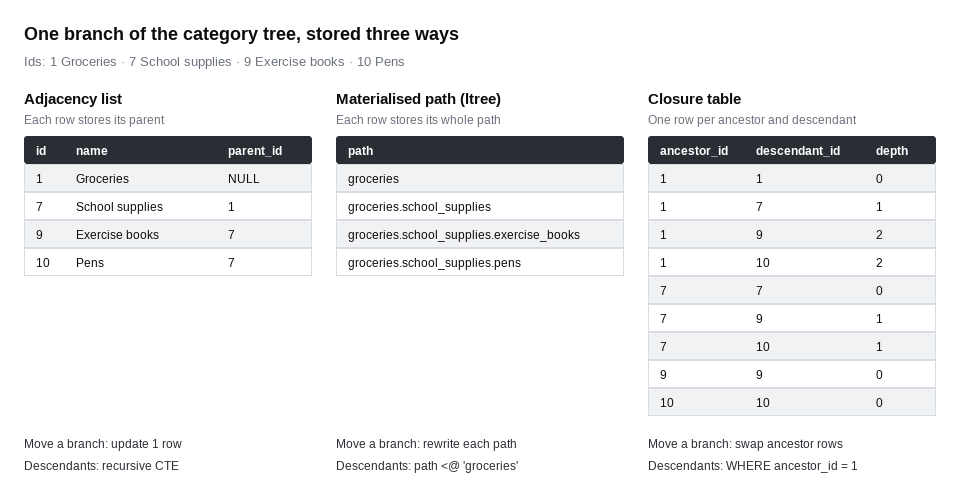
The adjacency list is the layout most schemas start with: each row points at its parent, and a top-level category has a NULL parent.
cat > ~/tree-demo/categories.sql <<'SQL'
\set ON_ERROR_STOP on
DROP TABLE IF EXISTS category_closure, category_paths, categories;

CREATE TABLE categories (
  id        integer PRIMARY KEY,
  name      text    NOT NULL,
  parent_id integer REFERENCES categories (id),
  CHECK (parent_id <> id)
);
CREATE INDEX categories_parent_id_idx ON categories (parent_id);

INSERT INTO categories (id, name, parent_id) VALUES
  (1,  'Groceries',       NULL),
  (2,  'Grains',          1),
  (3,  'Oils',            1),
  (4,  'Rice',            2),
  (5,  'Maize flour',     2),
  (6,  'Palm oil',        3),
  (7,  'School supplies', 1),
  (8,  'Stationery',      NULL),
  (9,  'Exercise books',  7),
  (10, 'Pens',            7);
SQL
sudo -u postgres psql -d school < ~/tree-demo/categories.sql
The foreign key means a parent must exist, and the CHECK stops a category being its own parent. Neither stops a longer loop such as A under B under A; the next step deals with that.
Children are one query away (WHERE parent_id = 1), but "everything under Groceries, at any depth" needs a recursive CTE. It has two parts joined by UNION ALL: a starting row, and a query that finds the children of the rows found so far. PostgreSQL repeats the second part until it finds no new rows.
cat > ~/tree-demo/descendants.sql <<'SQL'
\set ON_ERROR_STOP on
WITH RECURSIVE sub AS (
  SELECT id, name, 0 AS depth
  FROM categories
  WHERE id = :root
  UNION ALL
  SELECT c.id, c.name, s.depth + 1
  FROM categories c
  JOIN sub s ON c.parent_id = s.id
  WHERE s.depth < 20
) SEARCH DEPTH FIRST BY id SET ord
SELECT repeat('    ', depth) || name AS category, depth
FROM sub
ORDER BY ord;
SQL
sudo -u postgres psql -d school -v root=1 < ~/tree-demo/descendants.sql
-v root=1 sets the psql variable :root, so the same file walks any branch. WHERE s.depth < 20 is a depth limit: if bad data ever made the walk go round in circles, it stops after 20 levels instead of running until it runs out of memory. Set it comfortably above the deepest tree you expect. SEARCH DEPTH FIRST BY id SET ord adds a column, ord, that sorts each category straight after its parent, which is the order you want for an indented menu.
Check it worked
You get nine rows, and the category column reads as an indented outline:
Groceries
    Grains
        Rice
        Maize flour
    Oils
        Palm oil
    School supplies
        Exercise books
        Pens
Run it again with -v root=8 and you see only Stationery, which has no children yet.
Step 4 · Catch a loop in the tree with CYCLE
A parent pointer can be set so that the tree loops: put Groceries under Palm oil, which is itself under Groceries. This file does exactly that inside a transaction, looks at what each walk does, and rolls back, so your data is unchanged afterwards.
cat > ~/tree-demo/cycle.sql <<'SQL'
\set ON_ERROR_STOP on
BEGIN;
UPDATE categories SET parent_id = 6 WHERE id = 1;

-- 1. With only a depth limit, the walk repeats the same categories
WITH RECURSIVE sub AS (
  SELECT id, 0 AS depth FROM categories WHERE id = 1
  UNION ALL
  SELECT c.id, s.depth + 1
  FROM categories c
  JOIN sub s ON c.parent_id = s.id
  WHERE s.depth < 5
)
SELECT count(*) AS rows_walked, count(DISTINCT id) AS categories FROM sub;

-- 2. CYCLE marks the row that closes the loop and does not follow it
WITH RECURSIVE sub AS (
  SELECT id, name, parent_id, 0 AS depth FROM categories WHERE id = 1
  UNION ALL
  SELECT c.id, c.name, c.parent_id, s.depth + 1
  FROM categories c
  JOIN sub s ON c.parent_id = s.id
) CYCLE id SET is_cycle USING path
SELECT id, name, parent_id, depth, path
FROM sub
WHERE is_cycle;

ROLLBACK;
SQL
sudo -u postgres psql -d school < ~/tree-demo/cycle.sql
The first query walks 18 rows for 9 categories: it went round the loop once and was only stopped by the depth limit. A depth limit protects the server, but it hides the problem.
The second query uses CYCLE id SET is_cycle USING path. PostgreSQL keeps, in path, the ids visited on the way to each row. When a row's id is already in its own path, it sets is_cycle to true, returns that row and goes no further down it. Filtering on is_cycle gives you the culprit: Groceries (id 1) with parent_id 6, reached at depth 3, with a path through ids 1, 3, 6 and back to 1.
Run a check like this after bulk imports or admin edits to the tree, and fix the bad parent_id it points to.
Check it worked
The output shows 18 | 9, then one row for Groceries with parent_id 6 and depth 3. Confirm the rollback put the tree back:
sudo -u postgres psql -d school -c "SELECT id, name, parent_id FROM categories WHERE id = 1;"Groceries has an empty (NULL) parent_id again.
Step 5 · Store the same tree as a materialised path with ltree
A materialised path stores, on every row, the full route from the top of the tree: groceries.grains.rice. "Everything under Groceries" becomes "every path that starts with groceries", with no recursion. PostgreSQL's ltree extension gives you a column type for these paths, operators to compare them and index support. It ships with the PostgreSQL server packages, so there is nothing extra to install.
This file enables the extension, then builds the paths from the adjacency list you already have, with one recursive query:
cat > ~/tree-demo/paths.sql <<'SQL'
\set ON_ERROR_STOP on
CREATE EXTENSION IF NOT EXISTS ltree;
DROP TABLE IF EXISTS category_paths;

CREATE TABLE category_paths (
  id   integer PRIMARY KEY,
  name text    NOT NULL,
  path ltree   NOT NULL UNIQUE
);

WITH RECURSIVE walk AS (
  SELECT id, name, text2ltree(lower(replace(name, ' ', '_'))) AS path
  FROM categories
  WHERE parent_id IS NULL
  UNION ALL
  SELECT c.id, c.name, w.path || text2ltree(lower(replace(c.name, ' ', '_')))
  FROM categories c
  JOIN walk w ON c.parent_id = w.id
)
INSERT INTO category_paths (id, name, path)
SELECT id, name, path FROM walk;

CREATE INDEX category_paths_path_gist ON category_paths USING gist (path);
SQL
sudo -u postgres psql -d school < ~/tree-demo/paths.sql
Each label is the category name in lower case with spaces turned into underscores, because ltree labels may only contain letters, digits, underscores and hyphens. Which characters count as letters depends on the database's locale, so names with accents or in other scripts (Yorùbá tone marks, Amharic, Arabic) can be rejected or behave differently between servers. For a shop that lists categories in several languages, use the id as the label (1.7.10) and keep every display name in its own column.
The GiST index lets PostgreSQL answer path questions without reading every row once the table is large. Now ask the three common questions:
sudo -u postgres psql -d school <<'SQL'
-- Everything under Groceries, including Groceries itself
SELECT path, nlevel(path) - 1 AS depth
FROM category_paths
WHERE path <@ 'groceries'
ORDER BY path;

-- Only the direct children of Groceries
SELECT name FROM category_paths WHERE path ~ 'groceries.*{1}' ORDER BY path;

-- The breadcrumb for Pens: every ancestor, top first
SELECT name FROM category_paths
WHERE path @> 'groceries.school_supplies.pens'
ORDER BY nlevel(path);
SQL
<@ means "is a descendant of or equal to", @> is the reverse, and ~ matches an lquery pattern, where *{1} stands for exactly one more label. Sorting by path puts each category straight after its parent, the same outline order as before, alphabetical within each level.
Check it worked
The first query returns nine paths, from groceries to groceries.school_supplies.pens. The second returns Grains, Oils and School supplies. The third returns Groceries, School supplies and Pens.
Step 6 · Store the same tree as a closure table
A closure table stores every ancestor and descendant pair, with the distance between them. Each category is also paired with itself at depth 0, which keeps the queries simple. Subtree and ancestor questions become a single indexed lookup, and the database can still check every id with foreign keys.
Build it from the adjacency list:
cat > ~/tree-demo/closure.sql <<'SQL'
\set ON_ERROR_STOP on
DROP TABLE IF EXISTS category_closure;

CREATE TABLE category_closure (
  ancestor_id   integer NOT NULL REFERENCES categories (id),
  descendant_id integer NOT NULL REFERENCES categories (id),
  depth         integer NOT NULL CHECK (depth >= 0),
  PRIMARY KEY (ancestor_id, descendant_id)
);
CREATE INDEX category_closure_descendant_idx ON category_closure (descendant_id);

WITH RECURSIVE pairs AS (
  SELECT id AS ancestor_id, id AS descendant_id, 0 AS depth
  FROM categories
  UNION ALL
  SELECT p.ancestor_id, c.id, p.depth + 1
  FROM pairs p
  JOIN categories c ON c.parent_id = p.descendant_id
)
INSERT INTO category_closure (ancestor_id, descendant_id, depth)
SELECT ancestor_id, descendant_id, depth FROM pairs;
SQL
sudo -u postgres psql -d school < ~/tree-demo/closure.sql
The primary key index answers "everything under X" (WHERE ancestor_id = X) and the second index answers "everything above X" (WHERE descendant_id = X). Query both:
sudo -u postgres psql -d school <<'SQL'
-- Everything under Groceries
SELECT c.name, cl.depth
FROM category_closure cl
JOIN categories c ON c.id = cl.descendant_id
WHERE cl.ancestor_id = 1
ORDER BY cl.depth, c.name;

-- The breadcrumb for Pens
SELECT string_agg(c.name, ' > ' ORDER BY cl.depth DESC) AS breadcrumb
FROM category_closure cl
JOIN categories c ON c.id = cl.ancestor_id
WHERE cl.descendant_id = 10;
SQL
The price is size. Every category has one row per ancestor, including itself, so a deep tree with many leaves stores many more pairs than categories.
Check it worked
The first query lists nine categories, Groceries at depth 0 down to the five depth-2 categories. The breadcrumb reads Groceries > School supplies > Pens. Count the pairs with sudo -u postgres psql -d school -c "SELECT count(*) FROM category_closure;": 23 rows for 10 categories.
Step 7 · Move a branch in all three layouts
Now move School supplies, with Exercise books and Pens, from Groceries to Stationery. One transaction makes the change in all three layouts, so you can compare the work each one needs:
cat > ~/tree-demo/move.sql <<'SQL'
\set ON_ERROR_STOP on
BEGIN;

-- Adjacency list: one row changes
UPDATE categories SET parent_id = 8 WHERE id = 7;

-- Materialised path: every path in the branch is rewritten
UPDATE category_paths
SET path = 'stationery'::ltree || subpath(path, nlevel('groceries'::ltree))
WHERE path <@ 'groceries.school_supplies';

-- Closure table: cut the branch from its old ancestors ...
DELETE FROM category_closure
WHERE descendant_id IN (SELECT descendant_id FROM category_closure WHERE ancestor_id = 7)
  AND ancestor_id NOT IN (SELECT descendant_id FROM category_closure WHERE ancestor_id = 7);

-- ... then pair it with the new parent and everything above it
INSERT INTO category_closure (ancestor_id, descendant_id, depth)
SELECT up.ancestor_id, down.descendant_id, up.depth + down.depth + 1
FROM category_closure up
CROSS JOIN category_closure down
WHERE up.descendant_id = 8
  AND down.ancestor_id = 7;

COMMIT;
SQL
sudo -u postgres psql -d school < ~/tree-demo/move.sql
psql prints UPDATE 1, UPDATE 3, DELETE 3 and INSERT 0 3, which is the comparison in one line:
- The adjacency list changes one parent pointer, however big the branch is.
- The materialised path rewrites every row in the branch.
subpath(path, nlevel('groceries'::ltree))drops the labels of the old parent's path (one label,groceries) andstationerygoes on the front in their place. In a branch of 50,000 products that is 50,000 updated rows. - The closure table deletes the pairs that linked the branch to its old ancestors (only
Grocerieshere) and inserts one pair for each new ancestor and each category in the branch. The deeper the new position and the bigger the branch, the more rows move.
Keeping the delete and insert in one transaction matters: a reader in between would see a branch that belongs nowhere.
Check it worked
Ask each layout how many categories sit under Stationery now:
sudo -u postgres psql -d school <<'SQL'
WITH RECURSIVE sub AS (
  SELECT id FROM categories WHERE id = 8
  UNION ALL
  SELECT c.id FROM categories c JOIN sub s ON c.parent_id = s.id
)
SELECT (SELECT count(*) FROM sub) AS adjacency,
       (SELECT count(*) FROM category_paths WHERE path <@ 'stationery') AS ltree,
       (SELECT count(*) FROM category_closure WHERE ancestor_id = 8) AS closure;
SQL
sudo -u postgres psql -d school -v root=8 < ~/tree-demo/descendants.sql
All three layouts answer 4: Stationery, School supplies, Exercise books and Pens. The outline from descendants.sql now starts at Stationery. Rerun the ltree and closure breadcrumb queries from the last two steps and both read Stationery > School supplies > Pens, with the path for Pens now stationery.school_supplies.pens.
Step 8 · Choose a layout for your tree
All three layouts held the same tree and gave the same answers. They differ in which operations are cheap and in how much the database keeps correct for you.
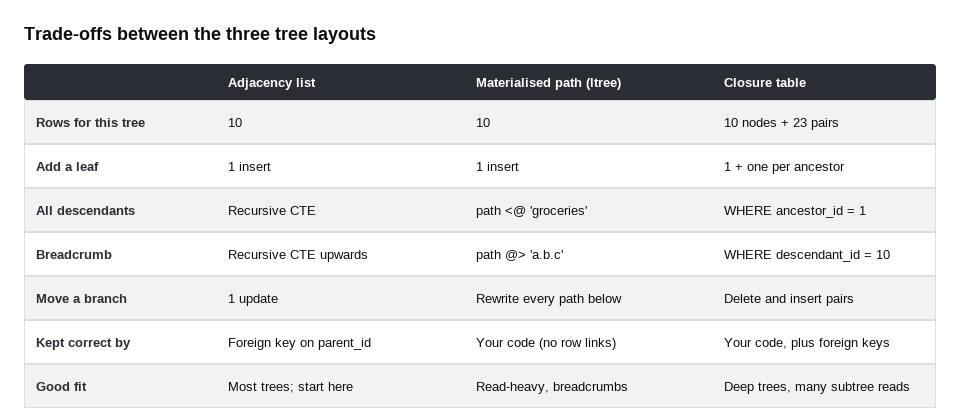
- Adjacency list. One row per category and one foreign key keep it correct. Moving a branch is a single update. Subtree and breadcrumb queries need a recursive CTE, which is fast for trees of a few levels and a few thousand rows, especially with an index on
parent_id. Start here unless you have measured a reason not to. - Materialised path with
ltree. One row per category, and subtree, ancestor and pattern queries are single indexed lookups that return rows already in outline order. Nothing links the rows to each other, so a typo in a path is not caught, and moving a branch rewrites every row in it. It suits trees that are read far more than they are reorganised: menus, breadcrumbs, URL-shaped hierarchies. - Closure table. Subtree and ancestor queries are a plain indexed lookup with the depth already known, and foreign keys still check every id. You pay in rows (23 for this 10-category tree) and in the code that keeps the pairs right on every insert and move. It suits deep trees where subtree queries dominate, such as permissions inherited through an organisation chart.
Many schemas keep parent_id as the source of truth and add a path or closure table beside it for the reads that need speed, as you did here. If you do, rebuild or update the extra table in the same transaction as every change to parent_id.
Whichever you choose, fetch a whole menu branch in one query rather than one request per level. On a low-end Android phone on a slow or prepaid connection, every extra round trip is a delay the user feels.
Check it worked
Compare how many rows each layout stores for the same ten categories:
sudo -u postgres psql -d school -c "SELECT (SELECT count(*) FROM categories) AS adjacency, (SELECT count(*) FROM category_paths) AS ltree, (SELECT count(*) FROM category_closure) AS closure;"You see 10, 10 and 23. Then write down, for a tree in your own project, which of the three questions it asks most often (subtree, breadcrumb or move) and the layout that question points to.
Step 9 · Clean up
When you have finished, remove the practice database and folder. This deletes everything in school, so check the name before you run it:
sudo -u postgres dropdb school
rm -rf ~/tree-demoCheck it worked
sudo -u postgres psql -Atc "SELECT count(*) FROM pg_database WHERE datname = 'school';"The answer is 0, and ls ~/tree-demo reports that the folder does not exist.
Next steps
- Get more practice with named
WITHsteps before writing bigger recursive queries:/tutorials/break-a-long-sql-query-into-steps-with-ctes. - Review inner, left and anti-joins, which every junction table query relies on:
/tutorials/combine-tables-with-sql-joins. - Apply these patterns to a full schema with practitioners, services and appointments:
/tutorials/design-the-clinic-booking-schema-tables-and-relationships.
Related tutorials
- Break a long SQL query into readable steps with CTEsYou will rewrite a 47-line nested PostgreSQL 18 report as a chain of named WITH steps you can check one at a time, read in EXPLAIN when PostgreSQL inlines a CTE and when it does not, and move old rows to an archive in one statement.
- Combine tables with SQL joins: inner, left, self and anti-joinsYou will join customers, orders, products and reviews in PostgreSQL 18, predict which rows each kind of join keeps, find customers who never ordered, and spot the join that silently doubles your counts.
- Design the clinic booking database: tables, keys and relationshipsYou will turn the clinic booking app's questions into a seven-table PostgreSQL 18 schema with identity keys, UUIDv7 public IDs and foreign keys, load it from schema.sql and confirm with \d that it matches your diagram.
Need this done for you?
Padding does this work for growing companies, from the first diagnosis to a system that keeps working.
Get new tutorials