Data analysis · Intermediate · 17 min
Join DataFrames in pandas without losing or duplicating rows
By Padding · Updated 18 Nov 2026
Python 3.15.2 · pandas 3.1.1 · uv 0.13 (checked on python:3.15-slim)
You will join orders to customers and products with pandas merge, compare the four join types by row count, catch duplicate and mismatched keys with validate= and indicator=, list unmatched rows with an anti-join and stack new batches with concat.
On this page
Most analysis questions need two tables at once. Revenue by city needs orders and customers. Margin by product needs orders and a price list. pandas puts them together with merge, and it nearly always runs without an error, which is the problem: a join that quietly drops rows or copies them gives you a believable, wrong total.
The two bugs behind almost every bad join are a key that appears more than once where you expected it once, and keys that look the same to you but not to pandas (C001 against c001 `, or the number `1003 against the text "1003"). In this tutorial you build three small CSV files for a shop, join them, plant both bugs on purpose and catch them with two merge arguments: validate= and indicator=. Then you list the rows that did not match and stack a new batch of orders with concat.
If you think in SQL, merge is a JOIN and the same traps apply; combine tables with SQL joins covers the SQL side, so this page stays with pandas.
Step 1 · Set up the project and the three tables
Make a throwaway folder, start a uv project in it and add pandas 3.1.1, pinned so the output below matches yours:
mkdir -p ~/joins-demo
cd ~/joins-demo
uv init --no-package --python 3.15
uv add "pandas==3.1.1"
Now write the data. orders.csv has one row per order. customers.csv and products.csv are lookups, meant to have one row per key. Two orders are deliberately awkward: order 1005 belongs to a customer C006 who is not in the customer list, and order 1006 is for a product P40 that is not in the price list.
cd ~/joins-demo
cat > orders.csv <<'CSV'
order_id,customer_id,product_code,qty
1001,C001,P10,2
1002,C002,P20,1
1003,C001,P30,5
1004,C003,P10,1
1005,C006,P20,3
1006,C002,P40,2
CSV
cat > customers.csv <<'CSV'
customer_id,name,city
C001,Amina Bello,Lagos
C002,Kwame Mensah,Accra
C003,Wanjiru Kamau,Nairobi
C004,Thabo Nkosi,Johannesburg
C005,Fatou Diop,Dakar
CSV
cat > products.csv <<'CSV'
product_code,product,unit_price
P10,Rice 5kg,12.50
P20,Cooking oil 2L,6.00
P30,Tomato paste x12,9.00
CSV
wc -l orders.csv customers.csv products.csvCheck it worked
wc -l reports 7, 6 and 4 lines: a header plus 6 orders, 5 customers and 3 products. ls shows the three CSV files next to pyproject.toml, uv.lock and main.py from uv init.
Step 2 · Compare the four join types by row count
The how= argument decides which rows survive when a key has no partner. Rather than memorise a Venn diagram, count the rows each choice gives you:
cd ~/joins-demo
cat > compare.py <<'PY'
import pandas as pd

orders = pd.read_csv("orders.csv")
customers = pd.read_csv("customers.csv")
print("orders:", len(orders), "customers:", len(customers))

for how in ["inner", "left", "right", "outer"]:
    joined = orders.merge(customers, on="customer_id", how=how)
    print(f"{how}: {len(joined)} rows")
PY
uv run compare.py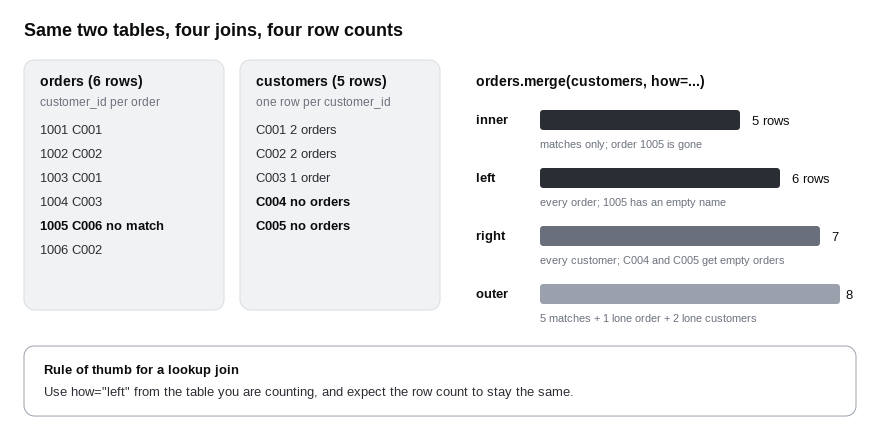
innerkeeps only orders whose customer exists, so order 1005 disappears from every total you compute afterwards.leftkeeps every order and leavesnameandcityempty (NaN) for 1005. This is the one you want when the left table is the thing you are counting.rightkeeps every customer, so C004 and C005 appear once each with empty order columns.outerkeeps everything from both sides: 5 matched rows, 1 order with no customer and 2 customers with no orders.
Check it worked
The script prints orders: 6 customers: 5, then inner: 5 rows, left: 6 rows, right: 7 rows and outer: 8 rows. If you can explain each number from the two CSV files, as in the list above, you have the model you need for the rest of this page.
Step 3 · Write a checked left join
A lookup join has one expectation you can write down: many orders point at one customer, and one product. validate="m:1" makes pandas check that the right-hand key is unique and stop if it is not. indicator= adds a column saying where each row came from (both, left_only or right_only); pass a name instead of True when you join twice, so the second column does not clash with the first.
cd ~/joins-demo
cat > join.py <<'PY'
import pandas as pd

orders = pd.read_csv("orders.csv")
customers = pd.read_csv("customers.csv")
products = pd.read_csv("products.csv")

joined = (
    orders
    .merge(customers, on="customer_id", how="left",
           validate="m:1", indicator="customer_match")
    .merge(products, on="product_code", how="left",
           validate="m:1", indicator="product_match")
)
assert len(joined) == len(orders), "the join changed the number of orders"

joined["revenue"] = joined["qty"] * joined["unit_price"]
print("rows:", len(joined))
print("orders without a customer:", (joined["customer_match"] == "left_only").sum())
print("orders without a product:", (joined["product_match"] == "left_only").sum())
print(f"revenue: {joined['revenue'].sum():.2f}")
joined.to_csv("orders_joined.csv", index=False)
PY
uv run join.py
The assert is the cheapest join check there is. A left join from a table should never change its row count when the right side is a true lookup; if it does, stop and find out why before you look at any totals.
Note that the revenue sum skips order 1006, whose price is missing. That is correct pandas behaviour, but it means 106.50 is revenue for known products only. The unmatched-row step below gives you the list to chase.
Check it worked
The script prints rows: 6, orders without a customer: 1, orders without a product: 1 and revenue: 106.50. Open orders_joined.csv: the customer_match column says left_only on order 1005 and the product_match column says left_only on order 1006.
Step 4 · Catch a duplicate key before it multiplies rows
Here is the first classic bug. Someone re-exports the customer list after Kwame Mensah moves to Kumasi, and the old row is still there. Make that file, then join it with and without the check:
cd ~/joins-demo
cp customers.csv customers_v2.csv
echo "C002,Kwame Mensah,Kumasi" >> customers_v2.csv
cat > dupes.py <<'PY'
import pandas as pd
from pandas.errors import MergeError

orders = pd.read_csv("orders.csv")
products = pd.read_csv("products.csv")
customers = pd.read_csv("customers_v2.csv")

unchecked = (
    orders
    .merge(customers, on="customer_id", how="left")
    .merge(products, on="product_code", how="left")
)
revenue = (unchecked["qty"] * unchecked["unit_price"]).sum()
print("rows without a check:", len(unchecked))
print(f"revenue without a check: {revenue:.2f}")

try:
    orders.merge(customers, on="customer_id", how="left", validate="m:1")
except MergeError as err:
    print("MergeError:", err)

print(customers[customers.duplicated("customer_id", keep=False)].to_string(index=False))
PY
uv run dupes.py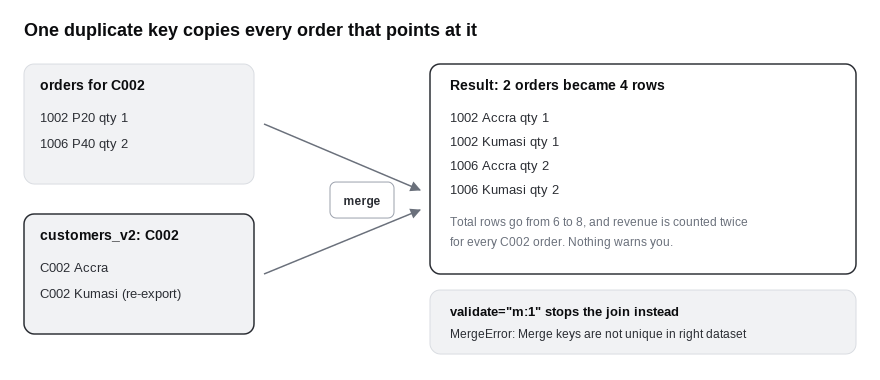
Without the check, both C002 orders match both C002 rows, so 6 orders become 8 rows and order 1002's revenue is counted twice: 112.50 instead of 106.50. With validate="m:1", pandas refuses. duplicated(..., keep=False) then shows every copy of the repeated key, not only the second one, so you can see which is right.
Fix it by deciding which row wins. Here the file is in export order, so the last row is the newest; with a real file, sort by an "updated at" column first and say so in your notes:
cd ~/joins-demo
cat > dedupe.py <<'PY'
import pandas as pd

orders = pd.read_csv("orders.csv")
customers = pd.read_csv("customers_v2.csv").drop_duplicates("customer_id", keep="last")

fixed = orders.merge(customers, on="customer_id", how="left", validate="m:1")
print("rows after removing the duplicate:", len(fixed))
print(fixed.loc[fixed["customer_id"] == "C002", ["order_id", "city"]].to_string(index=False))
PY
uv run dedupe.py
The other validate= values follow the same pattern: "1:1" when both sides should be unique (two halves of one table), "1:m" when the left side is the lookup, and "m:m", which checks nothing and is a sign to stop and think.
Check it worked
dupes.py prints rows without a check: 8, revenue without a check: 112.50, a line starting MergeError: Merge keys are not unique in right dataset, then the two C002 rows, one in Accra and one in Kumasi. dedupe.py prints rows after removing the duplicate: 6 and both C002 orders (1002 and 1006) with the city Kumasi.
Step 5 · Find keys that only look the same
The second classic bug is keys that differ in ways you do not notice in a spreadsheet: case, stray spaces and type. A second system, a CRM, exports customer segments with hand-typed IDs:
cd ~/joins-demo
cat > customers_crm.csv <<'CSV'
customer_id,segment
c001 ,retail
C002,wholesale
 C003,retail
c004,retail
C005,wholesale
CSV
cat > keys.py <<'PY'
import pandas as pd

orders = pd.read_csv("orders.csv")
crm = pd.read_csv("customers_crm.csv")

raw = orders.merge(crm, on="customer_id", how="left", indicator=True)
print("before cleaning, matched:", (raw["_merge"] == "both").sum())

crm["customer_id"] = crm["customer_id"].str.strip().str.upper()
clean = orders.merge(crm, on="customer_id", how="left",
                     validate="m:1", indicator=True)
print("after cleaning, matched:", (clean["_merge"] == "both").sum())
print("after cleaning, unmatched:", (clean["_merge"] == "left_only").sum())
PY
uv run keys.py
Before cleaning only C002 matches, so only its two orders get a segment. read_csv keeps leading and trailing spaces inside values by default, and "c001 " is a different string from "C001". After .str.strip().str.upper() the five orders with a known customer match, and the one left over is order 1005, the customer who is genuinely missing. Keep validate="m:1" on the cleaned join: cleaning can turn two different keys into one (c001 and `C001 `), which would bring the duplicate bug back.
Names are worse keys than IDs. Customer and city names arrive with and without accents (Lomé and Lome), in different scripts, or spelled several ways across French, English and local-language forms. Join on an ID wherever one exists, and treat a name match as a cross-check.
Type is the third mismatch. If someone reads a file with dtype=str to protect leading zeros, its numeric IDs become text, and pandas will not join text to numbers:
cd ~/joins-demo
cat > refunds.csv <<'CSV'
order_id,amount
1003,9.00
1004,12.50
CSV
cat > key_types.py <<'PY'
import pandas as pd

orders = pd.read_csv("orders.csv")
refunds = pd.read_csv("refunds.csv", dtype=str)
print("order_id types:", orders["order_id"].dtype, "and", refunds["order_id"].dtype)

try:
    orders.merge(refunds, on="order_id", how="left")
except ValueError as err:
    print("ValueError:", err)

refunds["order_id"] = pd.to_numeric(refunds["order_id"]).astype("int64")
joined = orders.merge(refunds, on="order_id", how="left", validate="1:1")
print("orders with a refund:", joined["amount"].notna().sum())
PY
uv run key_types.pyCheck it worked
keys.py prints before cleaning, matched: 2, after cleaning, matched: 5 and after cleaning, unmatched: 1. key_types.py prints the two key types (int64 and a string type), then a ValueError beginning You are trying to merge on int64 and, then orders with a refund: 2 once the IDs are numbers on both sides.
Step 6 · List the rows that did not match with an anti-join
An anti-join returns the rows in one table with no partner in the other. pandas has no how="anti", but indicator=True gives you one: keep the left_only rows. For a single key, isin is shorter and does the same job.
cd ~/joins-demo
cat > unmatched.py <<'PY'
import pandas as pd

orders = pd.read_csv("orders.csv")
customers = pd.read_csv("customers.csv")
products = pd.read_csv("products.csv")

tagged = orders.merge(customers[["customer_id"]], on="customer_id",
                      how="left", indicator=True)
no_customer = tagged.loc[tagged["_merge"] == "left_only", orders.columns]
print("orders with no customer:", ", ".join(no_customer["order_id"].astype(str)))

no_product = orders[~orders["product_code"].isin(products["product_code"])]
print("orders with an unknown product:", ", ".join(no_product["order_id"].astype(str)))

no_orders = customers[~customers["customer_id"].isin(orders["customer_id"])]
print("customers with no orders:", ", ".join(no_orders["customer_id"]))

to_chase = pd.concat(
    [no_customer.assign(problem="no customer"),
     no_product.assign(problem="unknown product")],
    ignore_index=True,
)
to_chase.to_csv("to_chase.csv", index=False)
print("rows in to_chase.csv:", len(to_chase))
PY
uv run unmatched.py
cat to_chase.csv
Selecting orders.columns after the merge drops the joined columns and _merge, so the result has the same shape as orders and can go straight to whoever owns the data. Joining against customers[["customer_id"]] rather than the whole table keeps the merge small.
One trap the anti-join exposes: pandas matches empty (NaN) keys to each other in merge. If both tables have orders or customers with a blank ID, they join as if they were the same customer. Check orders["customer_id"].isna().sum() before a join, and drop or fill blank keys on purpose.
Check it worked
The script prints orders with no customer: 1005, orders with an unknown product: 1006, customers with no orders: C004, C005 and rows in to_chase.csv: 2. cat to_chase.csv shows the two problem orders with a problem column saying what is wrong with each.
Step 7 · Stack new batches with concat
merge puts tables side by side. When you have more rows of the same table, such as December's orders arriving as a separate export, you stack them with concat. Its traps are different: a renamed column and repeated rows. This export calls the quantity column quantity and repeats order 1006:
cd ~/joins-demo
cat > orders_dec.csv <<'CSV'
order_id,customer_id,product_code,quantity
1006,C002,P40,2
1007,C004,P30,1
1008,C005,P10,4
CSV
cat > stack.py <<'PY'
import pandas as pd

orders = pd.read_csv("orders.csv")
dec = pd.read_csv("orders_dec.csv")

careless = pd.concat([orders, dec], ignore_index=True)
print("columns after a plain concat:", list(careless.columns))
print("rows with no qty:", careless["qty"].isna().sum())

dec = dec.rename(columns={"quantity": "qty"})
assert list(dec.columns) == list(orders.columns), "column names differ"
stacked = pd.concat([orders, dec], ignore_index=True)
print("rows stacked:", len(stacked))
print("repeated order ids:", stacked["order_id"].duplicated().sum())

stacked = stacked.drop_duplicates("order_id", keep="last")
assert stacked["order_id"].is_unique
stacked.to_csv("orders_all.csv", index=False)
print("rows saved:", len(stacked))
PY
uv run stack.py
concat lines columns up by name, not position. A column that exists in only one input is kept and filled with NaN for the other, so a plain concat with a renamed column gives you a table where the new rows have no quantity, and their revenue drops out of every sum. The assert on column names turns that into an error. drop_duplicates("order_id", keep="last") keeps the later copy of 1006, on the same reasoning as the customer fix.
On a slow or metered connection, exports often arrive as several partial files after a dropped download. The same pattern stacks them safely: rename, assert the columns, concat, then check the ID is unique.
Check it worked
The script prints the plain-concat columns ending in both 'qty' and 'quantity', rows with no qty: 3, rows stacked: 9, repeated order ids: 1 and rows saved: 8. orders_all.csv has 9 lines: a header and 8 orders. To confirm the combined file still joins cleanly, change orders.csv to orders_all.csv in join.py and run it again: it prints rows: 8, and orders without a customer: 1 is still order 1005. When you have finished, delete the folder with rm -r ~/joins-demo.
Next steps
- Summarise the joined orders by customer and city: group and aggregate data in pandas.
- See the same checks on a real dataset, with every unmatched code explained: add African subregions to the energy data with a checked join.
- Write the same joins in SQL: combine tables with SQL joins.
- If you are coming from VLOOKUP and XLOOKUP, move from spreadsheet formulas to pandas maps each formula to its pandas form.
Part of these paths
Related tutorials
- Move from spreadsheet formulas to pandasYou will redo a shop's sales workbook in pandas 3.1, step by step, turning fill down, XLOOKUP, IF, filters, SUMIFS, COUNTIFS and a pivot table into a short Python script that writes its results back to Excel.
- Group and aggregate data in pandasYou will summarise a shop's sales by region, month and city with pandas groupby, named aggregation, transform and filter, and finish with a regional report whose totals you have checked against the raw data.
- Combine tables with SQL joins: inner, left, self and anti-joinsYou will join customers, orders, products and reviews in PostgreSQL 18, predict which rows each kind of join keeps, find customers who never ordered, and spot the join that silently doubles your counts.
Need this done for you?
Padding does this work for growing companies, from the first diagnosis to a system that keeps working.
Get new tutorials