Containers and Kubernetes · Intermediate · 20 min
Lay out the Snip Kubernetes manifests with Kustomize overlays
By Padding · Updated 18 Nov 2026
Ubuntu 26.04 · Kubernetes 1.37 · kind 0.33 · Kustomize 5.8.3 · kubeconform 0.8.0
You will have one Kustomize base and separate dev and prod overlays for the Snip API, each rendering a complete, schema-checked set of Kubernetes 1.37 manifests that you can diff and apply to your kind cluster.
On this page
In part 1 you packaged Snip, the series' small Go link shortener, as a distroless image and loaded snip:0.1.0 into your kind cluster. Now it needs manifests. The first version of most projects is one folder of YAML files that gets copied to prod/ the day a second environment appears, and from then on every fix has to be made twice.
Kustomize avoids the copy. You write the shared objects once, in a base, and describe each environment as a small overlay that points at the base and changes only what differs: the namespace, the replica count, the image tag, a setting or two, the resource limits. kustomize build merges them and prints plain Kubernetes YAML. There is no template language and no variables, so the base stays valid YAML you can read on its own.
By the end you will have this layout in ~/snip-demo/k8s, with both overlays checked against the Kubernetes 1.37 API schemas before anything reaches the cluster:
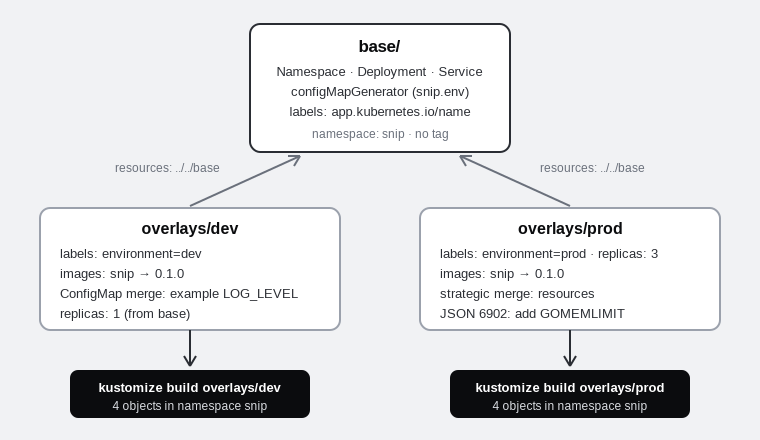
The later parts of the series add PostgreSQL, probes, routing, autoscaling and network policy to this same layout, so keep the folder when you finish.
Step 1 · Install Kustomize and kubeconform
kubectl already contains a copy of Kustomize (kubectl kustomize and kubectl apply -k), but that copy is pinned to whatever kubectl release you have and can trail the standalone tool. Install the standalone kustomize 5.8.3 so that you know exactly which version renders your manifests, and kubeconform 0.8.0, which checks YAML against the official Kubernetes API schemas without needing a cluster.
The commands work on Linux and macOS, on Intel or Arm. They download each release archive and its checksum file from GitHub, check the archive before unpacking it, and install the binaries in /usr/local/bin:
cd "$(mktemp -d)"
OS="$(uname -s | tr '[:upper:]' '[:lower:]')"
case "$(uname -m)" in
  x86_64) ARCH=amd64 ;;
  aarch64|arm64) ARCH=arm64 ;;
  *) echo "No release for CPU type $(uname -m)"; false ;;
esac
if command -v sha256sum >/dev/null; then SUM="sha256sum"; else SUM="shasum -a 256"; fi

KUSTOMIZE=5.8.3
curl -fsSLO "https://github.com/kubernetes-sigs/kustomize/releases/download/kustomize%2Fv${KUSTOMIZE}/kustomize_v${KUSTOMIZE}_${OS}_${ARCH}.tar.gz"
curl -fsSLO "https://github.com/kubernetes-sigs/kustomize/releases/download/kustomize%2Fv${KUSTOMIZE}/checksums.txt"
grep " kustomize_v${KUSTOMIZE}_${OS}_${ARCH}.tar.gz$" checksums.txt | $SUM -c

KUBECONFORM=0.8.0
curl -fsSLO "https://github.com/yannh/kubeconform/releases/download/v${KUBECONFORM}/kubeconform-${OS}-${ARCH}.tar.gz"
curl -fsSLO "https://github.com/yannh/kubeconform/releases/download/v${KUBECONFORM}/CHECKSUMS"
grep " kubeconform-${OS}-${ARCH}.tar.gz$" CHECKSUMS | $SUM -c

tar xzf "kustomize_v${KUSTOMIZE}_${OS}_${ARCH}.tar.gz"
tar xzf "kubeconform-${OS}-${ARCH}.tar.gz"
sudo install -m 0755 kustomize kubeconform /usr/local/bin/
Each checksum line ends in OK. If one prints FAILED, the download is damaged or not what GitHub published: do not install it, and download it again.
Binaries installed this way get no updates from apt or any other package manager. To upgrade, run the same commands with the new version numbers in KUSTOMIZE= and KUBECONFORM=. On macOS, Homebrew packages both tools if you prefer it to manage upgrades.
Check it worked
kustomize version
kubeconform -v
The first command prints v5.8.3 and the second v0.8.0.
Step 2 · Write the base
The base holds what every environment shares. It names no image tag and no environment-specific values, so on its own it describes Snip in the abstract. Create the folders:
mkdir -p ~/snip-demo/k8s/base ~/snip-demo/k8s/overlays/dev ~/snip-demo/k8s/overlays/prod
cd ~/snip-demo/k8s
A Namespace called snip, which holds everything the series runs on the cluster. Part 7 locks this namespace down:
cat > base/namespace.yaml <<'YAML'
apiVersion: v1
kind: Namespace
metadata:
  name: snip
YAML
The Deployment. The image is the bare name snip, which the overlays complete with a tag. imagePullPolicy: IfNotPresent lets kind use the image you loaded in part 1 instead of trying to pull it from a registry. The container reads its settings from a ConfigMap called snip-config, and listens on port 8080, as you built it in part 1:
cat > base/deployment.yaml <<'YAML'
apiVersion: apps/v1
kind: Deployment
metadata:
  name: snip
spec:
  replicas: 1
  selector:
    matchLabels:
      app.kubernetes.io/component: api
  template:
    metadata:
      labels:
        app.kubernetes.io/component: api
    spec:
      containers:
        - name: snip
          image: snip
          imagePullPolicy: IfNotPresent
          ports:
            - name: http
              containerPort: 8080
          envFrom:
            - configMapRef:
                name: snip-config
          resources:
            requests:
              cpu: 50m
              memory: 64Mi
            limits:
              memory: 128Mi
YAML
A Service in front of it, sending port 80 to the container port named http:
cat > base/service.yaml <<'YAML'
apiVersion: v1
kind: Service
metadata:
  name: snip
spec:
  selector:
    app.kubernetes.io/component: api
  ports:
    - name: http
      port: 80
      targetPort: http
YAML
The settings, as a plain KEY=value file. Snip from part 1 reads only ADDR and DATABASE_URL, and neither suits this file: ADDR changes the port the probes and Service expect, and DATABASE_URL holds a password, so part 3 sets it from a Secret. LOG_LEVEL and BASE_URL are example settings that Snip ignores for now. They are here so you can watch a value travel from a file, through an overlay, into the pod's environment, which works the same way for any setting your own app does read:
cat > base/snip.env <<'ENV'
LOG_LEVEL=info
BASE_URL=http://localhost:8080
ENV
Finally the kustomization.yaml that ties the folder together. resources lists the files to include. configMapGenerator turns snip.env into a ConfigMap. labels adds the standard app.kubernetes.io/name and app.kubernetes.io/part-of labels to every object:
cat > base/kustomization.yaml <<'YAML'
apiVersion: kustomize.config.k8s.io/v1beta1
kind: Kustomization
namespace: snip
labels:
  - pairs:
      app.kubernetes.io/name: snip
      app.kubernetes.io/part-of: snip
    includeSelectors: true
resources:
  - namespace.yaml
  - deployment.yaml
  - service.yaml
configMapGenerator:
  - name: snip-config
    envs:
      - snip.env
YAML
Use labels, not commonLabels
Older guides use commonLabels:. It still works, but Kustomize 5 prints Warning: 'commonLabels' is deprecated. Please use 'labels' instead. on every build. The two also behave differently: commonLabels always added its labels to selectors, while labels only does when you ask with includeSelectors: true.
That matters because a Deployment's spec.selector cannot be changed after it is created. A label you put in a selector today is one you can never remove without deleting and recreating the Deployment. The base adds only the two labels that will never change to selectors. The overlays will add an environment label without touching selectors. If you have an old kustomization with commonLabels, kustomize edit fix rewrites it to labels with includeSelectors: true, which keeps its behaviour; it also converts the old patchesStrategicMerge and patchesJson6902 fields to patches.
Check it worked
cd ~/snip-demo/k8s
kustomize build base | grep -E '^kind:|^  name:'
You see four kinds, Namespace, ConfigMap, Service and Deployment, and the ConfigMap's name is snip-config- followed by ten characters, something like snip-config-52545c5552. The next step explains that suffix.
Step 3 · Add the dev overlay
The dev overlay names the base as its only resource and then changes three things: a label, the image tag and one setting.
cd ~/snip-demo/k8s
cat > overlays/dev/kustomization.yaml <<'YAML'
apiVersion: kustomize.config.k8s.io/v1beta1
kind: Kustomization
resources:
  - ../../base
labels:
  - pairs:
      environment: dev
    includeTemplates: true
images:
  - name: snip
    newTag: 0.1.0
configMapGenerator:
  - name: snip-config
    behavior: merge
    literals:
      - LOG_LEVEL=debug
YAML- There is no
namespace:line, so dev keeps the base'ssnipnamespace, and so does prod. Your laptop has one kind cluster, and the series runs only dev on it; the later parts render and validate prod without applying it, and in real use goes to a cluster of its own, chosen with a kubeconfig context rather than a namespace (see/tutorials/switch-between-kubernetes-clusters-with-kubeconfig-contexts). An overlay can setnamespace: snip-devto run environments side by side on one cluster, but the rest of this series assumessnip. includeTemplates: trueputsenvironment: devon the pods as well as on the objects, without adding it to the selector.images:finds every container whose image issnipand sets its tag. If you tagged your image differently in part 1, use your tag here.behavior: mergekeeps the base's ConfigMap and overrides onlyLOG_LEVEL, the example setting from the base. Without it, Kustomize would refuse to build, because two generators would make a ConfigMap with the same name.
Why the hash suffix matters
Kustomize names each generated ConfigMap after a hash of its contents, and rewrites every reference to it, here the configMapRef in the Deployment. Change one value and the name changes, so the Deployment's pod template changes, and Kubernetes rolls out new pods that read the new settings.
Without the suffix, an edited ConfigMap keeps its name. Pods that read it through envFrom keep the old values until they happen to restart, as /tutorials/kubernetes-configmaps-and-secrets shows. The old, hashed ConfigMaps stay in the namespace after a rollout. Leave them: the previous ReplicaSet still points at its own ConfigMap, which is what lets a rollback in part 8 return to the old settings as well as the old image.
Check it worked
Compare the ConfigMap names of the base and the dev overlay, and count where dev's name appears:
cd ~/snip-demo/k8s
BASE_CM="$(kustomize build base | grep -o 'snip-config-[a-z0-9]*' | head -n 1)"
DEV_CM="$(kustomize build overlays/dev | grep -o 'snip-config-[a-z0-9]*' | head -n 1)"
echo "base: $BASE_CM  dev: $DEV_CM"
[ "$BASE_CM" != "$DEV_CM" ] && echo "different contents, different names"
kustomize build overlays/dev | grep -c "$DEV_CM"
kustomize build overlays/dev | grep -E 'LOG_LEVEL|image:|namespace:' | sort | uniq -c
The two names differ, and dev's name appears twice: once on the ConfigMap and once in the Deployment that reads it. The last command shows LOG_LEVEL: debug, image: snip:0.1.0 and namespace: snip on the three namespaced objects.
Step 4 · Add the prod overlay with patches
Production runs three replicas, gets more memory and a different value for the example BASE_URL setting. Replicas and the tag have their own fields. Resources need a patch, and Kustomize has two kinds.
A strategic-merge patch looks like a cut-down copy of the object. Kustomize merges it in, and it knows that containers is a list keyed by name, so it changes the snip container instead of replacing the whole list. Use it when you are setting values:
cd ~/snip-demo/k8s
cat > overlays/prod/resources.yaml <<'YAML'
apiVersion: apps/v1
kind: Deployment
metadata:
  name: snip
spec:
  template:
    spec:
      containers:
        - name: snip
          resources:
            requests:
              cpu: 200m
              memory: 192Mi
            limits:
              memory: 256Mi
YAML
A JSON 6902 patch is a list of operations (add, replace, remove, move, copy, test) on exact paths. Use it when you need precision a merge cannot give: removing a field, or acting on a list item by its position. Here it adds a GOMEMLIMIT environment variable, which tells the Go runtime to collect garbage harder as memory use nears 230 MiB, so Snip slows down a little under pressure instead of being killed at the 256 MiB limit:
cat > overlays/prod/gomemlimit.yaml <<'YAML'
- op: add
  path: /spec/template/spec/containers/0/env
  value:
    - name: GOMEMLIMIT
      value: 230MiB
YAML
The path names container 0, the first in the list. That is exact today and wrong the day someone puts a sidecar first, which is the trade-off of JSON patches. A JSON patch has no kind or name of its own, so its entry under patches says which object it targets:
cat > overlays/prod/kustomization.yaml <<'YAML'
apiVersion: kustomize.config.k8s.io/v1beta1
kind: Kustomization
resources:
  - ../../base
labels:
  - pairs:
      environment: prod
    includeTemplates: true
replicas:
  - name: snip
    count: 3
images:
  - name: snip
    newTag: 0.1.0
configMapGenerator:
  - name: snip-config
    behavior: merge
    literals:
      - BASE_URL=https://snip.example.test
patches:
  - path: resources.yaml
  - path: gomemlimit.yaml
    target:
      kind: Deployment
      name: snip
YAML
Both overlays use the same tag for now, because 0.1.0 is the only image you have. Part 8 pins prod to an image digest instead.
Check it worked
cd ~/snip-demo/k8s
kustomize build overlays/prod | grep -E 'replicas:|image:|BASE_URL|GOMEMLIMIT|memory:|namespace:'
You see replicas: 3, image: snip:0.1.0, BASE_URL: https://snip.example.test, name: GOMEMLIMIT, the memory values 256Mi and 192Mi, and namespace: snip. The base files are untouched: kustomize build base | grep replicas still prints replicas: 1.
Step 5 · Validate both overlays with kubeconform
kustomize build checks that the YAML parses and the patches apply. It does not check that targetport should be targetPort, and the API server only tells you at apply time, one error at a time. kubeconform checks every object against the JSON schemas generated from the Kubernetes API. -strict rejects fields that do not exist, which catches most typos. -kubernetes-version 1.37.3 picks the schemas for your cluster's version.
kubeconform downloads the schemas from GitHub on every run unless you give it a cache folder. On a metered or prepaid mobile connection the cache keeps repeat runs off the network; the folder must exist first:
mkdir -p ~/.cache/kubeconform
cd ~/snip-demo/k8s
for env in dev prod; do
  echo "== $env"
  kustomize build "overlays/$env" | kubeconform -strict -summary -kubernetes-version 1.37.3 -cache ~/.cache/kubeconform
done
Now prove it catches a mistake. This feeds it a Service with a lowercase targetport:
if printf 'apiVersion: v1\nkind: Service\nmetadata:\n  name: typo\nspec:\n  ports:\n    - port: 80\n      targetport: http\n' \
  | kubeconform -strict -summary -kubernetes-version 1.37.3 -cache ~/.cache/kubeconform; then
  echo "the typo was not caught"; false
else
  echo "kubeconform rejected the typo"
fiCheck it worked
Each overlay prints Summary: 4 resources found parsing stdin - Valid: 4, Invalid: 0, Errors: 0, Skipped: 0. The typo check prints an error ending in additional properties 'targetport' not allowed, then kubeconform rejected the typo. Run the loop before every apply, and in CI on every pull request that touches k8s/.
Step 6 · Compare kubectl kustomize with standalone kustomize
kubectl's built-in copy renders the same overlays. See which Kustomize version your kubectl carries, then compare its output with the standalone tool's:
cd ~/snip-demo/k8s
kubectl version --client
for env in dev prod; do
  if diff <(kubectl kustomize "overlays/$env") <(kustomize build "overlays/$env") >/dev/null; then
    echo "$env: same output"
  else
    echo "$env: outputs differ"
  fi
doneCheck it worked
kubectl version --client prints a Kustomize Version: line next to the client version; kubectl 1.37.3 carries Kustomize v5.8.1, two patch releases behind the standalone tool. For these overlays both tools print the same YAML, so you see same output twice. When the versions drift and a newer field appears, they can differ. The rule this series follows: render and validate with the pinned kustomize, and apply what it prints.
Step 7 · Diff and apply to the kind cluster
Make sure kubectl is talking to the kind cluster from part 1 and not to anything else you have access to:
kubectl config current-contextThe answer starts with kind-. Before you apply, ask the cluster what would change. kubectl diff sends the rendered objects to the API server as a dry run and prints a unified diff against what is there. It exits with status 1 when it finds differences, which is useful in CI and harmless in a terminal:
cd ~/snip-demo/k8s
kustomize build overlays/dev | kubectl diff -f -
The first time, every object is new, so the whole of it shows as added lines. Apply the dev overlay. Kustomize puts the Namespace first in its output, so it exists before the objects that live in it:
kustomize build overlays/dev | kubectl apply -f -
kubectl rollout status deployment/snip -n snip --timeout=120s
kubectl apply -k overlays/dev does the same in one command, using kubectl's built-in Kustomize. Piping from kustomize build keeps the tool that rendered the YAML the same one that kubeconform checked.
Prod shares the snip namespace on this cluster, so do not apply it here. Ask instead what it would change, which is what you would read before a real promotion:
kustomize build overlays/prod | kubectl diff -f -The diff shows replicas going from 1 to 3, the environment label changing from dev to prod, the new memory values, GOMEMLIMIT and a new snip-config-... ConfigMap. Nothing is applied.
Check it worked
kubectl get deployments,services,configmaps -n snip
kubectl get pods -n snip -L environment
The snip namespace shows a Deployment with 1/1 ready, a snip Service and a snip-config-... ConfigMap. The pod listing has an ENVIRONMENT column reading dev. If the pod sits in ErrImageNeverPull or ImagePullBackOff, the image is not in the cluster under that tag: load it again as in part 1, or fix newTag.
Step 8 · Watch the hash suffix trigger a rollout
To see the hash suffix at work without editing your dev overlay, make a throwaway overlay on top of it that sets a different value for LOG_LEVEL, and compare the ConfigMap names:
cd ~/snip-demo/k8s
mkdir -p overlays/try-warn
cat > overlays/try-warn/kustomization.yaml <<'YAML'
resources:
  - ../dev
configMapGenerator:
  - name: snip-config
    behavior: merge
    literals:
      - LOG_LEVEL=warn
YAML
kustomize build overlays/dev | grep -E 'snip-config-|LOG_LEVEL'
kustomize build overlays/try-warn | grep -E 'snip-config-|LOG_LEVEL'
Ask the cluster what applying it would change, then delete the throwaway folder:
kustomize build overlays/try-warn | kubectl diff -f -rm -rf ~/snip-demo/k8s/overlays/try-warnCheck it worked
The two builds show different snip-config-... names, each on the ConfigMap and again in the Deployment's configMapRef, next to LOG_LEVEL: debug and LOG_LEVEL: warn. The diff shows a new ConfigMap and the changed name in the Deployment's pod template, which is what would roll the pods. Nothing was applied, ls ~/snip-demo/k8s/overlays lists only dev and prod, and overlays/dev is unchanged.
Next steps
- Give Snip a real database:
/tutorials/run-postgresql-for-snip-in-a-statefulsetadds PostgreSQL 18 to this base, with its password in a Secret. - If you want to understand the Deployment and Service objects line by line, read
/tutorials/deploy-and-expose-an-app-on-kubernetes. - See when a chart beats an overlay, for software you hand to other people to install, in
/tutorials/package-an-app-as-a-helm-chart. - Revisit how ConfigMaps reach pods, and why mounted files update while environment variables do not, in
/tutorials/kubernetes-configmaps-and-secrets.
Related tutorials
- Validate Kubernetes manifests before they reach a clusterYou will have one script that checks plain, Kustomize, Helm, generated and custom-resource manifests against the Kubernetes 1.37 schemas and a set of lint rules, with no cluster, and a GitHub Actions job that runs it on every pull request.
- Use secrets in Docker builds without leaking them into the imageYou will find a token and a private key leaking through a Docker build with Trivy 0.76, then fix the build with secret and SSH mounts, carry the fix into Compose and GitHub Actions, and prove with a rescan that the build context is clean.
- Store data in Kubernetes with persistent volumes and claimsYou will claim storage on a Kubernetes 1.37 kind cluster, prove the data outlives its pod, see which access modes and reclaim policies keep or lose data, and know how expansion and snapshots work on a cloud CSI driver.
Need this done for you?
Padding does this work for growing companies, from the first diagnosis to a system that keeps working.
Get new tutorials