Web frameworks · Intermediate · 25 min
List and search books with server components and URL search params
By Padding · Updated 18 Nov 2026
Next.js 16.4 · React 19.3 · Drizzle ORM 0.45 · Node.js 26 · node:26 image
You will turn the library's book list into a searchable, paged catalogue that reads SQLite on every request, keeps the search in the URL, streams results behind a loading placeholder and filters to books on the shelf with one small client component.
On this page
At the end of part 2 the book list reads from SQLite, but it shows all twenty books on one page, and the production build froze that list at build time. A real catalogue needs three more things: a way to find one book, pages that stay short when the collection grows to a thousand, and data that is fresh on every visit.
In this part you add all three without writing a single API route. The list page is an async Server Component that queries the database directly. The search lives in the address bar as ?q=achebe&page=2, so a librarian can send a member a link to exactly the results they are looking at, and a bookmark or a reload shows the same thing. While the query runs, the page streams a placeholder first and the results after it. The only code that runs in the browser is a checkbox that filters to books on the shelf, which is the clearest way to see where the server stops and the client starts.
You continue in ~/community-library-demo from part 2. It left you with db in src/db/index.ts, the tables in src/db/schema.ts, and getBooks() and getBook(id) in src/lib/books.ts, all marked server-only. The seed data has twenty books, three of them out on loan.
Step 1 · Read the catalogue on every request
better-sqlite3 answers synchronously. When Next.js prerenders a page at build time, a synchronous query finishes during the build, and its result becomes part of the static HTML. That is why the part 2 production build kept showing the books as they were when you built it. connection() from next/server tells Next.js to stop prerendering at that point and wait for a real request, so anything after it runs per visit.
Replace src/lib/books.ts. It keeps the Book type, getBooks(), getBook(id) and the left join from part 2, adds connection() to each function, and adds searchBooks() with the types and the URL parsing that the rest of this part uses:
cd ~/community-library-demo
cat > src/lib/books.ts <<'TS'
import "server-only";
import { connection } from "next/server";
import { and, asc, count, eq, isNull, or, sql, type SQL } from "drizzle-orm";
import { db } from "@/db";
import { books, loans } from "@/db/schema";

export const PAGE_SIZE = 8;

export type Book = {
  id: number;
  title: string;
  author: string;
  year: number;
  available: boolean;
};

export type CatalogueQuery = {
  q: string;
  availableOnly: boolean;
  page: number;
};

export type CataloguePage = CatalogueQuery & {
  books: Book[];
  total: number;
  pageCount: number;
};

// Rule 1 in docs/data-model.md: a book is available when it has no open loan.
const openLoan = and(eq(loans.bookId, books.id), isNull(loans.returnedAt));

function selectBooks() {
  return db
    .select({
      id: books.id,
      title: books.title,
      author: books.author,
      year: books.year,
      available: sql<boolean>`${loans.id} is null`.mapWith(Boolean),
    })
    .from(books)
    .leftJoin(loans, openLoan);
}

// Turns ?q=...&available=1&page=2 into a clean query. Anything odd falls back to a default.
export function readCatalogueQuery(
  params: Record<string, string | string[] | undefined>,
): CatalogueQuery {
  const first = (value: string | string[] | undefined) =>
    Array.isArray(value) ? value[0] : value;
  const q = (first(params.q) ?? "").normalize("NFC").trim().slice(0, 100);
  const page = Number(first(params.page));
  return {
    q,
    availableOnly: first(params.available) === "1",
    page: Number.isSafeInteger(page) && page > 0 ? page : 1,
  };
}

export async function searchBooks(query: CatalogueQuery): Promise<CataloguePage> {
  await connection();

  const filters: SQL[] = [];
  if (query.q) {
    const needle = query.q.toLowerCase();
    filters.push(
      or(
        sql`instr(lower(${books.title}), ${needle}) > 0`,
        sql`instr(lower(${books.author}), ${needle}) > 0`,
      )!,
    );
  }
  if (query.availableOnly) filters.push(isNull(loans.id));
  const where = and(...filters);

  const [{ total }] = db
    .select({ total: count() })
    .from(books)
    .leftJoin(loans, openLoan)
    .where(where)
    .all();
  const pageCount = Math.max(1, Math.ceil(total / PAGE_SIZE));
  const page = Math.min(query.page, pageCount);

  const rows = selectBooks()
    .where(where)
    .orderBy(asc(books.title), asc(books.id))
    .limit(PAGE_SIZE)
    .offset((page - 1) * PAGE_SIZE)
    .all();

  return { ...query, page, books: rows, total, pageCount };
}

export async function getBooks(): Promise<Book[]> {
  await connection();
  return selectBooks().orderBy(asc(books.title)).all();
}

export async function getBook(id: string): Promise<Book | undefined> {
  await connection();
  const bookId = Number(id);
  if (!/^[0-9]+$/.test(id) || !Number.isSafeInteger(bookId) || bookId < 1) return undefined;
  return selectBooks().where(eq(books.id, bookId)).get();
}
TS
The parts worth reading slowly:
readCatalogueQuerynever trusts the URL. Anyone can type?page=-4or?q=followed by ten thousand characters, so the page falls back to 1, the search is cut to 100 characters, and a repeated parameter such as?q=a&q=buses the first value.- The search uses
instr(lower(column), needle), which finds the text anywhere in the title or author. The search text goes to SQLite as a bound parameter, never pasted into the SQL. UnlikeLIKE,instrtreats%and_as ordinary characters, so a search for100%does what the person meant. - SQLite's
lower()only changes the letters A to Z. SearchingngũgĩorNGŨGĨfinds Ngũgĩ wa Thiong'o, because only theNneeds lowering, but a title that starts with a capitalỌis missed on that letter whatever case the reader types: the search text is lowered in JavaScript, so a typedỌbecomesọ, while SQLite leaves theỌin the title as it is.normalize("NFC")handles the other common surprise: phone keyboards can send a Yorùbáọ̀asọplus a tone mark or asoplus two marks, and NFC turns both into the same form as the seeded text. - The count and the page come from the same
where, andpageis clamped to the last page, so?page=99shows the last page instead of an empty one. Sorting byidaftertitlekeeps the order stable if two copies share a title.
The home page from part 1 calls getBooks() at the top of the page. Now that getBooks() waits for a request, Next.js needs a <Suspense> boundary around whatever uses it, so the rest of the page can still be sent at once. Move the counts into their own component and wrap it:
cat > src/app/page.tsx <<'TSX'
import { Suspense } from "react";
import Link from "next/link";
import { getBooks } from "@/lib/books";
import styles from "./page.module.css";

async function ShelfCounts() {
  const books = await getBooks();
  const onShelf = books.filter((book) => book.available).length;

  return (
    <ul className={styles.stats}>
      <li>
        <span className={styles.number}>{books.length}</span> books
      </li>
      <li>
        <span className={styles.number}>{onShelf}</span> on the shelf
      </li>
    </ul>
  );
}

export default function HomePage() {
  return (
    <main>
      <h1>Community Library</h1>
      <p className={styles.lead}>
        Find a book, see if it is on the shelf, and ask a librarian to lend it to you.
      </p>
      <Suspense fallback={<p className={styles.stats}>Counting the shelves…</p>}>
        <ShelfCounts />
      </Suspense>
      <Link href="/books" className={styles.button}>
        Browse books
      </Link>
    </main>
  );
}
TSX
Start the dev server in your second terminal:
npm run devUntil steps 2 and 4 replace them, the part 1 book page and list page call getBooks() in places that now need a request or a <Suspense> boundary, so the dev overlay may show an error on /books and /books/3. Leave those pages for now.
Check it worked
The home page shows the heading and the "Browse books" button straight away, then the counts appear: 20 books and 17 on the shelf. From the first terminal:
curl -s http://localhost:3000/ | grep -o '[0-9]*</span> books\|[0-9]*</span> on the shelf\|Browse books' | sort -uThe output includes 20</span> books, 17</span> on the shelf and Browse books. curl waits for the whole streamed response, so it sees the counts even though a browser draws them a moment after the heading.
Step 2 · Load one book by its id
The book page from part 1 has a generateStaticParams that lists every id at build time. A function that calls connection() cannot run there, because there is no request during a build, and the book's status changes every time it is lent, so build-time pages would be out of date anyway. Replace the page without it. Part 7 returns to caching and decides what is safe to make ahead of time:
cat > "src/app/books/[id]/page.tsx" <<'TSX'
import type { Metadata } from "next";
import Link from "next/link";
import { notFound } from "next/navigation";
import { getBook } from "@/lib/books";

export async function generateMetadata({
  params,
}: PageProps<"/books/[id]">): Promise<Metadata> {
  const { id } = await params;
  const book = await getBook(id);
  return { title: book ? book.title : "Book not found" };
}

export default async function BookPage({ params }: PageProps<"/books/[id]">) {
  const { id } = await params;
  const book = await getBook(id);
  if (!book) notFound();

  return (
    <main>
      <p>
        <Link href="/books">Back to all books</Link>
      </p>
      <h1>{book.title}</h1>
      <dl>
        <dt>Author</dt>
        <dd>{book.author}</dd>
        <dt>First published</dt>
        <dd>{book.year}</dd>
        <dt>Status</dt>
        <dd>{book.available ? "On the shelf" : "On loan"}</dd>
      </dl>
    </main>
  );
}
TSX
cat > "src/app/books/[id]/loading.tsx" <<'TSX'
export default function Loading() {
  return (
    <main aria-busy="true">
      <p>Loading book…</p>
    </main>
  );
}
TSX
A loading.tsx file wraps the page next to it in a <Suspense> boundary, with the file's component as the fallback. The book page now reads its data per request, so it needs one, and this small one means a slow query shows "Loading book…" instead of a blank screen.
getBook returns undefined for anything that is not a whole number, such as abc, 0, 2.5 or an id with a thousand digits, so those never reach the database. notFound() then shows the "Not on our shelves" page from part 1.
Check it worked
Open http://localhost:3000/books/2: Half of a Yellow Sun, marked "On loan". Then try a few bad addresses:
curl -s http://localhost:3000/books/2 | grep -o '<h1>[^<]*</h1>\|<dd>On [a-z ]*</dd>'
curl -s http://localhost:3000/books/0 | grep -o 'Not on our shelves' | sort -u
curl -s http://localhost:3000/books/999999 | grep -o 'Not on our shelves' | sort -u
curl -s http://localhost:3000/books/abc | grep -o 'name="robots" content="noindex"'
curl -s -o /dev/null -w '%{http_code}\n' http://localhost:3000/books/999999
The first command prints <h1>Half of a Yellow Sun</h1> and <dd>On loan</dd>. The next two print Not on our shelves, the fourth prints the noindex tag, and the last prints 200. The bad-id commands search for the text rather than an <h1> tag because the not-found page arrives in the streamed part of the response, as data that React turns into the heading in the browser, not as ready-made HTML.
That 200 is the loose end from part 1. The page sends its first bytes, including the "Loading book…" placeholder, before the query has run, and an HTTP status cannot change after the first bytes have gone. Next.js adds the noindex tag so search engines drop the page anyway. If you need a real 404 status, the id has to be checked before the page starts, in proxy.ts; Redirect and rewrite requests with proxy in Next.js 16 shows how proxy works.
Step 3 · Build the result list and the pager
Before the list page, write the three pieces it uses. Each is a Server Component or a plain function, so none of them sends JavaScript to the browser.
First, one function that builds a /books address from the search state. It has no server-only import, because the client component in step 5 uses it too:
cat > src/app/books/catalogue-href.ts <<'TS'
// Builds a /books address from the search state. Server and client components both use it.
export function catalogueHref(state: { q: string; availableOnly: boolean; page: number }) {
  const params = new URLSearchParams();
  if (state.q) params.set("q", state.q);
  if (state.availableOnly) params.set("available", "1");
  if (state.page > 1) params.set("page", String(state.page));
  const search = params.toString();
  return search ? `/books?${search}` : "/books";
}
TS
Leaving out empty values keeps addresses short: page 1 of everything is plain /books, not /books?q=&page=1. URLSearchParams encodes the text, so a search for Bâ & co cannot break the address.
The pager shows Previous and Next links and where you are. It gets the whole result as props:
cat > src/app/books/pager.tsx <<'TSX'
import Link from "next/link";
import type { CataloguePage } from "@/lib/books";
import { catalogueHref } from "./catalogue-href";
import styles from "./books.module.css";

export default function Pager({ q, availableOnly, page, pageCount }: CataloguePage) {
  if (pageCount < 2) return null;

  return (
    <nav aria-label="Pages" className={styles.pager}>
      {page > 1 ? (
        <Link href={catalogueHref({ q, availableOnly, page: page - 1 })} rel="prev">
          Previous
        </Link>
      ) : (
        <span />
      )}
      <span>{`Page ${page} of ${pageCount}`}</span>
      {page < pageCount ? (
        <Link href={catalogueHref({ q, availableOnly, page: page + 1 })} rel="next">
          Next
        </Link>
      ) : (
        <span />
      )}
    </nav>
  );
}
TSX
The list itself is an async Server Component. It awaits searchBooks() and renders the same cards as part 1, plus a line saying how many books matched:
cat > src/app/books/book-list.tsx <<'TSX'
import Link from "next/link";
import { PAGE_SIZE, searchBooks, type CatalogueQuery } from "@/lib/books";
import Pager from "./pager";
import styles from "./books.module.css";

export default async function BookList({ query }: { query: CatalogueQuery }) {
  const result = await searchBooks(query);

  if (result.total === 0) {
    return (
      <p className={styles.summary}>
        {query.q
          ? `No books match “${query.q}”. Try part of a title or a surname.`
          : "No books are on the shelf right now."}
      </p>
    );
  }

  const from = (result.page - 1) * PAGE_SIZE + 1;
  const to = from + result.books.length - 1;

  return (
    <>
      <p className={styles.summary}>
        {`${result.total} ${result.total === 1 ? "book" : "books"}. Showing ${from} to ${to}.`}
      </p>
      <ul className={styles.list}>
        {result.books.map((book) => (
          <li key={book.id} className={styles.card}>
            <Link href={`/books/${book.id}`} className={styles.title}>
              {book.title}
            </Link>
            <p className={styles.meta}>
              {book.author}, {book.year}
            </p>
            <span className={styles.status}>
              {book.available ? "On the shelf" : "On loan"}
            </span>
          </li>
        ))}
      </ul>
      <Pager {...result} />
    </>
  );
}
TSX
The summary is one template string rather than several {} pieces in JSX, so it reaches the page as one run of text, which is simpler to find with Ctrl+F or with curl.
Add the styles these components use to the end of the list page's CSS Module from part 1. The .visually-hidden rule goes in the global styles, because any page may need a label that screen readers announce but sighted readers do not see:
cat >> src/app/books/books.module.css <<'CSS'

.search {
  display: flex;
  flex-wrap: wrap;
  gap: 0.5rem;
  margin: 0 0 0.75rem;
}

.search input[type="search"] {
  flex: 1 1 12rem;
  min-width: 0;
  font: inherit;
  padding: 0.5rem 0.75rem;
  border: 1px solid var(--muted);
  border-radius: 0.375rem;
}

.search button {
  font: inherit;
  padding: 0.5rem 1rem;
  border: 0;
  border-radius: 0.375rem;
  background: var(--accent);
  color: var(--paper);
}

.summary {
  color: var(--muted);
}

.pager {
  display: flex;
  justify-content: space-between;
  align-items: center;
  gap: 1rem;
  margin-top: 1.5rem;
}

.placeholder {
  height: 5.5rem;
  border-radius: 0.5rem;
  background: var(--shelf);
}
CSS
cat >> src/app/globals.css <<'CSS'

.visually-hidden {
  position: absolute;
  width: 1px;
  height: 1px;
  overflow: hidden;
  clip-path: inset(50%);
  white-space: nowrap;
}
CSSCheck it worked
Nothing uses the new components yet, so check the types instead. next typegen writes the route types such as PageProps<"/books/[id]"> that tsc needs:
npx next typegen
npx tsc --noEmit && echo "types ok"
The last line is types ok. A typo in a prop name or an import shows up here as an error with the file and line.
Step 4 · Put the search in the URL and stream the results
The search form is an ordinary form with method="get" behaviour: submitting it sends the browser to /books?q=what-you-typed. Form from next/form keeps that behaviour and makes it a client-side move, without a full page reload, and it prefetches the loading state of /books so the placeholder can appear the moment the person submits. The input's defaultValue puts the current search back in the box, so the page always shows what it is showing results for:
cat > src/app/books/search-form.tsx <<'TSX'
import Form from "next/form";
import styles from "./books.module.css";

type Props = { q: string; availableOnly: boolean };

export default function SearchForm({ q, availableOnly }: Props) {
  return (
    <Form action="/books" role="search" className={styles.search}>
      <label htmlFor="q" className="visually-hidden">
        Search by title or author
      </label>
      <input
        id="q"
        name="q"
        type="search"
        defaultValue={q}
        placeholder="Title or author"
        maxLength={100}
      />
      {availableOnly && <input type="hidden" name="available" value="1" />}
      <button type="submit">Search</button>
    </Form>
  );
}
TSX
A new search never carries a page field, so it always starts on page 1. The hidden available field keeps the filter from the next step switched on across searches.
Next, a placeholder to show while the query runs, and a loading.tsx for the whole /books route that uses it. The route-level file covers a first visit or a move from another page; the boundary inside the page, below, covers a new search on the same page:
cat > src/app/books/list-placeholder.tsx <<'TSX'
import styles from "./books.module.css";

export default function ListPlaceholder() {
  return (
    <div aria-busy="true">
      <p className={styles.summary}>Loading books…</p>
      <ul className={styles.list}>
        {[1, 2, 3].map((n) => (
          <li key={n} className={styles.placeholder} />
        ))}
      </ul>
    </div>
  );
}
TSX
cat > src/app/books/loading.tsx <<'TSX'
import ListPlaceholder from "./list-placeholder";

export default function Loading() {
  return (
    <main>
      <h1>Books</h1>
      <ListPlaceholder />
    </main>
  );
}
TSX
Now replace the list page. It reads searchParams, turns them into a clean query and hands that to the form and the list:
cat > src/app/books/page.tsx <<'TSX'
import type { Metadata } from "next";
import { Suspense } from "react";
import { readCatalogueQuery } from "@/lib/books";
import BookList from "./book-list";
import { catalogueHref } from "./catalogue-href";
import ListPlaceholder from "./list-placeholder";
import SearchForm from "./search-form";

export const metadata: Metadata = { title: "Books" };

export default async function BooksPage({ searchParams }: PageProps<"/books">) {
  const query = readCatalogueQuery(await searchParams);

  return (
    <main>
      <h1>Books</h1>
      <SearchForm q={query.q} availableOnly={query.availableOnly} />
      <Suspense key={catalogueHref(query)} fallback={<ListPlaceholder />}>
        <BookList query={query} />
      </Suspense>
    </main>
  );
}
TSX
Three details carry this page:
searchParamsis a promise in Next.js 16, likeparams. Awaiting it makes the page render per request, which a search page has to do anyway.- The page itself does no database work. It awaits
searchParams, renders the heading and the form, andBookListdoes the slow part inside<Suspense>. Because the page waits for the request, the browser first gets the heading and placeholder fromloading.tsx, then the form once the page renders for that request, then the results in the same response when the query finishes. key={catalogueHref(query)}gives the boundary a new identity for every different search. Without it, React would keep showing the old results while the new ones load; with it, a new search shows the placeholder, so the person can see their click did something. On a slow mobile connection that feedback matters more than on office broadband.
Check it worked
Open http://localhost:3000/books. You see a search box, "20 books. Showing 1 to 8.", eight cards starting with A Brief History of Time, and "Page 1 of 3" with a Next link. Type adichie and press Enter: the address becomes /books?q=adichie and three books by Chimamanda Ngozi Adichie remain. Reload the page, or paste the address in a new tab, and you get the same results.
From the first terminal, try a few searches and pages. --get --data-urlencode builds the ?q= part the same way the form does:
curl -s http://localhost:3000/books | grep -o 'Showing [0-9]* to [0-9]*\|Page [0-9]* of [0-9]*' | sort -u
curl -s 'http://localhost:3000/books?page=3' | grep -o 'href="/books/[0-9]*"' | sort -u | wc -l
curl -s 'http://localhost:3000/books?page=99' | grep -o 'Showing [0-9]* to [0-9]*' | sort -u
curl -s --get --data-urlencode 'q=adichie' http://localhost:3000/books | grep -o '[0-9]* books\. Showing' | sort -u
curl -s --get --data-urlencode 'q=NGŨGĨ' http://localhost:3000/books | grep -o 'Weep Not, Child\|Petals of Blood' | sort -u
curl -s --get --data-urlencode 'q=100%' http://localhost:3000/books | grep -o 'No books match[^.]*' | sort -u
The raw HTML holds each piece of visible text twice, once in the markup and once in the data React uses to take over the page, so every command ends with sort -u to print each match once. In order, the output is:
Page 1 of 3andShowing 1 to 8(sortputs them in alphabetical order).4: the last page holds books 17 to 20.Showing 17 to 20: page 99 does not exist, so you get the last page.3 books. Showing.Petals of BloodandWeep Not, Child, found with capital letters and tone marks.No books match “100%”, and no error: the%was searched for as text.
Step 5 · Add an "on the shelf" filter as a client component
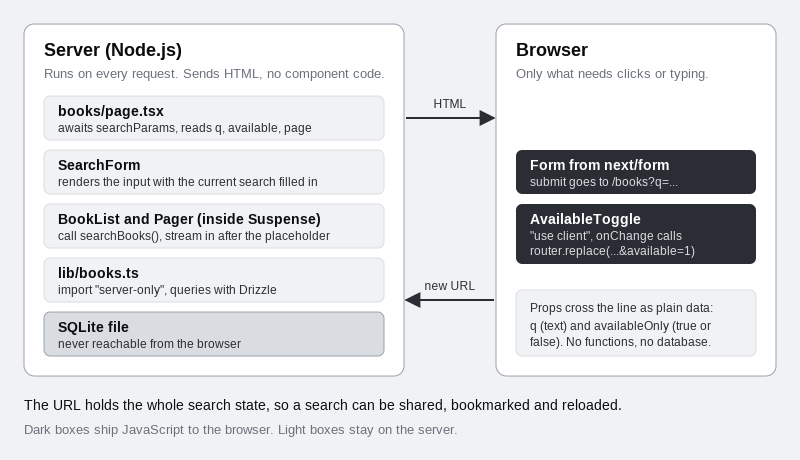
Everything so far runs on the server. A checkbox that changes the results the moment it is ticked needs code in the browser to listen for the change, and that is what a Client Component is for. The "use client" line at the top marks the boundary: this file, and anything it imports, is sent to the browser as JavaScript.
cat > src/app/books/available-toggle.tsx <<'TSX'
"use client";

import { useRouter } from "next/navigation";
import { useTransition } from "react";
import { catalogueHref } from "./catalogue-href";
import styles from "./books.module.css";

type Props = { q: string; availableOnly: boolean };

export default function AvailableToggle({ q, availableOnly }: Props) {
  const router = useRouter();
  const [isPending, startTransition] = useTransition();

  return (
    <label className={styles.toggle}>
      <input
        type="checkbox"
        name="available"
        value="1"
        defaultChecked={availableOnly}
        onChange={(event) => {
          const href = catalogueHref({ q, availableOnly: event.target.checked, page: 1 });
          startTransition(() => router.replace(href, { scroll: false }));
        }}
      />
      Only books on the shelf
      {isPending && <span className={styles.summary}> Updating…</span>}
    </label>
  );
}
TSX
cat >> src/app/books/books.module.css <<'CSS'

.toggle {
  flex-basis: 100%;
  display: flex;
  align-items: center;
  gap: 0.5rem;
}

.toggle input {
  width: 1.25rem;
  height: 1.25rem;
}
CSS
How it works:
- The component gets
qandavailableOnlyas props from the server. Props that cross from a Server Component to a Client Component must be plain data, such as text, numbers, booleans, arrays and plain objects. You could not pass the database or a function here. - On change it builds the new address with the same
catalogueHrefthe pager uses and callsrouter.replace. The server renders the page for that address and sends it back; the checkbox does no filtering itself.replacerather thanpushmeans ticking the box back and forth does not fill the Back button's history, andscroll: falsekeeps the page where it is. useTransitionreports when that navigation is still in progress, so "Updating…" appears next to the box until the new results arrive.- It cannot import
searchBooksor anything else from@/lib/books. That module starts withimport "server-only", and the build would fail if a client component pulled it in. The pager can, because it is a Server Component.
Put the checkbox inside the search form, in place of the hidden field. As a real form field named available, it is also sent when someone presses Enter in the search box, so the search and the filter always travel together:
cat > src/app/books/search-form.tsx <<'TSX'
import Form from "next/form";
import AvailableToggle from "./available-toggle";
import styles from "./books.module.css";

type Props = { q: string; availableOnly: boolean };

export default function SearchForm({ q, availableOnly }: Props) {
  return (
    <Form action="/books" role="search" className={styles.search}>
      <label htmlFor="q" className="visually-hidden">
        Search by title or author
      </label>
      <input
        id="q"
        name="q"
        type="search"
        defaultValue={q}
        placeholder="Title or author"
        maxLength={100}
      />
      <button type="submit">Search</button>
      <AvailableToggle q={q} availableOnly={availableOnly} />
    </Form>
  );
}
TSX
SearchForm is still a Server Component. It renders a Client Component as a child, which is how most pages mix the two: the server decides the layout and passes data down, and only the leaves that need clicks or typing run in the browser.
Check it worked
On /books, tick "Only books on the shelf". The address becomes /books?available=1, the summary changes to "17 books. Showing 1 to 8.", and Half of a Yellow Sun, A Brief History of Time and Americanah are gone. Search for adichie with the box ticked: only Purple Hibiscus is left, because the other two Adichie books are out. Untick the box and all three come back. From the terminal:
curl -s 'http://localhost:3000/books?available=1' | grep -o '[0-9]* books\. Showing' | sort -u
curl -s 'http://localhost:3000/books?available=1&q=adichie' | grep -o '[0-9]* book\. Showing\|Purple Hibiscus\|Half of a Yellow Sun' | sort -u
The first command prints 17 books. Showing and the second prints 1 book. Showing and Purple Hibiscus, with no Half of a Yellow Sun. Stop the dev server with Ctrl+C.
Step 6 · Build and try the catalogue in production
Lint and build:
npm run lint
npm run buildCheck it worked
The build succeeds. Its route table is something like this:
Route (app)
┌ ◐ /
├ ○ /_not-found
├ ◐ /books
└   /books/[id]
  └ ◐ /books/[id]
Compare it with part 2. There are no prebuilt book pages any more, and /, /books and /books/[id] are marked ◐, Partial Prerender: a static shell is made at build time and sent at once, and the parts after connection() or searchParams are filled in per request. For / the shell is the header, heading, button and the counts placeholder; for /books it is the heading and placeholder from loading.tsx, and the form and results arrive with the per-request render. That is the fix for the frozen list. Start the production server:
npm run startOpen http://localhost:3000/books and use it as a member would: page forward with Next, search for an author, tick "Only books on the shelf", open a book, press Back. The address bar always shows the search you are looking at, so copy one and open it in a private window to see it load the same results. From the first terminal, confirm the production build reads the database per request:
curl -s --get --data-urlencode 'q=weep' http://localhost:3000/books | grep -o '[0-9]* book\. Showing\|Weep Not, Child' | sort -uThis prints 1 book. Showing and Weep Not, Child. A frozen build-time list could not answer a search it had never seen. Stop the server with Ctrl+C, and keep ~/community-library-demo: part 4 adds forms that change the catalogue.
Next steps
- Continue the series: Add and edit books with server actions and Zod validation lets librarians add and change books, and the list you built here shows the change straight away.
- Go back to Store the library books in SQLite with Drizzle ORM for the schema and the left join that
searchBooks()builds on. - To return a real
404for missing books before the page streams, read Redirect and rewrite requests with proxy in Next.js 16. - For Server and Client Components outside this app, see How to Build Your First Next.js 16 App with the App Router.
Part of these paths
Related tutorials
- Store the library books in SQLite with Drizzle ORMYou will turn the library's data model into SQLite tables with Drizzle ORM 0.45, create them with drizzle-kit migrations, seed twenty books, and end with a server-only data module that the Next.js pages read the catalogue from.
- Add and edit books with server actions and Zod validationYou will give the library app an add-a-book page and an edit page whose forms post to Next.js 16 server actions, are checked by a Zod 4 schema on the server, show each mistake next to its field and redirect to the saved book.
- How to Build Your First Next.js 16 App with the App RouterYou will create a Next.js 16 app, add pages, a shared layout, a dynamic route that is built ahead of time, one interactive component and a JSON route, then run a production build and read what Next.js decided to prerender.
Need this done for you?
Padding does this work for growing companies, from the first diagnosis to a system that keeps working.
Get new tutorials