Web frameworks · Intermediate · 25 min
Store the library books in SQLite with Drizzle ORM
By Padding · Updated 18 Nov 2026
Next.js 16.4 · Drizzle ORM 0.45 · better-sqlite3 13.2 · Node.js 26 · node:26 image
You will turn the library's data model into SQLite tables with Drizzle ORM 0.45, create them with drizzle-kit migrations, seed twenty books, and end with a server-only data module that the Next.js pages read the catalogue from.
On this page
Part 1 left the library with pages that read six placeholder books from src/lib/books.ts. In this part the books move into a real database. You describe the tables from docs/data-model.md in TypeScript with Drizzle ORM, let drizzle-kit write and apply the SQL that creates them, fill them with twenty books and a few loans, and rewrite src/lib/books.ts so getBooks() and getBook(id) query the database. The pages themselves stay exactly as they are.
The database is SQLite. The whole database is one file on disk, read and written by a library inside the Node.js process, so there is no database server to install, secure or pay for. One library with a handful of librarians writes far less often than SQLite can handle, and a small virtual server, or a laptop at the front desk, runs it comfortably. Part 9 covers running the file safely in production: where it lives, who can read it and how to back it up.
The driver is better-sqlite3. Node.js 26 has its own built-in node:sqlite module, but Drizzle ORM 0.45 has no driver for it, so this series uses the long-standing better-sqlite3 package, which Drizzle supports directly. Its queries are synchronous, which matters once in this part, in the build step.
Step 1 · Install Drizzle and the SQLite driver
Work in the project from part 1. Install the runtime packages, then the tools you only need while developing. The versions are exact so your files match this tutorial, and --save-exact records them in package.json without a ^:
cd ~/community-library-demo
npm install --save-exact drizzle-orm@0.45.4 better-sqlite3@13.2.0 server-only@0.0.1
npm install --save-exact --save-dev drizzle-kit@0.31.11 @types/better-sqlite3@9.6.0 tsx@4.23.15
What each one does:
drizzle-ormbuilds typed SQL queries from table definitions you write in TypeScript.better-sqlite3is the SQLite driver. It contains SQLite itself, so you do not install SQLite separately.server-onlymarks a module that must never reach the browser. Step 5 uses it.drizzle-kitis the command-line tool that turns your table definitions into SQL migration files and applies them.@types/better-sqlite3gives TypeScript the driver's types.tsxruns a TypeScript file directly, for the seed script.
better-sqlite3 13.2 ships ready-made binaries for Linux, macOS and Windows on both x64 and Arm, so the install needs no C++ compiler and no extra download. On a metered or prepaid connection the two commands together fetch a few tens of megabytes.
Check it worked
npm ls drizzle-orm better-sqlite3 drizzle-kit tsx --depth=0
node -e 'const Database = require("better-sqlite3"); console.log(new Database(":memory:").prepare("select sqlite_version() as v").get())'
npm ls lists drizzle-orm@0.45.4, better-sqlite3@13.2.0, drizzle-kit@0.31.11 and tsx@4.23.15. The second command opens a throwaway in-memory database and prints the SQLite version inside the driver, something like { v: '3.54.1' }. If it prints an error about a missing .node file instead, run npm rebuild better-sqlite3.
Step 2 · Describe the tables in TypeScript
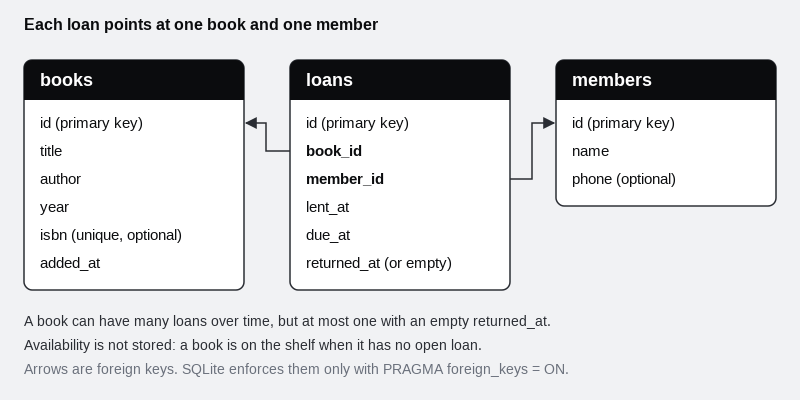
Open docs/data-model.md from part 1 next to your editor. Each kind of record becomes a table: books, members and loans. The librarians' accounts come in part 5, from the sign-in library.
Write the schema file:
mkdir -p src/db
cat > src/db/schema.ts <<'TS'
import { sql } from "drizzle-orm";
import {
  check,
  index,
  integer,
  sqliteTable,
  text,
  uniqueIndex,
} from "drizzle-orm/sqlite-core";

export const books = sqliteTable("books", {
  id: integer("id").primaryKey({ autoIncrement: true }),
  title: text("title").notNull(),
  author: text("author").notNull(),
  year: integer("year").notNull(),
  isbn: text("isbn").unique(),
  addedAt: integer("added_at", { mode: "timestamp" })
    .notNull()
    .default(sql`(unixepoch())`),
});

export const members = sqliteTable("members", {
  id: integer("id").primaryKey({ autoIncrement: true }),
  name: text("name").notNull(),
  phone: text("phone"),
  joinedAt: integer("joined_at", { mode: "timestamp" })
    .notNull()
    .default(sql`(unixepoch())`),
});

export const loans = sqliteTable(
  "loans",
  {
    id: integer("id").primaryKey({ autoIncrement: true }),
    bookId: integer("book_id")
      .notNull()
      .references(() => books.id),
    memberId: integer("member_id")
      .notNull()
      .references(() => members.id),
    lentAt: integer("lent_at", { mode: "timestamp" }).notNull(),
    dueAt: integer("due_at", { mode: "timestamp" }).notNull(),
    returnedAt: integer("returned_at", { mode: "timestamp" }),
  },
  (table) => [
    index("loans_member_idx").on(table.memberId),
    // Rule 2: a book can be out on only one loan at a time.
    uniqueIndex("loans_one_open_per_book")
      .on(table.bookId)
      .where(sql`returned_at is null`),
    check("loans_due_after_lent", sql`due_at > lent_at`),
  ],
);

export type BookRow = typeof books.$inferSelect;
export type NewBook = typeof books.$inferInsert;
TS
How the file maps to the data model:
- Each property is a TypeScript name (
addedAt) and the string is the column name in SQLite (added_at). Your code uses the first, the database the second. - SQLite has no date type.
integer(..., { mode: "timestamp" })stores seconds since 1970 and gives you a JavaScriptDatewhen you read it.(unixepoch())is SQLite's own clock, used as the default when a row is added without a date. isbnisunique()but notnotNull(). SQLite allows any number of empty (NULL) values in a unique column, which is exactly "optional, unique when present"..references(() => books.id)makesbook_ida foreign key: the database refuses a loan for a book that does not exist.loans_one_open_per_bookis a partial unique index. It only covers rows wherereturned_atis empty, so a book can have any number of finished loans but only one open one. Part 6 checks this rule in code too; the index is the last line of defence if two librarians click at the same moment.BookRowandNewBookare the row types Drizzle works out from the table, so you never write them by hand.
There is still no available column. Step 5 works it out from loans.
Check it worked
Load the file with tsx and list what it exports:
npx tsx --eval 'console.log(Object.keys(require("./src/db/schema.ts")).join(" "))'It prints the three table names, books loans members. The types only exist for TypeScript, so they are not in the list. A typo in the file shows up here as an error with a line number.
Step 3 · Generate and apply the first migration
A migration is a SQL file that changes the database from one version of the schema to the next. drizzle-kit compares your schema file with the migrations it has already written and writes a new one for the difference. You commit the migrations to Git, and every copy of the app, on your laptop and later on the server, applies the same files in the same order.
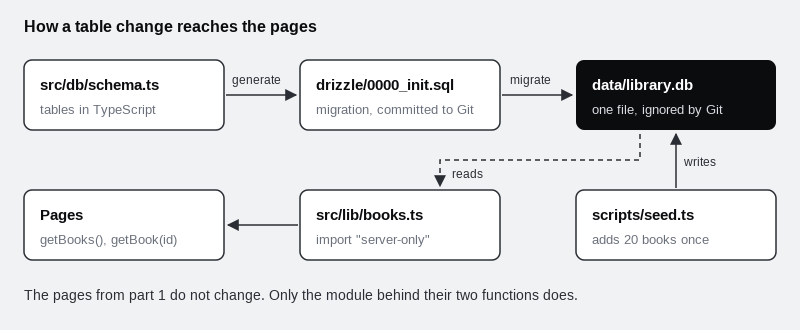
Tell drizzle-kit where the schema is, where to write migrations and which database file to use. The file name comes from the DATABASE_FILE environment variable when it is set, and defaults to data/library.db in the project:
cat > drizzle.config.ts <<'TS'
import { defineConfig } from "drizzle-kit";

export default defineConfig({
  dialect: "sqlite",
  schema: "./src/db/schema.ts",
  out: "./drizzle",
  dbCredentials: { url: process.env.DATABASE_FILE ?? "data/library.db" },
});
TS
npm pkg set scripts.db:generate="drizzle-kit generate" scripts.db:migrate="drizzle-kit migrate" scripts.db:seed="tsx scripts/seed.ts"
npm pkg set adds three scripts to package.json without you editing the file. Now generate the migration and read it:
npm run db:generate -- --name init
cat drizzle/0000_init.sql
drizzle-kit reports 3 tables with their column and index counts and writes drizzle/0000_init.sql. The file holds three CREATE TABLE statements and the indexes, including:
CREATE UNIQUE INDEX `loans_one_open_per_book` ON `loans` (`book_id`) WHERE returned_at is null;Read every migration before you apply it. This is the SQL that will run against your data.
The database file lives in a data folder. drizzle-kit does not create folders, so make it first, then apply the migration:
mkdir -p data
npm run db:migrate
Last, keep the database out of Git. It holds the library's real records, and SQLite writes two companion files next to it (library.db-wal and library.db-shm) while it runs, so ignore the whole folder. The command adds two lines to the end of the ignore file that create-next-app made:
printf '\n# SQLite database and its -wal and -shm files\n/data/\n' >> .gitignoreThe drizzle folder with the migrations is not ignored: it belongs in Git.
Check it worked
npm run db:migrate ends with migrations applied successfully!. List the tables in the new file:
node -e 'const db = require("better-sqlite3")("data/library.db", { readonly: true }); console.log(db.prepare("select name from sqlite_master where type = ? order by name").pluck().all("table").join(" "))'
git check-ignore -v data/library.db
The first command prints __drizzle_migrations books loans members sqlite_sequence. __drizzle_migrations is drizzle-kit's record of which migrations have run, so running npm run db:migrate again does nothing. sqlite_sequence is SQLite's counter for the autoIncrement ids. The second command names the .gitignore line that ignores the file, something like .gitignore:43:/data/ data/library.db.
Step 4 · Open the database and seed twenty books
The app and the seed script both need to open the database the same way, so put that in one small module. It makes the data folder if it is missing and sets two options on every connection:
cat > src/db/connect.ts <<'TS'
import { mkdirSync } from "node:fs";
import { dirname } from "node:path";
import Database from "better-sqlite3";
import { drizzle } from "drizzle-orm/better-sqlite3";
import * as schema from "./schema";

export function connect(file = process.env.DATABASE_FILE ?? "data/library.db") {
  mkdirSync(dirname(file), { recursive: true });
  const sqlite = new Database(file);
  // Readers do not wait for a writer, and a crash cannot leave a half-written page.
  sqlite.pragma("journal_mode = WAL");
  // SQLite ignores foreign keys unless each connection turns them on.
  sqlite.pragma("foreign_keys = ON");
  return drizzle({ client: sqlite, schema });
}
TS
The second pragma is easy to miss. SQLite has supported foreign keys for years but leaves them switched off for each new connection, for compatibility with old databases. Without that line, the references() in your schema would be decoration.
Now the seed script. It adds twenty books, three members and four loans, inside one transaction so a failure halfway leaves nothing behind. It refuses to run on a database that already has books, so you can never double the catalogue by running it twice:
mkdir -p scripts
cat > scripts/seed.ts <<'TS'
import { count } from "drizzle-orm";
import { connect } from "../src/db/connect";
import { books, loans, members } from "../src/db/schema";

const db = connect();
const DAY = 24 * 60 * 60 * 1000;
const daysAgo = (days: number) => new Date(Date.now() - days * DAY);
const twoWeeksAfter = (date: Date) => new Date(date.getTime() + 14 * DAY);

const [{ total }] = db.select({ total: count() }).from(books).all();

if (total > 0) {
  console.log(`The database already has ${total} books. Nothing was added.`);
} else {
  db.transaction((tx) => {
    // The first six match the placeholder books from part 1, so /books/3 is still Weep Not, Child.
    const added = tx
      .insert(books)
      .values([
        { title: "Things Fall Apart", author: "Chinua Achebe", year: 1958 },
        { title: "Half of a Yellow Sun", author: "Chimamanda Ngozi Adichie", year: 2006 },
        { title: "Weep Not, Child", author: "Ngũgĩ wa Thiong'o", year: 1964 },
        { title: "So Long a Letter", author: "Mariama Bâ", year: 1979 },
        { title: "A Brief History of Time", author: "Stephen Hawking", year: 1988 },
        { title: "The Joys of Motherhood", author: "Buchi Emecheta", year: 1979 },
        { title: "Arrow of God", author: "Chinua Achebe", year: 1964 },
        { title: "Purple Hibiscus", author: "Chimamanda Ngozi Adichie", year: 2003 },
        { title: "Petals of Blood", author: "Ngũgĩ wa Thiong'o", year: 1977 },
        { title: "Nervous Conditions", author: "Tsitsi Dangarembga", year: 1988 },
        { title: "The Famished Road", author: "Ben Okri", year: 1991 },
        { title: "Season of Migration to the North", author: "Tayeb Salih", year: 1966 },
        { title: "Aké: The Years of Childhood", author: "Wole Soyinka", year: 1981 },
        { title: "The Beautyful Ones Are Not Yet Born", author: "Ayi Kwei Armah", year: 1968 },
        { title: "Americanah", author: "Chimamanda Ngozi Adichie", year: 2013 },
        { title: "Kintu", author: "Jennifer Nansubuga Makumbi", year: 2014 },
        { title: "Homegoing", author: "Yaa Gyasi", year: 2016 },
        { title: "Stay With Me", author: "Ayọ̀bámi Adébáyọ̀", year: 2017 },
        { title: "Born a Crime", author: "Trevor Noah", year: 2016 },
        { title: "Long Walk to Freedom", author: "Nelson Mandela", year: 1994 },
      ])
      .returning({ id: books.id, title: books.title })
      .all();

    const [selam, ama, emeka] = tx
      .insert(members)
      .values([{ name: "ሰላም ተስፋዬ" }, { name: "Ama Mensah" }, { name: "Chukwuemeka Obi" }])
      .returning({ id: members.id })
      .all();

    const bookId = (title: string) => {
      const book = added.find((row) => row.title === title);
      if (!book) throw new Error(`No seeded book called ${title}`);
      return book.id;
    };

    const lent = { long: daysAgo(40), recent: daysAgo(3), overdue: daysAgo(20), today: daysAgo(0) };
    tx.insert(loans)
      .values([
        // Returned, so Things Fall Apart is on the shelf again.
        { bookId: bookId("Things Fall Apart"), memberId: selam.id, lentAt: lent.long, dueAt: twoWeeksAfter(lent.long), returnedAt: daysAgo(30) },
        { bookId: bookId("Half of a Yellow Sun"), memberId: ama.id, lentAt: lent.recent, dueAt: twoWeeksAfter(lent.recent) },
        { bookId: bookId("A Brief History of Time"), memberId: selam.id, lentAt: lent.overdue, dueAt: twoWeeksAfter(lent.overdue) },
        { bookId: bookId("Americanah"), memberId: emeka.id, lentAt: lent.today, dueAt: twoWeeksAfter(lent.today) },
      ])
      .run();
  });
  console.log("Added 20 books, 3 members and 4 loans.");
}
TS
npm run db:seed
A few details worth knowing:
- With better-sqlite3, Drizzle queries run synchronously.
.all()returns rows,.get()returns one row orundefined, and.run()runs a statement that returns nothing. The transaction callback is synchronous too: do not putawaitinside it. .returning()hands back the ids SQLite assigned, so the loans point at real rows instead of guessed numbers.- The loans give you something to look at: one returned, one recent, one overdue (lent 20 days ago with a 14-day loan) and one lent today. Parts 6 and 7 use them.
- The member names include Amharic script (ሰላም ተስፋዬ). SQLite stores text as UTF-8, so Ge'ez, Yorùbá tone marks and Arabic need nothing special.
Check it worked
The script prints Added 20 books, 3 members and 4 loans. Run it again, then count what is in the database:
npm run db:seed
node -e 'const db = require("better-sqlite3")("data/library.db", { readonly: true }); console.log(db.prepare("select (select count(*) from books) as books, (select count(*) from members) as members, (select count(*) from loans where returned_at is null) as out").get())'
The second seed run prints The database already has 20 books. Nothing was added. The count prints { books: 20, members: 3, out: 3 }: three books are out on loan right now.
The schema also protects the data on its own. Try to lend Half of a Yellow Sun (book 2) again while it is out:
node -e 'const db = require("better-sqlite3")("data/library.db"); db.pragma("foreign_keys = ON"); try { db.prepare("insert into loans (book_id, member_id, lent_at, due_at) values (2, 1, unixepoch(), unixepoch() + 1209600)").run(); console.log("inserted") } catch (error) { console.log(error.message) }'It prints UNIQUE constraint failed: loans.book_id, from the partial index. Nothing was added.
Step 5 · Write the server-only data module
The pages call getBooks() and getBook(id) from src/lib/books.ts. Keep those names and the Book type exactly as part 1 had them, and change what is inside.
First, the app's database connection. It opens the file once when the server loads the module, and it is marked server-only:
cat > src/db/index.ts <<'TS'
import "server-only";
import { connect } from "./connect";

export const db = connect();
TS
Then replace src/lib/books.ts. This overwrites the placeholder list from part 1:
cat > src/lib/books.ts <<'TS'
import "server-only";
import { and, asc, eq, isNull, sql } from "drizzle-orm";
import { db } from "@/db";
import { books, loans } from "@/db/schema";

export type Book = {
  id: number;
  title: string;
  author: string;
  year: number;
  available: boolean;
};

// Rule 1 in docs/data-model.md: a book is available when it has no open loan.
// The left join finds the open loan if there is one; no loan means on the shelf.
function selectBooks() {
  return db
    .select({
      id: books.id,
      title: books.title,
      author: books.author,
      year: books.year,
      available: sql<boolean>`${loans.id} is null`.mapWith(Boolean),
    })
    .from(books)
    .leftJoin(loans, and(eq(loans.bookId, books.id), isNull(loans.returnedAt)));
}

export async function getBooks(): Promise<Book[]> {
  return selectBooks().orderBy(asc(books.title)).all();
}

export async function getBook(id: string): Promise<Book | undefined> {
  const bookId = Number(id);
  if (!Number.isSafeInteger(bookId) || bookId < 1) return undefined;
  return selectBooks().where(eq(books.id, bookId)).get();
}
TS
What changed and why:
import "server-only"makes the build fail if any Client Component imports this module, directly or through another file. Without it, a careless import could try to bundle the database driver for the browser. Part 5 adds functions here that change data, so the guard matters more as the module grows.availableis no longer stored. SQLite returns1or0foris null, and.mapWith(Boolean)turns that intotrueorfalse, so theBooktype is unchanged.getBookstill takes the id as a string, because that is what the URL gives the page. Anything that is not a positive whole number, such as/books/abc, returnsundefinedand the page shows the not-found page from part 1.- The list is now sorted by title, which is what a reader scanning shelves expects.
- The functions stay
async, even though the queries are synchronous. The pages alreadyawaitthem, and part 3 relies on them returning promises.
Check it worked
You can see the guard outside Next.js. Outside server code, server-only throws as soon as it is imported; Next.js turns the same situation into a build error. Load the module with tsx:
{ npx tsx --eval 'import("./src/lib/books.ts")' 2>&1 || true; } | grep -o "cannot be imported from a Client Component module"It prints cannot be imported from a Client Component module: the module refused to load anywhere but in server code. Inside Next.js Server Components, the same import is allowed.
Step 6 · See the database in the app
Start the dev server in your second terminal, inside ~/community-library-demo:
npm run devOpen http://localhost:3000/books. None of the page files changed, yet the list now comes from SQLite.
Check it worked
The list says "20 books in the catalogue.", starts with "A Brief History of Time" marked "On loan", and Americanah and Half of a Yellow Sun are also "On loan". From the first terminal:
curl -s http://localhost:3000/books | sed 's/<!-- -->//g' | grep -o '[0-9][0-9]* books in the catalogue'
curl -s http://localhost:3000/ | grep -o '[0-9]*</span> books\|[0-9]*</span> on the shelf'
curl -s http://localhost:3000/books/2 | grep -o '<h1>[^<]*</h1>\|<dd>On [a-z ]*</dd>'
curl -s http://localhost:3000/books/abc | grep -o 'name="robots" content="noindex"'
The output is, in order: 20 books in the catalogue; 20</span> books and 17</span> on the shelf from the home page; <h1>Half of a Yellow Sun</h1> and <dd>On loan</dd>; and name="robots" content="noindex" for an id that is not a number, the tag Next.js adds to the not-found page. React separates the number from the text after it with an empty <!-- --> comment in the HTML, which is why the first command removes those before searching. Open http://localhost:3000/books/abc to see "Not on our shelves". Stop the dev server with Ctrl+C.
Step 7 · Build and run the production version
Lint and build, as at the end of part 1. The build also type-checks drizzle.config.ts, the seed script and the new modules:
npm run lint
npm run buildCheck it worked
The build succeeds, and the route table now lists twenty book pages under /books/[id] (two shown, then something like [+18 more paths]), because generateStaticParams reads the ids from the database.
That points to something to keep in mind. better-sqlite3 answers synchronously, so Next.js finishes these queries while it prerenders the pages at build time, and the production build serves the catalogue as it was when you ran npm run build. Part 3 reads the list at request time and part 7 decides deliberately what to cache. Until then, rebuild after changing the data.
Start the production server and click through the site:
npm run startOpen http://localhost:3000. The home page counts 20 books and 17 on the shelf. Browse books, open "Stay With Me" and check the author's tone marks show correctly, then try /books/999. From the first terminal:
curl -s http://localhost:3000/books/3 | grep -o '<h1>[^<]*</h1>'This prints <h1>Weep Not, Child</h1>: the ids from part 1 still lead to the same books. Stop the server with Ctrl+C.
If you use Git, git status now shows drizzle/, drizzle.config.ts, scripts/ and src/db/ as new, and data/ nowhere. Keep ~/community-library-demo and its data/library.db: part 3 continues from here.
Next steps
- Continue the series: List and search books with server components and URL search params adds search and paging to the list and reads it at request time.
- Go back to Start a community library app with Next.js 16 if you want to compare the placeholder module with the one you wrote here.
- Later in the series, Lend and return books with database transactions writes to the
loanstable and relies on the partial index from this part. - When you change a table later, edit
src/db/schema.ts, runnpm run db:generate -- --name <what-changed>, read the new SQL file, then runnpm run db:migrate.
Part of these paths
Related tutorials
- Start a community library app with Next.js 16You will plan a small community library app, create it with Next.js 16.4, and end with a navigable skeleton of a home page, a book list and a page per book, styled with CSS Modules, plus a written data model for the rest of the series.
- List and search books with server components and URL search paramsYou will turn the library's book list into a searchable, paged catalogue that reads SQLite on every request, keeps the search in the URL, streams results behind a loading placeholder and filters to books on the shelf with one small client component.
Need this done for you?
Padding does this work for growing companies, from the first diagnosis to a system that keeps working.
Get new tutorials