Containers and Kubernetes · Advanced · 26 min
Lock down the Snip namespace with network policies and Pod Security
By Padding · Updated 18 Nov 2026
Ubuntu 26.04 · Kubernetes 1.37 on kind 0.33 · Kustomize 5.8.3 · kubeconform 0.8.0
You will put the snip namespace under the restricted Pod Security level, harden the Snip, PostgreSQL and migration pods so they pass it, and add a default-deny NetworkPolicy with only four allowed paths, then prove from a debug pod that everything else is blocked.
On this page
Snip now has a database, probes, a gateway and an autoscaler, and every pod in the cluster can still talk to every other pod. A Kubernetes namespace is a naming boundary, not a security one. Out of the box, any pod anywhere can open a connection to snip-db-0 on port 5432, and any pod in snip can call out to the internet. The pods themselves can also ask for more than they need: nothing stops a manifest from running as root or keeping the full set of Linux capabilities.
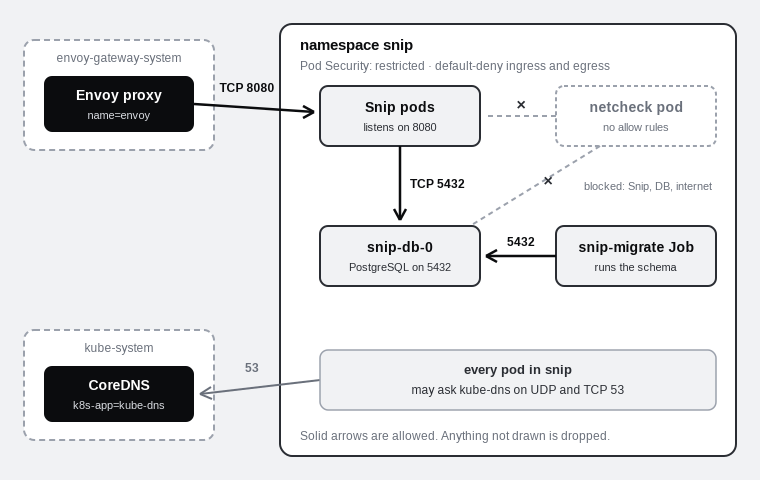
This part closes both gaps. First you switch on Pod Security admission at its restricted level for the namespace, and fix what it rejects in the Snip, PostgreSQL and migration pods. Then you add a NetworkPolicy that drops all traffic in and out of the namespace, and allow back only what Snip needs: the gateway to Snip, Snip to PostgreSQL, the migration Job to PostgreSQL, and DNS. Finally you start a debug pod with no allow rules and watch its connections fail.
Everything goes into one new Kustomize component, components/lockdown, so both overlays switch it on with one line and the files from earlier parts stay untouched.
Step 1 · See what the restricted level would reject
Pod Security admission is built into the API server and is on by default. It does nothing until a namespace carries one of its labels. There are three levels: privileged (no checks), baseline (blocks the obviously dangerous, such as host networking or privileged containers) and restricted, which also requires every container to give up root, privilege escalation and Linux capabilities, and to run under the container runtime's default seccomp filter.
Before you enforce anything, ask the API server what would break. A server-side dry run of the label checks every running pod in the namespace against the level and prints a warning per problem, without changing the namespace:
kubectl label --dry-run=server --overwrite namespace snip \
pod-security.kubernetes.io/enforce=restrictedCheck it worked
The command ends with namespace/snip labeled (server dry run) and, before it, warnings something like these:
Warning: existing pods in namespace "snip" violate the new PodSecurity enforce level "restricted:latest"
Warning: snip-7c9d5b6f4-2xk8q (and 1 other pod): allowPrivilegeEscalation != false, unrestricted capabilities, runAsNonRoot != true, seccompProfile
Warning: snip-db-0: allowPrivilegeEscalation != false, unrestricted capabilities, runAsNonRoot != true, seccompProfile
Snip already runs as UID 65532 from its distroless image, but the pod spec never says so, and admission only reads the spec. PostgreSQL is worse off: the official image starts as root and then switches to the postgres user. Running kubectl get namespace snip --show-labels confirms nothing changed: there is no pod-security label yet.
Step 2 · Harden the Snip and PostgreSQL pods
Each workload gets a strategic-merge patch that adds a security context and leaves everything else from earlier parts alone. The fields map one to one onto the warnings:
runAsNonRoot: truewith a numericrunAsUserandrunAsGroup. For Snip that is 65532, the distrolessnonrootuser from part 1. For PostgreSQL it is 999, thepostgresuser the image already uses for its data files, so the data from part 3 stays readable.allowPrivilegeEscalation: falseblocks setuid binaries and similar tricks from gaining more rights than the process started with.capabilities.drop: ["ALL"]removes every Linux capability. Neither process binds to a port below 1024, so neither needs any back.seccompProfile.type: RuntimeDefaultapplies the container runtime's system-call filter, which blocks calls such asmountorkexec_loadthat an application never needs.automountServiceAccountToken: falsestops Kubernetes mounting an API token into the pod. Snip and PostgreSQL never talk to the Kubernetes API, so a token there would only help someone who broke in.
readOnlyRootFilesystem: true is not part of the restricted level, but it is cheap to add and stops an attacker writing tools into the container. Snip writes nothing to disk. PostgreSQL writes to its data volume, plus two places you now give it as small emptyDir volumes: /run/postgresql for its socket and lock file, and /tmp.
mkdir -p ~/snip-demo/k8s/components/lockdown
cd ~/snip-demo/k8s/components/lockdown
cat > snip-security.yaml <<'YAML'
apiVersion: apps/v1
kind: Deployment
metadata:
  name: snip
spec:
  template:
    spec:
      automountServiceAccountToken: false
      securityContext:
        runAsNonRoot: true
        runAsUser: 65532
        runAsGroup: 65532
        seccompProfile:
          type: RuntimeDefault
      containers:
        - name: snip
          securityContext:
            allowPrivilegeEscalation: false
            readOnlyRootFilesystem: true
            capabilities:
              drop: ["ALL"]
YAML
cat > snip-db-security.yaml <<'YAML'
apiVersion: apps/v1
kind: StatefulSet
metadata:
  name: snip-db
spec:
  template:
    spec:
      automountServiceAccountToken: false
      securityContext:
        runAsNonRoot: true
        runAsUser: 999
        runAsGroup: 999
        fsGroup: 999
        seccompProfile:
          type: RuntimeDefault
      containers:
        - name: postgres
          securityContext:
            allowPrivilegeEscalation: false
            readOnlyRootFilesystem: true
            capabilities:
              drop: ["ALL"]
          volumeMounts:
            - name: run
              mountPath: /run/postgresql
            - name: tmp
              mountPath: /tmp
      volumes:
        - name: run
          emptyDir:
            sizeLimit: 16Mi
        - name: tmp
          emptyDir:
            sizeLimit: 64Mi
YAML
A patch names only what it adds, so your probes from part 4, the resources from part 2 and the database settings from part 3 are kept. If your Deployment, StatefulSet or containers have other names, change the names in these two files to match.
Check it worked
ls ~/snip-demo/k8s/components/lockdownThe folder lists snip-db-security.yaml and snip-security.yaml. They take effect once the component is switched on, in the fifth step.
Step 3 · Enforce the restricted level on the namespace
Pod Security reads three labels on the namespace, one per mode. enforce rejects a pod that breaks the level. warn lets it through but prints a warning to whoever applied it. audit writes it to the API server's audit log. Each mode can be pinned to a Kubernetes version, which fixes the exact rules in place: pin enforce to v1.37, so a cluster upgrade cannot suddenly reject pods that passed yesterday, and leave warn on latest, so you hear about new rules before you move the pin.
cd ~/snip-demo/k8s/components/lockdown
cat > namespace-pod-security.yaml <<'YAML'
apiVersion: v1
kind: Namespace
metadata:
  name: snip
  labels:
    pod-security.kubernetes.io/enforce: restricted
    pod-security.kubernetes.io/enforce-version: v1.37
    pod-security.kubernetes.io/warn: restricted
    pod-security.kubernetes.io/warn-version: latest
    pod-security.kubernetes.io/audit: restricted
    pod-security.kubernetes.io/audit-version: latest
YAML
The migration Job from part 3 lives in its own kustomization, and its pods are checked the same way the next time it runs. Give it the same security context. The init container uses the PostgreSQL image, so the pod runs as 999 like the database. The migrate container is Snip's own image, so it overrides that with 65532, the distroless nonroot user from part 1. Neither pg_isready nor snip migrate writes to disk, so both root filesystems can be read-only:
cd ~/snip-demo/k8s/migrate
cat > job-security.yaml <<'YAML'
apiVersion: batch/v1
kind: Job
metadata:
  name: snip-migrate
spec:
  template:
    spec:
      automountServiceAccountToken: false
      securityContext:
        runAsNonRoot: true
        runAsUser: 999
        runAsGroup: 999
        seccompProfile:
          type: RuntimeDefault
      initContainers:
        - name: wait-for-db
          securityContext:
            allowPrivilegeEscalation: false
            readOnlyRootFilesystem: true
            capabilities:
              drop: ["ALL"]
      containers:
        - name: migrate
          securityContext:
            runAsUser: 65532
            runAsGroup: 65532
            allowPrivilegeEscalation: false
            readOnlyRootFilesystem: true
            capabilities:
              drop: ["ALL"]
YAML
kustomize edit add patch --path job-security.yaml
cat kustomization.yamlCheck it worked
The migrate kustomization.yaml now has a patches: list with path: job-security.yaml, next to its resources: from part 3. Admission only checks pods when they are created, so pods already running keep running after you label the namespace. That is why the workloads are fixed in the same apply as the label: their new pods are created compliant.
Step 4 · Deny all traffic, then allow DNS
A NetworkPolicy selects pods and lists what may reach them (ingress) and what they may reach (egress). A pod that no policy selects accepts everything. Once any policy selects a pod for a direction, that direction allows only what some policy lists. Policies only ever add permissions, so the pattern is one policy that selects every pod and lists nothing, followed by small policies that each allow one path.
The empty podSelector: {} below selects every pod in the namespace, and naming both Ingress and Egress with no rules shuts both directions:
cd ~/snip-demo/k8s/components/lockdown
cat > default-deny.yaml <<'YAML'
apiVersion: networking.k8s.io/v1
kind: NetworkPolicy
metadata:
  name: default-deny-all
  namespace: snip
spec:
  podSelector: {}
  policyTypes:
    - Ingress
    - Egress
---
apiVersion: networking.k8s.io/v1
kind: NetworkPolicy
metadata:
  name: allow-dns-egress
  namespace: snip
spec:
  podSelector: {}
  policyTypes:
    - Egress
  egress:
    - to:
        - namespaceSelector:
            matchLabels:
              kubernetes.io/metadata.name: kube-system
          podSelector:
            matchLabels:
              k8s-app: kube-dns
      ports:
        - protocol: UDP
          port: 53
        - protocol: TCP
          port: 53
YAML
The second policy is the one people forget. Snip connects to snip-db-0.snip-db, a name, and turning that name into an address is itself a network call to CoreDNS in kube-system. With default deny and no DNS rule, Snip's database connection fails with a lookup timeout, which looks like a database problem and sends you looking in the wrong place. Both protocols are listed because DNS falls back to TCP for large answers.
Note the shape of the to: entry: namespaceSelector and podSelector sit in the same list item, so a pod must match both, meaning CoreDNS pods in kube-system only. Written as two separate items (each with its own -), they would allow every pod in kube-system or any pod labelled k8s-app: kube-dns in snip, which is far wider. kubernetes.io/metadata.name is a label Kubernetes puts on every namespace, set to its name.
The metadata.namespace: snip lines are needed because these objects come from a component, which the base's namespace: snip setting does not reach.
Check it worked
grep -c 'kind: NetworkPolicy' ~/snip-demo/k8s/components/lockdown/default-deny.yamlIt prints 2.
Step 5 · Allow the four paths Snip needs
Each path needs two halves: egress on the sending pod and ingress on the receiving pod, because default deny shut both. Envoy's own namespace has no policies, so its egress is already open, and only the Snip side needs a rule. The database path is inside snip, so it needs both.
cd ~/snip-demo/k8s/components/lockdown
cat > allow-snip.yaml <<'YAML'
apiVersion: networking.k8s.io/v1
kind: NetworkPolicy
metadata:
  name: snip-from-gateway
  namespace: snip
spec:
  podSelector:
    matchLabels:
      app.kubernetes.io/name: snip
  policyTypes:
    - Ingress
  ingress:
    - from:
        - namespaceSelector:
            matchLabels:
              kubernetes.io/metadata.name: envoy-gateway-system
          podSelector:
            matchLabels:
              app.kubernetes.io/name: envoy
      ports:
        - protocol: TCP
          port: 8080
---
apiVersion: networking.k8s.io/v1
kind: NetworkPolicy
metadata:
  name: snip-to-db
  namespace: snip
spec:
  podSelector:
    matchLabels:
      app.kubernetes.io/name: snip
  policyTypes:
    - Egress
  egress:
    - to:
        - podSelector:
            matchLabels:
              app.kubernetes.io/name: snip-db
      ports:
        - protocol: TCP
          port: 5432
---
apiVersion: networking.k8s.io/v1
kind: NetworkPolicy
metadata:
  name: migrate-to-db
  namespace: snip
spec:
  podSelector:
    matchLabels:
      batch.kubernetes.io/job-name: snip-migrate
  policyTypes:
    - Egress
  egress:
    - to:
        - podSelector:
            matchLabels:
              app.kubernetes.io/name: snip-db
      ports:
        - protocol: TCP
          port: 5432
---
apiVersion: networking.k8s.io/v1
kind: NetworkPolicy
metadata:
  name: db-from-clients
  namespace: snip
spec:
  podSelector:
    matchLabels:
      app.kubernetes.io/name: snip-db
  policyTypes:
    - Ingress
  ingress:
    - from:
        - podSelector:
            matchLabels:
              app.kubernetes.io/name: snip
        - podSelector:
            matchLabels:
              batch.kubernetes.io/job-name: snip-migrate
      ports:
        - protocol: TCP
          port: 5432
YAML
Three details decide whether these rules work:
- The Snip rule names port 8080, the container port, not the Service's port 80. Envoy sends traffic straight to pod addresses, and policies always see the pod's own port.
- Envoy Gateway puts each Gateway's proxy pods in
envoy-gateway-systemand labels themapp.kubernetes.io/name: envoy. Check yours withkubectl get pods -n envoy-gateway-system --show-labels. If you turned on its Gateway Namespace Mode in part 5, the proxies live in the Gateway's own namespace instead; change thenamespaceSelectorto match. - Kubernetes labels every pod a Job creates with
batch.kubernetes.io/job-name, which is how the migration pods are matched without editing the Job.
Kubelet health checks are not listed and do not need to be: traffic between a pod and the node it runs on is always allowed, so the probes from part 4 keep working. Snip gets no general internet egress, because it never calls out. If a later feature needs an outside API, add a narrow egress rule for it, and be glad of the default: cloud providers bill outbound data per gigabyte, and a compromised pod with open egress can run up that bill or carry your data out.
Now tie the files together as a component and switch it on in both overlays. kustomize edit appends it after the postgres component, which matters: the snip-db patch needs the StatefulSet that component adds.
cd ~/snip-demo/k8s/components/lockdown
cat > kustomization.yaml <<'YAML'
apiVersion: kustomize.config.k8s.io/v1alpha1
kind: Component
resources:
  - default-deny.yaml
  - allow-snip.yaml
patches:
  - path: namespace-pod-security.yaml
  - path: snip-security.yaml
  - path: snip-db-security.yaml
YAML
cd ~/snip-demo/k8s
(cd overlays/dev && kustomize edit add component ../../components/lockdown)
(cd overlays/prod && kustomize edit add component ../../components/lockdown)
cat overlays/dev/kustomization.yamlCheck it worked
The components: list in the dev kustomization reads ../../components/postgres first and ../../components/lockdown second.
Step 6 · Render and validate the manifests
Render both overlays and the migrate folder, and validate them against the Kubernetes 1.37 schemas. -strict catches a misplaced field, such as readOnlyRootFilesystem written at pod level, where it does not exist. kubeconform finds it before you touch the cluster; otherwise kubectl apply, which validates strictly by default, would reject the whole apply with an unknown field error:
cd ~/snip-demo/k8s
kustomize build overlays/dev | kubeconform -strict -summary -kubernetes-version 1.37.3
kustomize build overlays/prod | kubeconform -strict -summary -kubernetes-version 1.37.3
kustomize build migrate | kubeconform -strict -summary -kubernetes-version 1.37.3
Each line reports Invalid: 0, Errors: 0. The overlays count more resources than before: six NetworkPolicies on top of what you had.
Check it worked
Look for the hardening in the rendered output:
cd ~/snip-demo/k8s
kustomize build overlays/dev | grep -E 'kind: NetworkPolicy|pod-security.kubernetes.io/enforce|readOnlyRootFilesystem|automountServiceAccountToken'
kustomize build migrate | grep -E 'runAsUser|readOnlyRootFilesystem'
The first command shows six kind: NetworkPolicy lines, pod-security.kubernetes.io/enforce: restricted with its v1.37 version, and readOnlyRootFilesystem: true and automountServiceAccountToken: false twice each (Snip and PostgreSQL). The second shows runAsUser: 999 for the pod, runAsUser: 65532 for the migrate container, and readOnlyRootFilesystem: true for both Job containers.
Step 7 · Apply and prove what is blocked and what is not
Apply the dev overlay. The namespace gains its labels, the six policies are created, and the Snip Deployment and the database StatefulSet roll their pods with the new security contexts:
cd ~/snip-demo/k8s
kubectl apply -k overlays/dev
kubectl rollout status statefulset/snip-db -n snip --timeout=180s
kubectl rollout status deployment/snip -n snip --timeout=180s
kubectl label --dry-run=server --overwrite namespace snip pod-security.kubernetes.io/enforce-version=latest
Both rollouts finish under the enforce label, and the last command prints only namespace/snip labeled (server dry run) with no warnings. It changes enforce-version rather than repeating enforce=restricted, because Pod Security admission only re-checks the existing pods when the enforce level or version actually changes; the namespace already says restricted, so repeating that label would print nothing whether or not the pods comply. Moving the version from v1.37 to latest forces a check of every running pod, and the dry run means the pin stays at v1.37. If snip-db-0 restarts in a loop, read kubectl logs snip-db-0 -n snip: a Permission denied on the data directory means its files are not owned by UID 999, which can happen if the volume was first initialised by a different image or user.
Re-run the migration so you know the hardened Job passes admission and its policy. A Job cannot be changed once created, so delete the finished one first:
cd ~/snip-demo/k8s
kubectl delete job snip-migrate -n snip --ignore-not-found
kustomize build migrate | kubectl apply -n snip -f -
kubectl wait job/snip-migrate -n snip --for=condition=Complete --timeout=180s
Now confirm a non-compliant pod is refused. This one asks for nothing special, which under restricted is the problem:
kubectl run rootcheck -n snip --image=busybox:1.38.0 --restart=Never -- sleep 60 || echo "refused, as expected"The API server answers with something like Error from server (Forbidden): pods "rootcheck" is forbidden: violates PodSecurity "restricted:v1.37": allowPrivilegeEscalation != false ..., and no pod is created.
Next, a debug pod that passes Pod Security but matches none of the allow rules. Save it outside the overlays, so it is never applied with them:
mkdir -p ~/snip-demo/k8s/debug
cat > ~/snip-demo/k8s/debug/netcheck.yaml <<'YAML'
apiVersion: v1
kind: Pod
metadata:
  name: netcheck
  namespace: snip
  labels:
    app.kubernetes.io/name: netcheck
spec:
  automountServiceAccountToken: false
  securityContext:
    runAsNonRoot: true
    runAsUser: 65534
    runAsGroup: 65534
    seccompProfile:
      type: RuntimeDefault
  containers:
    - name: netcheck
      image: busybox:1.38.0
      command: ["sleep", "3600"]
      securityContext:
        allowPrivilegeEscalation: false
        readOnlyRootFilesystem: true
        capabilities:
          drop: ["ALL"]
YAML
kubeconform -strict -summary -kubernetes-version 1.37.3 ~/snip-demo/k8s/debug/netcheck.yaml
Start it and try each path. Every blocked attempt waits for its three-second timeout, then prints its message:
kubectl apply -f ~/snip-demo/k8s/debug/netcheck.yaml
kubectl wait pod/netcheck -n snip --for=condition=Ready --timeout=60s
kubectl exec -n snip netcheck -- nslookup snip-db.snip.svc.cluster.local
kubectl exec -n snip netcheck -- wget -q -T 3 -O- http://snip/healthz || echo "blocked: netcheck to Snip"
kubectl exec -n snip netcheck -- wget -q -T 3 -O- http://snip-db-0.snip-db:5432/ || echo "blocked: netcheck to PostgreSQL"
kubectl exec -n snip netcheck -- wget -q -T 3 -O /dev/null http://example.com || echo "blocked: netcheck to the internet"
Then drive Snip itself, so the allowed paths do real work. kubectl port-forward reaches the pod through the kubelet on its own node, so it is not a policy test; it only lets you call the API. The test is whether Snip can still look up and reach PostgreSQL behind default deny:
kubectl port-forward -n snip svc/snip 18080:80 >/dev/null &
PF=$!
sleep 2
curl -s -X POST -H 'Content-Type: application/json' -d '{"url":"https://kubernetes.io/docs/concepts/services-networking/network-policies/"}' http://127.0.0.1:18080/links
curl -s http://127.0.0.1:18080/readyz
kill "$PF"
Finally, repeat the curl --resolve request to https://snip.example.test from the end of part 5. That path runs through Envoy and the snip-from-gateway rule.
Check it worked
nslookupanswers with an address forsnip-db.snip.svc.cluster.local: DNS is allowed.- All three
wgetcalls end withdownload timed outand theirblocked:line. A timeout, rather thanconnection refused, is the sign that a policy dropped the packets. The internet one is blocked after DNS succeeded, so it is the egress rule that stops it. - The
POSTreturns JSON with a newcode, and/readyzprintsready: Snip reached PostgreSQL throughsnip-to-dband the DNS rule. - The part 5 request through the gateway still returns Snip's answer.
If the netcheck wget to Snip succeeds, your cluster's network plugin is not enforcing policies. kind's built-in kindnet has enforced them since kind 0.24; a cluster created with disableDefaultCNI and a plugin such as flannel ignores them silently.
Remove the debug pod, and keep everything else for part 8:
kubectl delete pod netcheck -n snipFrom now on, any helper pod you start in snip, such as a load generator for the autoscaler from part 6, needs a restricted security context like netcheck's, and cannot reach Snip unless you add a rule for it.
Next steps
- Ship a new version behind rollout gates, roll back a broken one and clean up the series in
/tutorials/release-a-new-snip-version-safely. - Limit what people and service accounts may do in the namespace, the API-side partner to this part, in
/tutorials/control-access-with-kubernetes-rbac. - Build images that run as a non-root user from the start, so restricted Pod Security passes without surprises, in
/tutorials/run-containers-as-a-non-root-user. - Revisit the gateway this part's ingress rule trusts in
/tutorials/route-traffic-to-snip-with-the-gateway-api.
Related tutorials
- Validate Kubernetes manifests before they reach a clusterYou will have one script that checks plain, Kustomize, Helm, generated and custom-resource manifests against the Kubernetes 1.37 schemas and a set of lint rules, with no cluster, and a GitHub Actions job that runs it on every pull request.
- Use secrets in Docker builds without leaking them into the imageYou will find a token and a private key leaking through a Docker build with Trivy 0.76, then fix the build with secret and SSH mounts, carry the fix into Compose and GitHub Actions, and prove with a rescan that the build context is clean.
- Store data in Kubernetes with persistent volumes and claimsYou will claim storage on a Kubernetes 1.37 kind cluster, prove the data outlives its pod, see which access modes and reclaim policies keep or lose data, and know how expansion and snapshots work on a cloud CSI driver.
Need this done for you?
Padding does this work for growing companies, from the first diagnosis to a system that keeps working.
Get new tutorials