Databases · Beginner · 22 min
Normalise a spreadsheet into database tables
By Padding · Updated 18 Nov 2026
Ubuntu 26.04 · PostgreSQL 18.7
You will turn a 12-row school fees spreadsheet into six PostgreSQL 18 tables in third normal form, move the data across with INSERT ... SELECT and prove with a join that nothing was lost.
On this page
Most databases start life as a spreadsheet. A school bursar keeps one sheet of fee payments: one row per item paid, with the student's name, class, class teacher and parent's phone typed on every row. It works until a parent changes their number, a new class opens, or someone deletes the wrong row. Then the sheet starts telling two stories at once.
Normalisation is the process of splitting that sheet into tables so that each fact is stored in exactly one place. In this tutorial you load a real-shaped fees sheet into PostgreSQL, find the three kinds of problem it causes, and apply first, second and third normal form one rule at a time. You then create the tables with keys, move the data across with INSERT ... SELECT, check that every row arrived, and rebuild the original sheet with a join. The last step covers when to copy data back into a wide shape on purpose.
The commands use PostgreSQL 18. PostgreSQL 19 came out in November 2026, and everything here works the same on it.
Step 1 · Load the sheet into a staging table
Make a folder for the exercise and save the sheet as a CSV file. These are the bursar's 12 rows for the first half of term. Read them before you go on, because every result later follows from them.
mkdir -p ~/fees-demo
cd ~/fees-demo
cat > fee_payments.csv <<'CSV'
receipt_no,paid_on,student_no,student_name,class,class_teacher,parent_name,parent_phones,fee_item,amount
R-1001,2026-09-08,S101,Chidi Okafor,JSS1A,Mrs Bello,Ngozi Okafor,08031112222; 08124445555,Tuition,85000
R-1001,2026-09-08,S101,Chidi Okafor,JSS1A,Mrs Bello,Ngozi Okafor,08031112222; 08124445555,Bus,15000
R-1002,2026-09-08,S102,Adaeze Okafor,JSS2B,Mr Eze,Ngozi Okafor,08031112222; 08124445555,Tuition,90000
R-1002,2026-09-08,S102,Adaeze Okafor,JSS2B,Mr Eze,Ngozi Okafor,08031112222; 08124445555,Bus,15000
R-1003,2026-09-10,S103,Fúnmiláyọ̀ Adéyẹmí,JSS1A,Mrs Bello,Kúnlé Adéyẹmí,07065556666,Tuition,85000
R-1003,2026-09-10,S103,Fúnmiláyọ̀ Adéyẹmí,JSS1A,Mrs Bello,Kúnlé Adéyẹmí,07065556666,Books,12000
R-1004,2026-09-12,S104,Musa Ibrahim,JSS2B,Mr Eze,Aisha Ibrahim,08097778888,Tuition,90000
R-1004,2026-09-12,S104,Musa Ibrahim,JSS2B,Mr Eze,Aisha Ibrahim,08097778888,Uniform,18000
R-1005,2026-09-15,S105,Efua Mensah,JSS1A,Mrs Bello,Kwame Mensah,08159990000,Tuition,85000
R-1006,2026-10-06,S101,Chidi Okafor,JSS1A,Mrs Bello,Ngozi Okafor,08031112222; 08124445555,Uniform,18000
R-1007,2026-10-06,S102,Adaeze Okafor,JSS2B,Mr Eze,Ngozi Okafor,08031112222; 08124445555,Books,12000
R-1008,2026-10-20,S103,Fúnmiláyọ̀ Adéyẹmí,JSS1A,Mrs. Bello,Kúnlé Adéyẹmí,07065556666,Bus,15000
CSV
A receipt can cover several fee items, so receipt R-1001 takes two rows. Chidi and Adaeze are siblings with the same parent. If you export your own sheet from a spreadsheet app, save it as CSV in UTF-8, so names such as Fúnmiláyọ̀ Adéyẹmí keep their tone marks. Also check the phone column: when a spreadsheet treats a phone number as a number, it drops the leading zero, and 08031112222 becomes 8031112222.
Create a database called fees and a staging table with one text column per spreadsheet column. Staging everything as text means the load cannot fail on a badly typed value; you deal with types later, when you choose them on purpose.
sudo -u postgres createdb fees
sudo -u postgres psql -d fees -v ON_ERROR_STOP=1 <<'SQL'
CREATE TABLE sheet (
  receipt_no    text,
  paid_on       text,
  student_no    text,
  student_name  text,
  class         text,
  class_teacher text,
  parent_name   text,
  parent_phones text,
  fee_item      text,
  amount        text
);
SQL
Now load the file. \copy ... FROM pstdin makes psql read the data from its own standard input, and the < redirect feeds the file in as you, so the postgres user never needs permission to read your home folder.
sudo -u postgres psql -d fees -v ON_ERROR_STOP=1 -c "\copy sheet FROM pstdin WITH (FORMAT csv, HEADER true)" < fee_payments.csvpsql prints COPY 12. -v ON_ERROR_STOP=1 makes psql stop and exit with an error code at the first failed statement, instead of carrying on. Every block in this tutorial uses it. If you prefer to work at a prompt, open one with sudo -u postgres psql -d fees and paste the SQL between the <<'SQL' and SQL lines.
Check it worked
sudo -u postgres psql -d fees -c "SELECT count(*) AS rows, count(DISTINCT receipt_no) AS receipts, count(DISTINCT student_no) AS students FROM sheet;"One row reads 12 rows, 8 receipts and 5 students.
Step 2 · Find what the sheet gets wrong
A table that stores the same fact on many rows suffers from three anomalies, named after the operation that goes wrong. Find each one in the data.
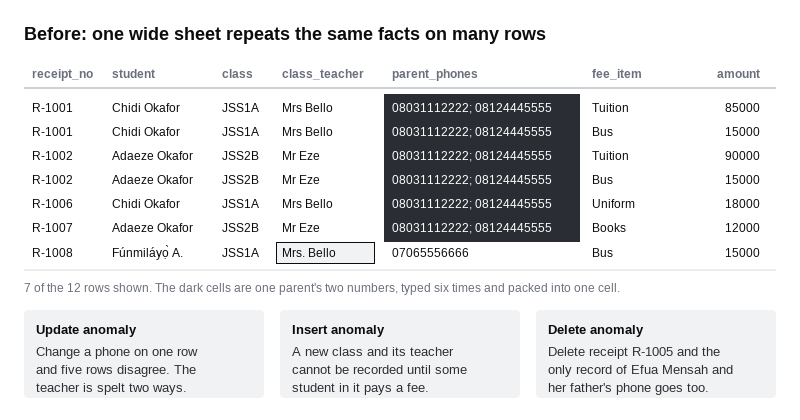
The update anomaly: a fact typed on many rows has to be changed on all of them, and sooner or later one is missed. Look at how the class teachers are recorded:
sudo -u postgres psql -d fees -v ON_ERROR_STOP=1 <<'SQL'
SELECT class, class_teacher, count(*) AS rows
FROM sheet
GROUP BY class, class_teacher
ORDER BY class, rows DESC;
SQL class | class_teacher | rows
-------+---------------+------
JSS1A | Mrs Bello | 6
JSS1A | Mrs. Bello | 1
JSS2B | Mr Eze | 5
(3 rows)JSS1A has one teacher and two spellings. A report grouped by teacher would now show two people. Count how often each parent's phone numbers are repeated:
sudo -u postgres psql -d fees -v ON_ERROR_STOP=1 <<'SQL'
SELECT parent_name, count(*) AS rows
FROM sheet
GROUP BY parent_name
ORDER BY rows DESC;
SQL
Ngozi Okafor's two numbers appear on 6 of the 12 rows. If she changes one, someone has to find and edit six cells.
The delete anomaly: removing one fact removes another by accident. Efua Mensah has paid once:
sudo -u postgres psql -d fees -c "SELECT count(*) FROM sheet WHERE student_no = 'S105';"It prints 1. If that receipt is cancelled and the row deleted, the school also loses the only record that Efua is a student and how to reach her father.
The insert anomaly: you cannot record one fact without inventing another. The school opens a new class, JSS3C, taught by Ms Hassan. There is nowhere to write that down until a student in JSS3C pays a fee, because every row in the sheet is a payment.
Check it worked
You have seen all three with your own queries: two spellings of Mrs Bello across 7 JSS1A rows, Ngozi Okafor on 6 rows, and Efua Mensah on exactly 1 row. Each problem has the same cause: the sheet mixes facts about payments, students, classes and parents in one row.
Step 3 · Apply first normal form: one value per cell, one key per row
The first rule has two parts. Every cell holds a single value, and every row can be identified by a key: a column, or a set of columns, whose values are never repeated.
The parent_phones column breaks the first part. Ngozi's cell holds two numbers separated by a semicolon, so you cannot look a parent up by one number or check that each number is valid. Split the cells into one value per row with string_to_table, which turns a delimited string into a set of rows:
sudo -u postgres psql -d fees -v ON_ERROR_STOP=1 <<'SQL'
SELECT DISTINCT trim(phone) AS phone, parent_name
FROM sheet
CROSS JOIN LATERAL string_to_table(parent_phones, ';') AS phone
ORDER BY phone;
SQL
The result has 5 rows, one per phone number, with Ngozi Okafor next to both 08031112222 and 08124445555. Phone numbers stay as text. They are identifiers, not quantities: nobody adds them up, and a number type would drop the leading zero just as the spreadsheet does.
For the second part, find the key. receipt_no alone repeats, because R-1001 has two items. A receipt never lists the same fee item twice, so try the pair receipt_no and fee_item. A key is only a key if no pair appears twice:
sudo -u postgres psql -d fees -v ON_ERROR_STOP=1 <<'SQL'
SELECT receipt_no, fee_item, count(*)
FROM sheet
GROUP BY receipt_no, fee_item
HAVING count(*) > 1;
SQLCheck it worked
The phone query lists 5 numbers, each on its own row. The key query prints (0 rows): no receipt and fee item pair repeats, so (receipt_no, fee_item) identifies every row of the sheet.
Step 4 · Apply second normal form: depend on the whole key
The second rule only matters when the key has more than one column, as yours does. Every other column must depend on the whole key, not on part of it.
Ask which columns are fixed once you know just the receipt_no. If a receipt always has one payment date and one student, those columns depend on half the key:
sudo -u postgres psql -d fees -v ON_ERROR_STOP=1 <<'SQL'
SELECT receipt_no,
       count(DISTINCT paid_on)    AS dates,
       count(DISTINCT student_no) AS students,
       count(*)                   AS items
FROM sheet
GROUP BY receipt_no
ORDER BY receipt_no;
SQL
Every receipt has 1 date and 1 student, and between 1 and 2 items. So paid_on and student_no are facts about the receipt, and repeating them on every item row is the same waste as repeating the phones. Only amount needs both halves of the key: you need the receipt and the fee item to know how much was paid for that item.
That splits the sheet in two:
receipts: one row per receipt, keyed byreceipt_no, holdingpaid_onandstudent_no.receipt_lines: one row per item, keyed by(receipt_no, fee_item), holdingamount.
Everything about the student still rides along with the receipt for now. The next rule deals with it.
Check it worked
The query returns 8 rows, one per receipt, and the dates and students columns hold only 1s. If any receipt showed 2 in either column, the sheet would contain a mistake to fix before splitting, because one receipt cannot be paid on two days.
Step 5 · Apply third normal form: depend on nothing but the key
The third rule: a column must depend on the key and on nothing else. Once you know student_no, you know the student's name, class and parent, whichever receipt you are looking at. Once you know the class, you know the teacher. Those columns depend on the key only through another column, and that chain is what lets the teacher be spelt two ways.
Check each chain. For every student, count the versions of their details; for every class, count the versions of its teacher. In a clean sheet every count is 1:
sudo -u postgres psql -d fees -v ON_ERROR_STOP=1 <<'SQL'
SELECT 'student' AS fact, student_no AS id,
       count(DISTINCT student_name || '|' || class || '|' || parent_name || '|' || parent_phones) AS versions
FROM sheet GROUP BY student_no
UNION ALL
SELECT 'class', class, count(DISTINCT class_teacher)
FROM sheet GROUP BY class
ORDER BY versions DESC, fact, id;
SQL
The first row is class | JSS1A | 2, and every other row has 1 version. Normalising forces you to settle this, because a class can only have one row in its own table. Ask the school which spelling is right before you change anything. Here the answer is "Mrs Bello", so fix the staging data:
sudo -u postgres psql -d fees -v ON_ERROR_STOP=1 -c "UPDATE sheet SET class_teacher = 'Mrs Bello' WHERE class = 'JSS1A';"psql prints UPDATE 7: all seven JSS1A rows, including the six that were already right. In the new design that change touches one row.
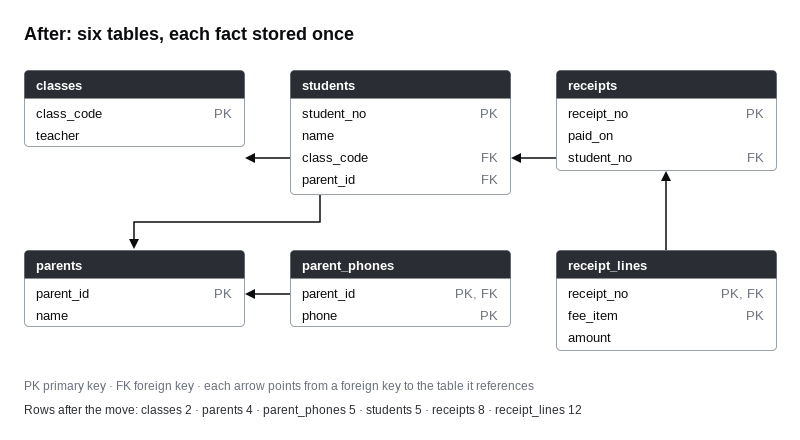
Third normal form gives you four more tables, and the design is complete:
classes:class_codeandteacher.parents: an id and aname. The sheet has no parent number, so the database generates one.parent_phones: one row per parent and phone, which is where first normal form put the split numbers.students:student_no,name,class_codeandparent_id.
Check it worked
Run the versions query again. Every row now shows 1, including JSS1A.
sudo -u postgres psql -d fees -c "SELECT class, count(DISTINCT class_teacher) AS versions FROM sheet GROUP BY class ORDER BY class;"Step 6 · Create the tables with keys
Write the design as SQL. Each PRIMARY KEY enforces the key you found, and each REFERENCES clause is a foreign key: it stops a row pointing at a class, parent, student or receipt that does not exist. Create the tables a row depends on before the tables that point at them.
sudo -u postgres psql -d fees -v ON_ERROR_STOP=1 <<'SQL'
CREATE TABLE classes (
  class_code text PRIMARY KEY,
  teacher    text NOT NULL
);

CREATE TABLE parents (
  parent_id integer GENERATED ALWAYS AS IDENTITY PRIMARY KEY,
  name      text NOT NULL
);

CREATE TABLE parent_phones (
  parent_id integer NOT NULL REFERENCES parents (parent_id),
  phone     text    NOT NULL,
  PRIMARY KEY (parent_id, phone)
);

CREATE TABLE students (
  student_no text    PRIMARY KEY,
  name       text    NOT NULL,
  class_code text    NOT NULL REFERENCES classes (class_code),
  parent_id  integer NOT NULL REFERENCES parents (parent_id)
);

CREATE TABLE receipts (
  receipt_no text PRIMARY KEY,
  paid_on    date NOT NULL,
  student_no text NOT NULL REFERENCES students (student_no)
);

CREATE TABLE receipt_lines (
  receipt_no text          NOT NULL REFERENCES receipts (receipt_no),
  fee_item   text          NOT NULL,
  amount     numeric(12,2) NOT NULL CHECK (amount > 0),
  PRIMARY KEY (receipt_no, fee_item)
);
SQL
The types are now deliberate. paid_on is a date, so 2026-02-30 is rejected. amount is numeric, which stores money exactly, where a floating-point type would round. GENERATED ALWAYS AS IDENTITY numbers the parents for you.
Check it worked
sudo -u postgres psql -d fees -c '\dt'The list has seven tables: your six new ones and sheet. Run sudo -u postgres psql -d fees -c '\d receipt_lines' to see its primary key on (receipt_no, fee_item) and the foreign key to receipts listed under the columns.
Step 7 · Move the data across with INSERT ... SELECT
INSERT INTO table (columns) SELECT ... inserts the result of a query. Fill the tables in the same order you created them, taking DISTINCT values from the sheet for each one. Run it as one transaction, so a failure part-way leaves every table empty rather than half full.
sudo -u postgres psql -d fees -v ON_ERROR_STOP=1 <<'SQL'
BEGIN;

INSERT INTO classes (class_code, teacher)
SELECT DISTINCT class, class_teacher FROM sheet;

INSERT INTO parents (name)
SELECT DISTINCT parent_name FROM sheet;

INSERT INTO parent_phones (parent_id, phone)
SELECT DISTINCT p.parent_id, trim(phone)
FROM sheet AS s
JOIN parents AS p ON p.name = s.parent_name
CROSS JOIN LATERAL string_to_table(s.parent_phones, ';') AS phone;

INSERT INTO students (student_no, name, class_code, parent_id)
SELECT DISTINCT s.student_no, s.student_name, s.class, p.parent_id
FROM sheet AS s
JOIN parents AS p ON p.name = s.parent_name;

INSERT INTO receipts (receipt_no, paid_on, student_no)
SELECT DISTINCT receipt_no, paid_on::date, student_no FROM sheet;

INSERT INTO receipt_lines (receipt_no, fee_item, amount)
SELECT receipt_no, fee_item, amount::numeric FROM sheet;

COMMIT;
SQL
psql prints one line per insert: INSERT 0 2, INSERT 0 4, INSERT 0 5, INSERT 0 5, INSERT 0 8 and INSERT 0 12. The ::date and ::numeric casts turn the staged text into the real types. A value that does not fit, such as 85,000 with a comma, stops the transaction with an error that names the bad value.
Two things are worth knowing:
- Had you skipped the teacher fix,
DISTINCTwould have produced two JSS1A rows and the primary key onclasseswould have rejected the second with aduplicate keyerror. The keys catch the inconsistencies you missed. - Parents are matched by name, because the sheet has nothing better. That is safe for 4 parents. With thousands of rows, two different parents can share a name, so check for that first (count distinct phone sets per name) or ask the school for a parent number.
Check it worked
Compare each table's row count with the number of distinct values in the sheet it came from:
sudo -u postgres psql -d fees -v ON_ERROR_STOP=1 <<'SQL'
SELECT 'classes' AS tbl, (SELECT count(*) FROM classes) AS rows, (SELECT count(DISTINCT class) FROM sheet) AS expected
UNION ALL SELECT 'parents', (SELECT count(*) FROM parents), (SELECT count(DISTINCT parent_name) FROM sheet)
UNION ALL SELECT 'students', (SELECT count(*) FROM students), (SELECT count(DISTINCT student_no) FROM sheet)
UNION ALL SELECT 'receipts', (SELECT count(*) FROM receipts), (SELECT count(DISTINCT receipt_no) FROM sheet)
UNION ALL SELECT 'receipt_lines', (SELECT count(*) FROM receipt_lines), (SELECT count(*) FROM sheet)
UNION ALL SELECT 'total paid', (SELECT sum(amount) FROM receipt_lines), (SELECT sum(amount::numeric) FROM sheet);
SQL
In every row, rows equals expected: 2, 4, 5, 8 and 12, and the total paid is 540000 on both sides (psql shows 540000.00 for the typed column).
Step 8 · Rebuild the sheet with a join
Counts can match while values are wrong. The stronger check is to rebuild the original sheet from the new tables and compare it with the staging table, row by row. Save the rebuild as a view, so you can reuse it:
sudo -u postgres psql -d fees -v ON_ERROR_STOP=1 <<'SQL'
CREATE VIEW sheet_rebuilt AS
SELECT r.receipt_no,
       r.paid_on,
       st.student_no,
       st.name   AS student_name,
       c.class_code AS class,
       c.teacher AS class_teacher,
       p.name    AS parent_name,
       (SELECT string_agg(pp.phone, '; ' ORDER BY pp.phone)
          FROM parent_phones AS pp
         WHERE pp.parent_id = p.parent_id) AS parent_phones,
       l.fee_item,
       l.amount
FROM receipt_lines AS l
JOIN receipts AS r  ON r.receipt_no  = l.receipt_no
JOIN students AS st ON st.student_no = r.student_no
JOIN classes  AS c  ON c.class_code  = st.class_code
JOIN parents  AS p  ON p.parent_id   = st.parent_id;
SQL
string_agg joins a parent's phone numbers back into one cell, the reverse of string_to_table. Now compare. EXCEPT returns the rows in the first query that are missing from the second, so run it in both directions and count what is left:
sudo -u postgres psql -d fees -v ON_ERROR_STOP=1 <<'SQL'
SELECT count(*) AS differences FROM (
  (SELECT receipt_no, paid_on::date, student_no, student_name, class, class_teacher,
          parent_name, parent_phones, fee_item, amount::numeric
     FROM sheet
   EXCEPT
   SELECT * FROM sheet_rebuilt)
  UNION ALL
  (SELECT * FROM sheet_rebuilt
   EXCEPT
   SELECT receipt_no, paid_on::date, student_no, student_name, class, class_teacher,
          parent_name, parent_phones, fee_item, amount::numeric
     FROM sheet)
) AS d;
SQL
It prints 0. Every row of the cleaned sheet can be rebuilt from the six tables, and the tables hold nothing extra.
The anomalies from the second step have gone. Record the new class without a payment:
sudo -u postgres psql -d fees -v ON_ERROR_STOP=1 -c "INSERT INTO classes (class_code, teacher) VALUES ('JSS3C', 'Ms Hassan');"Then cancel Efua's only receipt inside a transaction, look her up, and roll back so the receipt stays:
sudo -u postgres psql -d fees -v ON_ERROR_STOP=1 <<'SQL'
BEGIN;
DELETE FROM receipt_lines WHERE receipt_no = 'R-1005';
DELETE FROM receipts WHERE receipt_no = 'R-1005';
SELECT st.name, p.name AS parent, pp.phone
FROM students AS st
JOIN parents AS p ON p.parent_id = st.parent_id
JOIN parent_phones AS pp ON pp.parent_id = p.parent_id
WHERE st.student_no = 'S105';
ROLLBACK;
SQL
The query still returns Efua Mensah, Kwame Mensah and 08159990000. Deleting a payment no longer deletes a student.
Check it worked
The comparison printed 0 differences, JSS3C is now in classes with no receipts, and Efua's details survived the deleted receipt. A quick count confirms the rollback: sudo -u postgres psql -d fees -c "SELECT count(*) FROM receipts;" still prints 8.
Step 9 · Denormalise on purpose, and clean up
Normalised tables are the right place to keep data that changes. Some readers still want the wide shape: the bursar's end-of-term report, a dashboard that loads on a slow mobile connection, or an export for an accountant. Joining five tables on every page view can be more work than the report needs. Denormalising means storing a joined or summed copy on purpose, and accepting that the copy can fall behind.
A materialised view is PostgreSQL's built-in way to do that. It runs a query once and stores the result as a table:
sudo -u postgres psql -d fees -v ON_ERROR_STOP=1 <<'SQL'
CREATE MATERIALIZED VIEW student_fee_totals AS
SELECT st.student_no, c.class_code, c.teacher, sum(l.amount) AS total_paid
FROM students AS st
JOIN classes  AS c ON c.class_code = st.class_code
JOIN receipts AS r ON r.student_no = st.student_no
JOIN receipt_lines AS l ON l.receipt_no = r.receipt_no
GROUP BY st.student_no, c.class_code, c.teacher;

SELECT * FROM student_fee_totals ORDER BY student_no;
SQL student_no | class_code | teacher | total_paid
------------+------------+-----------+------------
S101 | JSS1A | Mrs Bello | 118000.00
S102 | JSS2B | Mr Eze | 117000.00
S103 | JSS1A | Mrs Bello | 112000.00
S104 | JSS2B | Mr Eze | 108000.00
S105 | JSS1A | Mrs Bello | 85000.00
(5 rows)Now Mrs Bello's name changes. In the normalised tables that is one row:
sudo -u postgres psql -d fees -v ON_ERROR_STOP=1 <<'SQL'
UPDATE classes SET teacher = 'Mrs Bello-Okeke' WHERE class_code = 'JSS1A';
SELECT student_no, teacher FROM student_fee_totals WHERE class_code = 'JSS1A' ORDER BY student_no;
SQL
psql prints UPDATE 1, but the materialised view still says Mrs Bello on all three rows. That is the price of the copy: it is only as fresh as its last refresh. Refresh it:
sudo -u postgres psql -d fees -v ON_ERROR_STOP=1 <<'SQL'
REFRESH MATERIALIZED VIEW student_fee_totals;
SELECT student_no, teacher FROM student_fee_totals WHERE class_code = 'JSS1A' ORDER BY student_no;
SQL
Denormalise when a copy is read far more often than its sources change and you can say when it gets refreshed (nightly, or after each batch of payments). Some copies are deliberate for a different reason: receipt_lines.amount records what was paid that day, even if the tuition fee goes up next term. History that must not change is not duplication. Keep the normalised tables as the source of truth either way, and never let anyone edit the copy.
When you have finished, remove the practice database and folder. This deletes the fees database with all its tables, so make sure nothing you want is in it.
cd ~
sudo -u postgres dropdb fees
rm -rf ~/fees-demoCheck it worked
Before the refresh the view showed Mrs Bello for S101, S103 and S105, and after it showed Mrs Bello-Okeke. After clean-up, this prints 0:
sudo -u postgres psql -Atc "SELECT count(*) FROM pg_database WHERE datname = 'fees';"Next steps
- Design a schema from the start rather than rescuing a sheet, with keys, types and a diagram: /tutorials/design-the-clinic-booking-schema-tables-and-relationships.
- Practise the joins that put normalised tables back together, and the one that doubles your totals: /tutorials/combine-tables-with-sql-joins.
- Load a large, messy CSV safely through a staging table and keep the rows that fail: /tutorials/load-and-export-csv-data-with-postgresql-copy.
- Turn the normalised fee data into per-class totals and averages: /tutorials/summarise-data-with-group-by-and-having.
Related tutorials
- Use SQLite safely in a Python app: WAL mode, foreign keys and busy timeoutsYou will build a small room-booking store on SQLite with Python 3.15, reproduce the "database is locked" error with two writer processes, and end with a connection helper that turns on foreign keys, WAL mode, a busy timeout and BEGIN IMMEDIATE writes, plus a tested online backup.
- Throttle login attempts with a sliding window in RedisYou will protect a Python login function from password guessing with a sliding-window log in Redis sorted sets, checked atomically in a Lua script, with per-address lockouts that double each time, an account-wide rule that asks for an extra check instead of locking the owner out, and tests that replay 50 guesses.
- Run background jobs with Redis Streams and consumer groupsYou will build a small receipt-sending job queue on Redis 8 Streams with two Python workers that share the work, recover jobs from a crashed worker, park repeated failures in a dead-letter stream and never send the same receipt twice.
Need this done for you?
Padding does this work for growing companies, from the first diagnosis to a system that keeps working.
Get new tutorials