Databases · Advanced · 24 min
Run background jobs with Redis Streams and consumer groups
By Padding · Updated 18 Nov 2026
Debian 13 (redis:8 image) · Redis 8.12 · Python 3.15 · redis-py 8.2
You will build a small receipt-sending job queue on Redis 8 Streams with two Python workers that share the work, recover jobs from a crashed worker, park repeated failures in a dead-letter stream and never send the same receipt twice.
On this page
When a customer pays, your checkout code should answer in milliseconds. Sending the receipt by email or SMS can take seconds, and the provider is sometimes down. The usual fix is a job queue: checkout records "send a receipt for order 1001" and returns, and a separate worker process does the slow part.
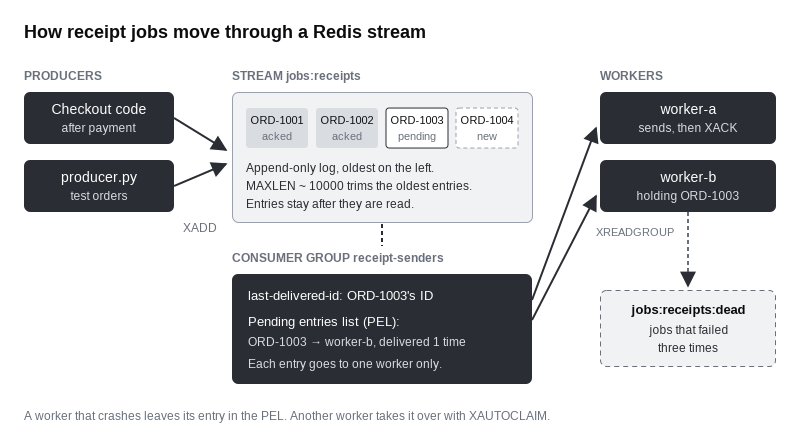
Redis Streams make a good small queue. A stream is an append-only log stored in Redis. A consumer group lets several workers share one stream so that each entry goes to one worker, and Redis remembers which entries were handed out but not yet confirmed. That record, the pending entries list, is what lets you recover jobs when a worker crashes.
In this tutorial you build that queue for receipts. You add jobs with XADD, create a group, run two Python workers that read with XREADGROUP, crash one on purpose and take its job over with XAUTOCLAIM, send jobs that fail three times to a dead-letter stream, and make the handler safe to run twice. At the end you compare Streams with a plain list queue and look at when a dedicated message broker is the better choice.
The commands use Redis 8.12 and redis-py 8.2 on Python 3.15. The same stream commands work on Valkey 8 and 9.
Step 1 · Check Redis and create the project
Confirm the server answers and see which version and eviction policy it runs:
redis-cli ping
redis-cli INFO server | grep '^redis_version'
redis-cli CONFIG GET maxmemory-policy
The first command replies PONG and the second redis_version:8.12.0 or a later 8.x. The third prints maxmemory-policy and its value. For a queue the value must be noeviction, the Redis default. With an eviction policy such as allkeys-lru, Redis deletes keys when memory runs out, and a deleted stream is a lost backlog of jobs. If your server is a shared cache with eviction on, run the queue on a separate Redis instance.
If your Redis requires a password, put it in two environment variables for this shell. read -rs asks for it without echoing it, so it stays out of your shell history. redis-cli reads REDISCLI_AUTH, and the Python code in this tutorial reads REDIS_URL. A password with characters such as @, / or : must be percent-encoded in the URL:
read -rsp 'Redis password: ' REDISCLI_AUTH; echo
export REDISCLI_AUTH
export REDIS_URL="redis://:${REDISCLI_AUTH}@localhost:6379/0"
Now create the project and add redis-py. The range allows 8.2 patch releases only, which is the first line with Python 3.15 support:
mkdir -p ~/receipts-demo
cd ~/receipts-demo
uv init --no-package --python 3.15
uv add "redis>=8.2,<8.3"Check it worked
uv run python -c "import redis; print(redis.__version__)"The command prints 8.2.0 or a later 8.2 release.
Step 2 · Add jobs to a stream
XADD appends an entry to a stream and creates the stream if it does not exist. An entry is a set of field and value pairs, much like a small hash. Add one receipt job by hand:
redis-cli XADD jobs:receipts MAXLEN '~' 10000 '*' order_id ORD-1000 email ada@example.com amount 2500.00 currency NGN'*' asks Redis to generate the entry ID, and the reply is that ID, something like 1795000000000-0: the server time in milliseconds and a sequence number. IDs always increase, so the stream keeps its order.
MAXLEN ~ 10000 caps the stream. A stream keeps entries after workers read them, so without a cap it grows until memory runs out. The ~ lets Redis trim in whole blocks, which is much cheaper than trimming to an exact count, and the stream may hold slightly more than 10,000 entries. Trimming removes the oldest entries whether or not a worker has finished with them, so set the cap well above the largest backlog you expect. Redis 8.2 and later also accept ACKED before MAXLEN, which trims only entries every group has acknowledged.
In an app, the producer is a few lines of code in your checkout. Create producer.py, which queues test orders. Its arguments are the first order number, how many orders to queue, and an optional email address to use for all of them:
cat > producer.py <<'PY'
import os
import sys

import redis

STREAM = "jobs:receipts"

r = redis.Redis.from_url(
    os.environ.get("REDIS_URL", "redis://localhost:6379/0"),
    decode_responses=True,
)


def enqueue(order_id, email, amount):
    job = {"order_id": order_id, "email": email, "amount": amount, "currency": "NGN"}
    return r.xadd(STREAM, job, maxlen=10_000, approximate=True)


first, count = int(sys.argv[1]), int(sys.argv[2])
email = sys.argv[3] if len(sys.argv) > 3 else None
for n in range(first, first + count):
    job_id = enqueue(f"ORD-{n}", email or f"customer{n}@example.com", f"{n * 5}.00")
    print(f"queued ORD-{n} as {job_id}")
PY
uv run producer.py 1001 5
The job carries only what the worker needs to find and send the receipt. Keep entries small: IDs and short values, not whole documents, because every entry lives in memory.
Check it worked
redis-cli XLEN jobs:receipts
redis-cli XRANGE jobs:receipts - + COUNT 2
The script printed five queued ORD-... lines. XLEN replies 6, and XRANGE shows the first two entries, ORD-1000 and ORD-1001, each as its ID followed by its fields and values.
Step 3 · Create a consumer group
Reading a stream with XRANGE does not take anything off it. To share work between workers, create a consumer group. The group keeps its own position in the stream and a list of entries it has handed out:
redis-cli XGROUP CREATE jobs:receipts receipt-senders 0The reply is OK. The last argument says where the group starts. 0 means "from the beginning", so the six jobs already queued will be processed. $ means "only entries added from now on", which is what you want when you add a group to a stream that already holds old history. Add MKSTREAM to create the group before the first job exists, for example in a deploy script.
Running the command a second time fails with BUSYGROUP Consumer Group name already exists, which is harmless.
Check it worked
redis-cli XINFO GROUPS jobs:receiptsThe output lists the group's fields and values on alternate lines: name is receipt-senders, consumers is 0, pending is 0, and lag is 6, the number of entries the group has not handed out yet.
Step 4 · Write a worker and run two of them
The worker reads new entries for the group, sends the receipt, and acknowledges the entry with XACK. Only an acknowledged entry leaves the pending list. If the worker fails before XACK, the entry stays pending and can be retried.
The worker also does three things you will use in the next steps: it takes over entries left idle by other workers, it moves entries to a dead-letter stream after three failed attempts, and it skips orders it has already sent. Sending is a stand-in that waits 0.3 seconds, as a slow mail or SMS provider would, and appends a line to outbox.log. Any address ending in @bounce.test fails, so you can test failures.
Create worker.py:
cat > worker.py <<'PY'
import os
import signal
import sys
import time

import redis

STREAM = "jobs:receipts"
GROUP = "receipt-senders"
DEAD = "jobs:receipts:dead"
MAX_DELIVERIES = 3
CLAIM_IDLE_MS = int(os.environ.get("CLAIM_IDLE_MS", "60000"))
CRASH_BEFORE_ACK = os.environ.get("CRASH_BEFORE_ACK") == "1"

consumer = sys.argv[1]
r = redis.Redis.from_url(
    os.environ.get("REDIS_URL", "redis://localhost:6379/0"),
    decode_responses=True,
)
signal.signal(signal.SIGTERM, lambda *_: sys.exit(0))


def log(text):
    print(f"{consumer}: {text}", flush=True)


def send_receipt(fields):
    """Stand-in for a call to an email or SMS provider."""
    time.sleep(0.3)
    if fields["email"].endswith("@bounce.test"):
        raise RuntimeError(f"mail server rejected {fields['email']}")
    with open("outbox.log", "a") as outbox:
        outbox.write(f"{consumer} sent receipt for {fields['order_id']} to {fields['email']}\n")


def handle(msg_id, fields):
    done_key = f"receipt:sent:{fields['order_id']}"
    if r.exists(done_key):
        log(f"{fields['order_id']} already sent, acknowledging {msg_id} without sending")
        r.xack(STREAM, GROUP, msg_id)
        return
    if CRASH_BEFORE_ACK:
        log(f"crashing while holding {msg_id}")
        os._exit(1)
    try:
        send_receipt(fields)
    except Exception as err:
        log(f"{msg_id} failed: {err}")
        return  # Not acknowledged: it stays pending and is retried later.
    r.set(done_key, msg_id, ex=7 * 24 * 3600)
    r.xack(STREAM, GROUP, msg_id)
    log(f"sent {fields['order_id']} ({msg_id})")


def dead_letter(msg_id, fields, deliveries):
    pipe = r.pipeline()  # MULTI/EXEC: both commands or neither
    pipe.xadd(DEAD, {**fields, "source_id": msg_id, "failed_attempts": deliveries - 1},
              maxlen=10_000, approximate=True)
    pipe.xack(STREAM, GROUP, msg_id)
    pipe.execute()
    log(f"moved {msg_id} to {DEAD} after {deliveries - 1} failed attempts")


def reclaim():
    start = "0-0"
    while True:
        start, claimed, deleted = r.xautoclaim(
            STREAM, GROUP, consumer, CLAIM_IDLE_MS, start_id=start, count=50
        )
        for msg_id in deleted:
            log(f"{msg_id} was trimmed from the stream before anyone acknowledged it")
        for msg_id, fields in claimed:
            entry = r.xpending_range(STREAM, GROUP, min=msg_id, max=msg_id, count=1)
            deliveries = entry[0]["times_delivered"] if entry else 1
            if deliveries > MAX_DELIVERIES:
                dead_letter(msg_id, fields, deliveries)
            else:
                log(f"retrying {msg_id}, delivery {deliveries}")
                handle(msg_id, fields)
        if start == "0-0":
            return


def main():
    log(f"waiting for jobs on {STREAM}")
    while True:
        reclaim()
        response = r.xreadgroup(GROUP, consumer, {STREAM: ">"}, count=1, block=2000)
        for _stream, messages in response or []:
            for msg_id, fields in messages:
                handle(msg_id, fields)


if __name__ == "__main__":
    try:
        main()
    except KeyboardInterrupt:
        log("stopped")
PY
The parts that matter:
xreadgroup(..., {STREAM: ">"}, count=1, block=2000)asks for entries never delivered to anyone in the group, one at a time, and waits up to two seconds if there are none.count=1means a slow job never holds up others behind it in the same batch. For many tiny jobs, a larger count saves round trips.- Keep
blockbelow the client's socket timeout. redis-py 8 setssocket_timeoutto five seconds by default, and a blocking read that waits longer raisesTimeoutError. - Each worker names itself, here from the command line. The group tracks pending entries per consumer name, so use a stable, unique name per process, such as the host name and a number.
- The entry is acknowledged only after the receipt is sent. That gives you at-least-once delivery: a crash between sending and
XACKmeans the job runs again. Thereceipt:sent:<order>key, kept for a week, is what stops a second run from sending a second receipt.
Start the first worker in your second terminal, from the same folder, and leave it running:
cd ~/receipts-demo
uv run worker.py worker-a
Open a third terminal, or a second tab, and start another worker under a different name:
cd ~/receipts-demo
uv run worker.py worker-b
Each worker prints waiting for jobs on jobs:receipts, then a sent ORD-... line for each job it handles. Between them they work through the six queued jobs. Back in your first terminal, queue ten more while the workers run:
uv run producer.py 1006 10Check it worked
Count how many receipts each worker sent, and check nothing is left pending:
cut -d' ' -f1 outbox.log | sort | uniq -c
redis-cli XPENDING jobs:receipts receipt-senders
The first command shows two lines, one for worker-a and one for worker-b, with counts that add up to 16. The split varies from run to run. The first line of the XPENDING reply is 0: every job was acknowledged.
Step 5 · Recover jobs from a crashed worker
Stop both workers with Ctrl+C in their terminals. Each prints stopped.
Queue three more jobs, then run a third worker that crashes after it takes its first job and before it acknowledges it. CRASH_BEFORE_ACK=1 makes the worker exit on the spot, as a process killed by a deploy or an out-of-memory error would:
uv run producer.py 1016 3
CRASH_BEFORE_ACK=1 uv run worker.py worker-c || echo "worker exited with status $?"
The worker prints crashing while holding <id>, and the shell prints worker exited with status 1. The job for ORD-1016 was delivered to worker-c and never acknowledged. Ask the group what is pending:
redis-cli XPENDING jobs:receipts receipt-senders
redis-cli XPENDING jobs:receipts receipt-senders - + 10
The summary form shows 1 pending entry, the lowest and highest pending IDs, and worker-c with 1. The extended form, with a range and a count, lists each pending entry: its ID, its owner worker-c, how many milliseconds since it was delivered, and its delivery count, 1.
Nobody will ever finish that job unless another worker takes it over. That is what reclaim() does: XAUTOCLAIM transfers to the calling worker any pending entries idle longer than CLAIM_IDLE_MS, adds one to their delivery count, and returns them. The default in worker.py is 60,000 ms, a minute. Pick a value comfortably longer than your slowest job takes, or a slow worker that is still busy will have its job taken from under it. For this demo, start worker-a again in your second terminal with a five-second threshold:
CLAIM_IDLE_MS=5000 uv run worker.py worker-aIt sends ORD-1017 and ORD-1018, which nobody had read, and once ORD-1016 has been idle for five seconds (straight away if you took longer than that to start the worker) it prints retrying <id>, delivery 2 and sent ORD-1016. Either order is fine.
A worker restarted under its old name could also re-read its own pending entries with XREADGROUP and the ID 0 in place of >. XAUTOCLAIM covers that case and the case where the old worker never returns, which is why the worker here uses only that.
Check it worked
grep 'ORD-1016' outbox.log
redis-cli XPENDING jobs:receipts receipt-senders
The first command prints worker-a sent receipt for ORD-1016 to customer1016@example.com. The XPENDING summary starts with 0. Leave worker-a running for the next step.
Step 6 · Park repeated failures in a dead-letter stream
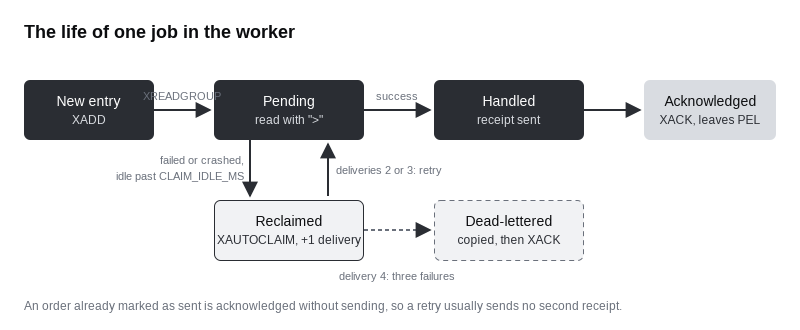
Some jobs will never succeed: a mistyped address, a deleted account, a bug. Retrying them forever wastes work and hides them. The worker counts deliveries instead. Each XAUTOCLAIM adds one to an entry's delivery count, and XPENDING reports it. When an entry comes round for a fourth time, it has failed three times, and dead_letter() copies it to jobs:receipts:dead and acknowledges it in one MULTI/EXEC transaction, so it is never in both places or neither.
Queue a job whose address always bounces:
uv run producer.py 2001 1 nobody@bounce.testWatch the worker's terminal. Over about 15 to 25 seconds it prints failed: mail server rejected nobody@bounce.test three times, with retrying <id>, delivery 2 and delivery 3 in between, and then moved <id> to jobs:receipts:dead after 3 failed attempts.
Check it worked
redis-cli XRANGE jobs:receipts:dead - +
redis-cli XPENDING jobs:receipts receipt-senders
The dead-letter stream holds one entry with the original fields, order_id ORD-2001 and the bounce address, plus source_id, the ID it had in the main stream, and failed_attempts 3. Nothing is pending in the main group.
Someone needs to look at the dead-letter stream. Check its length in your monitoring, with redis-cli XLEN jobs:receipts:dead, and alert when it grows. Once you fix the cause, queue the job again with XADD on jobs:receipts, then delete the dead entry with XDEL.
Step 7 · Make sure a repeated job does not send twice
At-least-once delivery means any job may run twice: after a crash between sending and XACK, after a reclaim from a worker that was only slow, or because the checkout code retried an XADD that had in fact worked. The handler must be idempotent: running it twice has the same effect as running it once.
The worker uses the order ID as the idempotency key. Before sending, it checks for receipt:sent:<order>, and it sets that key after a successful send. Test it by queuing a job for an order that already has its receipt:
uv run producer.py 1001 1The worker prints ORD-1001 already sent, acknowledging <id> without sending.
Check it worked
grep -c 'for ORD-1001 to' outbox.log
redis-cli GET receipt:sent:ORD-1001
The first command prints 1: one receipt for ORD-1001, even though two jobs named it. The second prints the stream ID of the job that sent it.
This check-then-mark pattern leaves a small window: two workers holding duplicate jobs for the same order at the same moment could both send. When a duplicate would really hurt, such as a payout or a charge, pass the order ID to the provider as its idempotency key so the provider rejects the second request, or record the send in your main database inside the same transaction as the order. On the producer side, Redis 8.6 added XADD ... IDMP, which returns the original entry instead of adding a duplicate when a producer retries with the same ID. Keep the handler idempotent anyway; it is the only defence that covers every cause.
Step 8 · Compare Streams with a list queue and a message broker
Before Streams existed, the common Redis queue was a list. A producer pushes with LPUSH, and a worker takes the oldest job with BLMOVE, which waits for a job and atomically moves it to a processing list so it is not lost if the worker dies:
redis-cli LPUSH queue:receipts '{"order_id":"ORD-3001"}'
redis-cli BLMOVE queue:receipts queue:receipts:processing RIGHT LEFT 5
redis-cli LREM queue:receipts:processing 1 '{"order_id":"ORD-3001"}'
LPUSH replies 1, the list length. BLMOVE returns the job. LREM, run when the job is done, replies 1 for the one item removed from the processing list.
That works, and libraries have used it for years, but you build the rest yourself. Compare what you just used:
- Recovery. A list knows only that a job sits in some processing list. A stream group records which worker holds each entry, since when, and how many times it was delivered, and
XAUTOCLAIMhands stale entries to a live worker. - Retries and dead letters. Streams give you the delivery count for free. With lists you store it yourself.
- History. A list forgets a job once it is removed. A stream keeps entries until trimmed, so you can inspect or replay recent jobs, and several groups, such as receipts and analytics, can each read the same stream at their own pace.
- Simplicity. For a single worker where losing an occasional job is fine, a list is fewer moving parts.
Redis keeps the whole queue in memory. By default it only saves periodic RDB snapshots, so a crash can lose several minutes of jobs. With AOF turned on (appendonly yes) and the default appendfsync everysec, the loss drops to about the last second. Choose a dedicated broker, such as RabbitMQ, Apache Kafka or a cloud provider's queue service, when:
- A lost job costs real money, and you need every write on disk before the producer is told it succeeded.
- The backlog can be larger than your server's RAM, for example during a long outage of a downstream service.
- You need weeks of retention for replays and audits, or many teams reading the same events.
- You need features Streams lack, such as scheduled or delayed jobs, priorities or complex routing.
If you already run Redis and your jobs are small and replaceable, as receipts are, Streams are often enough. Where receipts go out by SMS as well as email, which is common across many African markets, gateways can slow down at busy times. With a queue, checkout still returns quickly while the gateways are slow, and the workers catch up afterwards.
Check it worked
redis-cli LLEN queue:receipts
redis-cli LLEN queue:receipts:processing
Both lengths are 0: the job moved from the queue to the processing list and was removed when it was done.
Step 9 · Clean up
Stop worker-a with Ctrl+C in its terminal.
Then delete the keys this tutorial created and the project folder. These key names belong to this demo; check that nothing else on your server uses them before you run the commands:
redis-cli DEL jobs:receipts jobs:receipts:dead queue:receipts queue:receipts:processing
redis-cli --scan --pattern 'receipt:sent:ORD-*' | xargs redis-cli DEL
cd ~
rm -rf ~/receipts-demo
Deleting the stream also deletes its consumer group.
Check it worked
redis-cli EXISTS jobs:receipts jobs:receipts:dead
redis-cli --scan --pattern 'receipt:sent:*' | wc -l
Both commands print 0.
Next steps
- Send the receipt to another system from your worker, signed and retried properly: send webhooks with signatures and retries.
- Use the same Redis for caching, with expiry and invalidation: cache database results in Redis.
- Go back over the other Redis types and commands: learn the Redis data types with redis-cli.
- Run Redis or Valkey as a proper service with a password and memory limit: install Valkey on Ubuntu.
Related tutorials
- Use SQLite safely in a Python app: WAL mode, foreign keys and busy timeoutsYou will build a small room-booking store on SQLite with Python 3.15, reproduce the "database is locked" error with two writer processes, and end with a connection helper that turns on foreign keys, WAL mode, a busy timeout and BEGIN IMMEDIATE writes, plus a tested online backup.
- Throttle login attempts with a sliding window in RedisYou will protect a Python login function from password guessing with a sliding-window log in Redis sorted sets, checked atomically in a Lua script, with per-address lockouts that double each time, an account-wide rule that asks for an extra check instead of locking the owner out, and tests that replay 50 guesses.
- Recover the clinic database to a point in time with WAL archivingYou will archive the clinic database's WAL, take a base backup, undo a destructive DELETE by replaying the archive to the second before it ran, and rehearse that restore on a scratch copy.
Need this done for you?
Padding does this work for growing companies, from the first diagnosis to a system that keeps working.
Get new tutorials