Databases · Advanced · 24 min
Recover the clinic database to a point in time with WAL archiving
By Padding · Updated 18 Nov 2026
Ubuntu 26.04 · PostgreSQL 18.7
You will archive the clinic database's WAL, take a base backup, undo a destructive DELETE by replaying the archive to the second before it ran, and rehearse that restore on a scratch copy.
On this page
The pg_dump tutorial (/tutorials/back-up-and-restore-postgresql-with-pg-dump) gives you a copy of the clinic database as it was when the dump ran. If the nightly dump finishes at 02:00 and someone deletes a clinic's appointments at 16:40, restoring that dump throws away fourteen hours of bookings along with the mistake. For a booking system that is most of a working day: patients who rebooked, practitioners who marked visits completed, payments recorded against fees.
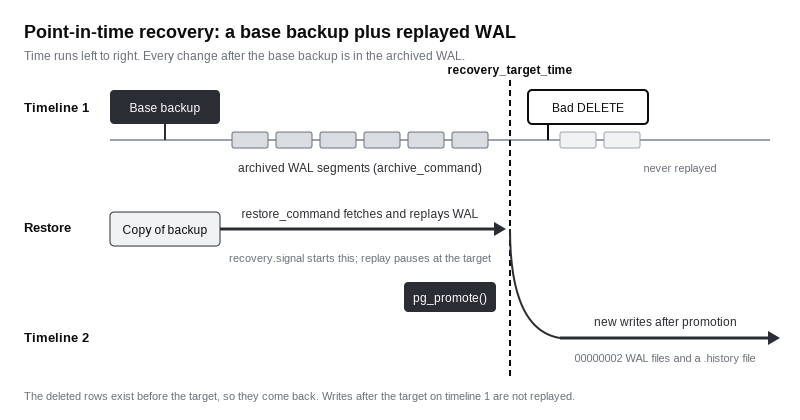
Point-in-time recovery (PITR) closes that gap. PostgreSQL already writes every change to its write-ahead log (WAL) before it changes a table. If you keep every finished WAL file, and one physical copy of the data directory to start from, you can rebuild the database as it stood at any moment after that copy: replay the WAL up to 16:39:59 and stop.
In this part you set that up for the clinic database and use it. You turn on WAL archiving into a backup folder, take a base backup with pg_basebackup, run a bad DELETE at a time you write down, restore the base backup, replay WAL to just before the DELETE, check the appointments are back and promote the server. Then you do the step most backup plans skip: restore again, on a scratch copy, to prove the backups you have now would work.
Everything here runs on PostgreSQL 18.7, the current 18.x release, on the server from /tutorials/install-postgresql-18-on-ubuntu-26-04. PostgreSQL 19.0 came out on 19 November 2026 and the same settings and functions work there; a base backup can only be restored by the major version that took it.
Point-in-time recovery works on the whole cluster, not one database. Every database on the server goes back to the target time together. If the clinic database shares its server with other apps, read the whole part before you rely on it.
Step 1 · Turn on WAL archiving
PostgreSQL recycles its WAL files once a checkpoint no longer needs them. Archiving tells it to hand each finished 16 MB WAL file to a command first, and to keep the file until that command succeeds. The command here copies it into a folder on the same server. That is enough to learn the mechanics; a later step explains why a real archive must also leave the server.
Create the archive folder and a folder for base backups, owned by postgres and readable by nobody else, because both hold every patient row:
sudo install -d -o postgres -g postgres -m 700 /var/lib/postgresql/pitr /var/lib/postgresql/pitr/wal /var/lib/postgresql/pitr/baseNow set the three archiving settings:
sudo -u postgres psql -v ON_ERROR_STOP=1 <<'SQL'
ALTER SYSTEM SET archive_mode = 'on';
ALTER SYSTEM SET archive_command = 'test ! -f /var/lib/postgresql/pitr/wal/%f && cp %p /var/lib/postgresql/pitr/wal/%f';
ALTER SYSTEM SET archive_timeout = '5min';
SQL
What each one does:
archive_mode = onstarts the archiver process. It only takes effect after a restart.archive_commandruns once per finished WAL file. PostgreSQL replaces%pwith the file's path and%fwith its name. Thetest ! -fpart refuses to overwrite a file that is already in the archive, so a misconfigured second server cannot quietly replace your history. If the command fails, PostgreSQL keeps the file and tries again.archive_timeout = 5minforces a switch to a new WAL file at least every five minutes when there has been any write. On a quiet evening, the current file might otherwise take hours to fill, and everything in it would be unarchived. Five minutes is the most work you can lose if the server's disk dies outright.
Archiving also needs wal_level to be replica or logical. replica is the default; check it has not been lowered:
sudo -u postgres psql -Atc "SHOW wal_level;"It prints replica. Restart PostgreSQL to start the archiver. Open connections drop, so pick a quiet moment on a live server.
sudo systemctl restart postgresqlCheck it worked
Force a WAL switch so there is a finished file to archive, then ask the archiver how it is doing:
sudo -u postgres psql -Atc "SELECT pg_walfile_name(pg_switch_wal());"sudo -u postgres psql -c "SELECT archived_count, last_archived_wal, failed_count, last_failed_wal FROM pg_stat_archiver;"
sudo ls -l /var/lib/postgresql/pitr/walThe first command prints a WAL file name such as 000000010000000000000004. pg_stat_archiver shows archived_count of at least 1, last_archived_wal equal to that name, and failed_count of 0. The folder listing has the same file, 16 MB. If failed_count climbs instead, the reason is in /var/log/postgresql/postgresql-18-main.log; it is almost always a missing folder or wrong ownership.
Step 2 · Take a base backup with pg_basebackup
WAL on its own is a list of changes. Replaying it needs a starting point: a physical copy of the data directory taken while archiving was on. pg_basebackup takes that copy over a replication connection while the server keeps serving bookings.
sudo -u postgres pg_basebackup -D /var/lib/postgresql/pitr/base/base-1 -X stream --checkpoint=fast -P-Dis a new folder for this backup. Use a fresh name each time; on a schedule, a date such asbase-2026-11-18works well.-X streamalso copies the WAL written while the backup runs, so the folder is a usable copy even without the archive.--checkpoint=faststarts at once instead of waiting for the next scheduled checkpoint.-Pshows progress.
The command connects through the local socket as postgres. Ubuntu's default pg_hba.conf already allows that for replication connections, so no password or network rule is needed.
The finished backup includes a backup_manifest file listing every file and its checksum. pg_verifybackup reads it and checks the copy, including the WAL it needs:
sudo -u postgres /usr/lib/postgresql/18/bin/pg_verifybackup /var/lib/postgresql/pitr/base/base-1Check it worked
pg_verifybackup prints backup successfully verified. The archive also gained a small file ending in .backup, which records where in the WAL this backup starts and ends:
sudo ls /var/lib/postgresql/pitr/walYou see the WAL files from the first step and the backup's files after them, one of them with a name like 000000010000000000000006.00000028.backup.
Step 3 · Make the mistake and write down the time
The rest of the clinic's day carries on after the backup. Book three appointments now, for a date after all the test data, so you can later prove that recovery replays work done after the base backup, not just the backup itself:
sudo -u postgres psql -d clinic -v ON_ERROR_STOP=1 <<'SQL'
INSERT INTO appointments (clinic_id, practitioner_id, patient_id, service_id, starts_at, ends_at, status, fee)
SELECT 2, 2, 100 + n, s.id,
       (current_date + 90) + time '09:00' + n * interval '30 minutes',
       (current_date + 90) + time '09:30' + n * interval '30 minutes',
       'booked', s.fee
FROM services AS s
CROSS JOIN generate_series(0, 2) AS n
WHERE s.clinic_id = 2 AND s.name = 'General consultation';
SQL
Count clinic 2's appointments, so you know what a good recovery has to bring back:
sudo -u postgres psql -d clinic -Atc "SELECT count(*) FROM appointments WHERE clinic_id = 2;"It prints a number in the low thousands. Write it down.
Now record the time. In a real incident this comes from the app's logs, the PostgreSQL log (with log_line_prefix including %m it stamps every statement) or the person who ran the command. Here you capture it in a shell variable and print it. Keep this terminal open: later steps use $GOOD_TIME.
GOOD_TIME="$(sudo -u postgres psql -Atc "SELECT now();")"
echo "$GOOD_TIME"
It prints something like 2026-11-18 16:39:58.214075+00, with your server's time zone offset at the end. Keep the offset: without it, PostgreSQL would read the time in the server's zone, and the target could land hours away from where you meant.
Now the mistake. A clean-up was meant to remove clinic 2's cancelled test bookings, but the AND status = 'cancelled' was left off:
The next command deletes every appointment for clinic 2. Run it only on the practice clinic database from this series, never on one that holds real bookings.
sudo -u postgres psql -d clinic -c "DELETE FROM appointments WHERE clinic_id = 2;"Check it worked
The command prints DELETE followed by the number you wrote down. Count again:
sudo -u postgres psql -d clinic -Atc "SELECT count(*) FROM appointments WHERE clinic_id = 2;"It prints 0. The bookings are gone from the live database, but every one of them is still in the base backup, and the WAL holds everything that happened between the backup and the DELETE.
Step 4 · Stop PostgreSQL and set the damaged cluster aside
The WAL record of the DELETE sits in the current WAL file, which has not been archived yet because it is not full. While the server is still running, force a switch so that file, and everything before your target time in it, goes to the archive:
LAST_WAL="$(sudo -u postgres psql -Atc "SELECT pg_walfile_name(pg_switch_wal());")"
echo "$LAST_WAL"sudo ls -l "/var/lib/postgresql/pitr/wal/$LAST_WAL"If ls says the file does not exist, wait a few seconds and run it again; the archiver copies files in the background. If the server had crashed instead and could not run pg_switch_wal, the unarchived WAL would still be in the damaged cluster's pg_wal folder, and you would copy any file missing from the archive across from there before restoring.
Stop PostgreSQL. From here until you promote, the clinic app cannot write, which is what you want: every booking made on the damaged database after this point would be lost by the restore anyway.
sudo systemctl stop postgresqlMove the damaged data directory aside rather than deleting it. It is your fallback if the restore goes wrong, and the only copy of anything written after your target time, which you may want to look at later.
Moving /var/lib/postgresql/18/main takes the cluster offline until the restore is finished. Check the path before you press Enter.sudo mv /var/lib/postgresql/18/main /var/lib/postgresql/18/main.damagedCheck it worked
sudo ls /var/lib/postgresql/18The listing shows main.damaged and no main. PostgreSQL is stopped and nothing has been lost yet.
Step 5 · Restore the base backup and replay WAL to the target
Copy the base backup into place as the new data directory. cp -a keeps the ownership and the 700 permissions PostgreSQL insists on:
sudo -u postgres cp -a /var/lib/postgresql/pitr/base/base-1 /var/lib/postgresql/18/mainNow tell PostgreSQL where the archive is and where to stop. On Ubuntu the main postgresql.conf lives in /etc/postgresql/18/main/ and reads every file in its conf.d folder, so put the recovery settings in a file of their own that you can delete afterwards. The heredoc is unquoted on purpose, so the shell fills in $GOOD_TIME:
sudo tee /etc/postgresql/18/main/conf.d/pitr.conf > /dev/null <<EOF
restore_command = 'cp /var/lib/postgresql/pitr/wal/%f %p'
recovery_target_time = '$GOOD_TIME'
recovery_target_action = 'pause'
EOF
cat /etc/postgresql/18/main/conf.d/pitr.confrestore_commandis the reverse ofarchive_command: PostgreSQL asks for a WAL file by name (%f) and the command copies it to where the server wants it (%p).recovery_target_timeis where replay stops. PostgreSQL applies every transaction that committed at or before this time and none after.recovery_target_action = 'pause'stops replay at the target and keeps the server read-only, so you can look at the data before committing to it.promotewould finish straight away, andshutdownwould stop the server.
The settings only matter if PostgreSQL starts in recovery mode, which an empty recovery.signal file in the data directory asks for:
sudo -u postgres touch /var/lib/postgresql/18/main/recovery.signalStart PostgreSQL. It finds backup_label from the base backup, which says where in the WAL to begin, fetches each WAL file from the archive in turn and replays it.
sudo systemctl start postgresqlCheck it worked
sudo -u postgres psql -Atc "SELECT pg_is_in_recovery(), pg_get_wal_replay_pause_state();"It prints t|paused: the server is still in recovery and has stopped at the target. If it prints t|not paused, replay is still running; wait a few seconds and run it again. The log says where it stopped:
sudo tail -n 20 /var/log/postgresql/postgresql-18-main.logNear the end are lines like recovery stopping before commit of transaction 812, time 2026-11-18 16:40:03.51+00 and pausing at the end of recovery. The transaction it stopped before is normally the DELETE; if a background job such as autovacuum committed in between, it is that one, and the DELETE comes after it. If the log says instead that recovery ended without reaching the target, a WAL file is missing from the archive; stop the server, copy the missing file from main.damaged/pg_wal, and start again.
Step 6 · Check the appointments and promote
The paused server answers read-only queries. Before ending recovery, check that it stopped where you wanted: clinic 2's appointments should be back, including the three booked after the base backup.
sudo -u postgres psql -d clinic -Atc "SELECT count(*) FROM appointments WHERE clinic_id = 2;"
sudo -u postgres psql -d clinic -c "SELECT starts_at, patient_id, status FROM appointments WHERE starts_at::date = current_date + 90 ORDER BY starts_at;"
The count matches the number you wrote down, and the second query lists the three bookings at 09:00, 09:30 and 10:00. If the count were still 0, the target was too late. You would stop the server, set an earlier recovery_target_time and repeat the previous step from the copy; nothing is final until you promote.
Promotion ends recovery and makes the server writable again:
sudo -u postgres psql -Atc "SELECT pg_promote();"It prints t once promotion is done. PostgreSQL then deletes recovery.signal and starts a new timeline, timeline 2. Its WAL file names begin 00000002, and it archives a small 00000002.history file that records where timeline 2 branched off. That is what keeps the WAL written after the target on timeline 1, including the DELETE, from ever being replayed onto the restored database.
Remove the recovery settings so they cannot confuse the next restore, and reload:
sudo rm /etc/postgresql/18/main/conf.d/pitr.confsudo systemctl reload postgresqlCheck it worked
sudo -u postgres psql -Atc "SELECT pg_is_in_recovery();"
sudo -u postgres psql -d clinic -c "INSERT INTO appointments (clinic_id, practitioner_id, patient_id, service_id, starts_at, ends_at, fee) SELECT 2, 2, 200, id, (current_date + 90) + time '11:00', (current_date + 90) + time '11:30', fee FROM services WHERE clinic_id = 2 AND name = 'General consultation';"sudo ls /var/lib/postgresql/pitr/wal | grep historypg_is_in_recovery() prints f, the booking succeeds with INSERT 0 1, and the archive lists 00000002.history. The clinic app can reconnect. Tell whoever owns the app that anything written between your target time and the shutdown was not recovered; it is still in main.damaged if they need to look.
Step 7 · Rehearse the restore on a scratch copy
You have now proved that base-1 and the archive could rebuild the database. That proof gets older every day: a full disk, a changed folder permission or a typo in archive_command can break archiving without anyone noticing until the day it matters. Restore regularly, monthly at least, and after any change to the backup set-up. This step shows a rehearsal that runs beside the live server and never touches it.
Start with a fresh base backup. The restored server is on timeline 2, and a backup taken now is the natural starting point for any future restore:
sudo -u postgres pg_basebackup -D /var/lib/postgresql/pitr/base/base-2 -X stream --checkpoint=fast -P
sudo -u postgres /usr/lib/postgresql/18/bin/pg_verifybackup /var/lib/postgresql/pitr/base/base-2
Book one more appointment after this backup and switch WAL, so the rehearsal has to replay something from the archive:
sudo -u postgres psql -d clinic -c "INSERT INTO appointments (clinic_id, practitioner_id, patient_id, service_id, starts_at, ends_at, fee) SELECT 2, 2, 201, id, (current_date + 90) + time '11:30', (current_date + 90) + time '12:00', fee FROM services WHERE clinic_id = 2 AND name = 'General consultation';"
LAST_WAL="$(sudo -u postgres psql -Atc "SELECT pg_walfile_name(pg_switch_wal());")"
Copy the backup to a scratch folder and give it a minimal configuration of its own: a different port, no network listener, the same restore_command, and peer login for postgres only. On Ubuntu the backup contains no postgresql.conf or pg_hba.conf, because those live in /etc, so you write both:
sudo -u postgres cp -a /var/lib/postgresql/pitr/base/base-2 /var/lib/postgresql/pitr/drill
sudo -u postgres tee /var/lib/postgresql/pitr/drill/postgresql.conf > /dev/null <<'EOF'
port = 5499
listen_addresses = ''
unix_socket_directories = '/var/run/postgresql'
restore_command = 'cp /var/lib/postgresql/pitr/wal/%f %p'
EOF
sudo -u postgres tee /var/lib/postgresql/pitr/drill/pg_hba.conf > /dev/null <<'EOF'
local all postgres peer
EOF
sudo -u postgres touch /var/lib/postgresql/pitr/drill/recovery.signal
Start it with pg_ctl, outside systemd, so it cannot be mistaken for the live cluster. The -c archive_mode=off matters: the backup's postgresql.auto.conf still has archive_mode = on from the first step, and it would beat the setting in postgresql.conf. A setting given on the command line beats both, so the rehearsal never writes into the real archive.
sudo -u postgres /usr/lib/postgresql/18/bin/pg_ctl -D /var/lib/postgresql/pitr/drill -o "-c archive_mode=off" -l /var/lib/postgresql/pitr/drill.log -w startWith no recovery target, the scratch server replays every WAL file the archive has and then promotes itself.
Keep a real archive off the server
A folder on the database server's own disk protects you from a bad DELETE, a broken migration or a dropped table. It does nothing if the disk fails, the server is lost or someone with root deletes /var/lib/postgresql. For the clinic's real data:
- Copy the archive and base backups to storage on another machine or object storage in another location, as they are written.
- Use a tool built for this rather than
cp. pgBackRest handles archiving and restoring with compression, encryption, parallel transfer to object storage and retention rules that remove old backups together with the WAL only they needed. Itsarchive-pushandarchive-getcommands replacearchive_commandandrestore_command. - Plan the bandwidth. Each forced WAL switch writes a full 16 MB file, though a mostly empty one compresses to very little. A clinic on a metered or prepaid connection, common for small practices across Africa, should compress before upload and schedule base backups for off-peak hours.
- Prune with care. The archive grows until you remove files, and the oldest WAL file you may delete is the one the oldest base backup you keep starts from.
pg_archivecleanupdoes this for a plain folder; pgBackRest does it for you.
Part 8 includes a backup-restore drill in its production checklist, so leave archiving switched on and keep both base backups.
Check it worked
Compare the scratch copy with the live database:
sudo -u postgres psql -p 5499 -Atc "SELECT pg_is_in_recovery();"
sudo -u postgres psql -p 5499 -d clinic -Atc "SELECT count(*) FROM appointments;"
sudo -u postgres psql -d clinic -Atc "SELECT count(*) FROM appointments;"
The first line prints f, and the two counts match, including the booking for patient 201 that exists only in the archived WAL. If the scratch server stays in recovery or the counts differ, read /var/lib/postgresql/pitr/drill.log: that is a problem you have found on a calm day instead of during an outage.
Stop the scratch server and delete it, then remove the damaged cluster you kept as a fallback. Check each path before you run these: rm -rf does not ask.
sudo -u postgres /usr/lib/postgresql/18/bin/pg_ctl -D /var/lib/postgresql/pitr/drill -m fast -w stop
sudo rm -rf /var/lib/postgresql/pitr/drill /var/lib/postgresql/pitr/drill.log
sudo rm -rf /var/lib/postgresql/18/main.damaged
sudo ls /var/lib/postgresql/pitr /var/lib/postgresql/18
The listings show base and wal in the pitr folder, and only main under 18.
Next steps
- Put this restore drill on the production checklist, with memory settings, timeouts and the upgrade policy:
/tutorials/get-the-clinic-database-ready-for-production. - Keep a standby a few seconds behind the primary for failover, and see why a standby is not a backup:
/tutorials/set-up-postgresql-streaming-replication. - Keep a logical copy too, for moving one database between servers or major versions:
/tutorials/back-up-and-restore-postgresql-with-pg-dump. - Go back to the roles the clinic app connects with:
/tutorials/give-the-clinic-app-least-privilege-database-roles.
Related tutorials
- Use SQLite safely in a Python app: WAL mode, foreign keys and busy timeoutsYou will build a small room-booking store on SQLite with Python 3.15, reproduce the "database is locked" error with two writer processes, and end with a connection helper that turns on foreign keys, WAL mode, a busy timeout and BEGIN IMMEDIATE writes, plus a tested online backup.
- Throttle login attempts with a sliding window in RedisYou will protect a Python login function from password guessing with a sliding-window log in Redis sorted sets, checked atomically in a Lua script, with per-address lockouts that double each time, an account-wide rule that asks for an extra check instead of locking the owner out, and tests that replay 50 guesses.
- Run background jobs with Redis Streams and consumer groupsYou will build a small receipt-sending job queue on Redis 8 Streams with two Python workers that share the work, recover jobs from a crashed worker, park repeated failures in a dead-letter stream and never send the same receipt twice.
Need this done for you?
Padding does this work for growing companies, from the first diagnosis to a system that keeps working.
Get new tutorials