AI and machine learning · Advanced · 25 min
Rerank search results with a cross-encoder
By Padding · Updated 18 Nov 2026
Python 3.15 · sentence-transformers 6.3 · PyTorch 2.15 (CPU)
You will add a cross-encoder reranking stage to an embedding search over 60 FAQ answers and measure, on 20 labelled queries, how much it lifts hit rate at 1 and MRR and how many milliseconds it adds per query on CPU.
On this page
Search over embeddings is fast because the expensive work happens before anyone searches. A bi-encoder turns every passage into a vector once, you store the vectors, and a query costs one more encoding and a matrix product. The price is that the model never sees the query and a passage together: each is squeezed into 384 numbers on its own, and the ranking is only as good as that compression.
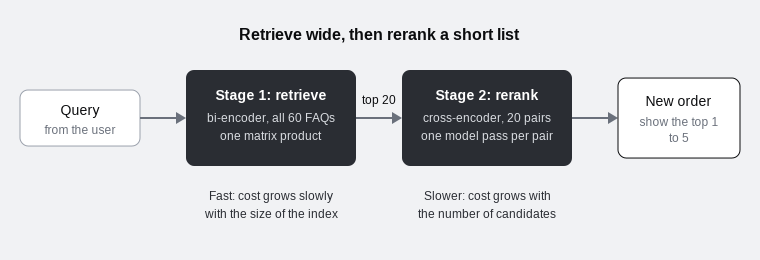
A cross-encoder works the other way. It takes the query and one passage as a single input, lets every query word attend to every passage word, and returns one relevance score. That is usually a sharper judgement, but it cannot be precomputed: scoring 60 passages means 60 model passes for every query. So the standard design has two stages. Retrieve a short list cheaply, then rerank only that list with the cross-encoder.
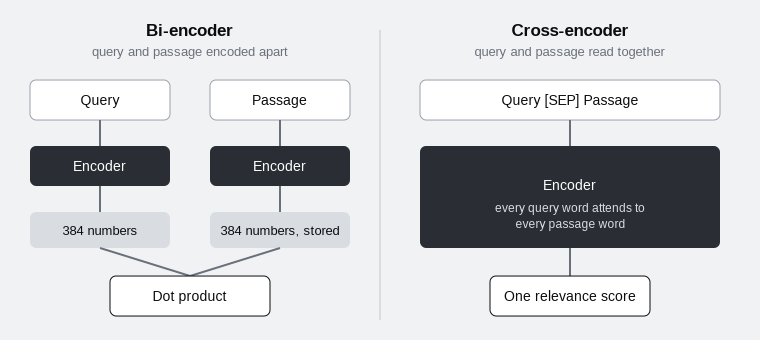
You will build both stages over 60 FAQ answers for a made-up mobile-money service called Pebble, then measure on 20 labelled queries whether reranking actually helps. It is not guaranteed to, and on this data the answer depends on what you rerank. That is the point of measuring. The FAQ search follows the same pattern as semantic search over an FAQ with embeddings, rebuilt here in a compact form so this tutorial stands alone.
Everything runs on CPU. The reranker is cross-encoder/ms-marco-MiniLM-L6-v2, a 22-million-parameter model trained on the MS MARCO web search dataset and released under Apache 2.0.
Step 1 · Set up the project and install the libraries
Make a throwaway folder and a virtual environment:
mkdir -p ~/rerank-demo
cd ~/rerank-demo
python3 -m venv .venv
source .venv/bin/activate
Install PyTorch from its CPU-only index first, so pip does not pull the much larger GPU build, then sentence-transformers:
pip install --quiet torch==2.15.0 --index-url https://download.pytorch.org/whl/cpu
pip install --quiet sentence-transformers==6.3.0
PyTorch is a few hundred megabytes, and the two models add about 180 MB on first use. On prepaid mobile data, run this step and the first model load on Wi-Fi; after that everything comes from the local cache.
Check it worked
python -c "import torch, sentence_transformers; print(torch.__version__, sentence_transformers.__version__)"The output is 2.15.0+cpu 6.3.0.
Step 2 · Write the FAQ and the labelled queries
The FAQ is 60 entries, each with an id, a question and an answer. Several entries are deliberately close to each other (the fee to send, the fee to withdraw, the most you can withdraw), because telling near neighbours apart is the job a reranker is meant to do:
cat > faq.jsonl <<'JSONL'
{"id": "f01", "q": "How do I send money to another Pebble wallet?", "a": "Open Send, choose Wallet, enter the phone number and the amount, check the name that appears, then confirm with your PIN. The money arrives in seconds."}
{"id": "f02", "q": "Can I send money from my wallet to a bank account?", "a": "Yes. Choose Send, then Bank, pick the bank and enter the account number. Bank transfers usually arrive within two hours on working days."}
{"id": "f03", "q": "How do I send money to someone in another country?", "a": "Choose Send, then International, pick the country and the receiving service. You see the exchange rate and the fee before you confirm."}
{"id": "f04", "q": "Can family abroad send money to my Pebble wallet?", "a": "Yes. The sender uses one of our international partners and enters your Pebble phone number. The money lands in your wallet in your local currency."}
{"id": "f05", "q": "I sent money to the wrong number. Can I get it back?", "a": "Call customer care straight away with the transaction ID. We contact the receiver and ask them to approve a reversal. We cannot take money back without their consent or a court order."}
{"id": "f06", "q": "Can I cancel a transfer that is still pending?", "a": "A transfer shown as pending in the app can be cancelled from its details screen for up to 30 minutes. Once it shows as completed, it can no longer be cancelled."}
{"id": "f07", "q": "What are the daily and monthly transaction limits?", "a": "A basic account can move up to 50,000 a day and 300,000 a month. Verified accounts have higher limits, shown under Profile, then Limits."}
{"id": "f08", "q": "How do I increase my transaction limits?", "a": "Upgrade to a verified account by uploading a national ID card or passport and a selfie in the app. Most upgrades are approved within one working day."}
{"id": "f09", "q": "How much does it cost to send money?", "a": "Sending to another Pebble wallet is free up to 5,000 and costs a small flat fee above that. The fee is shown before you enter your PIN."}
{"id": "f10", "q": "What is the fee for withdrawing cash?", "a": "Cash withdrawal fees depend on the amount and are the same at every agent. The full fee table is under Help, then Fees, and the fee is shown on screen before you confirm."}
{"id": "f11", "q": "How do I withdraw cash at an agent?", "a": "Give the agent your phone number, choose Withdraw in the app or on USSD, enter the agent number and the amount, then confirm with your PIN. Take your cash and the SMS receipt."}
{"id": "f12", "q": "How do I find a Pebble agent near me?", "a": "Open the Agents map in the app, or dial the USSD menu and choose Find agent to receive an SMS with the three nearest agents."}
{"id": "f13", "q": "How do I deposit cash into my wallet?", "a": "Visit any agent, give them the cash and your phone number. The agent sends the money to your wallet and you receive an SMS confirmation. Deposits are free."}
{"id": "f14", "q": "An agent charged me more than the listed fee. What should I do?", "a": "Agents must charge only the official fee. Report the agent number and the amount to customer care and we will investigate and refund any overcharge."}
{"id": "f15", "q": "Can I withdraw money from an ATM without a card?", "a": "Yes, at partner ATMs. Generate a one-time cash code in the app, then enter it with the amount at the ATM. The code expires after 30 minutes."}
{"id": "f16", "q": "How do I open a Pebble account?", "a": "Download the app or dial the USSD code, enter your phone number and full name, and set a four-digit PIN. You can use a basic account straight away."}
{"id": "f17", "q": "Which identity documents do you accept?", "a": "We accept a national ID card, a passport, a driving licence or a voter card. The document must be valid and the photo clear."}
{"id": "f18", "q": "How do I move my wallet to a new phone number?", "a": "Visit a Pebble service centre with your ID and both SIM cards if you still have them. We link your wallet and balance to the new number the same day."}
{"id": "f19", "q": "I forgot my PIN. How do I reset it?", "a": "Choose Forgot PIN on the login screen, answer your security questions and confirm with the code we send by SMS. If that fails, visit an agent with your ID."}
{"id": "f20", "q": "How do I change my PIN?", "a": "Go to Profile, then Security, then Change PIN. Enter the current PIN, then the new one twice. Do not use your birth year or 1234."}
{"id": "f21", "q": "My phone was lost or stolen. What should I do?", "a": "Call customer care from any phone to freeze your wallet, then block the SIM with your mobile network. Your balance is safe while the wallet is frozen."}
{"id": "f22", "q": "How do I close my account?", "a": "Withdraw or transfer your balance first, then ask customer care to close the account. Closing is permanent and the phone number can later open a new account."}
{"id": "f23", "q": "What happens if I do not use my wallet for a long time?", "a": "After twelve months without a transaction the wallet becomes dormant. Your money is kept, and one deposit or withdrawal at an agent makes it active again."}
{"id": "f24", "q": "Can I use Pebble on a basic phone without internet?", "a": "Yes. Dial the USSD code from any phone to send money, pay bills, buy airtime and check your balance. USSD needs no data bundle."}
{"id": "f25", "q": "Does the app use a lot of mobile data?", "a": "Turn on Lite mode under Settings to stop images loading and cut data use. A typical transfer then uses less than 50 KB."}
{"id": "f26", "q": "Can I use the app in my own language?", "a": "Yes. Go to Settings, then Language. The app is available in English, French, Swahili, Hausa, Yoruba and Amharic."}
{"id": "f27", "q": "How do I buy airtime?", "a": "Choose Airtime, enter your number or another number, enter the amount and confirm with your PIN. Airtime purchases have no fee."}
{"id": "f28", "q": "How do I buy a data bundle?", "a": "Choose Data, pick the network and the bundle size, then confirm. The bundle is active as soon as you get the network's SMS."}
{"id": "f29", "q": "How do I pay for prepaid electricity?", "a": "Choose Pay bills, then Electricity, enter your meter number and the amount. The token is shown in the app and sent by SMS."}
{"id": "f30", "q": "I paid for electricity but did not get a token.", "a": "Open the payment in your history and tap Resend token. If no token arrives within an hour, contact customer care with the meter number and transaction ID."}
{"id": "f31", "q": "Can I pay school fees with Pebble?", "a": "Yes, for schools on our list. Choose Pay bills, then School fees, search for the school and enter the student number as the reference."}
{"id": "f32", "q": "How do I pay a shop by scanning a QR code?", "a": "Choose Scan to pay, point the camera at the merchant's code, check the shop name and amount, then confirm with your PIN."}
{"id": "f33", "q": "How do I get a refund from a merchant?", "a": "Refunds for goods or services are made by the merchant. Ask the shop to send the refund to your wallet from their merchant app. We step in only if the payment itself was faulty."}
{"id": "f34", "q": "Do I earn interest on my savings?", "a": "Money in a Savings pocket earns interest, calculated daily and paid monthly. The current rate is shown on the Savings screen."}
{"id": "f35", "q": "Can I lock my savings so I cannot spend them?", "a": "Yes. Create a locked goal and choose a date. Money in a locked goal cannot be withdrawn before that date, except by closing the goal early."}
{"id": "f36", "q": "Am I eligible for a loan?", "a": "Loan offers are based on how long you have used Pebble and how you use it. If you qualify, the offer appears under Loans with the amount and the fee."}
{"id": "f37", "q": "What happens if I repay my loan late?", "a": "A late repayment adds a one-time late fee and lowers your future loan offers. If you are struggling, contact us before the due date to agree a new plan."}
{"id": "f38", "q": "How can I get a bigger loan?", "a": "Repay your loans on time and keep using your wallet. Your loan limit is reviewed after each loan you repay in full."}
{"id": "f39", "q": "Someone called asking for my PIN. Is that Pebble?", "a": "No. Pebble staff and agents will never ask for your PIN or one-time codes. Hang up and report the number to customer care."}
{"id": "f40", "q": "How do I know an SMS really came from Pebble?", "a": "Real messages come only from the PEBBLE sender name and never contain links asking you to log in. Check your balance in the app before you act on any message."}
{"id": "f41", "q": "Can I log in to my wallet on a new phone?", "a": "Yes. Install the app, sign in with your number, and confirm with the code sent to your SIM. Logins on new devices are also confirmed by your PIN."}
{"id": "f42", "q": "I see a transaction I did not make. What should I do?", "a": "Freeze your wallet in the app under Security, then call customer care. We investigate disputed transactions within five working days."}
{"id": "f43", "q": "How do I get a statement for my account?", "a": "Go to History, then Statement, choose the period and tap Download. The statement is a PDF you can share or print."}
{"id": "f44", "q": "Where can I see my recent transactions?", "a": "Open History in the app for all transactions, or use the Mini statement option in the USSD menu to get your last five by SMS."}
{"id": "f45", "q": "Can I get a receipt for a payment?", "a": "Open the payment in History and tap Share receipt. The receipt shows the date, the amount, the receiver and the transaction ID."}
{"id": "f46", "q": "My transfer failed but my balance went down.", "a": "Failed transfers are reversed to your wallet automatically, usually within 24 hours. If the money has not returned after that, contact customer care with the transaction ID."}
{"id": "f47", "q": "How long does a reversal take?", "a": "Once a reversal is approved, the money returns to your wallet within one working day and you receive an SMS."}
{"id": "f48", "q": "How do I contact customer care?", "a": "Call the free line, chat in the app or visit a service centre. Phone and chat support are open every day from 7am to 10pm."}
{"id": "f49", "q": "Is there a fee to receive money?", "a": "No. Receiving money into your Pebble wallet is always free, from another wallet, a bank or an international partner."}
{"id": "f50", "q": "Do I pay a fee to pay bills?", "a": "Most bill payments are free. A few billers add a small convenience fee, which is shown before you confirm."}
{"id": "f51", "q": "Why was my transfer reversed?", "a": "A transfer is reversed when the receiving wallet or bank account is closed, the details do not match, or our fraud checks stop it. The reason is shown in the transaction details."}
{"id": "f52", "q": "Can I reverse a payment I made to a merchant?", "a": "Payments to merchants are final once completed. If there is a problem with the goods, ask the merchant for a refund."}
{"id": "f53", "q": "What is the most I can withdraw at an agent at once?", "a": "A single agent withdrawal can be up to 100,000 on a verified account and 20,000 on a basic account, as long as the agent has enough cash."}
{"id": "f54", "q": "Why was my wallet frozen?", "a": "We freeze a wallet when you ask us to, after several wrong PIN attempts, or when we see activity that looks like fraud. You receive an SMS when it happens."}
{"id": "f55", "q": "How do I unfreeze my wallet?", "a": "If you froze it yourself, unfreeze it under Security in the app. Otherwise call customer care and confirm your identity."}
{"id": "f56", "q": "Can someone else withdraw cash for me?", "a": "Yes. Send the money to their wallet, or generate a cash code in the app and share it with them. Never share your PIN."}
{"id": "f57", "q": "What exchange rate do you use for international transfers?", "a": "We use the rate shown on screen when you confirm, which includes our margin. The rate is fixed for that transfer."}
{"id": "f58", "q": "How long do international transfers take?", "a": "Most international transfers arrive within minutes. Some countries and banks take up to two working days."}
{"id": "f59", "q": "Why was my loan application declined?", "a": "A loan is declined when your account is new, you have a loan still open, or a past loan was repaid late. Keep using your wallet and check again next month."}
{"id": "f60", "q": "Can I repay my loan early?", "a": "Yes. Repay any time from the Loans screen. Repaying early does not reduce the fee, but it can raise your next offer."}
JSONL
The labelled queries are what real users type into a help search: informal, often without the words the FAQ uses. Each one names the single entry that answers it. Writing these by hand, and agreeing on the right answer, is the most valuable part of any search evaluation:
cat > queries.jsonl <<'JSONL'
{"query": "I typed one digit wrong and the money went to a stranger", "answer": "f05"}
{"query": "how much will the agent take if I cash out 20,000?", "answer": "f10"}
{"query": "bought power units for my meter but no number arrived", "answer": "f30"}
{"query": "my uncle in London wants to send me money, how does it reach me?", "answer": "f04"}
{"query": "the transfer said failed but my balance is lower", "answer": "f46"}
{"query": "the reversal was approved yesterday, when do I see the money?", "answer": "f47"}
{"query": "a caller claiming to be Pebble wants my PIN, is this real?", "answer": "f39"}
{"query": "locked out because I cannot remember my PIN", "answer": "f19"}
{"query": "the agent asked for extra money on top of the fee", "answer": "f14"}
{"query": "does Pebble work on a phone without data?", "answer": "f24"}
{"query": "the app is using up my bundle, can it use less?", "answer": "f25"}
{"query": "can I stop a transfer I sent five minutes ago?", "answer": "f06"}
{"query": "what do I upload to send more than 50,000 a day?", "answer": "f08"}
{"query": "will my money grow if I keep it in savings?", "answer": "f34"}
{"query": "I cannot repay my loan on time, what happens?", "answer": "f37"}
{"query": "my phone was stolen on the bus, what should I do first?", "answer": "f21"}
{"query": "I changed network and got a new number, can I keep my balance?", "answer": "f18"}
{"query": "the shop sent the wrong goods and I paid by QR, how do I get a refund?", "answer": "f33"}
{"query": "my landlord wants proof that I paid the rent", "answer": "f45"}
{"query": "money left my wallet and I did not send it", "answer": "f42"}
JSONLCheck it worked
wc -l faq.jsonl queries.jsonl
python - <<'PY'
import json

ids = {json.loads(line)["id"] for line in open("faq.jsonl")}
answers = [json.loads(line)["answer"] for line in open("queries.jsonl")]
unknown = [a for a in answers if a not in ids]
print(f"{len(ids)} unique ids, {len(answers)} queries, unknown answers: {unknown}")
PY
wc reports 60 and 20 lines, and the script prints 60 unique ids, 20 queries, unknown answers: []. A typo in an answer id would show up in that list, and would otherwise quietly count as a miss in every score you compute later.
Step 3 · Build the first stage with embeddings
search.py holds everything the later scripts share: loading the FAQ, the text each entry is searched by (question and answer together), and two first-stage searches. EmbeddingSearch uses all-MiniLM-L6-v2, encodes all 60 passages once and saves the vectors to faq_vectors.npy. KeywordSearch is a deliberately simple word-matching search that you will use in a later step. The revision values pin the exact model files, so your scores match these even if the model pages change:
cat > search.py <<'PY'
import json
import math
import re
import sys
from collections import Counter
from pathlib import Path

import numpy as np
from sentence_transformers import SentenceTransformer

BI_ENCODER = "sentence-transformers/all-MiniLM-L6-v2"
BI_REVISION = "1110a243fdf4706b3f48f1d95db1a4f5529b4d41"


def load_faq(path="faq.jsonl"):
    return [json.loads(line) for line in open(path, encoding="utf-8")]


def passage(entry):
    return f"{entry['q']} {entry['a']}"


class EmbeddingSearch:
    def __init__(self, faq, vectors_path="faq_vectors.npy"):
        self.ids = [entry["id"] for entry in faq]
        self.model = SentenceTransformer(BI_ENCODER, revision=BI_REVISION, device="cpu")
        if Path(vectors_path).exists():
            self.vectors = np.load(vectors_path)
        else:
            texts = [passage(entry) for entry in faq]
            self.vectors = self.model.encode(texts, normalize_embeddings=True)
            np.save(vectors_path, self.vectors)

    def search(self, query, k=20):
        query_vector = self.model.encode(query, normalize_embeddings=True)
        scores = self.vectors @ query_vector
        top = np.argsort(-scores)[:k]
        return [(self.ids[i], float(scores[i])) for i in top]


def words(text):
    return re.findall(r"[a-z0-9]+", text.lower())


class KeywordSearch:
    """Scores an entry by the rarity of the query words it contains."""

    def __init__(self, faq):
        self.ids = [entry["id"] for entry in faq]
        self.docs = [set(words(passage(entry))) for entry in faq]
        counts = Counter(word for doc in self.docs for word in doc)
        self.idf = {word: math.log(len(self.docs) / n) for word, n in counts.items()}

    def search(self, query, k=20):
        terms = set(words(query))
        scores = [sum(self.idf[t] for t in terms if t in doc) for doc in self.docs]
        top = sorted(range(len(scores)), key=lambda i: -scores[i])[:k]
        return [(self.ids[i], scores[i]) for i in top]


if __name__ == "__main__":
    faq = load_faq()
    by_id = {entry["id"]: entry for entry in faq}
    for rank, (doc_id, score) in enumerate(EmbeddingSearch(faq).search(sys.argv[1], k=5), 1):
        print(f"{rank}. {doc_id} {score:.3f}  {by_id[doc_id]['q']}")
PY
Because the vectors are normalised, the dot product self.vectors @ query_vector is the cosine similarity of the query with every passage, computed in one operation. np.argsort(-scores)[:k] takes the k best.
Try a query that shares almost no words with its answer:
python search.py "the app is using up my bundle, can it use less?"Check it worked
The first run downloads the model, then prints five lines. The first is f25, "Does the app use a lot of mobile data?", with a score of about 0.49, and f28, "How do I buy a data bundle?", comes second at about 0.35. The query never says "data", but the model has learned that a bundle is mobile data. A second run is faster and creates no new files, because the vectors now load from faq_vectors.npy.
Step 4 · Rerank the top 20 with a cross-encoder
rerank.py takes the candidates from the first stage, pairs the query with each candidate's text, scores all the pairs with the cross-encoder in one predict call and sorts by that score. The first-stage score is thrown away: the new order comes from the cross-encoder alone.
cat > rerank.py <<'PY'
import sys

from sentence_transformers import CrossEncoder

from search import EmbeddingSearch, load_faq, passage

CROSS_ENCODER = "cross-encoder/ms-marco-MiniLM-L6-v2"
CROSS_REVISION = "233902d25c440f23af6f7d6e94d2946bac0bee0a"


class Reranker:
    def __init__(self, faq):
        self.by_id = {entry["id"]: entry for entry in faq}
        self.model = CrossEncoder(CROSS_ENCODER, revision=CROSS_REVISION, device="cpu")

    def rerank(self, query, candidates):
        pairs = [(query, passage(self.by_id[doc_id])) for doc_id, _ in candidates]
        scores = self.model.predict(pairs)
        ranked = sorted(zip(candidates, scores), key=lambda pair: -pair[1])
        return [(doc_id, float(score)) for (doc_id, _), score in ranked]


if __name__ == "__main__":
    query = sys.argv[1]
    faq = load_faq()
    candidates = EmbeddingSearch(faq).search(query, k=20)
    reranker = Reranker(faq)
    before = {doc_id: rank for rank, (doc_id, _) in enumerate(candidates, 1)}
    for rank, (doc_id, score) in enumerate(reranker.rerank(query, candidates)[:5], 1):
        entry = reranker.by_id[doc_id]
        print(f"{rank}. {doc_id} {score:7.2f}  was {before[doc_id]:>2}  {entry['q']}")
PY
Run it on a query about fees:
python rerank.py "how much will the agent take if I cash out 20,000?"Check it worked
The output has five lines, each with the new rank, the id, the cross-encoder score and the rank the entry had before. You should see something like this:
1. f53    4.45  was  1  What is the most I can withdraw at an agent at once?
2. f10   -3.12  was  4  What is the fee for withdrawing cash?
3. f11   -3.14  was  2  How do I withdraw cash at an agent?
Two things to notice. The scores are raw logits, not probabilities: higher means more relevant, a negative score is not an error, and they only mean something relative to each other for the same query. And in this run the cross-encoder moved the right answer, f10, up from fourth to second, but it put f53 first with a large margin. Your exact ranks and scores may differ slightly on another CPU or operating system. The answer to f53 contains the figure 20,000, and a model trained on web search has learned that an exact match on a specific number is strong evidence. Here it is a trap: the user asked about the fee, not the limit.
Step 5 · Measure hit rate and MRR before and after
One query proves nothing. evaluate.py runs every labelled query through both stages and reports three numbers for each order:
- hit@1: the share of queries where the right answer is first. This is what a user who reads one result experiences.
- MRR (mean reciprocal rank): the average of 1 divided by the right answer's position, so first counts 1, second 0.5, fourth 0.25, and not found counts 0. It rewards moving answers up even when they do not reach the top.
- recall@20: the share of queries whose answer is anywhere in the first stage's list. Reranking only reorders that list, so this is a hard ceiling on what reranking can fix.
It also times each stage per query, after one warm-up call, because the first call to a model includes one-off setup:
cat > evaluate.py <<'PY'
import argparse
import json
import statistics
import time

from rerank import Reranker
from search import EmbeddingSearch, KeywordSearch, load_faq

parser = argparse.ArgumentParser()
parser.add_argument("--first", choices=["embedding", "keyword"], default="embedding")
parser.add_argument("-k", type=int, default=20)
args = parser.parse_args()

faq = load_faq()
queries = [json.loads(line) for line in open("queries.jsonl", encoding="utf-8")]
first = EmbeddingSearch(faq) if args.first == "embedding" else KeywordSearch(faq)
reranker = Reranker(faq)
reranker.rerank("warm up", first.search("warm up", k=args.k))  # first call is slow


def reciprocal_rank(ids, answer):
    return 1 / (ids.index(answer) + 1) if answer in ids else 0.0


def metrics(lists):
    pairs = list(zip([q["answer"] for q in queries], lists))
    return {
        "hit@1": sum(ids[0] == answer for answer, ids in pairs) / len(pairs),
        "mrr": sum(reciprocal_rank(ids, answer) for answer, ids in pairs) / len(pairs),
        f"recall@{args.k}": sum(answer in ids for answer, ids in pairs) / len(pairs),
    }


before, after, first_ms, rerank_ms = [], [], [], []
for item in queries:
    t0 = time.perf_counter()
    candidates = first.search(item["query"], k=args.k)
    t1 = time.perf_counter()
    reranked = reranker.rerank(item["query"], candidates)
    t2 = time.perf_counter()
    first_ms.append((t1 - t0) * 1000)
    rerank_ms.append((t2 - t1) * 1000)
    before.append([doc_id for doc_id, _ in candidates])
    after.append([doc_id for doc_id, _ in reranked])

results = {
    "first_stage": args.first,
    "k": args.k,
    "before": metrics(before),
    "after": metrics(after),
    "median_first_ms": round(statistics.median(first_ms), 1),
    "median_rerank_ms": round(statistics.median(rerank_ms), 1),
}

print(f"first stage: {args.first}, reranking the top {args.k}")
print(f"{'':8}{'hit@1':>7}{'MRR':>7}{'recall@' + str(args.k):>11}")
for name in ("before", "after"):
    row = list(results[name].values())
    print(f"{name:8}{row[0]:>7.2f}{row[1]:>7.3f}{row[2]:>11.2f}")
print(f"median ms per query: first stage {results['median_first_ms']}, rerank {results['median_rerank_ms']}")

for item, b, a in zip(queries, before, after):
    answer = item["answer"]
    if answer not in b:
        print(f"  {answer} missing from the top {args.k}: {item['query']}")
    elif b.index(answer) != a.index(answer):
        print(f"  {answer} moved {b.index(answer) + 1} -> {a.index(answer) + 1}: {item['query']}")

with open(f"results-{args.first}-{args.k}.json", "w") as handle:
    json.dump(results, handle, indent=2)
PY
python evaluate.pyCheck it worked
The table looks something like this:
first stage: embedding, reranking the top 20
          hit@1    MRR  recall@20
before     0.90  0.918       1.00
after      0.80  0.857       1.00
Below it are the median timings and one line for each query whose answer moved. The timings depend on your CPU: expect single-digit milliseconds for the first stage and around 100 ms for reranking 20 pairs, roughly ten times more.
Reranking made this search worse. Recall@20 is 1.00, so every answer was available to the reranker, and the embedding search already put 18 of 20 first. The reranker moved both misses up without getting either to first place, and pushed two answers that were right down to fourth. One is the landlord query: rent receipts are not a web search topic, and in this run the reranker scored every candidate far below zero (under -10), meaning it found nothing relevant and its order was close to noise. The bi-encoder, trained on a broad mix of question and answer pairs, suits short FAQ entries better than a reranker trained on web passages.
This is a normal result, not a bug, and it is why you measure on your own queries before shipping a reranker.
Step 6 · Rerank a weaker first stage
A reranker earns its cost when the first stage is rough. Keyword search is the common case: it is cheap, it needs no model, and many products already have it. Run the same evaluation with KeywordSearch as the first stage:
python evaluate.py --first keywordCheck it worked
The table looks something like this:
first stage: keyword, reranking the top 20
          hit@1    MRR  recall@20
before     0.50  0.657       0.95
after      0.80  0.845       0.95
Keyword search alone puts the right answer first for only half the queries, because users rarely use the FAQ's words. Reranking its top 20 lifts hit@1 to 0.80. The list of moved answers shows the reranker doing what it is good at, such as pulling "An agent charged me more than the listed fee" from sixth to first for "the agent asked for extra money on top of the fee".
The output also says f45 missing from the top 20: no keyword matched the landlord query, so the answer never reached the reranker. That is the recall ceiling at work. Reranking cannot rescue an answer the first stage did not retrieve.
Step 7 · Find the reranker's ceiling and its cost
Both runs ended at a hit@1 of about 0.80. That is not a coincidence. A reranker replaces the first stage's order with its own judgement, so with full recall the result tends towards how good the reranker is on its own, whatever came before. Check this by reranking all 60 entries, which removes the first stage entirely, and then a shorter list of 10:
python evaluate.py -k 60
python evaluate.py -k 10Check it worked
With -k 60 the after row shows a hit@1 of 0.80 again: that is the reranker's own quality on this data, and the median rerank time is roughly three times the time for 20. With -k 10 the reranking time is about half the time for 20 and the quality barely changes. Reranking cost grows in line with the number of candidates, while the first stage barely notices the size of the index.
Use the numbers to decide, not the idea:
- Keep a reranker when its own quality (the after row with a large
k) beats your first stage on your labelled queries. Here it beats keyword search and loses to embeddings. - Choose
kfrom recall. Pick the smallest list whose recall is close to 1.00 on your queries; each extra candidate costs reranking time on every search. - Budget the latency on the server. Reranking runs where the search runs, so a user on a low-end Android phone or a slow connection feels it as extra wait before results arrive, not as work on their device.
- Try another reranker before giving up. Swap
CROSS_ENCODERfor a different model and run the same three commands; the labelled queries make any swap a five-minute comparison. These MS MARCO models are English only. If your users search in French, Swahili or Hausa, try a multilingual reranker such ascross-encoder/mmarco-mMiniLMv2-L12-H384-v1, and add queries in those languages toqueries.jsonlfirst.
Twenty queries is a small test set: one query is five points of hit@1. Before you act on a difference of one or two queries, add more labelled queries, ideally taken from real search logs.
Step 8 · Clean up
The project folder holds the virtual environment, the data and the saved vectors. The models sit in the Hugging Face cache in your home folder. Before you run the second command, check that no other project uses these two models, or leave that line out:
rm -rf ~/rerank-demo
rm -rf ~/.cache/huggingface/hub/models--cross-encoder--ms-marco-MiniLM-L6-v2 ~/.cache/huggingface/hub/models--sentence-transformers--all-MiniLM-L6-v2Check it worked
cd ~
ls ~/rerank-demo 2>/dev/null || echo "rerank-demo removed"
The output is rerank-demo removed.
Next steps
- Build the full FAQ search this tutorial compressed, with a no-answer threshold and a BM25 baseline: semantic search over an FAQ with embeddings.
- Apply the same before-and-after discipline to a whole answering pipeline: evaluate a RAG app with a test set.
- Look more closely at what the bi-encoder's vectors capture: turn text into embeddings with sentence-transformers.
- Run the first stage inside a database instead of in memory: vector search with PostgreSQL and pgvector.
Part of these paths
Related tutorials
- Build semantic search over an FAQ with embeddings in PythonYou will index 150 FAQ answers with a local embedding model, search them with a matrix product, reject questions the FAQ cannot answer, and measure the result against a BM25 keyword baseline and a hybrid of the two on 20 labelled queries.
- How to Evaluate and Improve a RAG App with a Test SetYou will write a test set of questions with known answers, measure retrieval with hit rate and mean reciprocal rank and the full pipeline with pass or fail checks, then use the results to add a distance cutoff that makes the app decline questions it cannot answer.
- Turn text into embeddings and compare meaning with sentence-transformersYou will run a small embedding model on your own CPU, turn a dozen sentences into vectors, and check with cosine similarity that paraphrases score high while sentences that only share keywords do not.
Need this done for you?
Padding does this work for growing companies, from the first diagnosis to a system that keeps working.
Get new tutorials